DS8870 architecture and rack layout

DS8870 architecture sits between the old DS8000 and the new. It kept the wide frames and spinning disks of the DS8800 but added POWER7+ servers, DC-UPS power and the first flash enclosure wired straight to the PCIe fabric, and plenty of these systems are still running in banks, utilities and government data centres.

We’ll open a DS8870 frame by frame: the power column on the left, the main column on the right, where the CPCs, I/O enclosures, drive enclosures and HPFEs sit, and how it’s all cabled. You’ll also meet the three configurations IBM sold and see why a Business Class box is cabled differently from an Enterprise Class one.

Every fact here comes from the IBM Redbook for DS8870 Release 7.5 (SG24-8085-05), so keep it open beside you, since the figure numbers in this lesson point to its pages.

TimeYou needBy the end you can
60 minutesThe practice shell with lab.profile and auto.profile, Python 3, a printout or sketch of the rack drawing belowDraw a DS8870 frame from memory, name the three configurations, trace a write from a host port to a drive or flash card, and find a failed part by its location

What it is, in one line

A DS8870 (model 961 with up to three 96E expansion frames) is two POWER7+ servers that share PCIe Gen2 I/O enclosures, which reach 2U drive enclosures through device adapter loops and 1U flash enclosures through direct PCIe cables, all powered by two DC-UPS units in every frame.

In Simple Words

A kitchen with a pantry wall

Picture a big restaurant kitchen. Along the left wall stands a tall pantry with the gas cylinders and a spare generator, and that wall feeds the whole kitchen, so if one cylinder runs out the second keeps every stove burning.

The rest of the room is shelves of ingredients stacked from the ceiling down, with two head chefs in the middle and the serving counters below them where waiters pick up and drop off orders. Some ingredients sit on slow shelves at the back and a runner fetches them by walking along a chain of shelves, while a few special ones are kept in a fast fridge right next to the counter.

A DS8870 frame is laid out much the same way: the pantry is the power column with its DC-UPS units, the shelves are drive enclosures, the chefs are the CPCs and the counters are the I/O enclosures, while the runner is the device adapter loop and the fast fridge is the HPFE.

Engineer's View

DS8870 by the numbers

  • Models: base frame 961, expansion frame 96E, machine type 242x (2421 to 2424 by warranty years). DS CLI still shows 2107-961.
  • CPCs: two IBM Power 740 servers (8205-E6D), POWER7+ at 4.228 GHz, 4U each, two sockets with 2 to 8 cores per socket. Older units used POWER7 at 3.55 GHz and can be converted.
  • Memory: 16 GB to 1 TB in total. NVS is 1/32 of CPC memory, at least 0.5 GB. An expansion frame needs dual 8-core and at least 128 GB.
  • Configurations: High-Performance All-Flash (base frame only, 1 to 8 HPFEs, 240 flash cards), Enterprise Class (up to three 96E, 1,536 SFF or 768 LFF drives plus 240 flash cards, 8 DA pairs) and Business Class (up to two 96E, 1,056 SFF or 528 LFF drives, 6 DA pairs). None can be converted to another.
  • I/O enclosures: 5U, six PCIe slots: HAs in slots 1 and 4, flash interface cards in 2 and 5, DAs in 3 and 6. Four in the base frame (1B1 to 1B4), four more in the first expansion (1B5 to 1B8).
  • Host adapters: 8 Gb with 4 or 8 ports, or 16 Gb with 4 ports (Release 7.5). Up to 16 HAs and 128 ports.
  • Back end: 2U drive enclosures (24 x 2.5-inch or 12 x 3.5-inch), installed in pairs; 1U HPFEs with 16 or 30 flash cards of 400 GB.
  • Power: two DC-UPS units, two AC cords and six PDUs in every frame; RPC cards only in the base frame.
  • Size: 193.4 cm high, 84.8 cm wide, 122.8 cm deep; a 961 with three 96E weighs up to 5,080 kg.

On DS8880 and later: frames became 19-inch racks, the HPFE grew into 2U pairs, and from DS8900F the DC-UPS units disappeared.

How it works, step by step

Stand at the front of an Enterprise Class DS8870 and read it left to right, top to bottom.

1The power column on the left

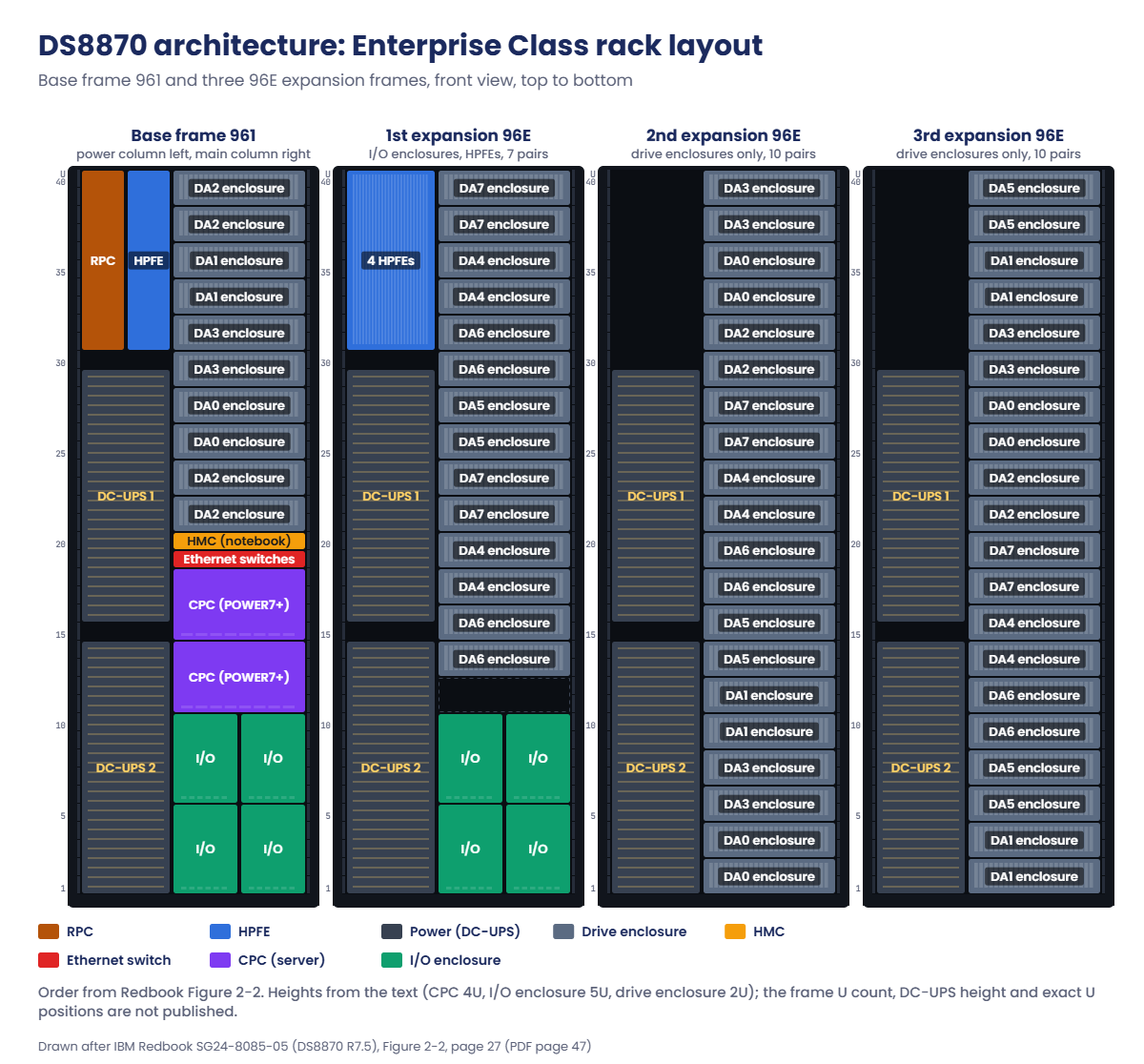
Every DS8870 frame has a narrow column on the left. In the base frame it holds the two RPC cards (rack power control) at the top, up to four HPFEs standing on their side, and two DC-UPS units below them. The first expansion frame has the HPFEs and DC-UPS units but no RPCs, and later expansion frames hold only the DC-UPS units.

Above the DC-UPS units, in the upper left, sits the unit emergency power off (UEPO) switch. It skips the safe NVS dump, so it’s only for real safety emergencies.

2The main column of the base frame

Going down from the top you’ll find five pairs of 2U drive enclosures (ten enclosures), then the HMC notebook on its slide-out tray, the Ethernet switches (you only see them from the rear), the two CPCs, and at the bottom two I/O enclosure pairs side by side.

In the drawing each drive enclosure carries a DA number such as DA2 or DA0, which is the device adapter pair whose loop that enclosure hangs on. The base frame mixes DA0 to DA3, and the first expansion uses DA4 to DA7.

DS8870 architecture rack layout: Enterprise Class base frame 961 and three 96E expansion frames

3The expansion frames

The first 96E holds up to seven enclosure pairs, an empty gap and two more I/O enclosure pairs at the bottom (1B5 to 1B8). Those I/O enclosures are cabled back to the CPCs in the base frame with PCIe cables, which is why a first expansion can never stand on its own.

The second and third 96E hold up to ten enclosure pairs each and nothing else except power. Because they have no I/O enclosures, their enclosures are cabled to DA pairs that live in the base and first expansion frames, and only Enterprise Class allows that third expansion frame.

4From CPC to I/O enclosure

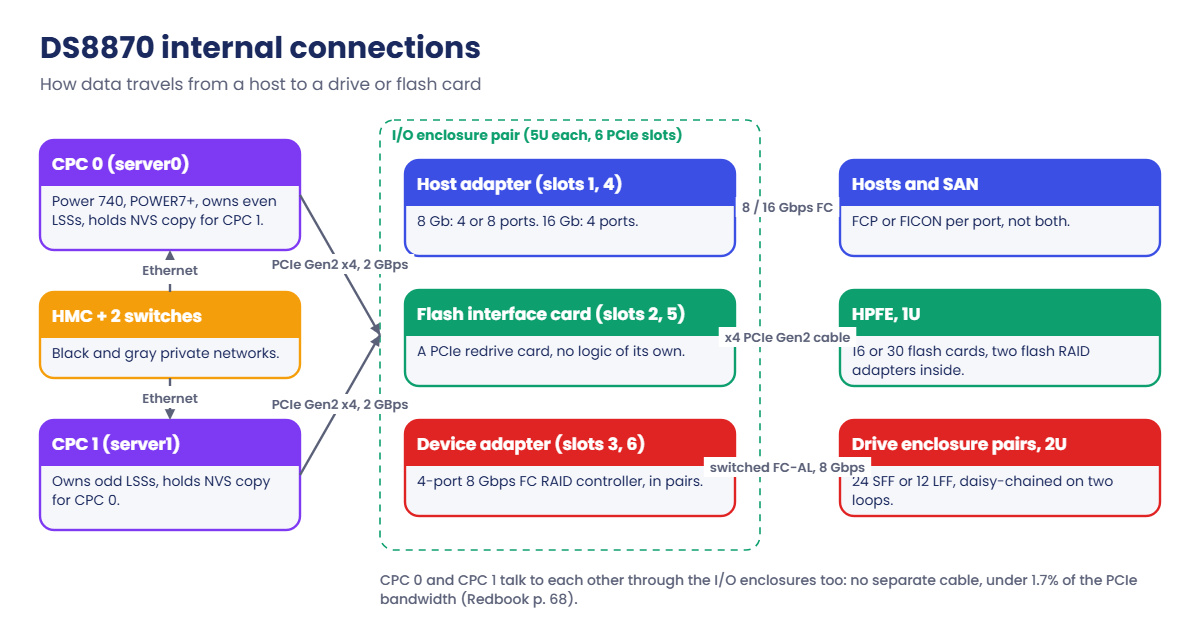
Each CPC has PCIe Gen2 adapters with point-to-point cables to every I/O enclosure, at 2 GBps in each direction per link and up to 16 links in total, so every I/O enclosure works as an extension of both CPCs.

The two CPCs also talk to each other through the I/O enclosures rather than over a separate cross-cluster cable. That traffic uses under 1.7% of the PCIe bandwidth, and if one I/O enclosure fails it moves to another.

5Two back ends: DA loops and HPFE cables

Spinning disks and flash drives in 2U enclosures are reached through device adapters. A DA is a 4-port 8 Gbps Fibre Channel RAID controller, and they come in pairs, one in each I/O enclosure of a pair.

Each DA pair builds two switched FC-AL networks and every drive sits on both of them, which gives each drive four paths.

Within an enclosure pair the upper enclosure is on one loop and the lower one on the other. An array site takes four drives from each, so every array spans both loops. New pairs go on the end of the chain, up to four pairs per DA pair, and you don’t have to recable the others.

The 1U HPFE skips the DA altogether. It has two flash RAID adapters built in, and each one runs an x4 PCIe Gen2 cable to a flash interface card in a different I/O enclosure of the pair. That flash interface card is only a PCIe redrive card.

Each HPFE counts as one DA pair, which is why its array sites show DA pair numbers like 10 and 11 in lsarraysite.

6Power and the NVS dump

The two DC-UPS units in each frame are 2N, meaning either one can power the whole frame, and each drive enclosure or CPC power supply is fed from a different DC-UPS through the PDUs. Every DC-UPS carries a battery service module (BSM) set of one primary module on top and three secondary ones, and the set has a fixed life of five years.

If both AC feeds are down for more than about 4 seconds (50 seconds with the extended power line disturbance feature), the batteries keep the CPCs up while each CPC writes its NVS to its own internal disks, which IBM calls the fire hose dump. When power comes back, the CPCs won’t take host I/O until the batteries can carry one more full dump, and a full recharge can take up to two hours.

DS8870 internal connections: CPCs, I/O enclosures, HA, DA, flash interface cards, HPFE and drive enclosures

7Three configurations, one frame design

All-Flash, Enterprise Class and Business Class all use the same physical frames, and the differences are in processors, memory, the number of I/O enclosures and how drive enclosures are cabled to DA pairs. To keep the entry price down, Business Class cabling puts more enclosures on fewer DA pairs, and that’s why it stops at six DA pairs and two expansion frames.

ItemAll-FlashEnterprise ClassBusiness Class
Cores per CPC8 or 162, 4, 8 or 162, 4, 8 or 16
System memory256 GB to 1 TB16 GB to 1 TB16 GB to 1 TB
96E framesnoneup to 3up to 2
DA pairsnoneup to 8up to 6
Max drives (SFF)none, 240 flash cards1,536 + 240 flash cards1,056 + 240 flash cards
Max HAs / ports16 / 12816 / 12816 / 128

See the original drawings in SG24-8085-05: Figure 2-1 All-Flash front view (page 26, PDF page 46), Figure 2-2 Enterprise Class (page 27, PDF page 47), Figure 2-3 Business Class (page 28, PDF page 48), Figure 2-9 I/O enclosure connections (page 37, PDF page 57), Figure 2-12 I/O enclosure slots (page 40, PDF page 60), Figure 2-15 HPFE PCIe cabling (page 46, PDF page 66), Figure 2-20 DC-UPS front and rear (page 54, PDF page 74).

A small warning: the Business Class drawing shows 22 enclosure boxes in the second expansion frame, but the text says at most 10 pairs per frame. When the Redbook’s text and figure disagree like this, go with the text.

Hands-on lab: map I/O enclosures and fill in a DS8870 rack

Before you run any command, double-check it

Read every command twice before you press Enter. Check the target: the system or account, the IDs, the names and the sizes. These commands are for learning and were tested in our lab, not on your system. At work, run the read-only list commands first, follow your change process, make sure a backup exists, and ask a second person to check anything that changes or deletes data. You run them at your own risk.

The practice shell is a G10 DS8A50, not a DS8870, but it’s good for the skill that matters on any generation, which is turning list output into a picture of the rack. After that you’ll fill in a DS8870 rack map by hand.

Practice shell note: the practice shell is our teaching tool, not IBM software. Real DS CLI output looks very much like this but is not identical. All outputs below are real shell output from a G10 system; card slot numbers are the shell’s own. Messages starting with SIM are practice shell messages.

1Reset and list the I/O enclosures

Run this:

python ds8sim.py -cfg lab.profile
simctl reset
lsioenclosure -s

You should see this:

dscli> simctl reset
SIM0100I simctl: factory state restored (users and passwords kept; use simctl reset -all to reset them too).
dscli> lsioenclosure -s
Date/Time: 24 October 2026 19:59:07 UTC IBM DSCLI Version: 7.10.10.348 DS: IBM.2107-78SV001
IBM.1400-1B1-78SV0
IBM.1400-1B2-78SV0
IBM.1400-1B3-78SV0
IBM.1400-1B4-78SV0

The middle part, 1B1 to 1B4, is the I/O enclosure (bay) name. A DS8870 base frame uses the same names for the four I/O enclosures at the bottom of its main column, and 1B5 to 1B8 for the four in the first expansion frame.

✅ Checkpoint: Four enclosures, 1B1 to 1B4.

2See which cards sit in which enclosure

Run this:

lshacard
lsdacard

You should see this:

dscli> lshacard
Date/Time: 24 October 2026 19:59:07 UTC IBM DSCLI Version: 7.10.10.348 DS: IBM.2107-78SV001
ID                           I/O enclosure      Frame State  Type  Speed   Fibre Channel ports Encryption capable Location code         S/N
==================================================================================================================================================
IBM.1400-1B1-78SV0/R-1-P1-C1 IBM.1400-1B1-78SV0 1     Online FC-LW 32 Gb/s 4                   yes                U1400.1B1.78SV0-P1-C1 YH10SV0001
IBM.1400-1B2-78SV0/R-1-P1-C3 IBM.1400-1B2-78SV0 1     Online FC-SW 32 Gb/s 4                   yes                U1400.1B2.78SV0-P1-C3 YH10SV0003
IBM.1400-1B2-78SV0/R-1-P1-C4 IBM.1400-1B2-78SV0 1     Online FC-SW 32 Gb/s 4                   yes                U1400.1B2.78SV0-P1-C4 YH10SV0004
IBM.1400-1B3-78SV0/R-1-P1-C5 IBM.1400-1B3-78SV0 1     Online FC-SW 32 Gb/s 4                   yes                U1400.1B3.78SV0-P1-C5 YH10SV0005
dscli> lsdacard
Date/Time: 24 October 2026 19:59:07 UTC IBM DSCLI Version: 7.10.10.348 DS: IBM.2107-78SV001
ID                           I/O enclosure      Frame State  DA pair Location code         S/N
=====================================================================================================
IBM.1400-1B1-78SV0/R-1-P1-C6 IBM.1400-1B1-78SV0 1     Online 0       U1400.1B1.78SV0-P1-C6 YA30SV0010
IBM.1400-1B2-78SV0/R-1-P1-C6 IBM.1400-1B2-78SV0 1     Online 0       U1400.1B2.78SV0-P1-C6 YA30SV0020
IBM.1400-1B1-78SV0/R-1-P1-C8 IBM.1400-1B1-78SV0 1     Online 2       U1400.1B1.78SV0-P1-C8 YA30SV0012
IBM.1400-1B2-78SV0/R-1-P1-C8 IBM.1400-1B2-78SV0 1     Online 2       U1400.1B2.78SV0-P1-C8 YA30SV0022

Read the Location code from the end: P1-C3 is card slot C3 in enclosure 1B2. Each DA pair has one card in 1B1 and one in 1B2, the same pairing rule a DS8870 follows, with one DA of the pair in each enclosure of an I/O enclosure pair.

Now look at the HAs. 1B2 holds two and 1B4 holds none, while on a DS8870 the Redbook rule is one HA in every I/O enclosure before a second goes in any of them. Keep that in mind for Step 4.

✅ Checkpoint: Two DA pairs (0 and 2), each split over 1B1 and 1B2; four HAs over three enclosures.

3Fill in a DS8870 rack map by hand

Close the drawing above. On paper, sketch the base frame of an Enterprise Class DS8870 with a narrow left column and a wide right column, and fill in each numbered position from top to bottom.

PositionColumnWhat sits here?
1Left, top?
2Left, beside 1?
3Left, middle?
4Left, bottom?
5Right, top (10 units)?
6Right, thin strip?
7Right, thin strip (rear only)?
8Right, two 4U drawers?
9Right, bottom (two rows of two)?
Answer key

1: RPC cards (base frame only). 2: up to four HPFEs standing on their side. 3: DC-UPS 1. 4: DC-UPS 2. 5: five pairs of 2U drive enclosures on DA pairs 0 to 3. 6: HMC notebook on its tray. 7: two 8-port Ethernet switches. 8: CPC 0 and CPC 1 (POWER7+). 9: two I/O enclosure pairs, 1B1 to 1B4. Source: SG24-8085-05, Figure 2-2, page 27.

✅ Checkpoint: At least eight of nine positions right.

4Turn the list output into a map with Python

This script runs on your laptop in the lab folder next to ds8sim.py, not on the DS8000. It calls the DS CLI three times, prints one line per I/O enclosure and then checks the HA spreading rule. It uses the auto.profile from Lesson 22, so if you don’t have one yet, set it up as shown there.

File bays.py:

# Runs on your workstation or jump server, not on the DS8000.
# It talks to the DS8000 only through the DS CLI (auto.profile: banner off, header on, format delim).
import csv, subprocess
DSCLI = ["python", "ds8sim.py", "-cfg", "auto.profile"]   # at work: ["dscli", "-cfg", "auto.profile"]

def dscli(*args):
    """Run one DS CLI command and return its rows as dictionaries."""
    out = subprocess.run(DSCLI + list(args), capture_output=True, text=True).stdout
    lines = [l for l in out.splitlines() if l and not l.startswith("SaatVedha") and not l.startswith("CMUC")]
    return list(csv.DictReader(lines))

bays = {}                                   # "1B1" -> {"HA": [...], "DA": [...]}
for e in dscli("lsioenclosure", "-l"):
    bays[e["ID"].split("-")[1]] = {"HA": [], "DA": []}
for card in dscli("lshacard", "-l"):
    bay, slot = card["I/O enclosure"].split("-")[1], card["Location code"].split("-")[-1]
    bays[bay]["HA"].append(slot)
for card in dscli("lsdacard", "-l"):
    bay, slot = card["I/O enclosure"].split("-")[1], card["Location code"].split("-")[-1]
    bays[bay]["DA"].append(f"{slot} (DA pair {card['DA pair']})")

print("I/O enclosure map")
for bay, cards in sorted(bays.items()):
    print(f"  {bay}: HA {', '.join(cards['HA']) or '-':10} DA {', '.join(cards['DA']) or '-'}")

# Rule from the Redbooks: one HA in every I/O enclosure before a second HA in any enclosure
counts = {bay: len(c["HA"]) for bay, c in bays.items()}
if max(counts.values()) > 1 and min(counts.values()) == 0:
    empty = [b for b, n in counts.items() if n == 0]
    full = [b for b, n in counts.items() if n > 1]
    print(f"WARN: {', '.join(full)} has 2+ HAs while {', '.join(empty)} has none. Spread host adapters first.")
else:
    print("OK: host adapters are spread over the I/O enclosures.")

Run this (in the lab folder):

python bays.py

You should see this:

I/O enclosure map
  1B1: HA C1         DA C6 (DA pair 0), C8 (DA pair 2)
  1B2: HA C3, C4     DA C6 (DA pair 0), C8 (DA pair 2)
  1B3: HA C5         DA -
  1B4: HA -          DA -
WARN: 1B2 has 2+ HAs while 1B4 has none. Spread host adapters first.
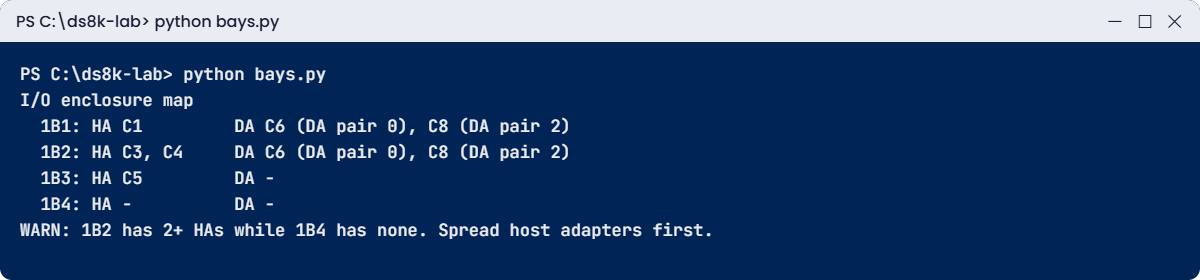
bays.py output: host and device adapters per I/O enclosure with a spread warning
bays.py output: one line per I/O enclosure and a warning about HA spreading.

Take that warning seriously. If 1B2 is serviced or fails, every host port in it goes away at once, so when you plan the next HA, put it in 1B4.

At work you’d run the same script against each DS8000 before a hardware order, so nobody ends up buying a card for the wrong bay.

✅ Checkpoint: The script prints four bays and the WARN line for 1B2 and 1B4.

Break It, Then Fix It

Both faults here are found by turning an ID into a physical place, which is what an engineer needs before opening a frame.

1Break it: a port goes dark

Run this:

simctl portfail I0032
lsioport -l I0032

You’ll see this:

SIM0105I simctl: I/O port I0032 has no light (cable or SFP problem).
dscli> lsioport -l I0032
Date/Time: 24 October 2026 19:59:07 UTC IBM DSCLI Version: 7.10.10.348 DS: IBM.2107-78SV001
ID    WWPN             State             Type             topo     portgrp Speed   Frame I/O Enclosure HA Card Security
=======================================================================================================================
I0032 500507630303B0DD No light detected Fibre Channel-SW SCSI-FCP 0       32 Gb/s 1     1B2           C3      Disabled

Why: “No light detected” means no optical signal is reaching the port, usually because of a pulled cable, a dirty connector or a dead SFP. The long listing tells you where to walk: frame 1, I/O enclosure 1B2, card C3. On a DS8870 the same ID scheme takes you to the bottom of the main column, and from the rear you can see the cable.

Fix: on the real box you or the SAN team reseat or replace the cable or SFP. In the shell you simulate the repair.

Run this:

simctl portfix I0032
lsioport -l I0032

You should see this:

SIM0106I simctl: I/O port I0032 has light again.
dscli> lsioport -l I0032
Date/Time: 24 October 2026 19:59:07 UTC IBM DSCLI Version: 7.10.10.348 DS: IBM.2107-78SV001
ID    WWPN             State                     Type             topo     portgrp Speed   Frame I/O Enclosure HA Card Security
===============================================================================================================================
I0032 500507630303B0DD Communication established Fibre Channel-SW SCSI-FCP 0       32 Gb/s 1     1B2           C3      Disabled

lsioport -l shows I0032 with no light detected in I/O enclosure 1B2, card C3
The dark port, with the frame, I/O enclosure and card that tell you where to look.

✅ Checkpoint: I0032 is back to Communication established.

2Break it: lose one CPC

Run this:

simctl serverfail 1
lspnode
lsserver

You’ll see this:

SIM0107I simctl: server1 is offline. Failover: server0 now serves rank groups 0 and 1. Host I/O continues; write cache runs in a single copy until failback.
dscli> lspnode
Date/Time: 24 October 2026 19:59:07 UTC IBM DSCLI Version: 7.10.10.348 DS: IBM.2107-78SV001
ID State   Release Processor       Memory   Location
===============================================================
00 Online  R10.1   Power9+ 20-core 512.0 GB U9009.42A.78SV00-P1
01 Offline R10.1   Power9+ 20-core 512.0 GB U9009.42A.78SV01-P1
dscli> lsserver
Date/Time: 24 October 2026 19:59:07 UTC IBM DSCLI Version: 7.10.10.348 DS: IBM.2107-78SV001
ID      Image ID         Image Name   Power Control SFI State
=============================================================
server0 IBM.2107-78SV001 ds8k-g10-lab Online        Online
server1 IBM.2107-78SV001 ds8k-g10-lab Offline       Offline
Note (practice shell): server1 is offline. server0 now runs rank groups 0 and 1 (failover).

Why: server1 lives on CPC 1. Hosts keep working because server0 has taken over all the LSSs, but writes now have only one cache copy. According to the DS8870 Redbook, recovery like this affects I/O latency by no more than 15 seconds, and typically by 8 seconds or less.

On a DS8870 the two CPCs are the two 4U drawers above the I/O enclosures in the base frame, and the location code in the service event tells the engineer which drawer to open.

Fix: on the real system IBM repairs the CPC and failback is automatic. In the shell:

Run this:

simctl serverfix 1
lsserver

You should see this:

SIM0108I simctl: server1 is online. Failback: rank group 1 moved back to server1.
dscli> lsserver
Date/Time: 24 October 2026 19:59:07 UTC IBM DSCLI Version: 7.10.10.348 DS: IBM.2107-78SV001
ID      Image ID         Image Name   Power Control SFI State
=============================================================
server0 IBM.2107-78SV001 ds8k-g10-lab Online        Online
server1 IBM.2107-78SV001 ds8k-g10-lab Online        Online

✅ Checkpoint: Both servers Online again.

This happened at work

The battery job that opened the wrong frame

A regional power and water utility ran its billing and outage systems on a DS8870 with a base frame and two expansion frames. The battery service modules in one DC-UPS were coming up to their five-year life, and the event said where: DC-UPS 2 in the first expansion frame.

The storage admin booked the IBM engineer for a Saturday window and wrote “rack 2, DC-UPS 2” in the ticket, going by the data centre floor plan. That plan numbered racks from the rear aisle, left to right, and seen from the rear the base frame was second in the row.

The engineer went by the ticket and worked on the base frame, whose batteries were fine. The 2N design meant nothing went down, but for about forty minutes the base frame ran on one DC-UPS while the batteries that were truly at end of life sat untouched next door.

It was a colleague who noticed, because the event was still open after the job was closed. The correct replacement needed a second window nine days later, and the change board wanted to know why a healthy frame had been opened on a live system.

The trouble was two numbering schemes. IBM numbers frames from the base frame, with the expansion frames to its right as seen from the front, but the floor plan counted from the back.

Since then both the front and rear doors carry the IBM frame role and serial, and every hardware ticket copies the frame and location straight from the service event instead of from someone’s memory.

Common mistakes and troubleshooting

SymptomLikely causeWhat to check / fix
Engineer opens the wrong frameFloor-plan rack numbers mixed with IBM frame orderLabel doors with frame role; copy the location from the event
Second or third 96E has no HAsThose frames have no I/O enclosures by designPlan HAs for the base and first expansion only
Cannot add a 96ECPCs below dual 8-core or memory below 128 GBUpgrade processors and memory first (concurrent)
Business Class cannot grow to a third expansionBusiness Class cabling stops at two 96E and 6 DA pairsPlan Enterprise Class from the start; no conversion exists
HPFE array shows DA pair 10 or 11HPFEs count as their own DA pairNormal; it is not a device adapter card
Hosts lose all paths during I/O enclosure serviceAll host ports in one I/O enclosureSpread HAs: one per enclosure before a second
RAID 6 not offered for HPFE flash cardsHPFE flash cards are RAID 5 only on DS8870Use RAID 5 there; RAID 6 for nearline drives

Make it a habit: before any hardware work, print the rack drawing from the Redbook, mark the part with a pen and tape it to the frame door you’re going to open.

Interview questions

Click a question to open it. Each one is worded the way an interviewer would ask it, and underneath you’ll see why they ask and one way you could answer in your own words.

Fresher level

1. What is in the left column of a DS8870 base frame?

Why they ask this: A basic layout check that shows you have looked inside one.

How you might answer: It’s the power area. There are two RPC cards at the top, up to four HPFEs standing on their side, and two DC-UPS units, with the UEPO switch just above the DC-UPS units. Expansion frames don’t have the RPCs.

2. How does a 1U HPFE connect to the CPCs on a DS8870?

Why they ask this: They test whether you know flash bypasses the device adapters.

How you might answer: Inside each HPFE there are two flash RAID adapters, and each runs an x4 PCIe Gen2 cable to a flash interface card in a different I/O enclosure of a pair. The I/O enclosures then connect to both CPCs over PCIe Gen2. One HPFE counts as one DA pair, and its flash cards use RAID 5.

2–5 years experience

3. Walk me through a host write on a DS8870, from the host port to the drive.

Why they ask this: They want the full path with real components.

How you might answer: The write comes in on a host adapter port in an I/O enclosure, and the HA passes it to the CPC that owns the LSS. That CPC keeps it in cache, copies it to NVS in the other CPC and then acknowledges the host.

Later the owning CPC destages it, either through a device adapter over the switched FC-AL loops to a drive enclosure pair, or through a flash interface card to an HPFE. Both CPCs reach every I/O enclosure over PCIe Gen2 cables.

4. What is the difference between Enterprise Class and Business Class DS8870, and when would you pick each?

Why they ask this: They test configuration judgment.

How you might answer: The frames are identical. Business Class cables more drive enclosures to fewer DA pairs and stops at six DA pairs, two expansion frames and 1,056 SFF drives, so it’s cheaper to start with. Enterprise Class goes up to eight DA pairs, three expansions and 1,536 drives. If growth or back-end bandwidth matters I’d pick Enterprise, because you can’t convert later.

Senior level

5. Explain how a DS8870 protects data in NVS during a complete power loss.

Why they ask this: Senior RAS knowledge.

How you might answer: Each frame has two DC-UPS units with battery service module sets. If both feeds stay down past the ride-through (about 4 seconds, or 50 with ePLD), host I/O stops and each CPC writes its NVS to its own internal disks, so you get two copies, and then it shuts down.

At power-up the data is restored and destaged, and the CPCs don’t take host I/O until the batteries can carry another full dump. BSMs have a five-year life, so I track them as a planned replacement.

6. A DS8870 at your site needs a battery replacement in one frame. How do you make sure the right frame is serviced?

Why they ask this: They want process and safety thinking.

How you might answer: I’d take the frame and location from the service event, never from the floor plan, and confirm with the IBM engineer which frame that is, counting from the base frame as seen from the front, then label the door. Since the power is 2N, I’d also check that the other DC-UPS in that frame is healthy before anyone starts.

Quick quiz

Q1. Which model is the DS8870 expansion frame?

  1. 95E
  2. 96E
  3. 86E
  4. E96
Show answer

B — 961 is the base, 96E the expansion.

Q2. What connects an HPFE to the I/O enclosures on a DS8870?

  1. Switched FC-AL
  2. x4 PCIe Gen2 cables
  3. SAS cables
  4. Ethernet
Show answer

B — Each flash RAID adapter uses an x4 PCIe Gen2 cable to a flash interface card.

Q3. How many DC-UPS units are in each DS8870 frame?

  1. One
  2. Two
  3. Three
  4. Six
Show answer

B — Two DC-UPS units per frame, either one can power it.

Q4. Which slots hold host adapters in a DS8870 I/O enclosure?

  1. 1 and 4
  2. 2 and 5
  3. 3 and 6
  4. 1 and 2
Show answer

A — HAs in 1 and 4, flash interface cards in 2 and 5, DAs in 3 and 6.

Q5. Which configuration allows a third expansion frame?

  1. All-Flash
  2. Business Class
  3. Enterprise Class
  4. All of them
Show answer

C — Only Enterprise Class goes to three 96E frames.

Quick recap

  • DS8870 = model 961 plus up to three 96E frames, POWER7+ CPCs, up to 1 TB memory.
  • Every frame: left power column (DC-UPS x2, plus RPCs and HPFEs where present) and a main column for enclosures, HMC, CPCs and I/O enclosures.
  • I/O enclosures 1B1 to 1B4 (base) and 1B5 to 1B8 (first expansion), PCIe Gen2 to both CPCs; slots HA 1/4, FIC 2/5, DA 3/6.
  • Two back ends: DA pairs on switched FC-AL loops to 2U enclosures, and direct x4 PCIe Gen2 cables to 1U HPFEs.
  • NVS is saved by batteries and a dump to the CPC internal disks.
  • All-Flash, Enterprise and Business Class share frames but not cabling; no conversion.

Next lesson

Lesson 24: DS8880 architecture and rack layout (hybrid and all-flash) → You move to 19-inch racks, HPFE Gen2 pairs and the 46U top-hat.

Further reading: DS8870 architecture

Want to go deeper into DS8870 architecture? The source for every number here is IBM Redbook SG24-8085, DS8870 Architecture and Implementation (Release 7.5). Open Figure 2-2 on page 27 (PDF page 47) next to the rack drawing in this lesson, and Figure 2-18 on page 50 (PDF page 70) for the switched loops.

To see where the family went next and before, read Lesson 22: DS8000 generations. You can also see the full plan for this course on the IBM DS8000 Architecture course page.

Scroll to Top

This website uses cookies

We use a few cookies to keep this site working. If you allow it, we also use Google Analytics to count visits so we can improve our lessons. You can accept all, deny the optional ones, or choose what to allow.