
Before you run any command, double-check it
Read every command twice before you press Enter. Check the target: the system or account, the IDs, the names and the sizes. These commands are for learning and were tested in our lab, not on your system. At work, run the read-only list commands first, follow your change process, make sure a backup exists, and ask a second person to check anything that changes or deletes data. You run them at your own risk.
In this lab you create ten thin volumes, write data to a few of them, read the pool numbers, release some space and set a ratio limit. Start in C:\ds8k-lab (shell setup is in Lesson 1).
Practice shell note: the practice shell is our own teaching tool, not IBM software, and real DS CLI output looks very close to this without being identical. Lines starting with SIM come from the shell’s simctl commands, which pretend to be host writes, and CMUN02041E is a practice shell message. The initfbvol messages are the ones IBM shows in its Redbook.
1Build one pool with a setup script
Save this as C:\ds8k-lab\setup-15.txt, run simctl reset and quit in the shell, and then run the script and log in again:
mkarray -raidtype 6 -arsite S7
mkrank -array A0 -keygrp 1 -stgtype fb
mkextpool -rankgrp 0 -keygrp 1 -stgtype fb thin_0
chrank -extpool P0 R0
Run this:
python ds8sim.py -hmc1 10.0.0.1 -user admin -passwd YourPassw0rd -script setup-15.txt
python ds8sim.py
✅ Checkpoint: The script ends with “chrank: Rank R0 successfully modified”.
2Create ten 2,000 GiB thin volumes
Type these at the dscli> prompt:
mkfbvol -extpool P0 -cap 2000 -sam ese -name app_#h 2000-2009
lsextpool -l
You should see this:
dscli> mkfbvol -extpool P0 -cap 2000 -sam ese -name app_#h 2000-2009
CMUC00025I mkfbvol: FB volume 2000 successfully created.
CMUC00025I mkfbvol: FB volume 2001 successfully created.
...
CMUC00025I mkfbvol: FB volume 2009 successfully created.
dscli> lsextpool -l
Date/Time: 24 October 2026 11:23:35 UTC IBM DSCLI Version: 7.10.10.348 DS: IBM.2107-78SV001
Name   ID stgtype rankgrp status availstor (2^30B) %allocated available reserved numvols totalLogicalCap(MiB/cyl) usedLogicalCap(MiB/cyl) provisionedCap(MiB/cyl) totalPhysicalCap(MiB/cyl) usedPhysicalCap(MiB/cyl)
====================================================================================================================================================================================================================
thin_0 P0 fb      0       below  17701             0          1132901   64       10      18127440                 1024                    20480000                18127441                  1024
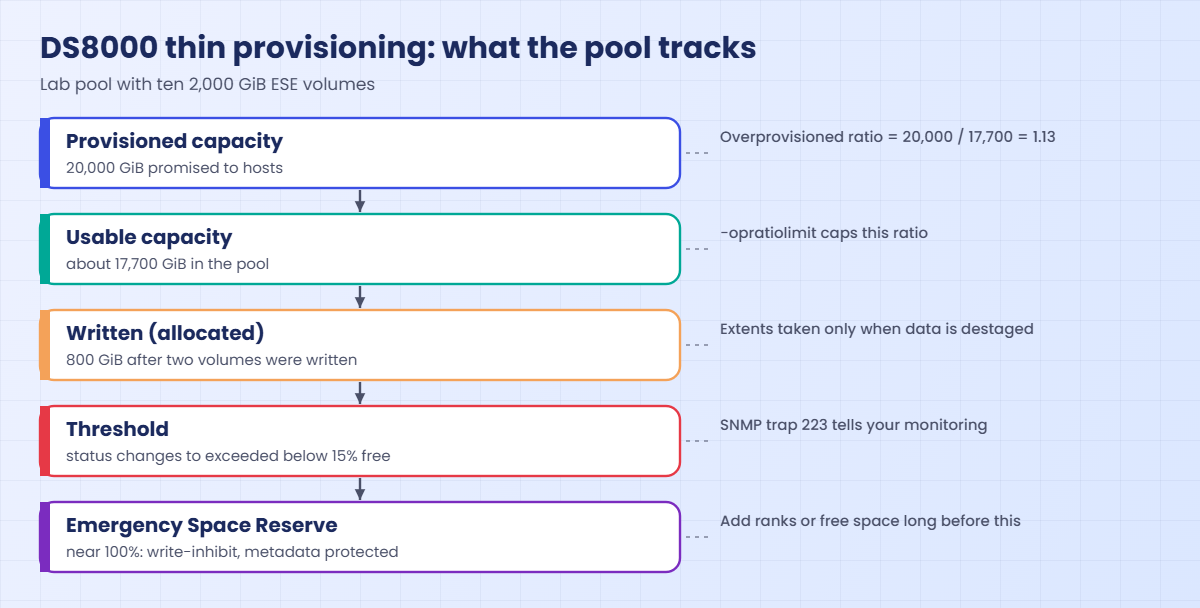
You’ve just created 20,000 GiB of volumes in a pool of about 17,700 GiB and availstor hasn’t moved, which is thin provisioning in action. (The ten success lines are shortened with “…”.)
The columns on the far right are the ones to read. provisionedCap is 20,480,000 MiB, the promise made to the hosts, totalLogicalCap is 18,127,440 MiB, what the pool really holds, and usedLogicalCap is only 1,024 MiB, the shell’s small reserve. Divide provisioned by total and you get the overprovisioning ratio, about 1.13.
✅ Checkpoint: numvols is 10, but %allocated is still 0.
3Write data and watch the pool
simctl write pretends a host wrote this many GiB to a volume.
Type these at the dscli> prompt:
simctl write 2000 500
simctl write 2001 300
lsextpool
showfbvol 2000
You should see this:
dscli> simctl write 2000 500
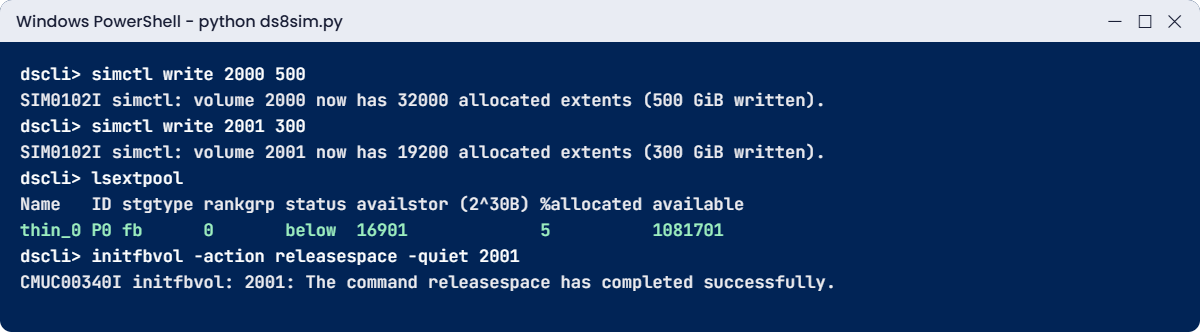
SIM0102I simctl: volume 2000 now has 32000 allocated extents (500 GiB written).
dscli> simctl write 2001 300
SIM0102I simctl: volume 2001 now has 19200 allocated extents (300 GiB written).
dscli> lsextpool
Date/Time: 24 October 2026 11:23:35 UTC IBM DSCLI Version: 7.10.10.348 DS: IBM.2107-78SV001
Name   ID stgtype rankgrp status availstor (2^30B) %allocated available reserved numvols
========================================================================================
thin_0 P0 fb      0       below  16901             5          1081701   64       10
dscli> showfbvol 2000
Date/Time: 24 October 2026 11:23:35 UTC IBM DSCLI Version: 7.10.10.348 DS: IBM.2107-78SV001
Name                       app_2000
...
exts                       128000
...
cap (2^30B)                2000.0
...
sam                        ESE
...
realextents                32000
virtualextents             201
realcap (MiB)              512000
...
You wrote 800 GiB, and availstor dropped by exactly 800 GiB to 16,901, with %allocated now at 5.
In showfbvol (shortened), exts 128000 is the full 2,000 GiB in 16 MiB extents, while realextents 32000 is what’s actually allocated, 500 GiB or a realcap of 512,000 MiB. sam ESE confirms it’s thin, and virtualextents is the shell’s metadata count for the full size.
✅ Checkpoint: availstor dropped to 16,901 and realextents is 32,000.
4Release a scratch volume’s space
Volume 2001 held a test load nobody needs any more. Without -quiet the DS CLI asks you to confirm with Y first and warns that all data on the volume will be lost, but you add -quiet here because the decision’s already made.
Type these at the dscli> prompt:
initfbvol -action releasespace -quiet 2001
lsextpool
You should see this:
dscli> initfbvol -action releasespace -quiet 2001
CMUC00340I initfbvol: 2001: The command releasespace has completed successfully.
dscli> lsextpool
Date/Time: 24 October 2026 11:23:35 UTC IBM DSCLI Version: 7.10.10.348 DS: IBM.2107-78SV001
Name   ID stgtype rankgrp status availstor (2^30B) %allocated available reserved numvols
========================================================================================
thin_0 P0 fb      0       below  17201             3          1100901   64       10
The data on 2001 is gone for good. The volume itself still exists and still looks like 2,000 GiB to the host, but its 300 GiB of extents are back in the pool, and availstor went up from 16,901 to 17,201.
✅ Checkpoint: availstor is back up to 17,201.
5Set an overprovisioning limit
Type this at the dscli> prompt:
chextpool -opratiolimit 1.5 P0You should see this:
dscli> chextpool -opratiolimit 1.5 P0
CMUC00001I chextpool: Extent pool P0 successfully modified.
On a real DS8000, P0 can now promise at most 1.5 times its usable capacity, and any new volume, expansion or migration that would go past that gets refused. The practice shell accepts the setting without enforcing it, so use the calculator below to see the effect.
✅ Checkpoint: chextpool reports CMUC00001I.
6Watch the ratio and the runway every day
Pools don’t fill up in one go, they fill a bit every day. So rather than doing a one-off sum, you’ll build the kind of small watcher storage teams really run. Once a day it reads lsextpool -l through the DS CLI, adds a line per pool to a CSV history and works out the overprovisioning ratio and the runway from real growth.
Save it on your laptop as C:\ds8k-lab\thin_calc.py, next to ds8sim.py. It runs on the laptop, not on the DS8000.
A script can’t answer password prompts, so you first save your password in a password file. If security.dat and auto.profile are already in your lab folder from an earlier lesson, skip this bit (the shell would only say the record already exists).
Run this (PowerShell, with your own password both times):
python ds8sim.py -hmc1 10.0.0.1 -user admin -passwd YourPassw0rd managepwfile -action add -name admin -pw YourPassw0rd -pwfile security.datYou should see this:
CMUC00206I managepwfile: Record 10.0.0.1/admin successfully added to password file security.dat.Then save these eight lines as auto.profile in the same folder. With banner: off, header: on and format: delim, every list comes back as one header row followed by comma-separated rows, which Python reads easily. Implementation Lesson 2 covers profiles in full.
auto.profile:
hmc1: 10.0.0.1
username: admin
pwfile: security.dat
devid: IBM.2107-78SV001
banner: off
header: on
format: delim
delim: ,
The script:
# thin_calc.py - daily thin-pool watcher: overprovisioning ratio and runway from real growth
# Runs on your workstation or jump server, not on the DS8000.
# It talks to the DS8000 only through the DS CLI (auto.profile: banner off, header on, format delim).
import csv, datetime, os, subprocess, sys
DSCLI = ["python", "ds8sim.py", "-cfg", "auto.profile"]   # at work: ["dscli", "-cfg", "auto.profile"]

def dscli(*args):
    """Run one DS CLI command and return its rows as dictionaries."""
    out = subprocess.run(DSCLI + list(args), capture_output=True, text=True).stdout
    lines = [l for l in out.splitlines() if l and not l.startswith("SaatVedha") and not l.startswith("CMUC")]
    return list(csv.DictReader(lines))

HISTORY = "thin_history.csv"     # one row per pool per day, kept on the jump server
RATIO_LIMIT = 1.5                # what you set with chextpool -opratiolimit (lsextpool doesn't list it)
# --date is for the lab only, to pretend days have passed. At work the scheduler just runs it daily.
today = sys.argv[sys.argv.index("--date") + 1] if "--date" in sys.argv else datetime.date.today().isoformat()

# 1. Today's numbers from the DS8000, appended to the history (once per pool per day)
old = []
if os.path.exists(HISTORY):
    with open(HISTORY, newline="") as f:
        old = list(csv.DictReader(f))
pools = dscli("lsextpool", "-l")
new = [{"date": today, "pool": p["ID"], "total": p["totalLogicalCap(MiB/cyl)"],
        "used": p["usedLogicalCap(MiB/cyl)"], "provisioned": p["provisionedCap(MiB/cyl)"]}
       for p in pools if not any(h["date"] == today and h["pool"] == p["ID"] for h in old)]
with open(HISTORY, "a", newline="") as f:
    w = csv.DictWriter(f, fieldnames=["date", "pool", "total", "used", "provisioned"])
    if not old:
        w.writeheader()
    w.writerows(new)
history = old + new

# 2. Ratio and runway for every pool
for p in pools:
    unit, div = ("GiB", 1024) if p["stgtype"] == "fb" else ("cyl", 1)   # FB columns are MiB, CKD are cylinders
    total = int(p["totalLogicalCap(MiB/cyl)"]) / div
    used = int(p["usedLogicalCap(MiB/cyl)"]) / div
    prov = int(p["provisionedCap(MiB/cyl)"]) / div
    warn = int(dscli("showextpool", p["ID"])[0]["%threshold"]) / 100
    ratio = prov / total                                   # overprovisioning ratio = provisioned / usable
    print(f"{today} {p['ID']} {p['Name']}: {used:,.0f} of {total:,.0f} {unit} used ({100*used/total:.0f}%), "
          f"{prov:,.0f} {unit} provisioned")
    print(f"  Overprovisioning ratio: {ratio:.2f} : 1 (limit {RATIO_LIMIT}, room for "
          f"{total*RATIO_LIMIT - prov:,.0f} {unit} more volumes)")
    day = lambda h: datetime.date.fromisoformat(h["date"])
    mine = sorted((h for h in history if h["pool"] == p["ID"]), key=day)
    last = mine[-1]
    first = [h for h in mine if (day(last) - day(h)).days <= 30][0]   # growth over the last 30 days at most
    days = (day(last) - day(first)).days
    if days == 0:
        print(f"  Runway: first sample saved in {HISTORY}; run again tomorrow to measure growth")
        continue
    growth = (int(last["used"]) - int(first["used"])) / div / days    # real growth per day from the history
    if growth <= 0:
        print(f"  Growth over {days} days: none, no runway to worry about")
        continue
    print(f"  Growth: {growth:,.0f} {unit}/day over {days} days")
    print(f"  Days until the {warn:.0%} warning: {(total*warn - used)/growth:.0f} | "
          f"days until full: {(total - used)/growth:.0f}")
The ratio is provisionedCap / totalLogicalCap and the runway is the space left divided by growth per day. It’s the same maths you’d do on paper, only with numbers straight from the box, and the warning level comes from %threshold in showextpool.
You can’t wait five days in a lab, so --date lets you pretend. It’s only a practice switch, and at work the scheduler runs the script every morning.
Run this (day 1):
python thin_calc.py --date 2026-11-01You should see this:
2026-11-01 P0 thin_0: 501 of 17,703 GiB used (3%), 20,000 GiB provisioned
  Overprovisioning ratio: 1.13 : 1 (limit 1.5, room for 6,554 GiB more volumes)
  Runway: first sample saved in thin_history.csv; run again tomorrow to measure growth
A single sample can’t show growth, so the script saves it and waits. Now pretend five days of host writes, 600 GiB onto volume 2002 at 120 GiB a day.
Type this at the dscli> prompt:
simctl write 2002 600You should see this:
dscli> simctl write 2002 600
SIM0102I simctl: volume 2002 now has 38400 allocated extents (600 GiB written).
Run this (day 6):
python thin_calc.py --date 2026-11-06You should see this:
2026-11-06 P0 thin_0: 1,101 of 17,703 GiB used (6%), 20,000 GiB provisioned
  Overprovisioning ratio: 1.13 : 1 (limit 1.5, room for 6,554 GiB more volumes)
  Growth: 120 GiB/day over 5 days
  Days until the 85% warning: 116 | days until full: 138
The ratio is 1.13 : 1 and the 1.5 limit still leaves room for 6,554 GiB more volumes. The runway is what you need to watch: at 120 GiB a day this pool reaches the 85% warning in about four months and is full 22 days later. With only 22 days between “warning” and “out of space”, the threshold has to trigger real action rather than just an email.
Open thin_history.csv in Excel and you can chart the pool’s growth without any other tools. At work, Task Scheduler or cron on the jump server runs python thin_calc.py (with dscli instead of ds8sim.py) every morning and mails the output, so the history builds up by itself and the runway always reflects this month’s real growth.
✅ Checkpoint: Your second run prints 1.13 : 1, 120 GiB/day and 138 days until full.
Type quit when you’re done.
Thin pools tend to go wrong in two ways: they run out, or someone tries to “release” the wrong kind of volume. Keep the shell from the lab open.
1Break it: fill the pool, then write more
simctl poolfill pretends other volumes have filled the pool to 90%, and then a host tries to write 2,000 GiB to volume 2002.
Type these at the dscli> prompt:
simctl poolfill P0 90
lsextpool
simctl write 2002 2000
You’ll get this:
dscli> simctl poolfill P0 90
SIM0109I simctl: extent pool P0 is now 90% allocated (113291 extents available).
dscli> lsextpool
Date/Time: 24 October 2026 11:29:12 UTC IBM DSCLI Version: 7.10.10.348 DS: IBM.2107-78SV001
Name   ID stgtype rankgrp status   availstor (2^30B) %allocated available reserved numvols
==========================================================================================
thin_0 P0 fb      0       exceeded 1770              90         113291    64       10
dscli> simctl write 2002 2000
SIM0005E simctl write: extent pool P0 has no free extents. The host write fails (out of space). Free space with initfbvol -action releasespace, delete volumes or add a rank.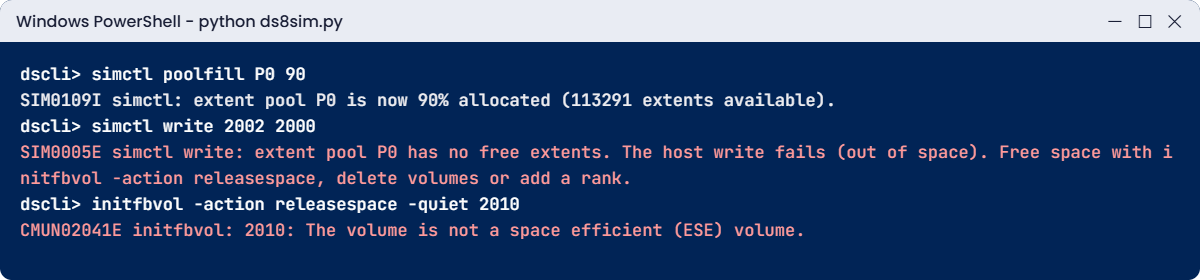
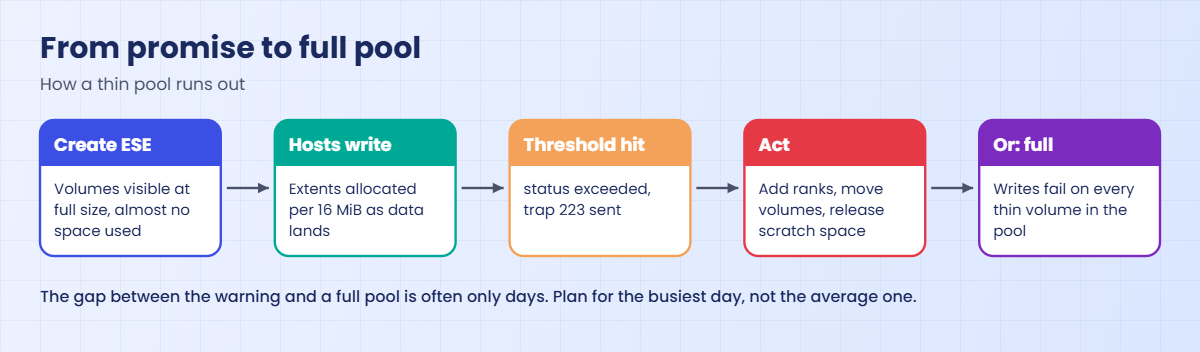
You got two warnings before it failed. status exceeded means the pool is past its 85% threshold, and availstor 1770 shows only 1,770 GiB left. The host still had a 2,000 GiB disk, so it tried to write 2,000 GiB and the pool couldn’t back that promise. (SIM lines are practice shell messages; on a real DS8000 the host gets write errors and the pool goes write-inhibit near 100%.)
To fix it, free up space you can safely give away and then retry:
initfbvol -action releasespace -quiet 2000
simctl write 2002 2000
lsextpool
You should see this:
dscli> initfbvol -action releasespace -quiet 2000
CMUC00340I initfbvol: 2000: The command releasespace has completed successfully.
dscli> simctl write 2002 2000
SIM0102I simctl: volume 2002 now has 128000 allocated extents (2000 GiB written).
dscli> lsextpool
Date/Time: 24 October 2026 11:29:13 UTC IBM DSCLI Version: 7.10.10.348 DS: IBM.2107-78SV001
Name   ID stgtype rankgrp status   availstor (2^30B) %allocated available reserved numvols
==========================================================================================
thin_0 P0 fb      0       exceeded 270               98         17291     64       10
In the lab, volume 2000 was a test load, so releasing its 500 GiB was enough. Look at what you’re left with, though: 98% allocated and 270 GiB free, which isn’t a fix so much as borrowed time. At work the real fixes are adding ranks to the pool, moving volumes to another pool or deleting volumes nobody uses, and they should happen at the threshold rather than at 98%.
✅ Checkpoint: volume 2002 now has 128,000 allocated extents.
2Break it: release space on a standard volume
A colleague creates a fully provisioned volume and later tries to shrink its footprint the “thin” way.
Type these at the dscli> prompt:
mkfbvol -extpool P0 -cap 100 -name std_#h 2010
initfbvol -action releasespace -quiet 2010
You’ll get this error:
dscli> mkfbvol -extpool P0 -cap 100 -name std_#h 2010
CMUC00025I mkfbvol: FB volume 2010 successfully created.
dscli> initfbvol -action releasespace -quiet 2010
CMUN02041E initfbvol: 2010: The volume is not a space efficient (ESE) volume.
Why: a standard volume took all its extents when it was created and keeps them, because space release only exists for ESE volumes. (Practice shell message text.) What you do next depends on what you want. If the data isn’t needed, delete the volume with rmfbvol, and if you want thin behaviour, create it with -sam ese next time.
Notice too that creating 2010 needed 100 GiB of real extents from a pool that only had 270 GiB left, so fully provisioned volumes in a nearly full thin pool make things worse.
✅ Checkpoint: You can explain why initfbvol refused volume 2010.