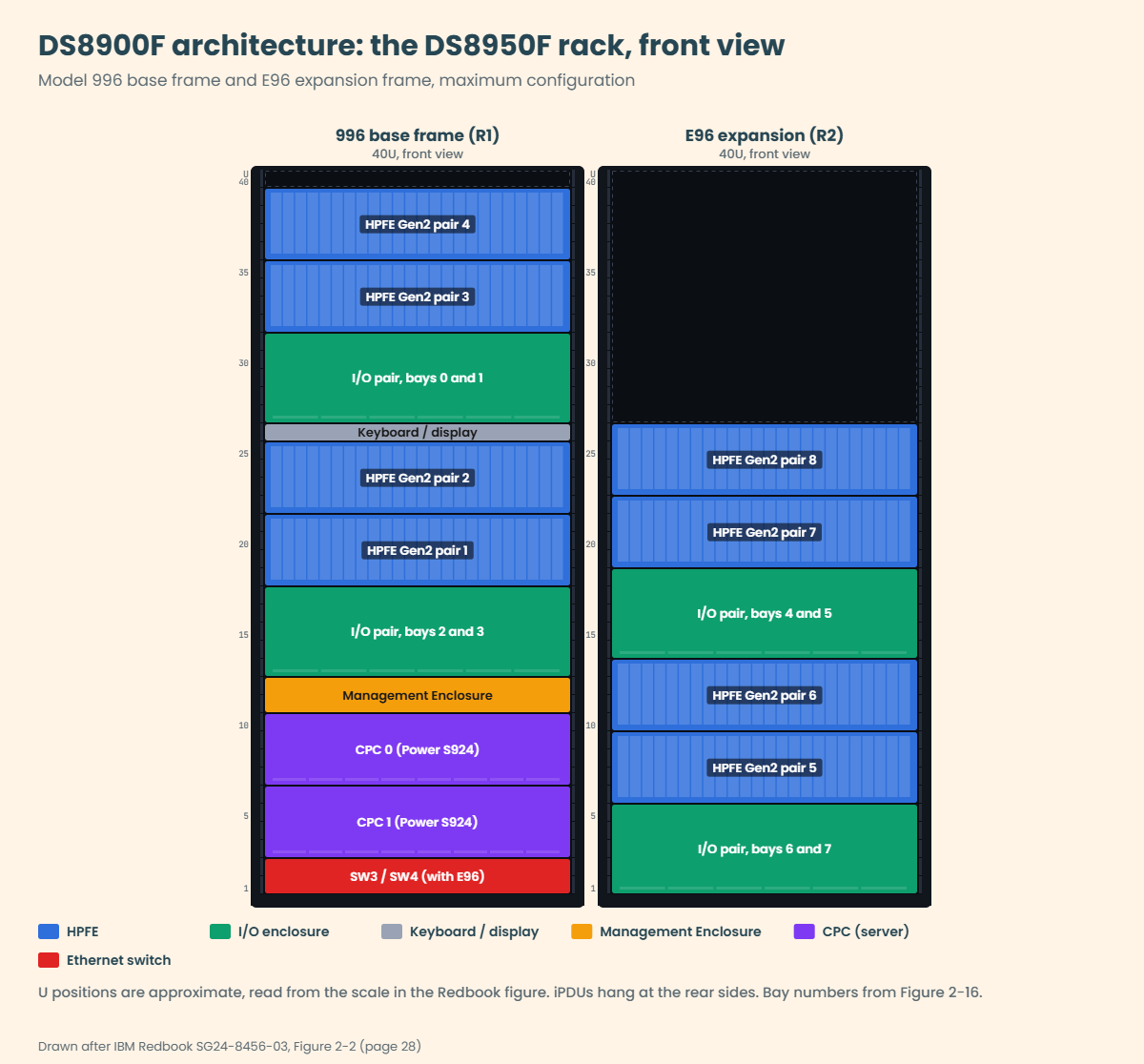
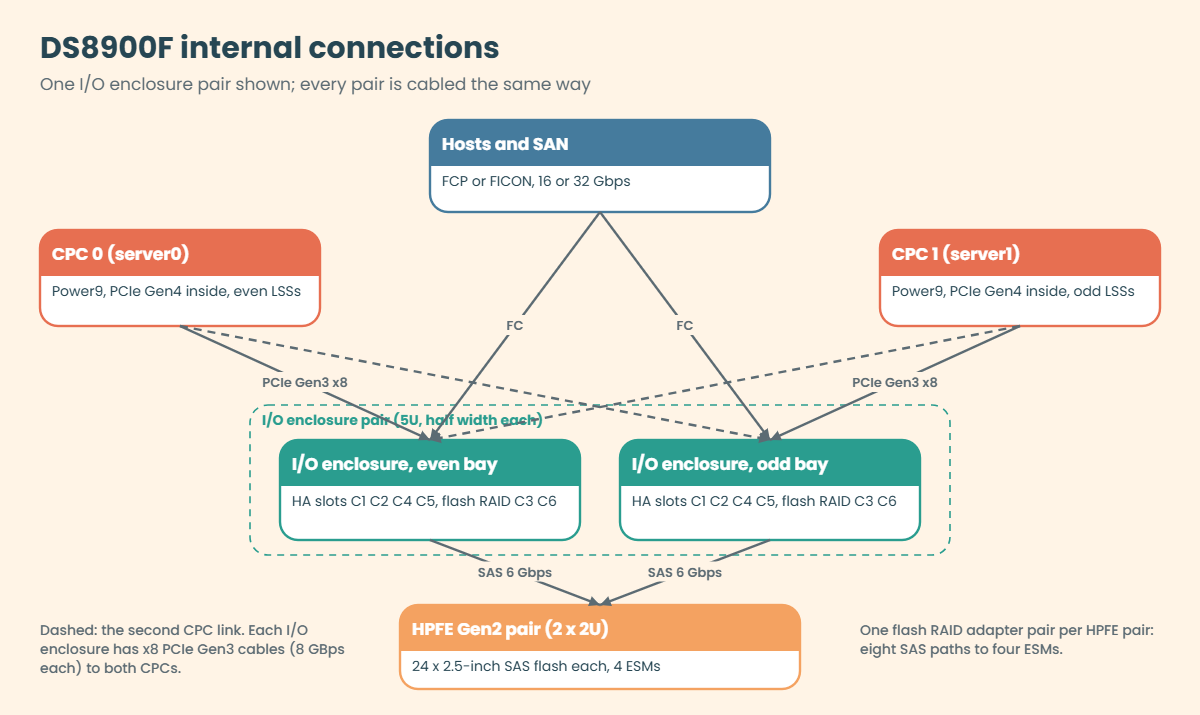
DS8900F architecture and rack layout
-
Phase 0: Start here
-
Phase 1: The hardware
-
Phase 2: Virtualization
-
Phase 3: Resilience and data protection
-
Phase 4: Generations, models and rack layouts
-
Phase 5: Wrap-up
The DS8900F architecture is the DS8000 generation that came just before the DS8A00, and you’ll keep running into it in banks and mainframe shops for years. It’s all-flash, it sits in a 40U rack (or inside an IBM Z rack), and it was the first DS8000 to swap the big internal batteries for small NVDIMM backup modules.
We’ll go through the four models (993, 994, 996, 998) and the E96 expansion frame, walk the rack from top to bottom and follow every cable: CPC to I/O bay, I/O bay to host adapter and flash RAID adapter, and adapter to HPFE Gen2. Along the way you’ll see why the expansion frame has to stand within 2 m unless you order optical cables.
Most of this carries straight over to the DS8A00 in the next lesson, because the parts kept their jobs and only their sizes, speeds and places changed.
| Time | You need | By the end you can |
|---|---|---|
| 50 to 60 minutes | The practice shell and lab.profile; Python 3 on your laptop; the DS8900F Redbook open in a browser | Name the DS8900F models and their limits, draw the 996 rack from memory, map CPC ports to I/O bays, and plan where an E96 may stand |
What it is, in one line
The DS8900F is an all-flash DS8000 built from two IBM Power9 servers, up to eight I/O enclosures and up to sixteen HPFE Gen2 flash enclosures in a 40U rack, protected by iPDUs and NVDIMMs instead of big batteries.
In Simple Words
A school with one office and many classrooms
Picture a school building. The office is on the ground floor, with two head teachers who share the work and always copy each other’s notes, and above them are corridors lined with classrooms full of desks. Every message from a parent comes in through a door on a corridor, goes to the office and then on to the right classroom, and if one head teacher is off sick, the other runs the whole school from the copied notes.
Sometimes the school builds a second wing next door. It has more corridors and classrooms but no office of its own, so it needs a covered walkway to the main building, and while a short walkway is cheap, a wing that’s far away needs a long, special bridge.
In a DS8900F the head teachers are the two CPCs and the corridors are I/O enclosures, with host adapters as the doors, HPFE flash enclosures as the classrooms and the E96 expansion frame as the second wing.
Engineer's View
DS8900F in numbers
All numbers come from IBM Redbook SG24-8456-03 (Release 9.3.2), Tables 2-1 to 2-6.
- Machine type 5341, four models in three classes: DS8980F model 998 (Analytic), DS8950F model 996 (Agility), DS8910F model 994 (Flexibility, racked) and DS8910F model 993 (Flexibility, rack-mounted in a customer or IBM Z rack, 16U). Expansion frame E96 for 996 and 998 only, at most one.
- CPCs: two IBM Power9 servers. 998 and 996 use the 4U Power S924 (9009-42A); 994 and 993 use the 2U Power S922 (9009-22A). Cores per CPC: 22 on the 998, 10 or 20 on the 996, 8 on the 994 and 993.
- Memory and NVS: 998 has 4352 GB fixed with 128 GB NVS. 996 offers 512 to 3456 GB (NVS 32 to 128 GB). 994 and 993 offer 192 or 512 GB (NVS 8 or 32 GB).
- Limits for 998 and 996: 4 I/O enclosure pairs, 32 host adapters, 128 ports, 8 HPFE Gen2 pairs, 384 drives. The 994 stops at 2 I/O pairs, 64 ports, 4 HPFE pairs and 192 drives. The 993 stops at 1 I/O pair, 32 ports, 2 HPFE pairs and 96 drives.
- Rack: 19-inch, 40U, 600 x 1050 mm. With covers it is about 193 cm high, 64 cm wide and 144 cm deep.
- Power: 2 to 6 iPDUs in two power domains. NVDIMMs plus Backup Power Modules (BPMs) in each CPC replace the DC-UPS and battery sets of the DS8880.
On DS8A00: the same layout idea, but Power9+, PCIe Gen4 to the I/O bays, HPFE Gen3 with NVMe, a 42U rack and no RAID 5 at all.
How it works, step by step
It’s easiest to learn the DS8900F in the order the data travels, starting at the servers and moving through the bays and adapters to the flash.
1Two CPCs run the storage system
Each CPC is a Power9 server running an AIX partition with the DS8000 microcode, and IBM calls these the storage nodes, server0 and server1. Inside each CPC the PCIe bus is Gen4, up to x16 wide.
Each CPC has its own cache and holds the NVS copy of the other server’s writes. Even LSSs belong to server0 and odd LSSs to server1, the same as on every DS8000 since the first one.
2PCIe cables link each CPC to every I/O bay
Every I/O enclosure connects to both CPCs over a pair of x8 PCIe Gen3 cables at 8 GBps each, so if one CPC fails the other can still reach every bay, and through the bays every host adapter and flash enclosure.
For this the 998 and the 20-core 996 have seven PCIe adapters per CPC: six 1-port cards in slots C2, C4, C6, C8, C9, C12 and one 2-port card in slot C3. The 994 uses four 1-port cards and the 993 only two.
3Host adapters and flash RAID adapters live in the bays
An I/O enclosure is half the width of the rack and 5U high, so two of them sit side by side as a pair. Each one has six PCIe slots, four for host adapters (C1, C2, C4, C5) and two for flash RAID adapters (C3, C6).
Host adapters have four ports at 32 Gbps (8, 16 or 32 negotiated) or 16 Gbps, and each port runs FCP or FICON. FC-AL is gone on this generation.
The enclosure’s PCIe module also has CXP ports T3 and T4 for zHyperLink cables.
4Flash RAID adapters drive HPFE Gen2 pairs
One flash RAID adapter pair (the DS8900F’s version of device adapters) serves one HPFE Gen2 pair. The two adapters sit in different I/O enclosures of a pair, each owned by a different CPC, and they connect to the four ESMs of the enclosure pair over eight 6 Gbps SAS paths.
Each HPFE Gen2 enclosure is 2U with 24 slots for 2.5-inch flash drives, and a pair holds 16, 32 or 48 drives. Every drive has two ports, one to each SAS expander, so losing a single cable or ESM never cuts a drive off.
5The Management Enclosure looks after everything
Older models had HMCs, switches and power controllers spread around the rack, but the DS8900F gathers them into one 2U Management Enclosure (ME) in the base frame. Inside it you’ll find two mini-PC HMCs, two 8-port Ethernet switches (SW1 black, SW2 gray), two Rack Power Control cards and two power supplies.
The black and gray networks are private, and each CPC’s service processor (FSP) and partition connect to both. Only HMC port eth2 goes out to your own network.
6Two power domains and NVDIMMs keep writes safe
The iPDUs hang vertically at the rear, with the green domain on the left and the yellow domain on the right (seen from the rear). Every power supply in a CPC, I/O enclosure, HPFE or ME gets one feed from each domain.
If both domains lose power for more than 20 ms, host I/O stops, the NVDIMMs copy NVS into their own flash running on BPM power, and the system turns off. When power is back you power it on from the HMC (unless automatic power control is set), and the NVS data is written out during IML.
7The E96 adds a second wing
The E96 holds up to four more HPFE Gen2 pairs and two more I/O enclosure pairs (bays 4 to 7), but no CPC, no ME and no keyboard. Its iPDUs report over Ethernet to two 24-port switches, SW3 and SW4, which only appear at the bottom of the base frame when an E96 is ordered.
The bays in the E96 are cabled to the CPCs in the base frame. The standard copper PCIe cable set reaches 2 m, which is why the frames normally stand side by side, while the optional optical set (Feature Code 1341) reaches 20 m. Either way you need one cable set per I/O enclosure pair in the E96.
Before a DS8950F can take an E96 it needs 20 cores per CPC and at least 1 TB of memory, while a DS8980F needs nothing extra.
Hands-on lab: map a DS8000 to its rack and plan an E96
Before you run any command, double-check it
Read every command twice before you press Enter. Check the target: the system or account, the IDs, the names and the sizes. These commands are for learning and were tested in our lab, not on your system. At work, run the read-only list commands first, follow your change process, make sure a backup exists, and ask a second person to check anything that changes or deletes data. You run them at your own risk.
The practice shell is a DS8A50, not a DS8900F, and it can’t pretend to be one. So in this lab you read the practice system’s hardware and place each part in a rack, fill in a rack map for a real DS8950F from the Redbook figure, and run a small planning script that works out where an E96 may stand.
Practice shell note: the practice shell is our teaching tool, not IBM software. Real DS CLI output looks very much like this but is not identical. Every output below is what the shell really printed. It is G10 (DS8A00) output; a DS8900F prints model 996 or 998 and Power9 details instead.
1Reset and read the system
Run this:
python ds8sim.py -cfg lab.profile
simctl reset
showsiYou should see this:
dscli> simctl reset
SIM0100I simctl: factory state restored (users and passwords kept; use simctl reset -all to reset them too).
dscli> showsi
Date/Time: 24 October 2026 19:49:34 UTC IBM DSCLI Version: 7.10.10.348 DS: IBM.2107-78SV001
Name ds8k-g10-lab
desc SaatVedha practice DS8A50
ID IBM.2107-78SV001
Model A05
NVS Memory 64.0 GB
Cache Memory 832.0 GB
Processor Memory 1015.6 GB
MTS IBM.5341-78SV000
(output shortened)Model A05 with MTS IBM.5341 tells you this is a DS8A50. A DS8950F has the same machine type 5341 (from Release 9.3) but model 996, so that one line is the quickest way to know which Redbook to open.
✅ Checkpoint: showsi shows Model A05 and MTS IBM.5341-78SV000.
2Look at the servers and the HMCs
Run this:
lspnode -l
lshmcYou should see this:
dscli> lspnode -l
Date/Time: 24 October 2026 19:49:34 UTC IBM DSCLI Version: 7.10.10.348 DS: IBM.2107-78SV001
ID State Release Processor Memory Location
==============================================================
00 Online R10.1 Power9+ 20-core 512.0 GB U9009.42A.78SV00-P1
01 Online R10.1 Power9+ 20-core 512.0 GB U9009.42A.78SV01-P1
dscli> lshmc
Date/Time: 24 October 2026 19:49:35 UTC IBM DSCLI Version: 7.10.10.348 DS: IBM.2107-78SV001
Name State Role Release Management-IP Location-Code Machine-Type Machine-Model Memory Disk
================================================================================================================================
DS8A50-1A.LAB Online Primary(1) R10.1 bundle 10.10.106.0 10.0.0.1 U7063CR2.78SV1DD 7063 CR2 33GB 1TB
DS8A50-1B.LAB Online Secondary(2) R10.1 bundle 10.10.106.0 10.0.0.2 U7063CR2.78SV2DD 7063 CR2 33GB 1TBThe two storage nodes, 00 and 01, are the two CPCs. Here the HMCs are machine type 7063 model CR2, which are separate 1U Power servers, the G10 way of doing it. On a DS8900F the two HMCs are small mini-PCs inside the 2U Management Enclosure, and the Redbook’s lshmc example shows machine type 1700 model L47 (page 171).
✅ Checkpoint: You can say where the HMCs sit on each generation: 1U units at the bottom of a DS8A00, inside the ME on a DS8900F.
3List I/O enclosures and host adapters
Run this:
lsioenclosure
lshacardYou should see this:
dscli> lsioenclosure
Date/Time: 24 October 2026 19:49:35 UTC IBM DSCLI Version: 7.10.10.348 DS: IBM.2107-78SV001
ID Frame State Host adapters Device adapters Location code S/N
========================================================================================
IBM.1400-1B1-78SV0 1 Online 1 2 U1400.1B1.78SV0 YE10SV0001
IBM.1400-1B2-78SV0 1 Online 1 2 U1400.1B2.78SV0 YE10SV0002
IBM.1400-1B3-78SV0 1 Online 2 0 U1400.1B3.78SV0 YE10SV0003
IBM.1400-1B4-78SV0 1 Online 0 0 U1400.1B4.78SV0 YE10SV0004
dscli> lshacard
Date/Time: 24 October 2026 19:49:35 UTC IBM DSCLI Version: 7.10.10.348 DS: IBM.2107-78SV001
ID I/O enclosure Frame State Type Speed Fibre Channel ports Encryption capable Location code S/N
==================================================================================================================================================
IBM.1400-1B1-78SV0/R-1-P1-C1 IBM.1400-1B1-78SV0 1 Online FC-LW 32 Gb/s 4 yes U1400.1B1.78SV0-P1-C1 YH10SV0001
IBM.1400-1B2-78SV0/R-1-P1-C3 IBM.1400-1B2-78SV0 1 Online FC-SW 32 Gb/s 4 yes U1400.1B2.78SV0-P1-C3 YH10SV0003
IBM.1400-1B2-78SV0/R-1-P1-C4 IBM.1400-1B2-78SV0 1 Online FC-SW 32 Gb/s 4 yes U1400.1B2.78SV0-P1-C4 YH10SV0004
IBM.1400-1B3-78SV0/R-1-P1-C5 IBM.1400-1B3-78SV0 1 Online FC-SW 32 Gb/s 4 yes U1400.1B3.78SV0-P1-C5 YH10SV0005
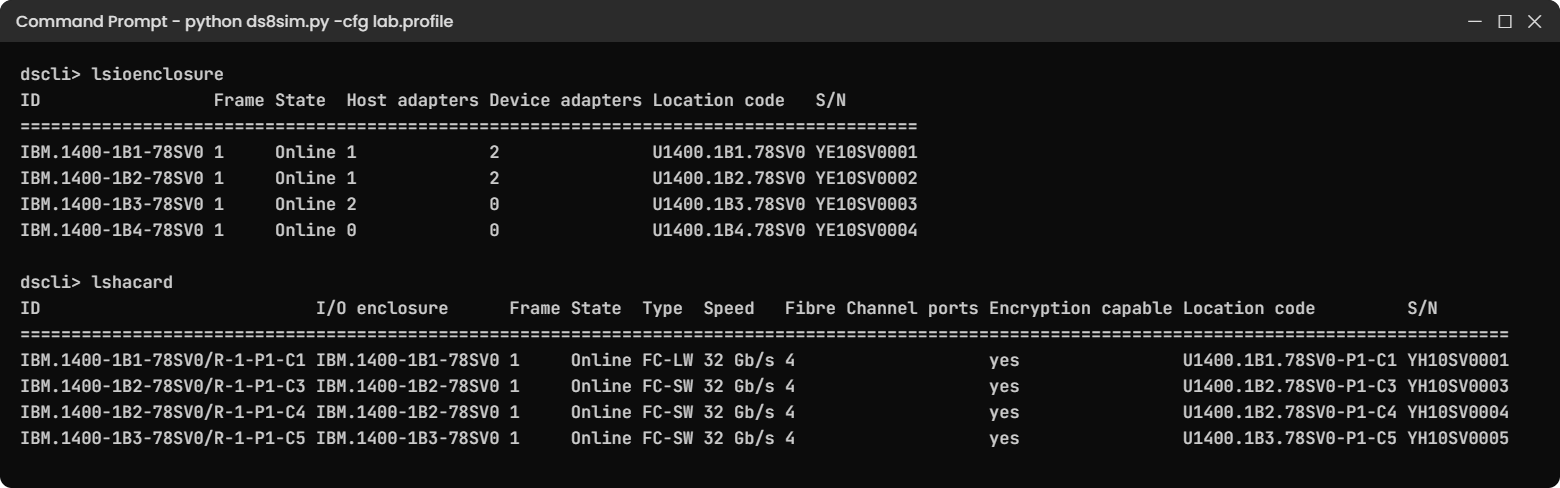
Four I/O enclosures in frame 1 make two pairs. On a fully built DS8950F base frame those are bays 0 to 3, with the upper pair as bays 0 and 1 and the lower pair (installed first) as bays 2 and 3, and an E96 would add bays 4 to 7 in frame 2.
Count the host adapters with lshacard: one card in 1B1, two in 1B2 and one in 1B3. In this practice shell the “Host adapters” column of lsioenclosure isn’t kept in step with that list, but on a real system the two agree.
✅ Checkpoint: You found 4 I/O enclosures, 4 host adapters, all 32 Gb/s with 4 ports, and one enclosure with no host adapter.
4Fill in a DS8950F rack map
Open the DS8900F Redbook at Figure 2-2 (page 28, PDF page 48), cover the labels and write down which part sits at each height in the base frame. Only use the rack drawing in this lesson to check yourself afterwards.
| Height (approx. U) | Your answer |
|---|---|
| U40 | ______ |
| U32 to U39 | ______ |
| U27 to U31 | ______ |
| U26 | ______ |
| U18 to U25 | ______ |
| U13 to U17 | ______ |
| U11 to U12 | ______ |
| U3 to U10 | ______ |
| U1 to U2 | ______ |
Answer key:
| Height (approx. U) | Part |
|---|---|
| U40 | Empty |
| U32 to U39 | HPFE Gen2 pairs 4 and 3 |
| U27 to U31 | Upper I/O enclosure pair (bays 0 and 1) |
| U26 | 1U keyboard and display drawer |
| U18 to U25 | HPFE Gen2 pairs 2 and 1 |
| U13 to U17 | Lower I/O enclosure pair (bays 2 and 3), installed first |
| U11 to U12 | Management Enclosure (2 HMCs, SW1, SW2, RPCs) |
| U3 to U10 | CPC 0 and CPC 1, Power S924, 4U each |
| U1 to U2 | SW3 and SW4 24-port switches, only with an E96 |
✅ Checkpoint: You got at least 7 of 9 rows right without looking.
5Plan where the E96 may stand
Save this planning tool as e96_plan.py in the lab folder on your laptop. It runs there and doesn’t talk to any DS8000. It checks the three rules from the Redbook: only the 996 and 998 take an E96, a 996 needs 20 cores per CPC and 1 TB of memory, and the distance between frames decides copper or optical cables.
File e96_plan.py:
# Planning tool: runs on your laptop. No DS8000 is involved.
# Checks where a DS8900F E96 expansion frame may stand (Redbook SG24-8456-03, pp. 26, 38, 40).
import sys
COPPER_MAX_M = 2 # copper PCIe cable set: frames must stand side by side
OPTICAL_MAX_M = 20 # optical PCIe cable set (Feature Code 1341)
def plan(model, cores_per_cpc, memory_gb, distance_m, io_pairs):
if model not in ("996", "998"):
return "NO model %s takes no expansion frame (only 996 and 998 do)" % model
if model == "996" and (cores_per_cpc < 20 or memory_gb < 1024):
return "NO a 996 needs 20 cores per CPC and at least 1024 GB memory for an E96"
if io_pairs not in (1, 2):
return "NO an E96 holds 1 or 2 I/O enclosure pairs"
if distance_m <= COPPER_MAX_M:
return "OK copper PCIe cables, %d cable set(s), frames side by side" % io_pairs
if distance_m <= OPTICAL_MAX_M:
return "OK order the optical PCIe cable set (FC 1341), %d set(s)" % io_pairs
return "NO %.1f m is more than the 20 m optical limit: move the frame" % distance_m
model, cores, mem, dist, pairs = sys.argv[1], int(sys.argv[2]), int(sys.argv[3]), float(sys.argv[4]), int(sys.argv[5])
print("Plan: model %s, %d cores/CPC, %d GB, E96 at %.1f m, %d I/O pair(s)" % (model, cores, mem, dist, pairs))
print(plan(model, cores, mem, dist, pairs))
Run this (three plans):
python e96_plan.py 996 20 2048 1.5 2
python e96_plan.py 996 20 2048 5 2
python e96_plan.py 996 10 512 1 1You should see this:
> python e96_plan.py 996 20 2048 1.5 2
Plan: model 996, 20 cores/CPC, 2048 GB, E96 at 1.5 m, 2 I/O pair(s)
OK copper PCIe cables, 2 cable set(s), frames side by side
> python e96_plan.py 996 20 2048 5 2
Plan: model 996, 20 cores/CPC, 2048 GB, E96 at 5.0 m, 2 I/O pair(s)
OK order the optical PCIe cable set (FC 1341), 2 set(s)
> python e96_plan.py 996 10 512 1 1
Plan: model 996, 10 cores/CPC, 512 GB, E96 at 1.0 m, 1 I/O pair(s)
NO a 996 needs 20 cores per CPC and at least 1024 GB memory for an E96At work you’d run a tool like this while the facilities team is drawing the floor plan, well before the order goes in, and the distance turns into a line on the order: copper set, or Feature Code 1341.
✅ Checkpoint: Plan 1 says copper, plan 2 says optical FC 1341, plan 3 refuses the E96 for a 10-core 996.
Break It, Then Fix It
Plenty of teams move from a DS8900F to a DS8A00 and copy their old build scripts across, and two DS8900F habits break on the new box. You’ll trigger both in the practice shell.
1Break it: RAID 5 from an old runbook
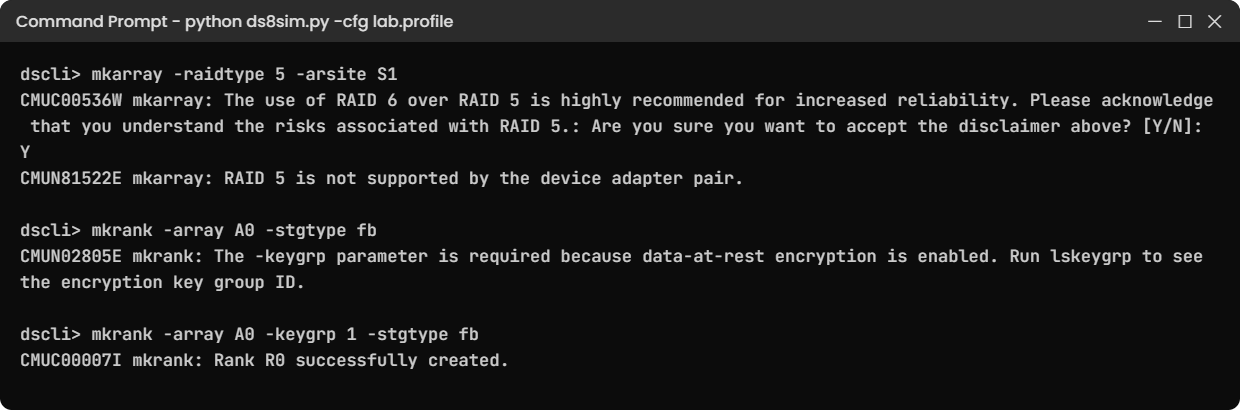
On a DS8900F you can get RAID 5 by RPQ on Tier 0 drives (the 800 GB feature 1611), and an old runbook says “small Tier 0 site: RAID 5”. Run that line on the G10 practice system and answer Y to the warning.
Run this:
mkarray -raidtype 5 -arsite S1You’ll get this:
dscli> mkarray -raidtype 5 -arsite S1
CMUC00536W mkarray: The use of RAID 6 over RAID 5 is highly recommended for increased reliability. Please acknowledge that you understand the risks associated with RAID 5.: Are you sure you want to accept the disclaimer above? [Y/N]: Y
CMUN81522E mkarray: RAID 5 is not supported by the device adapter pair.Why: the DS8A00 doesn’t support RAID 5 at all. Both the warning CMUC00536W and the error CMUN81522E are IBM messages printed in the DS8A00 Redbook (page 352).
Fix: use RAID 6, the default on both generations.
Run this:
mkarray -raidtype 6 -arsite S1
lsarrayYou should see this:
dscli> mkarray -raidtype 6 -arsite S1
CMUC00004I mkarray: Array A0 successfully created.
dscli> lsarray
Date/Time: 24 October 2026 19:49:35 UTC IBM DSCLI Version: 7.10.10.348 DS: IBM.2107-78SV001
Array State Data RAIDtype arsite Rank DA Pair DDMcap (10^9B)
======================================================================
A0 Unassigned Normal 6 (5+P+Q+S) S1 - 0 4800.0✅ Checkpoint: Array A0 exists as RAID 6 (5+P+Q+S) on S1.
2Break it: the encryption group in the wrong place
On a DS8900F the Redbook sets encryption on the pool with mkextpool -rankgrp 0 -stgtype fb -opratiolimit 3.5 -encryptgrp 1 my_pool (page 130), whereas on a DS8A00 the key group goes on the rank. Make the rank the old way, without a key group.
Run this:
mkrank -array A0 -stgtype fbYou’ll get this:
dscli> mkrank -array A0 -stgtype fb
CMUN02805E mkrank: The -keygrp parameter is required because data-at-rest encryption is enabled. Run lskeygrp to see the encryption key group ID.Why: on G10 every rank has to name its encryption key group. The message wording is the practice shell’s (see the shell’s message list), but the rule is IBM’s, shown as mkrank -array A0 -keygrp 1 -stgtype fb on page 352.
Fix: look up the key group and then pass it.
Run this:
lskeygrp
mkrank -array A0 -keygrp 1 -stgtype fb
lsrankYou should see this:
dscli> lskeygrp
Date/Time: 24 October 2026 19:49:35 UTC IBM DSCLI Version: 7.10.10.348 DS: IBM.2107-78SV001
ID state reckeystate reckeydate datakeydate keyprotocol type name
=======================================================================
1 accessible disabled - 10/01/2026 LOCAL DAR DAR_1
dscli> mkrank -array A0 -keygrp 1 -stgtype fb
CMUC00007I mkrank: Rank R0 successfully created.
dscli> lsrank
Date/Time: 24 October 2026 19:49:35 UTC IBM DSCLI Version: 7.10.10.348 DS: IBM.2107-78SV001
ID Group State datastate Array RAIDtype extpoolID stgtype
==============================================================
R0 - Unassigned Normal A0 6 - fb✅ Checkpoint: Rank R0 exists on A0 with stgtype fb.
This happened at work
The expansion frame that stood five metres too far
A stock exchange ran its trade-reporting databases on a DS8950F. Volumes were growing fast, so the team ordered an E96 expansion frame with two more I/O enclosure pairs and four HPFE Gen2 pairs, and the go-live date couldn’t move because a new market segment was opening in six weeks.
The floor space next to the base frame was taken by a cooling unit, so facilities found an open spot across the cold aisle, about 5 m away, and drew it on the plan. Nobody on the storage team checked the cable rule, and the order went in with the standard copper PCIe cable sets, which reach 2 m.
On install day the IBM SSR unpacked the E96, measured the run and stopped, because the copper cables couldn’t reach. Optical PCIe cable sets (Feature Code 1341, up to 20 m) had to be ordered and the install slipped by nine working days. The new segment only opened on time because the team squeezed temporary space out of the existing pools and paused two test environments.
Looking back, the frame position had been a facilities decision with no storage sign-off. Now frame distance is a line on the planning worksheet, checked against the Redbook limits (2 m copper, 20 m optical) and signed by the storage lead before any order goes in.
Common mistakes and troubleshooting
| Symptom | Likely cause | What to check / fix |
|---|---|---|
| E96 cables do not reach on install day | Copper set ordered, frame more than 2 m away | Plan distance early; order optical set FC 1341 (up to 20 m) |
| E96 order rejected for a DS8950F | 10-core CPCs or less than 1 TB memory | Upgrade to 20 cores per CPC and at least 1024 GB first |
| Hosts lose paths during I/O bay service | All host ports in one bay or one bay pair | Put each host’s paths in different I/O enclosures, ideally in different pairs |
| Planned RAID 5 fails on Tier 1 or Tier 2 drives | RAID 5 only by RPQ and only on Tier 0 | Use RAID 6 (default) or RAID 10 |
| Old DS8900F script fails on a DS8A00 | -encryptgrp on the pool, or RAID 5 | Use -keygrp on mkrank and RAID 6 |
| Power-on after an outage does not happen | Power control mode is manual | Power on from the HMC; check the mode in the worksheet |
| Cannot find the HMCs at the bottom of the rack | On DS8900F they are inside the 2U ME | Look above the CPCs at about U11 to U12 |
Make it a habit: before you touch any DS8000, run showsi and read the model. 99x means DS8900F rules apply, and A0x means DS8A00 rules.
Interview questions
Click a question to open it. Each one is worded the way an interviewer would ask it, and underneath you’ll see why they ask and one way you could answer in your own words.
Fresher level
1. You walk up to a DS8000 you have never seen. How do you tell if it is a DS8900F or a DS8A00?
Why they ask this: They want to see that you check before you assume, and that you know where the model shows up.
How you might answer: I’d run showsi and read the Model line. Models 993, 994, 996 and 998 are DS8900F, and A00, A01, A05 and A08 are DS8A00. They both use machine type 5341, so the model number is what gives it away. In the rack, a 2U Management Enclosure above the CPCs also tells me it’s a DS8900F.
2. What protects write data on a DS8900F if the power fails?
Why they ask this: A basic RAS question: do you know where NVS lives and how it is saved.
How you might answer: Writes sit in the owning CPC’s cache and in NVS on the other CPC, and NVS lives in NVDIMMs. If both power domains are lost for more than 20 ms, host I/O stops, each NVDIMM copies its data into its own flash running on the Backup Power Module, and the system powers off. At the next IML that data gets written out to the flash drives.
2–5 years experience
3. Facilities want to put a new E96 frame on the other side of the aisle. What do you ask?
Why they ask this: They check whether you know the physical limits that turn into real delays.
How you might answer: First I’d ask whether our model is a 996 or 998, and if it’s a 996, whether it has 20 cores per CPC and at least 1 TB of memory. Then the distance: copper PCIe cable sets reach 2 m, so the frames have to touch, while the optical sets, Feature Code 1341, reach 20 m.
If the spot is within 20 m, I’d order one optical set per I/O enclosure pair in the E96. Beyond 20 m it can’t be done, so the frame has to move.
4. Walk me through how a host write reaches a flash drive on a DS8950F.
Why they ask this: They want the full path, with the two-CPC design and the bays in the right order.
How you might answer: The write comes in on a host adapter port in an I/O enclosure, and the adapter sends it over PCIe Gen3 to the CPC that owns the LSS, server0 for even and server1 for odd. That CPC keeps it in cache, the other CPC keeps a copy in NVS, and then the host gets “complete”.
Later the owning CPC destages it through a flash RAID adapter in an I/O enclosure, over SAS to the HPFE Gen2 pair, and the RAID 6 array writes it across the drives.
Senior level
5. Your bank is moving from a DS8950F to a DS8A50. Which runbook items do you rewrite and why?
Why they ask this: They want to see you know the differences that break automation, not only the speeds.
How you might answer: The logical config scripts change. RAID 5 lines have to go, because the DS8A00 refuses RAID 5, and encryption moves from mkextpool -encryptgrp to mkrank -keygrp. Hardware commands get new names like lsdrive and lshacard.
The physical runbooks change as well. The HMCs are 1U units at the bottom of a 42U rack instead of inside the ME, the back end is NVMe on HPFE Gen3, and the E05 replaces the E96, with the same 2 m copper and 20 m optical rule.
6. How would you design host connectivity on a full DS8950F so no single bay service hurts a host?
Why they ask this: A senior should link the I/O bay layout and CPC cabling to SAN design.
How you might answer: Each I/O enclosure is cabled to both CPCs, so the risk is the enclosure itself. I’d give every host at least two paths on host adapters in different enclosures, ideally one in the upper pair and one in the lower pair, across two fabrics, which is also what the Redbook asks for: separate adapters in separate I/O enclosures.
I’d follow the plug order so adapters are spread one per enclosure before any enclosure gets a second, and keep a port map, so when a bay repair is planned there’s a clear list of the paths it affects.
Quick quiz
Q1. Which DS8900F models can take an E96 expansion frame?
- 993 and 994
- 994 and 996
- 996 and 998
- All four
Show answer
C — Only the DS8950F (996) and DS8980F (998) take an E96, at most one.
Q2. How far can an E96 stand from the base frame with the standard copper cables?
- 2 m
- 5 m
- 20 m
- 150 m
Show answer
A — Copper PCIe cable sets reach 2 m. The optical set (FC 1341) reaches 20 m.
Q3. What replaced the DC-UPS and battery sets in the DS8900F?
- A bigger UPS
- iPDUs with NVDIMMs and BPMs
- A diesel generator
- Flash drives in the HMC
Show answer
B — iPDUs feed two power domains, and NVDIMMs with Backup Power Modules save NVS.
Q4. What sits inside the 2U Management Enclosure?
- The CPCs
- Two HMCs, two 8-port switches and two RPCs
- HPFE drives
- Host adapters
Show answer
B — The ME holds two mini-PC HMCs, SW1 and SW2, two RPC cards and two PSUs.
Q5. How is each I/O enclosure linked to the CPCs on a DS8900F?
- One RIO-G loop
- A pair of x8 PCIe Gen3 cables, one to each CPC
- SAS cables
- Ethernet
Show answer
B — Each I/O enclosure has x8 PCIe Gen3 links (8 GBps each) to both CPCs.
Quick recap
- DS8900F = machine type 5341, models 993, 994, 996, 998; E96 only for 996 and 998, max one.
- Two Power9 CPCs: S924 (4U) on 998/996, S922 (2U) on 994/993.
- 40U rack: HPFE Gen2 pairs and I/O pairs above the KVM and the 2U ME, CPCs near the bottom.
- Each I/O enclosure has 4 host adapter slots and 2 flash RAID adapter slots, and x8 PCIe Gen3 links to both CPCs.
- HPFE Gen2 = 2U, 24 SAS flash drives, pairs on eight 6 Gbps SAS paths.
- iPDUs in green and yellow domains, NVDIMMs and BPMs instead of batteries.
- E96 distance: 2 m with copper, 20 m with optical FC 1341.
Next lesson
Lesson 26: DS8A00 rack layout: where every part sits → You walk the DS8A00 rack from the HMCs at the bottom to the top HPFE, front and rear, and learn its location codes.
Further reading: DS8900F architecture
Want to go deeper into DS8900F architecture? IBM Redbook SG24-8456-03, DS8900F Architecture and Implementation (Release 9.3.2). See the original drawings: Figure 1-3 on page 7 (PDF page 27) for the labelled photo, Figure 2-2 on page 28 (PDF page 48) for the 996 and E96 rack, Figure 2-3 on page 31 (PDF page 51) for the 994, Figure 2-5 on page 34 (PDF page 54) for the 993, Figure 2-7 on page 41 (PDF page 61) for the E96 at a distance, Figure 2-16 on page 49 (PDF page 69) for the bay numbers and Figure 2-19 on page 51 (PDF page 71) for the CPC to bay cabling.
The DS8910F model 993 also has its own IBM paper, REDP-5566. For the parts themselves, revisit I/O enclosures and host adapters in this course. You can also see the full plan for this course on the IBM DS8000 Architecture course page.
