How DS8000 parts connect: CPCs, I/O bays, adapters and enclosures
-
Phase 0: Start here
-
Phase 1: The hardware
-
Phase 2: Virtualization
-
Phase 3: Resilience and data protection
-
Phase 4: Generations, models and rack layouts
-
Phase 5: Wrap-up
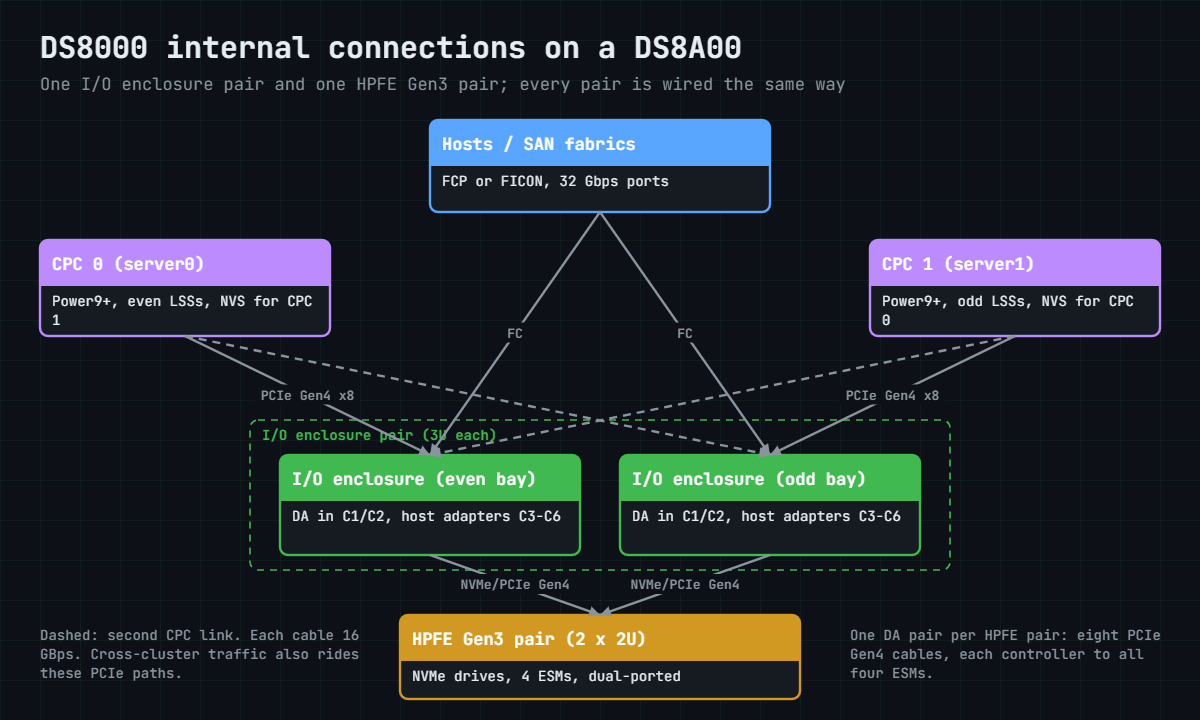
DS8000 internal connections are the cables and buses that join the two CPCs, the I/O enclosures, the host and device adapters and the drive enclosures. The plan has been the same on every DS8000 since the DS8700, and what changed from one generation to the next is the speed of each link and the kind of drive at the far end.
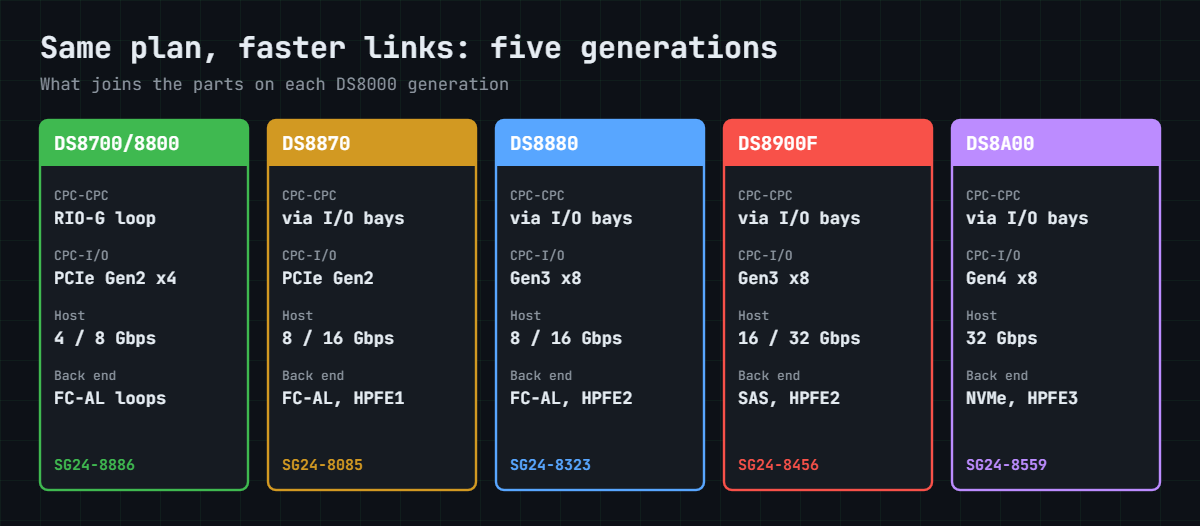
We’ll follow one story across five generations, DS8700/DS8800, DS8870, DS8880, DS8900F and DS8A00, looking at how the CPCs talk to each other, how each I/O enclosure reaches both CPCs, which slots hold which adapters, and how the back end moved from Fibre Channel loops to NVMe over PCIe.
After that you use the wiring to plan host paths. The practice shell lists ports with their I/O enclosure and card, and a small script on your laptop tells you whether two ports really give a host two independent paths.
| Time | You need | By the end you can |
|---|---|---|
| 55 to 65 minutes | The practice shell, lab.profile, auto.profile and security.dat (Lesson 26 shows how), Python 3 | Draw the CPC to I/O bay to adapter to enclosure path for any generation, name each link speed, and check a host path plan against the wiring |
What it is, in one line
Inside every DS8000, each I/O enclosure is cabled to both CPCs, host adapters and device adapters sit in those enclosures, and the device adapters reach the drive enclosures; only the link types changed, from RIO-G and FC-AL loops to PCIe Gen4 and NVMe.
In Simple Words
A bus depot with two control rooms
Think of a city bus depot with two control rooms, where every bus bay has a direct phone line to both of them, so if one control room loses power the other can still talk to every bay. Passengers arrive at gates along the bays, and buses leave from those same bays for the garages where they park. Each garage has two roads in, from two different bays, so one blocked road never traps a bus.
Over the years the depot got wider phone lines and faster roads, but the map never changed. In a DS8000 the control rooms are the CPCs and the bays are I/O enclosures, the gates are host adapters, the garage roads are device adapters, and the garages are drive or flash enclosures.
Engineer's View
The links, generation by generation
Numbers from the IBM Redbooks for each generation (SG24-8886, SG24-8085, SG24-8323, SG24-8456, SG24-8559).
- DS8700 / DS8800: CEC to CEC over a RIO-G loop (1 GHz ports), used only for CEC-to-CEC traffic. CECs to I/O enclosures over point-to-point PCIe Gen2 x4 cables, 2 GBps each, up to 16. Host adapters 4 Gbps or 8 Gbps. Device adapters drive switched FC-AL loops to disk enclosures.
- DS8870: no RIO-G. PCIe Gen2 cables (2 GBps each direction), cross-cluster traffic through the I/O enclosures. 8 or 16 Gbps host adapters. HPFE Gen1 flash attaches by x4 PCIe Gen2 cables to flash interface cards.
- DS8880: each I/O enclosure has a pair of x8 PCIe Gen3 cables, 8 GBps each, to the CPCs, four times DS8870. 8 or 16 Gbps host adapters. FC-AL for disk enclosures, SAS for HPFE Gen2.
- DS8900F: PCIe Gen3 x8 cables (8 GBps) to the bays, Gen4 inside the CPCs. 16 or 32 Gbps host adapters, no FC-AL. Flash RAID adapters reach HPFE Gen2 over eight 6 Gbps SAS paths.
- DS8A00: each I/O enclosure has a pair of x8 PCIe Gen4 cables, 16 GBps each. 32 Gbps host adapters. Device adapters reach HPFE Gen3 over NVMe on PCIe Gen4, eight cables per adapter pair.
Across all of them, a write goes to the cache of the CPC that owns the LSS and to the NVS of the other CPC, with even LSSs on CPC 0 and odd LSSs on CPC 1.
How it works, step by step
Follow one write from a host to a drive and you’ll pass through all the DS8000 internal connections. Do it on paper for each generation and the differences jump out at you.
1The rule that never changed
Two CPCs share the work. A host write lands in the cache of the CPC that owns the volume’s LSS and in the NVS of the other CPC, and only then does the host get “done”, so if one CPC fails the other still has a copy. For that to work the two CPCs have to reach each other and both have to reach every adapter, and all the cabling below is there to make sure they can.
2CPC to CPC: from RIO-G to the PCIe fabric
On the DS8700 and DS8800 the two CECs were linked by a RIO-G loop with 1 GHz ports, used only for traffic between the CECs. From the DS8870 onwards there’s no separate link, and cross-cluster messages travel over the PCIe paths through the I/O enclosures.
On the DS8880, DS8900F and DS8A00, the lowest working even-numbered I/O enclosure carries server 0 to server 1 traffic and the lowest odd-numbered one carries server 1 to server 0, and if that enclosure fails another one takes over. The DS8870 to DS8900F books put this traffic at under 1.7% of the PCIe bandwidth.
3CPC to I/O enclosure: wider pipes each time
Each I/O enclosure is cabled to both CPCs, so it behaves like an extension of each one. On the DS8700 and DS8800 those cables were PCIe Gen2 x4 at 2 GBps, fed by adapters on the CEC’s GX+ bus, and the DS8870 kept PCIe Gen2 at 2 GBps per direction with up to 16 connections.
The DS8880 moved to a pair of x8 PCIe Gen3 cables per enclosure at 8 GBps each, which IBM describes as four times faster than the DS8870. The DS8900F kept the Gen3 x8 cables but has Gen4 inside the CPC, and the DS8A00 uses x8 PCIe Gen4 cables at 16 GBps each.
4Inside the I/O enclosure: who sits in which slot
From the DS8700 to the DS8900F, every I/O enclosure has six PCIe adapter slots. On the DS8800 and DS8870 host adapters go in slots 1 and 4 and device adapters in 3 and 6, with the DS8870 adding flash interface cards in 2 and 5, while on the DS8880 and DS8900F host adapters use slots 1, 2, 4 and 5 and the RAID adapters 3 and 6.
The DS8A00 changes the plan, with device adapters in C1 and C2, host adapters in C3 to C6 and two zHyperLink connections. Each I/O enclosure takes up to four host adapters and 16 ports.
5Host adapters: faster ports, fewer kinds
Host adapters are shared by both CPCs, and each I/O is passed to the CPC that owns its LSS. Port speeds went from 4 and 8 Gbps (DS8700) to 8 and 16 Gbps (DS8870, DS8880), then 16 and 32 Gbps (DS8900F), and on the DS8A00 it’s 32 Gbps only.
FC-AL topology for hosts ended with the 16 Gbps adapter, so the DS8900F and DS8A00 support only FCP and FICON, and each port carries one protocol at a time.
6Back end: from loops to NVMe
Up to the DS8880, a device adapter pair drives disk enclosures over switched FC-AL. Each pair forms two loops, every drive sits on both switches and new enclosures are added at the end of the chain, which gives four paths to each drive.
Flash went a different way. HPFE Gen1 on the DS8870 uses x4 PCIe Gen2 cables to flash interface cards, and HPFE Gen2 on the DS8880 and DS8900F hangs off flash RAID adapters over SAS, with eight paths per enclosure pair.
HPFE Gen3 on the DS8A00 uses NVMe over PCIe Gen4. Each controller is wired to all four ESMs of the pair, and there’s a new dual-active design in which each node reaches both adapters of the pair.
7The private networks
Alongside the data paths runs a small Ethernet world of its own. Two switches, black and gray, connect each CPC, each CPC’s service processor (FSP) and the HMCs, and the default addresses are 172.16.x.x and 172.17.x.x on every generation in this course.
On the DS8900F these switches sit in the Management Enclosure, and on the DS8A00 they’re the two rack control hubs at the bottom of the base frame. Host traffic never goes over them.
8What the wiring means for host paths
Since each I/O enclosure reaches both CPCs, a CPC failure never cuts a host off. What can cut a host off is losing the card or the enclosure its paths run through, which is why IBM tells you to give every host paths through separate host adapters in separate I/O enclosures.
The plug order helps here, because IBM fills one host adapter per I/O enclosure before any enclosure gets a second. Your zoning should follow the same idea, one path per enclosure and, where you can, enclosures in different bay pairs.
Hands-on lab: trace ports to enclosures and check a host path plan
Before you run any command, double-check it
Read every command twice before you press Enter. Check the target: the system or account, the IDs, the names and the sizes. These commands are for learning and were tested in our lab, not on your system. At work, run the read-only list commands first, follow your change process, make sure a backup exists, and ask a second person to check anything that changes or deletes data. You run them at your own risk.
You’ll list the practice DS8A50’s ports, cards and device adapters, see which enclosure each one lives in, and plan two paths for a new database host, with a small script on your laptop checking the plan against the wiring rules.
Practice shell note: the practice shell is our teaching tool, not IBM software. Real DS CLI output looks very much like this but is not identical. The slot numbers the shell prints (host adapters in C1, C3, C4, C5 and device adapters in C6, C8) are its own and do not follow the DS8A00 slot plan; on a real DS8A00 host adapters use C3 to C6 and device adapters C1 and C2. Messages starting with SIM are practice-shell messages.
1List every port with its enclosure and card
Run this:
python ds8sim.py -cfg lab.profile
simctl reset
lsioport -lYou should see this:
dscli> simctl reset
SIM0100I simctl: factory state restored (users and passwords kept; use simctl reset -all to reset them too).
dscli> lsioport -l
Date/Time: 24 October 2026 20:07:29 UTC IBM DSCLI Version: 7.10.10.348 DS: IBM.2107-78SV001
ID WWPN State Type topo portgrp Speed Frame I/O Enclosure HA Card Security
===============================================================================================================================
I0010 50050763030130DD Offline Fibre Channel-LW - 0 32 Gb/s 1 1B1 C1 Disabled
I0011 50050763030170DD Offline Fibre Channel-LW - 0 32 Gb/s 1 1B1 C1 Disabled
I0012 500507630301B0DD Offline Fibre Channel-LW - 0 32 Gb/s 1 1B1 C1 Disabled
I0013 500507630301F0DD Offline Fibre Channel-LW - 0 32 Gb/s 1 1B1 C1 Disabled
I0030 50050763030330DD Communication established Fibre Channel-SW SCSI-FCP 0 32 Gb/s 1 1B2 C3 Disabled
I0031 50050763030370DD Offline Fibre Channel-SW - 0 32 Gb/s 1 1B2 C3 Disabled
I0032 500507630303B0DD Communication established Fibre Channel-SW SCSI-FCP 0 32 Gb/s 1 1B2 C3 Disabled
I0033 500507630303F0DD No light detected Fibre Channel-SW SCSI-FCP 0 32 Gb/s 1 1B2 C3 Disabled
I0040 50050763030430DD Offline Fibre Channel-SW - 0 32 Gb/s 1 1B2 C4 Disabled
I0041 50050763030470DD Communication established Fibre Channel-SW FICON 0 32 Gb/s 1 1B2 C4 Disabled
I0042 500507630304B0DD Communication established Fibre Channel-SW SCSI-FCP 0 32 Gb/s 1 1B2 C4 Disabled
I0043 500507630304F0DD No light detected Fibre Channel-SW SCSI-FCP 0 32 Gb/s 1 1B2 C4 Disabled
I0050 50050763030530DD Offline Fibre Channel-SW - 0 32 Gb/s 1 1B3 C5 Disabled
I0051 50050763030570DD Offline Fibre Channel-SW - 0 32 Gb/s 1 1B3 C5 Disabled
I0052 500507630305B0DD Communication established Fibre Channel-SW SCSI-FCP 0 32 Gb/s 1 1B3 C5 Disabled
I0053 500507630305F0DD Offline Fibre Channel-SW - 0 32 Gb/s 1 1B3 C5 DisabledThe last columns are the wiring: frame, I/O enclosure and host adapter card. Ports I0030 to I0033 are four ports on one card (C3) in enclosure 1B2. Only ports in SCSI-FCP topology showing “Communication established” are ready for open-systems hosts, which means I0030, I0032, I0042 and I0052, while I0041 is FICON, for IBM Z.
✅ Checkpoint: You can say which enclosure and card each of I0030, I0042 and I0052 sits on.
2Look at the cards behind the ports
Run this:
lshacard
lsdacardYou should see this:
dscli> lshacard
Date/Time: 24 October 2026 20:07:29 UTC IBM DSCLI Version: 7.10.10.348 DS: IBM.2107-78SV001
ID I/O enclosure Frame State Type Speed Fibre Channel ports Encryption capable Location code S/N
==================================================================================================================================================
IBM.1400-1B1-78SV0/R-1-P1-C1 IBM.1400-1B1-78SV0 1 Online FC-LW 32 Gb/s 4 yes U1400.1B1.78SV0-P1-C1 YH10SV0001
IBM.1400-1B2-78SV0/R-1-P1-C3 IBM.1400-1B2-78SV0 1 Online FC-SW 32 Gb/s 4 yes U1400.1B2.78SV0-P1-C3 YH10SV0003
IBM.1400-1B2-78SV0/R-1-P1-C4 IBM.1400-1B2-78SV0 1 Online FC-SW 32 Gb/s 4 yes U1400.1B2.78SV0-P1-C4 YH10SV0004
IBM.1400-1B3-78SV0/R-1-P1-C5 IBM.1400-1B3-78SV0 1 Online FC-SW 32 Gb/s 4 yes U1400.1B3.78SV0-P1-C5 YH10SV0005
dscli> lsdacard
Date/Time: 24 October 2026 20:07:29 UTC IBM DSCLI Version: 7.10.10.348 DS: IBM.2107-78SV001
ID I/O enclosure Frame State DA pair Location code S/N
=====================================================================================================
IBM.1400-1B1-78SV0/R-1-P1-C6 IBM.1400-1B1-78SV0 1 Online 0 U1400.1B1.78SV0-P1-C6 YA30SV0010
IBM.1400-1B2-78SV0/R-1-P1-C6 IBM.1400-1B2-78SV0 1 Online 0 U1400.1B2.78SV0-P1-C6 YA30SV0020
IBM.1400-1B1-78SV0/R-1-P1-C8 IBM.1400-1B1-78SV0 1 Online 2 U1400.1B1.78SV0-P1-C8 YA30SV0012
IBM.1400-1B2-78SV0/R-1-P1-C8 IBM.1400-1B2-78SV0 1 Online 2 U1400.1B2.78SV0-P1-C8 YA30SV0022There are four host adapters spread over three enclosures and two device adapter pairs, each split across 1B1 and 1B2 so the two halves of a pair belong to different CPCs. Treat 1B1 and 1B2 as one bay pair (bays 0 and 1) and 1B3 and 1B4 as the other (bays 2 and 3).
✅ Checkpoint: You found 4 host adapters and 2 DA pairs, and the DA pairs use 1B1 and 1B2.
3Plan two paths on paper
A new database host is getting two HBAs, one on each SAN fabric, so you need one DS8000 port for each. Look at the four ready ports and apply the rules: separate host adapters, separate I/O enclosures and, if you can, separate bay pairs.
| Plan | Ports | Your verdict |
|---|---|---|
| A | I0030 + I0032 | ______ |
| B | I0030 + I0042 | ______ |
| C | I0030 + I0052 | ______ |
✅ Checkpoint: You picked a plan before running the script.
4Check the plan with a script
Save this as pathcheck.py in the lab folder. It runs on your laptop and only reads, using the same auto.profile and security.dat as the rack map in Lesson 26, so if you don’t have them yet, create them the way that lesson shows.
File pathcheck.py:
# Runs on your workstation or jump server, not on the DS8000.
# It talks to the DS8000 only through the DS CLI (auto.profile: banner off, header on, format delim).
# Usage: python pathcheck.py I0030 I0052 (the two DS8000 ports planned for one host)
import csv, subprocess, sys
DSCLI = ["python", "ds8sim.py", "-cfg", "auto.profile"] # at work: ["dscli", "-cfg", "auto.profile"]
def dscli(*args):
"""Run one DS CLI command and return its rows as dictionaries."""
out = subprocess.run(DSCLI + list(args), capture_output=True, text=True).stdout
lines = [l for l in out.splitlines() if l and not l.startswith("SaatVedha") and not l.startswith("CMUC")]
return list(csv.DictReader(lines))
ports = {p["ID"]: p for p in dscli("lsioport", "-l")}
encs = [e["ID"].split("-")[1] for e in dscli("lsioenclosure")] # 1B1, 1B2, ... in bay order
bay_pair = {enc: i // 2 for i, enc in enumerate(encs)} # bays 0+1 = pair 0, bays 2+3 = pair 1
a, b = sys.argv[1], sys.argv[2]
for p in (a, b):
if p not in ports:
raise SystemExit("Port %s not found. Check it with: showioport %s" % (p, p))
q = ports[p]
print("%s enclosure %s (bay pair %d) card %s %s %s"
% (p, q["I/O Enclosure"], bay_pair[q["I/O Enclosure"]], q["HA Card"], q["topo"], q["State"]))
pa, pb = ports[a], ports[b]
problems = []
if (pa["I/O Enclosure"], pa["HA Card"]) == (pb["I/O Enclosure"], pb["HA Card"]):
problems.append("FAIL same host adapter: one card failure takes both paths")
elif pa["I/O Enclosure"] == pb["I/O Enclosure"]:
problems.append("FAIL same I/O enclosure: one enclosure repair takes both paths")
elif bay_pair[pa["I/O Enclosure"]] == bay_pair[pb["I/O Enclosure"]]:
problems.append("WARN same bay pair: allowed, but a second pair gives more margin")
for p in (pa, pb):
if p["State"] != "Communication established" or p["topo"] != "SCSI-FCP":
problems.append("WARN %s is '%s' / %s: fix it before the host goes live" % (p["ID"], p["State"], p["topo"]))
print("\n".join(problems) if problems else "OK different enclosures in different bay pairs, both ports up")
Run this:
python pathcheck.py I0030 I0032
python pathcheck.py I0030 I0042
python pathcheck.py I0030 I0052You should see this:
> python pathcheck.py I0030 I0032
I0030 enclosure 1B2 (bay pair 0) card C3 SCSI-FCP Communication established
I0032 enclosure 1B2 (bay pair 0) card C3 SCSI-FCP Communication established
FAIL same host adapter: one card failure takes both paths
> python pathcheck.py I0030 I0042
I0030 enclosure 1B2 (bay pair 0) card C3 SCSI-FCP Communication established
I0042 enclosure 1B2 (bay pair 0) card C4 SCSI-FCP Communication established
FAIL same I/O enclosure: one enclosure repair takes both paths
> python pathcheck.py I0030 I0052
I0030 enclosure 1B2 (bay pair 0) card C3 SCSI-FCP Communication established
I0052 enclosure 1B3 (bay pair 1) card C5 SCSI-FCP Communication established
OK different enclosures in different bay pairs, both ports up
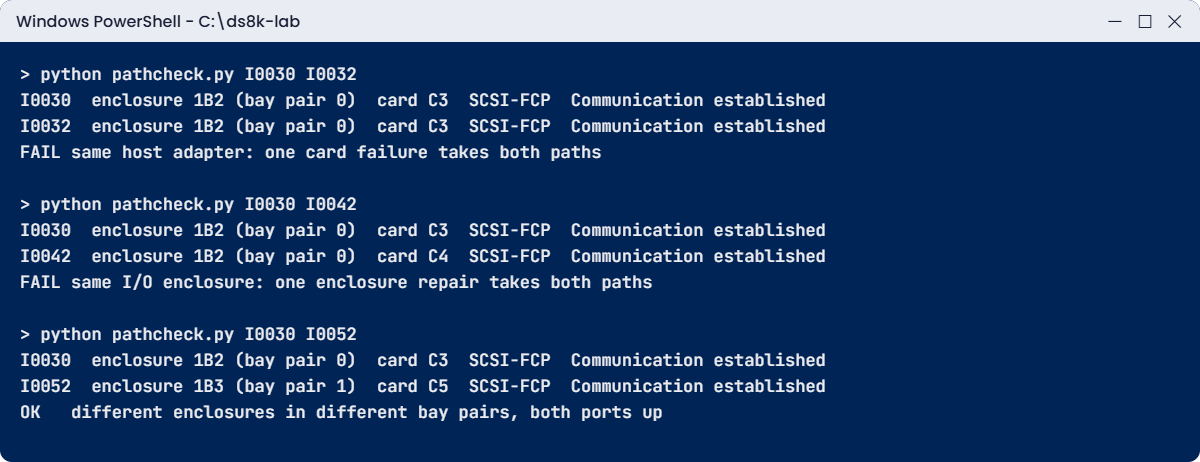
Plan A is the worst, with both ports on one card, so a single adapter failure or adapter firmware load takes out both paths. Plan B uses two cards but one enclosure, so an enclosure repair takes both. Plan C uses different enclosures in different bay pairs, and both its ports are up.
At work you’d run this check before raising the zoning change and paste its output into the change record.
✅ Checkpoint: Plan C (I0030 + I0052) is the only OK.
Break It, Then Fix It
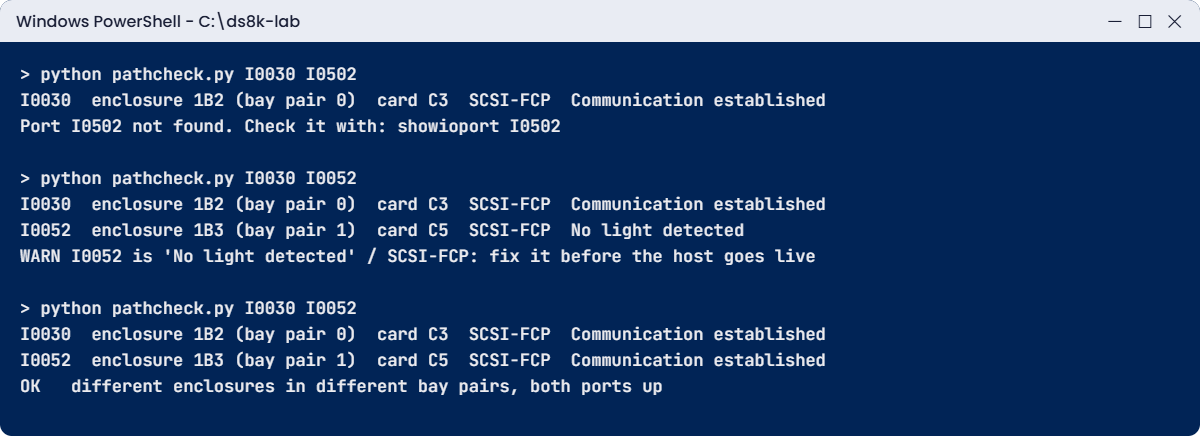
Path plans tend to go wrong in two ways in real life, a typo in a port ID and a port that looks fine on paper but has no light, and checking against the live system catches both.
1Break it: a mistyped port ID
The change request says I0502 instead of I0052. Run the check as it’s written.
Run this:
python pathcheck.py I0030 I0502You’ll get this:
> python pathcheck.py I0030 I0502
I0030 enclosure 1B2 (bay pair 0) card C3 SCSI-FCP Communication established
Port I0502 not found. Check it with: showioport I0502Then run this in the shell:
showioport I0502You’ll get this:
dscli> showioport I0502
CMUN04034E showioport: I0502: The I/O port does not exist.Why: there’s no port I0502 on this system. (This message wording is the practice shell’s.) A SAN admin would have zoned the host to a WWPN that doesn’t exist, and the host would have come up with one path.
Fix: copy port IDs from lsioport -l output instead of retyping them, and run the check again.
Run this:
python pathcheck.py I0030 I0052You should see this:
> python pathcheck.py I0030 I0052
I0030 enclosure 1B2 (bay pair 0) card C3 SCSI-FCP Communication established
I0052 enclosure 1B3 (bay pair 1) card C5 SCSI-FCP Communication established
OK different enclosures in different bay pairs, both ports up✅ Checkpoint: The corrected plan prints OK.
2Break it: a port with no light
Now pretend the cable on I0052 is damaged. Use the practice control in the practice shell (it isn’t a DS CLI command), then run the check from PowerShell and look at the port in the shell.
In the practice shell:
simctl portfail I0052You’ll get this:
dscli> simctl portfail I0052
SIM0105I simctl: I/O port I0052 has no light (cable or SFP problem).In PowerShell, then back in the shell:
python pathcheck.py I0030 I0052
lsioport I0052You’ll get this:
> python pathcheck.py I0030 I0052
I0030 enclosure 1B2 (bay pair 0) card C3 SCSI-FCP Communication established
I0052 enclosure 1B3 (bay pair 1) card C5 SCSI-FCP No light detected
WARN I0052 is 'No light detected' / SCSI-FCP: fix it before the host goes live
dscli> lsioport I0052
Date/Time: 24 October 2026 20:07:30 UTC IBM DSCLI Version: 7.10.10.348 DS: IBM.2107-78SV001
ID WWPN State Type topo portgrp Security
===================================================================================
I0052 500507630305B0DD No light detected Fibre Channel-SW SCSI-FCP 0 DisabledWhy: the plan itself is still right, but the port can’t be used. If the host went live now it would have one working path, and nobody would find out until the other one failed.
Fix: replace the cable or SFP (here that’s the practice control) and check again.
In the practice shell, then in PowerShell:
simctl portfix I0052
python pathcheck.py I0030 I0052You should see this:
dscli> simctl portfix I0052
SIM0106I simctl: I/O port I0052 has light again.
> python pathcheck.py I0030 I0052
I0030 enclosure 1B2 (bay pair 0) card C3 SCSI-FCP Communication established
I0052 enclosure 1B3 (bay pair 1) card C5 SCSI-FCP Communication established
OK different enclosures in different bay pairs, both ports up✅ Checkpoint: I0052 is back to Communication established and the check prints OK.
This happened at work
The bay repair that took the lab systems down
A pharmaceutical company ran its laboratory information system and batch release database on a DS8950F. For four years every new host had been zoned to ports in bays 2 and 3, the first I/O enclosure pair installed. The upper pair, bays 0 and 1, had host adapters too, but nobody used them because “the old ports always worked”.
When IBM scheduled a planned repair on the bay 2 enclosure, the storage team checked that every host had a path in bay 3 and approved the work. What they didn’t check was the state of those bay 3 ports.
For days, one SFP on a bay 3 adapter had been dropping light on and off, and the hosts behind it were already running on their bay 2 path alone. So when bay 2 went into service, eleven hosts lost all their paths, the lab system stopped for 40 minutes, and two batch release reports for the quality team were held up until the afternoon.
Two things had gone wrong: every host path sat in one bay pair, and nobody checked port state live before the service. The hosts were re-zoned so each one has paths in both bay pairs, the pre-service checklist now includes lsioport -l and host login checks, and port state changes raise an alert instead of waiting for someone to look.
Common mistakes and troubleshooting
| Symptom | Likely cause | What to check / fix |
|---|---|---|
| Host loses all paths during a card firmware load | Both paths on one host adapter | Use ports on separate host adapters (lsioport -l, HA Card column) |
| Host loses all paths during an enclosure repair | Both paths in one I/O enclosure | Separate I/O enclosures; ideally different bay pairs |
| Host comes up with one path | Port ID typo in the zoning or a dead port | Copy IDs from lsioport; check State before go-live |
| Port shows No light detected | Cable, SFP or patch panel fault | Replace and re-check; the port must show Communication established |
| Open-systems host cannot log in | Port is FICON, not SCSI-FCP | Check the topo column; change topology only on an unused port |
| Old runbook says FC-AL for a host port | Written for 8 Gbps adapters on older models | 16 and 32 Gbps adapters support FCP and FICON only |
| Confusion about DA slots on a new DS8A00 | Habit from DS8880/DS8900F (slots 3 and 6) | DS8A00 device adapters are in C1 and C2, host adapters in C3 to C6 |
Make it a habit to keep a current map of your DS8000 internal connections. Before any planned I/O enclosure or adapter work, list the ports that will go down, then every host with a path on those ports, and make sure each of them has a healthy path somewhere else.
Interview questions
Click a question to open it. Each one is worded the way an interviewer would ask it, and underneath you’ll see why they ask and one way you could answer in your own words.
Fresher level
1. How does a host adapter in one I/O enclosure reach both CPCs?
Why they ask this: A basic check that you understand the I/O enclosure is shared.
How you might answer: Every I/O enclosure is cabled to both CPCs over its own PCIe cables, so it works as an extension of each one, and the host adapter passes each I/O to the CPC that owns the LSS, even LSSs to CPC 0 and odd ones to CPC 1. On a DS8A00 those cables are x8 PCIe Gen4 at 16 GBps each.
2. What is the difference between a host adapter and a device adapter?
Why they ask this: They want to see that you know front end from back end.
How you might answer: A host adapter faces the SAN, and its 4 ports talk FCP or FICON to servers. A device adapter faces the drives, and on a DS8A00 that’s the flash RAID adapter reaching HPFE Gen3 over NVMe on PCIe Gen4. They both sit in I/O enclosures, and device adapters always come in pairs split across two enclosures.
2–5 years experience
3. Walk me through how the back end changed from DS8870 to DS8A00.
Why they ask this: They test whether you can explain a design trend, not just recite one model.
How you might answer: On the DS8870 the device adapters drive switched FC-AL loops. Each pair forms two loops and every drive is on both switches, so you get four paths per drive, while HPFE Gen1 flash hung off flash interface cards over PCIe Gen2.
The DS8880 kept FC-AL for disk and added HPFE Gen2 over SAS, and the DS8900F is all HPFE Gen2 with eight SAS paths per pair. The DS8A00 uses HPFE Gen3 with NVMe over PCIe Gen4, each controller wired to all four ESMs, plus a dual-active design so each node reaches both adapters.
4. A DBA asks for “two paths to the DS8000”. How do you choose the ports?
Why they ask this: They want a practical method that uses the hardware layout.
How you might answer: I’d list the ports with lsioport -l and only use SCSI-FCP ports showing Communication established. Then I’d pick two on different host adapters in different I/O enclosures, ideally in different bay pairs, one per SAN fabric.
I’d check the pair with a small script or by eye, zone it, and confirm both logins with lshostport -login before telling the DBA it’s ready.
Senior level
5. Why did IBM drop the RIO-G link between the CPCs, and what carries that traffic now?
Why they ask this: A senior should know the cross-cluster design and its failure handling.
How you might answer: On the DS8700 and DS8800 the RIO-G loop only carried CEC-to-CEC traffic, because the I/O enclosures had already moved to point-to-point PCIe. From the DS8870 onwards, cross-cluster messages ride the PCIe paths through the I/O enclosures instead.
Server 0 to server 1 uses the lowest working even-numbered enclosure and server 1 to server 0 the lowest odd one, failing over to any other enclosure if needed. The Redbooks put it at under 1.7% of the PCIe bandwidth, so a separate link just wasn’t worth having any more.
6. Design the host connectivity for a new DS8A50 with two I/O enclosure pairs in the base frame.
Why they ask this: They look for plug order, failure domains and operations, together.
How you might answer: I’d follow IBM’s plug order so host adapters are spread one per enclosure before any enclosure gets a second. Every host gets at least two paths on separate adapters in separate enclosures, one in bays 0 and 1 and one in bays 2 and 3, split across two fabrics.
I’d keep a port map in the runbook generated from lsioport -l, and before any planned enclosure or adapter work I’d list the affected hosts and check their other paths. Port state changes go to monitoring, so a dead SFP gets fixed before it matters.
Quick quiz
Q1. What links each DS8A00 I/O enclosure to the CPCs?
- A RIO-G loop
- A pair of x8 PCIe Gen4 cables, 16 GBps each
- SAS cables
- Ethernet
Show answer
B — Each I/O enclosure connects to both CPCs over x8 PCIe Gen4 cables at 16 GBps each.
Q2. On which models did a RIO-G loop link the two CECs?
- DS8A00
- DS8900F
- DS8700 and DS8800
- DS8880
Show answer
C — DS8700 and DS8800 used RIO-G for CEC-to-CEC traffic only; later models use the PCIe fabric.
Q3. How does a DS8880 device adapter reach standard disk enclosures?
- NVMe
- Switched FC-AL loops
- zHyperLink
- PCIe Gen4
Show answer
B — DAs drive switched FC-AL loops with four paths to each drive.
Q4. Which two ports give a host the best protection?
- Two ports on one card
- Two cards in one I/O enclosure
- Two enclosures in the same bay pair
- Two enclosures in different bay pairs
Show answer
D — Separate cards in separate enclosures; different bay pairs give the most margin.
Q5. Where do DS8A00 device adapters sit in an I/O enclosure?
- C1 and C2
- C3 and C6
- C7
- Slots 1 and 4
Show answer
A — On the DS8A00, device adapters use C1 and C2 and host adapters C3 to C6.
Quick recap
- Every DS8000: two CPCs, each I/O enclosure cabled to both, adapters in the enclosures.
- CPC to CPC: RIO-G on DS8700/DS8800; PCIe through the I/O enclosures from DS8870 on.
- CPC to I/O enclosure: PCIe Gen2 (2 GBps) to Gen3 x8 (8 GBps) to Gen4 x8 (16 GBps).
- Host ports: 4/8 Gbps, then 8/16, then 16/32, now 32 Gbps; FCP or FICON per port.
- Back end: switched FC-AL, then HPFE Gen1 PCIe, HPFE Gen2 SAS, HPFE Gen3 NVMe.
- Writes: cache of the owning CPC plus NVS of the other; even LSS to CPC 0, odd to CPC 1.
- Host paths: separate adapters in separate I/O enclosures, ideally different bay pairs.
Next lesson
Lesson 28: DS8000 model comparison: capacity, ports and features → You compare every DS8000 model side by side and learn how to pick one and recognise one.
Further reading: DS8000 internal connections
Want to go deeper into DS8000 internal connections? IBM Redbook SG24-8559 (DS8A00), SG24-8456 (DS8900F), SG24-8323 (DS8880), SG24-8085 (DS8870) and SG24-8886 (DS8700 and DS8800).
See the original drawings: DS8A00 Figure 2-17 on page 62 (PDF page 64) for the CPC to bay paths and Figure 4-6 on page 126 (PDF page 128) for the HPFE Gen3 paths; DS8900F Figure 2-19 on page 51 (PDF page 71) for the CPC port to bay map; DS8870 Figure 2-15 on page 46 for HPFE Gen1 PCIe cabling and Figure 2-18 on page 50 for the switched loops. For host-side multipath, see Attach Linux, Windows and VMware hosts in the Implementation course. You can also see the full plan for this course on the IBM DS8000 Architecture course page.
