RAS: failover, failback and no single point of failure

DS8000 failover and failback is how the box keeps your hosts running when one of its two servers stops. One CPC takes over everything and carries the load alone, then hands the work back later, and when it goes right the database team never even notices.

This is the first lesson of Phase 3. So far you’ve learned the parts and the virtualization layers, and now you’ll see why IBM puts two of almost everything in the frame, what really happens in the seconds after a CPC dies, and which mistakes on your side can still turn a part failure into an outage. In the lab you fail a server, a flash drive and a host path in the practice shell, watch what keeps working and then bring it all back.

TimeYou needBy the end you can
60 to 75 minutesThe practice shell from Lesson 1 in C:\ds8k-lab (or ~/ds8k-lab)Explain failover and failback step by step, name the single points of failure that are yours to remove, and read lsserver, lsarray and lshost during a failure

What it is, in one line

Failover means one DS8000 CPC takes over all its failed partner’s volumes without stopping host I/O, and failback means it hands them back once the partner is repaired.

In Simple Words

Two cooks in one restaurant kitchen

A small restaurant has two cooks, with Cook A making the dishes for even-numbered tables and Cook B the dishes for odd ones. Each time a waiter brings an order, the cook who owns that table pins the slip on his board, the other cook pins a copy on her board too, and only then does the waiter tell the customer “your order is in”.

Then one evening Cook A cuts his hand and has to go home. Cook B checks her board and finds she already has copies of all his open orders, so nothing’s lost. She cooks his waiting orders first so they’re safely on plates, then splits her stove in two, one half for even tables and one for odd, and the customers carry on eating. Service is a little slower, and if Cook B falls ill as well, the kitchen closes.

When Cook A comes back with a bandage he takes the even tables back and both boards start getting copies again, and that return is failback. In a DS8000 the cooks are the two servers, the order boards are cache and NVS and the tables are the LSSs.

Engineer's View

What the Redbook says happens inside

Every DS8A00 has two Power9+ CPCs. The storage partition in CPC 0 is server0 (node 0) and the one in CPC 1 is server1 (node 1), and both are active all the time.

  • Ownership: server0 owns the volumes in even LSSs and the extent pools of rank group 0, and server1 owns the odd LSSs and rank group 1. Both CPCs can reach all the arrays.
  • Two copies of each write: a write goes into the cache of the owning node and into the NVS of the other CPC, and the host gets “complete” once both copies exist. Once the data is destaged to flash, the NVS copy is dropped.
  • NVS size: 1/16 of system memory on most models. DS8A80 (A08) uses 256 GB of NVS with 4.8 TB of memory, and DS8A50 with 3.5 TB uses 192 GB.
  • Power loss: each CPC holds up to four NVDIMMs with their own Backup Power Modules. If both power domains drop for more than about 20 ms, the NVDIMMs copy NVS to their own flash and the data gets destaged at the next IML.
  • Cross-cluster talk: the two CPCs talk over the PCIe paths through the I/O enclosures, and if the enclosure being used for this fails, another one takes over automatically.
  • Recovery time: IBM says failover or failback generally adds no more than 7 seconds to I/O latency.
  • Inside each CPC: instruction retry, ECC on L2 and L3 caches, Chipkill memory, CRC with lane repair on buses and first-failure data capture, which means many faults get fixed before a failover is ever needed.

Failovers can be planned too. During a code load each CPC is updated in turn and its LSSs fail over to the partner, and replacing a Backup Power Module (5-year lifetime) also puts its CPC in service mode, which fails it over.

On DS8900F: it’s the same two-CPC design with Power9 servers, so the failover and failback flow here applies there too.

How it works, step by step

Let’s walk through DS8000 failover and failback with one real failure. It’s 2 p.m., both CPCs are healthy and a busy database is writing to volume 2000 (LSS 20, even) and volume 2100 (LSS 21, odd), when CPC 0 has a hardware fault.

1Before the failure: two copies of every write

A write for volume 2000 lands in server0’s cache and in server1’s NVS, while a write for volume 2100 lands in server1’s cache and server0’s NVS, so each server acts as the other’s backup notebook. Since every unwritten block already lives in two separate boxes, losing one box doesn’t lose data.

DS8000 failover and failback starts here: each write sits in the owning server cache and the partner NVS

2CPC 0 fails: what server1 has, and what it lost

When the failure hits, server1 still holds a copy of server0’s pending writes in its NVS, so those are safe. The trouble is the other direction: server1’s own writes for odd LSSs had their backup copy in server0’s NVS, that copy has just gone, and those writes now exist only once, in server1’s cache.

3Protect, destage, split

server1 reacts straight away. It first holds on to the cache data whose backup was in the failed CPC, so a restart of server1 wouldn’t lose it, and then adds those single-copy writes to its own NVS, using no more than 85% of the NVS space for this.

After that it destages the even-LSS data it was holding in NVS to the flash arrays and splits its cache and NVS into two halves, one for even LSSs and one for odd.

4server1 serves every LSS

server1 now owns every LSS, both rank groups and all the extent pools, so every read and write goes through it. The hosts see the same volumes on the same paths, because host adapters are shared and simply send the I/O to the surviving server.

The box can run like this as long as it needs to. What you lose is redundancy (one more CPC failure stops I/O) and some performance, since there’s only half the cache, and IBM Support starts work on the failed CPC right away.

5Failback when CPC 0 is repaired

When the DS8000 sees CPC 0 is ready, it starts failback by itself, or an IBM SSR or remote support starts it. server1 starts using server0’s NVS again and ownership of the even LSSs moves back to server0.

Both servers are active again and every write has two copies. Failback is invisible to hosts just like failover, and either direction normally adds at most 7 seconds of latency.

Five steps of a DS8000 CPC failover and failback

DS8000 failover and failback aren’t only for accidents, because IBM uses the same mechanism on purpose. During a code bundle install the CPC OS and LMC are updated one CPC at a time, and that CPC’s LSSs fail over to the partner first.

Some firmware updates restart each CPC separately as well, which is why a DS8000 code load can run during business hours.

It’s also worth knowing that not every fault gets as far as failover. Inside each CPC the processor retries failed instructions, ECC fixes single-bit memory errors, Chipkill survives a dead DRAM chip and bad cache lines get switched off without a restart, while components that keep failing are deconfigured and replaced later.

What the DS8000 can’t fix is your side of the cable. If a host has one path, or two paths through the same host adapter, the box can survive a CPC failure and the host still loses its disks. The Redbook rule is that every host needs at least two connections to ports on different host adapters in different I/O enclosures.

SAN switches follow the same idea, so use two fabrics.

You’ll find the same thinking all through the frame. Drives sit on two NVMe switch paths, flash RAID adapters come in pairs in different I/O enclosures, every major part has dual power supplies fed from two power domains, and there are two HMCs. RAID 6 survives two drive failures, and Smart Rebuild copies a failing drive to a spare before it dies.

Hands-on lab: fail a CPC and watch the host survive

Before you run any command, double-check it

Read every command twice before you press Enter. Check the target: the system or account, the IDs, the names and the sizes. These commands are for learning and were tested in our lab, not on your system. At work, run the read-only list commands first, follow your change process, make sure a backup exists, and ask a second person to check anything that changes or deletes data. You run them at your own risk.

You’ll build a tiny but complete setup and then test DS8000 failover and failback on it. You won’t learn many new commands; the point is to see for yourself which layer keeps the host running when each part fails.

Practice shell note: the practice shell is our own teaching tool, not IBM software, and real DS CLI output is similar but not identical. The simctl commands, every SIMxxxxI line and the “Note (practice shell)” line are ours. On a real DS8000 a CPC failure shows up as a serviceable event on the HMC and a Call Home to IBM, not as something you type.

1Build the starting point with a setup script

Save these lines as setup-18.txt in your lab folder. They reset the shell and make two RAID 6 arrays and ranks, one extent pool per rank group, one volume in an even LSS and one in an odd LSS, plus a Linux host with two ports that log in on two different I/O ports.

simctl reset
mkarray -raidtype 6 -arsite S1
mkarray -raidtype 6 -arsite S2
mkrank -array A0 -keygrp 1 -stgtype fb
mkrank -array A1 -keygrp 1 -stgtype fb
mkextpool -rankgrp 0 -keygrp 1 -stgtype fb FB_0
mkextpool -rankgrp 1 -keygrp 1 -stgtype fb FB_1
chrank -extpool P0 R0
chrank -extpool P1 R1
mkfbvol -extpool P0 -cap 100 -sam ese -name db_even 2000
mkfbvol -extpool P1 -cap 100 -sam ese -name db_odd 2100
mkhost -type "Linux Server" -hostport 10000000C9A1B201,10000000C9A1B202 saathost1
chhost -action map -volume 2000,2100 saathost1
simctl login 10000000C9A1B201 I0032
simctl login 10000000C9A1B202 I0052

Run this (use the password you chose in Lesson 1):

cd C:\ds8k-lab
python ds8sim.py -hmc1 10.0.0.1 -user admin -passwd YourPassw0rd -script setup-18.txt

You should see this:

SaatVedha DS8000 practice shell — not IBM software. Real DS CLI output looks like this but is not identical.
SIM0100I simctl: factory state restored (users and passwords kept; use simctl reset -all to reset them too).
CMUC00004I mkarray: Array A0 successfully created.
CMUC00004I mkarray: Array A1 successfully created.
CMUC00007I mkrank: Rank R0 successfully created.
CMUC00007I mkrank: Rank R1 successfully created.
CMUC00000I mkextpool: Extent pool P0 successfully created.
CMUC00000I mkextpool: Extent pool P1 successfully created.
CMUC00008I chrank: Rank R0 successfully modified.
CMUC00008I chrank: Rank R1 successfully modified.
CMUC00025I mkfbvol: FB volume 2000 successfully created.
CMUC00025I mkfbvol: FB volume 2100 successfully created.
CMUC00530I mkhost: The host saathost1 is successfully created.
CMUC00531I chhost: The host saathost1 is successfully modified.
SIM0103I simctl: host port 10000000C9A1B201 logged in to I0032.
SIM0103I simctl: host port 10000000C9A1B202 logged in to I0052.

✅ Checkpoint: The last two lines say both host ports logged in, one on I0032 and one on I0052.

2Check who owns what

Start the shell with python ds8sim.py, log in, and look at the two servers and the two ranks.

Type these at the dscli> prompt:

lsserver -l
lsrank

You should see this:

dscli> lsserver -l
Date/Time: 24 October 2026 10:43:40 UTC IBM DSCLI Version: 7.10.10.348 DS: IBM.2107-78SV001
ID      Image ID         Image Name   Power Control SFI State LIC Version OS Version Bundle Version
===================================================================================================
server0 IBM.2107-78SV001 ds8k-g10-lab Online        Online    7.10.10.348 AIX 7.3    10.10.106.0
server1 IBM.2107-78SV001 ds8k-g10-lab Online        Online    7.10.10.348 AIX 7.3    10.10.106.0
dscli> lsrank
Date/Time: 24 October 2026 10:43:40 UTC IBM DSCLI Version: 7.10.10.348 DS: IBM.2107-78SV001
ID Group State  datastate Array RAIDtype extpoolID stgtype
==========================================================
R0 0     Normal Normal    A0    6        P0        fb
R1 1     Normal Normal    A1    6        P1        fb

Both servers are Online and on the same code. Rank R0 is in Group 0, so server0 owns pool P0 and volume 2000, and rank R1 is in Group 1, so server1 owns P1 and volume 2100, with each server doing its own work and backing up the other.

✅ Checkpoint: You can say which server owns volume 2000 (server0) and which owns 2100 (server1).

3Prove the host has two independent paths

A CPC failover only helps if the host can still reach the box, so check where each host port logged in and then look at the location code of both I/O ports.

Type these:

lshostport -login
showioport I0032
showioport I0052

You should see this:

dscli> lshostport -login
Date/Time: 24 October 2026 10:43:40 UTC IBM DSCLI Version: 7.10.10.348 DS: IBM.2107-78SV001
WWNN             WWPN             Host      I/O ports ESSIOport
===============================================================
20000000C9A1B201 10000000C9A1B201 saathost1 16 (all)  I0032
20000000C9A1B202 10000000C9A1B202 saathost1 16 (all)  I0052
20000024FF2D0F86 21000024FF2D0F86 -         -         I0032
20000024FF2D0F87 21000024FF2D0F87 -         -         I0042
20000120FA13B914 10000090FA13B914 -         -         I0032
20000120FA13B915 10000090FA13B915 -         -         I0042
dscli> showioport I0032
Date/Time: 24 October 2026 10:43:40 UTC IBM DSCLI Version: 7.10.10.348 DS: IBM.2107-78SV001
ID         I0032
WWPN       500507630303B0DD
DA         -
loc        U1400.1B2.78SV0-P1-C3-T2
Type       Fibre Channel-SW
Speed      32 Gb/s
State      Communication established
topo       SCSI-FCP
portgrp    0
unkSCSIlog -
Logins     3
Security   Disabled
dscli> showioport I0052
Date/Time: 24 October 2026 10:43:40 UTC IBM DSCLI Version: 7.10.10.348 DS: IBM.2107-78SV001
ID         I0052
WWPN       500507630305B0DD
DA         -
loc        U1400.1B3.78SV0-P1-C5-T2
Type       Fibre Channel-SW
Speed      32 Gb/s
State      Communication established
topo       SCSI-FCP
portgrp    0
unkSCSIlog -
Logins     1
Security   Disabled

The two host WWPNs logged in on different ports. Now read the loc line: I0032 is in U1400.1B2 (I/O enclosure 2) and I0052 is in U1400.1B3 (I/O enclosure 3), so that’s two adapters in two enclosures, which is the Redbook rule for host connections proved straight from the CLI.

✅ Checkpoint: The two ports of saathost1 are in different I/O enclosures (1B2 and 1B3).

4Fail CPC 0

Now pretend CPC 0 has a hardware fault.

Type these:

simctl serverfail 0
lsserver

You should see this:

dscli> simctl serverfail 0
SIM0107I simctl: server0 is offline. Failover: server1 now serves rank groups 0 and 1. Host I/O continues; write cache runs in a single copy until failback.
dscli> lsserver
Date/Time: 24 October 2026 10:43:40 UTC IBM DSCLI Version: 7.10.10.348 DS: IBM.2107-78SV001
ID      Image ID         Image Name   Power Control SFI State
=============================================================
server0 IBM.2107-78SV001 ds8k-g10-lab Offline       Offline
server1 IBM.2107-78SV001 ds8k-g10-lab Online        Online
Note (practice shell): server0 is offline. server1 now runs rank groups 0 and 1 (failover).

server0 is Offline and server1 is now serving both rank groups. On a real system you’d also get a serviceable event and a Call Home, and IBM Support would get in touch.

✅ Checkpoint: lsserver shows server0 Offline and server1 Online.

5Check that the host did not notice

Type these:

lsfbvol
showhost saathost1

You should see this:

dscli> lsfbvol
Date/Time: 24 October 2026 10:43:40 UTC IBM DSCLI Version: 7.10.10.348 DS: IBM.2107-78SV001
Name    ID   accstate datastate configstate deviceMTM datatype extpool cap (2^30B) cap (10^9B) cap (blocks)
===========================================================================================================
db_even 2000 Online   Normal    Normal      2107-900  FB 512   P0      100.0       -           209715200
db_odd  2100 Online   Normal    Normal      2107-900  FB 512   P1      100.0       -           209715200
dscli> showhost saathost1
Date/Time: 24 October 2026 10:43:40 UTC IBM DSCLI Version: 7.10.10.348 DS: IBM.2107-78SV001
Name          saathost1
Type          Linux Server
State         Online
AddrMode      scsimap256
Volumes       2
Host ports    2
I/O ports     16 (all)
AddrDiscovery lunpolling
LBS           512
Cluster       -

Both volumes are still Online, 2000 included, even though its owner just died, and the host is Online with 2 volumes and 2 host ports. Nothing changed from the host’s side, because server1 took over LSS 20 and the host adapters forward I/O to it.

What did change doesn’t show here: every write now has only one copy in memory and the box is down to half its cache, so don’t plan big changes while you’re running on one CPC.

✅ Checkpoint: Volume 2000 shows accstate Online while server0 is down.

6A drive fails while you are on one CPC

Trouble rarely comes alone, so fail one drive in array site S2 and watch the RAID layer deal with it.

Type these:

simctl drivefail S2
lsarray
simctl tick
lsarray

You should see this:

dscli> simctl drivefail S2
SIM0110I simctl: drive IBM.2107-D04-8SV01/R1-P1-D9 failed. Array A1 is rebuilding onto a spare (about 10 simulated minutes; use simctl tick).
dscli> lsarray
Date/Time: 24 October 2026 10:43:40 UTC IBM DSCLI Version: 7.10.10.348 DS: IBM.2107-78SV001
Array State    Data       RAIDtype    arsite Rank DA Pair DDMcap (10^9B)
========================================================================
A0    Assigned Normal     6 (5+P+Q+S) S1     R0   0       4800.0
A1    Assigned Rebuilding 6 (5+P+Q+S) S2     R1   0       4800.0
dscli> simctl tick
SIM0111I simctl: array A1 rebuild complete; the failed drive was replaced and is now the spare.
SIM0112I simctl: clock advanced 10 minutes.
dscli> lsarray
Date/Time: 24 October 2026 10:53:40 UTC IBM DSCLI Version: 7.10.10.348 DS: IBM.2107-78SV001
Array State    Data   RAIDtype    arsite Rank DA Pair DDMcap (10^9B)
====================================================================
A0    Assigned Normal 6 (5+P+Q+S) S1     R0   0       4800.0
A1    Assigned Normal 6 (5+P+Q+S) S2     R1   0       4800.0

Array A1 went to Rebuilding while the volumes stayed online, and back to Normal after the rebuild onto a spare. That’s a separate safety net from failover, since RAID protects against losing a drive and the second CPC protects against losing a server, and you need both.

✅ Checkpoint: lsarray shows A1 Rebuilding, then Normal after simctl tick.

7Repair CPC 0 and fail back

Type these:

simctl serverfix 0
lsserver

You should see this:

dscli> simctl serverfix 0
SIM0108I simctl: server0 is online. Failback: rank group 0 moved back to server0.
dscli> lsserver
Date/Time: 24 October 2026 10:53:40 UTC IBM DSCLI Version: 7.10.10.348 DS: IBM.2107-78SV001
ID      Image ID         Image Name   Power Control SFI State
=============================================================
server0 IBM.2107-78SV001 ds8k-g10-lab Online        Online
server1 IBM.2107-78SV001 ds8k-g10-lab Online        Online

server0 is back and has taken rank group 0 (and the even LSSs) back, and both servers are keeping copies of each other’s writes again. Type quit when you’re done.

✅ Checkpoint: Both servers show Online again.

Practice shell: server0 fails, lsserver shows Offline, then failback brings it Online
Failover and failback in the practice shell: server0 goes Offline, then comes back.

Break It, Then Fix It

Now break two things real admins break all the time. Neither is a DS8000 fault; both are configuration choices, and they decide whether DS8000 failover and failback can actually protect your hosts.

1Break it: leave the host with one path, then lose that path

Say the second HBA cable was “temporarily” unplugged during a rack move and nobody plugged it back in, and then a few weeks later the SFP on the remaining port dies.

Type these:

simctl logout 10000000C9A1B202
lshostport -login
simctl portfail I0032
lshost

You’ll get this:

dscli> simctl logout 10000000C9A1B202
SIM0104I simctl: host port 10000000C9A1B202 logged out.
dscli> lshostport -login
Date/Time: 24 October 2026 10:53:50 UTC IBM DSCLI Version: 7.10.10.348 DS: IBM.2107-78SV001
WWNN             WWPN             Host      I/O ports ESSIOport
===============================================================
20000000C9A1B201 10000000C9A1B201 saathost1 16 (all)  I0032
20000024FF2D0F86 21000024FF2D0F86 -         -         I0032
20000024FF2D0F87 21000024FF2D0F87 -         -         I0042
20000120FA13B914 10000090FA13B914 -         -         I0032
20000120FA13B915 10000090FA13B915 -         -         I0042
dscli> simctl portfail I0032
SIM0105I simctl: I/O port I0032 has no light (cable or SFP problem).
dscli> lshost
Date/Time: 24 October 2026 10:53:50 UTC IBM DSCLI Version: 7.10.10.348 DS: IBM.2107-78SV001
Name      Type         State   Cluster
======================================
saathost1 Linux Server Offline -

Why: after the logout, lshostport -login showed only one port for saathost1, and that was your warning sign. When I0032 lost light the host had no path left, so lshost shows it Offline even though both CPCs were healthy the whole time. The best failover design in the world can’t save a host hanging off one cable.

To fix it, restore the light (the SAN team swaps the SFP), plug the second HBA back in and confirm both ports log in again on different I/O enclosures.

Type these:

simctl portfix I0032
simctl login 10000000C9A1B201 I0032
simctl login 10000000C9A1B202 I0052
lshost

You should see this:

dscli> simctl portfix I0032
SIM0106I simctl: I/O port I0032 has light again.
dscli> simctl login 10000000C9A1B201 I0032
SIM0103I simctl: host port 10000000C9A1B201 logged in to I0032.
dscli> simctl login 10000000C9A1B202 I0052
SIM0103I simctl: host port 10000000C9A1B202 logged in to I0052.
dscli> lshost
Date/Time: 24 October 2026 10:53:50 UTC IBM DSCLI Version: 7.10.10.348 DS: IBM.2107-78SV001
Name      Type         State  Cluster
=====================================
saathost1 Linux Server Online -

✅ Checkpoint: saathost1 is Online and lshostport -login shows two of its ports again.

2Break it: put an odd LSS volume in a rank group 0 pool

A colleague wants a new log volume next to the odd database volume, so he picks ID 2101, but because pool P0 has more room he types P0.

Type these:

mkfbvol -extpool P0 -cap 50 -sam ese -name log_odd 2101
lsextpool

You’ll get this error:

dscli> mkfbvol -extpool P0 -cap 50 -sam ese -name log_odd 2101
CMUN02030E mkfbvol: 21: Volumes in an odd LSS must be created in an extent pool of rank group 1. Extent pool P0 belongs to rank group 0.
dscli> lsextpool
Date/Time: 24 October 2026 10:53:50 UTC IBM DSCLI Version: 7.10.10.348 DS: IBM.2107-78SV001
Name ID stgtype rankgrp status availstor (2^30B) %allocated available reserved numvols
======================================================================================
FB_0 P0 fb      0       below  99576             0          6372864   64       1
FB_1 P1 fb      1       below  99576             0          6372864   64       1

Why: LSS 21 is odd, so it belongs to server1, and server1 only owns rank group 1 pools while P0 is rank group 0. The DS8000 won’t mix them, because the failover design relies on each server owning a clean half: its LSSs, its pools and its NVS partner. The exact error text comes from the practice shell, but a real DS8000 refuses this too, with its own message.

To fix it, create the volume in a rank group 1 pool, or pick an even LSS if it really has to live in P0.

Type these:

mkfbvol -extpool P1 -cap 50 -sam ese -name log_odd 2101
lsfbvol

You should see this:

dscli> mkfbvol -extpool P1 -cap 50 -sam ese -name log_odd 2101
CMUC00025I mkfbvol: FB volume 2101 successfully created.
dscli> lsfbvol
Date/Time: 24 October 2026 10:53:50 UTC IBM DSCLI Version: 7.10.10.348 DS: IBM.2107-78SV001
Name    ID   accstate datastate configstate deviceMTM datatype extpool cap (2^30B) cap (10^9B) cap (blocks)
===========================================================================================================
db_even 2000 Online   Normal    Normal      2107-900  FB 512   P0      100.0       -           209715200
db_odd  2100 Online   Normal    Normal      2107-900  FB 512   P1      100.0       -           209715200
log_odd 2101 Online   Normal    Normal      2107-900  FB 512   P1      50.0        -           104857600
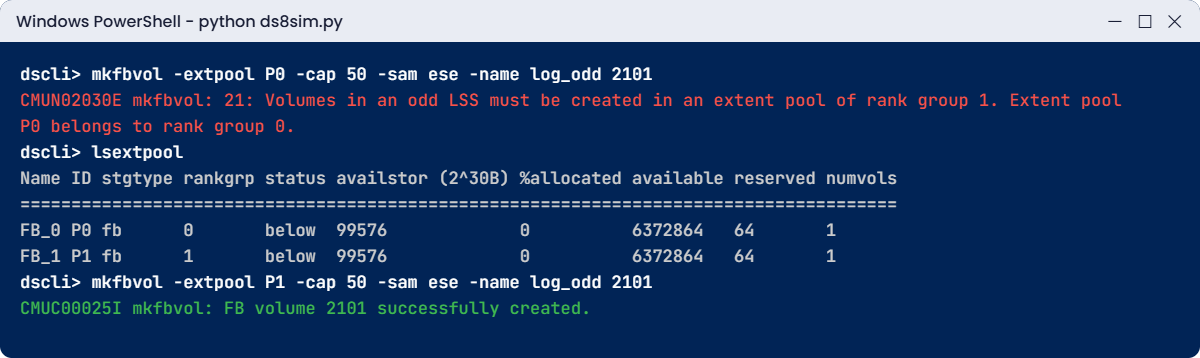
Practice shell: CMUN02030E when an odd LSS volume is created in a rank group 0 pool
The rank group error and the fix.

✅ Checkpoint: Volume 2101 exists in P1, next to 2100.

This happened at work

The six-second pause during a code load

A retail bank had planned a DS8000 code bundle install for a Sunday afternoon, with IBM running it remotely. The change ticket said “concurrent, no host impact”, so nobody told the application teams. At 15:40 the first CPC was updated and its LSSs failed over to the partner, and most systems didn’t blink, but the mobile banking login service raised an alarm. Response times had jumped from 30 ms to about 6 seconds for a short burst, and a few hundred customers got “please try again”.

The on-call manager called it a storage outage, but when the storage team checked, the I/O pause was well inside what IBM documents for failover and failback, up to 7 seconds. The real problem sat in the application, whose database driver had a 5-second I/O timeout, treated one slow write as a dead database and restarted its connection pool.

The fixes were boring and they worked. The application team raised the timeout above the storage recovery window, as the multipath and host attachment guides suggest, and the change process now warns every application owner about each CPC failover window, even for “concurrent” work. Two hours later the second CPC was updated with the teams watching, and nobody noticed a thing.

Lesson: with DS8000 failover and failback, “no outage” means hosts keep their disks, not that every single I/O stays fast. Know the 7-second number and make sure your applications can live with it.

Common mistakes and troubleshooting

SymptomLikely causeWhat to check / fix
A host loses its disks when one CPC failsThe host itself has one path, or both paths on one host adapterlshostport -login and showioport loc: two ports, two adapters, two I/O enclosures, two fabrics
Application errors during a “concurrent” code loadApplication or driver I/O timeout shorter than the failover pauseSet host and application timeouts above the documented recovery time (up to 7 s), and warn app owners before each CPC window
Everything got slower after a CPC repair callThe box is still running on one CPC (half cache, single-copy writes)lsserver should show both servers Online; ask IBM when failback will run
mkfbvol refuses an odd volume ID in a poolLSS parity does not match the pool rank groupOdd LSS → rank group 1 pool; even LSS → rank group 0 pool
One server is busy, the other almost idleAll busy volumes in even (or odd) LSSsSpread volumes over both rank groups so the two CPCs share the load and a failover only moves half
Team plans “reboot the CPC to clear the error”Treating the DS8000 like a normal serverNever restart CPCs yourself, open an IBM case instead. Failover and failback are run by the system or by IBM
Nobody noticed the CPC was down for daysCall Home and SNMP or email alerts not set upMake sure Call Home works and alerts reach a real mailbox, and include lsserver in your daily health check

After any DS8000 failover and failback event, planned or not, make a habit of running lsserver, lsarray and lshost and asking the host team to confirm every multipath device shows all its paths. Redundancy nobody checks tends to be the redundancy that’s missing on the bad day.

Interview questions

Click a question to open it. Each is phrased the way an interviewer might ask it, and underneath you’ll find why they ask it and one way to answer in your own words.

Fresher level

1. In simple words, what is a CPC failover on a DS8000?

Why they ask this: They want to know you understand the two-server design and not just the word. A clear, plain answer shows you could explain it to a manager in the middle of an incident.

How you might answer: A DS8000 has two CPCs. server0 owns the even LSSs and server1 the odd ones, and each keeps a copy of the other’s new writes in its NVS. If one CPC fails, the other uses that copy to take over all the LSSs, so the hosts keep their disks.

Failback is the reverse. Once the failed CPC is repaired it takes its LSSs back and both copies are kept again.

2. A host lost all its LUNs, but lsserver shows both servers Online. Where do you look?

Why they ask this: It checks you know the box can be healthy while the host isn’t, and interviewers like people who look at the path before blaming the array.

How you might answer: I’d look at the path rather than the CPCs, running lshost and lshostport -login to see whether the host ports are logged in and lsioport for ports with no light.

Then I’d check with the SAN team for zoning or switch port problems and with the host team for multipath. Most of the time one path was already missing and the second one has just failed.

2–5 years experience

3. Walk me through what server1 does in the first seconds after CPC 0 fails.

Why they ask this: They want the real sequence, which shows you’ve read beyond the marketing, and it also tests whether you know why the data is safe.

How you might answer: First it protects the writes whose backup copy was in CPC 0, keeping them in cache and adding them to its own NVS, up to 85% of NVS. Then it destages the even-LSS data it was holding in NVS to flash.

After that it splits its cache and NVS into even and odd halves and starts serving every LSS. IBM says the latency impact of failover or failback is generally no more than 7 seconds.

4. IBM says the code load is concurrent. What do you still do before it starts?

Why they ask this: It’s a test of change discipline. Concurrent doesn’t mean zero risk, and they want to see you protecting the applications.

How you might answer: I’d check both servers are Online and every host has at least two healthy paths on different host adapters, because each CPC fails over during the update and host adapters can go offline for a moment.

I’d tell application owners about the failover windows, check their I/O timeouts are longer than the recovery time and stay away from peak hours, and then watch lsserver and the host paths after each CPC.

Senior level

5. How would you design host connectivity so that no single DS8000 or SAN part can take a host down?

Why they ask this: Senior engineers own the end-to-end design, so they want a structured answer covering both the box and the fabric.

How you might answer: Every host gets at least two HBAs, each going to a different SAN fabric. On the DS8000 side I’d use ports on different host adapters in different I/O enclosures, spread so each fabric reaches both halves of the enclosures.

Then I’d use native multipath on the host (AIXPCM, MSDSM, DM Multipath or VMware NMP) and check paths after every change. For IBM Z I’d define four or eight channels per LCU and let CUIR handle service actions.

6. The box has been running on one CPC for three days waiting for a part. What risks do you raise with management?

Why they ask this: It checks your risk thinking and how you communicate. They want to hear the real exposure without any panic.

How you might answer: I’d explain that no data is lost and hosts are running normally, but redundancy has gone, so one more CPC failure would stop all I/O. Writes have a single memory copy and the cache is halved, so performance is lower too.

I’d ask IBM for a firm repair date, freeze non-urgent changes and code loads, avoid heavy batch where possible, check replication to the DR site is up to date, and keep the business updated every day.

Quick quiz

Q1. Which server owns a volume in LSS 21 during normal operation?

  1. server0
  2. server1
  3. Both at the same time
  4. The HMC
Show answer

B: odd LSSs belong to server1 in CPC 1, and even LSSs belong to server0.

Q2. Where is the backup copy of a write for an even-LSS volume kept?

  1. In server0 cache
  2. In server1 NVS
  3. On a spare drive
  4. On the HMC
Show answer

B: the owning server (server0) keeps it in cache and the partner CPC keeps the copy in its NVS.

Q3. What does IBM say about the I/O latency impact of failover or failback?

  1. None at all
  2. Generally no more than 7 seconds
  3. About 1 minute
  4. Hosts must be restarted
Show answer

B: the Redbook says recovery actions generally don’t affect I/O latency by more than 7 seconds.

Q4. After failover, what is lost while the DS8000 runs on one CPC?

  1. Access to half the volumes
  2. All Copy Services
  3. Redundancy and some performance
  4. The HMC connection
Show answer

C: everything keeps working, but one more CPC failure would stop I/O and the cache is smaller.

Q5. Which host setup survives a host adapter failure?

  1. One HBA, one path
  2. Two paths to ports on the same host adapter
  3. Two paths to different host adapters in different I/O enclosures
  4. Two paths through one SAN switch
Show answer

C: the Redbook rule is at least two connections on separate host adapters in separate I/O enclosures.

Quick recap

  • Each CPC owns half the LSSs and rank groups and keeps a copy of the other’s new writes in its NVS.
  • On failover the surviving server protects single-copy writes, destages the partner’s NVS data, splits cache and NVS and then serves every LSS.
  • Failback returns the LSSs to the repaired CPC, and either direction generally adds no more than 7 seconds of latency.
  • Running on one CPC loses no data, but redundancy is gone and the cache is halved.
  • Code loads use planned failovers, one CPC at a time.
  • Your part is two host paths on different host adapters and I/O enclosures, two fabrics, and LSS parity that matches the pool rank group.

Next lesson

Lesson 19: Copy Services map: FlashCopy, Metro Mirror, Global Mirror → Next you see how the DS8000 makes point-in-time and remote copies and when to use each.

Further reading: DS8000 failover and failback

Want to go deeper into DS8000 failover and failback? IBM Storage DS8A00 Architecture and Implementation Guide (IBM Redbooks), chapter 4, explains every RAS feature in detail. For the ownership rules behind this lesson, go back to Lesson 12: Extent pools, rank groups and server affinity.

You can also see the full plan for this course on the IBM DS8000 Architecture course page.

Scroll to Top

This website uses cookies

We use a few cookies to keep this site working. If you allow it, we also use Google Analytics to count visits so we can improve our lessons. You can accept all, deny the optional ones, or choose what to allow.