Power, cooling and the HMC network

The DS8000 HMC (Hardware Management Console) is the small server you’re talking to whenever you manage a DS8000. Every DS GUI click, DS CLI command and Call Home message to IBM goes through one of the two HMCs at the bottom of the frame, and they also switch the whole system on and off through the power units.

This lesson finishes the hardware tour with what the HMCs do and don’t do, how their private and customer networks are wired, and how power and cooling work. After that you set up a DS CLI profile that knows both HMCs, check which remote access is open, catch an IP clash before it happens and see why read-only users matter.

You need the practice shell from Lesson 1, and power domains first came up in Lesson 3.

TimeYou needBy the end you can
60 to 75 minutesThe practice shell from Lesson 1 and Python 3.8 or newerExplain what the two HMCs do, how their networks and the power domains are built, use a DS CLI profile with both HMCs, and spot a private network clash

What it is, in one line

The DS8000 HMC is a pair of small IBM Power consoles that run the GUI, DS CLI, Call Home and power control over private networks inside the frame, while host data never passes through them.

In Simple Words

The school office

Every school has an office near the gate where parents ask questions, change timetables and collect notices, and the office also rings the bell, switches the lights on in the morning and calls the plumber when a pipe leaks. No lesson happens there, though. Teaching happens in the classrooms, so if the office shuts for an hour, the children carry on learning.

A good school has two office windows, so one can close for lunch, and the office has its own private phone line to each classroom, separate from the public phone, so a wrong number from outside can’t ring a classroom.

The DS8000 HMC is that office, with HMC 1 and HMC 2 as its two windows. The classrooms are the CPCs and flash where the data moves, the private phone lines are the black and gray networks, and the public phone is your company network.

Engineer's View

The HMCs, their networks and the power system

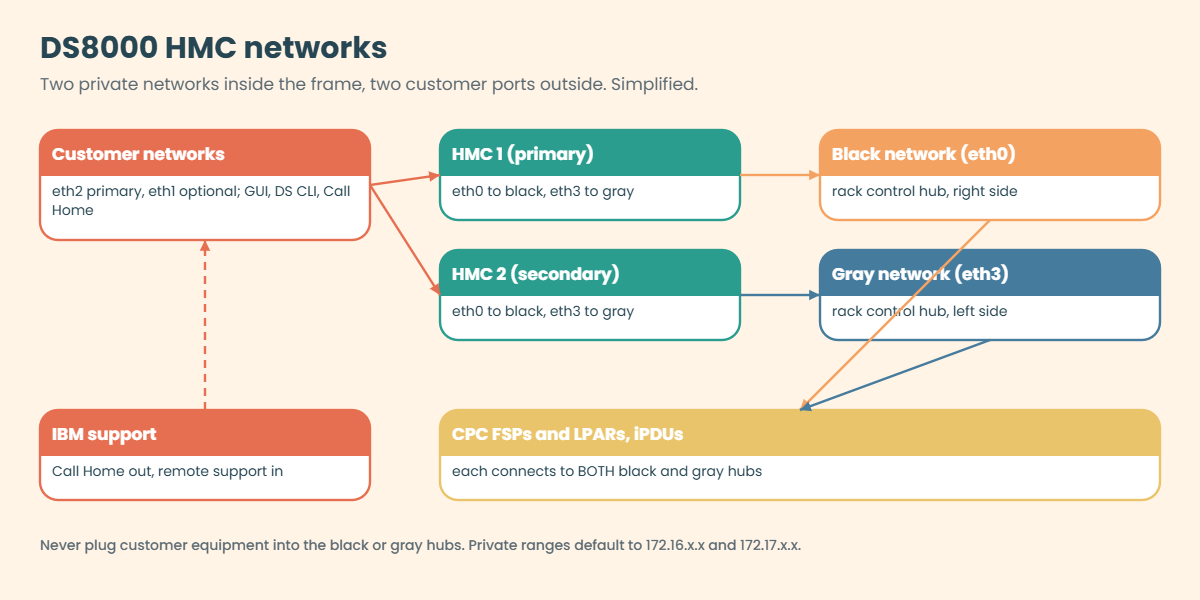
Each DS8A00 has two HMCs, both IBM Power 7063-CR2 1U servers running Red Hat Linux, mounted at the bottom of the base rack with HMC 1 above HMC 2, and since Release 10 they use Secure Boot. They run the DS GUI, the NIST web UI for service, Copy Services Manager, the RESTful API, the DS CLI and the ESSNI server.

The two HMCs are dual-active, so you can use either at any time and a change made through one shows up on the other straight away. HMC 1 is normally primary and some service functions run only there, and if the first HMC doesn’t answer, the DS CLI and GUI send the command to the second.

InterfaceNetworkUse
eth0Black private networkInternal: CPC FSPs, CPC LPARs, iPDUs
eth3Gray private networkInternal: same parts, second path
eth2Primary customer networkDS GUI, DS CLI, Copy Services Manager
eth1Optional second customer networkOften used to keep Call Home and remote support apart

The black and gray networks run through two 10-port rack control hubs. The private ranges default to 172.16.0.0–172.16.255.255 (black) and 172.17.0.0–172.17.255.255 (gray), and if those clash with a network the HMC can reach, IBM offers three other ranges at installation: 10.235/10.236, 192.168.160/240, or 9.15/9.16. Call Home also needs DNS resolution of esupport.ibm.com.

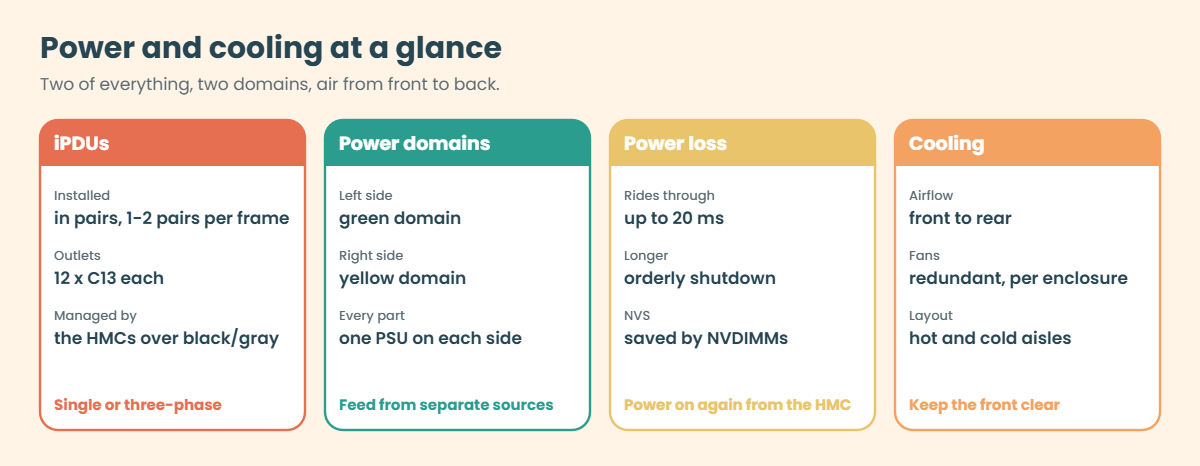
Power: iPDUs come in pairs, each with its own power cord and 12 C13 outlets, single or three-phase. The left-side iPDUs form one power domain (green) and the right-side ones the other (yellow), and the HMCs manage them over the private networks: system power on and off, outlet control, health checks and firmware.

The DS8A00 rides through a power line disturbance of up to 20 ms, and anything longer on both domains triggers an orderly shutdown with NVS saved to NVDIMM flash. The HMC is the only safe way to power the system on or off.

Cooling: each enclosure has its own redundant fans, and air flows from front to rear to suit hot-aisle and cold-aisle data centres.

On DS8900F you have the same idea of two HMCs on private black and gray networks. Check your own system with lshmc, and note that Secure Boot on the HMC came with Release 10.

How it works, step by step

Follow three everyday jobs through the HMC, running a command, calling IBM and switching the power, and you’ll see that each one uses a different network.

1Your command reaches an HMC

You run lsfbvol from your laptop, and the DS CLI connects over your company network to HMC 1 on its customer interface (eth2). If HMC 1 doesn’t answer, the DS CLI tries HMC 2, which you listed as hmc2 in your profile.

2The HMC talks to the CPCs privately

The HMC passes the request over the black or gray private network to the storage partitions in the CPCs, which hold the configuration, and the answer comes back the same way, so your laptop never talks to a CPC directly. Host I/O takes a completely separate path (SAN, host adapter, CPC, flash), which is why both HMCs can be down while every host keeps working.

DS8000 HMC networks: customer ports, black and gray private networks, CPCs and iPDUs

3A part fails and the HMC calls IBM

When a part fails, the CPCs report a serviceable event to the HMC, which sends Call Home to IBM over the customer network (often through eth1 or a proxy). If you allow it, IBM can then connect back for remote support through Assist On-site or the Remote Support Console, and lsaccess shows which of these doors are open.

4The HMC controls power

The iPDUs sit on the black and gray networks as well. The HMC switches the whole system on and off, powers single outlets off during a repair, collects power usage and updates iPDU firmware, and a DS8000 should only ever be powered off from the HMC.

5Power keeps flowing, and air keeps moving

Every CPC, I/O enclosure, HPFE and HMC has two power supplies, one plugged into each power domain, so if a domain fails the other carries the frame, and fans in every enclosure pull cool air in at the front and push warm air out at the back. If both domains drop for more than 20 ms, the system shuts down in order and the NVDIMMs save the write cache. Someone then powers it on from the HMC, or it comes back by itself if remote power control is set to automatic.

DS8000 power and cooling: iPDU pairs, green and yellow power domains, 20 ms ride-through

Two design rules follow from this. First, put both HMCs on your network and in every DS CLI profile so you can always manage the system; IBM notes that Copy Services environments in particular need both HMCs.

Second, protect the private networks. Never plug anything into the rack control hubs, and make sure the 172.16 and 172.17 ranges (or whichever option you picked) don’t clash with any network the HMCs can reach. The eth0 and eth3 interfaces can only be changed through an IBM support request, so it’s much better to get this right on installation day.

Hands-on lab: manage both HMCs and check the private networks

Before you run any command, double-check it

Read every command twice before you press Enter. Check the target: the system or account, the IDs, the names and the sizes. These commands are for learning and were tested in our lab, not on your system. At work, run the read-only list commands first, follow your change process, make sure a backup exists, and ask a second person to check anything that changes or deletes data. You run them at your own risk.

You’ll set up the way you’ll connect to the DS8000 every day, a profile that knows both HMCs, then check the HMCs and their remote access and test your networks against the private HMC ranges.

Practice shell note: the practice shell is our teaching tool, not IBM software, and real DS CLI output is similar but not identical. The shell accepts any HMC address and has no real network behind it, so it can’t show a dead HMC; on a real system the DS CLI falls over to hmc2. The HMC names and location codes are made up for the lab.

1Write a DS CLI profile with both HMCs

In your lab folder, create a text file called lab.profile with these lines. The real DS CLI uses the same name: value style in its profile.

lab.profile:

# lab.profile - DS CLI profile for the SaatVedha lab DS8A50
hmc1: 10.0.0.1
hmc2: 10.0.0.2
username: admin
devid: IBM.2107-78SV001

✅ Checkpoint: lab.profile sits next to ds8sim.py.

2Look at the two HMCs

Use the profile with -cfg, so the only thing you add is your password.

Run this (PowerShell):

python ds8sim.py -cfg lab.profile -passwd YOURPASSWORD lshmc

You should see this:

Date/Time: 24 October 2026 13:55:50 UTC IBM DSCLI Version: 7.10.10.348 DS: IBM.2107-78SV001
Name          State  Role         Release                  Management-IP Location-Code    Machine-Type Machine-Model Memory Disk
================================================================================================================================
DS8A50-1A.LAB Online Primary(1)   R10.1 bundle 10.10.106.0 10.0.0.1      U7063CR2.78SV1DD 7063         CR2           33GB   1TB
DS8A50-1B.LAB Online Secondary(2) R10.1 bundle 10.10.106.0 10.0.0.2      U7063CR2.78SV2DD 7063         CR2           33GB   1TB

Both are type 7063-CR2, both Online and on the same code bundle. Management-IP is the customer network address you reach them on, and the private black and gray addresses never show up here. On a real system, check after every code load that both HMCs show the same release.

✅ Checkpoint: Both HMCs are Online, primary and secondary.

3Check which access doors are open

Run this:

python ds8sim.py -cfg lab.profile -passwd YOURPASSWORD lsaccess -l

You should see this:

Date/Time: 24 October 2026 13:55:50 UTC IBM DSCLI Version: 7.10.10.348 DS: IBM.2107-78SV001
hmc  cmdline wui     modem    cim      aos     rsc     vpn
===============================================================
hmc1 enabled enabled disabled disabled enabled enabled disabled
hmc2 enabled enabled disabled disabled enabled enabled disabled

cmdline is DS CLI access and wui is the web interface, while aos (Assist On-site) and rsc (Remote Support Console) are the two ways IBM support can connect in. On a real system you change these with chaccess, for example chaccess -aos enable -hmc 1, but the practice shell only lists them. A lot of security teams keep remote support off until a case is open.
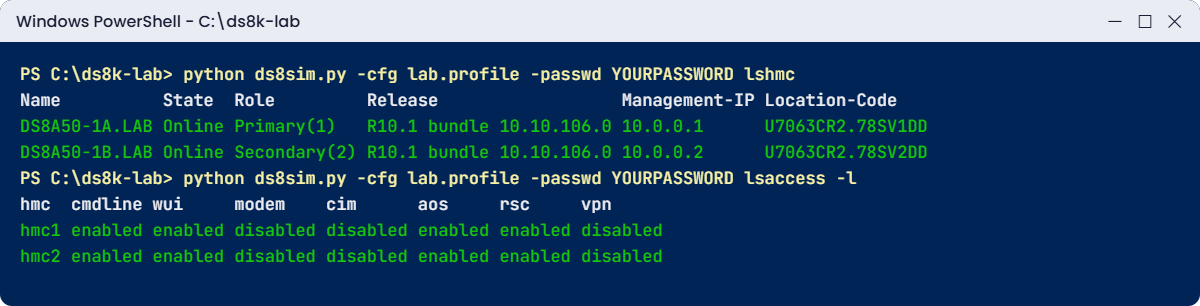
Practice shell lshmc and lsaccess -l through a DS CLI profile with both HMCs
Both HMCs and their access settings in the practice shell, through a DS CLI profile.

✅ Checkpoint: You can say which remote support methods are enabled on each HMC.

4Check your networks against the private ranges

Before installation, the network team gives you every subnet the HMCs will be able to reach. Save this checker as hmc_netcheck.py on your laptop, in the lab folder next to ds8sim.py; it’s a planning tool that runs there, not on the DS8000 or the HMC, and it tests your subnets against the four private range choices in IBM’s table. Step 5 uses its --check part.

# hmc_netcheck.py - SaatVedha check: do your networks clash with the DS8A00 private HMC networks?
# A planning tool: it runs on your laptop or jump server, not on the DS8000 or the HMC.
# With --check it also reads both HMCs through the DS CLI with lshmc
# (auto.profile: banner off, header on, format delim) and tests their Management-IP addresses.
# Ranges from the IBM Redbook SG24-8559-01, table "Private networks" (black = eth0, gray = eth3).
# Usage: python hmc_netcheck.py <your subnet> [<your subnet> ...]    for example 172.16.40.0/22
#        python hmc_netcheck.py --check [<your subnet> ...]
import csv, ipaddress, subprocess, sys
DSCLI = ["python", "ds8sim.py", "-cfg", "auto.profile"]   # at work: ["dscli", "-cfg", "auto.profile"]

def dscli(*args):
    """Run one DS CLI command and return its rows as dictionaries."""
    out = subprocess.run(DSCLI + list(args), capture_output=True, text=True).stdout
    lines = [l for l in out.splitlines() if l and not l.startswith("SaatVedha") and not l.startswith("CMUC")]
    return list(csv.DictReader(lines))

OPTIONS = {
    "Default":  ("172.16.0.0-172.16.255.255", "172.17.0.0-172.17.255.255"),
    "Option 1": ("10.235.0.0-10.235.2.255", "10.236.0.0-10.236.2.255"),
    "Option 2": ("192.168.160.0-192.168.162.255", "192.168.240.0-192.168.242.255"),
    "Option 3": ("9.15.0.0-9.15.2.255", "9.16.0.0-9.16.2.255"),
}

def nets(rng):
    a, b = (ipaddress.ip_address(x) for x in rng.split("-"))
    return list(ipaddress.summarize_address_range(a, b))

args = sys.argv[1:]
yours = []
if args and args[0] == "--check":
    args = args[1:]
    hmcs = dscli("lshmc")
    if not hmcs:
        print("No answer from the DS CLI. Check auto.profile and the password file.")
        sys.exit(2)
    for h in hmcs:
        print(f"HMC {h['Name']}: {h['Management-IP']}, {h['State']}, {h['Role']}, {h['Release']}")
        yours.append(ipaddress.ip_network(h["Management-IP"]))
    if len({h["Release"] for h in hmcs}) > 1:
        print("WARNING : the HMCs run different releases. Check the last code load.")
    for h in hmcs:
        if h["State"] != "Online":
            print(f"WARNING : {h['Name']} is {h['State']}. You are down to one HMC.")
elif not args:
    print("Usage: python hmc_netcheck.py <your subnet> [<your subnet> ...]")
    print("       python hmc_netcheck.py --check [<your subnet> ...]")
    sys.exit(1)

yours += [ipaddress.ip_network(s, strict=False) for s in args]
safe = []
for name, (black, gray) in OPTIONS.items():
    clashes = [f"{y} overlaps {label}" for label, rng in (("black", black), ("gray", gray))
               for y in yours if any(y.overlaps(n) for n in nets(rng))]
    if clashes:
        print(f"{name:8}: CLASH  - " + "; ".join(clashes))
    else:
        print(f"{name:8}: ok")
        safe.append(name)
print("Safe choices:", ", ".join(safe) if safe else "none - talk to IBM support")

Run this:

python hmc_netcheck.py 10.20.0.0/16 192.168.1.0/24

You should see this:

Default : ok
Option 1: ok
Option 2: ok
Option 3: ok
Safe choices: Default, Option 1, Option 2, Option 3

✅ Checkpoint: Your example networks are safe with the default 172.16 and 172.17 ranges.

5Check the installed HMCs

After installation you can test the real HMC addresses as well. --check reads both HMCs with lshmc through the DS CLI, tests their Management-IP addresses against the private ranges, and warns you if an HMC is down or the two are on different releases.

Your lab.profile still needs -passwd, and a script can’t answer password prompts, so save the password in a password file first. If security.dat is already in your lab folder from an earlier lesson, skip this command (the shell would tell you the record already exists).

Run this (PowerShell):

python ds8sim.py -cfg lab.profile -passwd YOURPASSWORD managepwfile -action add -name admin -pw YOURPASSWORD -pwfile security.dat

You should see this:

CMUC00206I managepwfile: Record 10.0.0.1/admin successfully added to password file security.dat.

Then save these eight lines as auto.profile in the same folder. banner: off, header: on and format: delim make every list come back as one header row plus comma-separated rows, which Python reads easily. Implementation Lesson 2 explains profiles in full.

auto.profile:

hmc1: 10.0.0.1
username: admin
pwfile: security.dat
devid: IBM.2107-78SV001
banner: off
header: on
format: delim
delim: ,

Run this (PowerShell):

python hmc_netcheck.py --check

You should see this:

HMC DS8A50-1A.LAB: 10.0.0.1, Online, Primary(1), R10.1 bundle 10.10.106.0
HMC DS8A50-1B.LAB: 10.0.0.2, Online, Secondary(2), R10.1 bundle 10.10.106.0
Default : ok
Option 1: ok
Option 2: ok
Option 3: ok
Safe choices: Default, Option 1, Option 2, Option 3

Both HMC addresses, 10.0.0.1 and 10.0.0.2, are outside every private range, and both HMCs are Online on the same bundle. You can add your own subnets after --check to test them along with the HMC addresses.

At work you run --check after every HMC change or code load, and the plain mode stays your tool for each new subnet the network team plans.

✅ Checkpoint: --check lists both HMCs and finds no clash for 10.0.0.1 and 10.0.0.2.

Break It, Then Fix It

Two HMC problems cause real management outages (and sometimes worse): a private range that clashes with a company network, and night staff with more rights than they need. You’ll cause both.

1Break it: a user VLAN inside the private range

The network team plans a new office VLAN, 172.16.40.0/22, and the HMC customer port will be able to route to it. Check it.

Run this (PowerShell):

python hmc_netcheck.py 172.16.40.0/22 10.20.0.0/16

You’ll get this:

Default : CLASH  - 172.16.40.0/22 overlaps black
Option 1: ok
Option 2: ok
Option 3: ok
Safe choices: Option 1, Option 2, Option 3

Why: by default the black private network uses 172.16.0.0 to 172.16.255.255. If the HMC can also reach 172.16.40.0/22 on the customer side, traffic for those addresses can go the wrong way, so either users can’t reach the HMC or the HMC loses touch with parts of its own frame. IBM says plainly that the private range must not interfere with any network the HMC can reach.

Fix: before installation, choose a safe option in the configuration worksheets (here Option 1, 2 or 3), or give the VLAN a different range, because after installation changing the private range takes an IBM support request. Now try a very crowded company that uses both 172.16.0.0/12 and 10.0.0.0/8:

Run this:

python hmc_netcheck.py 172.16.0.0/12 10.0.0.0/8

You should see this:

Default : CLASH  - 172.16.0.0/12 overlaps black; 172.16.0.0/12 overlaps gray
Option 1: CLASH  - 10.0.0.0/8 overlaps black; 10.0.0.0/8 overlaps gray
Option 2: ok
Option 3: ok
Safe choices: Option 2, Option 3

✅ Checkpoint: You can name a safe private range option for both networks.

2Break it: night staff try to change the system

The night shift only needs to watch the DS8000, so create a read-only user in the monitor group (Lesson 5 of the Implementation course covers users in full).

Run this:

python ds8sim.py -cfg lab.profile -passwd YOURPASSWORD mkuser -pw Watch3r01 -group monitor nightops

You should see this:

CMUC00133I mkuser: User nightops successfully created.

Log in once as nightops (the shell makes you change the password, as a real first login does), then try to change the SNMP settings.

Run this:

python ds8sim.py -hmc1 10.0.0.1 -user nightops -passwd Watch3r01 -newpasswd Watch3r02 lsserver
python ds8sim.py -hmc1 10.0.0.1 -user nightops -passwd Watch3r02 chsp -snmp on -snmpaddr 10.1.1.5

You’ll get this (lsserver output shortened):

CMUN00247W Your password has expired. You must change it now.
CMUC00249I Your password was changed successfully.
Date/Time: 24 October 2026 13:55:51 UTC IBM DSCLI Version: 7.10.10.348 DS: IBM.2107-78SV001
ID      Image ID         Image Name   Power Control SFI State
=============================================================
server0 IBM.2107-78SV001 ds8k-g10-lab Online        Online
server1 IBM.2107-78SV001 ds8k-g10-lab Online        Online
CMUN00018E chsp: Unauthorized: Your user group (monitor) does not have the authority to run this command.
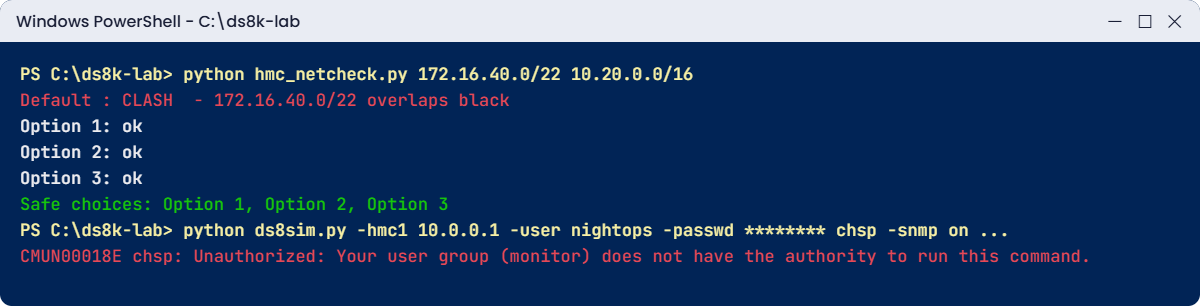
HMC private network clash check and a monitor user denied a change
A private range clash found before installation, and a monitor user stopped from making a change.

Why: this “error” is the system doing its job. A monitor user can list everything and change nothing, because every DS GUI and DS CLI change goes through the HMC, which checks the user’s group first. The CMUN00018E text is a practice shell message, and a real DS8000 refuses too, in its own wording.

Fix: someone with the right role makes the change, in a change window. In the lab, use the admin profile:

Run this:

python ds8sim.py -cfg lab.profile -passwd YOURPASSWORD chsp -snmp on -snmpaddr 10.1.1.5

You should see this:

CMUC00040I chsp: Storage complex IbmStoragePlex successfully modified.

✅ Checkpoint: nightops can read but not change; admin made the SNMP change.

This happened at work

The VLAN that ate the HMC

A government tax department ran its case and payment systems on two DS8000 systems whose HMCs had been installed years earlier with the default private ranges, 172.16 and 172.17.

During an office move the network team created a new user VLAN for 400 staff and, to save time, put it in 172.16.32.0/20 and routed it to the server management network where the HMC customer ports lived. Nobody asked the storage team.

The next morning the storage team couldn’t open the DS GUI on either HMC, DS CLI sessions timed out and Call Home had stopped for both systems. Host I/O was fine throughout, since the HMCs aren’t in the data path, but for two days nobody could create volumes for a deadline project, and a drive failure on one system was only spotted because an engineer happened to walk past the frame.

It took a while to see it was an address clash: the new user VLAN overlapped the HMCs’ own black private network, and traffic was going the wrong way. Once they found it the fix was quick, renumbering the user VLAN into a 10.x range. Afterwards the department put “DS8000 private ranges” on the network team’s list of reserved ranges and checks every new subnet against it, because the private networks don’t show up on any floor plan unless someone writes them down where the network team will see them.

Common mistakes and troubleshooting

SymptomLikely causeWhat to check / fix
GUI and DS CLI fail on both HMCs, hosts are fineHMC network problem, often an IP clash with the private rangesCheck routes to 172.16.x.x / 172.17.x.x (or your option) and renumber the clashing network.
DS CLI fails when HMC 1 is downOnly hmc1 in the profileAdd hmc2: to every profile and script.
Call Home stoppedDNS can’t resolve esupport.ibm.com, or proxy or firewall changeFix DNS or the proxy, because IP addresses alone are no longer supported for Call Home.
Someone plugged a laptop into the rack control hubTreating it as a normal switchThe hubs are private, so unplug it and use the customer network ports.
Night staff made an unplanned changeUsers have admin rights they don’t needGive watch-only staff the monitor group.
System stays off after a power cutRemote power control is manualPower it on from the HMC, or plan carefully for automatic mode.
Both power domains lost togetherBoth feeds from one building sourceFeed green and yellow from separate sources (Lesson 3).

Write down five facts for every DS8000 you own: both HMC addresses, the private range option, the DNS and proxy used for Call Home, the remote support setting, and which building feed each power domain uses. With those you can answer most “the console is down” calls in minutes.

Interview questions

Click a question to open it. Each is worded the way an interviewer would ask it, and underneath you’ll find why they ask it and one way you could answer in your own words.

Fresher level

1. What is the HMC on a DS8000, and is it in the data path?

Why they ask this: It’s a must-know basic that shows whether you understand management versus data.

How you might answer: The HMC is the management console, two 7063-CR2 Power servers at the bottom of the frame running the DS GUI, DS CLI, Copy Services Manager, Call Home and power control. It isn’t in the data path, so hosts keep reading and writing even if both HMCs are down, and only management and alerts stop.

2. Why does a DS8000 have two HMCs?

Why they ask this: They’re checking that you know what you’d lose with only one.

How you might answer: For redundancy. They’re dual-active, so if HMC 1 fails I keep managing through HMC 2, and the DS CLI fails over automatically if both are in the profile. The second HMC also keeps power control, encryption recovery and Copy Services management available.

2–5 years experience

3. The DS GUI is unreachable on both HMCs, but hosts are fine. What do you check?

Why they ask this: It’s a real troubleshooting scenario, and they want ordered thinking and some network awareness.

How you might answer: If the hosts are fine, it’s a management problem and not a storage one. So I’d check the network path to both HMC customer addresses, look for any recent firewall or routing change, and see whether a new subnet overlaps the private black and gray ranges. If an HMC itself is down I’d open a case with IBM, and the DS8000 keeps serving I/O in the meantime.

4. What are the black and gray networks, and what must you never do with them?

Why they ask this: It shows you know the internal design and one of the key safety rules.

How you might answer: They’re two private Ethernet networks inside the frame, running through two rack control hubs and connecting the HMCs (eth0 and eth3) to the CPC service processors, the CPC partitions and the iPDUs. You never connect customer equipment to those hubs, and you make sure their address range doesn’t clash with any network the HMCs can reach.

Senior level

5. You are planning a new DS8000 installation. What do you agree with the network and facilities teams about the HMCs and power?

Why they ask this: Seniors have to cover the cross-team details that cause outages later on.

How you might answer: With the network team: two customer addresses, a private range option that doesn’t clash with anything routable, DNS or a proxy for esupport.ibm.com, and a policy on remote support (AOS or RSC). With facilities: two power feeds from separate sources for the green and yellow domains, single or three-phase, and front-to-back airflow. I’d record all of it in the configuration worksheets before the SSR arrives.

6. How would you design access to the HMCs for a team of ten, including night operators?

Why they ask this: They’re testing your security thinking around the management plane.

How you might answer: Everyone gets their own account, ideally through LDAP, with the smallest role that works: monitor for night operators, op_storage or op_volume for daily work, and admin for very few people. Both HMCs go in every profile, remote support stays controlled with chaccess, and I check lsaccess after every change and audit.

Quick quiz

Q1. What happens to host I/O if both HMCs are down?

  1. All I/O stops
  2. I/O continues; only management and alerts stop
  3. Only writes stop
  4. The CPCs fail over
Show answer

B — The HMC is not in the data path.

Q2. Which HMC interfaces connect to the private black and gray networks?

  1. eth1 and eth2
  2. eth0 and eth3
  3. eth2 only
  4. USB
Show answer

B — eth0 is black, eth3 is gray; eth2 and eth1 are customer networks.

Q3. What is the default range of the black private network?

  1. 10.0.0.0/8
  2. 172.16.0.0 to 172.16.255.255
  3. 192.168.1.0/24
  4. 9.15.0.0/16
Show answer

B — Black defaults to 172.16.x.x and gray to 172.17.x.x; three other options exist.

Q4. How long a power line disturbance can a DS8A00 ride through?

  1. 2 ms
  2. 20 ms
  3. 2 seconds
  4. 20 seconds
Show answer

B — Up to 20 ms; longer on both domains triggers an orderly shutdown.

Q5. Why put hmc2 in your DS CLI profile?

  1. It is faster
  2. The DS CLI can fall over to it if HMC 1 is unavailable
  3. It is required for lshmc
  4. It enables Call Home
Show answer

B — With both HMCs listed, commands go to the second HMC when the first doesn’t answer.

Quick recap

  • Every DS8A00 has two dual-active HMCs (7063-CR2) at the bottom of the frame; they manage, monitor and call IBM but never carry host data.
  • HMC eth0 and eth3 connect to the private black and gray networks; eth2 and eth1 connect to your networks.
  • Private ranges default to 172.16.x.x and 172.17.x.x; pick another option if they clash with anything the HMCs can reach.
  • iPDUs in pairs form the green and yellow power domains, managed by the HMCs; the system rides through 20 ms of power loss.
  • Put both HMCs in every DS CLI profile; lshmc and lsaccess show their state and remote access.
  • Give watch-only staff the monitor group so they can see but not change.

Next lesson

Lesson 9: Virtualization: from drives to LUNs, the big picture → You leave the hardware and see how flash becomes the LUNs your servers use.

Further reading: DS8000 HMC

To go deeper into DS8000 HMC, IBM Storage DS8A00 Architecture and Implementation Guide (IBM Redbooks) covers power in chapter 2 and the Management Console in chapter 6. To see where data lives below the HMCs, go back to Lesson 7: HPFE Gen3.

You can also see the full plan for this course on the IBM DS8000 Architecture course page.

Scroll to Top

This website uses cookies

We use a few cookies to keep this site working. If you allow it, we also use Google Analytics to count visits so we can improve our lessons. You can accept all, deny the optional ones, or choose what to allow.