DS8000 model comparison: capacity, ports and features

A DS8000 model comparison is the page you wish someone had handed you on your first day at a new job. One customer runs a DS8870, the next a DS8886 and the third a brand-new DS8A50, and while they all speak the same DS CLI and all have two CPCs, their limits are very different.

Here you’ll put six families side by side, DS8700, DS8800, DS8870, DS8880, DS8900F and DS8A00, and compare processors, cache, drives, raw capacity, host ports, frames, power and features, using only numbers printed in IBM’s own Redbooks.

After that you’ll see how to pick a model for a real project and how to tell which model you’re standing in front of. In the lab you identify the practice DS8A50 from its own output and run a small sizing tool on your laptop.

TimeYou needBy the end you can
60 to 75 minutesThe practice shell from Lesson 1, Python 3 on your laptop, and Lessons 22 to 27 of this course (helpful, not required)Read any DS8000 spec in a minute, decode showsi, and size a DS8A10, DS8A50 or DS8A80 for growth, not just for today

What it is, in one line

A DS8000 model comparison lines up every generation on the same rows (processor, cache, drives, capacity, ports, frames, power and features) so you can see what really changed and pick the right box.

In Simple Words

Buying a school bus for the next five years

Your school needs a new bus. Today 30 children ride it, and a small bus has 32 seats, so the shop calls it a perfect fit. But the school is growing, with 40 children expected next year and 50 the year after, and the small bus also has a tiny fuel tank and can’t manage the hill road when it rains.

A sensible head teacher asks three things: how many seats will we need later and not only today, what else does the bus have to do, like hills and long trips, and can we add seats to this bus or will we have to buy a new one?

Choosing a DS8000 works the same way. The seats are the drives and capacity, the engine and fuel tank are the processor cores and cache, the road is the number of servers and ports that have to connect, and “can we add seats” is the expansion frame.

Engineer's View

Six families, one design idea

Every DS8000 since the DS8700 (IBM calls it the third generation) has the same basic shape: two CPCs (IBM Power servers) that mirror each write into the other one’s NVS, I/O enclosures holding the host and device adapters, and a back end of drives or flash. From one generation to the next, what changes is the processor, the internal link, the drives and the power design.

  • DS8700 (941/94E) and DS8800 (951/95E): POWER6 at 4.7 GHz and POWER6+ at 5.0 GHz, 2-way or 4-way per CEC, up to 384 GB of memory, NVS at 1/32 of memory. Spinning drives on switched FC-AL loops, PPS power with battery backup units (SG24-8886).
  • DS8870 (961/96E): POWER7+ at 4.228 GHz, 2 to 16 cores per CPC, 16 GB to 1 TB memory. Adds the first HPFE (1U, 400 GB flash cards) and DC-UPS power with batteries. Release 7.5 brings 16 Gbps host adapters and the RESTful API (SG24-8085).
  • DS8880 (98x): POWER8. DS8884 has 6 cores per CPC, DS8886 8, 16 or 24, DS8888F 24 or 48. PCIe Gen3, HPFE Gen2, 19-inch 40U racks (46U on DS8886/DS8888F), RAID 6 as default (SG24-8323).
  • DS8900F (99x): POWER9, all-flash only, 40U racks, iPDUs plus NVDIMMs with backup power modules instead of DC-UPS batteries, 32 Gbps host adapters (SG24-8456).
  • DS8A00 (A0x): Power9+, PCIe Gen4, HPFE Gen3 with NVMe and FlashCore Modules, 42U racks, RAID 6 or RAID 10 only, machine type 5341 (SG24-8559).

The machine types tell a story too: 242x for DS8700 to DS8870, 283x (hybrid) and 533x (all-flash) for DS8880, 5331 and later 5341 for DS8900F, and 5341 for DS8A00. In 242x and 283x the last digit is the warranty years.

How it works, step by step

It’s easy to compare storage boxes badly. People grab one number, usually raw TB, and stop there, so here’s the order senior storage architects tend to use instead.

1Start with what never changed

All six families keep two CPCs, cache with NVS mirroring, even LSSs on server0 and odd LSSs on server1, and the same logical model of array sites, arrays, ranks, extent pools and volumes. The DS CLI stays very close too, so a skill you pick up on a DS8A50 still works on a DS8870, apart from a few command differences that the Implementation course covers in its lesson on older generations.

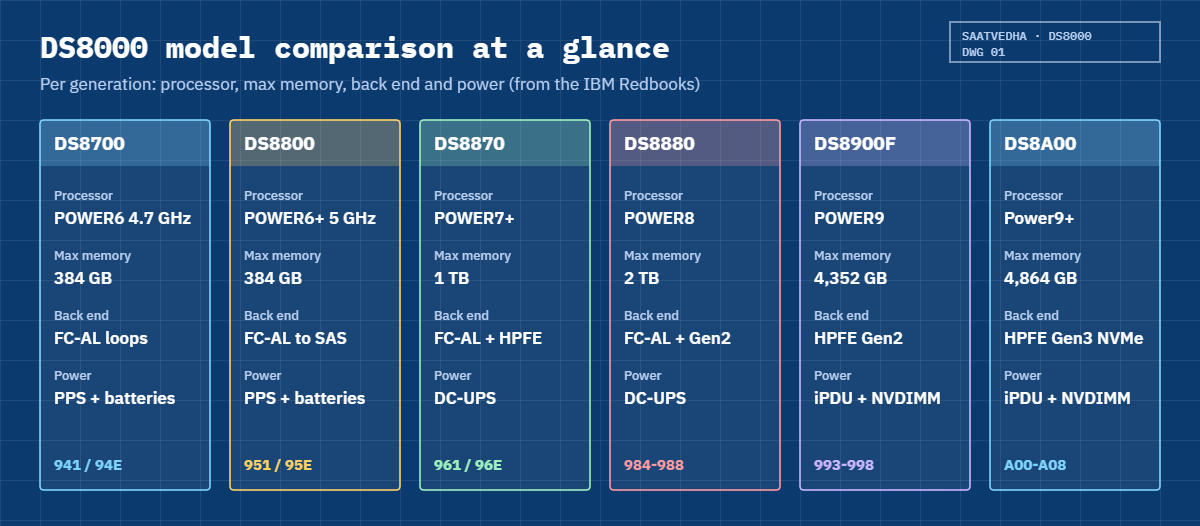
The differences are in size and speed, and the figure below shows the big shifts at a glance.

DS8000 model comparison: processor, memory, back end and power per generation

2Compare the engine and the shelves

This first table covers the boxes themselves. Cores are per CPC (every DS8000 has two), memory is for the whole system, and raw capacity uses the largest drives each book lists.

ModelProcessor (per CPC)Max memoryNVSMax drivesMax rawFrames
DS8700 (941)POWER6 4.7 GHz, 2 or 4-way384 GB1/321,0242,048 TB5
DS8800 (951)POWER6+ 5.0 GHz, 2 or 4-way384 GB1/32, max 6 GB per server1,536 SFF2.3 PB (LFF)4
DS8870 (961)POWER7+ 4.228 GHz, 2 to 16 cores1 TB1/321,536 + 240 flash cards2.46 PB SFF, 3 PB LFF4
DS8884 (984)POWER8 S822, 6 cores256 GBabout 1/16768 + 96 flash ¹—3
DS8886 (985/986)POWER8 S824, 8, 16 or 24 cores2 TB1/16, 64 GB at 2 TB1,536 + 192 flash ¹—5
DS8888F (988)POWER8 E850C, 24 or 48 cores2 TB64 GB768 flash11,796 TB3
DS8910F (994)POWER9 S922, 8 cores512 GB8 or 32 GB1922,949 TB1
DS8950F (996)POWER9 S924, 10 or 20 cores3,456 GB32 to 128 GB3845,898 TB2
DS8980F (998)POWER9 S924, 22 cores4,352 GB128 GB3845,898 TB2
DS8A10 (A01/A00)Power9+ S922, 10 cores512 GB16 or 32 GB1923,686.4 TB1
DS8A50 (A05)Power9+ S924, 20 cores3,584 GB64 to 192 GB3847,372.8 TB2
DS8A80 (A08)Power9+ S924, 24 cores4,864 GB256 GB3847,372.8 TB2

— means the Redbook does not state it. ¹ The DS8880 Redbook’s text (p. 12) gives DS8886 384 flash drives and DS8884 192, while its Figure 2-14 (p. 45) shows 192 and 96. We print the figure’s numbers. Sources: SG24-8886-02, SG24-8085-05, SG24-8323-04, SG24-8456-03, SG24-8559-01.

Read the table top to bottom and two trends stand out. Memory grew from 384 GB to 4.8 TB, while the number of drives dropped from 1,536 to 384, because each flash drive now holds far more than an old disk did, so you end up with fewer, bigger and faster parts.

3Compare how it connects and how it survives a power cut

The second table covers the front end, the rack and power. The smallest model in a family often has half the ports, and the DS8884F, the DS8910F 994 and the DS8A10 all stop at 64 ports.

FamilyMax host adapters / portsPort speedRackPower and NVS backupBack end
DS870032 HAs, 128 ports4 and 8 GbpsNot stated (193 cm tall)PPS + battery units; NVS dumped to CEC disksFC-AL loops, 16-drive enclosures front and rear
DS880016 HAs, 128 ports8 GbpsNot stated (193.4 cm)PPS + battery unitsFC-AL to 2U SAS enclosures (24 SFF or 12 LFF)
DS887016 HAs, 128 ports8 or 16 GbpsNot stated (193.4 cm)DC-UPS with battery sets; fire hose dump to CPC disksFC-AL enclosures + 1U HPFE on PCIe Gen2
DS8880up to 32 HAs, 128 ports8 or 16 Gbps40U, 46U optionDC-UPS (8U or 12U) with battery setsFC-AL enclosures + HPFE Gen2 (SAS) on PCIe Gen3
DS8900Fup to 32 HAs, 128 ports16 or 32 Gbps40UiPDUs + NVDIMM and backup power modulesHPFE Gen2 (SAS) only
DS8A00up to 32 HAs, 128 ports32 Gbps (8/16/32)42UiPDUs + NVDIMM and backup power modulesHPFE Gen3, NVMe over PCIe Gen4

The power column is the one people forget. On a DS8870 or DS8880 the NVS is protected by big battery sets that have to be replaced every few years, while from the DS8900F onwards small NVDIMMs copy NVS to their own flash and the batteries are gone, which changes both your service plans and your floor weight.

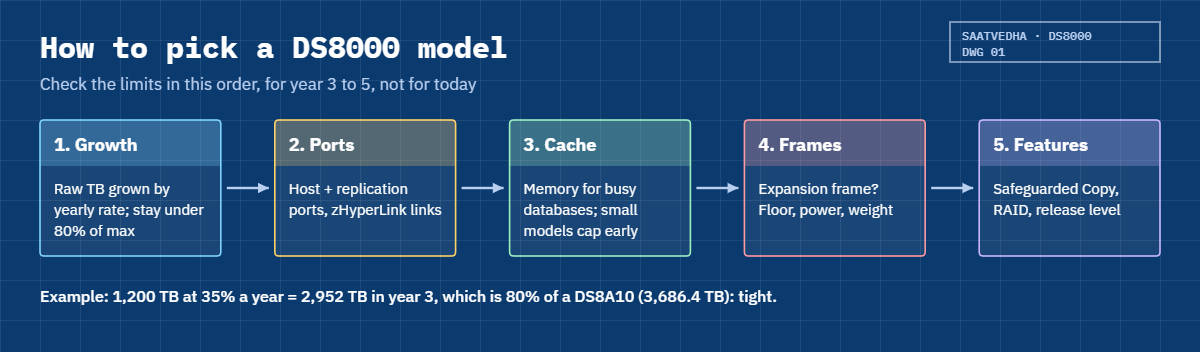
Five steps to pick a DS8000 model: growth, ports, cache, frames, features

4Compare the features you will actually use

Features decide more projects than speed does. A bank that has to keep immutable backups needs Safeguarded Copy, which starts with Release 8.5, and a mainframe shop that wants zHyperLink can’t use a DS8870.

FeatureDS8700 / DS8800DS8870DS8880DS8900FDS8A00
Redbook releaseR6.3R7.5R8.5R9.3.2R10.1
RAID levels5, 6, 105, 6, 10 (flash cards RAID 5)6 default, 10; 5 by RPQ6 default, 10; 5 by RPQ on Tier 06 default, 10; no RAID 5
Thin provisioningESE and TSEESE and TSEESE onlyESEESE (FCM pools ESE only)
FB extent sizes1 GiB1 GiB1 GiB or 16 MiB (R8.1+)1 GiB or 16 MiB16 MiB default, or 1 GiB
Safeguarded CopyNoNoYes, R8.5, through CSMYesYes, up to 1024 backups
zHyperLinkNoNoYes (12+ cores per CPC)YesYes
EncryptionFDE drives, plant orderAll drives FDEAll FDE, pools with -encryptgrpAll FDE, -encryptgrpAll FDE, -keygrp, local key option
Host mappingmkvolgrp + mkhostconnectmkvolgrp + mkhostconnectmkhost from R8.3mkhost recommendedmkhost recommended
HMCLaptop in the frameNotebook on a trayMini PC under the DC-UPSTwo mini PCs in the METwo 1U HMCs at the bottom

5Pick the model for the next five years, not for today

Now use the tables in this order. Start with growth: take today’s raw TB and grow it by your yearly rate for three to five years. Then ports: count host ports plus replication ports, and add zHyperLink links if you run IBM Z.

After that, cache, because busy databases want memory and the small models cap out early (DS8A10 at 512 GB). Last come frames and floor space, since only the DS8A50 and DS8A80 take an E05 expansion frame and a DS8A10 never does.

Leave yourself room. If a plan uses more than about 80% of a model’s maximum in year three, you’ll be buying again in year four, and that’s the rule our lab script checks.

6Tell which model you are looking at

On site, the front label and the frame shape help: 42U racks with HPFE Gen3 are DS8A00, 40U racks with a Management Enclosure are DS8900F, and 40U or 46U racks with DC-UPS boxes are DS8880. From the DS CLI, run showsi, where the Model field shows A05 or A01 on G10 and MTS shows IBM.5341. On older boxes the storage image ID still starts with IBM.2107, so go by the model field rather than the ID.

Watch out for one small trap. The DS8870 Redbook notes that DS CLI output and Call Home logs show “2107-961” while the order says 2421-961 (p. 80), so it’s the same box under two names.

Hands-on lab: identify the model and size a new project

Before you run any command, double-check it

Read every command twice before you press Enter. Check the target: the system or account, the IDs, the names and the sizes. These commands are for learning and were tested in our lab, not on your system. At work, run the read-only list commands first, follow your change process, make sure a backup exists, and ask a second person to check anything that changes or deletes data. You run them at your own risk.

You’ll play detective here. The practice shell is a DS8000, but which model? You’ll work that out from its own output, measure how much of the model’s limits it already uses, and then run a small sizing tool for a new project.

Practice shell note: the practice shell is our teaching tool, not IBM software. It behaves like a DS8A50 at Release 10.1. Real DS CLI output looks very much like this but is not identical. The sizing script is a planning tool that runs on your laptop; a DS8000 never runs your Python.

1Start clean

Open PowerShell (or Terminal), go to your lab folder and log in to the practice shell, then reset it so everyone starts from the same factory state.

Run this:

cd C:\ds8k-lab
python ds8sim.py
dscli> simctl reset

You should see this:

SIM0100I simctl: factory state restored (users and passwords kept; use simctl reset -all to reset them too).

✅ Checkpoint: the shell prints SIM0100I and the dscli> prompt is back.

2Read the model from showsi

Run this:

dscli> showsi

You should see this (output shortened):

Date/Time: 24 October 2026 19:50:21 UTC IBM DSCLI Version: 7.10.10.348 DS: IBM.2107-78SV001
Name             ds8k-g10-lab
desc             SaatVedha practice DS8A50
ID               IBM.2107-78SV001
Storage Unit     IBM.2107-78SV000
Model            A05
WWNN             5005076303FFF0DD
Signature        5a7e-0d5a-8a50-0001
State            Online
ESSNet           Enabled
Volume Group     -
os400Serial      001
NVS Memory       64.0 GB
Cache Memory     832.0 GB
Processor Memory 1015.6 GB
MTS              IBM.5341-78SV000

Decode it like this: MTS IBM.5341 is the G10 machine type and model A05 is the DS8A50 base frame. The ID ends in 1 (the storage image) and the Storage Unit ends in 0, the same rule licence keys follow, and an NVS of 64 GB matches the 1 TB memory option.

✅ Checkpoint: you can say “this is a DS8A50, model A05, machine type 5341” without looking at the desc line.

3Confirm with the processor nodes

Run this:

dscli> lspnode

You should see this:

Date/Time: 24 October 2026 19:50:21 UTC IBM DSCLI Version: 7.10.10.348 DS: IBM.2107-78SV001
ID State  Release Processor       Memory   Location
==============================================================
00 Online R10.1   Power9+ 20-core 512.0 GB U9009.42A.78SV00-P1
01 Online R10.1   Power9+ 20-core 512.0 GB U9009.42A.78SV01-P1

Twenty cores per CPC matches the DS8A50 row of the table, whereas a DS8A10 would show 10 cores and a DS8A80 24. Two nodes of 512 GB make up the 1 TB system, which is the smallest DS8A50 memory option.

✅ Checkpoint: 20-core per node, two nodes, 1 TB total.

4Count what is installed against the maximum

Run this:

dscli> lsioenclosure
dscli> lsstgencl IBM.2107-78SV001
dscli> lsarraysite

You should see this:

Date/Time: 24 October 2026 19:50:21 UTC IBM DSCLI Version: 7.10.10.348 DS: IBM.2107-78SV001
ID                 Frame State  Host adapters Device adapters Location code   S/N
========================================================================================
IBM.1400-1B1-78SV0 1     Online 1             2               U1400.1B1.78SV0 YE10SV0001
IBM.1400-1B2-78SV0 1     Online 1             2               U1400.1B2.78SV0 YE10SV0002
IBM.1400-1B3-78SV0 1     Online 2             0               U1400.1B3.78SV0 YE10SV0003
IBM.1400-1B4-78SV0 1     Online 0             0               U1400.1B4.78SV0 YE10SV0004
Date/Time: 24 October 2026 19:50:21 UTC IBM DSCLI Version: 7.10.10.348 DS: IBM.2107-78SV001
ID                    Frame Enclnum Loc   FC Interfaces State  DA pair
======================================================================
IBM.2107-D04-8SV01/R1 1     1       R1-D1 HPFE Gen3     Normal 0
IBM.2107-D04-8SV01/R2 1     2       R1-D2 HPFE Gen3     Normal 0
IBM.2107-D04-8SV02/R1 1     3       R1-D3 HPFE Gen3     Normal 2
IBM.2107-D04-8SV02/R2 1     4       R1-D4 HPFE Gen3     Normal 2
Date/Time: 24 October 2026 19:50:21 UTC IBM DSCLI Version: 7.10.10.348 DS: IBM.2107-78SV001
arsite DA Pair dkcap (10^9B) State      Array
=============================================
S1     0       4800.0        Unassigned -
S2     0       4800.0        Unassigned -
S3     0       4800.0        Unassigned -
S4     0       4800.0        Unassigned -
S5     2       4800.0        Unassigned -
S6     2       4800.0        Unassigned -
S7     2       3840.0        Unassigned -
S8     2       3840.0        Unassigned -

Work it out on paper. There are four I/O enclosures (two pairs) out of a possible eight, and two HPFE Gen3 pairs (four enclosures) out of a possible eight pairs.

Eight array sites of 8 drives gives 64 drives out of 384. For raw capacity, 6 sites x 8 x 4.8 TB = 230.4 TB plus 2 x 8 x 3.84 TB = 61.44 TB, which makes 291.84 TB of the 7,372.8 TB maximum.

✅ Checkpoint: 64 drives, 291.84 TB raw, and lots of room to grow inside this DS8A50.

5Give scripts a safe login

The sizing tool can read the box through the DS CLI, and for that it needs a password file and a script profile. Save the profile as auto.profile in your lab folder.

On macOS or Linux write the full path to your home folder, for example /home/you/dscli/security.dat.

Run this:

dscli> managepwfile -action add -name admin -pw <your password>
dscli> quit
notepad auto.profile

Put these 8 lines in auto.profile:

hmc1: 10.0.0.1
username: admin
pwfile: C:\Users\you\dscli\security.dat
devid: IBM.2107-78SV001
banner: off
header: on
format: delim
delim: ,

You should see this (after managepwfile):

CMUC00206I managepwfile: Record 10.0.0.1/admin successfully added to password file C:\Users\you\dscli\security.dat.

✅ Checkpoint: python ds8sim.py -cfg auto.profile showsi prints one comma-separated header line and one data line.

6Size a new project with model_fit.py

Save this script in the lab folder next to ds8sim.py. It runs on your laptop, not on the DS8000, and the model limits come straight from the DS8A00 Redbook tables you saw above.

# Planning tool: runs on your laptop, not on the DS8000.
# The model table below comes from IBM Redbook SG24-8559-01 (Tables 2-3 to 2-6, 2-15).
# Optional --check talks to the DS8000 only through the DS CLI (auto.profile: banner off, header on, format delim).
import argparse, csv, subprocess

DSCLI = ["python", "ds8sim.py", "-cfg", "auto.profile"]   # at work: ["dscli", "-cfg", "auto.profile"]

def dscli(*args):
    """Run one DS CLI command and return its rows as dictionaries."""
    out = subprocess.run(DSCLI + list(args), capture_output=True, text=True).stdout
    lines = [l for l in out.splitlines() if l and not l.startswith("SaatVedha") and not l.startswith("CMUC")]
    return list(csv.DictReader(lines))

# model: (MT-model, max memory GB, max host ports, max drives, max raw TB, max zHyperLink, frames)
MODELS = {
    "DS8A10": ("5341-A01/A00", 512, 64, 192, 3686.4, 4, 1),
    "DS8A50": ("5341-A05", 3584, 128, 384, 7372.8, 10, 2),
    "DS8A80": ("5341-A08", 4864, 128, 384, 7372.8, 12, 2),
}
CODE = {"A00": "DS8A10", "A01": "DS8A10", "A05": "DS8A50", "A08": "DS8A80"}

p = argparse.ArgumentParser()
p.add_argument("--raw-tb", type=float, default=0, help="raw TB you need today")
p.add_argument("--growth", type=float, default=0, help="growth per year in percent")
p.add_argument("--years", type=int, default=3)
p.add_argument("--ports", type=int, default=0)
p.add_argument("--memory-gb", type=int, default=0)
p.add_argument("--zhl", type=int, default=0)
p.add_argument("--check", action="store_true", help="compare with the installed box")
a = p.parse_args()

need_tb = a.raw_tb * (1 + a.growth / 100) ** a.years
print(f"Need in {a.years} years: {need_tb:.0f} TB raw, {a.ports} ports, {a.memory_gb} GB memory, {a.zhl} zHyperLink")
for name, (mtm, mem, ports, drives, raw, zhl, frames) in MODELS.items():
    gaps = []
    if need_tb > raw: gaps.append(f"raw {need_tb:.0f} > {raw} TB")
    if a.ports > ports: gaps.append(f"ports {a.ports} > {ports}")
    if a.memory_gb > mem: gaps.append(f"memory {a.memory_gb} > {mem} GB")
    if a.zhl > zhl: gaps.append(f"zHyperLink {a.zhl} > {zhl}")
    tight = need_tb > 0.8 * raw or a.ports > 0.8 * ports
    verdict = "NO   " if gaps else ("TIGHT" if tight else "FITS ")
    print(f"  {verdict} {name} ({mtm}, {frames} frame max) {'; '.join(gaps)}".rstrip())

if a.check:
    si = dscli("showsi")[0]
    model = CODE.get(si["Model"], "unknown")
    mem_gb = sum(float(n["Memory"].split()[0]) for n in dscli("lspnode"))
    ports = sum(int(h["Fibre Channel ports"]) for h in dscli("lshacard"))
    drives = len(dscli("lsdrive"))
    _, mmax, pmax, dmax, *_ = MODELS[model]
    print(f"Installed: {si['Name']} model {si['Model']} = {model} ({si['MTS']})")
    print(f"  memory {mem_gb:.0f} of {mmax} GB, host ports {ports} of {pmax} ({100*ports/pmax:.0f}%), "
          f"drives {drives} of {dmax} ({100*drives/dmax:.0f}%)")

Now size a university’s research storage three ways: on raw TB only, then with 35% growth a year for three years, and finally with ports and memory added.

Run this:

python model_fit.py --raw-tb 1200
python model_fit.py --raw-tb 1200 --growth 35 --years 3
python model_fit.py --raw-tb 1200 --growth 35 --years 3 --ports 40 --memory-gb 1024 --check

You should see this:

Need in 3 years: 1200 TB raw, 0 ports, 0 GB memory, 0 zHyperLink
  FITS  DS8A10 (5341-A01/A00, 1 frame max)
  FITS  DS8A50 (5341-A05, 2 frame max)
  FITS  DS8A80 (5341-A08, 2 frame max)
Need in 3 years: 2952 TB raw, 0 ports, 0 GB memory, 0 zHyperLink
  TIGHT DS8A10 (5341-A01/A00, 1 frame max)
  FITS  DS8A50 (5341-A05, 2 frame max)
  FITS  DS8A80 (5341-A08, 2 frame max)
Need in 3 years: 2952 TB raw, 40 ports, 1024 GB memory, 0 zHyperLink
  NO    DS8A10 (5341-A01/A00, 1 frame max) memory 1024 > 512 GB
  FITS  DS8A50 (5341-A05, 2 frame max)
  FITS  DS8A80 (5341-A08, 2 frame max)
Installed: ds8k-g10-lab model A05 = DS8A50 (IBM.5341-78SV000)
  memory 1024 of 3584 GB, host ports 16 of 128 (12%), drives 64 of 384 (17%)
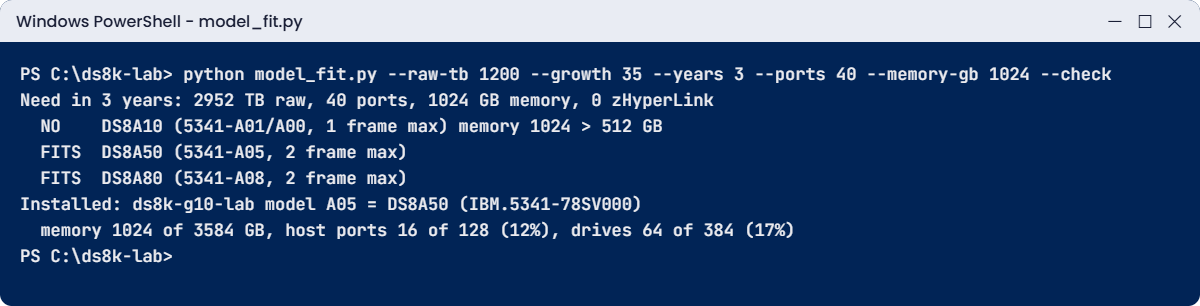
model_fit.py output sizing DS8A10, DS8A50 and DS8A80 in the practice shell lab
model_fit.py on the laptop: DS8A10 drops out once growth and memory are counted, and the check part reads the practice DS8A50.

See how the answer changes. On raw TB alone every model “fits”, but once you add growth the DS8A10 gets tight, above 80% of its 3,686.4 TB limit, and when you add a 1 TB cache need it drops out altogether. The --check part then reads the installed box through the DS CLI and shows how much headroom it has left, and at work you’d point the same script at the dscli command on a jump server.

✅ Checkpoint: the third run prints NO for DS8A10 and the Installed line shows 16 of 128 ports and 64 of 384 drives.

Break It, Then Fix It

People moving between models make two classic mistakes, and you’re going to make both on purpose.

1Break: build a RAID 5 array the old way

An engineer who grew up on a DS8870 types what always worked there, RAID 5. Log in to the practice shell, try it, and answer y to the disclaimer.

Run this:

python ds8sim.py
dscli> mkarray -raidtype 5 -arsite S1

You should see this:

CMUC00536W mkarray: The use of RAID 6 over RAID 5 is highly recommended for increased reliability. Please acknowledge that you understand the risks associated with RAID 5.: Are you sure you want to accept the disclaimer above? [Y/N]: y
CMUN81522E mkarray: RAID 5 is not supported by the device adapter pair.
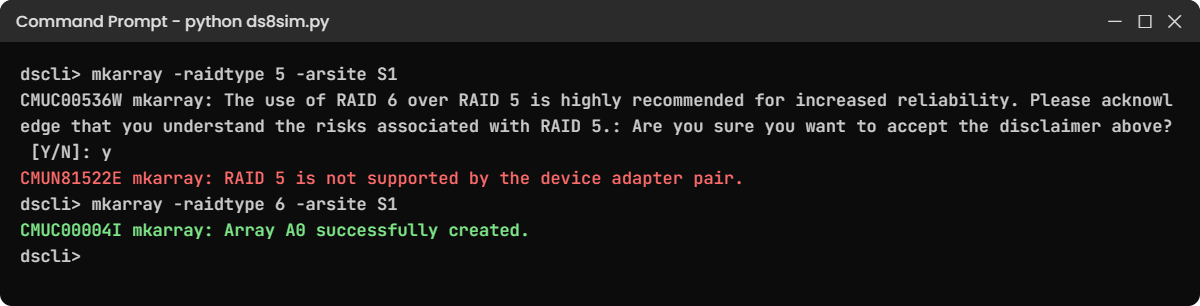
mkarray RAID 5 refused on DS8A00 with CMUN81522E, then RAID 6 created
RAID 5 is refused on G10 (CMUN81522E); RAID 6 works.

Why: the DS8A00 Redbook prints this exact pair of messages (Example 10-29, p. 352), because G10 supports RAID 6 and RAID 10 only. On a DS8880 the same command warns you and needs -force plus an RPQ (Redbook SG24-8323, p. 403-404), and on a DS8870 RAID 5 was normal, so one command gets three different answers across three generations.

Fix it:

dscli> mkarray -raidtype 6 -arsite S1
dscli> lsarray

You should see this:

CMUC00004I mkarray: Array A0 successfully created.
Date/Time: 24 October 2026 19:51:00 UTC IBM DSCLI Version: 7.10.10.348 DS: IBM.2107-78SV001
Array State      Data   RAIDtype    arsite Rank DA Pair DDMcap (10^9B)
======================================================================
A0    Unassigned Normal 6 (5+P+Q+S) S1     -    0       4800.0

✅ Checkpoint: A0 is RAID 6 (5+P+Q+S). Run simctl reset before the next step so the box is clean again.

2Break: run the tool from the wrong folder

On a jump server, scheduled jobs often start in a different folder. Try that yourself: go one folder up and run the check.

Run this:

cd ..
python ds8k-lab\model_fit.py --raw-tb 1200 --check

You should see this:

Need in 3 years: 1200 TB raw, 0 ports, 0 GB memory, 0 zHyperLink
  FITS  DS8A10 (5341-A01/A00, 1 frame max)
  FITS  DS8A50 (5341-A05, 2 frame max)
  FITS  DS8A80 (5341-A08, 2 frame max)
Traceback (most recent call last):
  File "C:\ds8k-lab\model_fit.py", line 45, in <module>
    si = dscli("showsi")[0]
         ~~~~~~~~~~~~~~~^^^
IndexError: list index out of range

Why: the helper runs python ds8sim.py -cfg auto.profile from the current folder, and neither file is there. So the DS CLI part prints an error instead of rows (in the practice shell that’s CMUN00017E, a practice shell message), the list comes back empty and [0] fails. The planning part still ran, which is why the first lines look fine, and that’s the dangerous bit: a report can look half right.

Fix it:

cd C:\ds8k-lab
python model_fit.py --raw-tb 1200 --check

You should see this (last two lines):

Installed: ds8k-g10-lab model A05 = DS8A50 (IBM.5341-78SV000)
  memory 1024 of 3584 GB, host ports 16 of 128 (12%), drives 64 of 384 (17%)

✅ Checkpoint: the Installed line is back. In a scheduled job, set the start folder or use full paths for the profile and the dscli command.

This happened at work

The university that bought seats for one year

A large university was replacing the old storage in its research data centre. The tender asked for “1,200 TB raw, all-flash, IBM DS8000 class”, and the procurement team compared quotes on raw TB and price, so the DS8A10 won easily.

Nobody had asked the research groups about growth. In the first year a genomics project and a new climate-modelling grant came in, and capacity grew by about a third every year. By month 20 the DS8A10 was close to its limit of 192 drives in four HPFE Gen3 pairs, and a DS8A10 can’t take an expansion frame.

Performance suffered first. The system had 256 GB of memory and the nightly analysis jobs kept pushing each other out of cache, so the team bought the upgrade to 512 GB, which helped, but that was already the DS8A10’s ceiling. Looking back, the model had been picked on today’s raw TB alone, with cache, ports and growth never on the comparison sheet and nobody asking the 80% headroom question.

Fixing it cost a second purchase. In year three the university bought a DS8A50, moved the research pools onto it and kept the DS8A10 for administration systems. These days the storage lead sizes every project with a three-to-five-year growth line and checks memory, ports and frames against the model tables before any quote is opened.

Common mistakes and troubleshooting

SymptomLikely causeWhat to check / fix
Model chosen, two years later the frame is fullSized on today’s raw TB onlyGrow the raw TB for 3 to 5 years and keep under about 80% of the model maximum.
No room for an expansion frameDS8A10, DS8910F 994 and DS8884F have no expansion optionCheck the frames column before buying; only DS8A50/DS8A80 take an E05.
Mainframe team asks for zHyperLink on an old boxDS8870 and older have none; DS8880 needs 12+ cores per CPCCheck the features table and core count before promising it.
Old runbook fails with RAID 5 errorsRAID 5 is gone on G10 and needs an RPQ on DS8880/DS8900FUse RAID 6 (default) or RAID 10 and update the runbook.
Two documents give different drive countsThe Redbook text and figure disagree (DS8880 HPFE counts)Quote the source and page; confirm with IBM for a quote.
You report the wrong model in a ticketYou read the storage image ID (IBM.2107) instead of the modelUse showsi: Model and MTS fields.

Two tips. Keep one comparison sheet per project with the source page for every number, so nobody argues from memory, and when a spec isn’t in the Redbook, write “not stated” rather than guessing, because IBM’s Introduction and Planning Guide for that model is the next place to look.

Interview questions

Click a question to open it. Each one is worded the way an interviewer would ask it, and underneath you’ll see why they ask and one way you could answer in your own words.

Fresher level

1. What are the main differences between a DS8880 and a DS8A00, in plain words?

Why they ask this: They want to see that you know the generations by their real building blocks, not just the names. A short, ordered answer shows you have worked with more than one box.

How you might answer: I’d say the design idea hasn’t changed, two CPCs with mirrored NVS, but nearly every part has moved on. The DS8880 uses POWER8, PCIe Gen3 and DC-UPS power with battery sets, and it can still have spinning drives on FC-AL loops next to HPFE Gen2 flash.

The DS8A00 uses Power9+, PCIe Gen4 and iPDUs with NVDIMMs, and it has only HPFE Gen3 NVMe flash, FlashCore Modules included. It also drops RAID 5 and comes in a 42U rack.

2. How do you find out which DS8000 model you are logged in to?

Why they ask this: A simple practical question that shows whether you have actually used the DS CLI. Many people guess from the hostname.

How you might answer: I run showsi and read the Model and MTS fields. On a G10 that’s something like Model A05 and MTS IBM.5341, which means a DS8A50. I don’t go by the storage image ID, because that still starts with IBM.2107 on every generation, and then lspnode confirms the cores per node, which is 10, 20 or 24 on the DS8A00 family.

2–5 years experience

3. A customer wants 1,500 TB raw today and expects 30% growth a year. Walk me through how you pick between DS8A10 and DS8A50.

Why they ask this: This checks sizing method, not memorised numbers. They want to hear growth, headroom and the other limits besides capacity.

How you might answer: First I’d grow the number. 1,500 TB at 30% for three years comes to about 3,300 TB, which is close to 90% of the DS8A10’s 3,686.4 TB, so it already fails my 80% headroom rule. Then I’d check ports, memory and zHyperLink against the model table.

The DS8A10 also tops out at 512 GB memory, 64 ports and one frame, so unless the customer has a firm plan to buy a second box, I’d propose a DS8A50 and put the growth line in the proposal.

4. You inherit a DS8870 and a DS8900F. What changes in your day-to-day work between them?

Why they ask this: They want to know you can run mixed estates safely. Small command differences cause real outages.

How you might answer: On the DS8870 I’d map hosts with mkvolgrp and mkhostconnect, I can still use RAID 5 and TSE, and there’s no Safeguarded Copy. On the DS8900F I’d use mkhost and the newer GUI, RAID 6 is the default and small 16 MiB extents exist. I keep one runbook per generation and check ver -l before I run any script.

Senior level

5. Your CIO asks: “Why can’t we just compare vendors on price per raw TB?” How do you answer?

Why they ask this: Senior engineers must explain trade-offs to managers in business terms. They want a clear, calm argument.

How you might answer: I’d tell them raw TB is the size of the warehouse, not how fast the trucks get in and out. Two boxes with the same raw TB can differ four times over in cache and by half in host ports, and one of them may have no expansion path at all.

Then I’d show a one-page sheet with the growth line, ports, cache, frames, the features we need such as Safeguarded Copy, and power and floor, and after that the price per usable, protected TB over five years, because that’s the number that matters.

6. The Redbook text and figure give different maximums for DS8886 flash drives. What do you do?

Why they ask this: This shows how you handle conflicting documentation, which happens often. They want care, not confidence.

How you might answer: I’d write both numbers down with their page references, design to the lower one, and ask IBM to confirm in writing for the configuration we’re ordering. The text on p. 12 says 384 flash drives and Figure 2-14 says 192, and I’d never present a disputed number to a customer as fact.

Quick quiz

Q1. Which generation was the first to drop RAID 5 completely?

  1. DS8870
  2. DS8880
  3. DS8900F
  4. DS8A00
Show answer

D — The DS8A00 Redbook says RAID 5 is not supported; mkarray -raidtype 5 fails with CMUN81522E. DS8880 and DS8900F still allow it by RPQ.

Q2. How is NVS protected during a power loss on a DS8900F or DS8A00?

  1. Battery sets in DC-UPS units dump NVS to CPC disks
  2. NVDIMMs copy NVS to their own flash, powered by backup power modules
  3. The HMC saves NVS over the network
  4. NVS is not protected
Show answer

B — From DS8900F on, NVDIMMs plus BPMs replace the DC-UPS battery sets and the fire hose dump of earlier models.

Q3. Which models take an expansion frame?

  1. DS8A10 and DS8A50
  2. Only DS8A80
  3. DS8A50 and DS8A80
  4. All DS8A00 models
Show answer

C — Only the A05 (DS8A50) and A08 (DS8A80) base frames take one E05. DS8A10 is single-frame.

Q4. showsi shows Model A01 and MTS IBM.5341. What are you looking at?

  1. DS8A10 racked
  2. DS8A50
  3. DS8950F
  4. DS8886
Show answer

A — 5341-A01 is the racked DS8A10. A00 is the rack-mount DS8A10 for a client rack.

Q5. A plan needs 2,952 TB raw in year three. Why does model_fit.py call the DS8A10 TIGHT?

  1. It exceeds 3,686.4 TB
  2. It is above 80% of the DS8A10 maximum
  3. DS8A10 cannot use FCMs
  4. It needs zHyperLink
Show answer

B — 2,952 TB is about 80% of 3,686.4 TB, so there is almost no room left for year four.

Quick recap

  • All DS8000 generations share two CPCs, mirrored NVS and the same logical model; the parts around them changed.
  • Memory grew from 384 GB (DS8700/DS8800) to 4.8 TB (DS8A80) while drive counts fell to 384 bigger flash drives.
  • Power moved from PPS and batteries to DC-UPS and then to iPDUs with NVDIMMs.
  • RAID 5 is normal on DS8870, RPQ-only on DS8880/DS8900F and gone on DS8A00.
  • Safeguarded Copy needs R8.5+, zHyperLink needs DS8880 or later, mkhost needs R8.3+.
  • Size for growth over 3 to 5 years and check memory, ports, frames and features, not raw TB alone.
  • showsi Model and MTS tell you which box you are on.

Next lesson

Lesson 29: Architecture interview prep and whiteboard drill → You put the whole course together and practise answering like a DS8000 engineer.

Further reading: DS8000 model comparison

Want to go deeper into DS8000 model comparison? Every number in this lesson comes from these IBM Redbooks: DS8A00, SG24-8559 (Figure 2-10 on page 56 for the processor and memory options), DS8900F, SG24-8456 (Tables 2-1 to 2-6, pages 26 to 35), DS8880, SG24-8323 (Figure 2-14 on page 45), DS8870, SG24-8085 (Table 2-1 on page 35) and DS8700 and DS8800, SG24-8886 (Tables 2-1 to 2-4, pages 24 to 35). For the G10 family in detail, go back to Lesson 2: DS8000 models.

You can also see the full plan for this course on the IBM DS8000 Architecture course page.

Scroll to Top

This website uses cookies

We use a few cookies to keep this site working. If you allow it, we also use Google Analytics to count visits so we can improve our lessons. You can accept all, deny the optional ones, or choose what to allow.