
Before you run any command, double-check it
Read every command twice before you press Enter. Check the target: the system or account, the IDs, the names and the sizes. These commands are for learning and were tested in our lab, not on your system. At work, run the read-only list commands first, follow your change process, make sure a backup exists, and ask a second person to check anything that changes or deletes data. You run them at your own risk.
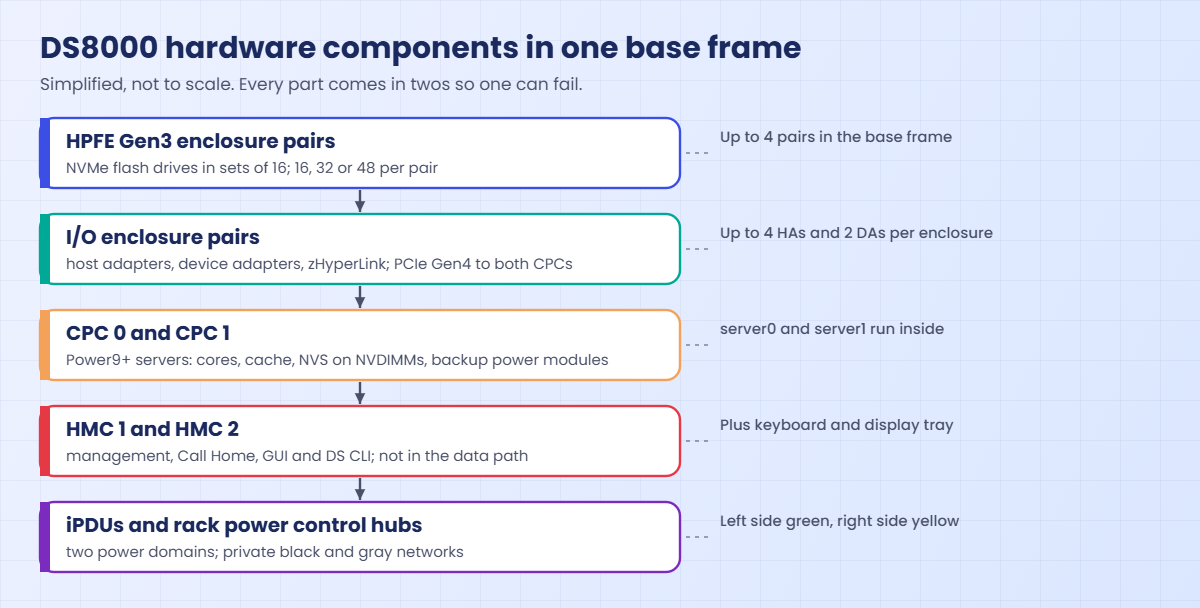
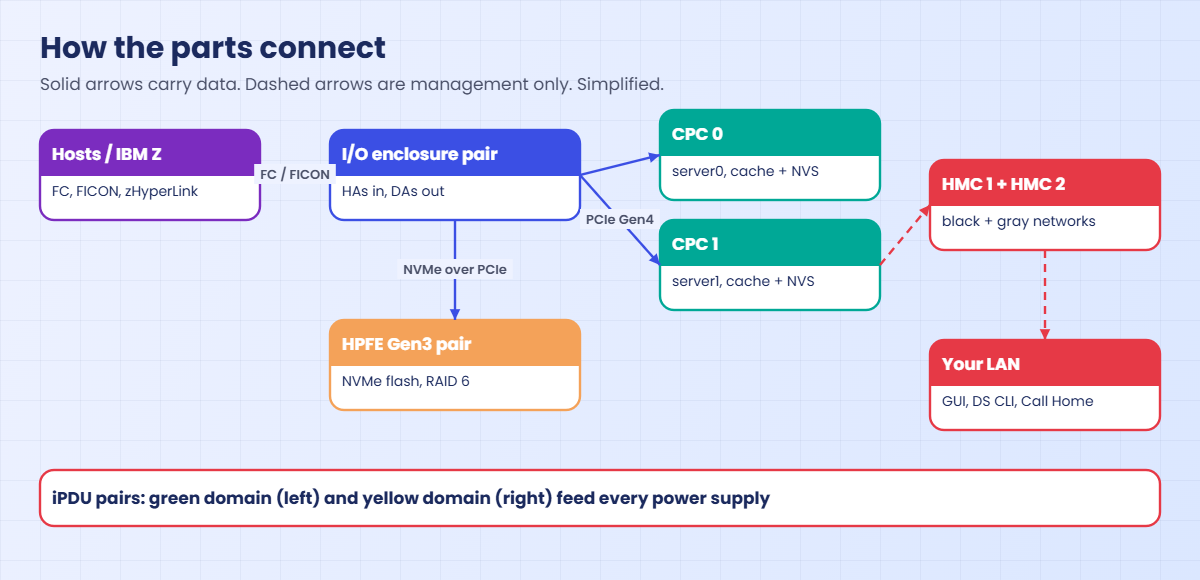
You’ll do the same frame walk in the practice shell, bottom to top with one command per part, and end up with a parts count for the lab DS8A50, the kind of list you keep for every box you look after.
Practice shell note: the practice shell is our teaching tool, not IBM software. Real DS CLI output is similar but not identical, and the part IDs, location codes and serial numbers here are made up for the lab; on a real DS8000 these commands show the real frame.
1Start clean
Start the shell with python ds8sim.py, log in and reset the lab system.
Run this:
simctl resetYou should see this:
SIM0100I simctl: factory state restored (users and passwords kept; use simctl reset -all to reset them too).✅ Checkpoint: You are at the dscli> prompt.
2Bottom of the frame: the two HMCs
Run this:
lshmcYou should see this:
Date/Time: 24 October 2026 10:52:54 UTC IBM DSCLI Version: 7.10.10.348 DS: IBM.2107-78SV001
Name          State  Role         Release                  Management-IP Location-Code    Machine-Type Machine-Model Memory Disk
================================================================================================================================
DS8A50-1A.LAB Online Primary(1)   R10.1 bundle 10.10.106.0 10.0.0.1      U7063CR2.78SV1DD 7063         CR2           33GB   1TB
DS8A50-1B.LAB Online Secondary(2) R10.1 bundle 10.10.106.0 10.0.0.2      U7063CR2.78SV2DD 7063         CR2           33GB   1TB
Machine type 7063, model CR2, is the Power9 HMC from the parts table. One is primary and one secondary, each with its own IP address on your network.
✅ Checkpoint: Two HMCs, both Online.
3The two CPCs
Run this:
lspnodeYou should see this:
Date/Time: 24 October 2026 10:52:54 UTC IBM DSCLI Version: 7.10.10.348 DS: IBM.2107-78SV001
ID State  Release Processor       Memory   Location
==============================================================
00 Online R10.1   Power9+ 20-core 512.0 GB U9009.42A.78SV00-P1
01 Online R10.1   Power9+ 20-core 512.0 GB U9009.42A.78SV01-P1
Node 00 is CPC 0 and node 01 is CPC 1, and both run the same release. On a real system, a node that isn’t Online means its partner is carrying all the work.
✅ Checkpoint: Two nodes, same release, both Online.
4The I/O enclosures
Run this:
lsioenclosureYou should see this:
Date/Time: 24 October 2026 10:52:54 UTC IBM DSCLI Version: 7.10.10.348 DS: IBM.2107-78SV001
ID                 Frame State  Host adapters Device adapters Location code   S/N
========================================================================================
IBM.1400-1B1-78SV0 1     Online 1             2               U1400.1B1.78SV0 YE10SV0001
IBM.1400-1B2-78SV0 1     Online 1             2               U1400.1B2.78SV0 YE10SV0002
IBM.1400-1B3-78SV0 1     Online 2             0               U1400.1B3.78SV0 YE10SV0003
IBM.1400-1B4-78SV0 1     Online 0             0               U1400.1B4.78SV0 YE10SV0004
Four enclosures make two pairs. The first pair (1B1, 1B2) carries the device adapters for the flash and the second pair (1B3, 1B4) holds only host adapters, with none in 1B4 yet, which is a design gap you’ll understand in Lesson 6.
✅ Checkpoint: You counted 4 I/O enclosures, 4 host adapters and 4 device adapters.
5The device adapters
Run this:
lsdacardYou should see this:
Date/Time: 24 October 2026 10:52:54 UTC IBM DSCLI Version: 7.10.10.348 DS: IBM.2107-78SV001
ID                           I/O enclosure      Frame State  DA pair Location code         S/N
=====================================================================================================
IBM.1400-1B1-78SV0/R-1-P1-C6 IBM.1400-1B1-78SV0 1     Online 0       U1400.1B1.78SV0-P1-C6 YA30SV0010
IBM.1400-1B2-78SV0/R-1-P1-C6 IBM.1400-1B2-78SV0 1     Online 0       U1400.1B2.78SV0-P1-C6 YA30SV0020
IBM.1400-1B1-78SV0/R-1-P1-C8 IBM.1400-1B1-78SV0 1     Online 2       U1400.1B1.78SV0-P1-C8 YA30SV0012
IBM.1400-1B2-78SV0/R-1-P1-C8 IBM.1400-1B2-78SV0 1     Online 2       U1400.1B2.78SV0-P1-C8 YA30SV0022
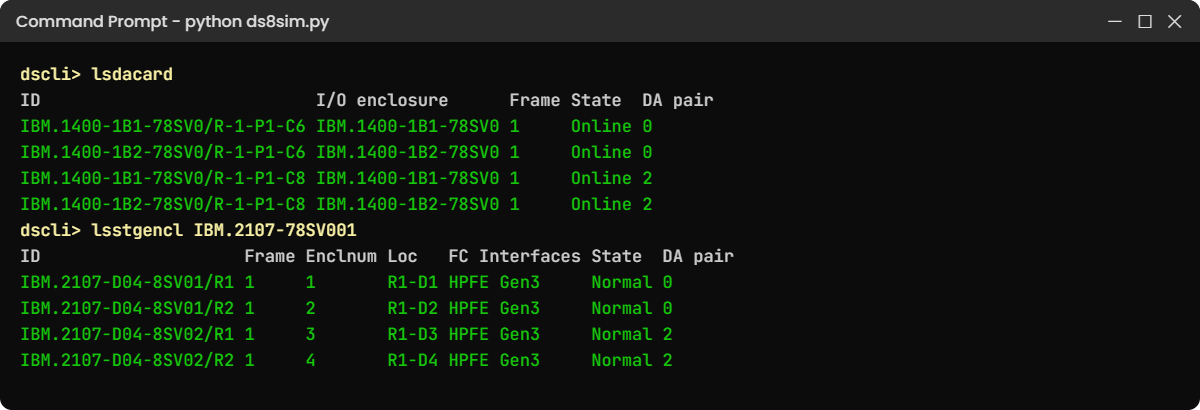
Look at the pairs: DA pair 0 has one card in 1B1 and one in 1B2, and DA pair 2 is laid out the same way. Because each pair is split across two enclosures, losing one enclosure never cuts off the flash.
✅ Checkpoint: Each DA pair has one card in each enclosure of the pair.
6Top of the frame: flash enclosures and drives
Run this:
lsstgencl IBM.2107-78SV001You should see this:
Date/Time: 24 October 2026 10:52:54 UTC IBM DSCLI Version: 7.10.10.348 DS: IBM.2107-78SV001
ID                    Frame Enclnum Loc   FC Interfaces State  DA pair
======================================================================
IBM.2107-D04-8SV01/R1 1     1       R1-D1 HPFE Gen3     Normal 0
IBM.2107-D04-8SV01/R2 1     2       R1-D2 HPFE Gen3     Normal 0
IBM.2107-D04-8SV02/R1 1     3       R1-D3 HPFE Gen3     Normal 2
IBM.2107-D04-8SV02/R2 1     4       R1-D4 HPFE Gen3     Normal 2
Two HPFE Gen3 pairs, 8SV01 on DA pair 0 and 8SV02 on DA pair 2, which fits the rule “one DA pair per HPFE pair”.
Now count the drives. lsdrive prints one line per drive, and -s prints only the IDs.
Run this:
lsdrive -sYou should see this (output shortened):
Date/Time: 24 October 2026 11:05:30 UTC IBM DSCLI Version: 7.10.10.348 DS: IBM.2107-78SV001
IBM.2107-D04-8SV01/R1-P1-D1
IBM.2107-D04-8SV01/R1-P1-D2
...
IBM.2107-D04-8SV02/R1-P1-D31
IBM.2107-D04-8SV02/R1-P1-D32
Look at the IDs: each HPFE pair (8SV01, 8SV02) numbers its drives D1 to D32, so that’s 32 drives per pair in two sets of 16, and 64 drives in total. The 8-drive groups inside each pair are the array sites you saw with lsarraysite in Lesson 1.
✅ Checkpoint: You found 2 HPFE pairs and 64 drives, 32 in each pair.
7Work out one HPFE pair on paper, with Python
The shell shows you the parts, and a small script shows the rules behind them: sets of 16, two array sites per set and two global spares per HPFE pair. Save this as drive_sets.py in your lab folder, next to ds8sim.py.
It’s a planning tool that runs on your laptop, and the plan part needs no DS8000 at all. Step 8 uses its --check part on the lab system.
# drive_sets.py - SaatVedha HPFE Gen3 drive set checker
# A planning tool: it runs on your laptop or jump server, not on the DS8000.
# Plan mode needs no DS8000. --check reads the installed drives through the DS CLI
# (auto.profile: banner off, header on, format delim) and tests them against the same rules.
# Rules from the IBM Redbook SG24-8559-01 (DS8A00, Release 10.1).
# Usage: python drive_sets.py <drives in the HPFE pair> <drive size in TB> <fcm|std> [second type]
#        python drive_sets.py --check
import csv, subprocess, sys
DSCLI = ["python", "ds8sim.py", "-cfg", "auto.profile"]   # at work: ["dscli", "-cfg", "auto.profile"]

def dscli(*args):
    """Run one DS CLI command and return its rows as dictionaries."""
    out = subprocess.run(DSCLI + list(args), capture_output=True, text=True).stdout
    lines = [l for l in out.splitlines() if l and not l.startswith("SaatVedha") and not l.startswith("CMUC")]
    return list(csv.DictReader(lines))

SIZES = {"fcm": [4.8, 9.6, 19.2], "std": [1.6, 1.92, 3.84, 7.68]}

def plan(drives, size, kinds):
    """Print the layout of one HPFE pair, or the rule it breaks. Returns True if it is valid."""
    if len(set(kinds)) > 1:
        print("ERROR: FCM and industry-standard drives can't be mixed in one HPFE pair (Release 10.1).")
        return False
    kind = kinds[0]
    if drives not in (16, 32, 48):
        print(f"ERROR: an HPFE Gen3 pair holds 16, 32 or 48 drives (sets of 16), not {drives}.")
        return False
    if size not in SIZES.get(kind, []):
        print(f"ERROR: {size} TB is not a {kind} size. Choose from {SIZES.get(kind)}.")
        return False
    sets = drives // 16
    sites = drives // 8
    data = 0
    for i in range(sites):
        data += 5 if i < 2 else 6          # first two RAID 6 arrays 5+P+Q+S, the rest 6+P+Q
    print(f"Drive sets      : {sets} x 16 drives, {drives // 2} in each enclosure of the pair")
    print(f"Array sites     : {sites} (8 drives each)")
    print(f"Global spares   : 2")
    print(f"RAID 6 arrays   : 2 x 5+P+Q+S" + (f", {sites - 2} x 6+P+Q" if sites > 2 else ""))
    print(f"Raw capacity    : {drives} x {size} TB = {round(drives * size, 2)} TB")
    print(f"Data drives     : {data} -> {round(data * size, 2)} TB before formatting")
    return True

if len(sys.argv) > 1 and sys.argv[1] == "--check":
    # After installation: group the drives that lsdrive reports by HPFE pair and test each pair.
    pairs = {}
    for d in dscli("lsdrive"):
        pairs.setdefault(d["Storage enclosure"], []).append(d)
    if not pairs:
        print("No drives returned. Check auto.profile and the password file.")
        sys.exit(2)
    bad = 0
    for pair, ds in sorted(pairs.items()):
        classes = sorted({d["Class"] for d in ds})
        kinds = ["fcm" if d["Class"] == "FlashCoreModule" else "std" for d in ds]
        sizes = sorted({round(float(d["Capacity"]) / 1000, 2) for d in ds})
        print(f"HPFE pair {pair}: {len(ds)} drives, {' + '.join(classes)}, {' / '.join(str(s) for s in sizes)} TB")
        if len(sizes) > 1 and len(set(kinds)) == 1:
            print("ERROR: more than one drive size in this pair. Check the order and the drive sets.")
            ok = False
        else:
            ok = plan(len(ds), sizes[0], kinds)
        bad += not ok
    print(f"Result          : {len(pairs) - bad} of {len(pairs)} HPFE pair(s) follow the rules.")
    sys.exit(1 if bad else 0)

if len(sys.argv) < 4:
    print("Usage: python drive_sets.py <drives in the HPFE pair> <drive size in TB> <fcm|std> [second type]")
    sys.exit(1)

drives, size, kind = int(sys.argv[1]), float(sys.argv[2]), sys.argv[3].lower()
kinds = [kind] + ([sys.argv[4].lower()] if len(sys.argv) > 4 else [])
sys.exit(0 if plan(drives, size, kinds) else 2)
Run this (PowerShell):
python drive_sets.py 32 4.8 fcmYou should see this:
Drive sets      : 2 x 16 drives, 16 in each enclosure of the pair
Array sites     : 4 (8 drives each)
Global spares   : 2
RAID 6 arrays   : 2 x 5+P+Q+S, 2 x 6+P+Q
Raw capacity    : 32 x 4.8 TB = 153.6 TB
Data drives     : 22 -> 105.6 TB before formatting
This is one HPFE pair of the lab system. Of the 32 drives, 2 are spares and 8 hold RAID 6 parity, which leaves 22 for data, and FlashCore Modules then compress that data (more on that in Lesson 7).
Try the biggest pair you can buy:
Run this:
python drive_sets.py 48 19.2 fcmYou should see this:
Drive sets      : 3 x 16 drives, 24 in each enclosure of the pair
Array sites     : 6 (8 drives each)
Global spares   : 2
RAID 6 arrays   : 2 x 5+P+Q+S, 4 x 6+P+Q
Raw capacity    : 48 x 19.2 TB = 921.6 TB
Data drives     : 34 -> 652.8 TB before formatting
Eight of those pairs give you the 7,372.8 TB raw maximum of a DS8A50 or DS8A80 from Lesson 2. Type quit when you’ve finished in the shell.
✅ Checkpoint: You can explain why 32 drives give 22 data drives in RAID 6.
8Check the installed drives against the rules
That’s the plan on paper, and after installation you check the real box against the same rules. --check asks the DS CLI for lsdrive, groups the drives by HPFE pair and runs each pair through those rules.
A script can’t answer password prompts, so save your password in a password file first. If security.dat is already in your lab folder from an earlier lesson, skip this command (the shell would tell you the record already exists).
Run this (PowerShell):
python ds8sim.py -hmc1 10.0.0.1 -user admin -passwd YOURPASSWORD managepwfile -action add -name admin -pw YOURPASSWORD -pwfile security.datYou should see this:
CMUC00206I managepwfile: Record 10.0.0.1/admin successfully added to password file security.dat.Then save these eight lines as auto.profile in the same folder. banner: off, header: on and format: delim make every list come back as one header row plus comma-separated rows, which Python reads easily. Implementation Lesson 2 explains profiles in full.
auto.profile:
hmc1: 10.0.0.1
username: admin
pwfile: security.dat
devid: IBM.2107-78SV001
banner: off
header: on
format: delim
delim: ,
Run this:
python drive_sets.py --checkYou should see this:
HPFE pair IBM.2107-D04-8SV01: 32 drives, FlashCoreModule, 4.8 TB
Drive sets      : 2 x 16 drives, 16 in each enclosure of the pair
Array sites     : 4 (8 drives each)
Global spares   : 2
RAID 6 arrays   : 2 x 5+P+Q+S, 2 x 6+P+Q
Raw capacity    : 32 x 4.8 TB = 153.6 TB
Data drives     : 22 -> 105.6 TB before formatting
HPFE pair IBM.2107-D04-8SV02: 32 drives, FlashCoreModule + FlashTier2, 3.84 / 4.8 TB
ERROR: FCM and industry-standard drives can't be mixed in one HPFE pair (Release 10.1).
Result          : 1 of 2 HPFE pair(s) follow the rules.
Pair 8SV01 passes with 32 FlashCore Modules of one size, the same as the plan from step 7, and pair 8SV02 fails, which is the check doing its job. The practice shell simplifies that pair by putting FCM and tier 2 drives in it together, something a real Release 10.1 system doesn’t allow, and Lesson 7 comes back to it.
At work you run --check after every drive upgrade, before anyone builds arrays on the new drives.
✅ Checkpoint: The check passes pair 8SV01 and flags the mixed drive types in pair 8SV02.
Two things go wrong in real frames all the time: a flash drive fails, or someone plans hardware the rules don’t allow. You’ll do both on purpose.
1Break it: fail a flash drive
You need an array to fail a drive in, so save this one-line setup file as setup-03.txt and run it in script mode (arrays get built properly in Lesson 10).
setup-03.txt:
mkarray -raidtype 6 -arsite S1Run this (PowerShell):
python ds8sim.py -hmc1 10.0.0.1 -user admin -passwd YOURPASSWORD -script setup-03.txtYou should see this:
CMUC00004I mkarray: Array A0 successfully created.Now start the shell, fail a drive in array site S1 and see what it did.
Run this:
simctl drivefail S1
lsarray -l
lsdrive -l
You’ll see this (lsdrive output shortened):
dscli> simctl drivefail S1
SIM0110I simctl: drive IBM.2107-D04-8SV01/R1-P1-D1 failed. Array A0 is rebuilding onto a spare (about 10 simulated minutes; use simctl tick).
dscli> lsarray -l
Date/Time: 24 October 2026 10:52:54 UTC IBM DSCLI Version: 7.10.10.348 DS: IBM.2107-78SV001
Array State      Data       RAIDtype    arsite Rank DA Pair DDMcap (10^9B) diskclass       encrypt
====================================================================================================
A0    Unassigned Rebuilding 6 (5+P+Q+S) S1     -    0       4800.0         FlashCoreModule supported
dscli> lsdrive -l
ID                           Storage enclosure  Frame State  Class           Capacity Array Location  Interface Firmware S/N
===============================================================================================================================
IBM.2107-D04-8SV01/R1-P1-D1  IBM.2107-D04-8SV01 1     Failed FlashCoreModule 4800.0   A0    R1-P1-D1  NVMe      4.1.2    SVS101
Why: one drive in array A0 died, and the device adapter pair started rebuilding its data onto a global spare straight away. Data Rebuilding means the array still serves I/O but has used up one of its two RAID 6 safety margins, while the enclosure stays Normal because only one slot failed.
Fix: on a real DS8000 the HMC raises a serviceable event and calls IBM, and an SSR replaces the drive, so your part is to check the call went out and watch the rebuild. In the shell, move the clock forward.
Run this:
simctl tick
lsarray -l
You should see this:
SIM0111I simctl: array A0 rebuild complete; the failed drive was replaced and is now the spare.
SIM0112I simctl: clock advanced 10 minutes.
Date/Time: 24 October 2026 11:02:54 UTC IBM DSCLI Version: 7.10.10.348 DS: IBM.2107-78SV001
Array State      Data   RAIDtype    arsite Rank DA Pair DDMcap (10^9B) diskclass       encrypt
================================================================================================
A0    Unassigned Normal 6 (5+P+Q+S) S1     -    0       4800.0         FlashCoreModule supported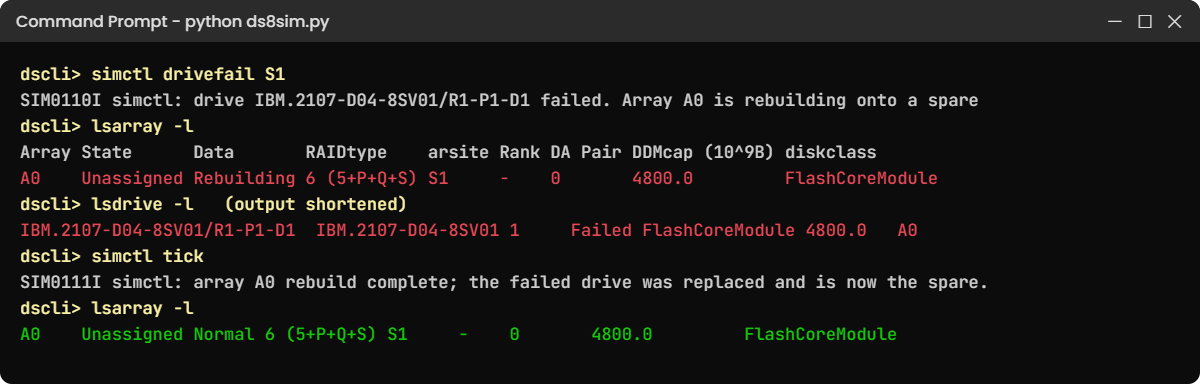
✅ Checkpoint: Array A0 shows Normal again.
2Break it: plan an HPFE pair the rules don’t allow
A buyer wants to save money: “40 drives of 3.84 TB, and let’s put a few FlashCore Modules in the same drawer.” Check both ideas.
Run this (PowerShell):
python drive_sets.py 40 3.84 std
python drive_sets.py 32 4.8 fcm std
You’ll get this:
ERROR: an HPFE Gen3 pair holds 16, 32 or 48 drives (sets of 16), not 40.
ERROR: FCM and industry-standard drives can't be mixed in one HPFE pair (Release 10.1).
Why: flash comes in drive sets of 16, split 8 and 8 across the two enclosures, so 40 isn’t possible. And with Release 10.1, one HPFE pair (and one storage pool) holds either FlashCore Modules or industry-standard drives, never a mix.
Fix: order 32 or 48 drives, and put each drive type in its own HPFE pair.
Run this:
python drive_sets.py 48 3.84 stdYou should see this:
Drive sets      : 3 x 16 drives, 24 in each enclosure of the pair
Array sites     : 6 (8 drives each)
Global spares   : 2
RAID 6 arrays   : 2 x 5+P+Q+S, 4 x 6+P+Q
Raw capacity    : 48 x 3.84 TB = 184.32 TB
Data drives     : 34 -> 130.56 TB before formatting
✅ Checkpoint: You can explain why “40 drives” and “mixed drawers” both fail.