Attach Linux, Windows and VMware hosts (multipath)
-
Phase 0: Before you start
-
Phase 1: Plan and install
-
Phase 2: Build the storage
-
Phase 3: Copy Services
-
Phase 4: Run it day to day
-
Phase 5: Troubleshooting and career
DS8000 multipath is what turns four paths to one LUN into one safe disk on the host. Without it, a Linux server sees the same DS8000 volume as /dev/sdb, /dev/sdc and more, and one bad cable or port can take an application down. With it, the host spreads I/O over all the paths and carries on when one of them breaks.
First you check the paths from the DS8000 side, and then you build a real two-path setup on your laptop, where an Ubuntu 24.04 VirtualBox VM presents an iSCSI LUN that claims to be an IBM 2107900 (the DS8000 product ID) and Linux DM Multipath groups both paths into one device. After that you’ll look at the matching tools on Windows (MPIO with MSDSM) and VMware ESXi (NMP and Round Robin).
You’ll need the host mappings from Lesson 14 (or setup-14.txt), plus VirtualBox with an Ubuntu Server 24.04 VM called saat-host1 that has two host-only network adapters.
| Time | You need | By the end you can |
|---|---|---|
| 90 minutes | Practice shell with setup-14.txt; VirtualBox VM saat-host1 (Ubuntu Server 24.04, 2 vCPU, 2 GB RAM, two host-only NICs) | Check host paths on the DS8000, configure Linux DM Multipath for IBM 2107900 LUNs, test a path failure, and explain MPIO/MSDSM on Windows and NMP Round Robin on ESXi |
What it is, in one line
DS8000 multipath is host software (DM Multipath on Linux, MPIO with MSDSM on Windows, NMP on ESXi) that sees every path to a DS8000 LUN, combines them into one device, balances I/O and fails over when a path breaks.
In Simple Words
Two roads to the same school
A school bus driver knows two ways to the school, the main road and the river road, and on a normal day he sends half the buses each way so neither road gets jammed. One morning a tree comes down across the main road. He doesn’t cancel school, he just sends every bus by the river road, and the children turn up a little late but they all turn up.
If he’d only known the main road, the whole school would have stayed home that day. Multipath is that driver, the roads are the cables, switches and DS8000 ports between a server and its disk, and the school is the LUN.
Engineer's View
Multipathing with a DS8000
Every DS8000 LUN reaches a host over several paths, one for each HBA port through each zoned DS8000 port, so two HBAs zoned to two DS8000 ports in different I/O enclosures give you four paths. The host OS sees one SCSI device per path, and they all carry the same WWID (the volume GUID, which starts with 6005076 for IBM).
- Linux: Device-Mapper Multipath (
multipath-tools). Ubuntu 24.04 ships version 0.9.4, and its built-in hardware table already has an entry for vendor IBM, product^2107900, which groups paths by priority, fails back straight away and queues I/O if every path is lost. - Windows: the native MPIO feature with the Microsoft DSM (MSDSM), since IBM’s old SDDDSM is end of service.
- AIX: native MPIO with AIXPCM (SDDPCM is end of service).
- VMware ESXi: the Native Multipathing Plug-in (NMP), with a SATP that claims the device and a PSP (path selection policy) such as Round Robin.
- IBM Z: there’s no host software to install, because the channel subsystem uses Dynamic Path Selection and Dynamic Path Reconnect over the paths defined in HCD.
IBM’s guidance is at least two independent connections to host adapters in different I/O enclosures, more than one switch or director, and two to four paths per LUN for most servers. Up to eight can make sense for very high data rates, but beyond that you only get more devices and more complexity.
For FB volumes the DS8000 product ID is 2107900, which you already saw as deviceMTM 2107-900 in lsfbvol back in Lesson 13.
On DS8900F: the product ID and the host-side setup are the same.
How it works, step by step
You set multipath up on the host, but you check it from both ends. This is the flow for a new Linux server.
1Confirm the paths on the DS8000
lshostport -login shows each host WWPN and the DS8000 port it’s using. The minimum is two HBAs on two DS8000 ports in different I/O enclosures, and if you only see one, stop and get the zoning fixed before you touch the host.
2Install multipath on the host
On Ubuntu it’s apt install multipath-tools, on RHEL dnf install device-mapper-multipath followed by mpathconf --enable, and on Windows you add the Multipath I/O feature. ESXi already has NMP built in.
3Let the built-in rules match the DS8000
DM Multipath reads the SCSI vendor and product from each path, and for IBM 2107900 the built-in entry applies, so normally you don’t add anything device-specific. Keep /etc/multipath.conf short, with defaults such as user_friendly_names and find_multipaths and a blacklist only if you need one.
4Rescan and build the maps
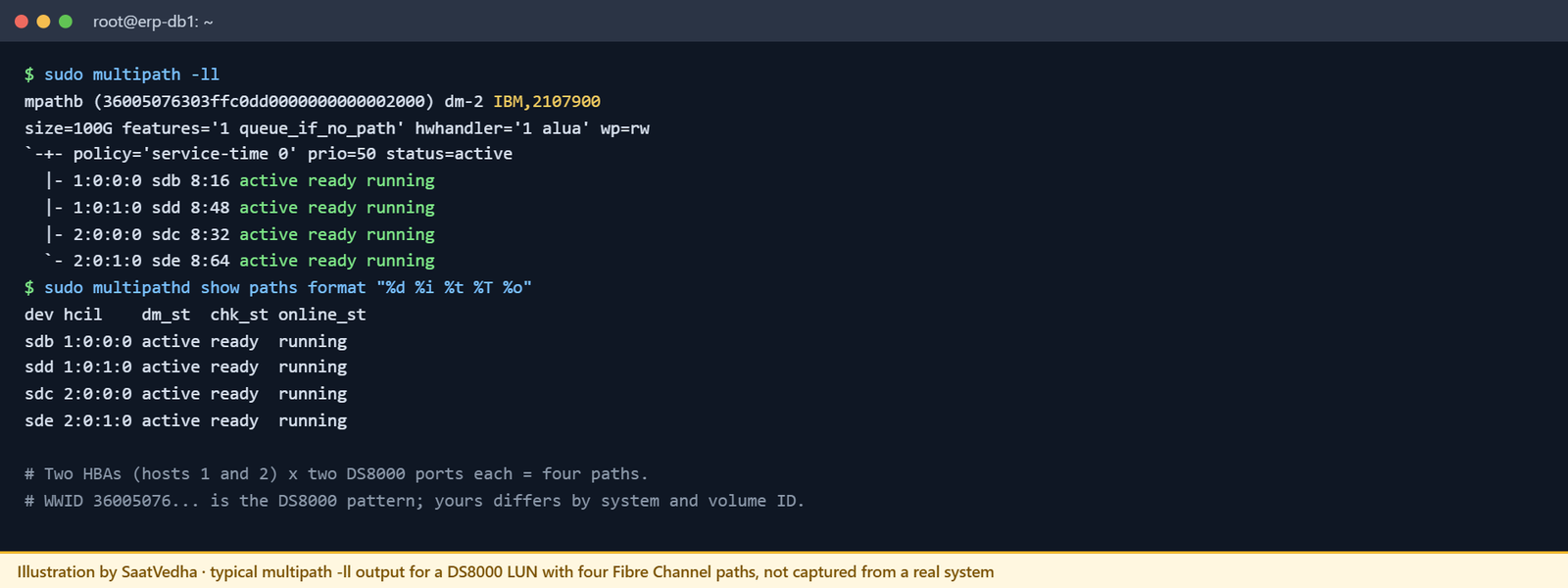
Rescan the SCSI buses, restart multipathd and run multipath -ll. You want each LUN to appear once, as mpathX or its WWID, with every path listed as active ready running.
5Use only the multipath device
File systems, LVM and databases have to sit on /dev/mapper/mpathX and never on /dev/sdX, because a file system on a single sd path loses its disk the moment that path fails.
6Test a path failure before go-live
While I/O is running, take one path away (pull a cable, disable a switch port, or in the lab block one iSCSI portal). multipath -ll should show that path as failed faulty while the I/O carries on, and when you restore it, check it goes back to active.
7Repeat for each OS
Windows and ESXi work on the same idea, only with different tools.
| OS | Multipath stack | Check paths with | Typical policy |
|---|---|---|---|
| Linux | multipath-tools | multipath -ll | Built-in IBM 2107900 entry, group_by_prio |
| Windows | MPIO + MSDSM | mpclaim -s -d | Round Robin, set per disk or globally |
| VMware ESXi | NMP (SATP + PSP) | esxcli storage nmp device list | Round Robin (VMW_PSP_RR) where IBM and VMware recommend it |
| AIX | MPIO + AIXPCM | lspath | Native PCM defaults |
Hands-on lab: two-path DS8000-style LUN with Linux multipath
Before you run any command, double-check it
Read every command twice before you press Enter. Check the target: the system or account, the IDs, the names and the sizes. These commands are for learning and were tested in our lab, not on your system. At work, run the read-only list commands first, follow your change process, make sure a backup exists, and ask a second person to check anything that changes or deletes data. You run them at your own risk.
Part A checks the DS8000 side in the practice shell, and Part B builds a real two-path Linux setup in VirtualBox. A laptop has no Fibre Channel, so the VM uses two iSCSI paths (one per host-only NIC) to a LIO target on the same VM, and because the target reports vendor IBM and product 2107900, multipath treats the LUN like a DS8000 volume.
Practice shell note: Part A runs in our practice shell, which isn’t IBM software, so the output is real but a real DS CLI looks slightly different, and the SIM messages come from the shell. Part B runs on your own Ubuntu VM. We captured the multipath -t and package outputs on Ubuntu 24.04 ourselves, while VM outputs marked “something like this” are examples and yours will have different names, numbers and WWIDs.
1Part A: check the paths on the DS8000
Run this (practice shell, after setup-14.txt):
showhost erp_db1
lshostport -loginYou should see this:
dscli> showhost erp_db1
Date/Time: 24 October 2026 14:09:40 UTC IBM DSCLI Version: 7.10.10.348 DS: IBM.2107-78SV001
Name erp_db1
Type Linux Server
State Online
AddrMode scsimap256
Volumes 8
Host ports 2
I/O ports 16 (all)
AddrDiscovery lunpolling
LBS 512
Cluster erp_cluster
dscli> lshostport -login
Date/Time: 24 October 2026 14:09:40 UTC IBM DSCLI Version: 7.10.10.348 DS: IBM.2107-78SV001
WWNN WWPN Host I/O ports ESSIOport
=============================================================
20000024FF2D0F86 21000024FF2D0F86 erp_db1 16 (all) I0032
20000024FF2D0F87 21000024FF2D0F87 erp_db1 16 (all) I0042
20000120FA13B914 10000090FA13B914 erp_db2 16 (all) I0032
20000120FA13B915 10000090FA13B915 erp_db2 16 (all) I0042erp_db1 has two host ports, one logged in on I0032 (I/O enclosure 1B2) and one on I0042 (also 1B2 in this small lab box), whereas on a real build you’d want them in two different enclosures. With 8 volumes and 2 paths each, the host sees 16 SCSI devices before multipath gets involved.
✅ Checkpoint: Each ERP host has exactly two logged-in WWPNs.
2Part B: prepare saat-host1
In VirtualBox, give the VM two host-only adapters, say on networks 192.168.56.0/24 and 192.168.57.0/24, set the addresses 192.168.56.10 and 192.168.57.10 in netplan and then install the packages.
Run this (on saat-host1):
sudo apt update
sudo apt install -y targetcli-fb open-iscsi multipath-tools lsscsi
dpkg -l multipath-tools open-iscsi targetcli-fb | tail -3You should see this (captured on Ubuntu 24.04):
$ dpkg -l multipath-tools open-iscsi targetcli-fb | tail -3
ii multipath-tools 0.9.4-5ubuntu8.2 amd64 maintain multipath block device access
ii open-iscsi 2.1.9-3ubuntu5.5 amd64 iSCSI initiator tools
ii targetcli-fb 1:2.1.53-1ubuntu3 all Command shell for managing the Linux LI✅ Checkpoint: multipath-tools 0.9.4 and open-iscsi 2.1.9 are installed.
3Create a LUN that looks like a DS8000 volume
Create a 2 GiB file-backed LUN and set its SCSI vendor and product before you export it, because LIO won’t let you change them once the LUN is in use.
Run this:
sudo mkdir -p /var/lib/iscsi_disks
sudo targetcli /backstores/fileio create name=ds8k_lun0 file_or_dev=/var/lib/iscsi_disks/lun0.img size=2G
WWN=$(sudo find /sys/kernel/config/target/core -path '*ds8k_lun0/wwn' -type d)
echo IBM | sudo tee $WWN/vendor_id
echo 2107900 | sudo tee $WWN/product_idYou should see something like this (from a VM, not captured by us):
Created fileio ds8k_lun0 with size 2147483648
IBM
2107900✅ Checkpoint: tee echoed IBM and 2107900 without “Invalid argument”.
4Publish it on two iSCSI portals
Run this:
T=iqn.2026-10.com.saatvedha:ds8k-lab
sudo targetcli /iscsi create $T
sudo targetcli /iscsi/$T/tpg1/luns create /backstores/fileio/ds8k_lun0
sudo targetcli /iscsi/$T/tpg1/portals delete 0.0.0.0 3260
sudo targetcli /iscsi/$T/tpg1/portals create 192.168.56.10 3260
sudo targetcli /iscsi/$T/tpg1/portals create 192.168.57.10 3260
INIT=$(sudo awk -F= '/^InitiatorName/{print $2}' /etc/iscsi/initiatorname.iscsi)
sudo targetcli /iscsi/$T/tpg1/acls create $INIT
sudo targetcli saveconfigThe ACL does the job of the DS8000 host mapping here, so only this initiator name can see the LUN.
✅ Checkpoint: sudo targetcli ls shows one LUN, two portals and one ACL.
5Log in over both paths
Start by shortening the iSCSI replacement timeout, so multipath can fail over in a few seconds instead of waiting the default 120 seconds, and then discover and log in to both portals.
Run this:
sudo sed -i 's/^node.session.timeo.replacement_timeout = 120/node.session.timeo.replacement_timeout = 15/' /etc/iscsi/iscsid.conf
sudo iscsiadm -m discovery -t sendtargets -p 192.168.56.10
sudo iscsiadm -m discovery -t sendtargets -p 192.168.57.10
sudo iscsiadm -m node --login
lsscsi | grep 2107900You should see something like this (from a VM, not captured by us):
[2:0:0:0] disk IBM 2107900 4.0 /dev/sdb
[3:0:0:0] disk IBM 2107900 4.0 /dev/sdcYou get two SCSI disks for the same LUN, one per path, which is the same situation as a server zoned to two DS8000 ports.
✅ Checkpoint: Two IBM 2107900 disks appear.
6See the built-in DS8000 rule and turn multipath on
Run this:
multipath -t | grep -B2 -A4 2107900
sudo tee /etc/multipath.conf <<'EOF'
defaults {
user_friendly_names yes
find_multipaths yes
}
EOF
sudo systemctl restart multipathd
sudo multipath -llYou should see this for the first command (captured on Ubuntu 24.04):
$ multipath -t | grep -B2 -A4 2107900
device {
vendor "IBM"
product "^2107900"
path_grouping_policy "group_by_prio"
failback "immediate"
no_path_retry "queue"
}And something like this for multipath -ll (from a VM, not captured by us):
mpatha (36001405b3c3a1f2e4d6b8a9c0d1e2f30) dm-0 IBM,2107900
size=2.0G features='1 queue_if_no_path' hwhandler='1 alua' wp=rw
`-+- policy='service-time 0' prio=50 status=active
|- 2:0:0:0 sdb 8:16 active ready running
`- 3:0:0:0 sdc 8:32 active ready runningThere’s one device, mpatha, with two healthy paths, and queue_if_no_path comes from the IBM rule (no_path_retry queue). Your WWID won’t match ours, since LIO uses its own 6001405 prefix while a real DS8000 LUN starts with 6005076.
✅ Checkpoint: multipath -ll lists one map with two “active ready running” paths.

7Fail one path while writing
Both portals are on the same VM, so pulling a virtual cable won’t break anything because the traffic never leaves the VM. Block one portal with a firewall rule instead, while a write runs in a second terminal.
Run this:
sudo mkfs.ext4 -q /dev/mapper/mpatha && sudo mount /dev/mapper/mpatha /mnt
sudo dd if=/dev/zero of=/mnt/test bs=1M count=1500 oflag=direct &
sudo iptables -I INPUT -d 192.168.57.10 -p tcp --dport 3260 -j DROP
sleep 30; sudo multipath -ll
sudo iptables -D INPUT -d 192.168.57.10 -p tcp --dport 3260 -j DROPYou should see something like this (from a VM, not captured by us):
mpatha (36001405b3c3a1f2e4d6b8a9c0d1e2f30) dm-0 IBM,2107900
size=2.0G features='1 queue_if_no_path' hwhandler='1 alua' wp=rw
`-+- policy='service-time 0' prio=50 status=active
|- 2:0:0:0 sdb 8:16 active ready running
`- 3:0:0:0 sdc 8:32 failed faulty runningdd keeps writing through sdb, and once you delete the rule, iscsid reconnects and the path is back to active within a minute.
✅ Checkpoint: One path failed, the write finished, and the path came back.
Break It, Then Fix It
Two failures this time: one where multipath doesn’t start properly because of a typo in the config, and one where the host had no multipath at all.
1Break it: a one-letter typo in multipath.conf
Write the config with user_friendly_name (the s is missing) and check it.
Run this (on saat-host1):
sudo tee /etc/multipath.conf <<'EOF'
defaults {
user_friendly_name yes
find_multipaths yes
}
EOF
sudo multipath -t > /dev/nullYou’ll get this (captured on Ubuntu 24.04):
$ sudo multipath -t > /dev/null
1222.062271 | /etc/multipath.conf line 2, invalid keyword in the defaults section: user_friendly_nameWhy: multipath warns about keywords it doesn’t know and then ignores them. Nothing stops, so a typo in a timeout or blacklist line can sit there for months while the setting you meant never gets applied.
Fix: correct the keyword, run multipath -t again until it prints no warnings and restart multipathd. Add multipath -t > /dev/null to every config change you make.
✅ Checkpoint: multipath -t prints no warning lines.
2Break it: the host used a single path device
On the DS8000 side, simulate a dead cable or SFP on I0032 and see what the hosts lose (simctl portfail is practice-only).
Run this (practice shell):
simctl portfail I0032
lsioport I0032 I0042
lshostport -login
lshost -lYou’ll get this:
dscli> simctl portfail I0032
SIM0105I simctl: I/O port I0032 has no light (cable or SFP problem).
dscli> lsioport I0032 I0042
Date/Time: 24 October 2026 14:09:40 UTC IBM DSCLI Version: 7.10.10.348 DS: IBM.2107-78SV001
ID WWPN State Type topo portgrp Security
===========================================================================================
I0032 500507630303B0DD No light detected Fibre Channel-SW SCSI-FCP 0 Disabled
I0042 500507630304B0DD Communication established Fibre Channel-SW SCSI-FCP 0 Disabled
dscli> lshostport -login
Date/Time: 24 October 2026 14:09:40 UTC IBM DSCLI Version: 7.10.10.348 DS: IBM.2107-78SV001
WWNN WWPN Host I/O ports ESSIOport
=============================================================
20000024FF2D0F87 21000024FF2D0F87 erp_db1 16 (all) I0042
20000120FA13B915 10000090FA13B915 erp_db2 16 (all) I0042
dscli> lshost -l
Date/Time: 24 October 2026 14:09:40 UTC IBM DSCLI Version: 7.10.10.348 DS: IBM.2107-78SV001
Name Type State Cluster AddrMode Volumes Host ports I/O ports
================================================================================
erp_db1 Linux Server Online erp_cluster scsimap256 8 2 16 (all)
erp_db2 Linux Server Online erp_cluster scsimap256 8 2 16 (all)
wh_esx1 VMware Offline - scsimap256 2 0 16 (all)Why: each ERP host lost one of its two paths but stays Online, because its other WWPN is still logged in through I0042. A host running multipath won’t even notice. But a host that mounted /dev/sdb directly, where sdb happened to be the I0032 path, has just lost its file system.
Fix: on the DS8000, raise a cable or SFP job for I0032, and on the hosts, make sure every file system and volume group sits on /dev/mapper/mpath*. Then bring the port back and confirm both paths have returned.
Run this:
simctl portfix I0032
lshostport -loginYou should see this:
dscli> simctl portfix I0032
SIM0106I simctl: I/O port I0032 has light again.
dscli> lshostport -login
Date/Time: 24 October 2026 14:09:40 UTC IBM DSCLI Version: 7.10.10.348 DS: IBM.2107-78SV001
WWNN WWPN Host I/O ports ESSIOport
=============================================================
20000024FF2D0F86 21000024FF2D0F86 erp_db1 16 (all) I0032
20000024FF2D0F87 21000024FF2D0F87 erp_db1 16 (all) I0042
20000120FA13B914 10000090FA13B914 erp_db2 16 (all) I0032
20000120FA13B915 10000090FA13B915 erp_db2 16 (all) I0042✅ Checkpoint: All four ERP WWPNs are logged in again.

3Windows and ESXi, side by side
On Windows Server, add the feature, let MSDSM claim the DS8000 LUNs, set Round Robin and check the paths (these are example commands, so run them on your own server):
Install-WindowsFeature -Name Multipath-IO
New-MSDSMSupportedHW -VendorId IBM -ProductId 2107900
Set-MSDSMGlobalDefaultLoadBalancePolicy -Policy RR
mpclaim -s -dOn ESXi, list which SATP and PSP claimed each DS8000 device, and set Round Robin on a device if your IBM and VMware guidance tells you to:
esxcli storage nmp device list
esxcli storage nmp device set --device naa.6005076... --psp VMW_PSP_RROn both you’re looking for the same result: each DS8000 LUN shows once, with all its paths listed and none dead. Use the naa ID from the device list, which ends with the DS8000 volume ID.
This happened at work
The order database that died on a cable swap
A national retailer moved its order database onto a new DS8000. The Linux team built the server from an old template that had never been used with SAN storage, while the DS8000 side was spot on, with two HBAs zoned to two host adapters in different I/O enclosures and four paths per LUN.
Nobody had put multipath-tools on the template. The DBA saw sixteen disks for four LUNs, picked /dev/sdb to /dev/sde because “they were first”, built LVM on them and went live.
Three weeks later, during a planned change, a data centre engineer swapped a dirty cable on one DS8000 port. The DS8000 and the switches didn’t blink, but on the database server two of the four sd devices under LVM disappeared for 40 seconds, the volume group went into error and the database crashed right in the middle of the lunch-time order peak.
Getting back took four hours. They installed multipath, rebuilt LVM on the mpath devices from a backup and replayed the logs. The retailer lost orders, and the storage team lost a fair bit of trust, even though the storage was never the problem.
Now their go-live checklist has three lines for every SAN host: multipath -ll shows each LUN once with all paths active, nothing is mounted on a plain sd device, and someone pulls a path on purpose before the application goes live.
Common mistakes and troubleshooting
| Symptom | Likely cause | What to check / fix |
|---|---|---|
| Host sees 4 or 8 disks per LUN | No multipath, or multipathd not running | Install multipath-tools, check systemctl status multipathd, run multipath -ll |
| multipath -ll empty although paths exist | find_multipaths and only one path seen, or blacklist | Check the path count in lsscsi, the blacklist and multipath -v3 |
| Path failure freezes I/O for 2 minutes | iSCSI replacement_timeout 120 s, or no_path_retry queue with no path left | Lower replacement_timeout and check all paths, not only one |
| Settings ignored after a config change | Keyword typo | multipath -t > /dev/null must print nothing |
| File system lost when one cable moved | Mounted on /dev/sdX | Use /dev/mapper/mpath* everywhere, including fstab |
| tee says Invalid argument on vendor_id (lab) | LUN already exported | Set vendor and product before creating the LUN |
| Windows shows duplicate disks | MPIO feature not installed or LUN not claimed | Install Multipath-IO, run New-MSDSMSupportedHW and reboot |
| ESXi uses only one path | PSP is Most Recently Used or Fixed | Check esxcli storage nmp device list and set the PSP per IBM/VMware guidance |
A good rule of thumb is to count the paths at both ends, because the DS8000 (lshostport -login) and the host (multipath -ll, mpclaim -s -d or esxcli) should agree on the number.
Interview questions
Click a question to open it. They’re written the way an interviewer would ask them, and under each one you’ll find why they ask it and one way you could answer in your own words.
Fresher level
1. Why does a server need multipath software when it is connected to a DS8000?
Why they ask this: It’s a basic check that you understand paths and devices.
How you might answer: Each DS8000 LUN reaches the server over several paths, and without multipath the OS shows a separate disk for each one. Multipath combines them into one device, balances the I/O and fails over when a path breaks, so without it one bad cable or port can bring the application down.
2. Which multipath software do you use with a DS8000 on Linux, Windows and VMware?
Why they ask this: They want to see your knowledge is current, not stuck on old IBM drivers.
How you might answer: On Linux I’d use the native DM Multipath from multipath-tools, on Windows the built-in MPIO feature with the Microsoft DSM, and on ESXi VMware NMP. IBM’s old SDDDSM and SDDPCM are end of service.
2–5 years experience
3. Walk me through bringing a new Linux host with four paths per LUN onto a DS8000.
Why they ask this: They’re after a procedure that’s checked from start to finish.
How you might answer: On the DS8000 I’d confirm with lshostport -login that both HBAs are logged in through ports in different I/O enclosures, and map the volumes. On the host I install multipath-tools and keep multipath.conf minimal, since the built-in IBM 2107900 rule already applies, and I check it with multipath -t. Then I rescan, restart multipathd and make sure multipath -ll shows each LUN once with four active paths. File systems go on /dev/mapper devices, and before go-live I pull one path to prove failover works.
4. A user says their server froze for two minutes during a SAN switch reboot, then carried on. What do you look at?
Why they ask this: It tests whether you understand timeouts and queueing.
How you might answer: A freeze like that fits I/O queueing while the paths were down. I’d check multipath -ll for how many paths were left, the HBA or iSCSI timeouts like dev_loss_tmo or replacement_timeout, and the no_path_retry setting. If the host lost every path, then zoning or cabling put everything through that one switch, and that’s what needs fixing.
Senior level
5. How do you design and prove host resilience for a critical database on a DS8000?
Why they ask this: At senior level you own availability end to end, not just the storage part.
How you might answer: I’d design two fabrics, two HBAs and DS8000 ports on different host adapters in different I/O enclosures, giving two to four paths per LUN, with the OS-native multipath stack on vendor defaults and every volume group on multipath devices. Before go-live I run failure tests while the database is running: pull each path, fail a switch and reset a DS8000 port, watching latency and logs. I also write down the expected path counts so monitoring can alert when one goes missing.
6. During a DS8000 code upgrade, each host adapter port goes offline briefly. What do you check beforehand?
Why they ask this: They want to see that you think ahead about planned maintenance.
How you might answer: I’d check that every host has paths through at least two host adapters in different I/O enclosures, comparing lshostport -login on the DS8000 with multipath -ll or mpclaim on the hosts. Any host with a single path or no multipath either gets fixed first or gets downtime scheduled. IBM’s code upgrade can take host adapter ports offline, so the single-path hosts are where the risk is.
Quick quiz
Q1. What SCSI product ID does a DS8000 FB volume report?
- 2145
- 2107900
- DS8A50
- 5341
Show answer
B: DS8000 FB LUNs report vendor IBM, product 2107900.
Q2. Which Windows component should handle DS8000 multipath today?
- SDDDSM
- MPIO with MSDSM
- PowerPath only
- None
Show answer
B: IBM moved Windows to the native MPIO stack with the Microsoft DSM.
Q3. On Linux, where should a file system on a DS8000 LUN live?
- /dev/sdb
- /dev/mapper/mpathX
- /dev/dm-old
- /mnt/sdb
Show answer
B: use the multipath device, so losing one path doesn’t remove the disk.
Q4. What does multipath -t do?
- Tests a path failure
- Prints the full effective configuration and warns about bad keywords
- Deletes maps
- Shows paths per LUN
Show answer
B: multipath -t dumps the configuration, built-in device entries included, and reports invalid keywords.
Q5. IBM’s minimum for host redundancy is…
- One HBA, one port
- Two connections to host adapters in separate I/O enclosures
- Four HBAs
- Eight paths per LUN
Show answer
B: at least two independent connections, on separate host adapters in separate I/O enclosures.
Quick recap
- Each DS8000 LUN reaches a host over several paths, and multipath turns them into one device.
- Linux: DM Multipath with the built-in IBM 2107900 rule; Windows: MPIO + MSDSM; ESXi: NMP; AIX: AIXPCM.
- Check the paths at both ends, with lshostport -login on the DS8000 and multipath -ll (or mpclaim, esxcli) on the host.
- File systems go on /dev/mapper devices and never on /dev/sdX.
- Validate multipath.conf with multipath -t, and test a path failure before go-live.
Next lesson
Lesson 16: CKD volumes for IBM Z: LCUs, volumes, PAV → Next you move to the mainframe side, with LCUs, 3390 volumes and alias devices.
Further reading: DS8000 multipath
Want to go deeper into DS8000 multipath? IBM Redbook SG24-8559, sections 4.3.2, 5.2.9 and 13.5 cover host connections, multipathing and spreading paths, and if you want to look again at the mappings these paths lead to, see Lesson 14: hosts, host ports and volume mapping.
You can also see the full plan for this course on the IBM DS8000 Implementation course page.
