Physical planning: floor, power, cables, WWPNs

DS8000 physical planning is all the work you do before the storage turns up: the route into the building, the floor, power, cooling, cables and port addresses. Nobody notices it when it goes right, but when it goes wrong a 924 kg box sits in the loading bay and the whole project waits for it.

Here you’ll work with the real DS8A00 numbers from IBM’s Redbook (packed size and weight, service clearance, power and heat, host adapter limits and cable distances) and then build two small Python tools. One checks a site against those numbers, and the other decodes the WWPNs of the DS8000 ports so you can hand the SAN team a clean, checked list.

All you need is the practice shell and Python from the earlier lessons. Beyond Lesson 1, you don’t need any hardware knowledge.

TimeYou needBy the end you can
70 to 85 minutesPython 3.8+, the practice shell in C:\ds8k-lab with your lab.profileCheck a room for a DS8A50 delivery, estimate power and heat, and decode and verify DS8000 port WWPNs before zoning

What it is, in one line

DS8000 physical planning makes sure the frame can reach its spot, has two power feeds and enough cooling, and that the right host adapters, cables and WWPN list are ready for the SAN team.

In Simple Words

Buying a new fridge

Say your parents order a big double-door fridge. Before the shop delivers it, your father goes round with a tape measure to see if the kitchen door is wide enough and whether two men can carry it up the stairs. Your mother checks there’s a socket near the spot that can take the load, and she leaves a gap behind the fridge because the shop man said it needs air to stay cool. Then the model number goes on the warranty card, so the service man knows which one to fix.

A DS8000 needs the same care, only bigger. The route check is your tape measure, the two separate power feeds are the socket, the service clearance and cold aisle are the air gap, and each port’s WWPN works like that model number: a fixed address the SAN team uses to find it.

Engineer's View

The numbers you plan with (DS8A00)

ItemValue from the Redbook
Packed base frame (A01, A05, A08)2.22 m high, 1.00 m wide, 1.50 m deep, up to 924 kg
Packed expansion frame E05Same size, up to 603 kg; at most one expansion frame
DS8A10 A00 (rack-mounted)3 pallets, up to 825.8 kg in total
Installed frame with covers204 cm high, 62 cm wide, 124 cm deep
Service clearanceAt least 121.92 cm in front, 76.2 cm at the rear
Peak powerA00/A01 7.9 kW, A05 and A08 9.1 kW, E05 up to 10.2 kW
Heat and airUp to 34,800 BTU/h per frame; front-to-back airflow
Operating range16–32 °C, 20–80% relative humidity (45% optimum)
Power cordsBase frame 2–4, expansion frame 2; connect to separate AC distribution
Single-phase input200–240 V nominal, 30–32 A wall breaker (can vary by region)

Host adapters: every model takes from 2 to 16 host adapters in the base frame, and up to 32 once you add an E05 expansion frame. Each one is a 4-port 32 Gbps card, shortwave or longwave, and a port runs FCP or FICON but never both at once.

Each FC port allows up to 509 logins, and a system has at most 128 FC ports.

Cables: at 32 Gbps a shortwave link reaches 70 m on OM3, 100 m on OM4 and 150 m on OM5, while longwave on 9 µm single-mode fibre goes to 10 km. zHyperLink uses PCIe Gen4 cables of up to 150 m.

WWNN and WWPN: each storage image has its own WWNN, which you see with lssi, and each port has a fixed WWPN that lsioport shows. A DS8000 WWPN always starts with 50:05:07:63:0, followed by the z and x:xx values from the WWNN and a YY:Y part that depends on where the adapter sits.

Don’t zone with lssu. That’s the storage unit WWNN, and hosts never see it.

On DS8900F you follow the same planning steps, but the weights, power and adapter counts are different, so always work from the planning guide for your exact model.

How it works, step by step

We’ll follow a DS8A50 with one expansion frame into a data centre on the fourth floor of an office tower. In physical planning each check depends on the one before it, so the order matters.

1Walk the delivery route

The carrier unloads the frames as close to the final spot as they can. You give them the weight and size, and then you walk the whole route yourself with the building engineer: loading bay, hallways, ramps, lift and the data centre door.

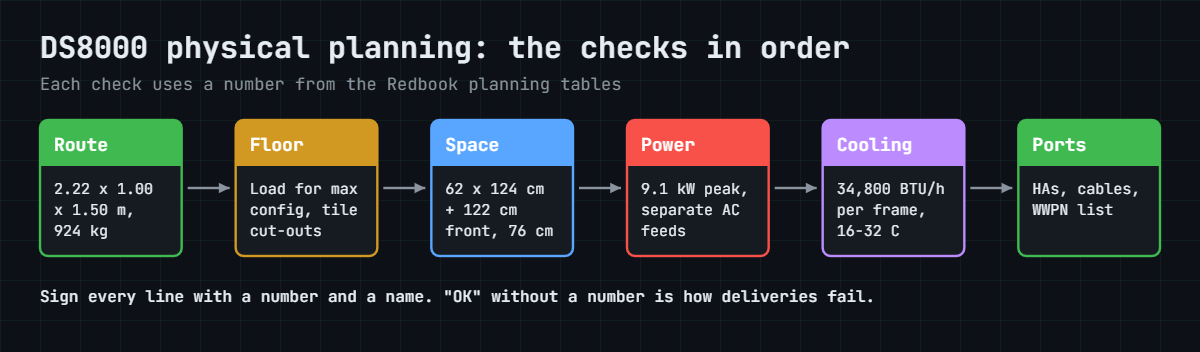
The packed base frame is 2.22 m high, 1.00 m wide and weighs up to 924 kg, so a lift rated for 800 kg won’t take it and a standard 0.9 m door won’t let the crate through.

2Check the floor and cut the tiles

A DS8000 is fine on either a raised or a solid floor. Get the building engineer to confirm the floor load along the route and at the final position, and plan for the maximum configuration rather than today’s, so adding drives later doesn’t overload the tiles.

On a raised floor the cable cut-out is 41.91 cm × 8.89 cm and sits 10 cm from the frame edge. If you ordered the top exit feature for overhead cabling (codes AAV1 and AAX0), check that before anyone cuts a tile.

DS8000 physical planning checks in order: route, floor, space, power, cooling, ports

3Plan space, power and cooling

The installed frame is 62 cm wide and 124 cm deep, and the IBM SSR needs at least 121.92 cm of clear space in front and 76.2 cm behind. Air flows front to back, so the front goes on the cold aisle and the rear on the hot aisle, and nothing gets stacked on top of the frame.

Each frame has redundant iPDUs, and the power cords must land on separate AC distribution systems so that losing one feed doesn’t stop the box. Give the facilities team the peak power (9.1 kW for an A05) and the heat load (up to 34,800 BTU/h per frame).

4Plan host adapters and cables

Count the host ports you need for FCP and FICON, and allow for growth. The Redbook’s advice is to put one host adapter in each I/O enclosure before any enclosure gets a second, and to keep separate ports for remote mirroring.

Then choose cables by distance. At 32 Gbps OM4 shortwave gives you 100 m, so if the SAN switches sit in a room further away you need longwave adapters and single-mode fibre. That has to be on the order; you don’t want to find out on install day.

5Hand the SAN team a WWPN list

The SAN team builds its zones from WWPNs. Once IBM powers the system on, lssi gives you the storage image WWNN and lsioport gives you every port WWPN (in the GUI it’s under Actions > Modify Fibre Channel Port Protocols, once you add the WWPN column).

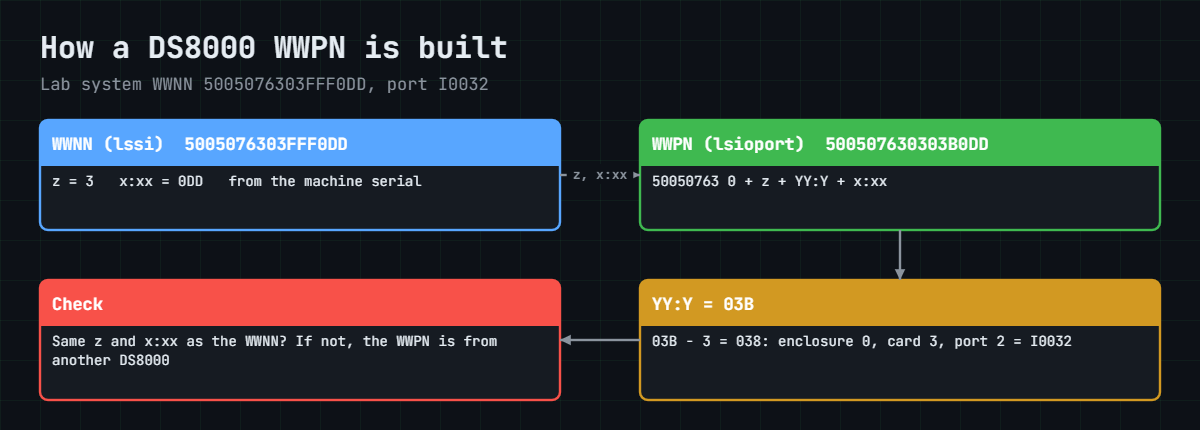
How a DS8000 WWPN is built from the storage image WWNN and the port location

All DS8000 port WWPNs follow one shape. They start with 50:05:07:63:0, then come a z digit and an x:xx part copied from the storage image WWNN, and last a YY:Y part that depends on the adapter’s physical position. Our lab box has the WWNN 5005076303FFF0DD, which makes z 3 and x:xx 0DD, and port I0032 is 500507630303B0DD.

That gives you a quick sanity check: if a WWPN in the zoning sheet doesn’t carry your system’s z and x:xx, it belongs to another DS8000. On sites with several boxes, zoning the wrong system is a common copy-paste mistake.

The decoder you write in the lab below does this check for every port. Its YY:Y rule (subtract 3, then split into enclosure, card and port) is our own reading of the pattern. It matches every example in the Redbook, but treat it as a helper and trust lsioport for the final ID.

Hands-on lab: check the site and decode WWPNs

Before you run any command, double-check it

Read every command twice before you press Enter. Check the target: the system or account, the IDs, the names and the sizes. These commands are for learning and were tested in our lab, not on your system. At work, run the read-only list commands first, follow your change process, make sure a backup exists, and ask a second person to check anything that changes or deletes data. You run them at your own risk.

You’re the storage admin, two months before delivery. First you check the site with a calculator built on the Redbook numbers, and then, as if IBM had just powered the system on, you pull the port list from the practice shell and decode every WWPN for the SAN team.

Practice shell note: the practice shell is our own teaching tool, not IBM software. Its WWNN, WWPNs and adapter serial numbers are made up for the lab, though they follow the real DS8000 WWPN pattern, and real DS CLI output looks similar but not identical.

1Write the site calculator

Save this as site_calc.py in C:\ds8k-lab. The numbers at the top all come from the Redbook tables in the Engineer’s View, and the room line holds your building’s limits.

It’s a planning tool that runs on your laptop months before delivery, with no DS8000 anywhere near it. Only the optional --check part talks to the DS8000, once IBM has installed it, and you’ll use that in step 4.

Save this as site_calc.py:

# site_calc.py - SaatVedha DS8000 site check (numbers from IBM Redbook SG24-8559-01, chapter 5)
# Planning tool: runs on your laptop, not on the DS8000. The site check needs no DS8000.
# Optional --check (after install) compares the plan with the box through the DS CLI (auto.profile).
import sys
import csv, subprocess
DSCLI = ["python", "ds8sim.py", "-cfg", "auto.profile"]   # at work: ["dscli", "-cfg", "auto.profile"]

def dscli(*args):
    """Run one DS CLI command and return its rows as dictionaries."""
    out = subprocess.run(DSCLI + list(args), capture_output=True, text=True).stdout
    lines = [l for l in out.splitlines() if l and not l.startswith("SaatVedha") and not l.startswith("CMUC")]
    return list(csv.DictReader(lines))

FRAME = {  # packed height m, packed width m, packed weight kg, peak power kW
    "A01": (2.22, 1.00, 924, 7.9),   # DS8A10 racked
    "A05": (2.22, 1.00, 924, 9.1),   # DS8A50
    "A08": (2.22, 1.00, 924, 9.1),   # DS8A80
    "E05": (2.22, 1.00, 603, 10.2),  # expansion frame (power is "up to")
}
WIDTH_CM, DEPTH_CM = 62, 124          # unpacked frame with covers
FRONT_CM, REAR_CM = 121.92, 76.2      # minimum service clearance
BTU_PER_FRAME = 34800                 # thermal load, upper limit

# your room - change these
room = {"lift_kg": 1000, "door_h_m": 2.40, "door_w_m": 1.20, "power_kw": 25.0}
frames = [a for a in sys.argv[1:] if a != "--check"] or ["A05", "E05"]

print("Frames:", " + ".join(frames))
if frames.count("E05") > 1:
    sys.exit("STOP: a DS8A00 has at most one expansion frame")
stop = 0
for f in frames:
    h, w, kg, kw = FRAME[f]
    why = []
    if kg > room["lift_kg"]:
        why.append(f"lift takes {room['lift_kg']} kg")
    if h > room["door_h_m"]:
        why.append(f"door is {room['door_h_m']} m high")
    if w > room["door_w_m"]:
        why.append(f"door is {room['door_w_m']} m wide")
    stop += bool(why)
    print(f"  {f}: packed {h} x {w} m, {kg} kg -> {'OK' if not why else 'STOP: ' + ', '.join(why)}")

kw = sum(FRAME[f][3] for f in frames)
area = (WIDTH_CM * len(frames)) * (DEPTH_CM + FRONT_CM + REAR_CM) / 10000
print(f"Peak power: {kw:.1f} kW of {room['power_kw']} kW -> {'OK' if kw <= room['power_kw'] else 'NOT ENOUGH'}")
print(f"Heat for the cooling team: up to {BTU_PER_FRAME * len(frames):,} BTU/h")
print(f"Floor incl. service clearance: {area:.2f} m2")
print("RESULT:", "fix the site before delivery" if stop or kw > room["power_kw"] else "site ready")

if "--check" in sys.argv:                 # only after IBM has installed the system
    model = dscli("lssi")[0]["Model"]
    used = {r["Frame"] for r in dscli("lsstgencl") + dscli("lsioenclosure")}
    print()
    print(f"DS8000 says: model {model}, enclosures in {len(used)} frame(s)")
    print(f"  base frame: plan {frames[0]}, box {model} -> {'OK' if frames[0] == model else 'DIFFERENT'}")
    print(f"  frames: plan {len(frames)}, box {len(used)} -> "
          f"{'OK' if len(frames) == len(used) else 'DIFFERENT: check the order and the install'}")

✅ Checkpoint: site_calc.py is saved in the lab folder.

2Check a DS8A50 with one expansion frame

Run this:

python site_calc.py

You should see this:

Frames: A05 + E05
  A05: packed 2.22 x 1.0 m, 924 kg -> OK
  E05: packed 2.22 x 1.0 m, 603 kg -> OK
Peak power: 19.3 kW of 25.0 kW -> OK
Heat for the cooling team: up to 69,600 BTU/h
Floor incl. service clearance: 3.99 m2
RESULT: site ready

Two frames need 19.3 kW at peak and up to 69,600 BTU/h of cooling, and with service clearance front and back they take about 4 m² of floor. The data centre manager needs that last number to book the space.

✅ Checkpoint: RESULT says “site ready” for A05 + E05.

3Try a configuration that isn’t allowed

A sales sheet says “two expansion frames”, so check it.

Run this:

python site_calc.py A05 E05 E05

You should see this:

Frames: A05 + E05 + E05
STOP: a DS8A00 has at most one expansion frame

A DS8A00 can have one expansion frame at most, so two frames in total. Catching this on paper costs nothing, but catching it when the truck arrives costs a lot.

✅ Checkpoint: The calculator stops on a second E05.

4Check the plan against the box and export the ports

IBM has now powered the system on. Scripts get a profile of their own, so save auto.profile in the lab folder. It uses the security.dat from Lesson 2 (copy it into the lab folder if it’s somewhere else).

Save this as auto.profile:

hmc1: 10.0.0.1
username: admin
pwfile: security.dat
devid: IBM.2107-78SV001
banner: off
header: on
format: delim
delim: ,

With the banner off, the header on and format delim, every DS CLI list prints one header row followed by plain comma-separated rows, which is easy for Python to read.

Run this:

python site_calc.py --check
python ds8sim.py -cfg auto.profile lsioport | Out-File -Encoding ascii ports.csv
Get-Content ports.csv -TotalCount 2

You should see this (after the site check lines you know from step 2):

DS8000 says: model A05, enclosures in 1 frame(s)
  base frame: plan A05, box A05 -> OK
  frames: plan 2, box 1 -> DIFFERENT: check the order and the install
ID,WWPN,State,Type,topo,portgrp,Security
I0010,50050763030130DD,Offline,Fibre Channel-LW,-,0,Disabled

--check asked the DS8000 for its model (lssi) and for the frames its enclosures sit in (lsstgencl, lsioenclosure). The base frame matches your plan. The practice DS8A50 has only one frame, so the check flags the E05; on a real install that line means either the expansion frame is missing or the plan was written for a different order.

The practice shell prints its one-line notice to the error stream, so it stays out of the file. On macOS and Linux use > ports.csv and head -2 ports.csv. In Windows PowerShell 5.1 a plain > saves the file as UTF-16, and that’s why the line above uses Out-File -Encoding ascii.

✅ Checkpoint: The check shows base frame OK, and ports.csv starts with the ID,WWPN header and has 16 port rows.

5Decode and verify every WWPN

Save this as wwpn.py next to ds8sim.py. It runs there on your laptop, not on the DS8000: it asks the DS8000 for the WWNN (lssi) and the port list (lsioport), then checks that each WWPN carries the same z and x:xx digits and that its YY:Y part matches the port ID.

If you give it a file name, it checks that sheet against the live WWNN instead of the live port list. You’ll need this in the break lab.

Save this as wwpn.py:

# wwpn.py - decode DS8000 port WWPNs (pattern from IBM Redbook SG24-8559-01, section 5.2.10)
# Runs on your workstation or jump server, not on the DS8000.
# It talks to the DS8000 only through the DS CLI (auto.profile: banner off, header on, format delim).
import sys
import csv, subprocess
DSCLI = ["python", "ds8sim.py", "-cfg", "auto.profile"]   # at work: ["dscli", "-cfg", "auto.profile"]

def dscli(*args):
    """Run one DS CLI command and return its rows as dictionaries."""
    out = subprocess.run(DSCLI + list(args), capture_output=True, text=True).stdout
    lines = [l for l in out.splitlines() if l and not l.startswith("SaatVedha") and not l.startswith("CMUC")]
    return list(csv.DictReader(lines))

def decode(wwpn):
    w = wwpn.replace(":", "").upper()
    if len(w) != 16 or not w.startswith("50050763"):
        return None
    yyy = int(w[10:13], 16) - 3          # YY:Y part = port location
    return {"z": w[9], "x": w[13:], "encl": yyy // 0x80,
            "card": yyy % 0x80 // 0x10, "port": yyy % 0x10 // 4}

wwnn = dscli("lssi")[0]["WWNN"].upper()   # storage image WWNN, straight from lssi
if len(sys.argv) > 1:                       # check a sheet someone sent you
    with open(sys.argv[1], newline="") as f:
        rows = list(csv.DictReader(f))
else:                                       # or the live port list
    rows = dscli("lsioport")
print(f"Storage image WWNN {wwnn}: z={wwnn[9]}, x:xx={wwnn[13:]}")
count = {}
print(f"{'ID':<6} {'WWPN':<17} {'Encl':>4} {'Card':>4} {'Port':>4}  Check")
for row in rows:
    d = decode(row["WWPN"])
    if d is None:
        print(f"{row['ID']:<6} {row['WWPN']:<17}  not a DS8000 WWPN (16 hex digits, starts 50050763)")
        continue
    same = d["z"] == wwnn[9] and d["x"] == wwnn[13:]
    name = f"I{d['encl']:02X}{d['card']:X}{d['port']:X}"
    check = "OK" if same and name == row["ID"] else (
        "WRONG SYSTEM" if not same else f"ID should be {name}")
    print(f"{row['ID']:<6} {row['WWPN']:<17} {d['encl']:>4} {d['card']:>4} {d['port']:>4}  {check}")
    topo = row["topo"] if row["topo"] != "-" else "not set"
    count[topo] = count.get(topo, 0) + 1
print()
print("Ports by topology:", ", ".join(f"{t} {n}" for t, n in sorted(count.items())))

Run this:

python wwpn.py

You should see this:

Storage image WWNN 5005076303FFF0DD: z=3, x:xx=0DD
ID     WWPN              Encl Card Port  Check
I0010  50050763030130DD     0    1    0  OK
I0011  50050763030170DD     0    1    1  OK
I0012  500507630301B0DD     0    1    2  OK
I0013  500507630301F0DD     0    1    3  OK
I0030  50050763030330DD     0    3    0  OK
I0031  50050763030370DD     0    3    1  OK
I0032  500507630303B0DD     0    3    2  OK
I0033  500507630303F0DD     0    3    3  OK
I0040  50050763030430DD     0    4    0  OK
I0041  50050763030470DD     0    4    1  OK
I0042  500507630304B0DD     0    4    2  OK
I0043  500507630304F0DD     0    4    3  OK
I0050  50050763030530DD     0    5    0  OK
I0051  50050763030570DD     0    5    1  OK
I0052  500507630305B0DD     0    5    2  OK
I0053  500507630305F0DD     0    5    3  OK

Ports by topology: FICON 1, SCSI-FCP 6, not set 9

Every port belongs to this system and every ID matches its WWPN. The port ID reads the same way: in I0032, 00 is the enclosure number, 3 the card and 2 the port, and the decoder pulls those same numbers back out of the WWPN. The summary tells the SAN team how many ports are ready for open systems (6 FCP), how many are for the mainframe (1 FICON) and how many still need a topology (9).

At work you’d run it from the jump server after every adapter change and send the list on to the SAN team, so nobody has to type a WWPN by hand. Topologies get set in Lesson 10.

✅ Checkpoint: All 16 rows say OK and the summary shows FICON 1, SCSI-FCP 6, not set 9.

Site calculator and WWPN decoder output for the lab DS8A50
The site check and the WWPN decoder on the lab DS8A50 (decoder output shortened).

6Look at the adapters behind the ports

One more check for the plan: which host adapters are installed, and is each one shortwave or longwave?

Run this:

python ds8sim.py -cfg lab.profile lshacard

You should see this (columns shortened):

ID                           I/O enclosure      Frame State  Type  Speed   Fibre Channel ports
=================================================================================================
IBM.1400-1B1-78SV0/R-1-P1-C1 IBM.1400-1B1-78SV0 1     Online FC-LW 32 Gb/s 4
IBM.1400-1B2-78SV0/R-1-P1-C3 IBM.1400-1B2-78SV0 1     Online FC-SW 32 Gb/s 4
IBM.1400-1B2-78SV0/R-1-P1-C4 IBM.1400-1B2-78SV0 1     Online FC-SW 32 Gb/s 4
IBM.1400-1B3-78SV0/R-1-P1-C5 IBM.1400-1B3-78SV0 1     Online FC-SW 32 Gb/s 4

There are four 4-port 32 Gb/s adapters. One is longwave, so its ports I0010 to I0013 can reach a switch up to 10 km away on single-mode fibre, and the other three are shortwave (OM4 up to 100 m at 32 Gbps). On a real order you’d also look at how the adapters are spread, because IBM advises one adapter in every I/O enclosure before any enclosure gets a second.

✅ Checkpoint: You can say which ports need single-mode fibre.

Break It, Then Fix It

Physical planning mistakes seem boring until one of them costs you a day, so make two of the classic ones happen on purpose.

1Break it: the data centre door is too narrow

The building engineer measured the door at 0.9 m, which is a normal single door. In site_calc.py change "door_w_m": 1.20 to "door_w_m": 0.90, then save and run it.

Run this:

python site_calc.py

You’ll get this:

Frames: A05 + E05
  A05: packed 2.22 x 1.0 m, 924 kg -> STOP: door is 0.9 m wide
  E05: packed 2.22 x 1.0 m, 603 kg -> STOP: door is 0.9 m wide
Peak power: 19.3 kW of 25.0 kW -> OK
Heat for the cooling team: up to 69,600 BTU/h
Floor incl. service clearance: 3.99 m2
RESULT: fix the site before delivery

Why: the packed frame is 1.00 m wide. Power and cooling are fine, but the crate can’t get through the door, and this happens a lot at real sites where old office buildings have been turned into server rooms.

Fix: you can’t make the DS8000 smaller, so change the route instead. Use the double door at the goods entrance, or agree with the carrier to uncrate in the corridor (the unpacked frame is 62 cm wide). Then put the value back to 1.20 and confirm “site ready”.

The proper fix is to measure in week one instead of on delivery day.

✅ Checkpoint: With door_w_m back at 1.20, RESULT says “site ready”.
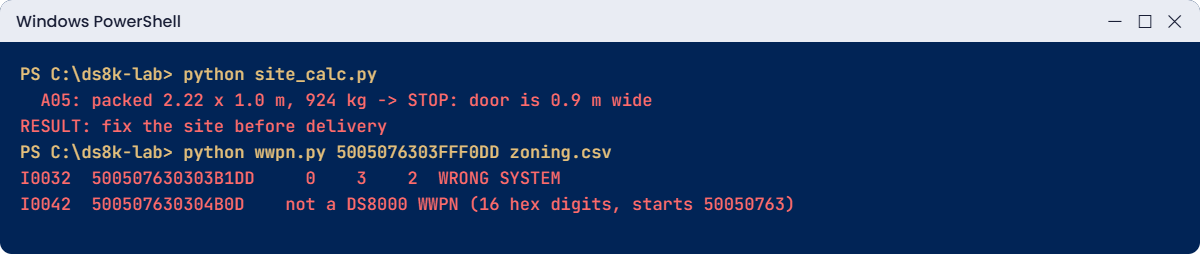
Site check stopped by a narrow door and WWPN typos caught by the decoder
Both breaks: a door that is too narrow, and two WWPN typos.

2Break it: two typos in the zoning sheet

The SAN engineer typed the WWPNs into a spreadsheet by hand. Make a copy of your port list and add two typical mistakes: change one digit in I0032 (the 0 before DD becomes 1) and drop one digit from I0042.

Run this (PowerShell):

(Get-Content ports.csv) -replace '500507630303B0DD','500507630303B1DD' -replace '500507630304B0DD','500507630304B0D' | Set-Content zoning.csv
python wwpn.py zoning.csv

You’ll get this (rows I0030 to I0043 and the summary):

I0030  50050763030330DD     0    3    0  OK
I0031  50050763030370DD     0    3    1  OK
I0032  500507630303B1DD     0    3    2  WRONG SYSTEM
I0033  500507630303F0DD     0    3    3  OK
I0040  50050763030430DD     0    4    0  OK
I0041  50050763030470DD     0    4    1  OK
I0042  500507630304B0D    not a DS8000 WWPN (16 hex digits, starts 50050763)
I0043  500507630304F0DD     0    4    3  OK
Ports by topology: FICON 1, SCSI-FCP 5, not set 9

Why: 500507630303B1DD carries x:xx = 1DD, but this system’s WWNN ends in 0DD. In the practice lab 1DD is the DR box (WWNN 5005076303FFF1DD), so this zone would point at the wrong DS8000. The second WWPN has only 15 hex digits, and no switch will accept that.

Fix: don’t type WWPNs at all. Generate the sheet from lsioport as you did in step 4, and confirm any single port with showioport I0032 before zoning. Run the decoder on the corrected sheet and every row comes back OK.

✅ Checkpoint: wwpn.py shows OK for all rows of the regenerated ports.csv.

This happened at work

Delivery day at the converted office floor

This one was a colocation company moving a regional bank’s storage into a new data hall on the third floor of a converted office block. The hall was modern, with a raised floor, hot and cold aisles and new power, but getting to it was another story.

On delivery morning the carrier wheeled the crated DS8A50 to the service lift and found it was rated below the packed weight. Past the lift, the corridor fire door at the end was a single door, narrower than the crate. Somebody had ticked “check access: OK” on the planning sheet after measuring only the hall door.

So the frames went back on the truck. It took nine days to rebook the carrier, get a crane permit for the loading balcony and rent a goods-lift slot. The bank’s migration window moved, and the colocation company paid the extra carrier and crane costs under its service contract.

Looking back, the problem was a vague task. “Check access” never said what to measure, against which numbers, or along which path.

Their site checklist now has one line for each point on the route (bay, lift, every door, the floor load at the final spot) with the frame’s packed size and weight printed beside it, and the building engineer signs each line. Power feeds and service clearance went onto the same checklist, so nothing gets marked “OK” without a number.

Common mistakes and troubleshooting

SymptomLikely causeWhat to check / fix
Crate stuck at a door or liftRoute not measured end to endWalk the whole route with the packed size (2.22 × 1.00 × 1.50 m) and weight (924 kg).
Floor tiles cut in the wrong placeTop exit (overhead cabling) ordered but not checkedConfirm AAV1/AAX0 on the order before cutting; cut-out is 41.91 × 8.89 cm.
One power failure takes down a frameBoth cords on the same AC distributionEach frame’s cords must go to separate power systems.
Frame runs hot, alarms in summerHot and cold aisles mixed or blockedFront of frame to cold aisle, rear to hot aisle; keep the 16–32 °C range.
Host link won’t come up at 32 GbpsShortwave cable too long or wrong typeAt 32 Gbps: OM3 70 m, OM4 100 m, OM5 150 m; use longwave for longer runs.
Host sees nothing after zoningWWPN typed by hand, or from the wrong systemGenerate the list from lsioport; check z and x:xx against the lssi WWNN.
SAN team zoned the lssu WWNNStorage unit WWNN used instead of the storage imageUse lssi for the WWNN; hosts only see the storage image.

A habit worth building: put a source next to every number in your site plan, such as “Redbook Table 5-1” or “planning guide”, so that when someone questions it six months later you can show where it came from.

Interview questions

Click a question to open it. Each one is phrased the way an interviewer would ask it, and under it you’ll see why they ask and one way you could answer in your own words.

Fresher level

1. A new DS8A50 arrives in six weeks. What would you check in the building before it comes?

Why they ask this: They want a practical list rather than theory, because it shows whether you think about the physical side at all.

How you might answer: I’d walk the route with the building engineer, from the loading bay through the lift and every door to the final spot. The packed frame is 2.22 m high, 1 m wide and up to 924 kg, so I’d check the lift rating, door sizes and floor load against those numbers.

After that I’d confirm two separate power feeds, cooling for up to 34,800 BTU/h per frame and the service clearance front and back, and I’d find out whether we ordered top-exit cabling before anyone cuts tiles.

2. Where do you find the WWPNs of the DS8000 ports for the SAN team?

Why they ask this: Every SAN project starts here, so they’re checking that you know the right command and the WWNN trap.

How you might answer: I’d run lsioport, which lists each port ID with its WWPN, state and topology. For the storage WWNN I use lssi and not lssu, because hosts see the storage image, not the storage unit.

Then I export the list with -fmt delim and send the file, so nobody ends up typing WWPNs by hand.

2–5 years experience

3. A host link between a DS8000 and a switch in the next room won’t come up at 32 Gbps. What’s on your list?

Why they ask this: They want to know you’ll look at the physical layer and distance limits before you blame the software.

How you might answer: I’d start with the basics: is there light on the port in lsioport, what SFP type is it, and what’s the cable. Then distance, because at 32 Gbps shortwave only reaches 70 m on OM3 and 100 m on OM4, and a long run through patch panels can go over that.

If it’s over the limit, you either move to a closer switch, use better fibre, or go to longwave adapters with single-mode fibre, which reach 10 km.

4. The SAN team says a zone is configured but the host sees no DS8000 ports. How do you check whether the WWPN is right?

Why they ask this: They want to see your method and whether you know the WWPN structure, which usually separates people who’ve done this from people who haven’t.

How you might answer: I’d compare the zoned WWPN with the lsioport output for the port they meant to zone. DS8000 WWPNs carry the z and x:xx digits of the storage image WWNN, so one look at those digits tells me whether the WWPN even belongs to this box.

Usually it’s a typo or a copy-paste from another DS8000. I’d regenerate the list from the DS CLI and ask them to re-zone from that.

Senior level

5. You’re planning host adapters for a DS8A50 that will serve both VMware and z/OS and replicate to a DR site. How do you lay out the ports?

Why they ask this: At senior level you’re balancing availability, performance and growth, and they want to hear the rules you follow and why.

How you might answer: I’d put one host adapter in each I/O enclosure before adding a second anywhere, and then split the ports by job: FCP for open systems, FICON for z/OS, and dedicated FCP ports for Metro Mirror or Global Mirror.

Each host gets paths through two adapters in two enclosures. I’d also leave room to grow, since the base frame takes 16 adapters and an E05 frame up to 32 in total, and I’d check every cable run’s length against its speed.

6. Facilities asks you for the power and cooling numbers for a two-frame DS8A50. What do you give them, and what do you ask back?

Why they ask this: They want to see that you can talk to other teams in their language and still protect redundancy.

How you might answer: I’d give them the peak power (9.1 kW for the A05 and up to 10.2 kW for the E05), the heat load of up to 34,800 BTU/h per frame, the 16–32 °C operating range and the front-to-back airflow, and I’d tell them each frame needs its cords on separate AC distribution.

In return I’d ask for the breaker ratings, which feeds the cords will land on, and confirmation that losing one feed won’t take out both.

Quick quiz

Q1. What is the maximum packaged weight of a DS8A50 model A05 base frame?

  1. 603 kg
  2. 825.8 kg
  3. 924 kg
  4. 1,200 kg
Show answer

C — The packed A01, A05 and A08 frames are up to 924 kg. The E05 expansion frame is up to 603 kg.

Q2. How much service clearance does a DS8A00 need in front?

  1. 30 cm
  2. 76.2 cm
  3. 121.92 cm
  4. 200 cm
Show answer

C — At least 121.92 cm (48 in) in front and 76.2 cm (30 in) at the rear.

Q3. How far can a 32 Gbps shortwave link reach on OM4 fibre?

  1. 35 m
  2. 70 m
  3. 100 m
  4. 10 km
Show answer

C — At 32 Gbps: OM3 70 m, OM4 100 m, OM5 150 m. Longwave on single-mode fibre reaches 10 km.

Q4. Which command gives the WWNN that hosts and zoning should use?

  1. lssu
  2. lssi
  3. lshmc
  4. lsserver
Show answer

B — lssi shows the storage image WWNN. lssu shows the storage unit WWNN, which hosts don’t see.

Q5. A DS8000 WWPN carries which values from the storage image WWNN?

  1. The serial number in plain text
  2. The z and x:xx values
  3. The HMC IP address
  4. Nothing; it is random
Show answer

B — The WWPN reuses the z and x:xx values from the WWNN and adds YY:Y from the adapter position.

Quick recap

  • Walk the whole delivery route with the packed size (2.22 × 1.00 × 1.50 m) and weight (up to 924 kg).
  • Plan floor load for the maximum configuration and check top-exit cabling before cutting tiles.
  • Give facilities the peak power (9.1 kW for an A05), up to 34,800 BTU/h per frame and front-to-back airflow; use separate AC feeds.
  • Keep 121.92 cm in front and 76.2 cm behind for service.
  • Up to 16 host adapters in the base frame, 32 with an E05; one adapter per I/O enclosure first.
  • Take the WWNN from lssi and the WWPNs from lsioport, and check the z and x:xx digits rather than trusting a typed list.

Next lesson

Lesson 4: Network planning and the Management Console → You plan the HMC network, firewall and remote support, and see how the two HMCs share the work.

Further reading: DS8000 physical planning

For more on DS8000 physical planning, section 5.2 of IBM’s guide has every planning table used here: IBM Storage DS8A00 Architecture and Implementation Guide (IBM Redbooks). To see where these checks fit in a whole project, read A DS8000 project from delivery to first LUN.

You can also see the full plan for this course on the IBM DS8000 Implementation course page.

Scroll to Top

This website uses cookies

We use a few cookies to keep this site working. If you allow it, we also use Google Analytics to count visits so we can improve our lessons. You can accept all, deny the optional ones, or choose what to allow.