Running older DS8000s: DS8870, DS8880 and DS8900F with DS CLI
-
Phase 0: Before you start
-
Phase 1: Plan and install
-
Phase 2: Build the storage
-
Phase 3: Copy Services
-
Phase 4: Run it day to day
-
Phase 5: Troubleshooting and career
Sooner or later you’ll log in to a DS8880, and your DS8880 DS CLI session will look almost exactly like the DS8A00 you trained on. Almost, because a script that maps hosts with mkhost may fail, a host type you’ve typed for years may not exist, and RAID 5 may suddenly be allowed again.
Treat this lesson as your field guide to the older systems: DS8870 (Release 7), DS8880 (Release 8) and DS8900F (Release 9). It covers what stays the same, what changed, and how to check a box before you run anything on it.
The lab has you map a host the classic way, with volume groups and host connections, just as you would on a DS8870 or an early DS8880, and then break it twice and fix it.
| Time | You need | By the end you can |
|---|---|---|
| 60 to 75 minutes | The practice shell, and Lessons 13 and 14 of this course (FB volumes and host mapping) | Read ver -l to find out which release you’re on, map hosts with mkvolgrp and mkhostconnect, and translate a DS8A00 runbook for a DS8880 |
What it is, in one line
Running older DS8000s means using the same DS CLI with release-aware habits: check the release first, and then use the commands, host types and RAID rules that release supports.
In Simple Words
Driving your uncle’s old car
You learned to drive in a new car, with a push button to start it, a handbrake that’s just a switch and lights that come on by themselves. Then one day you borrow your uncle’s old car. The steering wheel, pedals and gears are all where you’d expect, so you can drive it.
But there’s a key to turn, the handbrake is a lever, and you have to switch the lights on yourself. Drive it like the new car and you’ll leave it rolling down the hill with the lights off.
Older DS8000s are your uncle’s car. The DS CLI feels the same, but a few controls still work the old way, and a good driver checks the car before setting off.
Engineer's View
What the releases really change
Each DS8000 family has its own release line, and the bundle version printed by ver -l tells you which one you’re on:
- DS8870, Release 7.5: in the Redbook,
ver -lshows DSCLI 7.7.50.273 with bundle 87.50.109.0 (SG24-8085, p. 385). Host access is done withmkvolgrpandmkhostconnect, FB extents are 1 GiB only, RAID 5, 6 and 10 all exist, and TSE volumes still work. - DS8880, Release 8.5: DSCLI 7.8.50.474, bundle 88.50.168.0 (SG24-8323, p. 447).
mkhost,mkclusterand the related commands came in Release 8.3, though the GUI had them in 8.2, and small 16 MiB extents came in 8.1. RAID 6 is the default and RAID 5 needs-forceplus an RPQ. TSE is gone, so thin means ESE. - DS8900F, Release 9.3: DSCLI 7.9.30.154, bundle 89.30.68.0 (SG24-8456, p. 407). The book recommends the
mkhostmethod and keeps the volume group method for compatibility. - DS8A00, Release 10.1: DSCLI 7.10.10.348, bundle 10.10.106.0. RAID 5 is refused, small extents are the default, and you give encryption groups with
-keygrp.
Two more differences tend to catch people out. One is host type names, where the DS8880 and DS8870 lists show LinuxRHEL, LinuxSuse and Win2012 but G10 uses generic types such as Linux and Windows. The other is encrypted pools, where the DS8880 and DS8900F examples use mkextpool ... -encryptgrp 1 and the DS8A00 uses -keygrp 1.
How it works, step by step
This is the routine an experienced engineer follows on any DS8000 that isn’t the one they know best. It takes five minutes and can save you whole weekends.
1Check the release before anything else
Run ver -l and read the bundle version. Its first digits give you the family and release: 87.x is a DS8870 on Release 7, 88.x a DS8880 on Release 8, 89.x a DS8900F on Release 9, and 10.x a DS8A00 on Release 10. After that, compare the DSCLI line with the LMC.
If the DS CLI is much older or newer than the box, it may refuse to connect or be missing commands, which is the trap from Lesson 2 of this course.
Put the release in your change ticket, because everything below depends on it. In a DS8880 DS CLI session the bundle starts with 88.
2Remember what did not change
The logical ladder is the same on every family: array site, array, rank, extent pool, volume, then host access. Even LSSs belong to server0 and odd ones to server1, and commands like lsarraysite, mkarray, mkrank, mkextpool, chrank, mkfbvol, lsfbvol and showfbvol are printed with the same flags in the DS8870, DS8880, DS8900F and DS8A00 Redbooks.
Profiles, managepwfile, script mode and the user groups all work the same way as well.
The figure shows the area that changed most, which is how a host gets its volumes.
3Map hosts the way the release expects
Before Release 8.3 the DS CLI had no host object, so you build two things yourself. A volume group (mkvolgrp) is the list of volumes, and a host connection (mkhostconnect) is one HBA port, with its WWPN and host type, pointing at one volume group. Two HBAs means two host connections pointing at the same group.
Choose the volume group type based on the host type. lshosttype -type scsimask lists types such as pSeries (AIX) that use Report LUNs, and lshosttype -type scsimap256 lists the LUN polling types such as Linux and Windows. This is part of what a DS8880 prints for the second list, quoted from the Redbook (Example 12-47, p. 413):
LinuxRHEL Intel - Linux RHEL LUNPolling 512
LinuxSuse Intel - Linux Suse LUNPolling 512
Win2008 Intel - Windows 2008 LUNPolling 512
Win2012 Intel - Windows 2012 LUNPolling 512On G10 the same list shows generic names like Linux and Windows instead. From Release 8.3 the DS CLI also has mkhost, mkhostport and chhost -action map, which build the volume group for you behind the scenes. The older commands still work on every later release, so if you run a mixed estate, a volume-group script is the safest bet.
4Respect the RAID, extent and thin rules of that release
RAID 5 is normal on a DS8870 (mkarray -raidtype 5 -arsite S38, p. 351). On a DS8880, RAID 6 is the default and RAID 5 needs -force, an RPQ and drives under 1 TB, and on G10 it’s refused outright.
You choose extent size per rank, and a DS8870 only has 1 GiB FB extents. The DS8880 Redbook calls the flag -extunit in its FB section (p. 403) but -extsize in its CKD section (p. 419), and the DS8900F and DS8A00 books both use -extsize.
When a book contradicts itself like that, run help mkrank on the box and go with what it prints.
From the DS8880 onwards, thin volumes are -sam ese. A DS8870 also has TSE, which needs a repository (mksestg), and none of the later families support TSE.
5Use the old names for hardware and the right GUI
Older boxes know lsddm, lsda and lshba, which G10 renamed to lsdrive, lsdacard and lshacard. The old names still run there but have no help page. The GUI moved around too: DS8870 Release 7.4 brought in the new Storage Management GUI, with the old DS Storage Manager still reachable from Help, and the DS8900F book dates its DS GUI to Release 9.0.
6Translate your runbook, task by task
Here’s one runbook written twice, with DS8A00 Release 10.1 on the left and a DS8880 below Release 8.3 on the right. The commands come from the DS8A00 and DS8880 Redbooks.
| Task | DS8A00 (R10.1) | DS8880 before R8.3 |
|---|---|---|
| Check the release | ver -l | ver -l (bundle 88.x) |
| Create an array | mkarray -raidtype 6 -arsite S1 | Same; RAID 5 only with -force and an RPQ |
| Rank with small extents | mkrank -array A0 -stgtype fb -keygrp 1 (16 MiB default) | R8.1+: size flag per Redbook p. 403 / 419, check help mkrank |
| Encrypted pool | mkextpool -rankgrp 0 -stgtype fb -keygrp 1 pool_0 | mkextpool -rankgrp 0 -stgtype fb -encryptgrp 1 pool_0 |
| Thin volume | mkfbvol -extpool P0 -cap 50 -sam ese 2000 | Same |
| Map a Linux host | mkhost -type “Linux Server”, mkhostport, chhost -action map | mkvolgrp -type scsimap256 + mkhostconnect -hosttype LinuxRHEL -volgrp Vn |
| Add a volume to the host | chhost -action map -volume 2001 host | chvolgrp -action add -volume 2001 Vn |
| Remove a volume | chhost -action unmap -volume 2001 host | chvolgrp -action remove -volume 2001 Vn |
| List drives / adapters | lsdrive, lsdacard, lshacard | lsddm, lsda, lshba |
Keep two templates in your team’s script folder, one per method (a DS8880 DS CLI template and a G10 template), and choose between them by the bundle version, not by the customer’s name. Our Command Builder already has the classic tasks: map a host with a volume group, add volumes to a volume group and remove volumes from a volume group.
Hands-on lab: map a host the DS8880 way with volume groups
Before you run any command, double-check it
Read every command twice before you press Enter. Check the target: the system or account, the IDs, the names and the sizes. These commands are for learning and were tested in our lab, not on your system. At work, run the read-only list commands first, follow your change process, make sure a backup exists, and ask a second person to check anything that changes or deletes data. You run them at your own risk.
You’ll give the Linux VM saat-host1 its disks without using mkhost once, the way you would on a DS8870 or a DS8880 before Release 8.3. The practice shell is a DS8A50, and G10 still accepts the classic commands, so everything you type here also works on the older boxes (with their own host type names).
Practice shell note: the practice shell is our teaching tool, not IBM software. It behaves like a DS8A50 at Release 10.1, which is why its lshosttype list shows the G10 names. Real DS CLI output looks very much like this but isn’t identical, and the text points out any messages the shell made up.
1Reset and build the storage
Save this file as setup-28.txt in your lab folder. It builds a pool pair and four 50 GiB thin volumes, two in each pool.
# setup-28.txt: two RAID 6 ranks, a pool pair, four thin volumes
mkarray -raidtype 6 -arsite S1
mkarray -raidtype 6 -arsite S2
mkrank -array A0 -stgtype fb -keygrp 1
mkrank -array A1 -stgtype fb -keygrp 1
mkextpool -rankgrp 0 -stgtype fb -keygrp 1 pool_0
mkextpool -rankgrp 1 -stgtype fb -keygrp 1 pool_1
chrank -extpool P0 R0
chrank -extpool P1 R1
mkfbvol -extpool P0 -cap 50 -sam ese -name app_#h 2000-2001
mkfbvol -extpool P1 -cap 50 -sam ese -name app_#h 2100-2101
lsfbvolRun this:
cd C:\ds8k-lab
python ds8sim.py -hmc1 10.0.0.1 -user admin -passwd <your password> simctl reset
python ds8sim.py -hmc1 10.0.0.1 -user admin -passwd <your password> -script setup-28.txtYou should see this (last lines):
CMUC00025I mkfbvol: FB volume 2101 successfully created.
Date/Time: 24 October 2026 19:59:02 UTC IBM DSCLI Version: 7.10.10.348 DS: IBM.2107-78SV001
Name ID accstate datastate configstate deviceMTM datatype extpool cap (2^30B) cap (10^9B) cap (blocks)
============================================================================================================
app_2000 2000 Online Normal Normal 2107-900 FB 512 P0 50.0 - 104857600
app_2001 2001 Online Normal Normal 2107-900 FB 512 P0 50.0 - 104857600
app_2100 2100 Online Normal Normal 2107-900 FB 512 P1 50.0 - 104857600
app_2101 2101 Online Normal Normal 2107-900 FB 512 P1 50.0 - 104857600✅ Checkpoint: four volumes, 2000-2001 in P0 (server0) and 2100-2101 in P1 (server1).
2Pick the host type and find the WWPNs
Start the shell (python ds8sim.py) and look up the LUN polling host types first, then the HBA ports that have logged in but aren’t known yet.
Run this:
dscli> lshosttype -type scsimap256
dscli> lshostport -unknownYou should see this (first list shortened):
Date/Time: 24 October 2026 19:59:20 UTC IBM DSCLI Version: 7.10.10.348 DS: IBM.2107-78SV001
HostType Profile AddrDiscovery LBS
=================================================
Linux Linux Server LUNPolling 512
VMWare VMWare LUNPolling 512
Windows Windows Server LUNPolling 512
Date/Time: 24 October 2026 19:59:20 UTC IBM DSCLI Version: 7.10.10.348 DS: IBM.2107-78SV001
WWNN WWPN ESSIOport
===========================================
20000024FF2D0F86 21000024FF2D0F86 I0032
20000024FF2D0F87 21000024FF2D0F87 I0042
20000120FA13B914 10000090FA13B914 I0032
20000120FA13B915 10000090FA13B915 I0042saat-host1 owns the first two WWPNs, one through I0032 and one through I0042, and its host type here is Linux. On a DS8880 you’d pick LinuxRHEL or LinuxSuse from the same list.
✅ Checkpoint: you know the type (Linux, scsimap256) and the two WWPNs ending 0F86 and 0F87.
3Create the volume group
Run this:
dscli> mkvolgrp -type scsimap256 -volume 2000,2100 saat-host1_vg
dscli> showvolgrp V0You should see this:
CMUC00030I mkvolgrp: Volume group V0 successfully created.
Date/Time: 24 October 2026 19:59:20 UTC IBM DSCLI Version: 7.10.10.348 DS: IBM.2107-78SV001
Name saat-host1_vg
ID V0
Type SCSI Map 256
Vols 2000 2100You take one volume from each pool, so both servers share this host’s work.
✅ Checkpoint: V0 exists, type SCSI Map 256, with 2000 and 2100.
4Create one host connection per HBA port
Run this:
dscli> mkhostconnect -wwname 21000024FF2D0F86 -hosttype Linux -volgrp V0 -portgrp 1 saat-host1_fc0
dscli> mkhostconnect -wwname 21000024FF2D0F87 -hosttype Linux -volgrp V0 -portgrp 1 saat-host1_fc1
dscli> lshostconnectYou should see this:
CMUC00012I mkhostconnect: Host connection 0001 successfully created.
CMUC00012I mkhostconnect: Host connection 0002 successfully created.
Date/Time: 24 October 2026 19:59:20 UTC IBM DSCLI Version: 7.10.10.348 DS: IBM.2107-78SV001
Name ID WWPN HostType Profile portgrp volgrpID ESSIOport
=====================================================================================
saat-host1_fc0 0001 21000024FF2D0F86 Linux Linux Server 1 V0 all
saat-host1_fc1 0002 21000024FF2D0F87 Linux Linux Server 1 V0 allBecause both lines have the same port group number (1), you and the GUI can tell they’re two HBAs in one server. That’s exactly why the Redbooks recommend one port group per server.
✅ Checkpoint: two connections, both volgrpID V0, both portgrp 1.
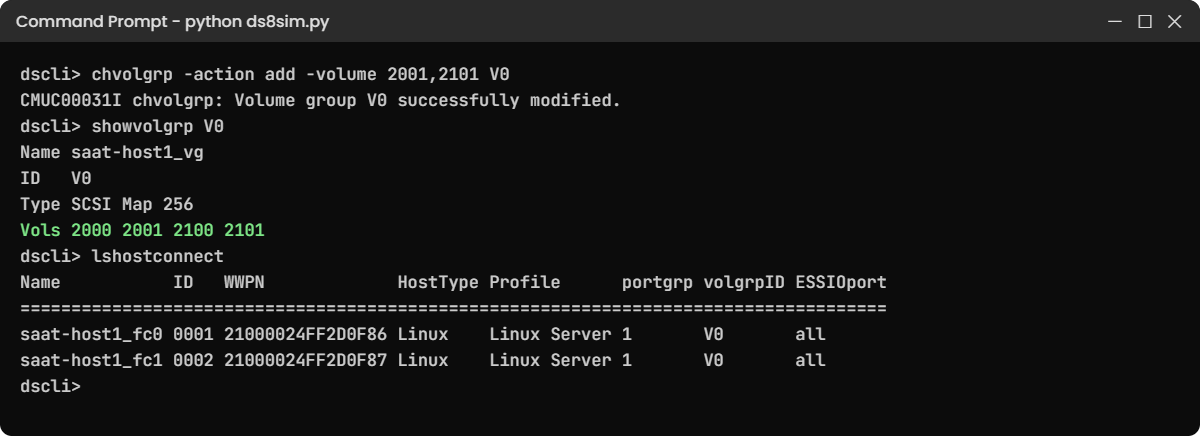
5Add and remove volumes with chvolgrp
The application team asks for two more disks and then hands one back.
Run this:
dscli> chvolgrp -action add -volume 2001,2101 V0
dscli> showvolgrp V0
dscli> chvolgrp -action remove -volume 2101 V0
dscli> showvolgrp V0You should see this:
CMUC00031I chvolgrp: Volume group V0 successfully modified.
Date/Time: 24 October 2026 19:59:20 UTC IBM DSCLI Version: 7.10.10.348 DS: IBM.2107-78SV001
Name saat-host1_vg
ID V0
Type SCSI Map 256
Vols 2000 2001 2100 2101
CMUC00031I chvolgrp: Volume group V0 successfully modified.
Date/Time: 24 October 2026 19:59:20 UTC IBM DSCLI Version: 7.10.10.348 DS: IBM.2107-78SV001
Name saat-host1_vg
ID V0
Type SCSI Map 256
Vols 2000 2001 2100
A single command changed what both HBAs see, since both host connections point at V0. On the host you’d now do a rescan (Lesson 15 shows how).
✅ Checkpoint: V0 holds 2000, 2001 and 2100.
6Prove there is no host object
Run this:
dscli> lshostconnect -l
dscli> lshostYou should see this:
Date/Time: 24 October 2026 19:59:20 UTC IBM DSCLI Version: 7.10.10.348 DS: IBM.2107-78SV001
Name ID WWPN HostType LBS addrDiscovery Profile portgrp volgrpID ESSIOport host
============================================================================================================
saat-host1_fc0 0001 21000024FF2D0F86 Linux 512 LUNPolling Linux Server 1 V0 all -
saat-host1_fc1 0002 21000024FF2D0F87 Linux 512 LUNPolling Linux Server 1 V0 all -
CMUC00234I lshost: No Host found.The host column is empty and lshost finds nothing. That’s a pure pre-8.3 setup, and plenty of DS8870 and DS8880 systems still look like this today when you open a DS8880 DS CLI session. On a newer release you could attach these connections to a host later with chhostconnect -host.
✅ Checkpoint: host shows – on both connections and lshost reports No Host found.
Break It, Then Fix It
A second server, saat-host2, needs volume 2101. You’ll copy a command from an old DS8880 runbook and then forget a flag, and both mistakes are common when people move between generations.
1Break: use a DS8880 host type on a newer box
Run this:
dscli> mkvolgrp -type scsimap256 -volume 2101 saat-host2_vg
dscli> mkhostconnect -wwname 10000090FA13B914 -hosttype LinuxRHEL -volgrp V1 -portgrp 2 saat-host2_fc0You should see this:
CMUC00030I mkvolgrp: Volume group V1 successfully created.
CMUN00010E mkhostconnect: Invalid value for -hosttype: LinuxRHEL. Run lshosttype.
Why: LinuxRHEL is a real host type on a DS8880 and DS8870 (you saw it in the Redbook list above), but this box uses the G10 list. The CMUN00010E text is a practice shell message, and a real DS8000 rejects the value in its own words. Either way the point is the same: host type names belong to a release, so read lshosttype on the box you’re actually working on.
Fix it:
dscli> lshosttype -type scsimap256
dscli> mkhostconnect -wwname 10000090FA13B914 -hosttype Linux -volgrp V1 -portgrp 2 saat-host2_fc0You should see this (list shortened):
Date/Time: 24 October 2026 19:59:20 UTC IBM DSCLI Version: 7.10.10.348 DS: IBM.2107-78SV001
HostType Profile AddrDiscovery LBS
=================================================
Linux Linux Server LUNPolling 512
VMWare VMWare LUNPolling 512
Windows Windows Server LUNPolling 512
CMUC00012I mkhostconnect: Host connection 0003 successfully created.✅ Checkpoint: connection 0003 exists with host type Linux.
2Break: forget -volgrp on the second HBA
Run this:
dscli> mkhostconnect -wwname 10000090FA13B915 -hosttype Linux -portgrp 2 saat-host2_fc1
dscli> lshostconnectYou should see this:
CMUC00012I mkhostconnect: Host connection 0004 successfully created.
Date/Time: 24 October 2026 19:59:20 UTC IBM DSCLI Version: 7.10.10.348 DS: IBM.2107-78SV001
Name ID WWPN HostType Profile portgrp volgrpID ESSIOport
=====================================================================================
saat-host1_fc0 0001 21000024FF2D0F86 Linux Linux Server 1 V0 all
saat-host1_fc1 0002 21000024FF2D0F87 Linux Linux Server 1 V0 all
saat-host2_fc0 0003 10000090FA13B914 Linux Linux Server 2 V1 all
saat-host2_fc1 0004 10000090FA13B915 Linux Linux Server 2 - allWhy: the command worked, and that’s what makes it dangerous. Connection 0004 points at no volume group, so saat-host2 sees volume 2101 on one path only. Multipath shows a single path, and the first cable or switch problem on the other side takes the disk away.
And nothing on the storage side warns you about it.
Fix it:
dscli> chhostconnect -volgrp V1 0004
dscli> lshostconnect 0003 0004You should see this:
CMUC00013I chhostconnect: Host connection 0004 successfully modified.
Date/Time: 24 October 2026 19:59:20 UTC IBM DSCLI Version: 7.10.10.348 DS: IBM.2107-78SV001
Name ID WWPN HostType Profile portgrp volgrpID ESSIOport
=====================================================================================
saat-host2_fc0 0003 10000090FA13B914 Linux Linux Server 2 V1 all
saat-host2_fc1 0004 10000090FA13B915 Linux Linux Server 2 V1 all✅ Checkpoint: every connection in port group 2 shows V1. Make “same portgrp, same volgrpID” a line in your change checklist.
This happened at work
The onboarding script that only knew one release
This happened at an IT outsourcing company that looked after storage for about forty clients. A capable junior engineer had written a neat onboarding script on the company’s DS8A00 lab that created volumes, then ran mkcluster, mkhost, mkhostport and chhost -action map, and in the lab it worked every time.
Then in a Saturday change window it ran against a retail client’s DS8880 that was still on Release 8.2. The volume commands went through fine, but the very next line failed, because the DS CLI on that release didn’t have mkcluster or mkhost yet. Those only came in Release 8.3.
The script didn’t check return codes, so it kept going and every mapping line failed as well.
Meanwhile the client’s database team sat waiting with twelve new volumes that weren’t mapped to anything. The on-call engineer had to work out by hand what the script had done, map the volumes with mkvolgrp and mkhostconnect, and clean up the half-built state, and the window overran by three hours.
Root cause: the script assumed a single release, and nobody had checked it against the client inventory. Now every script starts with ver -l and refuses to run if the bundle isn’t on its supported list, the team keeps a volume-group template for systems below 8.3, scripts stop at the first non-zero return code, and the client inventory shows each box’s release next to its name.
Common mistakes and troubleshooting
| Symptom | Likely cause | What to check / fix |
|---|---|---|
| mkhost or mkcluster rejected | Release below 8.3 (DS8870, early DS8880) | ver -l; use mkvolgrp + mkhostconnect instead. |
| Host type value rejected | Type name from another release (LinuxRHEL vs Linux) | lshosttype -type scsimap256 or scsimask on that box. |
| Host sees disks on one path only | A host connection without -volgrp, or pointing at another group | lshostconnect: same portgrp must show the same volgrpID; fix with chhostconnect -volgrp. |
| AIX host sees odd LUN numbers or none | Volume group type does not match the host (mask vs map) | AIX (pSeries) uses scsimask; Linux and Windows use scsimap256. |
| RAID 5 command behaves differently per box | RAID rules changed: normal on DS8870, RPQ on DS8880/DS8900F, refused on G10 | Use RAID 6 unless an approved exception exists. |
| mkrank extent flag not accepted | Flag name differs between books and releases | help mkrank on the box; DS8870 has 1 GiB extents only. |
| Script works in the lab, fails at the client | DS CLI or LMC level differs | Check ver -l for both, keep per-release templates. |
Two habits fix most of these. On an unfamiliar box, start every session with ver -l, lssi and lshosttype and paste the output into the ticket, and never let a script carry on after a failed command (the next lesson shows how).
Interview questions
Click a question to open it. They’re worded the way an interviewer would ask them, and under each one you’ll find why they ask it and one way you could answer in your own words.
Fresher level
1. You are given access to a DS8000 you have never seen. What do you run first, and why?
Why they ask this: They want to see safe habits on systems you don’t know, and a calm checklist beats jumping straight into changes.
How you might answer: I’d run ver -l to see the DS CLI and bundle level, lssi or showsi for the model and storage image ID, and lsserver to check both servers are online. The bundle tells me the family, so 88.x would be a DS8880.
After that I know which commands, host types and RAID rules apply, before I touch anything.
2. What is the difference between a volume group and a host connection?
Why they ask this: It checks the basic host access model that every DS8000 still uses underneath, and freshers often mix the two up.
How you might answer: A volume group is the list of volumes a host is allowed to see, and you make it with mkvolgrp. A host connection is one HBA port with its WWPN and host type, made with mkhostconnect and pointed at one volume group. So a server with two HBAs has two host connections pointing at the same volume group.
2–5 years experience
3. Walk me through giving a new Linux server two LUNs on a DS8880 at Release 8.2.
Why they ask this: They want the pre-8.3 method, in the right order and with checks, and not the G10 commands.
How you might answer: First I’d run lshostport -unknown to find the two WWPNs and lshosttype -type scsimap256 to confirm the type, which is LinuxRHEL on that release. Then mkvolgrp -type scsimap256 with the two volumes, ideally one from an even LSS and one from an odd LSS.
Next comes mkhostconnect for each WWPN with -hosttype, -volgrp and the same -portgrp. I’d finish with lshostconnect to check both lines show the same volume group, and ask the host team to rescan and confirm two paths per LUN.
4. A script written for a DS8A00 must also run on a client’s DS8880. What do you change?
Why they ask this: It’s about real automation across mixed estates, and they want to hear release checks and fallbacks, not hope.
How you might answer: I’d add a ver -l check at the start and branch on the bundle, so below 88.3 it uses mkvolgrp and mkhostconnect, and from 8.3 mkhost works. I’d map the host type names (Linux vs LinuxRHEL), swap -keygrp for -encryptgrp on mkextpool, drop any RAID 5 assumptions, and make the script stop on any non-zero return code.
Senior level
5. Your team supports DS8870, DS8880 and DS8A00. How do you design runbooks so people don’t mix them up?
Why they ask this: Senior engineers are judged on stopping mistakes across the whole team, so they want to hear about structure, ownership and checks.
How you might answer: I’d keep one shared logical procedure, the ladder from array to host, plus a small release table for each family with the exact commands and host types. Every runbook step names the minimum release it needs.
Scripts read the bundle from ver -l and refuse to run outside their list, the inventory shows the release next to every box, and change reviews check it. I’d also schedule code upgrades so the estate doesn’t drift apart as much.
6. The DS8880 Redbook uses -extunit in one place and -extsize in another. How do you handle that?
Why they ask this: They want to see how you handle documentation that contradicts itself, under change control.
How you might answer: I’d trust the box over the book, because help mkrank on the target system shows the real flag for that release. I’d write down which one worked in the runbook along with the release number, and test the command on a spare array site or in a lab before the change window.
Quick quiz
Q1. Which release first added mkhost and mkcluster to the DS CLI?
- Release 7.5
- Release 8.1
- Release 8.3
- Release 9.0
Show answer
C — The DS8880 Redbook says the host and cluster commands came with Release 8.3; the GUI had them in 8.2.
Q2. ver -l shows bundle 88.50.168.0. What are you logged in to?
- DS8870
- DS8880
- DS8900F
- DS8A00
Show answer
B — 88.x bundles are DS8880 Release 8; 87.x is DS8870, 89.x DS8900F, 10.x DS8A00.
Q3. Which volume group type does a Linux host use?
- scsimask
- scsimap256
- ficon
- fb
Show answer
B — Linux and Windows use LUN polling, which is scsimap256. AIX (pSeries) uses scsimask.
Q4. Two host connections share portgrp 2 but one shows volgrpID “-“. What happens?
- Nothing, the DS8000 copies the group
- The host sees its LUNs on one path only
- The host sees no LUNs at all
- The volume group is deleted
Show answer
B — The connection without a volume group gives that HBA no LUNs, so multipath has one path.
Q5. How do you add volume 2001 to a host on a DS8880 at Release 8.2?
- chhost -action map -volume 2001
- chvolgrp -action add -volume 2001 Vn
- mkhostport -volume 2001
- mkfbvol -volgrp Vn 2001
Show answer
B — Before 8.3 you change the volume group; every host connection pointing at it sees the change.
Quick recap
- Start with ver -l: bundle 87.x = DS8870, 88.x = DS8880, 89.x = DS8900F, 10.x = DS8A00.
- The logical ladder and most commands are the same on every family.
- Before Release 8.3, hosts get volumes through mkvolgrp + mkhostconnect; chvolgrp adds and removes volumes.
- Host type names differ: LinuxRHEL/Win2012 on DS8880 and older, Linux/Windows on G10.
- RAID 5: normal on DS8870, RPQ on DS8880/DS8900F, refused on DS8A00. TSE only on DS8870.
- Encrypted pools: -encryptgrp on DS8880/DS8900F, -keygrp on DS8A00.
- Same port group, same volume group: check it with lshostconnect.
Next lesson
Lesson 29: DS8000 automation from a jump server: DS CLI scripts and Python → You turn these habits into safe scripts that check the release and stop on errors.
Further reading: DS8880 DS CLI
Want to go deeper into DS8880 DS CLI? The classic host commands are in IBM DS8880 Architecture and Implementation, SG24-8323 (Chapter 12, Examples 12-47 to 12-53, pages 412 to 416). For a DS8870, see SG24-8085 (Chapter 12, pages 359 to 362), and for DS8900F SG24-8456 (pages 370 to 377).
The modern method is in our lesson Hosts, host ports and volume mapping. You can also see the full plan for this course on the IBM DS8000 Implementation course page.
