Set up Ransomware Threat Detection
-
Phase 0: Before you start
-
Phase 1: Plan and install
-
Phase 2: Build the storage
-
Phase 3: Copy Services
-
Phase 4: Run it day to day
-
Phase 5: Troubleshooting and career
DS8000 ransomware threat detection is new in Release 10.1. It watches the data your hosts write and warns you when that data starts to look like ransomware at work: FlashCore Module 4 drives measure how random each write is, the DS8000 summarises those figures and checks them with an AI model, and IBM Storage Insights Pro sends you the alert.
You’ll see what you need (hardware, code, licence, settings), how the data flows, where the two rollout phases honestly stand, and what to do in the first hour after an alert. The lab has you check the threat detection settings and then rehearse the storage side of a response, which means isolating the LUNs, taking a consistent snapshot for forensics and keeping the evidence safe.
You’ll need the practice shell and Lessons 17 and 18 (delete and FlashCopy). Architecture Lesson 21 on Safeguarded Copy is useful too.
| Time | You need | By the end you can |
|---|---|---|
| 60 to 75 minutes | The SaatVedha practice shell and the setup script below | List the RTD prerequisites and settings, explain the two phases, and run the first storage steps after a ransomware alert |
What it is, in one line
Ransomware Threat Detection uses FlashCore Module 4 drives to spot write patterns that look like encryption, then alerts you through Storage Insights Pro so you can isolate the volumes and recover from Safeguarded Copy.
In Simple Words
The library guard who reads handwriting
A library has a guard who glances at every page students write in the shared notebooks, and normal notes look like words and sentences. One night someone starts scribbling random letters over every page, very fast, and that’s not how anybody writes notes.
The guard doesn’t grab the pen himself. He rings the head librarian and tells her “someone is scrambling the notebooks in room 3”, and she locks room 3, photographs the pages right away for the police, and fetches last night’s copies from the locked cupboard.
In our story the guard is threat detection, the phone call is the Storage Insights alert and the locked cupboard is Safeguarded Copy.
Engineer's View
What RTD needs and how it works
Prerequisites. You need FCM4 drives (FlashCore Module 4), a DS8000 G10 on code level 10.1 or higher, the Security Group License for customer alerts, and IBM Storage Insights Pro for the alerting itself. Storage Insights Pro comes with Expert Care Premium, while Expert Care Basic and Advanced only include the base Storage Insights, and that has no ransomware alerts.
Two phases. Phase 1 (Release 10.1) is learning mode, where data goes to IBM to train the model and only IBM Support sees the alerts. From Phase 2 (Release 10.2 and later), customers with the Security licence and Storage Insights Pro get real-time alerts themselves.
You won’t see ransomware alerts in the DS8000 GUI. They arrive through Storage Insights Pro and email.
Data flow. Every FCM4 has a Summarizer that measures entropy (randomness) and the change in compression for each write. An Aggregator in the CPC rolls those metrics up per monitor group and hands them every 2 seconds to the Inference Engine, which runs on the HMC and compares them with trained machine learning models.
Only volumes mapped to hosts are watched. FlashCopy and Safeguarded Copy snapshots aren’t.
Three settings. Automatic Updates for Threat Detection Storage (enabled by default) keeps the Inference Engine up to date, and Automatic Sending of Threat Detection Data to IBM (also enabled by default) lets the telemetry leave the box.
The third is Call Home, which controls all data going to IBM. The Redbook notes it’s disabled by default, so nothing leaves until someone enables it. On the DS CLI, showsi shows TDSAutoUpdate and TDSSendData, and you change them with chsi -tdsautoupdate and chsi -tdssenddata. The GUI has the same switches under Settings → Advanced.
Response. IBM’s workflow goes like this: isolate (unmap or mask the LUNs, or VARY OFFLINE on IBM Z), capture an immutable point with an unplanned Safeguarded Copy backup in CSM (a FlashCopy consistency group with freeze is optional), examine a recovered copy in a clean room, and then restore from the last good backup. Check Metro or Global Mirror before anything else, so you don’t push the corruption to DR.
Versus FlashSystem. FlashSystem gives you alerts without an extra licence and keeps up to 256 Safeguarded backups per volume, whereas the DS8000 needs the Security licence but keeps up to 1,024.
How it works, step by step
Imagine it’s 3 a.m. and a file server’s volumes suddenly get a burst of writes that are almost perfectly random. This is what happens next in Phase 2.
1FCM4 measures every write
Each FlashCore Module 4 looks at every write it gets and works out its entropy and how well it compresses. Encrypted data looks random and won’t compress, whereas normal database and file data usually compresses well.
2The DS8000 summarises and asks the model
The Aggregator in the CPC gathers the per-drive figures into small summaries for each monitor group. Every 2 seconds the Inference Engine on the HMC checks those against models that have learned what normal looks like on this particular system.
3The alert reaches you
If the pattern looks like ransomware, the data goes to IBM through Call Home and the alert goes to Storage Insights Pro, which emails you and can also call a webhook into your SOAR tool. The alert names the storage system and lists steps to validate it.
4Validate quickly
Check with the host and application owners whether anyone just turned on compression or encryption, kicked off a big migration, restored a backup or installed a new application, because any of those gives the same pattern. If none of that happened, treat it as real and call your security officer.
5Isolate
Cut the suspect volumes off from the infected host so the encryption can’t spread any further. Unmap them on the DS8000 or disable the host’s WWPNs on the SAN, and on IBM Z vary the devices or paths offline.
6Capture and examine
Take an unplanned Safeguarded Copy backup in Copy Services Manager, or a FlashCopy consistency group with -freeze, so the current state is kept as evidence. After that, recover the last clean Safeguarded backup to separate recovery volumes and mount them on an isolated forensic host for scanning.
7Restore and learn
Once the security team trusts a recovery point, restore production from it with CSM, but pause or check replication first so the corruption doesn’t travel to DR. Afterwards sit down and review how quickly the alert came, how quickly you isolated, and what you’d automate next time.
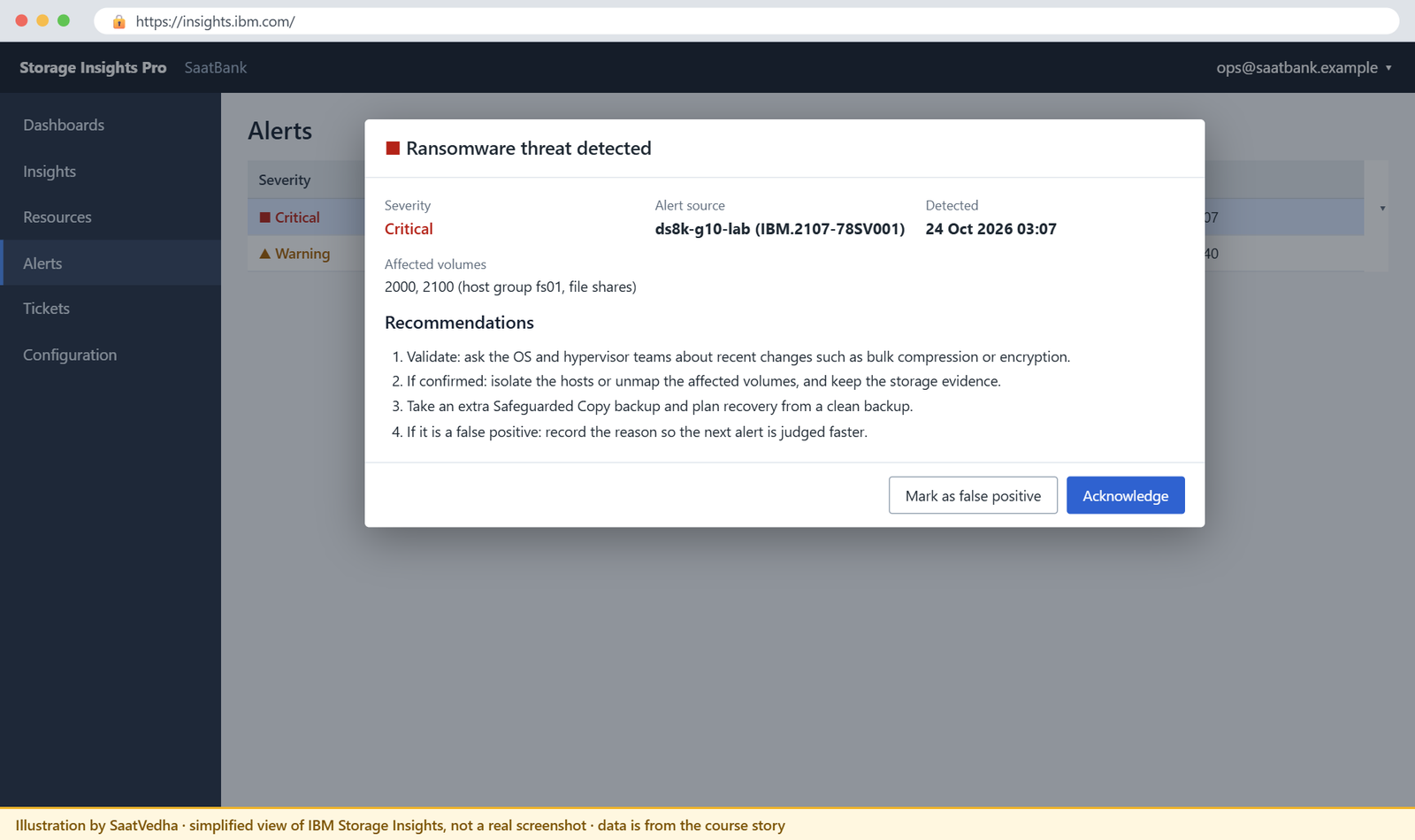
Hands-on lab: check RTD settings and rehearse the response
Before you run any command, double-check it
Read every command twice before you press Enter. Check the target: the system or account, the IDs, the names and the sizes. These commands are for learning and were tested in our lab, not on your system. At work, run the read-only list commands first, follow your change process, make sure a backup exists, and ask a second person to check anything that changes or deletes data. You run them at your own risk.
Your file server fs01 has two LUNs (2000 and 2100) on FlashCore Module pools. Both already have Safeguarded backup capacity, and every night a NOCOPY FlashCopy of 2000 goes to 2010. You’ll check the detection settings first and then rehearse the first storage actions of a ransomware response.
Practice shell note: the practice shell is our teaching tool, not IBM software. It can’t detect ransomware or send alerts, but it does let you practise the commands around RTD. Real DS CLI output is close to this but not identical, and CMUN02948E and CMUN03024E are practice shell messages.
1Start clean and load the setup script
setup-23.txt:
# setup-23.txt: FCM pools, a file server with two LUNs, backup capacity and forensic volumes (Lesson 23)
mkarray -raidtype 6 -arsite S1
mkarray -raidtype 6 -arsite S2
mkrank -array A0 -keygrp 1 -stgtype fb
mkrank -array A1 -keygrp 1 -stgtype fb
mkextpool -rankgrp 0 -keygrp 1 -stgtype fb FB_0
mkextpool -rankgrp 1 -keygrp 1 -stgtype fb FB_1
chrank -extpool P0 R0
chrank -extpool P1 R1
mkfbvol -extpool p0 -cap 200 -sam ese -name files_#h 2000
mkfbvol -extpool p1 -cap 200 -sam ese -name files_#h 2100
mkfbvol -extpool p0 -cap 200 -sam ese -name nightly_#h 2010
mkfbvol -extpool p0 -cap 200 -sam ese -name forensic_#h 2020
mkfbvol -extpool p1 -cap 200 -sam ese -name forensic_#h 2120
mkhost -type "Windows Server" -hostport 21000024FF2D0F86,21000024FF2D0F87 fs01
chhost -action map -volume 2000,2100 fs01
managefbvol -action mksafeguardedcap -extpool P0 -multiplier 2 2000
managefbvol -action mksafeguardedcap -extpool P1 -multiplier 2 2100
mkflash -nocp 2000:2010Run this:
python ds8sim.py (then: simctl reset, quit)
python ds8sim.py -hmc1 10.0.0.1 -user admin -script setup-23.txt
python ds8sim.pyThe script finishes with two CMUC00430I lines (backup capacity) and one CMUC00137I (the nightly FlashCopy).
✅ Checkpoint: no errors in the setup output.
2Check the threat detection settings
Run this:
showsi IBM.2107-78SV001You should see this:
dscli> showsi IBM.2107-78SV001
Date/Time: 24 October 2026 11:23:28 UTC IBM DSCLI Version: 7.10.10.348 DS: IBM.2107-78SV001
Name ds8k-g10-lab
ID IBM.2107-78SV001
Model A05
WWNN 5005076303FFF0DD
State Online
MTS IBM.5341-78SV000
TDSAutoUpdate Enabled
TDSSendData Enabled
DualControl Disabled
(output shortened)TDSAutoUpdate Enabled keeps the Inference Engine current. TDSSendData Enabled lets telemetry go to IBM, though only if Call Home is on as well. DualControl Disabled means a single admin can make risky changes alone, which is why many banks switch it on (Lesson 5).
On a real DS8000 you’d change these with chsi -tdssenddata enable|disable or chsi -tdsautoupdate enable|disable plus the storage image ID, or in the GUI under Settings → Advanced. chsi isn’t in the practice shell.
✅ Checkpoint: you can say what TDSAutoUpdate and TDSSendData control.
3Confirm the drives are FlashCore Modules
Run this:
lsarraysite -l -diskclass FlashCoreModuleYou should see this:
dscli> lsarraysite -l -diskclass FlashCoreModule
Date/Time: 24 October 2026 11:23:28 UTC IBM DSCLI Version: 7.10.10.348 DS: IBM.2107-78SV001
arsite DA Pair dkcap (10^9B) diskrpm State Array diskclass encrypt
===============================================================================
S1 0 4800.0 65000 Assigned A0 FlashCoreModule supported
S2 0 4800.0 65000 Assigned A1 FlashCoreModule supported
S3 0 4800.0 65000 Unassigned - FlashCoreModule supported
S4 0 4800.0 65000 Unassigned - FlashCoreModule supported
S5 2 4800.0 65000 Unassigned - FlashCoreModule supported
S6 2 4800.0 65000 Unassigned - FlashCoreModule supportedRTD needs FCM4 drives. lsarraysite -l shows the class FlashCoreModule, but on a real system you should confirm the drive generation with IBM or in the GUI hardware view before you promise anyone detection.
✅ Checkpoint: the arrays you use sit on FlashCoreModule sites.
4Check the backup capacity is ready
Run this:
showfbvol 2000You should see this:
dscli> showfbvol 2000
Date/Time: 24 October 2026 11:23:28 UTC IBM DSCLI Version: 7.10.10.348 DS: IBM.2107-78SV001
Name files_2000
ID 2000
extpool P0
cap (2^30B) 200.0
cap (blocks) 419430400
volgrp V0
sam ESE
safeguardedcap (2^30B) 400.0
safeguardedloc P0
usedsafeguardedcap (2^30B) 0.0
safeguarded no
SGC Recovered no
(output shortened)safeguardedcap 400.0 is twice the 200 GiB volume, in P0. safeguarded no means there are no backups yet, because Copy Services Manager has to take them on a schedule. Without good backups, detection is only an early warning.
✅ Checkpoint: 2000 shows safeguardedcap (2^30B) 400.0.
5Alert: isolate the file server
Let’s say Storage Insights Pro has just alerted on fs01 and the owners confirm there’s no planned change. Unmap both LUNs so the infected server can’t write to them any more.
Run these:
lshost -l
chhost -action unmap -volume 2000,2100 fs01
showhost fs01You should see this:
dscli> lshost -l
Date/Time: 24 October 2026 11:23:28 UTC IBM DSCLI Version: 7.10.10.348 DS: IBM.2107-78SV001
Name Type State Cluster AddrMode Volumes Host ports I/O ports
==========================================================================
fs01 Windows Server Online - scsimap256 2 2 16 (all)
dscli> chhost -action unmap -volume 2000,2100 fs01
CMUC00531I chhost: The host fs01 is successfully modified.
dscli> showhost fs01
Date/Time: 24 October 2026 11:23:28 UTC IBM DSCLI Version: 7.10.10.348 DS: IBM.2107-78SV001
Name fs01
Type Windows Server
State Online
AddrMode scsimap256
Volumes 0
Host ports 2
I/O ports 16 (all)
(output shortened)fs01 now shows Volumes 0. The volumes and their data are still there, and only the host has lost access. On IBM Z you’d vary the devices offline instead.
✅ Checkpoint: showhost fs01 shows Volumes 0.
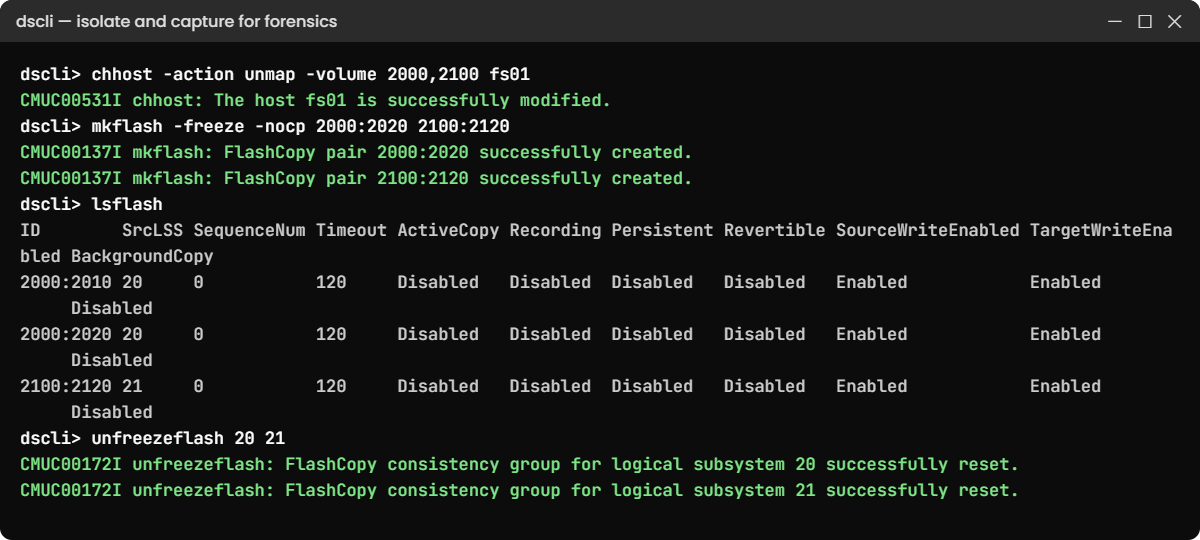
6Capture a consistent copy for forensics
Copy both LUNs into the forensic volumes at the same instant, using -freeze so the two stay consistent, and release the freeze straight after.
Run these:
mkflash -freeze -nocp 2000:2020 2100:2120
lsflash
unfreezeflash 20 21You should see this:
dscli> mkflash -freeze -nocp 2000:2020 2100:2120
CMUC00137I mkflash: FlashCopy pair 2000:2020 successfully created.
CMUC00137I mkflash: FlashCopy pair 2100:2120 successfully created.
dscli> lsflash
Date/Time: 24 October 2026 11:23:28 UTC IBM DSCLI Version: 7.10.10.348 DS: IBM.2107-78SV001
ID SrcLSS SequenceNum Timeout ActiveCopy Recording Persistent Revertible SourceWriteEnabled TargetWriteEnabled BackgroundCopy
====================================================================================================================================
2000:2010 20 0 120 Disabled Disabled Disabled Disabled Enabled Enabled Disabled
2000:2020 20 0 120 Disabled Disabled Disabled Disabled Enabled Enabled Disabled
2100:2120 21 0 120 Disabled Disabled Disabled Disabled Enabled Enabled Disabled
dscli> unfreezeflash 20 21
CMUC00172I unfreezeflash: FlashCopy consistency group for logical subsystem 20 successfully reset.
CMUC00172I unfreezeflash: FlashCopy consistency group for logical subsystem 21 successfully reset.2000:2020 and 2100:2120 now hold the state from the moment of the alert, ready for the security team to study, and the nightly pair 2000:2010 is still in place. In the real procedure you’d also trigger an unplanned Safeguarded backup in CSM, which no host can ever change.
✅ Checkpoint: lsflash shows 2000:2020 and 2100:2120, and unfreezeflash printed CMUC00172I twice.
7On a real system: recover a clean copy in CSM
In Copy Services Manager, open the Safeguarded Copy session for fs01, pick the newest backup from before the attack and Recover it to the recovery volumes. Map those to an isolated forensic host and scan them, and only after that Restore production from the backup.

✅ Checkpoint: you can describe isolate, capture, examine and restore in order.
Break It, Then Fix It
Start fresh (simctl reset, then setup-23.txt). These are two mistakes people make in that first stressful hour.
1Break it: delete the infected LUN “to stop it”
A panicked admin unmaps the LUNs and then tries to delete 2000 to stop the damage.
Run these:
chhost -action unmap -volume 2000,2100 fs01
rmfbvol -safe 2000You’ll see this:
dscli> chhost -action unmap -volume 2000,2100 fs01
CMUC00531I chhost: The host fs01 is successfully modified.
dscli> rmfbvol -safe 2000
CMUN02948E rmfbvol: 2000: The Delete logical volume task cannot be initiated because the Allow Host Pre-check Control Switch is set to true and the volume that you have specified is in use (host I/O in the last 5 minutes or a Copy Services relationship).Why: 2000 is in a FlashCopy relationship, so the DS8000 sees it as in use and refuses, which is lucky, because deleting it would wipe out the evidence the security team needs. With an active Safeguarded relationship the DS8000 refuses even if you add -force.
Fix: don’t delete anything during an incident. Unmapping has already stopped the writes, so keep everything until the security team tells you otherwise.
✅ Checkpoint: 2000 still exists and is unmapped.

2Break it: snapshot onto the nightly backup target
The admin wants a forensic copy and picks 2010, since “it’s the backup volume”.
Run these:
mkflash -freeze -nocp 2000:2010
lsflash 2010You’ll see this:
dscli> mkflash -freeze -nocp 2000:2010
CMUN03024E mkflash: 2000:2010: The target volume is already a FlashCopy target.
dscli> lsflash 2010
Date/Time: 24 October 2026 11:23:29 UTC IBM DSCLI Version: 7.10.10.348 DS: IBM.2107-78SV001
ID SrcLSS SequenceNum Timeout ActiveCopy Recording Persistent Revertible SourceWriteEnabled TargetWriteEnabled BackgroundCopy
====================================================================================================================================
2000:2010 20 0 120 Disabled Disabled Disabled Disabled Enabled Enabled DisabledWhy: 2010 is already the target of the nightly NOCOPY pair. Had it been free, the new copy would have overwritten last night’s clean image with infected data, and that’s the one copy you may need most.
Fix: use separate forensic volumes that you created in advance, and keep the group frozen only for a moment.
Run these:
mkflash -freeze -nocp 2000:2020
unfreezeflash 20
lsflash 2000You should see this:
dscli> mkflash -freeze -nocp 2000:2020
CMUC00137I mkflash: FlashCopy pair 2000:2020 successfully created.
dscli> unfreezeflash 20
CMUC00172I unfreezeflash: FlashCopy consistency group for logical subsystem 20 successfully reset.
dscli> lsflash 2000
Date/Time: 24 October 2026 11:23:29 UTC IBM DSCLI Version: 7.10.10.348 DS: IBM.2107-78SV001
ID SrcLSS SequenceNum Timeout ActiveCopy Recording Persistent Revertible SourceWriteEnabled TargetWriteEnabled BackgroundCopy
====================================================================================================================================
2000:2010 20 0 120 Disabled Disabled Disabled Disabled Enabled Enabled Disabled
2000:2020 20 0 120 Disabled Disabled Disabled Disabled Enabled Enabled Disabled✅ Checkpoint: 2000:2010 and 2000:2020 both exist.
This happened at work
The 3 a.m. alert at a bank
This was at a bank that had just moved to Release 10.2 with the Security licence and Storage Insights Pro. At 3:07 a.m. the on-call storage engineer got an email saying ransomware threat had been detected on the DS8000 that held the branch file shares.
Her first thought was to leave it till morning, but she followed the runbook instead and rang the Windows on-call engineer, who confirmed no planned job was running.
At 3:19 she unmapped the four file-share LUNs with chhost -action unmap and the writes stopped. By 3:25 the security team had triggered an unplanned Safeguarded backup in CSM.
The forensic scan later showed that a compromised service account had started encrypting home folders at 2:58, and only about 6% of files were touched before isolation. The team recovered the 2:00 a.m. Safeguarded backup to clean volumes, checked them on an isolated server and had the shares restored by 9:40. Branches opened on time, with a short notice about some folders.
What went right: the alert path had been tested, the runbook had the exact commands, Safeguarded backups ran every 2 hours, and nobody deleted anything. What they improved: a Storage Insights webhook now opens a SOAR ticket and pages both teams together, which saves about 10 minutes.
The lesson: detection only buys you minutes, and it’s a rehearsed runbook that turns those minutes into a small incident rather than a disaster.
Common mistakes and troubleshooting
| Symptom | Likely cause | What to check / fix |
|---|---|---|
| No RTD alerts ever arrive | Phase 1 code, no Security licence, or no Storage Insights Pro | Check code level 10.2+, the licence and the Storage Insights edition. |
| IBM says no RTD data is received | Call Home disabled or TDSSendData disabled | Enable Call Home; showsi TDSSendData; chsi -tdssenddata enable. |
| Admin looks for the alert in the DS8000 GUI | Alerts come only through Storage Insights Pro and email | Set up Storage Insights Pro alerts, email and a webhook. |
| Alert after a planned job | Compression, encryption, migration or restore looks like ransomware | Validate with app owners first; add known jobs to the runbook. |
| Snapshot volumes not monitored | FlashCopy and Safeguarded snapshots are excluded by design | Expected; RTD watches host-mapped volumes. |
| Recovery takes days | No tested Safeguarded Copy schedule or recovery volumes | Predefine CSM sessions, retention and recovery volumes; rehearse. |
Write the runbook before you need it, with the exact unmap, FlashCopy and CSM steps for your most important systems, and test it twice a year.
Interview questions
Click a question to open it. They’re worded the way an interviewer would ask them, and under each one you’ll find why they ask it and one way you could answer in your own words.
Fresher level
1. In simple words, how does DS8000 Ransomware Threat Detection spot an attack?
Why they ask this: They want to know you understand the idea and don’t only know the product name.
How you might answer: Ransomware encrypts data, and encrypted data looks random and doesn’t compress. FlashCore Module 4 drives measure the entropy and compressibility of every write, the DS8000 summarises that, and an inference engine on the HMC compares it with models of normal behaviour. If it looks like ransomware, we get an alert from Storage Insights Pro.
2. What do you need before a DS8000 can send you ransomware alerts?
Why they ask this: It’s a practical check on the prerequisites, which customers often get wrong.
How you might answer: You need FCM4 drives, a DS8000 G10 on code 10.1 or later, the Security Group License and IBM Storage Insights Pro, and Call Home has to be enabled so the data reaches IBM. Customer alerts only come in Phase 2, from Release 10.2. In Phase 1 the data just trains the models.
2–5 years experience
3. An RTD alert arrives at 3 a.m. Walk me through your first 30 minutes.
Why they ask this: They’re looking for a calm, ordered response that keeps the evidence and limits the damage.
How you might answer: I’d quickly check with the host owner whether there’s any planned encryption, compression, migration or restore. If there isn’t, I’d call the security officer and isolate the volumes, either by unmapping them with chhost -action unmap or by blocking the host WWPNs.
Next I’d trigger an unplanned Safeguarded backup in CSM, or a FlashCopy with -freeze to separate forensic volumes, and I wouldn’t delete anything. From there the security team works on a recovered copy in an isolated environment.
4. Why isn’t RTD enough on its own to protect against ransomware?
Why they ask this: It shows whether you see detection as one layer and not the whole answer.
How you might answer: Detection only tells you something’s wrong, and you still need clean copies to recover from. That means Safeguarded Copy backups on a schedule the hosts can’t touch, tested recovery volumes and a runbook. And the alerts only work if Call Home, the licence and Storage Insights Pro are all in place.
Senior level
5. Design a ransomware response for a bank’s DS8000 estate with Metro Mirror to DR.
Why they ask this: At senior level you have to tie together detection, isolation, immutable copies and replication.
How you might answer: I’d turn on RTD with Storage Insights Pro and a webhook into the SOAR tool, and run Safeguarded Copy through CSM every few hours with a retention the business has agreed to. I’d also have recovery volumes and an isolated forensic host or LPAR ready in advance.
When an alert comes, we isolate, take an unplanned backup, and pause or check replication so DR doesn’t end up holding only corrupted data. We restore only after validation, and we rehearse the whole thing twice a year.
6. How would you explain the cost of the Security licence and Storage Insights Pro to management?
Why they ask this: They want to see you can make a business case as well as a technical one.
How you might answer: I’d put it next to the cost of downtime and data loss, because one day without branch file shares or a payment system usually costs much more. RTD shortens the gap between infection and isolation, so there’s less data to restore. And if we already have Expert Care Premium, Storage Insights Pro is included, so the only extra cost may be the Security licence.
Quick quiz
Q1. Which drives does DS8000 RTD need?
- Any NVMe flash
- FlashCore Module 4 (FCM4)
- Spinning disks
- FlashTier2 only
Show answer
B — RTD relies on FCM4 drives that measure entropy and compression per write.
Q2. Where do customers see RTD alerts in Phase 2?
- The DS8000 GUI Events page
- IBM Storage Insights Pro and email
- The HMC console only
- lsproblem in the DS CLI
Show answer
B — The DS8000 GUI does not show ransomware alerts; Storage Insights Pro does.
Q3. What happens in Phase 1 (Release 10.1)?
- Customers get full alerts
- Data is sent for model training; only IBM sees alerts
- RTD is turned off
- FlashCopy is disabled
Show answer
B — Phase 1 is learning mode for model training.
Q4. Which volumes does the Inference Engine watch?
- FlashCopy targets
- Safeguarded backups
- Volumes mapped to hosts
- Only CKD volumes
Show answer
C — Snapshots are excluded because they do not change after creation.
Q5. What is the first storage action after a confirmed alert?
- Delete the infected volumes
- Isolate them by unmapping from the host
- Run initfbvol
- Expand the volumes
Show answer
B — Isolate first to stop the spread and keep the evidence.
Quick recap
- RTD measures entropy and compression of every write on FCM4 drives and runs an AI model on the HMC.
- You need FCM4, code 10.1+, the Security licence, Storage Insights Pro and Call Home.
- Phase 1 trains the models; Phase 2 (10.2+) sends customer alerts through Storage Insights Pro.
showsishows TDSAutoUpdate and TDSSendData;chsichanges them.- Response: validate, isolate, capture an immutable copy, examine in a clean room, restore.
- Never delete or overwrite evidence during an incident.
Next lesson
Lesson 25: Initial setup from scratch: the day-0 runbook → You take a factory-fresh DS8000 to its first mapped volume in one ordered runbook.
Further reading: DS8000 ransomware threat detection
Want to go deeper into DS8000 ransomware threat detection? Chapter 14 of the IBM Storage DS8A00 Architecture and Implementation Guide (IBM Redbooks) describes RTD and the response workflow. For the recovery side, see FlashCopy and Safeguarded Copy hands-on.
You can also see the full plan for this course on the IBM DS8000 Implementation course page.
