Create arrays and ranks
-
Phase 0: Before you start
-
Phase 1: Plan and install
-
Phase 2: Build the storage
-
Phase 3: Copy Services
-
Phase 4: Run it day to day
-
Phase 5: Troubleshooting and career
To create DS8000 arrays and ranks, you turn the raw array sites IBM installed into protected RAID arrays and then format each array into a rank of fixed-size extents. They’re the first two real building blocks of any DS8000 configuration, and everything you build later (pools, volumes, host mappings) sits on top of them.
You’ll look at the array sites, choose between RAID 6 and RAID 10, create arrays with mkarray and then ranks with mkrank, including the encryption key group a DS8A00 with data-at-rest encryption insists on. You’ll also see how to undo a mistake in the only order the DS8000 allows.
You need the practice shell and the profile from Lesson 9. Lessons 12 to 14 reuse the ranks you build here, and you’ll get a setup script so you can rebuild them in seconds.
| Time | You need | By the end you can |
|---|---|---|
| 60 to 75 minutes | The practice shell with lab.profile from Lesson 9 | Read array sites and disk classes, create RAID 6 and RAID 10 arrays, create encrypted FB ranks with the right extent size, and remove a rank and array cleanly |
What it is, in one line
An array is one array site (8 flash drives) protected with RAID 6 or RAID 10, and a rank is that array formatted into extents of one storage type (FB or CKD), ready to join an extent pool.
In Simple Words
New cupboards for the school staff room
Imagine the school gets a delivery of new steel cupboards. The cupboards are the drives, and they come in sets of eight, with each set standing together in one corner, which is the array site.
First the caretaker decides how to protect what goes inside. He can keep two cupboards for “backup notes” so that even if two cupboards break nothing is lost, which is RAID 6, or he can make every cupboard a twin of another one, which is RAID 10. Once he’s decided, the set becomes an array.
Next he fits shelves inside, all the same size, so teachers can ask for “three shelves” without measuring anything; smaller shelves for small books or bigger ones for big files. That’s the rank, and the shelves are extents. Only then can the head teacher hand shelves out to classes, which happens in the next lesson with extent pools.
Engineer's View
Arrays, ranks and the rules behind them
On a DS8A00 the drives come in array sites of 8 identical flash drives, and each HPFE Gen3 pair holds up to six array sites. The chain is strictly one to one to one: one array site makes one array, and one array makes one rank.
- Disk classes: FlashTier1 (1.6 TB), FlashTier2 (1.92, 3.84 or 7.68 TB) and FlashCoreModule (4.8, 9.6 or 19.2 TB, with built-in compression).
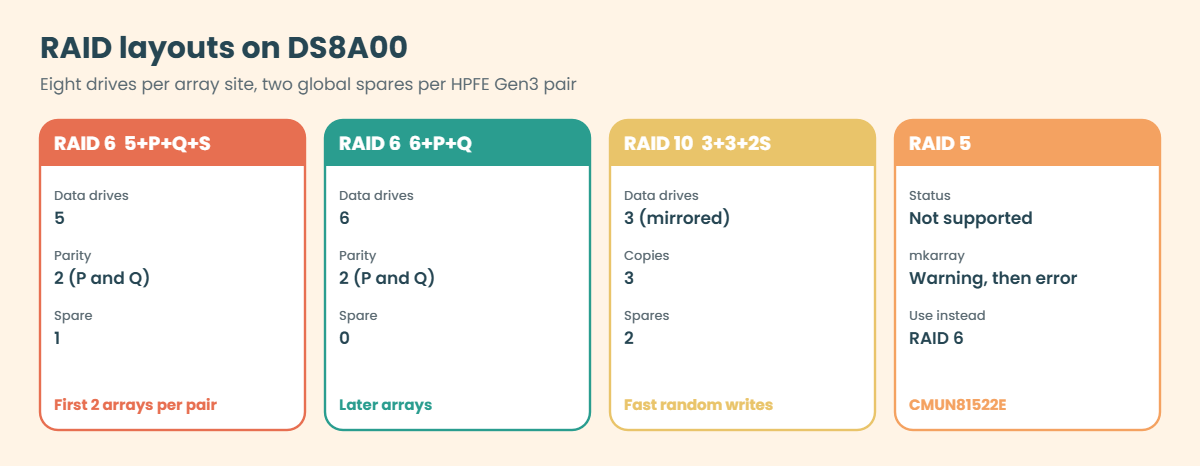
- RAID: RAID 6 (the default) or RAID 10. RAID 5 isn’t supported on DS8A00, and
mkarrayshows a warning and then rejects it. - Layouts: RAID 6 is 5+P+Q+S (five data drives, two parity and one spare) or 6+P+Q, and RAID 10 is 3+3+2S or 4+4. Each HPFE Gen3 pair keeps two global spares, so the first two RAID 6 arrays built on a pair come out as 5+P+Q+S and the later ones as 6+P+Q.
- Rank storage type:
-stgtype fbfor open systems orckdfor IBM Z, and you can’t change it later. - Extent size: small extents are the default, 16 MiB for FB and 21 cylinders for CKD, while large extents are 1 GiB (FB) or 1113 cylinders (CKD). Whichever rank goes into a pool first sets the pool’s extent size.
- Encryption: with data-at-rest encryption on,
mkrankneeds-keygrpwith the ID you get fromlskeygrp. - Ownership: a new rank has no group. It gets rank group 0 (server0) or 1 (server1) once you put it into an extent pool.
The DS GUI hides this ladder by treating array site, array and rank as one “array”, and asks for the RAID type and extent size when you assign it to a pool. The DS CLI shows every rung, which is why troubleshooting usually happens there.
On DS8900F: the commands and the one to one chain are the same, but built on the earlier HPFE Gen2 enclosures.
How it works, step by step
This is the order a storage admin follows, with steps 1 and 2 being planning and steps 3 to 6 the commands.
1Read the array sites
lsarraysite -l lists every array site with its device adapter (DA) pair, drive capacity, disk class and state, and Unassigned means no array exists on it yet. Group the sites by disk class, because each class turns into its own tier later on.
2Decide RAID type per site
RAID 6 is the right choice for nearly everything, since it survives two drive failures and only costs two drives of parity. RAID 10 gives faster small random writes but halves the usable space, and IBM i workloads with heavy random writes are the typical RAID 10 case.
Check the encryption state as well: lskeygrp shows whether a key group exists and what its ID is.
3Create the arrays
mkarray -raidtype 6 -arsite S1 builds array A0 from site S1. The DS8000 numbers arrays in order (A0, A1, …) whichever site you use, so write down the site-to-array mapping in your worksheet.
4Check the layout
lsarray -l shows the real layout in brackets, for example 6 (5+P+Q+S), which tells you how many drives hold data. Five data drives of 4.8 TB give you 24 TB of physical space before compression.
5Create the ranks
mkrank -array A0 -keygrp 1 -stgtype fb formats A0 into rank R0 with 16 MiB extents. Only add -extsize 1GiB when you want large extents on purpose, and keep in mind that every rank going into the same pool has to use the same extent size.
6Verify the ranks
lsrank -l shows the extents, extent size, key group and, on FlashCore Module ranks, the logical and physical capacity, and showrank gives the same for a single rank. The Group column stays at - until the rank joins a pool.
7Undo in reverse order
Mistakes happen, like the wrong RAID type, the wrong site or the wrong storage type. You can’t edit an array or a rank, only delete and rebuild, and the DS8000 enforces the order: rmrank first, then rmarray.
Removing a rank formats its drives, so only ever do it on capacity that holds no data.
| Object | Make | List | Remove |
|---|---|---|---|
| Array site | (installed by IBM) | lsarraysite | – |
| Array | mkarray | lsarray | rmarray |
| Rank | mkrank | lsrank | rmrank (first) |
Hands-on lab: build RAID 6 arrays and encrypted FB ranks
Before you run any command, double-check it
Read every command twice before you press Enter. Check the target: the system or account, the IDs, the names and the sizes. These commands are for learning and were tested in our lab, not on your system. At work, run the read-only list commands first, follow your change process, make sure a backup exists, and ask a second person to check anything that changes or deletes data. You run them at your own risk.
You’ll turn the six array sites on DA pairs 0 and 2 into RAID 6 arrays and encrypted FB ranks, which is how a real build starts. Two sites (S3 and S4) are left unused for the Break It section.
Practice shell note: the practice shell is our own teaching tool, not IBM software, and real DS CLI output looks very close to this but isn’t identical. The capacity numbers come from the shell’s own formulas (including a simulated FlashCore Module compression factor), and some messages are practice shell messages. All the outputs below are what the shell printed.
1Reset and look at the array sites
Run this:
python ds8sim.py -cfg lab.profile
simctl reset
lsarraysite -lYou should see this:
dscli> simctl reset
SIM0100I simctl: factory state restored (users and passwords kept; use simctl reset -all to reset them too).
dscli> lsarraysite -l
Date/Time: 24 October 2026 11:12:31 UTC IBM DSCLI Version: 7.10.10.348 DS: IBM.2107-78SV001
arsite DA Pair dkcap (10^9B) diskrpm State Array diskclass encrypt
===============================================================================
S1 0 4800.0 65000 Unassigned - FlashCoreModule supported
S2 0 4800.0 65000 Unassigned - FlashCoreModule supported
S3 0 4800.0 65000 Unassigned - FlashCoreModule supported
S4 0 4800.0 65000 Unassigned - FlashCoreModule supported
S5 2 4800.0 65000 Unassigned - FlashCoreModule supported
S6 2 4800.0 65000 Unassigned - FlashCoreModule supported
S7 2 3840.0 65000 Unassigned - FlashTier2 supported
S8 2 3840.0 65000 Unassigned - FlashTier2 supportedThere are six sites of 4.8 TB FlashCore Modules and two of 3.84 TB FlashTier2 drives, all Unassigned, with S1 to S4 on DA pair 0 and S5 to S8 on DA pair 2.
✅ Checkpoint: All eight array sites show Unassigned.
2Find the encryption key group
Run this:
lskeygrpYou should see this:
dscli> lskeygrp
Date/Time: 24 October 2026 11:12:31 UTC IBM DSCLI Version: 7.10.10.348 DS: IBM.2107-78SV001
ID state reckeystate reckeydate datakeydate keyprotocol type name
=======================================================================
1 accessible disabled - 10/01/2026 LOCAL DAR DAR_1Key group 1 is accessible and uses local key management, so you’ll pass -keygrp 1 to every mkrank.
✅ Checkpoint: You know the key group ID is 1.
3Create four RAID 6 arrays on FlashCore Modules
Use two sites on each DA pair, so the work is spread over both flash RAID adapter pairs.
Run this:
mkarray -raidtype 6 -arsite S1
mkarray -raidtype 6 -arsite S2
mkarray -raidtype 6 -arsite S5
mkarray -raidtype 6 -arsite S6
lsarray -lYou should see this:
dscli> mkarray -raidtype 6 -arsite S1
CMUC00004I mkarray: Array A0 successfully created.
dscli> mkarray -raidtype 6 -arsite S2
CMUC00004I mkarray: Array A1 successfully created.
dscli> mkarray -raidtype 6 -arsite S5
CMUC00004I mkarray: Array A2 successfully created.
dscli> mkarray -raidtype 6 -arsite S6
CMUC00004I mkarray: Array A3 successfully created.
dscli> lsarray -l
Date/Time: 24 October 2026 11:12:31 UTC IBM DSCLI Version: 7.10.10.348 DS: IBM.2107-78SV001
Array State Data RAIDtype arsite Rank DA Pair DDMcap (10^9B) diskclass encrypt
================================================================================================
A0 Unassigned Normal 6 (5+P+Q+S) S1 - 0 4800.0 FlashCoreModule supported
A1 Unassigned Normal 6 (5+P+Q+S) S2 - 0 4800.0 FlashCoreModule supported
A2 Unassigned Normal 6 (5+P+Q+S) S5 - 2 4800.0 FlashCoreModule supported
A3 Unassigned Normal 6 (5+P+Q+S) S6 - 2 4800.0 FlashCoreModule supportedAll four are 6 (5+P+Q+S) because they’re the first two arrays on each DA pair, so each one carries a spare. The state is Unassigned since no rank uses them yet.
✅ Checkpoint: Arrays A0 to A3 exist, two on DA pair 0 and two on DA pair 2.
4Create four encrypted FB ranks
Run this:
mkrank -array A0 -keygrp 1 -stgtype fb
mkrank -array A1 -keygrp 1 -stgtype fb
mkrank -array A2 -keygrp 1 -stgtype fb
mkrank -array A3 -keygrp 1 -stgtype fb
lsrankYou should see this:
dscli> mkrank -array A0 -keygrp 1 -stgtype fb
CMUC00007I mkrank: Rank R0 successfully created.
dscli> mkrank -array A1 -keygrp 1 -stgtype fb
CMUC00007I mkrank: Rank R1 successfully created.
dscli> mkrank -array A2 -keygrp 1 -stgtype fb
CMUC00007I mkrank: Rank R2 successfully created.
dscli> mkrank -array A3 -keygrp 1 -stgtype fb
CMUC00007I mkrank: Rank R3 successfully created.
dscli> lsrank
Date/Time: 24 October 2026 11:12:31 UTC IBM DSCLI Version: 7.10.10.348 DS: IBM.2107-78SV001
ID Group State datastate Array RAIDtype extpoolID stgtype
==============================================================
R0 - Unassigned Normal A0 6 - fb
R1 - Unassigned Normal A1 6 - fb
R2 - Unassigned Normal A2 6 - fb
R3 - Unassigned Normal A3 6 - fb✅ Checkpoint: Ranks R0 to R3 are Unassigned, stgtype fb, Group still “-“.

5Look inside one rank
Run this:
showrank R0You should see this:
dscli> showrank R0
Date/Time: 24 October 2026 11:12:31 UTC IBM DSCLI Version: 7.10.10.348 DS: IBM.2107-78SV001
ID R0
SN -
Group -
State Unassigned
datastate Normal
Array A0
RAIDtype 6
extpoolID -
extpoolnam -
volumes -
stgtype fb
exts 6372928
usedexts 0
widearrays 0
nararrays 1
trksize 128
strpsize 384
strpesize 0
(output shortened)R0 has 16 MiB extents (the default) and belongs to key group 1. The exts number is how many extents the rank offers, and it looks very large here because the shell simulates FlashCore Module compression, which makes the logical capacity bigger than the physical drives.
✅ Checkpoint: extsize shows 16MiB and encryptgrp shows 1.
6Add the FlashTier2 sites and save a setup script
Build the last two arrays and ranks and then check everything in one go.
Run this:
mkarray -raidtype 6 -arsite S7
mkarray -raidtype 6 -arsite S8
mkrank -array A4 -keygrp 1 -stgtype fb
mkrank -array A5 -keygrp 1 -stgtype fb
lsarraysiteYou should see this:
dscli> mkarray -raidtype 6 -arsite S7
CMUC00004I mkarray: Array A4 successfully created.
dscli> mkarray -raidtype 6 -arsite S8
CMUC00004I mkarray: Array A5 successfully created.
dscli> mkrank -array A4 -keygrp 1 -stgtype fb
CMUC00007I mkrank: Rank R4 successfully created.
dscli> mkrank -array A5 -keygrp 1 -stgtype fb
CMUC00007I mkrank: Rank R5 successfully created.
dscli> lsarraysite
Date/Time: 24 October 2026 11:12:31 UTC IBM DSCLI Version: 7.10.10.348 DS: IBM.2107-78SV001
arsite DA Pair dkcap (10^9B) State Array
=============================================
S1 0 4800.0 Assigned A0
S2 0 4800.0 Assigned A1
S3 0 4800.0 Unassigned -
S4 0 4800.0 Unassigned -
S5 2 4800.0 Assigned A2
S6 2 4800.0 Assigned A3
S7 2 3840.0 Assigned A4
S8 2 3840.0 Assigned A5Six sites are now Assigned and S3 and S4 are still unused. Lessons 12 to 14 start from these ranks, so save the commands in a file called setup-11.txt in your lab folder.
After any simctl reset you can rebuild everything with one line: python ds8sim.py -cfg lab.profile -script setup-11.txt.
File setup-11.txt:
# setup-11.txt: arrays and ranks from Lesson 11 (run after simctl reset)
mkarray -raidtype 6 -arsite S1
mkarray -raidtype 6 -arsite S2
mkarray -raidtype 6 -arsite S5
mkarray -raidtype 6 -arsite S6
mkarray -raidtype 6 -arsite S7
mkarray -raidtype 6 -arsite S8
mkrank -array A0 -keygrp 1 -stgtype fb
mkrank -array A1 -keygrp 1 -stgtype fb
mkrank -array A2 -keygrp 1 -stgtype fb
mkrank -array A3 -keygrp 1 -stgtype fb
mkrank -array A4 -keygrp 1 -stgtype fb
mkrank -array A5 -keygrp 1 -stgtype fb
lsrank
✅ Checkpoint: Six ranks R0 to R5 exist and setup-11.txt is saved.
Break It, Then Fix It
Next, two mistakes: deleting things in the wrong order, and trying an old habit the DS8A00 won’t accept any more.
1Break it: remove an array that still has a rank
A colleague built a RAID 10 array on S3 by mistake (the plan said RAID 6) and made a rank on it straight away. Now you’re asked to “just delete the array”.
Run this:
mkarray -raidtype 10 -arsite S3
mkrank -array A6 -keygrp 1 -stgtype fb
lsarray -l A6
rmarray -quiet A6You’ll get this error:
dscli> mkarray -raidtype 10 -arsite S3
CMUC00004I mkarray: Array A6 successfully created.
dscli> mkrank -array A6 -keygrp 1 -stgtype fb
CMUC00007I mkrank: Rank R6 successfully created.
dscli> lsarray -l A6
Date/Time: 24 October 2026 11:12:56 UTC IBM DSCLI Version: 7.10.10.348 DS: IBM.2107-78SV001
Array State Data RAIDtype arsite Rank DA Pair DDMcap (10^9B) diskclass encrypt
===========================================================================================
A6 Assigned Normal 10 (4x2) S3 R6 0 4800.0 FlashCoreModule supported
dscli> rmarray -quiet A6
CMUN02016E rmarray: A6: The array cannot be removed because rank R6 is defined on it.Why: the layout 10 (4x2) confirms it’s RAID 10. You can’t remove an array while a rank sits on it, because the rank owns the formatted space. (This particular message comes from the practice shell, but a real DS8000 refuses too.)
Fix: remove the rank first and then the array. -quiet skips the y/n prompt, so only use it when you’re sure.
Run this:
rmrank -quiet R6
rmarray -quiet A6
lsarraysite -l S3You should see this:
dscli> rmrank -quiet R6
CMUC00010I rmrank: Rank R6 successfully deleted.
dscli> rmarray -quiet A6
CMUC00006I rmarray: Array A6 successfully deleted.
dscli> lsarraysite -l S3
Date/Time: 24 October 2026 11:12:56 UTC IBM DSCLI Version: 7.10.10.348 DS: IBM.2107-78SV001
arsite DA Pair dkcap (10^9B) diskrpm State Array diskclass encrypt
===============================================================================
S3 0 4800.0 65000 Unassigned - FlashCoreModule supported✅ Checkpoint: S3 is Unassigned again and ready for a correct RAID 6 array.

2Break it: ask for RAID 5
Engineers who grew up on older arrays still type RAID 5 to “save two drives”. Try it, and answer y to the warning.
Run this:
mkarray -raidtype 5 -arsite S3
y
lsarraysite S3You’ll get this:
dscli> mkarray -raidtype 5 -arsite S3
CMUC00536W mkarray: The use of RAID 6 over RAID 5 is highly recommended for increased reliability. Please acknowledge that you understand the risks associated with RAID 5.: Are you sure you want to accept the disclaimer above? [Y/N]: y
CMUN81522E mkarray: RAID 5 is not supported by the device adapter pair.
dscli> lsarraysite S3
Date/Time: 24 October 2026 11:12:56 UTC IBM DSCLI Version: 7.10.10.348 DS: IBM.2107-78SV001
arsite DA Pair dkcap (10^9B) State Array
=============================================
S3 0 4800.0 Unassigned -Why: it’s the same warning and error the IBM Redbook shows, because the DS8A00 device adapters don’t support RAID 5 at all. Even after you accept the disclaimer no array gets created, and S3 stays Unassigned.
Fix: use RAID 6. It costs one drive more than RAID 5 would and survives two failures, which matters on large flash drives where a rebuild takes a while.
✅ Checkpoint: You can explain why RAID 5 fails on DS8A00 and what to use instead.
This happened at work
Six arrays on the wrong drives
A logistics company added a new HPFE Gen3 pair to its DS8A50, with six array sites of 3.84 TB FlashTier2 drives for a warehouse system, sitting next to the existing FlashCore Module sites the ERP database used. The change was booked for a Sunday.
The engineer on duty built his script from the previous year’s file, which used site IDs S1 to S6. On the current box, though, S1 to S6 were the remaining empty FlashCore Module sites, and the new FlashTier2 drives were S7 to S12.
The script ran without a hitch, creating arrays, ranks and two new pools, and nobody checked the disk class. On Monday the warehouse team created thin volumes in the new pools, and when the ERP team went to do its planned expansion on Wednesday, there was no FlashCore Module capacity left.
It took a week to undo. The warehouse volumes had to be migrated out, the ranks removed (each removal formats the drives), and the arrays removed and rebuilt on the right sites.
What went wrong was that the site IDs were copied instead of read. The team’s rule now is to run lsarraysite -l -diskclass FlashTier2 (or whichever class you want) and paste the output into the change record before any mkarray.
Common mistakes and troubleshooting
| Symptom | Likely cause | What to check / fix |
|---|---|---|
| mkrank fails asking for -keygrp | Encryption is on | lskeygrp, then mkrank -keygrp ID |
| RAID 5 rejected after the warning | DS8A00 supports only RAID 6 and RAID 10 | Use -raidtype 6 (or 10) |
| rmarray refused | A rank still uses the array | rmrank first, then rmarray |
| Array built on the wrong drive type | Site IDs copied from an old script | lsarraysite -l -diskclass before mkarray |
| Rank will not join a pool later | Extent size or storage type differs from the pool | Plan one extent size and stgtype per pool; rebuild the rank |
| Less usable space than expected on RAID 6 | First arrays on a DA pair carry a spare (5+P+Q+S) | Check lsarray -l layout; later arrays are 6+P+Q |
| Group column shows “-“ | Rank not yet in an extent pool | Normal until chrank -extpool in Lesson 12 |
A good habit is to run the matching list command after every build step and keep the output with the change record. Between them, lsarraysite, lsarray -l and lsrank -l tell the whole story.
Interview questions
Click a question to open it. Each one is phrased the way an interviewer would ask it, and under it you’ll see why they ask and one way you could answer in your own words.
Fresher level
1. What is the difference between an array site, an array and a rank?
Why they ask this: They want to see that you understand the DS8000 building blocks and the order they come in.
How you might answer: An array site is a group of eight identical drives that IBM installs. An array is one array site with RAID 6 or RAID 10 applied, which you make with mkarray, and a rank is that array formatted into extents of one storage type, FB or CKD, made with mkrank. It’s one to one to one.
2. Why can’t you create a RAID 5 array on a DS8A00?
Why they ask this: They’re checking whether you know the current platform’s limits or are working from old habits.
How you might answer: DS8A00 only supports RAID 6 and RAID 10. If you try RAID 5, mkarray shows a warning, and even after you accept it the command fails because the device adapters don’t support RAID 5. RAID 6 survives two drive failures, which matters a lot with large flash drives.
2–5 years experience
3. Walk me through building four encrypted FB ranks on a new DS8000.
Why they ask this: They want a clear sequence along with the checks a careful engineer adds.
How you might answer: I’d list the sites with lsarraysite -l and pick sites of the right disk class, spread across the DA pairs, then run lskeygrp to get the key group ID. After that, mkarray -raidtype 6 for each site and lsarray -l to confirm the layout.
Then mkrank -array An -keygrp 1 -stgtype fb for each array, keeping the default 16 MiB extents unless the plan says 1 GiB, and finally lsrank -l to check the extents, extent size and key group.
4. When would you choose RAID 10 over RAID 6 on a DS8A00?
Why they ask this: They want to hear you weigh the trade-offs rather than recite one rule.
How you might answer: RAID 6 is the default and suits most workloads, with more usable space and protection against two failures. I’d look at RAID 10 for workloads with heavy small random writes or poor write-cache efficiency, some IBM i systems for example. Since RAID 10 roughly halves usable capacity, I’d only pick it with performance data to back it up.
Senior level
5. An array was built with the wrong RAID type and a rank already exists on it. No volumes yet. How do you fix it and what do you watch for?
Why they ask this: They’re testing whether you know the dependency order and the risk that comes with deleting.
How you might answer: I’d confirm with lsrank -l that the rank has no used extents and isn’t in a pool. Then I remove the rank first with rmrank, which formats the drives, and after that the array with rmarray, and the site goes back to Unassigned.
I’d rebuild with the correct mkarray and mkrank and keep lsarray -l output from before and after. If the rank had been in a pool with data on it, I’d move the data first, or unassign the rank so Easy Tier empties it, and never just delete it.
6. How would you lay out arrays for a new DS8A50 with two HPFE Gen3 pairs and two drive classes?
Why they ask this: At senior level you plan for balance, tiers and growth later on.
How you might answer: I’d keep each drive class separate, since each one becomes its own tier. Arrays get spread evenly across both DA pairs, and I’d plan an even number of ranks of each class so the pools in rank group 0 and 1 end up with the same capacity. All the ranks in one pool use the same extent size, normally 16 MiB, and I’d remember that the first two RAID 6 arrays per pair carry spares and so give a bit less space.
Quick quiz
Q1. How many drives are in one DS8A00 array site?
- 4
- 6
- 8
- 16
Show answer
C — An array site is a group of 8 identical flash drives.
Q2. Which RAID types does a DS8A00 support?
- RAID 5 and RAID 6
- RAID 6 and RAID 10
- RAID 5, 6 and 10
- RAID 1 only
Show answer
B — RAID 6 (default) and RAID 10. RAID 5 is rejected.
Q3. mkrank says -keygrp is required. Why?
- The array is RAID 10
- Data-at-rest encryption is enabled
- The rank is CKD
- The extent size is missing
Show answer
B — With encryption on, every rank needs the key group ID from lskeygrp.
Q4. What is the default FB extent size?
- 1 GiB
- 16 MiB
- 21 cylinders
- 64 KiB
Show answer
B — Small extents (16 MiB FB, 21 cylinders CKD) are the default.
Q5. In which order do you remove a rank and its array?
- rmarray, then rmrank
- rmrank, then rmarray
- Either order
- rmextpool removes both
Show answer
B — The array can’t be removed while a rank is defined on it.
Quick recap
- One array site (8 drives) makes one array, which makes one rank.
- mkarray -raidtype 6|10 -arsite Sn; RAID 5 is not supported on DS8A00.
- The first two RAID 6 arrays per HPFE Gen3 pair are 5+P+Q+S, later ones 6+P+Q.
- mkrank -array An -keygrp ID -stgtype fb|ckd; default extents are 16 MiB (FB) or 21 cylinders (CKD).
- Check every step with lsarraysite -l, lsarray -l and lsrank -l.
- Undo in reverse: rmrank first, then rmarray.
Next lesson
Lesson 12: Create extent pools and balance them → You create a pool pair, one per rank group, and add your new ranks evenly.
Further reading: create DS8000 arrays and ranks
For more on how to create DS8000 arrays and ranks, IBM Redbook SG24-8559, sections 10.3.1 to 10.3.3 has the full mkarray and mkrank examples. For the theory, go back to Array sites, arrays and RAID 6 / RAID 10 in the Architecture course.
You can also see the full plan for this course on the IBM DS8000 Implementation course page.
Try it yourself: open the DS8000 array and rank command builder, type the array site and RAID type, and it writes mkarray and mkrank for you with the checks.
