Hosts, host ports and volume mapping

DS8000 host mapping is where a volume finally reaches a server. You tell the DS8000 who the server is (a host object with a type), how to recognise it (the WWPNs of its HBA ports) and which volumes it’s allowed to see. Get one character of a WWPN wrong and the server sees nothing, and if you map a volume to the wrong host, two servers may end up writing to the same disk.

You’ll find the host ports that are already logged in, create hosts and a cluster with mkhost and mkcluster, add ports with mkhostport and map volumes with chhost and chcluster. Along the way you’ll see the volume groups the DS8000 creates behind the scenes, plus the older mkvolgrp and mkhostconnect method that you’ll still come across on existing systems.

Begin with your Lesson 13 volumes, or rebuild everything with setup-13.txt.

TimeYou needBy the end you can
60 to 75 minutesThe practice shell, lab.profile and setup-13.txt from Lesson 13Find logged-in WWPNs, create hosts and clusters, map volumes to a host or a whole cluster, read the automatic volume groups, and fix a WWPN typo and a missing zone

What it is, in one line

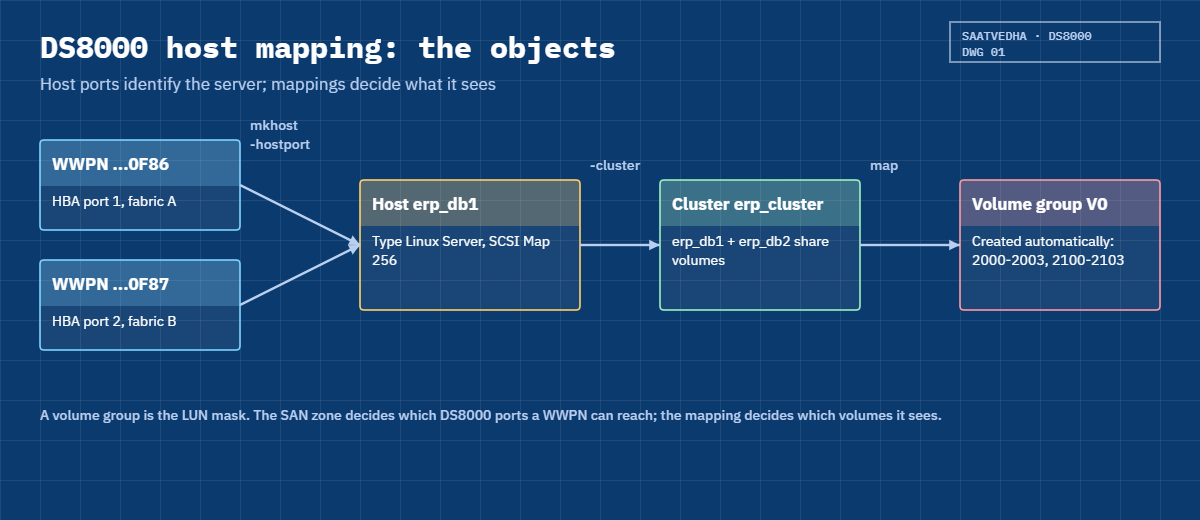
DS8000 host mapping links a host object (type plus HBA WWPNs) to volumes, either directly or through a cluster, and the DS8000 keeps the result in a volume group that acts as the LUN mask.

In Simple Words

Library cards and the reading room

Think of a school library with a reading room full of special books. Not every student can take any book, so the librarian keeps a register of which student may read which books, and next to each name she writes the number from that student’s library card. When a student shows the card, she checks the number and hands over only the books on that student’s list.

If she copies a single digit of the card number wrong, the real student gets turned away even though everything else in the register is correct.

For group projects she makes a “class 5B” list, and everyone in 5B can read the same set of books. In DS8000 terms the student is the host, the card number is the WWPN, the book list is the volume group and the class list is the cluster.

Engineer's View

Hosts, ports, clusters and volume groups

The DS8000 masks LUNs by WWPN, so a host’s volumes are only visible to HBA ports that are defined on that host and logged in through a zoned I/O port.

  • Host: mkhost -type "Linux Server" Host_Name. The type sets the addressing mode. Most open systems (Linux Server, Windows Server, VMware) use SCSI Map 256 with LUN polling, while AIX and a few others use SCSI Mask with report LUN, and lshosttype -type scsimap256 or scsimask lists them.
  • Host ports: each is 16 hex characters. You can add them with -hostport wwpn1,wwpn2 on mkhost or later with mkhostport -host, and each WWPN can only be defined once on the system.
  • Finding WWPNs: lshostport -login shows every logged-in WWPN and the DS8000 port it uses, and -unknown narrows that to the ones not yet assigned to a host. You can also add ports before they log in.
  • Clusters: mkcluster groups hosts that share volumes, such as cluster nodes or ESXi hosts, and any volume mapped to a cluster shows up on every member with the same SCSI ID.
  • Mapping: chhost -action map -volume ... or chcluster -action map -volume ..., and the DS8000 builds a volume group named after the host or cluster for you.
  • Earlier method: mkvolgrp plus mkhostconnect -wwname ... -volgrp. It still works, but the GUI only shows connections that belong to a host object, which is why IBM recommends mkhost and chhost.

By default, host I/O port access shows 16 (all). IBM suggests you restrict paths with SAN zoning and leave the DS8000 port mask alone.

On DS8900F: the same host and cluster commands are there from Release 9 onward, while older code used only volume groups and host connections.

How it works, step by step

Host mapping involves three teams: the server team (WWPNs), the SAN team (zoning) and you (the DS8000 objects). Work through it in this order.

1Collect WWPNs from the server team

Ask for the WWPN of every HBA port and which fabric it’s on. On Linux you’ll find them in /sys/class/fc_host/host*/port_name, on Windows through PowerShell with Get-InitiatorPort, and on ESXi under Storage Adapters. Always get them in writing, never over the phone.

2Check the logins on the DS8000

After the SAN team has zoned the HBAs to the DS8000 ports, lshostport -unknown lists the WWPNs that are logged in but not defined yet. Compare them with the server team’s list one character at a time.

DS8000 host mapping objects: WWPNs, host, cluster and automatic volume group

3Create the host

mkhost -type "Linux Server" -hostport wwpn1,wwpn2 name creates the host and its ports in one go. Pick the type that matches the OS so the addressing mode comes out right, and use a name the server team will recognise, usually the server’s hostname.

4Group shared hosts in a cluster

For clustered databases or an ESXi cluster, create the cluster first with mkcluster, then add hosts to it with -cluster on mkhost or with chhost -cluster later. Hosts that shouldn’t share disks stay out of clusters.

5Map the volumes

Shared volumes go to the cluster with chcluster -action map, and private ones such as boot disks go to a single host with chhost -action map. Spread the volume list over even and odd LSSs so both DS8000 servers serve the host.

6Verify on the DS8000

lshost -l gives each host’s state, volume count and port count, lshostport -l shows each WWPN, its host and whether it’s logged in, and lsvolgrp and showvolgrp show the automatic volume groups and what’s in them.

Mapping a new server: WWPNs, zoning, logins, host and map, rescan

7Verify on the host

The server team then rescans (Linux rescan-scsi-bus.sh or echo "- - -" > /sys/class/scsi_host/hostN/scan, a Disk Management rescan on Windows, a storage rescan on ESXi) and confirms each LUN shows up once per path. In Lesson 15 you’ll set up multipathing so those paths turn into one disk.

ObjectMakeListWhat it means
Hostmkhostlshost -lOne server and its type
Host portmkhostportlshostport -lOne HBA WWPN
ClustermkclusterlsclusterHosts that share volumes
Mappingchhost / chcluster -action mapshowvolgrpWhich volumes they see

Hands-on lab: create hosts and a cluster, map volumes

Before you run any command, double-check it

Read every command twice before you press Enter. Check the target: the system or account, the IDs, the names and the sizes. These commands are for learning and were tested in our lab, not on your system. At work, run the read-only list commands first, follow your change process, make sure a backup exists, and ask a second person to check anything that changes or deletes data. You run them at your own risk.

Two database servers, erp_db1 and erp_db2, make up a cluster and share the eight ERP volumes, and one ESXi host, wh_esx1, gets the two warehouse volumes. All four database HBA ports are already logged in through I0032 and I0042.

Practice shell note: the practice shell is our own teaching tool, not IBM software. Real DS CLI output looks very close to this but isn’t identical. The simctl commands (login, break, fix) are practice-only and stand in for the SAN and server teams, and their SIM messages come from the shell. Every output below is what the shell printed.

1Rebuild the Lesson 13 volumes and find the WWPNs

Run this:

python ds8sim.py -cfg lab.profile
simctl reset
quit
python ds8sim.py -cfg lab.profile -script setup-13.txt
python ds8sim.py -cfg lab.profile
lshostport -unknown

You should see this:

dscli> lshostport -unknown
Date/Time: 24 October 2026 14:01:20 UTC IBM DSCLI Version: 7.10.10.348 DS: IBM.2107-78SV001
WWNN             WWPN             ESSIOport
===========================================
20000024FF2D0F86 21000024FF2D0F86 I0032
20000024FF2D0F87 21000024FF2D0F87 I0042
20000120FA13B914 10000090FA13B914 I0032
20000120FA13B915 10000090FA13B915 I0042

Four WWPNs are logged in but don’t belong to any host. The server team tells you the 21000024FF2D0F8x pair is erp_db1 and the 10000090FA13B91x pair is erp_db2, and since each server has one port on I0032 and one on I0042, each has two paths.

✅ Checkpoint: You matched each WWPN to a server.

2Check the host type

Run this:

lshosttype -type scsimap256

You should see this:

dscli> lshosttype -type scsimap256
Date/Time: 24 October 2026 14:01:20 UTC IBM DSCLI Version: 7.10.10.348 DS: IBM.2107-78SV001
HostType   Profile              AddrDiscovery LBS
=================================================
AppleOSX   Apple - OSX          LUNPolling    512
Fujitsu    Fujitsu - Solaris    LUNPolling    512
HpTru64    HP - Tru64           LUNPolling    512
HpVms      HP - Open VMS        LUNPolling    512
Linux      Linux Server         LUNPolling    512
(output shortened)

Linux Server uses SCSI Map 256 with LUN polling and 512-byte blocks, and VMware sits in the same list.

✅ Checkpoint: You know Linux Server and VMware are SCSI Map 256 types.

3Create the cluster and both hosts

erp_db1 gets its ports on the mkhost line and erp_db2 gets them afterwards with mkhostport, so you see both ways of doing it.

Run this:

mkcluster erp_cluster
mkhost -type "Linux Server" -hostport 21000024FF2D0F86,21000024FF2D0F87 -cluster erp_cluster erp_db1
mkhost -type "Linux Server" -cluster erp_cluster erp_db2
mkhostport -host erp_db2 10000090FA13B914 10000090FA13B915
lshost -l

You should see this:

dscli> mkcluster erp_cluster
CMUC00538I mkcluster: The cluster erp_cluster is successfully created.
dscli> mkhost -type "Linux Server" -hostport 21000024FF2D0F86,21000024FF2D0F87 -cluster erp_cluster erp_db1
CMUC00530I mkhost: The host erp_db1 is successfully created.
dscli> mkhost -type "Linux Server" -cluster erp_cluster erp_db2
CMUC00530I mkhost: The host erp_db2 is successfully created.
dscli> mkhostport -host erp_db2 10000090FA13B914 10000090FA13B915
CMUC00542I mkhostport: The host port 10000090FA13B914 is successfully created.
CMUC00542I mkhostport: The host port 10000090FA13B915 is successfully created.
dscli> lshost -l
Date/Time: 24 October 2026 14:01:20 UTC IBM DSCLI Version: 7.10.10.348 DS: IBM.2107-78SV001
Name    Type         State  Cluster     AddrMode   Volumes Host ports I/O ports
===============================================================================
erp_db1 Linux Server Online erp_cluster scsimap256 0       2          16 (all)
erp_db2 Linux Server Online erp_cluster scsimap256 0       2          16 (all)

Both hosts are Online because their ports are logged in, and each has 2 host ports and 0 volumes so far.

✅ Checkpoint: erp_db1 and erp_db2 are Online in erp_cluster with 2 ports each.

4Map the ERP volumes to the cluster

Run this:

chcluster -action map -volume 2000-2003,2100-2103 erp_cluster

You should see this:

dscli> chcluster -action map -volume 2000-2003,2100-2103 erp_cluster
CMUC00541I chcluster: The cluster erp_cluster is successfully modified.

Four volumes come from LSS 20 (server0) and four from LSS 21 (server1), which splits the database load across both DS8000 servers.

✅ Checkpoint: The cluster was modified without errors.

5Create the ESXi host and map its volumes

Run this:

mkhost -type VMware wh_esx1
chhost -action map -volume 2200,2300 wh_esx1
lshost -l

You should see this:

dscli> mkhost -type VMware wh_esx1
CMUC00530I mkhost: The host wh_esx1 is successfully created.
dscli> chhost -action map -volume 2200,2300 wh_esx1
CMUC00531I chhost: The host wh_esx1 is successfully modified.
dscli> lshost -l
Date/Time: 24 October 2026 14:01:20 UTC IBM DSCLI Version: 7.10.10.348 DS: IBM.2107-78SV001
Name    Type         State   Cluster     AddrMode   Volumes Host ports I/O ports
================================================================================
erp_db1 Linux Server Online  erp_cluster scsimap256 8       2          16 (all)
erp_db2 Linux Server Online  erp_cluster scsimap256 8       2          16 (all)
wh_esx1 VMware       Offline -           scsimap256 2       0          16 (all)

Both ERP hosts now show 8 volumes. wh_esx1 has its 2 volumes but shows Offline with 0 host ports, because you created it before the server team sent the ESXi WWPNs. That’s allowed, and the host comes Online as soon as you add ports that log in.

✅ Checkpoint: erp_db1 and erp_db2 show 8 volumes; wh_esx1 shows 2.

Practice shell chcluster and chhost map volumes, lshost -l shows volume counts
ERP volumes mapped to the cluster, warehouse volumes to the ESXi host.

6See the automatic volume groups

Run this:

lsvolgrp
showvolgrp V0
showcluster erp_cluster

You should see this:

dscli> lsvolgrp
Date/Time: 24 October 2026 14:01:20 UTC IBM DSCLI Version: 7.10.10.348 DS: IBM.2107-78SV001
Name        ID Type
===========================
erp_cluster V0 SCSI Map 256
wh_esx1     V1 SCSI Map 256
dscli> showvolgrp V0
Date/Time: 24 October 2026 14:01:20 UTC IBM DSCLI Version: 7.10.10.348 DS: IBM.2107-78SV001
Name erp_cluster
ID   V0
Type SCSI Map 256
Vols 2000 2001 2002 2003 2100 2101 2102 2103
dscli> showcluster erp_cluster
Date/Time: 24 October 2026 14:01:20 UTC IBM DSCLI Version: 7.10.10.348 DS: IBM.2107-78SV001
Name         erp_cluster
Hosts        erp_db1 erp_db2
Volumes      8
Volume Group V0

The DS8000 created a volume group for each cluster or host and named it after them, so V0 is the LUN mask for both ERP servers and you never had to type mkvolgrp.

✅ Checkpoint: V0 holds the eight ERP volumes and erp_cluster lists both hosts.

7Check every port and save the setup

Run this:

lshostport -l

You should see this:

dscli> lshostport -l
Date/Time: 24 October 2026 14:01:20 UTC IBM DSCLI Version: 7.10.10.348 DS: IBM.2107-78SV001
WWPN             Name    Type         State     Volumes AddrMode   I/O ports Host
====================================================================================
10000090FA13B914 erp_db2 Linux Server logged_in 8       scsimap256 16 (all)  erp_db2
10000090FA13B915 erp_db2 Linux Server logged_in 8       scsimap256 16 (all)  erp_db2
21000024FF2D0F86 erp_db1 Linux Server logged_in 8       scsimap256 16 (all)  erp_db1
21000024FF2D0F87 erp_db1 Linux Server logged_in 8       scsimap256 16 (all)  erp_db1

All four ports are logged_in, belong to the right host and see 8 volumes. Lessons 15 and 17 need a setup-14.txt, so copy setup-13.txt, remove its last lsfbvol line and add these lines.

Add to setup-14.txt:

mkcluster erp_cluster
mkhost -type "Linux Server" -hostport 21000024FF2D0F86,21000024FF2D0F87 -cluster erp_cluster erp_db1
mkhost -type "Linux Server" -cluster erp_cluster erp_db2
mkhostport -host erp_db2 10000090FA13B914 10000090FA13B915
chcluster -action map -volume 2000-2003,2100-2103 erp_cluster
mkhost -type VMware wh_esx1
chhost -action map -volume 2200,2300 wh_esx1
lshost -l

✅ Checkpoint: Four host ports, all logged_in, two per host.

Break It, Then Fix It

There are two usual reasons a new host “sees nothing”: a mistyped WWPN and a missing SAN zone. From the server side they look the same, but both show up on the DS8000 if you know where to look.

1Break it: one swapped pair of characters in a WWPN

A new payments server, pay_app1, gets zoned and its two HBA ports log in (simctl login plays the SAN team here). The WWPN list you got over chat has one typo, ...D456A011 instead of ...D4560A11.

Run this:

simctl login 2100F4E9D4560A11 I0032 2000F4E9D4560A11
simctl login 2100F4E9D4560A12 I0042 2000F4E9D4560A12
lshostport -unknown
mkhost -type "Linux Server" -hostport 2100F4E9D456A011,2100F4E9D4560A12 pay_app1
chhost -action map -volume 2201,2301 pay_app1
lshostport -l
lshostport -unknown

You’ll get this:

dscli> simctl login 2100F4E9D4560A11 I0032 2000F4E9D4560A11
SIM0103I simctl: host port 2100F4E9D4560A11 logged in to I0032.
dscli> simctl login 2100F4E9D4560A12 I0042 2000F4E9D4560A12
SIM0103I simctl: host port 2100F4E9D4560A12 logged in to I0042.
dscli> lshostport -unknown
Date/Time: 24 October 2026 14:01:20 UTC IBM DSCLI Version: 7.10.10.348 DS: IBM.2107-78SV001
WWNN             WWPN             ESSIOport
===========================================
2000F4E9D4560A11 2100F4E9D4560A11 I0032
2000F4E9D4560A12 2100F4E9D4560A12 I0042
dscli> mkhost -type "Linux Server" -hostport 2100F4E9D456A011,2100F4E9D4560A12 pay_app1
CMUC00530I mkhost: The host pay_app1 is successfully created.
dscli> chhost -action map -volume 2201,2301 pay_app1
CMUC00531I chhost: The host pay_app1 is successfully modified.
dscli> lshostport -l
Date/Time: 24 October 2026 14:01:20 UTC IBM DSCLI Version: 7.10.10.348 DS: IBM.2107-78SV001
WWPN             Name     Type         State      Volumes AddrMode   I/O ports Host
=======================================================================================
10000090FA13B914 erp_db2  Linux Server logged_in  8       scsimap256 16 (all)  erp_db2
10000090FA13B915 erp_db2  Linux Server logged_in  8       scsimap256 16 (all)  erp_db2
21000024FF2D0F86 erp_db1  Linux Server logged_in  8       scsimap256 16 (all)  erp_db1
21000024FF2D0F87 erp_db1  Linux Server logged_in  8       scsimap256 16 (all)  erp_db1
2100F4E9D4560A12 pay_app1 Linux Server logged_in  2       scsimap256 16 (all)  pay_app1
2100F4E9D456A011 pay_app1 Linux Server logged_out 2       scsimap256 16 (all)  pay_app1
dscli> lshostport -unknown
Date/Time: 24 October 2026 14:01:20 UTC IBM DSCLI Version: 7.10.10.348 DS: IBM.2107-78SV001
WWNN             WWPN             ESSIOport
===========================================
2000F4E9D4560A11 2100F4E9D4560A11 I0032

Why: there’s no error at all, since the DS8000 accepts any well-formed WWPN whether it’s logged in or not. The clues are in the lists: the mistyped port shows logged_out, and the real WWPN 2100F4E9D4560A11 is still sitting in lshostport -unknown. Meanwhile the server sees its disks on one path only and loses them completely if that path fails.

Fix: delete the wrong port and add the real one, and copy WWPNs from lshostport -unknown instead of retyping them.

Run this:

rmhostport -quiet 2100F4E9D456A011
mkhostport -host pay_app1 2100F4E9D4560A11
lshost -l

You should see this:

dscli> rmhostport -quiet 2100F4E9D456A011
CMUC00544I rmhostport: The host port 2100F4E9D456A011 is successfully deleted.
dscli> mkhostport -host pay_app1 2100F4E9D4560A11
CMUC00542I mkhostport: The host port 2100F4E9D4560A11 is successfully created.
dscli> lshost -l
Date/Time: 24 October 2026 14:01:20 UTC IBM DSCLI Version: 7.10.10.348 DS: IBM.2107-78SV001
Name     Type         State   Cluster     AddrMode   Volumes Host ports I/O ports
=================================================================================
erp_db1  Linux Server Online  erp_cluster scsimap256 8       2          16 (all)
erp_db2  Linux Server Online  erp_cluster scsimap256 8       2          16 (all)
pay_app1 Linux Server Online  -           scsimap256 2       2          16 (all)
wh_esx1  VMware       Offline -           scsimap256 2       0          16 (all)

✅ Checkpoint: pay_app1 is Online with 2 host ports and 2 volumes.
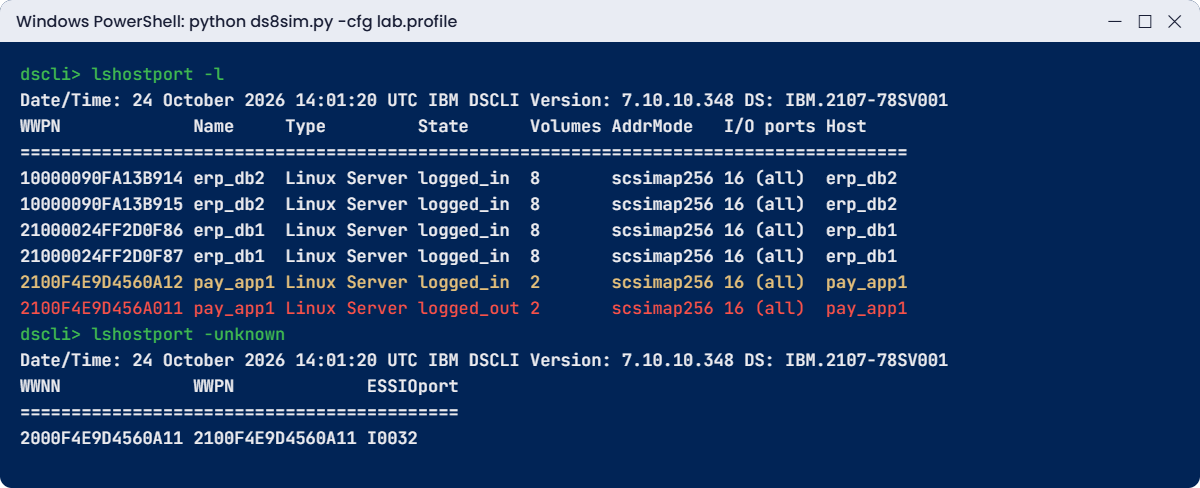
Practice shell: mistyped WWPN shows logged_out while the real one stays unknown
The typo gives no error: one port logged_out, the real WWPN still unknown.

2Break it: the SAN zone is deleted

During a SAN clean-up someone removes the zones for the DS8000 ports by mistake (simctl break zone-missing plays that part).

Run this:

simctl break zone-missing
lshost
lshostport -login

You’ll get this:

dscli> simctl break zone-missing
SIM0120I simctl: scenario zone-missing: the SAN zone was deleted, so no host port is logged in. Hosts show State Offline. Check: lshostport -login, lshost. Fix: simctl fix zone-missing (the SAN team restores the zone).
dscli> lshost
Date/Time: 24 October 2026 14:01:20 UTC IBM DSCLI Version: 7.10.10.348 DS: IBM.2107-78SV001
Name     Type         State   Cluster
=========================================
erp_db1  Linux Server Offline erp_cluster
erp_db2  Linux Server Offline erp_cluster
pay_app1 Linux Server Offline -
wh_esx1  VMware       Offline -
dscli> lshostport -login
Date/Time: 24 October 2026 14:01:20 UTC IBM DSCLI Version: 7.10.10.348 DS: IBM.2107-78SV001
CMUC00234I lshostport: No Host Port found.

Why: nothing changed in the DS8000 configuration, but no HBA can reach a DS8000 port any more, so every host shows Offline and nothing is logged in. Your mapping is fine. It’s the path that’s gone.

Fix: the SAN team puts the zones back, and you confirm with lshostport -login that every WWPN has returned, two per host.

Run this:

simctl fix zone-missing
lshostport -login

You should see this:

dscli> simctl fix zone-missing
SIM0124I simctl: scenario zone-missing fixed.
dscli> lshostport -login
Date/Time: 24 October 2026 14:01:20 UTC IBM DSCLI Version: 7.10.10.348 DS: IBM.2107-78SV001
WWNN             WWPN             Host     I/O ports ESSIOport
==============================================================
20000024FF2D0F86 21000024FF2D0F86 erp_db1  16 (all)  I0032
20000024FF2D0F87 21000024FF2D0F87 erp_db1  16 (all)  I0042
20000120FA13B914 10000090FA13B914 erp_db2  16 (all)  I0032
20000120FA13B915 10000090FA13B915 erp_db2  16 (all)  I0042
2000F4E9D4560A11 2100F4E9D4560A11 pay_app1 16 (all)  I0032
2000F4E9D4560A12 2100F4E9D4560A12 pay_app1 16 (all)  I0042

✅ Checkpoint: All six host WWPNs are logged in again, each host on I0032 and I0042.

This happened at work

One wrong digit, a whole morning of “no disks”

A retail bank was adding two new Linux servers for its internet banking front end. The server engineer sent the four WWPNs over chat, typed from a photo of the HBA labels, and the storage engineer pasted them into mkhost, mapped twelve volumes and closed the ticket.

The next morning the Linux team said server 2 couldn’t see any disks, though server 1 was fine. The SAN team checked the zones and the switch logins and found all four HBA ports logged in to the switch and zoned to the DS8000.

For two hours each team kept showing the others that their part was correct. Then the storage engineer ran lshostport -l and saw both ports of server 2 as logged_out, while lshostport -unknown listed two WWPNs that were logged in but unassigned. They were off from the defined ones by one character, a 6 that had been read as a b on the label photo. Swapping the two wrong ports for the real ones took a minute, and after a rescan the server saw all twelve LUNs on four paths.

Since then the bank takes WWPNs from lshostport -unknown (or the switch) and checks them against the server’s own /sys/class/fc_host output, and never from labels or chat messages.

Common mistakes and troubleshooting

SymptomLikely causeWhat to check / fix
Host shows OfflineNo defined port is logged in: zone missing, typo, cableCheck lshostport -l (logged_out?) and lshostport -unknown, then ask the SAN team
Host sees LUNs on only one pathOne WWPN mistyped or one fabric not zonedRun lshostport -l per host and check both ports are logged_in
mkhostport says port already definedWWPN belongs to another hostCheck lshostport -l, and never move a port without checking that host first
Wrong server sees a LUNVolume mapped to the wrong host or clusterCheck showvolgrp and unmap with chhost -action unmap
Cluster node missing shared LUNsVolumes mapped to one host, not the clusterMap shared volumes with chcluster
Host type wrong (AIX as Linux)Wrong -type at mkhostFix it with chhost -type and check lshosttype
GUI shows “unassigned host ports” with volumesCreated with mkhostconnect, no host objectCreate a host and attach the connections with chhostconnect -host

Make it a habit: after every mapping change, run lshost -l and check each host is Online with the port and volume count you expect, then ask the server team to confirm they see the same number of disks per path.

Interview questions

Click a question to open it. They’re written the way an interviewer would ask them, and under each one you’ll find why they ask it and one way you could answer in your own words.

Fresher level

1. How does a DS8000 decide which server may see which volume?

Why they ask this: They want LUN masking explained simply and correctly.

How you might answer: It masks by WWPN. A host object holds the WWPNs of the server’s HBA ports, and whatever volumes are mapped to that host or its cluster sit in a volume group, so only those WWPNs, logged in through a zoned DS8000 port, can see those volumes.

2. How do you find the WWPNs of a new server on the DS8000 side?

Why they ask this: It’s a practical check of everyday work.

How you might answer: Once the SAN team has zoned the server, I run lshostport -unknown, which lists the logged-in WWPNs that aren’t assigned to a host yet along with the DS8000 port they came in on. I compare those with the server team’s list before I create the host.

2–5 years experience

3. Walk me through presenting eight shared volumes to a two-node Linux cluster.

Why they ask this: They want the whole sequence, with the checks.

How you might answer: I’d check lshostport -unknown for the four WWPNs, run mkcluster, then mkhost -type “Linux Server” -hostport … -cluster for each node. After that, chcluster -action map -volume with four volumes from an even LSS and four from an odd one. I’d verify with lshost -l (both Online, 8 volumes, 2 ports) and showvolgrp, then ask the Linux team to rescan and confirm they see the same LUN IDs on both nodes.

4. A new host shows Offline on the DS8000. What do you check, in order?

Why they ask this: It tests structured troubleshooting across teams.

How you might answer: I’d start with lshostport -l for that host. If its ports are logged_out, I look in lshostport -unknown for a WWPN that’s almost the same, because that means a typo. If nothing’s logged in at all, it’s zoning or cabling, so I ask the SAN team to check the switch logins and zones. And if the ports are logged in but the host still has no disks, I check the mapping with showvolgrp.

Senior level

5. What is the difference between the mkhost/chhost method and the older mkvolgrp/mkhostconnect method? When would you still use the old one?

Why they ask this: Senior people deal with legacy setups and migrations all the time.

How you might answer: With the host method you create host and cluster objects and the volume groups get built for you, and that’s what the GUI shows. The old method has you build volume groups and host connections by hand, and connections without a host appear in the GUI as unassigned ports. These days I only use the old commands to understand or tidy up older configurations, and I attach those connections to host objects with chhostconnect -host so everything’s visible in one place.

6. How would you prevent wrong-host mappings in a team of six storage admins?

Why they ask this: They’re after process thinking as well as commands.

How you might answer: I’d keep the naming standard simple, with host names matching server hostnames and clusters named after the application. Every mapping change comes with a ticket listing volume IDs and hosts, and we paste lshost -l and showvolgrp output from before and after. Shared volumes always get mapped to the cluster, never node by node, and any unmap gets a second person’s review.

Quick quiz

Q1. Which command lists logged-in WWPNs not yet assigned to a host?

  1. lshost -l
  2. lshostport -unknown
  3. lsioport
  4. showhost
Show answer

B: lshostport -unknown shows WWPNs that are logged in but have no host.

Q2. How many characters does a WWPN have?

  1. 8
  2. 12
  3. 16
  4. 32
Show answer

C: a WWPN is 16 hexadecimal characters.

Q3. Which command maps volumes to every host in a cluster?

  1. chhost -action map
  2. chcluster -action map
  3. mkvolgrp
  4. mkhostconnect
Show answer

B: chcluster -action map makes the volumes visible to every cluster member.

Q4. A host port shows logged_out but the server is zoned. Likely cause?

  1. RAID 6
  2. A typo in the defined WWPN
  3. Wrong extent size
  4. Pool full
Show answer

B: the real WWPN is logged in under a different value, so check lshostport -unknown.

Q5. What does the DS8000 create when you map volumes to a host?

  1. A new pool
  2. A volume group named after the host
  3. A new LSS
  4. A rank
Show answer

B: the volume group works as the LUN mask for that host or cluster.

Quick recap

  • A host holds a type and WWPNs, and the type sets SCSI Map 256 or SCSI Mask addressing.
  • lshostport -unknown shows the logged-in WWPNs that still need a host.
  • mkhost -hostport, mkhostport and mkcluster create the objects, and chhost or chcluster -action map presents the volumes.
  • The DS8000 builds a volume group for each host or cluster by itself.
  • lshost -l and lshostport -l show Online state, ports and volumes at a glance.
  • A WWPN typo gives no error, so look for logged_out ports and unknown logins.

Next lesson

Lesson 15: Attach Linux, Windows and VMware hosts (multipath) → Next you make the host see each LUN once over several paths, with multipath on Linux, MPIO on Windows and NMP on ESXi.

Further reading: DS8000 host mapping

Want to go deeper into DS8000 host mapping? IBM Redbook SG24-8559, sections 10.3.6 to 10.3.8 covers volume groups, hosts and clusters with full examples, and for the concepts you can go back to How hosts see volumes in the Architecture course.

You can also see the full plan for this course on the IBM DS8000 Implementation course page.

Scroll to Top

This website uses cookies

We use a few cookies to keep this site working. If you allow it, we also use Google Analytics to count visits so we can improve our lessons. You can accept all, deny the optional ones, or choose what to allow.