The configuration flow and worksheets

The DS8000 configuration flow is the fixed order of steps that turns a freshly installed, empty DS8000 into storage a server can use: users and encryption, licence keys, a pool pair with arrays, FC ports, hosts, and finally volumes and mapping. Each step depends on the one before it, and if you get the order wrong the system either refuses or, worse, lets you build something you’ll have to tear down later.

You’ll go through IBM’s configuration flow from Chapter 8 of the Redbook, what goes on the configuration worksheets before delivery, and the general rules for a balanced layout: one pool per internal server, hosts on two I/O enclosures, and FB and CKD kept apart.

In the lab you write the logical plan as a small worksheet, check it with Python, generate a DS CLI script in the right order and run it on the practice DS8A50. It’s the first time in the course you build real storage end to end, and the lessons after this take each step in depth.

TimeYou needBy the end you can
75 to 90 minutesPython 3.8+, and the practice shell with lab.profile in C:\ds8k-labList the DS8000 configuration steps in order with the reason for each, fill in a logical worksheet, and build a pool pair, host and two mapped volumes from a generated script

What it is, in one line

The DS8000 configuration flow is the order IBM gives for setting up a new system: keys, pool pair and arrays, FC ports, hosts, volumes and mapping, with users and encryption done first.

In Simple Words

Building a house in the right order

When a family builds a house, the builder sticks to a fixed order: foundation, walls, roof, electric wiring, paint and, last of all, furniture. Nobody paints a wall that hasn’t been built, and nobody puts a sofa in a room with no roof, because the first rain would ruin it. Before any of this starts, the family fills in a form saying how many rooms they want, where the kitchen goes and what colour each room should be, and the builder works from that form.

A DS8000 gets built the same way. The licence keys are the permit, pools and arrays are the foundation and walls, FC ports and hosts are the doors and wiring, volumes and mapping are the furniture, and the configuration worksheets are the family’s form.

Engineer's View

IBM’s flow and the rules behind it

Before delivery you fill in the configuration (customization) worksheets from the Introduction and Planning Guide: company contacts, HMC network, remote support and Call Home, SNMP and email notification, power mode, and the control switches for IBM i and IBM Z hosts. They go to the IBM SSR before the system arrives.

Before logical configuration, list every user who needs access along with their role (at least two admins and two secadmins, and never both roles on one person). If you’re using data-at-rest encryption, set it up before any logical configuration.

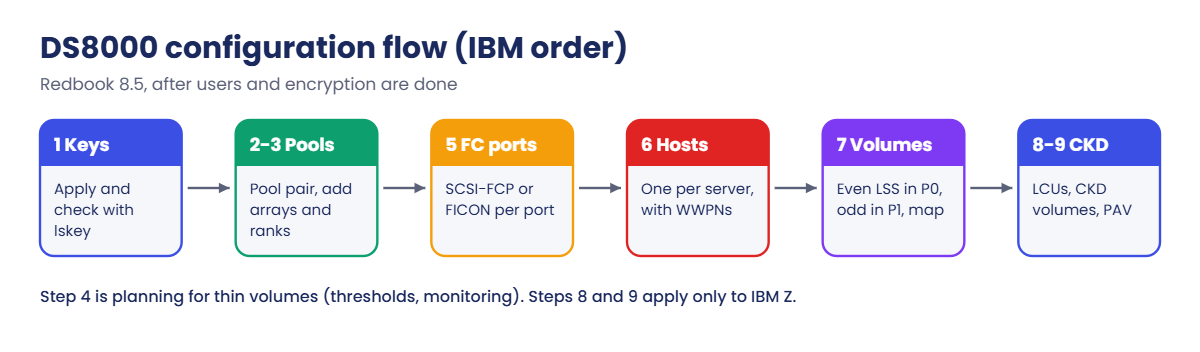
The flow (Redbook 8.5), with DS GUI, DS CLI or both:

  1. Install licence keys.
  2. Create a pool pair: storage type FB or CKD, and extent size.
  3. Add arrays to the pools.
  4. Plan controls and monitoring for thin (space-efficient) volumes.
  5. Configure FC ports: FCP or FICON.
  6. Create hosts with their WWPNs.
  7. Create FB volumes and map them to hosts.
  8. Create IBM Z LCUs with their SSIDs.
  9. Create CKD base volumes and PAV aliases.

Rules for a good layout: use at least two pools (a pool pair), one per internal server, or four pools if you have both FB and CKD. Keep to at most two pools per volume type and put as many arrays as you can into the pair. The first volume created in an address group makes it FB or CKD for all 16 LSSs (address group F has 15).

The volumes of one LSS can sit in several pools on the same server. Put every host on two host adapters in two I/O enclosures and keep dedicated ports for Copy Services. With FlashCore Modules, pools only hold thin-provisioned (ESE) volumes.

Pool thresholds are 85% by default.

On DS8900F the flow is the same, though the GUI wizards and some defaults change from release to release.

How it works, step by step

Here’s the flow for a real first build: an airline’s new DS8A50 that has to give a Linux database server two LUNs, one from each internal server, ahead of a planned cut-over.

1Worksheets and users first

Weeks before delivery the team sends the configuration worksheets to IBM, and on install day the SSR hands over a running, empty system. The storage team then creates named users (Lesson 5), and since the airline encrypts data at rest, encryption gets set up before anything else.

If you add encryption after the pools exist, you have to rebuild them.

2Licence keys

Apply the activation keys and check them with lskey (Lesson 6). Without Base Function none of the next steps will work.

DS8000 configuration flow steps in IBM order: keys, pool pair, FC ports, hosts, volumes, CKD

3A pool pair with arrays

Create two FB extent pools, one in rank group 0 (served by server0) and one in rank group 1 (server1). Then build arrays from the array sites and add their ranks to the pools, spreading them evenly, because this step decides whether both CPCs share the work.

With encryption on, each rank and pool also gets the encryption key group. With FlashCore Modules you plan thin (ESE) volumes, since FCM pools won’t accept anything else, and you keep an eye on the pool thresholds.

4FC ports

Set each host port to SCSI-FCP or FICON, because a port can’t be both. Spread the open systems ports over the I/O enclosures and keep separate ports for Metro Mirror or Global Mirror.

5Hosts

Create one host per server with its HBA WWPNs and the right host type. If two servers share LUNs as a cluster, create both hosts and put them into a cluster so that shared volumes get the same SCSI ID on every node.

6Volumes and mapping

Create the FB volumes, putting even-LSS volumes in the rank group 0 pool and odd-LSS volumes in the rank group 1 pool, and map them to the host. For IBM Z the last steps are different: LCUs with unique SSIDs, then CKD volumes with PAV aliases.

From DS8000 worksheet to a checked DS CLI build script

Once the host team sees the LUNs on two paths, the first build is done. From here to Lesson 17, each lesson picks up one of these steps and goes into detail: the GUI wizard in Lesson 8, ports in Lesson 10, arrays in Lesson 11, pools in Lesson 12, volumes in Lesson 13 and hosts in Lesson 14.

What keeps this order safe is the worksheet. If every value (sites, RAID type, ports, WWPNs, volume IDs) is written down and checked before you start, the build itself is only typing, but when values get decided on the fly, steps end up done early, late or twice.

Hands-on lab: from worksheet to first build

Before you run any command, double-check it

Read every command twice before you press Enter. Check the target: the system or account, the IDs, the names and the sizes. These commands are for learning and were tested in our lab, not on your system. At work, run the read-only list commands first, follow your change process, make sure a backup exists, and ask a second person to check anything that changes or deletes data. You run them at your own risk.

You’ll build the airline’s first two LUNs on the practice DS8A50 the way careful teams do it: write the logical worksheet, have a script check it against the real hardware, generate the DS CLI commands in IBM’s order and run them as one script.

Practice shell note: the practice shell is our own teaching tool, not IBM software. Its capacity numbers come from simple formulas and the WWPNs of saat-host1 are made up, and real DS CLI output looks very close to this but isn’t identical. The success messages are IBM’s, while the two error messages in the break lab come from the practice shell. Data-at-rest encryption is on in the practice system, which is why ranks and pools take -keygrp 1.

1Start clean and make a profile for scripts

Scripts get a profile of their own so their output is always plain comma-separated rows. Save auto.profile in the lab folder next to ds8sim.py (it uses the security.dat from Lesson 2), or keep the one you made in Lesson 6 if you already have it.

Save this as auto.profile:

hmc1: 10.0.0.1
username: admin
pwfile: security.dat
devid: IBM.2107-78SV001
banner: off
header: on
format: delim
delim: ,

Run this:

python ds8sim.py -cfg lab.profile simctl reset
python ds8sim.py -cfg auto.profile lsarraysite -l

You should see this (after the notice lines and the reset message):

arsite,DA Pair,dkcap (10^9B),diskrpm,State,Array,diskclass,encrypt
S1,0,4800.0,65000,Unassigned,-,FlashCoreModule,supported
S2,0,4800.0,65000,Unassigned,-,FlashCoreModule,supported
S3,0,4800.0,65000,Unassigned,-,FlashCoreModule,supported
S4,0,4800.0,65000,Unassigned,-,FlashCoreModule,supported
S5,2,4800.0,65000,Unassigned,-,FlashCoreModule,supported
S6,2,4800.0,65000,Unassigned,-,FlashCoreModule,supported
S7,2,3840.0,65000,Unassigned,-,FlashTier2,supported
S8,2,3840.0,65000,Unassigned,-,FlashTier2,supported

This is what the checker reads for itself: which array sites exist and what drives they hold. There’s no file to export, because the script asks the DS8000 every time it runs and so never works from an old copy.

✅ Checkpoint: lsarraysite lists S1 to S8, and S1 and S2 hold FlashCoreModule drives.

2Fill in the logical worksheet

Save this as worksheet.csv. Each row is one decision: which array sites go into the pool pair, the RAID level, the encryption key group, which ports become FCP, the host and its two HBA WWPNs, and the volumes. Volume 2000 sits in LSS 20 (even) and 2100 in LSS 21 (odd), so each internal server owns one of them.

Save this as worksheet.csv:

section,key,value
pool,fb_sites,S1;S2
pool,raid,6
pool,keygrp,1
ports,fcp,I0031;I0040
host,name,saat-host1
host,type,Linux Server
host,wwpns,10000000C9A1B2C3;10000000C9A1B2C4
volumes,ids,2000;2100
volumes,cap_gib,100
volumes,sam,ese

✅ Checkpoint: worksheet.csv has 10 rows after the header.

3Write the checker and script builder

Save this as build_flow.py next to ds8sim.py. It runs there, on your laptop or a jump server and not on the DS8000, and the first thing it does is ask the DS8000 what exists (lsarraysite -l, lsioport, lskey).

It then checks the worksheet against those answers: licence keys applied, at least two arrays, real array sites, real FCP ports, ESE volumes when the sites hold FlashCore Modules, and 16-digit WWPNs. It only writes flow.txt, in IBM’s order, when every check passes.

Save this as build_flow.py:

# build_flow.py - check a DS8000 worksheet, then write a DS CLI script in IBM's configuration order
# Order from IBM Redbook SG24-8559-01, section 8.5 (FB only; CKD steps 8-9 left out)
# Runs on your workstation or jump server, not on the DS8000.
# It talks to the DS8000 only through the DS CLI (auto.profile: banner off, header on, format delim).
import sys
import csv, subprocess
DSCLI = ["python", "ds8sim.py", "-cfg", "auto.profile"]   # at work: ["dscli", "-cfg", "auto.profile"]

def dscli(*args):
    """Run one DS CLI command and return its rows as dictionaries."""
    out = subprocess.run(DSCLI + list(args), capture_output=True, text=True).stdout
    lines = [l for l in out.splitlines() if l and not l.startswith("SaatVedha") and not l.startswith("CMUC")]
    return list(csv.DictReader(lines))

def rows(name):
    with open(name, newline="") as f:
        return list(csv.DictReader(f))

ws = {(r["section"], r["key"]): r["value"] for r in rows(sys.argv[1] if len(sys.argv) > 1 else "worksheet.csv")}
lst = lambda s, k: [v for v in ws.get((s, k), "").split(";") if v]
site_class = {r["arsite"]: r["diskclass"] for r in dscli("lsarraysite", "-l")}   # live from the DS8000
port_ids = {r["ID"] for r in dscli("lsioport")}
key_names = {k["Activation Key"] for k in dscli("lskey", "IBM.2107-78SV001")}

problems = []
if "Base function" not in key_names:
    problems.append("licence: no Base function key; apply the keys first (Lesson 6)")
sites = lst("pool", "fb_sites")
if len(sites) < 2:
    problems.append("pool: use at least two arrays so each rank group gets one")
for s in sites:
    if s not in site_class:
        problems.append(f"pool: array site {s} does not exist on this system")
for p in lst("ports", "fcp"):
    if p not in port_ids:
        problems.append(f"ports: I/O port {p} does not exist on this system")
fcm = any(site_class.get(s) == "FlashCoreModule" for s in sites)
sam = ws.get(("volumes", "sam"), "standard")
if fcm and sam != "ese":
    problems.append("volumes: pools with FlashCore Modules take only thin (ESE) volumes; set sam to ese")
for w in lst("host", "wwpns"):
    if len(w) != 16:
        problems.append(f"host: WWPN {w} must be 16 hex digits")
if problems:
    print("WORKSHEET PROBLEMS:")
    print("\n".join("  " + p for p in problems))
    sys.exit(1)

kg, name = ws[("pool", "keygrp")], ws[("host", "name")]
out = ["# flow.txt - generated by build_flow.py",
       "# 1 licence keys must already be applied", "lskey IBM.2107-78SV001",
       "# 2-3 pool pair: one pool per rank group, then arrays and ranks"]
out += [f"mkextpool -rankgrp {g} -stgtype fb -keygrp {kg} fb_pool_{g}" for g in (0, 1)]
for i, s in enumerate(sites):
    out += [f"mkarray -raidtype {ws[('pool', 'raid')]} -arsite {s}",
            f"mkrank -array A{i} -stgtype fb -keygrp {kg} -extpool P{i % 2}"]
out += ["# 5 FC ports", "setioport -topology scsifcp " + " ".join(lst("ports", "fcp")),
        "# 6 host with its WWPNs",
        f"mkhost -type \"{ws[('host', 'type')]}\" -hostport {','.join(lst('host', 'wwpns'))} {name}",
        "# 7 volumes (even LSS in P0, odd LSS in P1) and mapping"]
ids = lst("volumes", "ids")
for v in ids:
    pool = "P0" if int(v[:2], 16) % 2 == 0 else "P1"
    out.append(f"mkfbvol -extpool {pool} -cap {ws[('volumes', 'cap_gib')]} -sam {sam} -name {name}_#h {v}")
out += [f"chhost -action map -volume {','.join(ids)} {name}", "lsextpool", "lsfbvol", "lshost"]
open("flow.txt", "w").write("\n".join(out) + "\n")
print(f"Worksheet OK: wrote flow.txt with {len([l for l in out if not l.startswith('#')])} commands")

At work you follow this pattern for every bigger change: check the plan against the live box from the jump server, generate the script, get a colleague to review it, and then run it.

✅ Checkpoint: build_flow.py is saved next to worksheet.csv and auto.profile.

4Generate the script

Run this:

python build_flow.py
Get-Content flow.txt

You should see this:

Worksheet OK: wrote flow.txt with 15 commands
# flow.txt - generated by build_flow.py
# 1 licence keys must already be applied
lskey IBM.2107-78SV001
# 2-3 pool pair: one pool per rank group, then arrays and ranks
mkextpool -rankgrp 0 -stgtype fb -keygrp 1 fb_pool_0
mkextpool -rankgrp 1 -stgtype fb -keygrp 1 fb_pool_1
mkarray -raidtype 6 -arsite S1
mkrank -array A0 -stgtype fb -keygrp 1 -extpool P0
mkarray -raidtype 6 -arsite S2
mkrank -array A1 -stgtype fb -keygrp 1 -extpool P1
# 5 FC ports
setioport -topology scsifcp I0031 I0040
# 6 host with its WWPNs
mkhost -type "Linux Server" -hostport 10000000C9A1B2C3,10000000C9A1B2C4 saat-host1
# 7 volumes (even LSS in P0, odd LSS in P1) and mapping
mkfbvol -extpool P0 -cap 100 -sam ese -name saat-host1_#h 2000
mkfbvol -extpool P1 -cap 100 -sam ese -name saat-host1_#h 2100
chhost -action map -volume 2000,2100 saat-host1
lsextpool
lsfbvol
lshost

Read the comments, which follow the Redbook’s numbered flow. Step 4 (thin volume monitoring) is a planning step and steps 8 and 9 are for CKD, so none of them show up here.

✅ Checkpoint: flow.txt starts with lskey and ends with lshost.

Generated DS CLI flow script building a pool pair, host and two volumes in the practice shell
The worksheet check and the generated build script in the practice shell (output shortened).

5Run the build

Run this:

python ds8sim.py -cfg lab.profile -script flow.txt

You should see this (after the notice and the lskey listing, which you know from Lesson 6):

CMUC00000I mkextpool: Extent pool P0 successfully created.
CMUC00000I mkextpool: Extent pool P1 successfully created.
CMUC00004I mkarray: Array A0 successfully created.
CMUC00007I mkrank: Rank R0 successfully created.
CMUC00004I mkarray: Array A1 successfully created.
CMUC00007I mkrank: Rank R1 successfully created.
CMUC00011I setioport: I/O Port I0031 successfully configured.
CMUC00011I setioport: I/O Port I0040 successfully configured.
CMUC00530I mkhost: The host saat-host1 is successfully created.
CMUC00025I mkfbvol: FB volume 2000 successfully created.
CMUC00025I mkfbvol: FB volume 2100 successfully created.
CMUC00531I chhost: The host saat-host1 is successfully modified.

And the three checks at the end:

Name      ID stgtype rankgrp status availstor (2^30B) %allocated available reserved numvols
===========================================================================================
fb_pool_0 P0 fb      0       below  99576             0          6372864   64       1
fb_pool_1 P1 fb      1       below  99576             0          6372864   64       1
Name            ID   accstate datastate configstate deviceMTM datatype extpool cap (2^30B) cap (10^9B) cap (blocks)
===================================================================================================================
saat-host1_2000 2000 Online   Normal    Normal      2107-900  FB 512   P0      100.0       -           209715200
saat-host1_2100 2100 Online   Normal    Normal      2107-900  FB 512   P1      100.0       -           209715200
Name       Type         State   Cluster
=======================================
saat-host1 Linux Server Offline -

There’s one pool per rank group with one volume in each, and both volumes are mapped to saat-host1. The host shows Offline because no HBA has logged in yet, which happens once the SAN is zoned (Lesson 14). Lessons 10 to 14 explain each of these commands step by step.

✅ Checkpoint: lsfbvol shows 2000 in P0 and 2100 in P1, and lshost lists saat-host1.

Break It, Then Fix It

Configuration problems come from two places, a worksheet with a wrong value and steps run out of order, and you’ll cause both.

1Break it: a worksheet that forgets the drive type

The planner copied an old worksheet from a system with industry-standard flash and left out the volumes,sam,ese line. Make a copy without that line and check it.

Run this (PowerShell):

Get-Content worksheet.csv | Where-Object { $_ -ne 'volumes,sam,ese' } | Set-Content worksheet-v1.csv
python build_flow.py worksheet-v1.csv

You’ll get this:

WORKSHEET PROBLEMS:
  volumes: pools with FlashCore Modules take only thin (ESE) volumes; set sam to ese

Why: array sites S1 and S2 hold FlashCore Modules, and IBM’s rule is that FCM pools only support thin-provisioned (ESE) volumes. Without the check the script would build the pools and the host and then fail at mkfbvol, leaving you with a half-built system at 2 a.m., so the checker stops it before a single command runs.

Fix: keep the sam row (the full worksheet.csv) and check again, and python build_flow.py says “Worksheet OK”. If you need thick volumes, the worksheet has to use array sites with industry-standard drives instead.

✅ Checkpoint: build_flow.py accepts worksheet.csv and refuses worksheet-v1.csv.

Worksheet check refusing thick volumes on FCM and an out-of-order DS CLI script
Both breaks: a worksheet the checker refuses, and steps run out of order.

2Break it: do the host part first

The server team is in a hurry, and someone runs “just the host bit” on a fresh system before any pools exist. Start clean and run it.

Save this as rushed.txt, then run:

# rushed.txt - the host team wanted their LUN first
mkhost -type "Linux Server" -hostport 10000000C9A1B2C3,10000000C9A1B2C4 saat-host1
mkfbvol -extpool P0 -cap 100 -sam ese -name saat-host1_#h 2000
chhost -action map -volume 2000 saat-host1
python ds8sim.py -cfg lab.profile simctl reset
python ds8sim.py -cfg lab.profile -script rushed.txt

You’ll get this (after the notice lines):

CMUC00530I mkhost: The host saat-host1 is successfully created.
CMUN02019E mkfbvol: P0: The extent pool does not exist.
CMUN02038E chhost: 2000: The FB volume does not exist.

Why: volumes live in extent pools, and pools need ranks, keys and arrays first. The host did get created, though, so the system is now half done, with a host and no volumes, which confuses whoever looks at it next. On a real DS8000 the order errors look different, but the cause is the same.

Fix: remove the half-built object and run the full flow in the right order.

Run this (answer y):

python ds8sim.py -cfg lab.profile rmhost saat-host1
python ds8sim.py -cfg lab.profile -script flow.txt

You should see this, then the full build from the lab:

CMUC00529W rmhost: Are you sure that you want to delete host saat-host1? [Y/N]: y
CMUC00528I rmhost: The host saat-host1 is successfully deleted.

✅ Checkpoint: flow.txt runs without errors and lsfbvol shows 2000 and 2100.

This happened at work

The weekend that was built twice

An airline had two days to get a new DS8A50 into service ahead of a reservations system migration. The project plan said “configure storage: Saturday”, and instead of a logical worksheet there was only an email thread.

On Saturday morning one engineer started creating pools and volumes in the GUI while another was still applying licence keys from his laptop. At noon the security team turned up to set up data-at-rest encryption with the external key servers, as had been agreed months before.

Encryption has to be configured before the logical configuration, so every pool, rank and volume built that morning had to be deleted, encryption set up, and the whole lot built again. To make it worse, all the volumes had ended up in pools on rank group 0, because nobody had written down which LSS goes where.

The team was still at it at 4 a.m. on Sunday. The migration started six hours late, and for the first week the performance graphs showed server0 doing nearly all the work until the volumes were moved.

For the second system they wrote a one-page worksheet covering users, encryption, keys, the pool pair with its array sites, ports, hosts with WWPNs and volume IDs per LSS, with a name and a time against each step. They generated the DS CLI script from it, ran it in one go, and the build was done in under two hours.

Common mistakes and troubleshooting

SymptomLikely causeWhat to check / fix
Pools must be rebuilt after go-liveEncryption set up after logical configurationEncryption first, then keys, pools, ports, hosts, volumes.
Can’t create ranks or poolsLicence keys not applied yetlskey before anything else (Lesson 6).
One CPC far busier than the otherAll volumes in one pool or only even LSSsPool pair, one per rank group; even LSS to P0, odd to P1.
mkfbvol refused in an FCM poolStandard (thick) volume requestedFCM pools accept only ESE volumes; plan -sam ese.
FB volume refused in an address groupAddress group already holds CKDThe first volume fixes FB or CKD for all 16 LSSs; plan groups per type.
Host sees LUNs on one path onlyPorts on one I/O enclosureTwo host adapters in two I/O enclosures per host.
Script stops half way, objects left behindSteps out of orderGenerate scripts from a checked worksheet; clean up half-built objects.

Keep the worksheet and the generated script together in version control. Then the next system, the DR copy or a rebuild after a test is the same script run with a different worksheet.

Interview questions

Click a question to open it. Each one is phrased the way an interviewer would ask it, and under it you’ll see why they ask and one way you could answer in your own words.

Fresher level

1. A new DS8000 has just been handed over by IBM. In what order do you configure it?

Why they ask this: It’s the core question for any DS8000 build role, and they want both the order and the reason behind it.

How you might answer: Named users and roles come first, then encryption if we’re using it, because it has to be in place before logical configuration. After that the licence keys, a pool pair with arrays, the FC port topology, the hosts with their WWPNs, and finally the volumes and their mapping.

For IBM Z the last steps are LCUs with SSIDs and then CKD volumes with PAV aliases. Each step depends on the one before it.

2. What are the DS8000 configuration worksheets, and who uses them?

Why they ask this: They want to see that you know planning happens before delivery and gets shared with IBM.

How you might answer: They’re the customization worksheets in the Introduction and Planning Guide, covering contacts, the HMC network, remote support and Call Home, notifications, power mode and the control switches for IBM i and IBM Z.

We fill them in before delivery and hand them to the IBM SSR, who sets the system up from them on install day.

2–5 years experience

3. Why do we create a pool pair instead of one big pool?

Why they ask this: They’re checking whether you understand the two internal servers and how load gets balanced.

How you might answer: Every extent pool belongs to a rank group, and each rank group is served by one internal server. With one pool in rank group 0 and another in rank group 1, I can put even-LSS volumes on server0 and odd ones on server1, so both CPCs share the work.

With one big pool, one server would end up doing almost everything. If FB and CKD are both in use, I’d go with four pools.

4. You need FB volumes in LSS 30, but someone already created a CKD volume in LSS 32. What’s the problem?

Why they ask this: They’re testing the address group rule, which catches people out in real projects.

How you might answer: LSS 30 and 32 are both in address group 3, and the first volume created in an address group decides whether the whole group, all 16 LSSs, is FB or CKD. There’s already a CKD volume in 32, so the group is CKD and LSS 30 won’t accept FB volumes.

I’d either use another address group for FB or, if the CKD volume was a mistake, remove it and its LCU. That’s why I plan address groups per volume type in the worksheet.

Senior level

5. How would you make DS8000 builds repeatable across five sites?

Why they ask this: Senior engineers turn builds into tested templates, so they want to hear about worksheets, scripts and checks.

How you might answer: I’d keep one worksheet format per site, plus a generator that checks it against the hardware (drive types, array sites, WWPN format) and then writes the DS CLI script in IBM’s order, with both kept in version control.

Every build runs the same script with a different worksheet and finishes with lsextpool, lsfbvol and lshost checks and a two-path test from the host. Whatever we learn at one site goes back into the checker.

6. The project manager wants to start creating volumes before the security team finishes the encryption design. What do you say?

Why they ask this: They want to see that you’ll hold firm on a technical dependency and can explain what it costs the business.

How you might answer: I’d explain that encryption has to be configured before any logical configuration. Pools and volumes we create now would have to be deleted and rebuilt once encryption is turned on, and that takes longer than waiting.

Meanwhile I’d offer the things we can safely do: users, licence keys, port planning, collecting host WWPNs and the worksheet. Once encryption is ready, the build itself goes quickly.

Quick quiz

Q1. What must be done before any logical configuration if you use data-at-rest encryption?

  1. Create volumes
  2. Configure encryption
  3. Map hosts
  4. Set FC ports
Show answer

B — Encryption must be configured before you create arrays, pools and volumes.

Q2. What is step 1 of IBM’s configuration flow?

  1. Create hosts
  2. Create a pool pair
  3. Install licence keys
  4. Create LCUs
Show answer

C — Licence keys come first; nothing else works without Base Function.

Q3. Why create a pool pair?

  1. To use two extent sizes
  2. So each internal server gets its own pool
  3. Because one pool is limited to 100 TB
  4. For CKD only
Show answer

B — One pool per rank group lets both internal servers share the work.

Q4. Which volumes can you create in a pool built on FlashCore Modules?

  1. Only standard (thick)
  2. Only thin-provisioned ESE
  3. Both
  4. Only CKD
Show answer

B — Pools with FCM storage support only thin-provisioned (ESE) volumes.

Q5. When are the configuration worksheets completed?

  1. After the first LUN
  2. Before the system is delivered
  3. During the code upgrade
  4. Never; IBM fills them in
Show answer

B — Complete them before delivery and give them to the IBM SSR.

Quick recap

  • Complete the configuration worksheets before delivery and give them to the IBM SSR.
  • Order: users, encryption (if used), licence keys, pool pair and arrays, FC ports, hosts, volumes and mapping; for IBM Z, LCUs and CKD volumes.
  • Use a pool pair, one per rank group; four pools when you have FB and CKD.
  • The first volume in an address group fixes it as FB or CKD.
  • FCM pools take only ESE volumes; hosts go on two host adapters in two I/O enclosures.
  • Write the logical plan as a worksheet, check it, and generate the DS CLI script from it.

Next lesson

Lesson 8: Storage Management GUI tour and System Setup → You walk through the DS GUI and its System Setup wizard, which does the same flow with clicks.

Further reading: DS8000 configuration flow

For more on the DS8000 configuration flow, chapter 8 of IBM’s guide lists the worksheets, roles, encryption notes and the full flow: IBM Storage DS8A00 Architecture and Implementation Guide (IBM Redbooks). For why pool pairs and LSS parity matter, go back to Extent pools, rank groups and server affinity in our Architecture course.

You can also see the full plan for this course on the IBM DS8000 Implementation course page.

Scroll to Top

This website uses cookies

We use a few cookies to keep this site working. If you allow it, we also use Google Analytics to count visits so we can improve our lessons. You can accept all, deny the optional ones, or choose what to allow.