
Before you run any command, double-check it
Read every command twice before you press Enter. Check the target: the system or account, the IDs, the names and the sizes. These commands are for learning and were tested in our lab, not on your system. At work, run the read-only list commands first, follow your change process, make sure a backup exists, and ask a second person to check anything that changes or deletes data. You run them at your own risk.
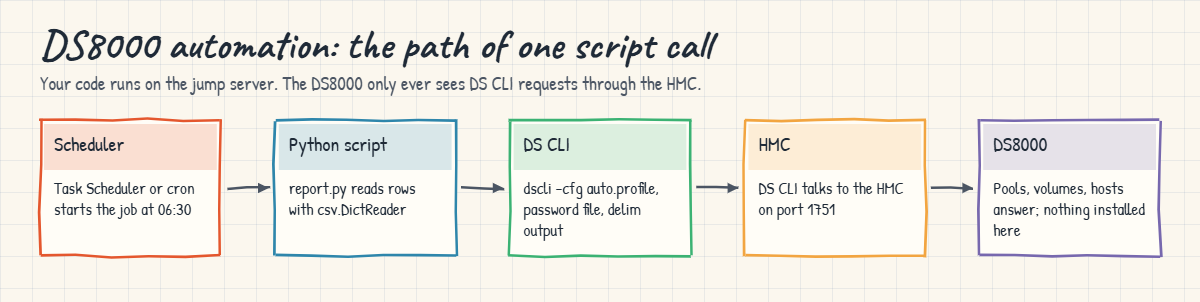
Your laptop plays the jump server and the practice shell plays the DS8000. Everything you build here is what you’d copy to a real jump server, with one change: the DSCLI line points at the real dscli command rather than ds8sim.py.
Practice shell note: the practice shell is our teaching tool, not IBM software, and real DS CLI output looks very much like this but isn’t identical. The return code values and the CMUN messages marked below belong to the practice shell, so on a real system go by the code and message your DS CLI prints.
1Build a small system to automate
Save this as setup-29.txt in C:\ds8k-lab. It creates a pool pair, two volumes and a host with two paths. Put in your own admin password.
# setup-29.txt: pool pair, two volumes, host saat-host1 with two paths
mkarray -raidtype 6 -arsite S1
mkarray -raidtype 6 -arsite S2
mkrank -array A0 -stgtype fb -keygrp 1
mkrank -array A1 -stgtype fb -keygrp 1
mkextpool -rankgrp 0 -stgtype fb -keygrp 1 pool_0
mkextpool -rankgrp 1 -stgtype fb -keygrp 1 pool_1
chrank -extpool P0 R0
chrank -extpool P1 R1
mkfbvol -extpool P0 -cap 100 -sam ese -name web_#h 2000
mkfbvol -extpool P1 -cap 100 -sam ese -name web_#h 2100
mkhost -type "Linux Server" saat-host1
mkhostport -host saat-host1 21000024FF2D0F86
mkhostport -host saat-host1 21000024FF2D0F87
chhost -action map -volume 2000,2100 saat-host1
Run this:
cd C:\ds8k-lab
python ds8sim.py -hmc1 10.0.0.1 -user admin -passwd <your password> simctl reset
python ds8sim.py -hmc1 10.0.0.1 -user admin -passwd <your password> -script setup-29.txt
You should see this (last lines):
CMUC00530I mkhost: The host saat-host1 is successfully created.
CMUC00542I mkhostport: The host port 21000024FF2D0F86 is successfully created.
CMUC00542I mkhostport: The host port 21000024FF2D0F87 is successfully created.
CMUC00531I chhost: The host saat-host1 is successfully modified.
✅ Checkpoint: the last line is CMUC00531I and no line starts with CMUN.
2Create the password file and the script profile
Store the password once, then write an 8-line profile called auto.profile. On macOS or Linux, use the full path, such as /home/you/dscli/security.dat.
Run this:
python ds8sim.py -hmc1 10.0.0.1 -user admin -passwd <your password> managepwfile -action add -name admin -pw <your password>
notepad auto.profile
Put these lines in auto.profile:
hmc1: 10.0.0.1
username: admin
pwfile: C:\Users\you\dscli\security.dat
devid: IBM.2107-78SV001
banner: off
header: on
format: delim
delim: ,
Then run a single-shot command and look at its return code:
python ds8sim.py -cfg auto.profile lsextpool
echo $LASTEXITCODE
python ds8sim.py -cfg auto.profile showextpool P9
echo $LASTEXITCODE
You should see this:
SaatVedha DS8000 practice shell — not IBM software. Real DS CLI output looks like this but is not identical.
Name,ID,stgtype,rankgrp,status,availstor (2^30B),%allocated,available,reserved,numvols
pool_0,P0,fb,0,below,99576,0,6372864,64,1
pool_1,P1,fb,1,below,99576,0,6372864,64,1
0
SaatVedha DS8000 practice shell — not IBM software. Real DS CLI output looks like this but is not identical.
CMUN02019E showextpool: P9: The extent pool does not exist.
6
There’s no password on the command line, you get one header row and comma-separated data, and the return code is 0 for success. In the practice shell the failed command returns 6. On macOS or Linux, use echo $? instead of $LASTEXITCODE.
✅ Checkpoint: lsextpool returns 0 and prints comma-separated rows; the bad pool returns a non-zero code.
3Run a DS CLI script file
Script mode logs in once and then runs every line. Save daily.txt:
# daily.txt: read-only checks
lsextpool
lshost
lshostport -login
Run this:
python ds8sim.py -cfg auto.profile -script daily.txtYou should see this:
Name,ID,stgtype,rankgrp,status,availstor (2^30B),%allocated,available,reserved,numvols
pool_0,P0,fb,0,below,99576,0,6372864,64,1
pool_1,P1,fb,1,below,99576,0,6372864,64,1
Name,Type,State,Cluster
saat-host1,Linux Server,Online,-
WWNN,WWPN,Host,I/O ports,ESSIOport
20000024FF2D0F86,21000024FF2D0F86,saat-host1,16 (all),I0032
20000024FF2D0F87,21000024FF2D0F87,saat-host1,16 (all),I0042
20000120FA13B914,10000090FA13B914,-,-,I0032
20000120FA13B915,10000090FA13B915,-,-,I0042
(The practice shell’s first line, “SaatVedha DS8000 practice shell…”, is left out here because the real DS CLI doesn’t print it.) Script mode works well for a fixed set of checks you keep in a file, but once you need decisions such as “warn if a pool is above 80%”, it’s time to move to Python.
✅ Checkpoint: three blocks, each with its own header row.
4Write the daily report in Python
Save this as report.py next to ds8sim.py. It runs on your laptop or jump server, not on the DS8000, and it only reads.
# Runs on your workstation or jump server, not on the DS8000.
# It talks to the DS8000 only through the DS CLI (auto.profile: banner off, header on, format delim).
# Read-only daily report: pool capacity and host paths. Exit code 1 = warnings, 2 = no data.
import csv, subprocess, sys
DSCLI = ["python", "ds8sim.py", "-cfg", "auto.profile"]   # at work: ["dscli", "-cfg", "auto.profile"]

def dscli(*args):
    """Run one DS CLI command and return its rows as dictionaries."""
    out = subprocess.run(DSCLI + list(args), capture_output=True, text=True).stdout
    lines = [l for l in out.splitlines() if l and not l.startswith("SaatVedha") and not l.startswith("CMUC")]
    return list(csv.DictReader(lines))

POOL_WARN = 80          # % allocated
MIN_PATHS = 2           # logged-in host ports per host

rc = subprocess.run(DSCLI + ["ver"], capture_output=True, text=True).returncode
if rc != 0:
    print(f"ERROR DS CLI login failed (rc={rc}): check user, password file and profile")
    sys.exit(2)
pools = dscli("lsextpool")
warn = 0
for p in pools:
    pct = int(p["%allocated"])
    state = "WARN" if pct >= POOL_WARN else "OK  "
    warn += state == "WARN"
    print(f"{state} pool {p['ID']} {p['Name']}: {pct}% allocated, {p['availstor (2^30B)']} GiB available")

logins = dscli("lshostport", "-login")
for h in dscli("lshost"):
    paths = sum(1 for l in logins if l["Host"] == h["Name"])
    state = "WARN" if paths < MIN_PATHS else "OK  "
    warn += state == "WARN"
    print(f"{state} host {h['Name']}: {paths} logged-in ports")
sys.exit(1 if warn else 0)
Run this:
python report.py
echo $LASTEXITCODE
You should see this:
OK   pool P0 pool_0: 0% allocated, 99576 GiB available
OK   pool P1 pool_1: 0% allocated, 99576 GiB available
OK   host saat-host1: 2 logged-in ports
0
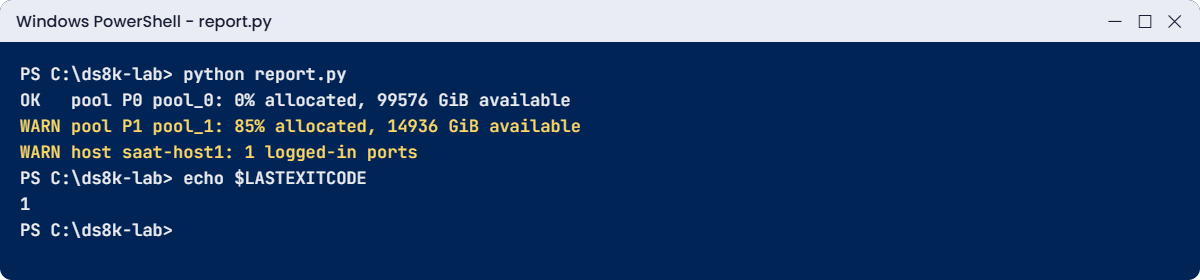
Now cause some trouble with two practice shell controls: fill pool P1 to 85% and pull one of saat-host1’s cables. Run the report again, and then put everything back.
Run this:
python ds8sim.py -cfg auto.profile simctl poolfill P1 85
python ds8sim.py -cfg auto.profile simctl logout 21000024FF2D0F87
python report.py
echo $LASTEXITCODE
python ds8sim.py -cfg auto.profile simctl poolfill P1 0
python ds8sim.py -cfg auto.profile simctl login 21000024FF2D0F87 I0042
You should see this (report part):
OK   pool P0 pool_0: 0% allocated, 99576 GiB available
WARN pool P1 pool_1: 85% allocated, 14936 GiB available
WARN host saat-host1: 1 logged-in ports
1
✅ Checkpoint: two WARN lines and exit code 1, then all OK again after you undo the changes.
5Create volumes with a guarded change script
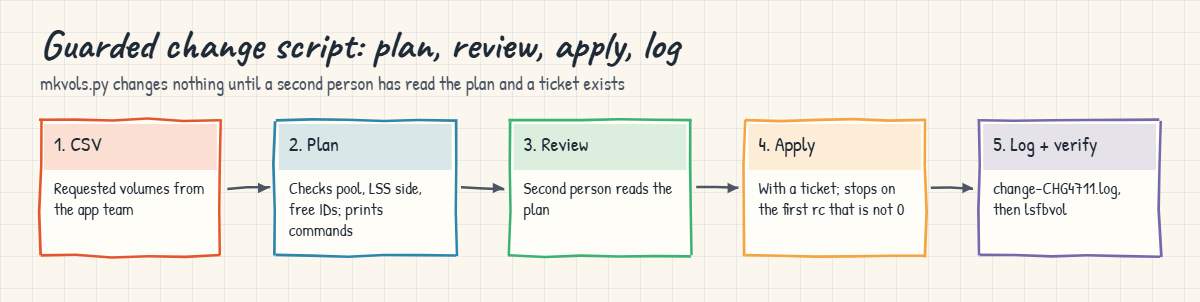
The application team sends you a CSV with three new volumes. Save it as new-vols.csv and the change script as mkvols.py. By default it only plans, and it changes nothing unless you give it --apply and a ticket number.
id,pool,cap_gib,name
2001,P0,50,web_2001
2101,P1,50,web_2101
2002,P1,50,web_2002
# Runs on your workstation or jump server, not on the DS8000.
# It talks to the DS8000 only through the DS CLI (auto.profile: banner off, header on, format delim).
# Guarded change script: plan by default, --apply only with a change ticket. Stops on the first error.
import argparse, csv, subprocess, sys, datetime
DSCLI = ["python", "ds8sim.py", "-cfg", "auto.profile"] # at work: ["dscli", "-cfg", "auto.profile"]
def dscli(*args):
"""Run one DS CLI command and return its rows as dictionaries."""
out = subprocess.run(DSCLI + list(args), capture_output=True, text=True).stdout
lines = [l for l in out.splitlines() if l and not l.startswith("SaatVedha") and not l.startswith("CMUC")]
return list(csv.DictReader(lines))
ap = argparse.ArgumentParser()
ap.add_argument("csvfile")
ap.add_argument("--apply", action="store_true")
ap.add_argument("--ticket", default="")
a = ap.parse_args()
pools = {p["ID"]: p for p in dscli("lsextpool")}
existing = {v["ID"] for v in dscli("lsfbvol")}
plan, problems = [], []
for r in csv.DictReader(open(a.csvfile)):
vid, pool = r["id"].upper(), r["pool"].upper()
lss_even = int(vid[:2], 16) % 2 == 0
if pool not in pools:
problems.append(f"{vid}: pool {pool} does not exist")
elif lss_even != (pools[pool]["rankgrp"] == "0"):
problems.append(f"{vid}: LSS {vid[:2]} and pool {pool} (rank group {pools[pool]['rankgrp']}) are on different servers")
if vid in existing:
problems.append(f"{vid}: volume already exists")
plan.append(["mkfbvol", "-extpool", pool, "-cap", r["cap_gib"], "-sam", "ese", "-name", r["name"], vid])
for cmd in plan:
print("PLAN", " ".join(cmd))
for p in problems:
print("STOP", p)
if problems or not a.apply:
print("Plan only. Nothing was changed." if not problems else "Fix the problems above. Nothing was changed.")
sys.exit(1 if problems else 0)
if not a.ticket:
sys.exit("STOP --apply needs --ticket (the approved change number)")
log = open(f"change-{a.ticket}.log", "a")
for cmd in plan:
res = subprocess.run(DSCLI + cmd, capture_output=True, text=True)
msg = [l for l in res.stdout.splitlines() if l.startswith("CMU")]
line = f"{datetime.datetime.now():%Y-%m-%d %H:%M:%S} rc={res.returncode} {' '.join(cmd)} {' '.join(msg)}"
print(line)
log.write(line + "\n")
if res.returncode != 0:
sys.exit(f"STOP rc={res.returncode}: later commands were not run")
print(f"Done. Log: change-{a.ticket}.log")Run this (plan only):
python mkvols.py new-vols.csvYou should see this:
PLAN mkfbvol -extpool P0 -cap 50 -sam ese -name web_2001 2001
PLAN mkfbvol -extpool P1 -cap 50 -sam ese -name web_2101 2101
PLAN mkfbvol -extpool P1 -cap 50 -sam ese -name web_2002 2002
STOP 2002: LSS 20 and pool P1 (rank group 1) are on different servers
Fix the problems above. Nothing was changed.
The plan has caught a real rule: a volume in an even LSS must come from a rank group 0 pool. Change the last CSV line to 2002,P0,50,web_2002, show the new plan to a colleague, and then apply it with the ticket number.
Run this:
python mkvols.py new-vols.csv --apply
python mkvols.py new-vols.csv --apply --ticket CHG4711
You should see this:
PLAN mkfbvol -extpool P0 -cap 50 -sam ese -name web_2001 2001
PLAN mkfbvol -extpool P1 -cap 50 -sam ese -name web_2101 2101
PLAN mkfbvol -extpool P0 -cap 50 -sam ese -name web_2002 2002
STOP --apply needs --ticket (the approved change number)
PLAN mkfbvol -extpool P0 -cap 50 -sam ese -name web_2001 2001
PLAN mkfbvol -extpool P1 -cap 50 -sam ese -name web_2101 2101
PLAN mkfbvol -extpool P0 -cap 50 -sam ese -name web_2002 2002
2026-10-24 20:06:37 rc=0 mkfbvol -extpool P0 -cap 50 -sam ese -name web_2001 2001 CMUC00025I mkfbvol: FB volume 2001 successfully created.
2026-10-24 20:06:37 rc=0 mkfbvol -extpool P1 -cap 50 -sam ese -name web_2101 2101 CMUC00025I mkfbvol: FB volume 2101 successfully created.
2026-10-24 20:06:37 rc=0 mkfbvol -extpool P0 -cap 50 -sam ese -name web_2002 2002 CMUC00025I mkfbvol: FB volume 2002 successfully created.
Done. Log: change-CHG4711.log
Your timestamps will be different. If you run the plan once more, every line says “volume already exists”, so running the script twice by mistake doesn’t change anything.
✅ Checkpoint: change-CHG4711.log holds three rc=0 lines and lsfbvol shows 2001, 2002 and 2101.
6Schedule the report
On a jump server you’d run the report every morning, with something like this (you don’t run it in the lab):
# Windows Task Scheduler
schtasks /Create /TN "DS8000 daily report" /SC DAILY /ST 06:30 /TR "cmd /c cd /d C:\ds8k-lab && python report.py > report.log"
# Linux cron (crontab -e)
30 6 * * * cd /home/you/ds8k-lab && python3 report.py > report.log 2>&1 || mail -s "DS8000 report" storage-team < report.log
Both versions start in the script folder, keep the output and raise an alert when the exit code isn’t 0, and neither has a retry loop.
✅ Checkpoint: you can explain what happens on exit codes 0, 1 and 2.
Automation usually breaks for dull reasons, like someone editing a profile or a password changing. You’ll try both.
1Break: change the delimiter
A colleague wants the output to open neatly in a spreadsheet, so they change the last profile line to a semicolon.
Run this:
(Get-Content auto.profile) -replace 'delim: ,','delim: ;' | Set-Content auto.profile
python ds8sim.py -cfg auto.profile lsextpool
python report.py
You should see this:
SaatVedha DS8000 practice shell — not IBM software. Real DS CLI output looks like this but is not identical.
Name;ID;stgtype;rankgrp;status;availstor (2^30B);%allocated;available;reserved;numvols
pool_0;P0;fb;0;below;99576;0;6372864;64;3
pool_1;P1;fb;1;below;99576;0;6372864;64;2
Traceback (most recent call last):
  File "C:\ds8k-lab\report.py", line 23, in <module>
    pct = int(p["%allocated"])
              ~^^^^^^^^^^^^^^
KeyError: '%allocated'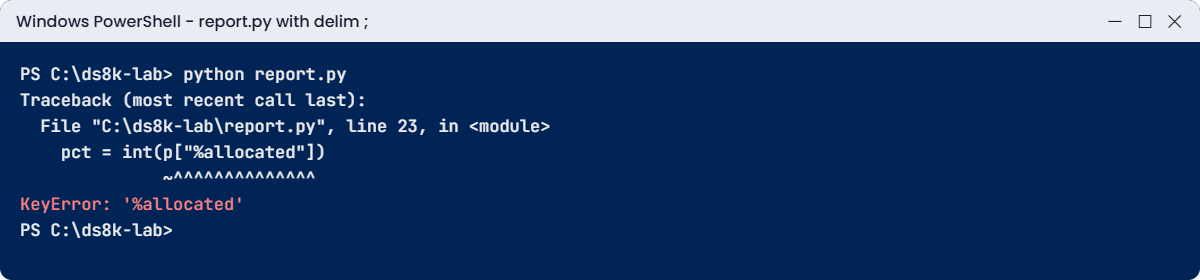
Why: Python’s csv reader splits on commas by default. With semicolons, each line becomes one big column called “Name;ID;stgtype;…”, so there’s no column named %allocated. The DS CLI did nothing wrong here; what broke was the agreement between the profile and the script.
Fix it:
(Get-Content auto.profile) -replace 'delim: ;','delim: ,' | Set-Content auto.profile
python report.py
You should see this:
OK   pool P0 pool_0: 0% allocated, 99576 GiB available
OK   pool P1 pool_1: 0% allocated, 99576 GiB available
OK   host saat-host1: 2 logged-in ports
✅ Checkpoint: the report works again. Keep script profiles apart from personal ones, and let only the script owner change them.
2Break: run the report as a new monitor user
Security says reports mustn’t run as admin, which is fair enough. So you create a monitor user, store its password and switch the profile over to it.
Run this:
python ds8sim.py -cfg auto.profile mkuser -pw Report2026 -group monitor rptuser
python ds8sim.py -cfg auto.profile managepwfile -action add -name rptuser -pw Report2026
(Get-Content auto.profile) -replace 'username: admin','username: rptuser' | Set-Content auto.profile
python report.py
echo $LASTEXITCODE
python ds8sim.py -cfg auto.profile lsextpool
You should see this (after the first two commands):
ERROR DS CLI login failed (rc=5): check user, password file and profile
2
SaatVedha DS8000 practice shell — not IBM software. Real DS CLI output looks like this but is not identical.
CMUN00247W Your password has expired. You must change it now.
Enter a new password:
Re-enter the new password:
CMUN00246E The password for user rptuser has expired and must be changed. No new password was entered.
Why: a password set with mkuser is temporary and expires at the first login (the Redbook says the same about admin/admin). A script can’t type in a new password, so the login fails. The CMUN00247W and CMUN00246E texts are practice shell messages, and a real DS CLI refuses in its own words.
Notice that the report behaved properly: it said “login failed” and exited 2 instead of printing an empty “all OK”.
Fix it: log in once by hand, then update the password file
python ds8sim.py
Enter the primary management console IP address: 10.0.0.1
Enter the secondary management console IP address:
Enter your username: rptuser
Enter your password: (type Report2026; it does not show)
(enter a new password twice)
dscli> managepwfile -action change -name rptuser -pw <the new password>
dscli> quit
python report.py
You should see this:
CMUN00247W Your password has expired. You must change it now.
CMUC00249I Your password was changed successfully.
CMUC00206I managepwfile: Record 10.0.0.1/rptuser successfully changed in password file C:\Users\you\dscli\security.dat.
OK   pool P0 pool_0: 0% allocated, 99576 GiB available
OK   pool P1 pool_1: 0% allocated, 99576 GiB available
OK   host saat-host1: 2 logged-in ports
✅ Checkpoint: the report runs as rptuser. Try python ds8sim.py -cfg auto.profile mkfbvol -extpool P0 -cap 10 -sam ese 2003: the monitor user is refused (CMUN00018E, a practice shell message), which is exactly what you want from a report account.