
DS8000 practice shell: download, setup and lab controls
-
Phase 0: Before you start
-
Phase 1: Plan and install
-
Phase 2: Build the storage
-
Phase 3: Copy Services
-
Phase 4: Run it day to day
-
Phase 5: Troubleshooting and career
The DS8000 practice shell is a small program that lets you type IBM DS8000 DS CLI commands on your own laptop with no real storage system behind it. You can make arrays, ranks, pools, volumes and host mappings, break things on purpose and fix them again, and every lab in our two DS8000 courses runs on it.
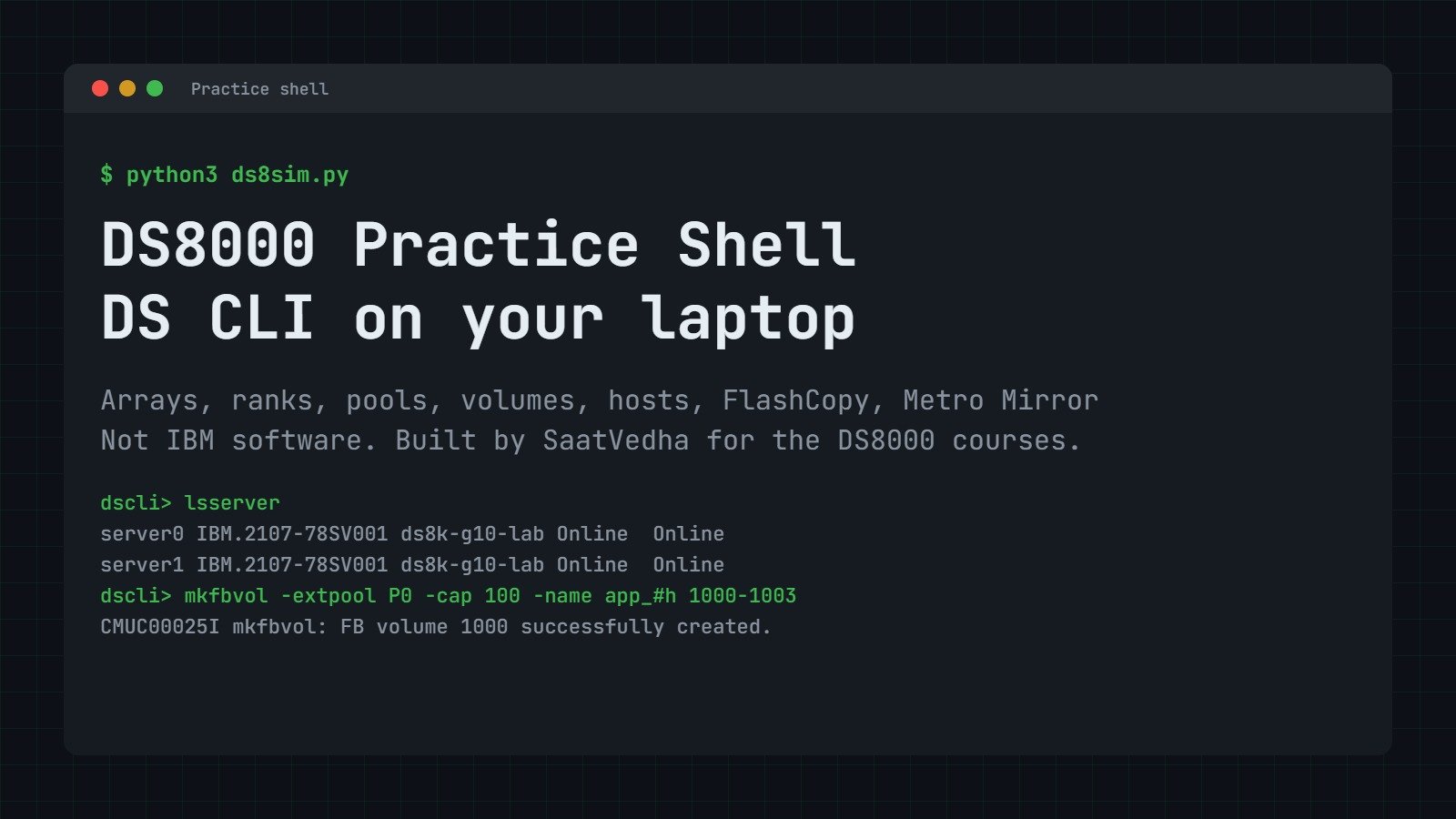
It works a bit like a flight simulator, where a pilot learns the controls on the ground before going near a real plane. Here you learn DS CLI before you touch a real box that’s holding a bank’s data.
| Time | You need | By the end you can |
|---|---|---|
| 15 to 20 minutes | A Windows, macOS or Linux laptop with Python 3.8 or newer | Download and start the practice shell, use simctl to cause and fix faults, and tell real DS CLI messages from practice-shell ones |
What you get in the DS8000 practice shell
- One Python file,
ds8sim.py. No database, no server, no internet needed after download. - About 100 DS CLI style commands:
lssi,lsarraysite,mkarray,mkrank,mkextpool,mkfbvol,mkckdvol,mkhost,mkvolgrp,mkflash,mkpprcpath,mkpprc,managefbvoland many more. - A pretend lab system
IBM.2107-78SV001(a DS8A50 style box) and a second “DR” boxIBM.2107-78SV002for Metro Mirror and Global Copy practice. - Real rules: rank group 0 and 1, even and odd LSSs, FB and CKD address groups, extent sizes, thin (ESE) pools that can run out of space, plus users and roles.
- A practice-only
simctlcommand that pulls cables, fails a server or fills a pool, which is what the “Break It, Then Fix It” labs use.
Download
The zip contains ds8sim.py and README.txt. If you’d like to check the file isn’t damaged, its SHA-256 is:
b0f80b40d96a12c0ad34fa19040089062b0b063bbebba8942dd3f17362341a14
Set up the DS8000 practice shell in 5 minutes
Python 3.8 or newer is the only thing you need to install. Pick your system below.
Step 1: Install Python
| Your laptop | What to do | Check it |
|---|---|---|
| Windows 10 / 11 | Install Python 3 from python.org or the Microsoft Store, and on the first installer screen tick Add python.exe to PATH. | python --version |
| macOS | Install Python 3 from python.org, or run xcode-select --install in Terminal. | python3 --version |
| Linux (Ubuntu, Rocky, Fedora) | Python 3 is usually there already. If it isn’t, run sudo apt install python3 or sudo dnf install python3. | python3 --version |
| VirtualBox Linux VM | You can use any Ubuntu Server or Rocky Linux VM you’ve already built for the course, and copy the zip in with a shared folder or scp. | python3 --version |
✅ Checkpoint: you see Python 3.8 or a higher number.
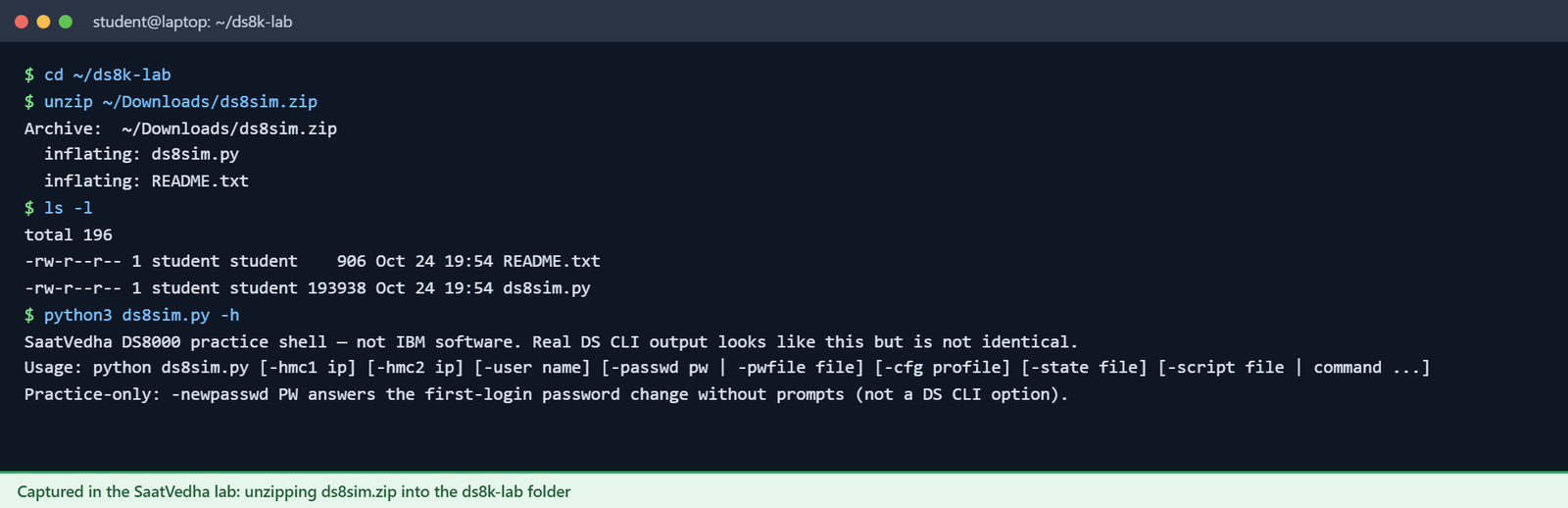
Step 2: Unzip into its own folder
Make a folder such as ds8k-lab and unzip the file into it. The shell saves your work in a file called ds8sim-state.json in whichever folder you run it from, so keeping one folder for it keeps everything tidy.
On Windows you can right-click the zip, choose Extract All and then open a Command Prompt in that folder.
Step 3: Start it and log in
Run python ds8sim.py on Windows or python3 ds8sim.py on macOS and Linux. Type 10.0.0.1 for the management console, press Enter for the second one, and log in as admin with password admin. As on a real DS8000, it makes you choose a new password on first login, so use 8 or more characters with at least one letter and one number.
✅ Checkpoint: you see the dscli> prompt.
Step 4: Run your first commands
✅ Checkpoint: both servers show Online. Your practice DS8000 is ready.
Type help to list every command, mkfbvol -h to see how a single command is used, and quit to leave. Your work is saved for next time.
Run it from a script (no prompts)
Like real DS CLI, the shell can run a single command or a script file. For labs and scripts it also has one extra start-up flag, -newpasswd, which does the first-login password change for you, and real DS CLI doesn’t have that flag.
The previous lesson, Your lab: DS CLI, practice shell and VirtualBox, shows you how to keep the login in a DS CLI profile (lab.profile) and a password file the way you would at work, and from then on every lab command starts with python ds8sim.py -cfg lab.profile.
Practice controls: simctl
simctl is our own command and doesn’t exist on a real DS8000. It stands in for the outside world (the SAN, the host, the power, the clock) and the “Break It, Then Fix It” labs rely on it.
| Command | What it does |
|---|---|
simctl help | List all practice controls. |
simctl status | Short summary of the pretend machine. |
simctl reset | Back to a clean system. Keeps your users and passwords. |
simctl reset -all | Back to factory state. Login is admin / admin again. |
simctl login <wwpn> [ioport] | A host port logs in to the DS8000 (like a zoned, cabled HBA). |
simctl logout <wwpn> | A host port logs out (cable pulled or zone removed). |
simctl portfail / portfix <ioport> | An I/O port loses light, then gets it back. |
simctl serverfail / serverfix 0|1 | One CPC goes offline (failover), then comes back (failback). |
simctl io <vol> | Mark recent host I/O on a volume, so it counts as “in use”. |
simctl write <vol> <GiB> | The host writes data to a thin (ESE) volume. |
simctl poolfill <pool> <percent> | Pretend other data fills a pool to this level. |
simctl drivefail <arraysite> | Fail one drive. The array rebuilds onto a spare. |
simctl tick [minutes] | Move the clock forward, so rebuilds and copies finish. |
simctl break / fix <scenario> | Ready-made faults: zone-missing, wrong-lss, pool-full, port-topology-ficon. |
simctl linkfail / linkfix <ioport> | Cut or restore a replication link to the DR box. |
For the Copy Services labs, run commands on the DR box with -dev IBM.2107-78SV002. Its WWNN is 5005076303FFF1DD.
What the practice shell does not do
A teaching tool has to leave a few things out, and the lessons mention them when they come up.
- No real data moves, and the capacity numbers come from simple formulas rather than real drives.
- A few commands aren’t included:
applykey,chaccess/showaccess,chsi, the Easy Tier commands,mkaliasvolandchextpool -threshold. The lessons show their real syntax, but you can’t run them in the shell. - Some real limits aren’t checked: the over-provisioning ratio limit (
opratiolimit), duplicate SSIDs, and mixing FlashCore Module and Flash Tier 2 drives on one DA pair. - Copy Services timing is simplified, so copies finish after a simulated minute or two.
-fmt xmloutput is only a rough copy of the real layout.- All names, serial numbers, WWNNs and firmware levels are made up for the lab.
- Safeguarded Copy backups are made in Copy Services Manager or GDPS rather than in DS CLI, so the shell only handles the capacity part with
managefbvol, as a real system does.
Which messages are real and which are made up
A real DS8000 replies with message IDs like CMUC00025I (all good) or CMUN02282E (error), and the last letter gives the type: I for information, W for a warning that waits for your yes or no, and E for an error. The shell follows the same style.
We were careful to keep track of where each message comes from, and they fall into three groups.
SIM message. A real DS8000 may print a different ID and different words for the same problem. In the lessons we label these as “practice shell message”.Show all 233 invented DS CLI style messages
| ID | Message (%s = filled in when it runs) |
|---|---|
CMUC00014W | rmhostconnect: Are you sure you want to delete host connection %s? |
CMUC00015I | rmhostconnect: Host connection %s successfully deleted. |
CMUC00019W | rmlcu: Are you sure you want to delete LCU %s? |
CMUC00020I | rmlcu: LCU %s successfully deleted. |
CMUC00032W | rmvolgrp: Are you sure you want to delete volume group %s? |
CMUC00033I | rmvolgrp: Volume group %s successfully deleted. |
CMUC00249I | Your password was changed successfully. |
CMUC00539W | rmcluster: Are you sure that you want to delete cluster %s? |
CMUC00540I | rmcluster: The cluster %s is successfully deleted. |
CMUC00543W | rmhostport: Are you sure that you want to delete host port %s? |
CMUC00544I | rmhostport: The host port %s is successfully deleted. |
CMUN00010E | %s: Invalid flag: %s. Enter “help %s” for the correct syntax. |
CMUN00010E | Syntax error: %s |
CMUN00010E | Invalid value for -fmt: %s. |
CMUN00010E | lshosttype: Invalid value for -type: %s. |
CMUN00010E | mkrank: Invalid value for -extsize: %s. Use 16MiB or 1GiB (fb), 21cyl or 1113cyl (ckd). |
CMUN00010E | %s: Invalid value for -sam: %s. Use standard or ese. |
CMUN00010E | %s: Invalid value for -eam: %s. |
CMUN00010E | mkfbvol: Invalid value for -cap: %s. |
CMUN00010E | mkfbvol: Invalid value for -type: %s. |
CMUN00010E | chfbvol: Invalid value for -cap: %s. |
CMUN00010E | mkckdvol: Invalid value for -datatype: %s. |
CMUN00010E | mkhost: Invalid value for -type: %s. Enter “help mkhost” for the list of host types. |
CMUN00010E | chhost: Invalid value for -action: %s. |
CMUN00010E | chhost: Invalid value for -type: %s. |
CMUN00010E | mkvolgrp: Invalid value for -type: %s. |
CMUN00010E | mkhostconnect: Invalid value for -hosttype: %s. Run lshosttype. |
CMUN00010E | %s: Invalid value for -group: %s. Groups: %s. |
CMUN00010E | chsp: Invalid value for -%s: %s. |
CMUN00010E | %s: The practice shell supports -action %s. |
CMUN00010E | mkpprc: Invalid value for -mode: %s. |
CMUN00011E | %s: The flag -%s requires a parameter. |
CMUN00011E | mkarray: The -raidtype and -arsite parameters are required. |
CMUN00011E | mkrank: The -array parameter is required. |
CMUN00011E | mkrank: The -stgtype parameter is required. Specify fb or ckd. |
CMUN00011E | showrank: A rank ID is required. |
CMUN00011E | chrank: A rank ID is required. |
CMUN00011E | chrank: Specify -extpool or -unassign. |
CMUN00011E | mkextpool: The -rankgrp parameter is required. Specify 0 or 1. |
CMUN00011E | mkextpool: The -stgtype parameter is required. Specify fb or ckd. |
CMUN00011E | mkextpool: An extent pool name is required. |
CMUN00011E | showextpool: An extent pool ID is required. |
CMUN00011E | mkfbvol: The -extpool, -cap and volume_ID parameters are required. |
CMUN00011E | showfbvol: A volume ID is required. |
CMUN00011E | chfbvol: A volume ID is required. |
CMUN00011E | rmfbvol: A volume ID is required. |
CMUN00011E | %s: The -action releasespace parameter is required. |
CMUN00011E | mklcu: The -id and -ss parameters are required. |
CMUN00011E | mkckdvol: The -extpool, -cap and volume_ID parameters are required. |
CMUN00011E | showckdvol: A volume ID is required. |
CMUN00011E | setioport: Specify -topology scsifcp or -topology ficon. |
CMUN00011E | showioport: An I/O port ID is required. |
CMUN00011E | mkcluster: A cluster name is required. |
CMUN00011E | chcluster: The -volume parameter is required with -action. |
CMUN00011E | mkhost: A host name is required. |
CMUN00011E | showhost: A host name is required. |
CMUN00011E | chhost: A host name is required. |
CMUN00011E | chhost: The -volume parameter is required with -action. |
CMUN00011E | rmhost: A host name is required. |
CMUN00011E | mkhostport: The -host parameter and a WWPN are required. |
CMUN00011E | mkvolgrp: A volume group name is required. |
CMUN00011E | showvolgrp: A volume group ID is required. |
CMUN00011E | chvolgrp: A volume group ID is required. |
CMUN00011E | chvolgrp: Use -action add|remove|replace with -volume. |
CMUN00011E | mkhostconnect: The -wwname parameter and a name are required. |
CMUN00011E | chhostconnect: A host connection ID is required. |
CMUN00011E | mkuser: The -pw and -group parameters and a user name are required. |
CMUN00011E | rmuser: A user name is required. |
CMUN00011E | chuser: A user name is required. |
CMUN00011E | managepwfile: Use -action add|remove|change -name user [-pw password]. |
CMUN00011E | managepwfile: The -pw parameter is required. |
CMUN00011E | %s: A volume ID is required. |
CMUN00011E | %s: Specify -multiplier or -cap. |
CMUN00011E | %s: Volume pairs (source:target) are required. |
CMUN00011E | %s: The -remotewwnn parameter is required. |
CMUN00011E | %s: Specify a Source_LSS:Target_LSS pair, for example 20:20. |
CMUN00011E | mkpprcpath: The -srclss, -tgtlss parameters and port pairs are required. |
CMUN00011E | mkpprcpath: Port pairs look like I0030:I0130. |
CMUN00011E | %s: The -type mmir|gcp parameter is required. |
CMUN00011E | mkpprc: Volume pairs (source:target) are required. |
CMUN00011E | rmpprc: -at src|tgt must be used together with -unconditional. |
CMUN00012E | Invalid %s ID: %s. |
CMUN00012E | Invalid %s ID range: %s. |
CMUN00013E | %s: This is not a DS CLI command. A DS CLI script can contain only DS CLI commands. The script stopped. |
CMUN00014E | %s: Unknown command. Enter “help” for a list of commands. |
CMUN00015E | rmfbvol: The -safe and -force parameters cannot be used together. |
CMUN00015E | chckdvol: The -cap and -datatype parameters cannot be used together. |
CMUN00015E | mkflash: The -cp and -nocp parameters cannot be used together. |
CMUN00015E | mkflash: The -wait parameter cannot be used with -persist, -record or -nocp. |
CMUN00016E | %s: %s: The storage image ID is not valid or is not managed by this management console. |
CMUN00017E | The profile %s was not found. |
CMUN00018E | %s: Unauthorized: Your user group (%s) does not have the authority to run this command. |
CMUN00019E | The script file %s cannot be read. |
CMUN00244E | Authentication failure: the user name or password is not correct. |
CMUN00245E | The user account %s is locked. Ask an administrator to run chuser -unlock %s. |
CMUN00246E | The password for user %s has expired and must be changed. Log in interactively (python ds8sim.py) to set a new password. |
CMUN00246E | The password for user %s has expired and must be changed. No new password was entered. |
CMUN00247W | Your password has expired. You must change it now. |
CMUN00248E | The passwords do not match. Try again. |
CMUN00250E | The password must be at least 8 characters long. |
CMUN00251E | The password must contain at least one letter and one number. |
CMUN00252E | The new password must be different from the old password. |
CMUN02012E | mkarray: RAID type %s is not supported. Use 6 or 10. |
CMUN02013E | mkarray: %s: The array site does not exist. |
CMUN02014E | mkarray: %s: The array site is already assigned to array %s. An array site can hold only one array. |
CMUN02015E | rmarray: %s: The array does not exist. |
CMUN02015E | mkrank: %s: The array does not exist. |
CMUN02016E | rmarray: %s: The array cannot be removed because rank %s is defined on it. |
CMUN02017E | mkrank: %s: The array is already assigned to rank %s. |
CMUN02018E | mkrank: The extent size %s does not match storage type %s. |
CMUN02019E | %s: %s: The extent pool does not exist. |
CMUN02019E | showextpool: %s: The extent pool does not exist. |
CMUN02019E | chextpool: %s: The extent pool does not exist. |
CMUN02019E | rmextpool: %s: The extent pool does not exist. |
CMUN02019E | mkfbvol: %s: The extent pool does not exist. |
CMUN02020E | %s: %s: The storage type of rank %s (%s) does not match the storage type of extent pool %s (%s). |
CMUN02021E | %s: %s: The extent size of the rank (%s) does not match the extent size of extent pool %s (%s). |
CMUN02022E | %s: %s: The rank has allocated extents and cannot be moved. |
CMUN02022E | chrank: %s: The rank has allocated extents and cannot be unassigned. |
CMUN02023E | showrank: %s: The rank does not exist. |
CMUN02023E | chrank: %s: The rank does not exist. |
CMUN02023E | rmrank: %s: The rank does not exist. |
CMUN02024E | rmrank: %s: The rank is assigned to extent pool %s. Unassign it first (chrank -unassign %s). |
CMUN02025E | mkextpool: %s: An extent pool with this name already exists. |
CMUN02026E | rmextpool: %s: The extent pool contains volumes and cannot be deleted. |
CMUN02027E | rmextpool: %s: The extent pool contains ranks. Unassign the ranks first. |
CMUN02028E | %s: %s: The extent pool storage type is %s. Use an %s extent pool. |
CMUN02029E | %s: %s: The extent pool has no ranks. |
CMUN02030E | %s: %s: Volumes in an %s %s must be created in an extent pool of rank group %d. Extent pool %s belongs to rank group %d. |
CMUN02030E | mkfbvol: %s: Volumes in an %s LSS must be created in an extent pool of rank group %d. |
CMUN02031E | %s: %s: Only thin provisioned ESE volumes (-sam ese) can be created in an extent pool with FlashCore Module ranks. |
CMUN02032E | mkfbvol: The capacity must be between 1 block and 16 TiB. |
CMUN02032E | chfbvol: The capacity must be between 1 block and 16 TiB. |
CMUN02033E | mkfbvol: %s: LSS FF is reserved. Use LSS 00 – FE. |
CMUN02034E | mkfbvol: %s: Address group %s is already used for CKD (it has LCUs). An address group can hold only FB or only CKD. |
CMUN02035E | mkfbvol: %s: The volume already exists. |
CMUN02035E | mkckdvol: %s: The volume already exists. |
CMUN02036E | mkfbvol: %s: The volume group does not exist. |
CMUN02036E | %s: %s: The volume group does not exist. |
CMUN02037E | mkfbvol: %s: Unable to create the volume: the extent pool %s does not have enough available extents. |
CMUN02037E | chfbvol: %s: The extent pool %s does not have enough available extents. |
CMUN02037E | mkckdvol: %s: Unable to create the volume: the extent pool %s does not have enough available extents. |
CMUN02037E | chckdvol: %s: The extent pool %s does not have enough available extents. |
CMUN02038E | showfbvol: %s: The FB volume does not exist. |
CMUN02038E | chfbvol: %s: The FB volume does not exist. |
CMUN02038E | rmfbvol: %s: The FB volume does not exist. |
CMUN02038E | %s: %s: The volume does not exist. |
CMUN02038E | showckdvol: %s: The CKD volume does not exist. |
CMUN02038E | chckdvol: %s: The CKD volume does not exist. |
CMUN02038E | rmckdvol: %s: The CKD volume does not exist. |
CMUN02038E | %s: %s: The FB volume does not exist. |
CMUN02038E | mkvolgrp: %s: The FB volume does not exist. |
CMUN02038E | chvolgrp: %s: The FB volume does not exist. |
CMUN02038E | %s: %s: The %s does not exist. |
CMUN02039E | chfbvol: %s: The new capacity must be larger than the current capacity. A volume cannot be reduced in size. |
CMUN02039E | chckdvol: %s: The new capacity must be larger than the current capacity. A volume cannot be reduced in size. |
CMUN02040E | chfbvol: %s: Delete all Copy Services relationships of the volume before you expand it. |
CMUN02041E | %s: %s: The volume is not a space efficient (ESE) volume. |
CMUN02042E | %s: %s: The volume is in use. Specify -force to reinitialize it. |
CMUN02043E | mklcu: %s: LCU IDs must be 00 – FE. |
CMUN02044E | mklcu: %s: The LCU already exists. |
CMUN02045E | mklcu: %s: Address group %s already contains FB volumes. An address group can hold only FB or only CKD. |
CMUN02046E | rmlcu: %s: The LCU does not exist. |
CMUN02047E | rmlcu: %s: The LCU contains volumes and cannot be deleted. |
CMUN02048E | %s: %s: The capacity must be at least 1 cylinder. |
CMUN02049E | %s: %s: A 3390 volume can have at most 65520 cylinders. Use -datatype 3390-A for larger volumes. |
CMUN02050E | %s: %s: Above 65520 cylinders a 3390-A volume must be a multiple of 1113 cylinders between 65667 and 1182006. |
CMUN02051E | mkckdvol: All volumes of one command must be in the same LCU. |
CMUN02052E | %s: %s: The host does not exist. |
CMUN02053E | %s: %s: A WWPN must be 16 hexadecimal characters. |
CMUN02054E | %s: %s: The host port is already defined (host connection %s). Each host port can be defined only once. |
CMUN02055E | mkcluster: %s: The cluster already exists. |
CMUN02056E | showcluster: %s: The cluster does not exist. |
CMUN02056E | chcluster: %s: The cluster does not exist. |
CMUN02056E | rmcluster: %s: The cluster does not exist. |
CMUN02056E | mkhost: %s: The cluster does not exist. |
CMUN02056E | chhost: %s: The cluster does not exist. |
CMUN02057E | %s: %s: No volumes are mapped. |
CMUN02058E | rmcluster: The cluster %s/%s cannot be removed because it contains volumes. |
CMUN02059E | mkhost: %s: The host already exists. |
CMUN02060E | rmhostport: %s: The host port does not exist. |
CMUN02061E | %s: %s: The host connection does not exist. |
CMUN02062E | mkuser: %s: The user already exists. |
CMUN02063E | rmuser: %s: The user does not exist. |
CMUN02063E | chuser: %s: The user does not exist. |
CMUN02063E | showuser: %s: The user does not exist. |
CMUN02064E | rmuser: %s: You cannot delete the user that you are logged in with. |
CMUN02065E | managepwfile: Record %s already exists in password file %s. |
CMUN02066E | %s: Only op_volume and op_copy_services can be combined. |
CMUN02805E | mkrank: The -keygrp parameter is required because data-at-rest encryption is enabled. Run lskeygrp to see the encryption key group ID. |
CMUN02805E | mkextpool: The -keygrp parameter is required because data-at-rest encryption is enabled. Run lskeygrp to see the encryption key group ID. |
CMUN02806E | mkrank: %s: The encryption key group does not exist. |
CMUN02948E | rmfbvol: %s: The Delete logical volume task cannot be initiated because the Allow Host Pre-check Control Switch is set to true and the volume that you have specified is in use (host I/O in the last 5 minutes or a Copy Services relationship). |
CMUN03001E | Volume pairs must be written source:target, for example 2000:2100. |
CMUN03002E | The source and target ranges must have the same number of volumes. |
CMUN03003E | %s: %s: The remote storage image is not known or has no connection to %s. |
CMUN03004E | %s: %s: This is the WWNN of the local storage image. Specify the WWNN of the remote storage image (run lssi on the remote box). |
CMUN03005E | %s: %s: No storage image with this WWNN is connected. |
CMUN03010E | mkpprcpath: %s:%s: There is no physical connection between these ports. Run lsavailpprcport. |
CMUN03011E | mkpprcpath: %s: The port topology is FICON. Remote Mirror and Copy paths need SCSI-FCP ports. |
CMUN03012E | rmpprcpath: %s:%s: The path does not exist. |
CMUN03013E | rmpprcpath: %s:%s: Volume pairs still use this path. Remove the pairs first or specify -force. |
CMUN03020E | %s: %s: The volume does not exist. |
CMUN03020E | mkpprc: %s: The volume does not exist on %s. |
CMUN03021E | %s: %s: The FlashCopy relationship does not exist. |
CMUN03022E | mkflash: %s:%s: The source and target must be different volumes. |
CMUN03023E | mkflash: %s:%s: The target volume must be the same type and at least the same size as the source volume. |
CMUN03024E | mkflash: %s:%s: The target volume is already a FlashCopy target. |
CMUN03025E | mkflash: %s: A source volume can have at most 12 FlashCopy relationships. |
CMUN03026E | mkflash: %s: The source already has an incremental (-record) relationship. |
CMUN03027E | resyncflash: %s: The relationship was not created with -record -persist. |
CMUN03028E | reverseflash: %s: The background copy has not finished. Use -fast (Fast Reverse Restore). |
CMUN03030E | mkpprc: %s:%s: The target volume is smaller than the source volume. |
CMUN03031E | mkpprc: %s: Copy Services support volumes up to 4 TiB. |
CMUN03032E | mkpprc: %s:%s: A volume is already in a Remote Mirror and Copy relationship. |
CMUN03033E | mkpprc: %s:%s: No working Remote Mirror and Copy path exists from LSS %s to LSS %s. Create one with mkpprcpath and check lspprcpath. |
CMUN03033E | resumepprc: %s:%s: No working Remote Mirror and Copy path exists from LSS %s to LSS %s. |
CMUN03033E | failbackpprc: %s:%s: No working Remote Mirror and Copy path exists from LSS %s to LSS %s. Create the path in this direction with mkpprcpath. |
CMUN03034E | %s: %s:%s: The Remote Mirror and Copy relationship does not exist on %s. |
CMUN03035E | pausepprc: %s:%s: Run this command for the source (primary) volume. |
CMUN03035E | resumepprc: %s:%s: Run this command for the source (primary) volume. |
CMUN03036E | resumepprc: %s:%s: The target volume is also a source (after failover). Use failbackpprc. |
CMUN03037E | failbackpprc: %s:%s: The volume %s is not a source. Run failoverpprc first. |
CMUN03050E | %s: %s: The volume has no backup capacity. |
CMUN03051E | %s: %s: The volume already has backup capacity. Use -action expandsafeguardedcap. |
CMUN03052E | %s: The -multiplier value must be at least 1.5. |
CMUN03053E | %s: %s: The backup capacity is larger than the maximum (%s). |
CMUN03054E | %s: %s: The new backup capacity must be larger than the current one. |
CMUN03055E | %s: The volume is in an active Safeguarded Copy relationship. |
CMUN03060E | chsp: You can specify at most two SNMP trap addresses, separated by a comma with no spaces. |
CMUN04034E | setioport: %s: The I/O port does not exist. |
CMUN04034E | showioport: %s: The I/O port does not exist. |
CMUN04034E | mkpprcpath: %s: The I/O port does not exist. |
Show all 36 SIM messages (simctl only)
| ID | Message (%s = filled in when it runs) |
|---|---|
SIM0001E | simctl %s: missing argument. Enter “simctl help”. |
SIM0001E | simctl: unknown action %s. Enter “simctl help”. |
SIM0002E | simctl: volume %s does not exist. |
SIM0003E | simctl: I/O port %s does not exist. |
SIM0004E | simctl write: volume %s is a standard volume; its extents are already allocated. |
SIM0005E | simctl write: extent pool %s has no free extents. The host write fails (out of space). Free space with initfbvol -action releasespace, delete volumes or add a rank. |
SIM0006E | simctl: use 0 or 1. |
SIM0007E | simctl: %s is already offline; the practice shell keeps one server running. |
SIM0008E | simctl: extent pool %s does not exist. |
SIM0009E | simctl: array site %s has no array. |
SIM0010E | simctl: no free address group for this scenario. |
SIM0011E | simctl: create an extent pool with a rank first. |
SIM0012E | simctl: unknown scenario %s. Use zone-missing, wrong-lss, pool-full or port-topology-ficon. |
SIM0013E | simctl: scenario %s is not active. |
SIM0014E | simctl write: volume %s is only %.1f GiB; a host cannot write %s GiB to it. |
SIM0015E | simctl: %s is not a replication link port (I0030, I0052). |
SIM0100I | simctl: factory state restored. Users are back to admin/admin; the next login must change the password. |
SIM0100I | simctl: factory state restored (users and passwords kept; use simctl reset -all to reset them too). |
SIM0101I | simctl: host I/O recorded on volume %s (in use for the next 5 minutes). |
SIM0102I | simctl: volume %s now has %d allocated extents (%s GiB written). |
SIM0103I | simctl: host port %s logged in to %s. |
SIM0104I | simctl: host port %s logged out. |
SIM0105I | simctl: I/O port %s has no light (cable or SFP problem). |
SIM0106I | simctl: I/O port %s has light again. |
SIM0107I | simctl: %s is offline. Failover: %s now serves rank groups 0 and 1. Host I/O continues; write cache runs in a single copy until failback. |
SIM0108I | simctl: %s is online. Failback: rank group %s moved back to %s. |
SIM0109I | simctl: extent pool %s is now %d%% allocated (%d extents available). |
SIM0110I | simctl: drive %s failed. Array %s is rebuilding onto a spare (about 10 simulated minutes; use simctl tick). |
SIM0111I | simctl: array %s rebuild complete; the failed drive was replaced and is now the spare. |
SIM0112I | simctl: clock advanced %d minutes. |
SIM0113I | simctl: replication link %s <-> %s is %s. |
SIM0120I | simctl: scenario zone-missing: the SAN zone was deleted, so no host port is logged in. Hosts show State Offline. Check: lshostport -login, lshost. Fix: simctl fix zone-missing (the SAN team restores the zone). |
SIM0121I | simctl: scenario wrong-lss: a mainframe colleague created CKD LCU %s, so address group %s (LSS %s0-%sF) is now CKD. mkfbvol into LSS %s0-%sF will fail. Check: lslcu. Fix: use another address group, or rmlcu %s. |
SIM0122I | simctl: scenario pool-full: extent pool %s is 100%% allocated. New volumes, expansions and ESE writes fail. Check: lsextpool. Fix: simctl fix pool-full, or add a rank (chrank -extpool). |
SIM0123I | simctl: scenario port-topology-ficon: I0032 and I0042 were changed to FICON. Open systems hosts cannot log in. Check: lsioport, lshostport -login. Fix: setioport -topology scsifcp -force I0032 I0042. |
SIM0124I | simctl: scenario %s fixed. |
Common problems
“python is not recognized” on Windows
Python isn’t on your PATH. Run the installer again and tick Add python.exe to PATH, or use py ds8sim.py instead.
SyntaxError when it starts
Your Python is older than 3.8. Check it with python3 --version and install a newer one.
CMUN00244E Authentication failure
The user name or password is wrong. If you’ve forgotten the new password, close the shell and delete ds8sim-state.json in your folder, and the next start takes you back to admin / admin with an empty system.
My volumes are gone
The shell saves into ds8sim-state.json in the folder you started it from, so start it from the same folder each time or you’ll get a fresh system.
A lab says a command should fail, but it works
Run simctl reset and go through the lab steps again from the start, because leftovers from an earlier lab can change the result.
Where to go next
Next in this course: Physical planning: floor, power, cables, WWPNs. Come back to this page whenever a lab asks you to reset the shell or cause a fault.
New to DS8000? The IBM DS8000 Architecture course explains the hardware, RAID, ranks, pools and volumes in plain words. Keep the DS8000 DSCLI commands cheat sheet open in another tab, and use the Command Builder to fill in a DS CLI command with your own pool, volume and host names.
For the official word on any command, go to IBM’s guide: IBM Storage DS8A00 Architecture and Implementation Guide (IBM Redbooks).