
Before you run any command, double-check it
Read every command twice before you press Enter. Check the target: the system or account, the IDs, the names and the sizes. These commands are for learning and were tested in our lab, not on your system. At work, run the read-only list commands first, follow your change process, make sure a backup exists, and ask a second person to check anything that changes or deletes data. You run them at your own risk.
The whole lab runs in the practice shell. Work in your lab folder (C:\ds8k-lab or ~/ds8k-lab).
Practice shell note: the practice shell is our teaching tool, not IBM software, and real DS CLI output is close but not identical. SIM lines, “Note (practice shell)” and the IDs CMUN02034E and CMUN03027E are practice shell messages. simctl commands cause the faults and stand in for other teams (SAN, IBM service).
1Save the build script
Save this as build-25.txt. Then copy it to rebuild-25.txt and put the line simctl reset at the very top, because you’ll run the rebuild file before every incident.
build-25.txt:
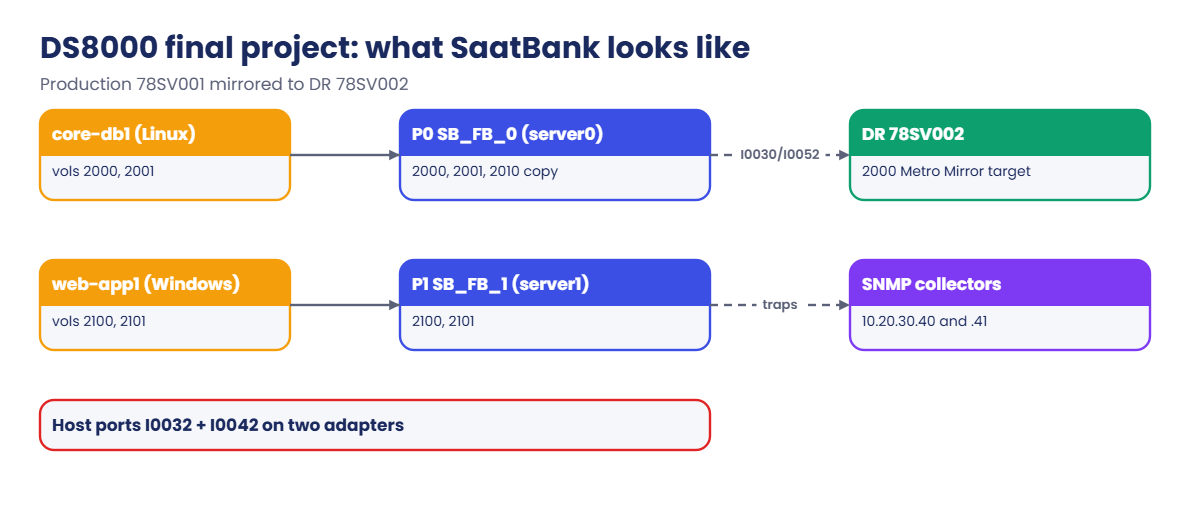
# build-25.txt: SaatBank production on IBM.2107-78SV001 with DR on IBM.2107-78SV002 (Lesson 31)
mkarray -raidtype 6 -arsite S1
mkarray -raidtype 6 -arsite S2
mkrank -array A0 -keygrp 1 -stgtype fb
mkrank -array A1 -keygrp 1 -stgtype fb
mkextpool -rankgrp 0 -keygrp 1 -stgtype fb SB_FB_0
mkextpool -rankgrp 1 -keygrp 1 -stgtype fb SB_FB_1
chrank -extpool P0 R0
chrank -extpool P1 R1
mkfbvol -extpool p0 -cap 100 -sam ese -name core_#h 2000-2001
mkfbvol -extpool p1 -cap 100 -sam ese -name web_#h 2100-2101
mkfbvol -extpool p0 -cap 100 -sam ese -name core_copy_#h 2010
mkhost -type "Linux Server" -hostport 10000090FA13B914,10000090FA13B915 core-db1
mkhost -type "Windows Server" -hostport 21000024FF2D0F86,21000024FF2D0F87 web-app1
chhost -action map -volume 2000,2001 core-db1
chhost -action map -volume 2100,2101 web-app1
mkflash -record -persist 2000:2010
mkfbvol -dev IBM.2107-78SV002 -extpool p0 -cap 100 -name dr_core_#h 2000
mkpprcpath -remotedev IBM.2107-78SV002 -remotewwnn 5005076303FFF1DD -srclss 20 -tgtlss 20 I0030:I0130 I0052:I0152
mkpprc -remotedev IBM.2107-78SV002 -type mmir -mode full 2000:2000
simctl tick 3
chsp -snmp on -snmpaddr 10.20.30.40,10.20.30.41
✅ Checkpoint: you can explain every line of the script.
2Run the build
Run this:
python ds8sim.py -hmc1 10.0.0.1 -user admin -script rebuild-25.txtYou should see this (after the password prompt and the SIM0100I reset line):
CMUC00004I mkarray: Array A0 successfully created.
CMUC00004I mkarray: Array A1 successfully created.
...
CMUC00025I mkfbvol: FB volume 2000 successfully created.
CMUC00149I mkpprcpath: Remote Mirror and Copy path 20:20 successfully established.
CMUC00153I mkpprc: Remote Mirror and Copy volume pair relationship 2000:2000 successfully created.
SIM0112I simctl: clock advanced 3 minutes.
CMUC00040I chsp: Storage complex IbmStoragePlex successfully modified.
(output shortened)
✅ Checkpoint: the last line is CMUC00040I and nothing failed.
3Verify every layer
Start python ds8sim.py and run the blueprint checks, and keep the output as your known-good baseline.
Run these:
lshost
lshostport -login
lsextpool
You should see this:
dscli> lshost
Date/Time: 24 October 2026 14:03:16 UTC IBM DSCLI Version: 7.10.10.348 DS: IBM.2107-78SV001
Name     Type           State  Cluster
======================================
core-db1 Linux Server   Online -
web-app1 Windows Server Online -
dscli> lshostport -login
Date/Time: 24 October 2026 14:03:16 UTC IBM DSCLI Version: 7.10.10.348 DS: IBM.2107-78SV001
WWNN             WWPN             Host     I/O ports ESSIOport
==============================================================
20000024FF2D0F86 21000024FF2D0F86 web-app1 16 (all)  I0032
20000024FF2D0F87 21000024FF2D0F87 web-app1 16 (all)  I0042
20000120FA13B914 10000090FA13B914 core-db1 16 (all)  I0032
20000120FA13B915 10000090FA13B915 core-db1 16 (all)  I0042
dscli> lsextpool
Date/Time: 24 October 2026 14:03:16 UTC IBM DSCLI Version: 7.10.10.348 DS: IBM.2107-78SV001
Name    ID stgtype rankgrp status availstor (2^30B) %allocated available reserved numvols
=========================================================================================
SB_FB_0 P0 fb      0       below  99576             0          6372864   64       3
SB_FB_1 P1 fb      1       below  99576             0          6372864   64       2
Then these:
lsflash
lspprc 2000
lspprcpath 20
You should see this:
dscli> lsflash
Date/Time: 24 October 2026 14:03:16 UTC IBM DSCLI Version: 7.10.10.348 DS: IBM.2107-78SV001
ID        SrcLSS SequenceNum Timeout ActiveCopy Recording Persistent
====================================================================
2000:2010 20     0           120     Disabled   Enabled   Enabled
(output shortened)
dscli> lspprc 2000
Date/Time: 24 October 2026 14:03:16 UTC IBM DSCLI Version: 7.10.10.348 DS: IBM.2107-78SV001
ID        State       Reason Type         SourceLSS Timeout (secs) Critical Mode First Pass Status
==================================================================================================
2000:2000 Full Duplex -      Metro Mirror 20        60             Disabled      Invalid
dscli> lspprcpath 20
Date/Time: 24 October 2026 14:03:16 UTC IBM DSCLI Version: 7.10.10.348 DS: IBM.2107-78SV001
Src Tgt State   SS   Port  Attached Port Tgt WWNN
=========================================================
20  20  Success FF20 I0030 I0130         5005076303FFF1DD
20  20  Success FF20 I0052 I0152         5005076303FFF1DD
Run lsserver and lsarray as well, which should show both servers Online and both arrays Normal.
✅ Checkpoint: 2 hosts Online, 4 logins, both pools below, FlashCopy Recording Enabled, mirror Full Duplex, 2 paths Success, servers Online, arrays Normal.

4How to run each incident
For incident N, run the rebuild, then run the one-line incident below with its output hidden, and then start the shell and troubleshoot.
python ds8sim.py -hmc1 10.0.0.1 -user admin -script rebuild-25.txt
python ds8sim.py -hmc1 10.0.0.1 -user admin -script incident-NN.txt > nul    (macOS/Linux: > /dev/null)
python ds8sim.py
✅ Checkpoint: you know how to start each incident from a clean build.
5The ten incidents
Each incident file is just one or two lines. Save them as incident-01.txt to incident-10.txt, and read only the ticket text first; look at the file contents only when you create it.
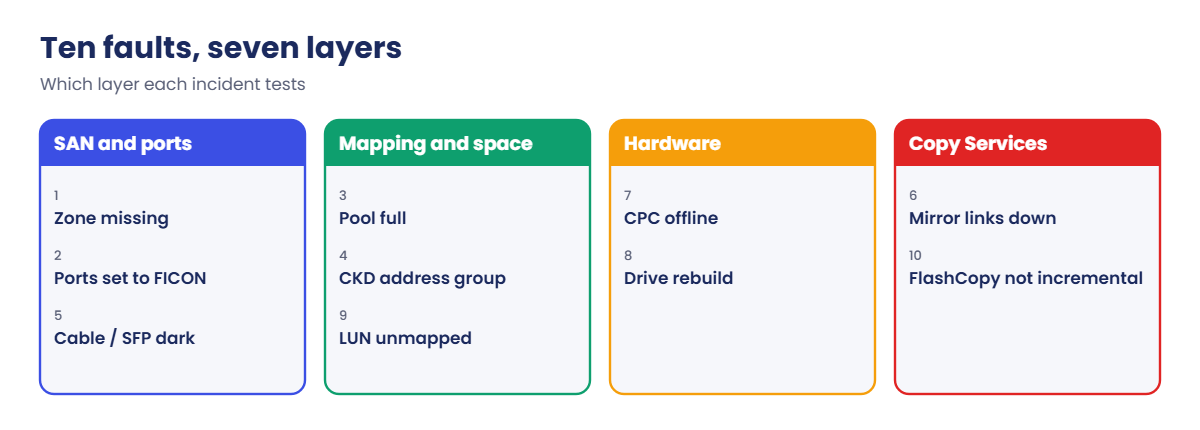
| # | Ticket text | incident-NN.txt contains |
|---|---|---|
| 1 | “Core banking and web both lost their disks.” | simctl break zone-missing |
| 2 | “Both servers lost disks right after a port tidy-up on the DS8000.” | simctl break port-topology-ficon |
| 3 | “The web database says write failed, disk full.” | simctl break pool-full P1 |
| 4 | “Please create a 50 GiB web LUN 3100.” It fails. | simctl break wrong-lss |
| 5 | “Web and core are a bit slower, and multipath shows one path failed.” | simctl portfail I0042 |
| 6 | “DR team: is the mirror healthy?” Nobody has looked for a while. | simctl linkfail I0030 |
| 7 | “IBM called: a CPC reported a problem. Are we down?” | simctl serverfail 1 |
| 8 | “Call Home opened a drive case. Is our data safe?” | simctl drivefail S2 |
| 9 | “core-db1 lost one of its two disks after a cleanup ticket.” | chhost -action unmap -volume 2001 core-db1 |
| 10 | “The Monday test refresh copied the whole volume again instead of just the changes.” | simctl io 2000 30 |
✅ Checkpoint: you created ten incident files.
6Score yourself
For each incident, score one point for the right layer, one for the command that proves the cause, and one for a fix you can prove. If you get 25 or more out of 30, you’re ready for a junior DS8000 role, and under 20 you should go back over Lessons 14, 15 and 19 and try again next week.
✅ Checkpoint: you wrote symptom, cause, fix and proof for all ten.
Try each incident before you open its answer. Every solution shows the commands that prove the cause and the fix, with real practice shell output (Date/Time banners taken out).
1Incident 1: answer
Show the solution
Layer: Layer 2, SAN. Cause: the ports are SCSI-FCP and established, but no host WWPN is logged in and both hosts are Offline. The DS8000 side is fine, so the problem is the zone or the HBAs.
Fix: the SAN team puts the zone back (the shell command plays their part), and then lshost shows both hosts Online.
Commands:
lshostport -login
lsioport I0032 I0042
simctl fix zone-missing
lshost
Output:
dscli> lshostport -login
CMUC00234I lshostport: No Host Port found.
dscli> lsioport I0032 I0042
ID    WWPN             State                     Type             topo     portgrp Security
===========================================================================================
I0032 500507630303B0DD Communication established Fibre Channel-SW SCSI-FCP 0       Disabled
I0042 500507630304B0DD Communication established Fibre Channel-SW SCSI-FCP 0       Disabled
dscli> simctl fix zone-missing
SIM0124I simctl: scenario zone-missing fixed.
dscli> lshost
Name     Type           State  Cluster
======================================
core-db1 Linux Server   Online -
web-app1 Windows Server Online -2Incident 2: answer
Show the solution
Layer: Layer 3, DS8000 ports. Cause: both host ports show topo FICON, and open systems hosts can only log in to SCSI-FCP ports.
Fix: run setioport -topology scsifcp -force on both ports, then check lshost.
Commands:
lshost
lsioport I0032 I0042
setioport -topology scsifcp -force I0032 I0042
lshost
Output:
dscli> lshost
Name     Type           State   Cluster
=======================================
core-db1 Linux Server   Offline -
web-app1 Windows Server Offline -
dscli> lsioport I0032 I0042
ID    WWPN             State                     Type             topo  portgrp Security
========================================================================================
I0032 500507630303B0DD Communication established Fibre Channel-SW FICON 0       Disabled
I0042 500507630304B0DD Communication established Fibre Channel-SW FICON 0       Disabled
dscli> setioport -topology scsifcp -force I0032 I0042
CMUC00011I setioport: I/O Port I0032 successfully configured.
CMUC00011I setioport: I/O Port I0042 successfully configured.
dscli> lshost
Name     Type           State  Cluster
======================================
core-db1 Linux Server   Online -
web-app1 Windows Server Online -3Incident 3: answer
Show the solution
Layer: Layer 5, space. Cause: the host write fails and P1 is full with 0 available extents, so the thin web volumes can’t grow.
Fix: add capacity with a new RAID 6 array and a rank, chrank it into P1 (rank group 1), and the write then goes through.
Commands:
simctl write 2100 10
lsextpool
mkarray -raidtype 6 -arsite S3
mkrank -array A2 -keygrp 1 -stgtype fb
chrank -extpool P1 R2
lsextpool
simctl write 2100 10
Output:
dscli> simctl write 2100 10
SIM0005E simctl write: extent pool P1 has no free extents. The host write fails (out of space). Free space with initfbvol -action releasespace, delete volumes or add a rank.
dscli> lsextpool
Name    ID stgtype rankgrp status availstor (2^30B) %allocated available reserved numvols
=========================================================================================
SB_FB_0 P0 fb      0       below  99576             0          6372864   64       3
SB_FB_1 P1 fb      1       full   0                 100        0         64       2
dscli> mkarray -raidtype 6 -arsite S3
CMUC00004I mkarray: Array A2 successfully created.
dscli> mkrank -array A2 -keygrp 1 -stgtype fb
CMUC00007I mkrank: Rank R2 successfully created.
dscli> chrank -extpool P1 R2
CMUC00008I chrank: Rank R2 successfully modified.
dscli> lsextpool
Name    ID stgtype rankgrp status availstor (2^30B) %allocated available reserved numvols
=========================================================================================
SB_FB_0 P0 fb      0       below  99576             0          6372864   64       3
SB_FB_1 P1 fb      1       below  119491            45         7647450   128      2
dscli> simctl write 2100 10
SIM0102I simctl: volume 2100 now has 640 allocated extents (10 GiB written).4Incident 4: answer
Show the solution
Layer: Layer 5, address groups. Cause: address group 3 now holds a CKD LCU, so you can’t create an FB volume anywhere in LSS 30 to 3F.
Fix: use an FB LSS that matches the pool (21 for P1), and agree an LSS plan with the mainframe team.
Commands:
mkfbvol -extpool p1 -cap 50 -sam ese -name web_#h 3100
lslcu
mkfbvol -extpool p1 -cap 50 -sam ese -name web_#h 2103
Output:
dscli> mkfbvol -extpool p1 -cap 50 -sam ese -name web_#h 3100
CMUN02034E mkfbvol: 3100: Address group 3 is already used for CKD (it has LCUs). An address group can hold only FB or only CKD.
dscli> lslcu
ID Group addrgrp confgvols subsys conbasetype
=============================================
3A 0     3       0         0x3A3A 3990-6
dscli> mkfbvol -extpool p1 -cap 50 -sam ese -name web_#h 2103
CMUC00025I mkfbvol: FB volume 2103 successfully created.5Incident 5: answer
Show the solution
Layer: Layer 3, ports. Cause: each host has just one login left, on I0032, and I0042 shows No light detected and link error counters.
Fix: the data centre team replaces the cable or SFP (portfix) and both logins come back. Ask the host teams to confirm multipath shows all paths.
Commands:
lshostport -login
lsioport I0042
showioport -metrics I0042
simctl portfix I0042
Output:
dscli> lshostport -login
WWNN             WWPN             Host     I/O ports ESSIOport
==============================================================
20000024FF2D0F86 21000024FF2D0F86 web-app1 16 (all)  I0032
20000120FA13B914 10000090FA13B914 core-db1 16 (all)  I0032
dscli> lsioport I0042
ID    WWPN             State             Type             topo     portgrp Security
===================================================================================
I0042 500507630304B0DD No light detected Fibre Channel-SW SCSI-FCP 0       Disabled
dscli> showioport -metrics I0042
ID                     I0042
Logins (FC)            0
LinkFailErr (FC)       7
LossSyncErr (FC)       7
LossSigErr (FC)        7
CRCErr (FC)            0
CurrentSpeed (FC)      -
(output shortened)
dscli> simctl portfix I0042
SIM0106I simctl: I/O port I0042 has light again.
6Incident 6: answer
Show the solution
Layer: Layer 7, Copy Services. Cause: the pair is Suspended with reason Internal Conditions Both and both paths are Failed, so DR has been falling behind ever since the links dropped.
Fix: restore the links, recreate both paths in a single mkpprcpath, run resumepprc, and wait for Full Duplex.
Commands:
lspprc 2000
lspprcpath 20
simctl linkfix I0030
simctl linkfix I0052
mkpprcpath -remotedev IBM.2107-78SV002 -remotewwnn 5005076303FFF1DD -srclss 20 -tgtlss 20 I0030:I0130 I0052:I0152
resumepprc -remotedev IBM.2107-78SV002 -type mmir 2000:2000
simctl tick 2
lspprc 2000
Output:
dscli> lspprc 2000
ID        State     Reason                   Type         SourceLSS Timeout (secs) Critical Mode First Pass Status
==================================================================================================================
2000:2000 Suspended Internal Conditions Both Metro Mirror 20        60             Disabled      Invalid
dscli> lspprcpath 20
Src Tgt State  SS   Port  Attached Port Tgt WWNN
========================================================
20  20  Failed FF20 I0030 I0130         5005076303FFF1DD
20  20  Failed FF20 I0052 I0152         5005076303FFF1DD
dscli> simctl linkfix I0030
SIM0113I simctl: replication link I0030 <-> I0130 is up.
dscli> simctl linkfix I0052
SIM0113I simctl: replication link I0052 <-> I0152 is up.
dscli> mkpprcpath -remotedev IBM.2107-78SV002 -remotewwnn 5005076303FFF1DD -srclss 20 -tgtlss 20 I0030:I0130 I0052:I0152
CMUC00149I mkpprcpath: Remote Mirror and Copy path 20:20 successfully established.
dscli> resumepprc -remotedev IBM.2107-78SV002 -type mmir 2000:2000
CMUC00158I resumepprc: Remote Mirror and Copy volume pair 2000:2000 relationship successfully resumed. This message is being returned before the copy completes.
dscli> simctl tick 2
SIM0112I simctl: clock advanced 2 minutes.
dscli> lspprc 2000
ID        State       Reason Type         SourceLSS Timeout (secs) Critical Mode First Pass Status
==================================================================================================
2000:2000 Full Duplex - Metro Mirror 20 60 Disabled Invalid7Incident 7: answer
Show the solution
Layer: Layer 6, servers. Cause: server1 is Offline and server0 is running both rank groups, and the hosts stay Online thanks to failover.
Fix: IBM repairs the CPC (serverfix), failback runs and both servers come back Online. Keep other changes on hold while you’re running on one server.
Commands:
lsserver
lshost
simctl serverfix 1
Output:
dscli> lsserver
ID      Image ID         Image Name   Power Control SFI State
=============================================================
server0 IBM.2107-78SV001 ds8k-g10-lab Online        Online
server1 IBM.2107-78SV001 ds8k-g10-lab Offline       Offline
Note (practice shell): server1 is offline. server0 now runs rank groups 0 and 1 (failover).
dscli> lshost
Name     Type           State  Cluster
======================================
core-db1 Linux Server   Online -
web-app1 Windows Server Online -
dscli> simctl serverfix 1
SIM0108I simctl: server1 is online. Failback: rank group 1 moved back to server1.8Incident 8: answer
Show the solution
Layer: Layer 6, back end. Cause: array A1 is Rebuilding onto a spare after a drive failed. RAID 6 still protects the data, but there’s less redundancy until the rebuild finishes.
Fix: let the rebuild finish and IBM replace the drive, then check lsarray shows Normal.
Commands:
lsarray
simctl tick 10
Output:
dscli> lsarray
Array State    Data       RAIDtype    arsite Rank DA Pair DDMcap (10^9B)
========================================================================
A0    Assigned Normal     6 (5+P+Q+S) S1     R0   0       4800.0
A1    Assigned Rebuilding 6 (5+P+Q+S) S2     R1   0       4800.0
dscli> simctl tick 10
SIM0111I simctl: array A1 rebuild complete; the failed drive was replaced and is now the spare.
SIM0112I simctl: clock advanced 10 minutes.9Incident 9: answer
Show the solution
Layer: Layer 4, mapping. Cause: core-db1 has 1 volume now instead of 2, because a cleanup ticket unmapped 2001.
Fix: map it back with chhost -action map, and have the host team rescan.
Commands:
showhost core-db1
chhost -action map -volume 2001 core-db1
showhost core-db1
Output:
dscli> showhost core-db1
Name          core-db1
Type          Linux Server
State         Online
AddrMode      scsimap256
Volumes       1
(output shortened)
dscli> chhost -action map -volume 2001 core-db1
CMUC00531I chhost: The host core-db1 is successfully modified.
dscli> showhost core-db1
Name          core-db1
Type          Linux Server
State         Online
AddrMode      scsimap256
Volumes       2
(output shortened)10Incident 10: answer
Show the solution
Layer: Layer 7, FlashCopy. Cause: the refresh ran without -record -persist, so Recording and Persistent are now Disabled and the pair isn’t incremental any more.
Fix: remove the pair, create it again with -record -persist, and put the full command into the refresh script.
Commands:
lsflash 2000:2010
resyncflash -record -persist 2000:2010
rmflash 2000:2010
mkflash -record -persist 2000:2010
lsflash 2000:2010
Output:
dscli> lsflash 2000:2010
ID        SrcLSS SequenceNum Timeout ActiveCopy Recording Persistent
====================================================================
2000:2010 20     0           120     Enabled    Disabled  Disabled
(output shortened)
dscli> resyncflash -record -persist 2000:2010
CMUN03027E resyncflash: 2000:2010: The relationship was not created with -record -persist.
dscli> rmflash 2000:2010
CMUC00144W rmflash: Are you sure you want to remove the FlashCopy pair 2000:2010? [y/n]: y
CMUC00140I rmflash: FlashCopy pair 2000:2010 successfully removed.
dscli> mkflash -record -persist 2000:2010
CMUC00137I mkflash: FlashCopy pair 2000:2010 successfully created.
dscli> lsflash 2000:2010
ID        SrcLSS SequenceNum Timeout ActiveCopy Recording Persistent
====================================================================
2000:2010 20     0           120     Enabled    Enabled   Enabled
(output shortened)
✅ Checkpoint: you solved at least eight of the ten incidents without opening the answer.