Initial setup from scratch: the day-0 runbook

DS8000 initial setup covers everything between the day the crates arrive and the day the first host sees its first LUN. IBM handles the physical side and you handle the logical side, in a fixed order, and most day-0 trouble comes from doing the right steps in the wrong order.

Think of this lesson as the runbook that pulls the earlier lessons together. Every stage links to the lesson that covers it in depth, so here you can concentrate on the order, the hand-offs between people and the check you run before moving on.

In the lab you’ll take a factory-fresh practice system to a mapped LUN with one DS CLI script, then break the order on purpose and watch a default password stop a scheduled job.

TimeYou needBy the end you can
60 to 75 minutesThe SaatVedha practice shell (see the practice shell lesson). Lessons 4 to 14 are useful but you don’t need them.Run a day-0 build in the right order, prove each stage with a read-only check, and hand over a system with no default passwords left

What it is, in one line

DS8000 initial setup is the ordered day-0 runbook that takes a new system from IBM’s hand-over to the first host volume, with every default changed and every stage checked along the way.

In Simple Words

Moving into a new flat

The builder hands you the keys to a new flat. He’s sorted out the walls, the pipes and the wiring, and everything inside is now your job. A sensible family goes about it in order: first you change the locks, because the builder and his team still have copies of the old key, then you put the electricity meter in your name and give the building guard your phone number so he can ring you if a pipe bursts.

Only after that do the furniture and books come in. You put up the shelf before the books, since books on the floor aren’t a library, and if you carry the books in first you’ll end up moving them twice.

A DS8000 works the same way, with IBM as the builder. You change the default password (the locks), apply the licence keys (the meter) and switch on Call Home and alerts (the guard’s number), and only then build arrays, pools, volumes and hosts, shelf first and books second.

Engineer's View

What the Redbook says about day 0

Who does what. The physical installation is done by IBM or an IBM Business Partner. Your side covers installation planning, getting and applying the feature activation codes, and the logical configuration.

The Redbook also puts LDAP, remote support connectivity and SNMP or Spectrum Control integration on the client’s list (SG24-8559-01, pp. 17 and 142-143).

Worksheets first. The configuration worksheets are in Appendix D of the planning guide G10-I53-01. They cover company details, the HMC network, remote support and Call Home, notifications and power control, and the IBM SSR keys them into the HMC (pp. 180 and 218).

Network rules. Every HMC needs its own IP address, host name and domain. Call Home needs DNS to resolve esupport.ibm.com, since IP-only Call Home isn’t supported any more.

During the install the SSR switches on NTP and sets up remote support (AOS or RSC) (pp. 177-180).

First logon. Browse to https://<HMC_IP> and sign in as admin / admin. That password expires on first logon, and DS CLI won’t run any other command until you’ve changed it.

The HMC web UI has a default user of its own, customer, and you have to change that one too (pp. 175-176 and 182-183).

The wizard. Once you’ve logged on, the System Setup wizard asks for a system name and then the licensed functions, and finishes with a summary (pp. 228-231).

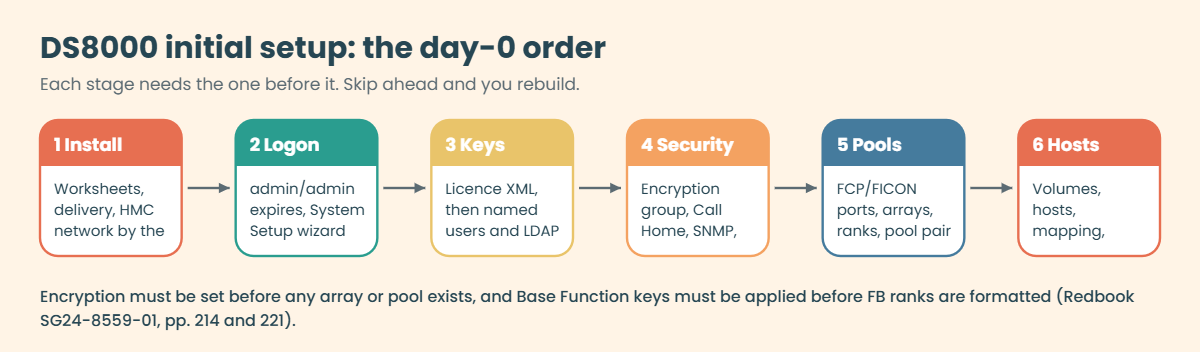
Order rules you cannot break. Encryption has to be set up before the logical configuration starts. If you want local key management, you choose it when you order, because it can’t be added later with a licence.

You apply the Base Function keys before FB ranks are formatted, and the zsS keys before CKD ranks (pp. 214, 220-221).

On DS8900F and DS8880. The idea and order are the same, but there you attach encryption groups with mkextpool -encryptgrp, while the DS8A00 uses -keygrp.

Implementation Lesson 28 covers the other differences.

How it works, step by step

1Fill in the worksheets before the truck arrives

Day 0 actually starts weeks before day 0. The worksheets hold the HMC IP addresses, the DNS and NTP servers, Call Home contacts, notification addresses and your power control choice.

Give each worksheet an owner and a date. Lesson 1 builds the plan, and Lesson 3 covers floor, power and doors.

2IBM installs the box and the HMC network

The IBM SSR places the frames, connects power and cables, loads the code level and applies your HMC network worksheet, and sets up remote support and NTP at the same time.

What you need ready that day is the network: two HMC addresses, the firewall ports open and DNS working. Lesson 4 lists the ports and the private network ranges you mustn’t clash with.

3First logon: change the default password and name the system

Log in to the DS GUI as admin/admin and you’ll be forced to set a new password straight away. After that the System Setup wizard asks for a system name and the licence keys.

Before you leave this screen, change the HMC web UI password for the customer user too. There are two default passwords on day 0, and auditors will check both.

DS8000 initial setup order in six stages from install to hosts

4Apply the licence keys

Read the machine type, serial and signature with showsi. Download the key file for that serial from the IBM entitlement site, apply it in the wizard or with applykey, and check the result with lskey.

Lesson 6 goes through the key file and the classic mistake of applying a file to the wrong serial.

5Create named users and connect LDAP

Nobody should carry on working as admin. Create one named account for each person in the right group (admin, op_storage, op_volume, monitor and so on), set the password rules with chpass, and hook up LDAP if your company uses it.

Put the admin password in the company vault. You’ll find the full user story in Lesson 5.

6Set up encryption before any array exists

If the system is going to encrypt data at rest, the key group and key servers have to be ready before you create the first array, because once data sits in pools, adding encryption means taking everything apart.

Run lskeygrp and make sure the group is accessible. Architecture Lesson 20 explains key groups and the deadlock risk.

7Switch on Call Home, SNMP, syslog and time

Ask the SSR to send a test Call Home and check IBM actually received it. Point SNMP traps at two monitoring servers with chsp, add syslog servers with mksyslogserver, and make sure the HMC clock matches your NTP source.

If a system can’t call for help, you’ll end up hearing about its problems from users. Lesson 21 covers this stage in detail.

8Set the I/O port protocols

Every host port is either SCSI-FCP for open systems or FICON for IBM Z, never both. Set them from your port plan with setioport before anyone zones a host to them.

Lesson 10 shows you how to check the logins and light on each port.

9Build arrays, ranks and a pool pair

Now the storage layers go in from the bottom up: arrays on array sites, ranks on arrays (with the key group), and one pool per rank group so the two CPCs share the work.

Lesson 11 and Lesson 12 take you through these commands one at a time.

Who does what on day 0: IBM SSR, storage admin, network and security team

10Create the first volumes

Put volumes in LSSs that match their pool, so an even LSS goes in the even pool and an odd LSS in the odd pool. On FlashCore Module pools the volumes have to be thin (-sam ese).

The ID rules are explained in Lesson 13.

11Create hosts, map volumes and test from the host

Define each server with its real WWPNs and then map the volumes to it. Take the WWPNs from lshostport -unknown, not from a photo of a label.

Finish on the host side with multipath, two paths per volume and one path pulled as a test. See Lesson 14 and Lesson 15.

12Back up the configuration and sign the hand-over

Once the first host works, export the configuration settings with offloadfile -config and file them with the project documents. Run a read-only check script too, and save its output as proof of the state you handed over.

Then go through the hand-over checklist with a second person: no default passwords, named users only, Call Home tested, traps received, config backup stored. Day 0 is finished only when all of that is ticked.

Hands-on lab: take a factory-fresh DS8000 to its first mapped LUN

Before you run any command, double-check it

Read every command twice before you press Enter. Check the target: the system or account, the IDs, the names and the sizes. These commands are for learning and were tested in our lab, not on your system. At work, run the read-only list commands first, follow your change process, make sure a backup exists, and ask a second person to check anything that changes or deletes data. You run them at your own risk.

You’re the storage admin on hand-over day. IBM has just left, the practice system is factory-fresh, and you need to get one Linux server, saat-host1, running with two LUNs. You’ll build it with one script and check every stage with a second, read-only one.

Practice shell note: the practice shell is our teaching tool, not IBM software, and real DS CLI output is close to it but not identical. The first-login lines (CMUN00247W, CMUC00249I) and CMUN00246E, CMUN02019E and CMUN02038E are practice shell messages. Anything that happens in the GUI, on the HMC or by the IBM SSR can’t run in the shell, so those steps are marked “on a real system”.

1Start from a factory-fresh system

Run this (in C:\ds8k-lab, or ~/ds8k-lab with python3):

python ds8sim.py
dscli> simctl reset -all
dscli> quit

You should see this:

SIM0100I simctl: factory state restored. Users are back to admin/admin; the next login must change the password.

This is the state IBM hands you: no arrays, no pools, no hosts, and admin/admin as the only way in.

✅ Checkpoint: the shell says users are back to admin/admin.

2Do the first login and change the default password

On a real system you do this in the DS GUI, which forces the change on you. In the shell you can do it in one line with the practice-only -newpasswd flag.

Run this:

python ds8sim.py -hmc1 10.0.0.1 -user admin -passwd admin -newpasswd Day0Pass1 ver -l

You should see this:

SaatVedha DS8000 practice shell — not IBM software. Real DS CLI output looks like this but is not identical.
CMUN00247W Your password has expired. You must change it now.
CMUC00249I Your password was changed successfully.
Date/Time: 24 October 2026 19:50:29 UTC IBM DSCLI Version: 7.10.10.348 DS: IBM.2107-78SV001
(output shortened)
Storage Image    LMC         Bundle Version
===========================================
IBM.2107-78SV001 7.10.10.348 10.10.106.0

Note down the code level for your hand-over record: bundle 10.10.106.0 is Release 10.1.

✅ Checkpoint: the password changed and ver -l shows bundle 10.10.106.0.

3Save the day-0 build script

Save this as day0-build.txt in your lab folder. The stages follow the Redbook order, and a comment line tells you which stage you’re in.

# day0-build.txt: day-0 runbook, logical part (Lesson 25)
# Stage 1: check the box, licences and key group
lssi
lskey
lskeygrp
# Stage 2: password rules and named users
chpass -expire 90 -fail 5
mkuser -pw Temp1234 -group admin ravi_adm
mkuser -pw Temp1234 -group monitor noc_view
# Stage 3: SNMP traps to the monitoring servers
chsp -snmp on -snmpaddr 10.20.30.40,10.20.30.41
# Stage 4: host ports to SCSI-FCP
setioport -topology scsifcp I0031 I0051
# Stage 5: arrays, ranks and a pool pair
mkarray -raidtype 6 -arsite S1
mkarray -raidtype 6 -arsite S2
mkrank -array A0 -keygrp 1 -stgtype fb
mkrank -array A1 -keygrp 1 -stgtype fb
mkextpool -rankgrp 0 -keygrp 1 -stgtype fb FB_0
mkextpool -rankgrp 1 -keygrp 1 -stgtype fb FB_1
chrank -extpool P0 R0
chrank -extpool P1 R1
# Stage 6: first volumes, one per pool
mkfbvol -extpool P0 -cap 100 -sam ese -name app_#h 2000
mkfbvol -extpool P1 -cap 100 -sam ese -name app_#h 2100
# Stage 7: the first host and its LUNs
mkhost -type "Linux Server" -hostport 10000090FA13B914,10000090FA13B915 saat-host1
chhost -action map -volume 2000,2100 saat-host1

✅ Checkpoint: the file is saved next to ds8sim.py.

4Run the build

Run this:

python ds8sim.py -hmc1 10.0.0.1 -user admin -passwd Day0Pass1 -script day0-build.txt
$LASTEXITCODE

You should see this:

SaatVedha DS8000 practice shell — not IBM software. Real DS CLI output looks like this but is not identical.
(lssi, lskey and lskeygrp listings shortened: model A05, 18 licence rows, key group 1 accessible)
CMUC00195I chpass: Security properties successfully set.
CMUC00133I mkuser: User ravi_adm successfully created.
CMUC00133I mkuser: User noc_view successfully created.
CMUC00040I chsp: Storage complex IbmStoragePlex successfully modified.
CMUC00011I setioport: I/O Port I0031 successfully configured.
CMUC00011I setioport: I/O Port I0051 successfully configured.
(two mkarray, two mkrank, two mkextpool and two chrank lines, all successful)
CMUC00025I mkfbvol: FB volume 2000 successfully created.
CMUC00025I mkfbvol: FB volume 2100 successfully created.
CMUC00530I mkhost: The host saat-host1 is successfully created.
CMUC00531I chhost: The host saat-host1 is successfully modified.
0

Every change line should end in “successfully”. The last line is the return code, and 0 means no command failed. On macOS or Linux, use echo $? instead of $LASTEXITCODE.

✅ Checkpoint: no E messages in the output and the return code is 0.

Day-0 build script output in the DS8000 practice shell
The whole day-0 build in a single script run, seven stages with every line successful and return code 0. Practice shell output.

5Check stages 1 and 2: users and password rules

Now prove each stage with a read-only script. Save it as verify-25.txt, run it once, and read the output a block at a time.

It has eight read-only commands, one or two for each stage: lsuser, showpass, showsp, lsioport, lsextpool, lsfbvol, showhost saat-host1, lshostport -login.

Run this:

python ds8sim.py -hmc1 10.0.0.1 -user admin -passwd Day0Pass1 -script verify-25.txt

You should see this (first block):

SaatVedha DS8000 practice shell — not IBM software. Real DS CLI output looks like this but is not identical.
Date/Time: 24 October 2026 19:50:57 UTC IBM DSCLI Version: 7.10.10.348 DS: IBM.2107-78SV001
Name     Group       State
===========================
admin    admin       active
noc_view monitor     active
ravi_adm admin       active
secadmin secadmin    active
service  ibm_service active
Date/Time: 24 October 2026 19:50:57 UTC IBM DSCLI Version: 7.10.10.348 DS: IBM.2107-78SV001
Password Expiration   90 days
Failed Logins Allowed 5
Password Age          0 days
Minimum Length        8
Password History      8

✅ Checkpoint: ravi_adm (admin) and noc_view (monitor) exist, and passwords now expire after 90 days with 5 failed logins allowed.

6Check stages 3 and 4: traps and ports

You should see this (next blocks):

Date/Time: 24 October 2026 19:50:57 UTC IBM DSCLI Version: 7.10.10.348 DS: IBM.2107-78SV001
Name           IbmStoragePlex
SNMP           Enabled
SNMPadd        10.20.30.40,10.20.30.41
(output shortened)
Date/Time: 24 October 2026 19:50:57 UTC IBM DSCLI Version: 7.10.10.348 DS: IBM.2107-78SV001
ID    WWPN             State                     Type             topo     portgrp Security
===========================================================================================
I0031 50050763030370DD Offline                   Fibre Channel-SW SCSI-FCP 0       Disabled
I0032 500507630303B0DD Communication established Fibre Channel-SW SCSI-FCP 0       Disabled
I0042 500507630304B0DD Communication established Fibre Channel-SW SCSI-FCP 0       Disabled
I0051 50050763030570DD Offline                   Fibre Channel-SW SCSI-FCP 0       Disabled
(output shortened)

I0031 and I0051 now say SCSI-FCP but Offline, which means the protocol is set but no cable is plugged in yet. That’s normal on day 0, and worth a note for the SAN team.

✅ Checkpoint: SNMP is Enabled with two addresses, and I0031 and I0051 show SCSI-FCP.

7Check stages 5 and 6: pools and volumes

You should see this:

Date/Time: 24 October 2026 19:50:57 UTC IBM DSCLI Version: 7.10.10.348 DS: IBM.2107-78SV001
Name ID stgtype rankgrp status availstor (2^30B) %allocated available reserved numvols
======================================================================================
FB_0 P0 fb      0       below  99576             0          6372864   64       1
FB_1 P1 fb      1       below  99576             0          6372864   64       1
Date/Time: 24 October 2026 19:50:57 UTC IBM DSCLI Version: 7.10.10.348 DS: IBM.2107-78SV001
Name     ID   accstate datastate configstate deviceMTM datatype extpool cap (2^30B) cap (10^9B) cap (blocks)
============================================================================================================
app_2000 2000 Online   Normal    Normal      2107-900  FB 512   P0      100.0       -           209715200
app_2100 2100 Online   Normal    Normal      2107-900  FB 512   P1      100.0       -           209715200

There’s one pool per rank group with one volume in each. Volume 2000 (even LSS 20) sits in P0 and 2100 (odd LSS 21) in P1, so both CPCs are carrying work from day one.

✅ Checkpoint: P0 is rank group 0, P1 is rank group 1, and each holds one 100 GiB volume.

8Check stage 7: the host and its paths

You should see this (last blocks):

Date/Time: 24 October 2026 19:50:57 UTC IBM DSCLI Version: 7.10.10.348 DS: IBM.2107-78SV001
Name          saat-host1
Type          Linux Server
State         Online
AddrMode      scsimap256
Volumes       2
Host ports    2
I/O ports     16 (all)
(output shortened)
Date/Time: 24 October 2026 19:50:57 UTC IBM DSCLI Version: 7.10.10.348 DS: IBM.2107-78SV001
WWNN             WWPN             Host       I/O ports ESSIOport
================================================================
20000120FA13B914 10000090FA13B914 saat-host1 16 (all)  I0032
20000120FA13B915 10000090FA13B915 saat-host1 16 (all)  I0042

Both WWPNs of saat-host1 are logged in, one through I0032 and one through I0042. Those are two host adapters (C3 and C4) in the same I/O enclosure, which is fine in a lab, but at work you’d zone the second path to a port in a different enclosure, such as I0052 (Architecture Lesson 6).

✅ Checkpoint: saat-host1 has 2 volumes, 2 host ports, and logins on two different I/O ports.

9Finish the steps the shell cannot do

On a real system there are three more items before day 0 is closed: ask the SSR for a test Call Home, check remote access with lsaccess -l, and export the configuration. The export looks roughly like this (from Redbook Example 12-25, with our lab names):

dscli> offloadfile -config c:\ds8k-lab\handover
CMUC00428I offloadfile: The config file has been offloaded to c:\ds8k-lab\handover\productSettings.
CMUC00428I offloadfile: The config file has been offloaded to c:\ds8k-lab\handover\ICSInstall.history.

offloadfile won’t run from the embedded DS CLI in the GUI, so run it from DS CLI on your workstation. Keep the files, the verify output and the signed checklist together in one folder.

[Add your screenshot here]

✅ Checkpoint: you have a hand-over folder with day0-build.txt, the verify-25.txt output and (on a real system) the offloaded config files.

Break It, Then Fix It

Two things go wrong on real day-0 projects over and over: a team runs its part before the layer underneath exists, and a scheduled job is left on the default password. You’ll cause both here.

1Break: run the volume stage first

Reset the shell (simctl reset -all, then the first login from lab step 2). Imagine the volume team, keen to get done, running their part before the pools exist, and save this as wrong-order.txt:

# wrong-order.txt: the volume team ran their part first
mkfbvol -extpool P0 -cap 100 -sam ese -name app_#h 2000
mkhost -type "Linux Server" -hostport 10000090FA13B914,10000090FA13B915 saat-host1
chhost -action map -volume 2000 saat-host1

Run this:

python ds8sim.py -hmc1 10.0.0.1 -user admin -passwd Day0Pass1 -script wrong-order.txt
$LASTEXITCODE

You should see this:

SaatVedha DS8000 practice shell — not IBM software. Real DS CLI output looks like this but is not identical.
CMUN02019E mkfbvol: P0: The extent pool does not exist.
CMUC00530I mkhost: The host saat-host1 is successfully created.
CMUN02038E chhost: 2000: The FB volume does not exist.
6
Wrong build order and default password errors in the practice shell
Both breaks in one window: the wrong build order leaves a host with no LUNs (return code 6), and the factory password stops a scheduled job (return code 5). Practice shell output.

Why: a volume takes its extents from a pool, and there’s no pool yet. Look at what got left behind, though. The script didn’t stop at the first error, so the host now exists with no LUNs, and a half-built state like that confuses the next person, who sees a host and assumes the job’s done.

Return code 6 is your alarm, and a good runbook checks it after every stage and stops there.

2Fix: build the layers below first, then map

Run this:

fix-order.txt holds the Stage 5 lines from day0-build.txt (two arrays, two ranks, the pool pair, two chrank lines), followed by mkfbvol for 2000 and the chhost -action map line. mkhost is left out because the host is already there.

python ds8sim.py -hmc1 10.0.0.1 -user admin -passwd Day0Pass1 -script fix-order.txt
python ds8sim.py -hmc1 10.0.0.1 -user admin -passwd Day0Pass1 showhost saat-host1

You should see this:

(eight array, rank and pool lines shortened)
CMUC00025I mkfbvol: FB volume 2000 successfully created.
CMUC00531I chhost: The host saat-host1 is successfully modified.
(showhost output shortened)
Name          saat-host1
Type          Linux Server
State         Online
Volumes       1

Before you rerun anything, always check what the failed run left behind. If you reran the full build here, it would fail again on mkhost.

✅ Checkpoint: saat-host1 shows Volumes 1 and the return code is 0.

3Break: a nightly job with the default password

Lots of teams write the monitoring job on day 0, while the box still has its factory login. Reset again with simctl reset -all (the shell goes back to admin/admin) and save a one-line report as nightly.txt:

# nightly.txt: read-only report the monitoring job runs every night
lsextpool

A scheduler has nobody sitting at the keyboard, and the empty string piped in plays that part:

Run this:

"" | python ds8sim.py -hmc1 10.0.0.1 -user admin -passwd admin -script nightly.txt
$LASTEXITCODE

You should see this:

SaatVedha DS8000 practice shell — not IBM software. Real DS CLI output looks like this but is not identical.
CMUN00247W Your password has expired. You must change it now.
Enter a new password: 
Re-enter the new password: 
CMUN00246E The password for user admin has expired and must be changed. No new password was entered.
5

Why: the factory password expires at the first logon, and DS CLI refuses every other command until a person changes it. A job can’t answer the prompt, so it fails with return code 5 (an authentication problem). Every new user you create hits the same thing, since mkuser passwords are temporary too.

4Fix: change the password once, then use a password file

Run this:

python ds8sim.py -hmc1 10.0.0.1 -user admin -passwd admin -newpasswd Day0Pass1 managepwfile -action add -pwfile security.dat -name admin -pw Day0Pass1
python ds8sim.py -hmc1 10.0.0.1 -user admin -pwfile security.dat -script nightly.txt
$LASTEXITCODE

You should see this:

SaatVedha DS8000 practice shell — not IBM software. Real DS CLI output looks like this but is not identical.
CMUN00247W Your password has expired. You must change it now.
CMUC00249I Your password was changed successfully.
CMUC00206I managepwfile: Record 10.0.0.1/admin successfully added to password file security.dat.
SaatVedha DS8000 practice shell — not IBM software. Real DS CLI output looks like this but is not identical.
CMUC00234I lsextpool: No Extent Pool found.
0

The job now reads the password from the encrypted file, so there’s nothing secret in the script. At work, give the job its own monitor user rather than admin, log in with it once by hand to set its password, and keep the password file only on the jump server. Lesson 9 shows the profile that goes with it.

✅ Checkpoint: the nightly job returns 0 and prints the pool list (empty after the reset).

This happened at work

The branch data centre that could not call for help

A cooperative bank had opened a new data centre in a second city for its branch systems and a disaster recovery copy. A partner installed a new DS8A50 over three busy days, and the logical configuration got done late on the last evening because the bank wanted the branch servers moved that weekend.

The hand-over sheet said “complete”, but it wasn’t. The DS GUI admin password had been changed to the example password from a manual and was shared by three people, and the HMC web UI still had its factory login.

Nobody had ever tested Call Home either, because DNS on the management VLAN couldn’t resolve IBM’s support address.

Three weeks later a FlashCore Module failed. RAID 6 rebuilt onto a spare and the volumes stayed online, so no user noticed anything. The system did raise a service event, since only one spare was left, but that event never got out of the building.

It was a quarterly security review that found it, 23 days later, together with the two default logins. Nothing was lost, but for weeks the bank had been one more failure away from a degraded array, and the auditors wrote up a high finding on access control.

Root cause: there was no day-0 runbook with a sign-off. Each team did its own part and nobody owned the checks in between.

Fix: the bank wrote a hand-over checklist with named sign-offs covering every default password changed and vaulted, named users only, a test Call Home confirmed by IBM, SNMP traps seen on the monitoring screen and the config export stored. The partner now runs a read-only verify script and attaches its output to the hand-over.

Lesson: day 0 isn’t over when the first LUN works. It’s over when the box can call for help and nobody can walk in with a factory password.

Common mistakes and troubleshooting

SymptomLikely causeWhat to check / fix
Every DS CLI command after login failsFactory password never changed, or a new user’s temporary passwordLog in once by hand and set a new password; then use managepwfile
mkfbvol says the pool does not existVolume stage ran before arrays, ranks and poolsBuild bottom up; check lsextpool first
Pools must be rebuilt after the security reviewEncryption set up after the logical configCreate the key group before any array; check lskeygrp
Ranks refuse to formatBase Function key not applied yetApply keys, check lskey, then mkrank
Call Home test never reaches IBMNo DNS for esupport.ibm.com, or the firewall blocks itFix DNS and firewall on the HMC network; retest with the SSR
Script finished but objects are missingDS CLI kept going after an errorCheck the return code after every stage; read the output for E lines

Tip: keep your day-0 scripts small, one per stage, and run the read-only verify script again a week after hand-over. If anything’s different, someone changed it outside the change process.

Interview questions

Click a question to open it. They’re worded the way an interviewer would ask them, and under each one you’ll find why they ask it and one way you could answer in your own words.

Fresher level

1. You are given a brand-new DS8000 that IBM has just installed. What do you do first, before you create any storage?

Why they ask this: They want to see if you think about access and safety before capacity.

How you might answer: I’d log in as admin, change the factory password straight away and name the system in the setup wizard. Then I’d change the HMC web UI customer login, apply the licence keys and check them with lskey.

I wouldn’t start on arrays and pools until named users, the key group, Call Home and alerts are all in place.

2. What does the IBM SSR do on day 0, and what is your job?

Why they ask this: They’re checking you know where the hand-over line is, which matters a lot when something turns out to be missing.

How you might answer: The SSR does the physical install, loads the code, applies the HMC network worksheet and sets up remote support and NTP. My side is the planning, getting and applying the activation keys, and the whole logical configuration, so users, LDAP, ports, pools, volumes and hosts.

2–5 years experience

3. Walk me through the order of a DS8000 logical configuration and tell me which steps cannot be swapped.

Why they ask this: They want proof you’ve actually built one and know where rework comes from.

How you might answer: Keys go first, because ranks won’t format without Base Function, and encryption next, because the key group has to exist before any array. After that it’s ports, arrays, ranks, a pool pair, volumes in matching LSSs, then hosts and mapping.

The two I never swap are encryption before arrays and pools before volumes, because getting either wrong means tearing down what you’ve built.

4. Your colleague’s day-0 script returned code 6 but most lines say “successfully”. What do you do?

Why they ask this: They’re testing whether you trust return codes and go looking for half-built states.

How you might answer: I’d go through the output for E messages, because DS CLI carries on after a failure. In my lab a volume failed because the pool was missing, but the host still got created. So I’d list what’s there with lsextpool, lsfbvol and lshost, and then run only the missing stage rather than the whole script.

Senior level

5. How would you design the hand-over from an installation partner so that nothing is missed?

Why they ask this: Seniors get judged on processes that still work when they’re not in the room.

How you might answer: I’d make a checklist with a named owner and a sign-off for every stage: defaults changed and vaulted, named users, a test Call Home confirmed by IBM, traps received, and the config exported with offloadfile -config.

The partner attaches the output of a read-only verify script, and a week later we run the same script again and compare.

6. The security team wants encryption, but the project is late and the pools already exist. What do you advise?

Why they ask this: They want to see if you can hold firm on an expensive rule and explain what it costs.

How you might answer: I’d explain that encryption has to be in place before the logical configuration, so adding it now means emptying the pools and rebuilding them. If there’s no data on them yet, I’d rebuild today, because it only gets more expensive later. If there is data, I’d plan migration windows and get the business to agree to the delay in writing.

Quick quiz

Q1. What happens at the first logon with admin / admin on a new DS8A00?

  1. Nothing, it stays valid
  2. The password expires and must be changed
  3. The account is locked
  4. IBM sends a new password
Show answer

B — The default password expires at the first logon, and DS CLI refuses other commands until it is changed.

Q2. Which step must come before creating the first array on an encrypted system?

  1. Creating hosts
  2. Mapping volumes
  3. Setting up the key group
  4. Exporting the config
Show answer

C — Encryption must be configured before the logical configuration starts.

Q3. Why did wrong-order.txt create a host but no mapping?

  1. DS CLI stops at the first error
  2. DS CLI kept going after mkfbvol failed
  3. The host type was wrong
  4. The WWPN was a typo
Show answer

B — The script continued after the pool error, so the host was made and the map failed. The return code 6 showed it.

Q4. What does Call Home need on the HMC network?

  1. DNS resolution of esupport.ibm.com
  2. A modem line
  3. An FC port in FICON mode
  4. A volume group
Show answer

A — IP-only Call Home is no longer supported, so DNS must resolve the IBM support address.

Q5. Which command exports the configuration settings for your hand-over folder?

  1. lsuser -l
  2. offloadfile -config
  3. showsp
  4. ver -l
Show answer

B — offloadfile -config writes the advanced settings and ICS history files. Run it from DS CLI on your workstation.

Quick recap

  • IBM installs the box and the HMC network. You own planning, keys and the whole logical configuration.
  • Change both defaults on day 0: DS GUI admin and the HMC web UI customer login.
  • Order: keys, users, encryption, alerts, ports, arrays, ranks, pools, volumes, hosts, config backup.
  • Encryption before arrays and pools before volumes are the two rules you never swap.
  • DS CLI scripts carry on after an error, so check the return code and the output after every stage.
  • Prove the hand-over with a read-only verify script and a signed checklist.

Next lesson

Lesson 26: DS8000 administration: daily, weekly and monthly checks → Day 0 is done. Next you learn the checks that keep the system healthy every day after it.

Further reading: DS8000 initial setup

Want to go deeper into DS8000 initial setup? IBM Redbook SG24-8559-01, DS8A00 Architecture and Implementation Guide covers who does what in Chapter 5 (pp. 142-144), the HMC network and first logon in Chapter 6 (pp. 175-183) and the logical configuration order on p. 221. Also see IBM Documentation: mkuser and the DS CLI command reference.

On SaatVedha, Lesson 7: DS8000 configuration flow goes deeper into the logical order. You can also see the full plan for this course on the IBM DS8000 Implementation course page.

Scroll to Top

This website uses cookies

We use a few cookies to keep this site working. If you allow it, we also use Google Analytics to count visits so we can improve our lessons. You can accept all, deny the optional ones, or choose what to allow.