
7After: check and clean up
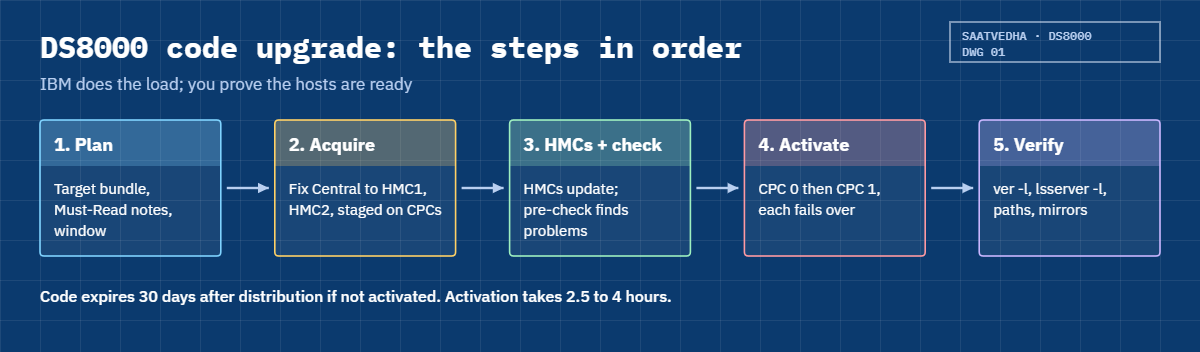
Run ver -l and lsserver -l to confirm both servers are on the new bundle. Then re-check host paths and mirrors, upgrade DS CLI on your workstations, and test the GUI, CSM and key manager connections.
Before you run any command, double-check it
Read every command twice before you press Enter. Check the target: the system or account, the IDs, the names and the sizes. These commands are for learning and were tested in our lab, not on your system. At work, run the read-only list commands first, follow your change process, make sure a backup exists, and ask a second person to check anything that changes or deletes data. You run them at your own risk.
You’re the storage admin in the week before a code load, looking after two hosts, a Linux ERP database (erp-db1) and a Windows app server (win-app1). You’ll record the current level and run the outside-the-box checks, then rehearse what each CPC update looks like from the hosts’ side.
Practice shell note: the practice shell is our own teaching tool, not IBM software, and it can’t load code. Real DS CLI output is similar but not identical, and the SIM lines and “Note (practice shell)” lines are ours. The simctl serverfail steps only imitate the CPC failover that a real code load triggers.
1Start clean and load the setup script
Save this as setup-20.txt. After simctl reset both hosts’ ports are already logged in to the lab SAN, so all the script does is build the storage and map it.
setup-20.txt:
# setup-20.txt: a small working system with two hosts for Lesson 20
mkarray -raidtype 6 -arsite S1
mkarray -raidtype 6 -arsite S2
mkrank -array A0 -keygrp 1 -stgtype fb
mkrank -array A1 -keygrp 1 -stgtype fb
mkextpool -rankgrp 0 -keygrp 1 -stgtype fb FB_0
mkextpool -rankgrp 1 -keygrp 1 -stgtype fb FB_1
chrank -extpool P0 R0
chrank -extpool P1 R1
mkfbvol -extpool p0 -cap 100 -sam ese -name erp_#h 2000-2001
mkfbvol -extpool p1 -cap 100 -sam ese -name erp_#h 2100-2101
mkhost -type "Linux Server" -hostport 10000090FA13B914,10000090FA13B915 erp-db1
mkhost -type "Windows Server" -hostport 21000024FF2D0F86,21000024FF2D0F87 win-app1
chhost -action map -volume 2000,2100 erp-db1
chhost -action map -volume 2001,2101 win-app1
Run this:
python ds8sim.py   (then: simctl reset, quit)
python ds8sim.py -hmc1 10.0.0.1 -user admin -script setup-20.txt
python ds8sim.py
✅ Checkpoint: the script ends with two CMUC00531I lines.
2Record the current code level
Run these:
ver -l
lsserver -l
You should see this:
dscli> ver -l
Date/Time: 24 October 2026 11:09:34 UTC IBM DSCLI Version: 7.10.10.348 DS: IBM.2107-78SV001
DSCLI 7.10.10.348
StorageManager 10.2.2507181727
HMC DSCLI 7.10.10.348
==================Version==================
Storage Image    LMC         Bundle Version
===========================================
IBM.2107-78SV001 7.10.10.348 10.10.106.0
dscli> lsserver -l
Date/Time: 24 October 2026 11:09:34 UTC IBM DSCLI Version: 7.10.10.348 DS: IBM.2107-78SV001
ID      Image ID         Image Name   Power Control SFI State LIC Version OS Version Bundle Version
===================================================================================================
server0 IBM.2107-78SV001 ds8k-g10-lab Online        Online    7.10.10.348 AIX 7.3    10.10.106.0
server1 IBM.2107-78SV001 ds8k-g10-lab Online        Online    7.10.10.348 AIX 7.3    10.10.106.0
Put these in the change record: DS CLI 7.10.10.348, bundle 10.10.106.0 on both servers. The two servers have to show the same level, and a mismatch means an earlier load didn’t finish.
✅ Checkpoint: both servers show bundle 10.10.106.0.
3Check both HMCs
Run this:
lshmcYou should see this:
dscli> lshmc
Date/Time: 24 October 2026 11:09:34 UTC IBM DSCLI Version: 7.10.10.348 DS: IBM.2107-78SV001
Name          State  Role         Release                  Management-IP Location-Code    Machine-Type Machine-Model Memory Disk
================================================================================================================================
DS8A50-1A.LAB Online Primary(1)   R10.1 bundle 10.10.106.0 10.0.0.1      U7063CR2.78SV1DD 7063         CR2           33GB   1TB
DS8A50-1B.LAB Online Secondary(2) R10.1 bundle 10.10.106.0 10.0.0.2      U7063CR2.78SV2DD 7063         CR2           33GB   1TB
Both HMCs need to be Online. The bundle lands on HMC1 first and is then copied to HMC2, so a broken HMC2 kills the plan before it starts.
✅ Checkpoint: two HMCs Online, primary and secondary.
4Check hardware health
Run this:
lsarrayYou should see this:
dscli> lsarray
Date/Time: 24 October 2026 11:09:34 UTC IBM DSCLI Version: 7.10.10.348 DS: IBM.2107-78SV001
Array State    Data   RAIDtype    arsite Rank DA Pair DDMcap (10^9B)
====================================================================
A0    Assigned Normal 6 (5+P+Q+S) S1     R0   0       4800.0
A1    Assigned Normal 6 (5+P+Q+S) S2     R1   0       4800.0
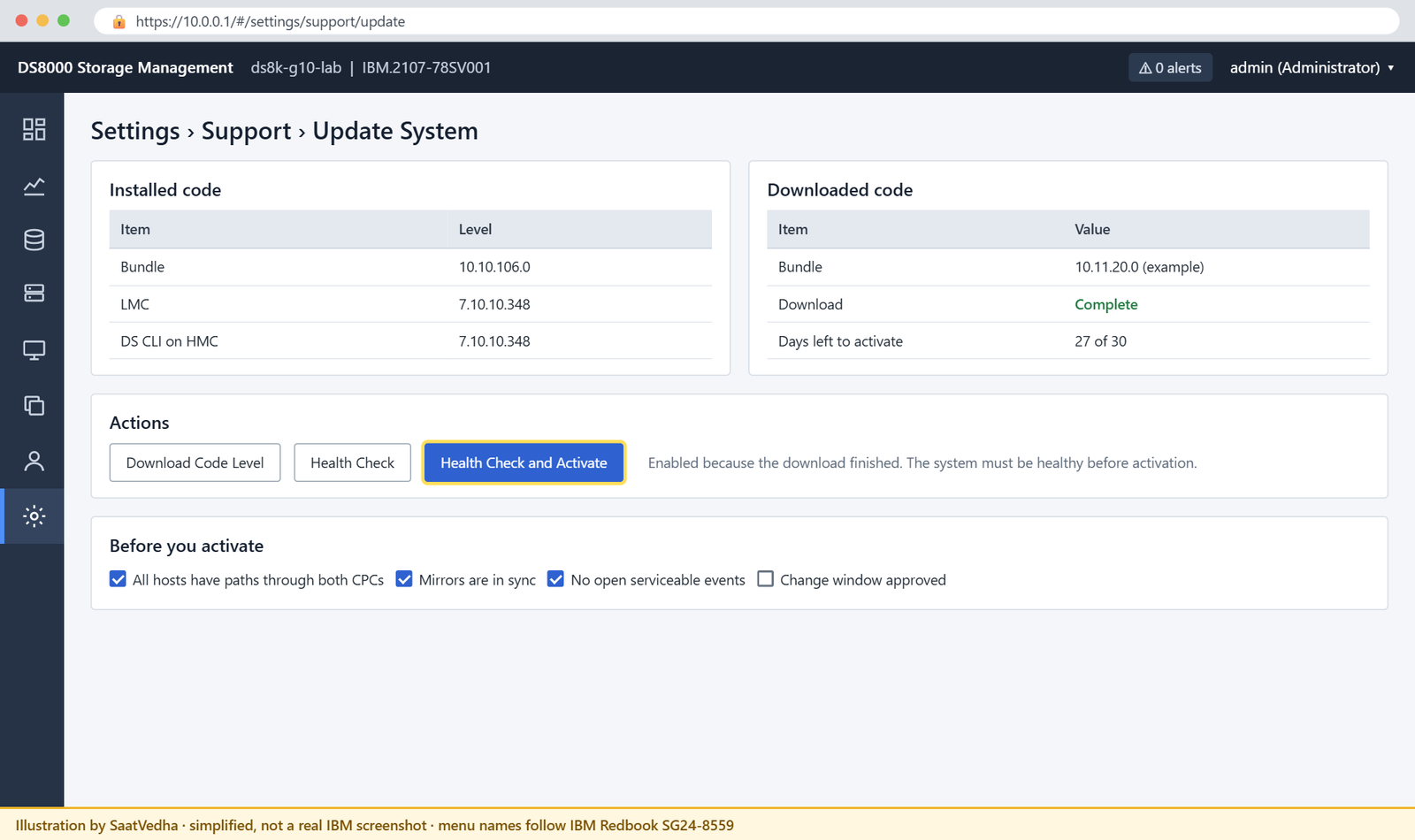
Every array is Normal. Fix any rebuilding array or failed part before activation, because the code load already reduces redundancy for a few hours, and on a real system check the GUI Events page for open serviceable events as well.
✅ Checkpoint: every array shows Data Normal.
5Check every host has two paths on two adapters
Run these:
lshost
lshostport -login
lsioport -l I0032 I0042
You should see this:
dscli> lshost
Date/Time: 24 October 2026 11:09:34 UTC IBM DSCLI Version: 7.10.10.348 DS: IBM.2107-78SV001
Name     Type           State  Cluster
======================================
erp-db1  Linux Server   Online -
win-app1 Windows Server Online -
dscli> lshostport -login
Date/Time: 24 October 2026 11:09:34 UTC IBM DSCLI Version: 7.10.10.348 DS: IBM.2107-78SV001
WWNN             WWPN             Host     I/O ports ESSIOport
==============================================================
20000024FF2D0F86 21000024FF2D0F86 win-app1 16 (all)  I0032
20000024FF2D0F87 21000024FF2D0F87 win-app1 16 (all)  I0042
20000120FA13B914 10000090FA13B914 erp-db1  16 (all)  I0032
20000120FA13B915 10000090FA13B915 erp-db1  16 (all)  I0042
dscli> lsioport -l I0032 I0042
Date/Time: 24 October 2026 11:09:34 UTC IBM DSCLI Version: 7.10.10.348 DS: IBM.2107-78SV001
ID    WWPN             State                     Type             topo     portgrp Speed   Frame I/O Enclosure HA Card Security
===============================================================================================================================
I0032 500507630303B0DD Communication established Fibre Channel-SW SCSI-FCP 0       32 Gb/s 1     1B2           C3      Disabled
I0042 500507630304B0DD Communication established Fibre Channel-SW SCSI-FCP 0       32 Gb/s 1     1B2           C4      Disabled
Each host has two logged-in WWPNs, one on I0032 and one on I0042, and lsioport -l shows I0032 sits on HA card C3 and I0042 on C4. Because they’re on different adapters, the other path carries the I/O while one adapter takes new firmware.
On the hosts themselves, ask the teams to show you multipath -ll (Linux) or mpclaim -s -d (Windows) with every path active.
✅ Checkpoint: each host lists two WWPNs on two different HA cards.

6Check Copy Services
Run this:
lspprcYou should see this:
dscli> lspprc
CMUC00234I lspprc: No Remote Mirror and Copy found.
There are no mirrors on this lab system. On a real one, every pair should be Full Duplex before the load, and you note down any that aren’t so nobody blames the upgrade afterwards.
✅ Checkpoint: you know the mirror state before the change.
7Rehearse the CPC 0 update
During activation CPC 0 is updated while CPC 1 runs everything, so imitate that and watch from the host side.
Run these:
simctl serverfail 0
lsserver
lshost
You should see this:
dscli> simctl serverfail 0
SIM0107I simctl: server0 is offline. Failover: server1 now serves rank groups 0 and 1. Host I/O continues; write cache runs in a single copy until failback.
dscli> lsserver
Date/Time: 24 October 2026 11:09:34 UTC IBM DSCLI Version: 7.10.10.348 DS: IBM.2107-78SV001
ID      Image ID         Image Name   Power Control SFI State
=============================================================
server0 IBM.2107-78SV001 ds8k-g10-lab Offline       Offline
server1 IBM.2107-78SV001 ds8k-g10-lab Online        Online
Note (practice shell): server0 is offline. server1 now runs rank groups 0 and 1 (failover).
dscli> lshost
Date/Time: 24 October 2026 11:09:34 UTC IBM DSCLI Version: 7.10.10.348 DS: IBM.2107-78SV001
Name     Type           State  Cluster
======================================
erp-db1  Linux Server   Online -
win-app1 Windows Server Online -
Both hosts stay Online. All the rank groups are now running on server1, and write data has only one cache copy until failback, which is why you keep other risky work out of a code load window.
✅ Checkpoint: lshost shows both hosts Online while server0 is offline.
8Rehearse the CPC 1 update and finish
Run these:
simctl serverfix 0
simctl serverfail 1
lshost
simctl serverfix 1
lsserver
You should see this:
dscli> simctl serverfix 0
SIM0108I simctl: server0 is online. Failback: rank group 0 moved back to server0.
dscli> simctl serverfail 1
SIM0107I simctl: server1 is offline. Failover: server0 now serves rank groups 0 and 1. Host I/O continues; write cache runs in a single copy until failback.
dscli> lshost
Date/Time: 24 October 2026 11:09:34 UTC IBM DSCLI Version: 7.10.10.348 DS: IBM.2107-78SV001
Name     Type           State  Cluster
======================================
erp-db1  Linux Server   Online -
win-app1 Windows Server Online -
dscli> simctl serverfix 1
SIM0108I simctl: server1 is online. Failback: rank group 1 moved back to server1.
dscli> lsserver
Date/Time: 24 October 2026 11:09:34 UTC IBM DSCLI Version: 7.10.10.348 DS: IBM.2107-78SV001
ID      Image ID         Image Name   Power Control SFI State
=============================================================
server0 IBM.2107-78SV001 ds8k-g10-lab Online        Online
server1 IBM.2107-78SV001 ds8k-g10-lab Online        Online
Both servers are back Online. After a real load you’d run ver -l and lsserver -l again at this point and expect to see the new bundle number on both servers.
✅ Checkpoint: both servers Online at the end.
9Write your pre-upgrade checklist
Turn the steps above into a checklist you can reuse, and keep it short so people will use it:
[ ] Target bundle chosen, Must-Read notes read, window booked
[ ] ver -l and lsserver -l recorded (before)
[ ] lshmc: both HMCs Online
[ ] lsarray / GUI Events: no rebuild, no open serviceable events
[ ] Every host: 2+ paths on 2 different HA cards (lshostport -login, lsioport -l)
[ ] Host teams confirm multipath shows all paths active
[ ] lspprc: mirrors Full Duplex (note exceptions)
[ ] No SAN or host changes in the same window
[ ] After: ver -l, lsserver -l, paths, mirrors, DS CLI upgrade, GUI/CSM/key manager checks
✅ Checkpoint: you have a checklist with before, during and after checks.
Start fresh (simctl reset, then run setup-20.txt again). This time you’re looking for the two problems that most often turn a quiet code load into an incident.
1Break it: a rebuild running before the window
A drive fails the night before the code load.
Run these:
simctl drivefail S1
lsarray
You’ll see this:
dscli> simctl drivefail S1
SIM0110I simctl: drive IBM.2107-D04-8SV01/R1-P1-D1 failed. Array A0 is rebuilding onto a spare (about 10 simulated minutes; use simctl tick).
dscli> lsarray
Date/Time: 24 October 2026 11:09:34 UTC IBM DSCLI Version: 7.10.10.348 DS: IBM.2107-78SV001
Array State    Data       RAIDtype    arsite Rank DA Pair DDMcap (10^9B)
========================================================================
A0    Assigned Rebuilding 6 (5+P+Q+S) S1     R0   0       4800.0
A1    Assigned Normal     6 (5+P+Q+S) S2     R1   0       4800.0
Why it matters: array A0 is rebuilding onto a spare, and starting a code load now would pile one reduced-redundancy event on top of another. IBM’s pre-check would also flag the open serviceable event.
Fix: let the rebuild finish and get the part replaced, then run the checks again, and move the window if you have to.
Run these:
simctl tick 10
lsarray
You should see this:
dscli> simctl tick 10
SIM0111I simctl: array A0 rebuild complete; the failed drive was replaced and is now the spare.
SIM0112I simctl: clock advanced 10 minutes.
dscli> lsarray
Date/Time: 24 October 2026 11:19:34 UTC IBM DSCLI Version: 7.10.10.348 DS: IBM.2107-78SV001
Array State    Data   RAIDtype    arsite Rank DA Pair DDMcap (10^9B)
====================================================================
A0    Assigned Normal 6 (5+P+Q+S) S1     R0   0       4800.0
A1    Assigned Normal 6 (5+P+Q+S) S2     R1   0       4800.0
✅ Checkpoint: A0 shows Data Normal again.

2Break it: a host quietly down to one path
Last month someone moved a cable for erp-db1, and its second HBA never logged back in. Nobody noticed, because the database kept working.
Run these:
simctl logout 10000090FA13B915
lshostport -login
You’ll see this:
dscli> simctl logout 10000090FA13B915
SIM0104I simctl: host port 10000090FA13B915 logged out.
dscli> lshostport -login
Date/Time: 24 October 2026 11:19:34 UTC IBM DSCLI Version: 7.10.10.348 DS: IBM.2107-78SV001
WWNN             WWPN             Host     I/O ports ESSIOport
==============================================================
20000024FF2D0F86 21000024FF2D0F86 win-app1 16 (all)  I0032
20000024FF2D0F87 21000024FF2D0F87 win-app1 16 (all)  I0042
20000120FA13B914 10000090FA13B914 erp-db1  16 (all)  I0032
erp-db1 has only one WWPN logged in now, on I0032. So what happens when that adapter takes new firmware? Imitate the port going dark:
Run these:
simctl portfail I0032
lshost
simctl portfix I0032
You’ll see this:
dscli> simctl portfail I0032
SIM0105I simctl: I/O port I0032 has no light (cable or SFP problem).
dscli> lshost
Date/Time: 24 October 2026 11:19:34 UTC IBM DSCLI Version: 7.10.10.348 DS: IBM.2107-78SV001
Name     Type           State   Cluster
=======================================
erp-db1  Linux Server   Offline -
win-app1 Windows Server Online  -
dscli> simctl portfix I0032
SIM0106I simctl: I/O port I0032 has light again.
Why: with one path, losing that port means losing every disk. Fast-load is very short, but IBM warns that a host on a single path, or with both paths on the same adapter, can lose connectivity, so never bet a database on “it’s only 2 seconds”.
Fix: get the second path back before the load. The SAN team fixes the zone or cable and the HBA logs in on a different adapter (here I0052 on card C5), and then you repeat the test.
Run these:
simctl login 10000090FA13B915 I0052
lshostport -login
simctl portfail I0032
lshost
simctl portfix I0032
You should see this:
dscli> simctl login 10000090FA13B915 I0052
SIM0103I simctl: host port 10000090FA13B915 logged in to I0052.
dscli> lshostport -login
Date/Time: 24 October 2026 11:19:34 UTC IBM DSCLI Version: 7.10.10.348 DS: IBM.2107-78SV001
WWNN             WWPN             Host     I/O ports ESSIOport
==============================================================
20000024FF2D0F86 21000024FF2D0F86 win-app1 16 (all)  I0032
20000024FF2D0F87 21000024FF2D0F87 win-app1 16 (all)  I0042
20000090FA13B915 10000090FA13B915 erp-db1  16 (all)  I0052
20000120FA13B914 10000090FA13B914 erp-db1  16 (all)  I0032
dscli> simctl portfail I0032
SIM0105I simctl: I/O port I0032 has no light (cable or SFP problem).
dscli> lshost
Date/Time: 24 October 2026 11:19:34 UTC IBM DSCLI Version: 7.10.10.348 DS: IBM.2107-78SV001
Name     Type           State  Cluster
======================================
erp-db1  Linux Server   Online -
win-app1 Windows Server Online -
dscli> simctl portfix I0032
SIM0106I simctl: I/O port I0032 has light again.
✅ Checkpoint: erp-db1 stays Online with I0032 dark.