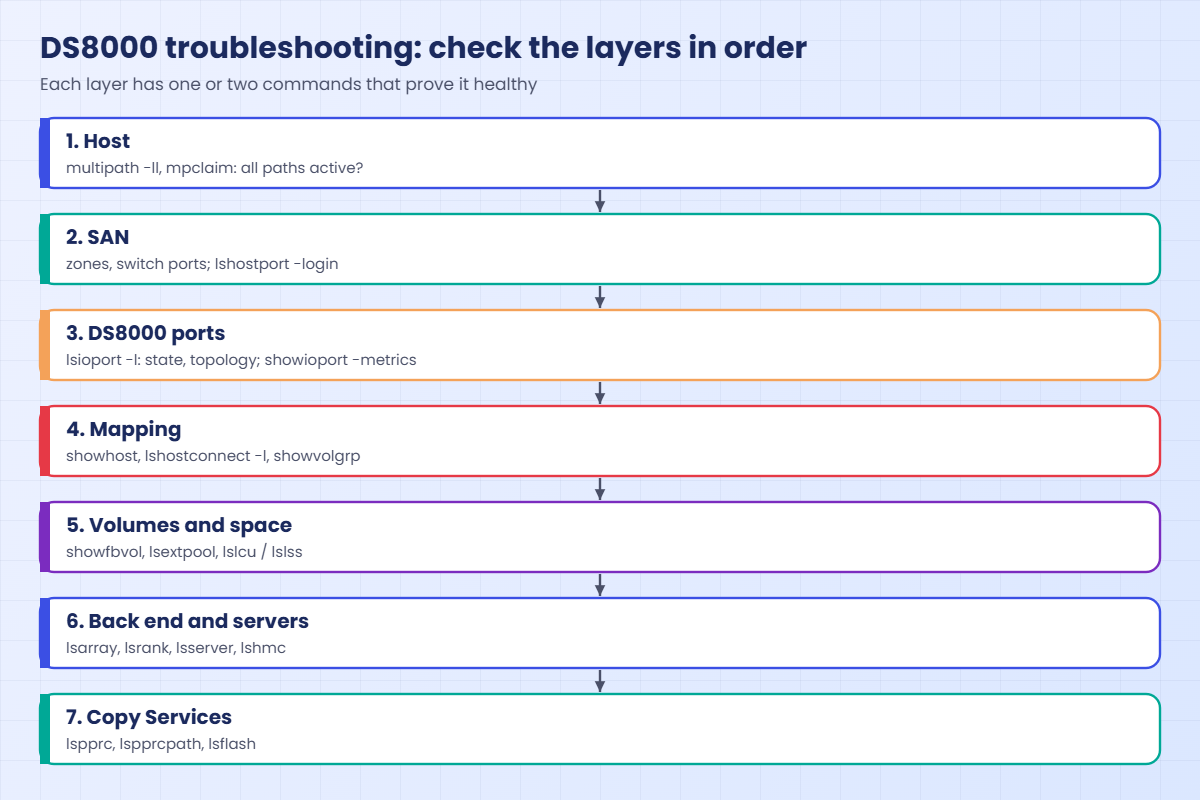
Troubleshooting blueprint: what, where, how to check
-
Phase 0: Before you start
-
Phase 1: Plan and install
-
Phase 2: Build the storage
-
Phase 3: Copy Services
-
Phase 4: Run it day to day
-
Phase 5: Troubleshooting and career
DS8000 troubleshooting is less about knowing every error message and more about asking the right questions in the right order. When a ticket says “the disks are gone” or “the storage is slow”, a calm engineer working down a fixed checklist finds the cause faster than a clever one who jumps to guesses.
This lesson gives you that checklist, a blueprint that goes layer by layer from the host, through the SAN and the DS8000 ports, to hosts and volume groups, pools and ranks, servers and hardware, and finally Copy Services. For every layer you’ll see which command to run and what “good” looks like, and in the lab you work through a hospital incident with two hidden faults using nothing but the blueprint.
It pulls together everything from Lessons 10 to 23, so keep your notes from those handy.
| Time | You need | By the end you can |
|---|---|---|
| 75 to 90 minutes | The SaatVedha practice shell and the two scripts below | Use a layered checklist to find DS8000 problems, read the key DS CLI outputs fast, and fix two hidden faults in the practice shell |
What it is, in one line
A troubleshooting blueprint is a fixed order of checks, from host to SAN to DS8000 ports, mappings, pools and hardware, so you can find the broken layer quickly and prove it with a command.
In Simple Words
Finding why the tap has no water
The kitchen tap is dry. You could call a plumber, dig up the garden or blame the city, but a sensible person checks in order. Is the tap turned on, is the valve under the sink open, and does the bathroom tap work? Is the main valve for the house open, and is the whole street without water?
Each check takes a moment and tells you which half of the pipe the problem is in, so within a few minutes you know where to look. A DS8000 is the same, going from the host to cables and switches, storage ports, which disks the host may see, where those disks get their space, and finally the machine itself. Check in order and you’ll never dig up the garden for a closed tap.
Engineer's View
The blueprint, layer by layer
Layer 0, scope. Is it one host, one application, or everything? Since when, and what changed? Look at the change calendar first.
Layer 1, host. Does multipath show all paths, are the disks visible, and what latency does the host see? (multipath -ll, mpclaim, esxcli.)
Layer 2, SAN. Zones are present, switch ports are clean and both fabrics are in use. On the DS8000, lshostport -login shows which host WWPNs are logged in and on which I/O port.
Layer 3, DS8000 ports. Use lsioport -l for the state (Communication established, No light detected, Offline) and the topology (SCSI-FCP for open systems, FICON for IBM Z), and showioport -metrics for the error counters.
Layer 4, host objects and mapping. With lshost -l, showhost, lshostconnect -l and showvolgrp you check for the right WWPNs, the right host type and the volumes mapped.
Layer 5, volumes and space. lsfbvol / showfbvol give you state and size, lsextpool shows status below, exceeded or full, and lslss and lslcu reveal address group clashes.
Layer 6, back end and servers. Check lsarray (Normal or Rebuilding), lsrank, lsserver (are both Online?), lshmc, and hardware lists such as lshacard, lsdrive and lsstgencl. Serviceable events show up on the GUI Events page and go to IBM through Call Home.
Layer 7, Copy Services. With lspprc, lspprcpath and lsflash, check that mirrors are Full Duplex, paths show Success and copies are in the state you expect.
Evidence. Save the outputs before you change anything. If you open an IBM case, IBM may ask for a PEPackage (offloadfile -pepackage) or an on-demand data dump, and the audit log tells you who changed what.
How it works, step by step
This is how the blueprint plays out on a real ticket: “PACS image viewer down in radiology since 08:10”.
1Scope and change
Two hosts are affected, the PACS database and the radiology app server, and both use the same DS8000. The change calendar shows a “port tidy-up” on the DS8000 at 08:00, which narrows the search straight away.
2Host and SAN
The Linux team reports all paths failed, while the SAN team sees both host HBAs online in the fabric. So cables and zones look fine, and the problem is probably at the DS8000 ports.
3DS8000 ports
lshostport -login shows no host logins at all, and lsioport shows the two host-facing ports are now set to FICON. Open systems hosts can’t log in to a FICON port, so that’s the first fault, proven with two commands.
4Fix one thing, then re-check
Set the ports back to SCSI-FCP, then check the logins and host state again. If you fix five things at once you won’t know which one worked.
5Keep going: space
The hosts are back, but the database is logging “write failed”. lsextpool shows pool P0 at status full, so the thin volumes can’t get new extents, and that’s a second, separate fault.
6Fix with real capacity
Add a rank to the pool, move volumes or free up space. Then confirm writes go through and the pool status is below its threshold.
7Close properly
Write down the cause, the fix and the proof (the before and after outputs), plus the follow-up questions: why did a port change happen without a check, and why did nobody see the pool alert? A good incident report stops the next one.
Look at what the blueprint did here. It found two unrelated faults on one ticket, and without the fixed order the team would have celebrated when the hosts came back and missed the full pool until the next outage.
That’s the most common trap in storage incidents: the first fix makes the loudest symptom go away and everyone stops looking. Finishing every layer, even when the first one already explained something, costs you five more minutes and saves you the second call.
Hands-on lab: troubleshoot a hospital incident
Before you run any command, double-check it
Read every command twice before you press Enter. Check the target: the system or account, the IDs, the names and the sizes. These commands are for learning and were tested in our lab, not on your system. At work, run the read-only list commands first, follow your change process, make sure a backup exists, and ask a second person to check anything that changes or deletes data. You run them at your own risk.
You’re on call for a hospital, and the PACS database (pacs-db1) and the radiology app (ris-app1) are both reporting problems. Use the blueprint to find every fault, fix it and prove it.
The incident script hides the faults, so try not to read its messages before you begin.
Practice shell note: the practice shell is our teaching tool, not IBM software, and real DS CLI output is close but not identical. SIM lines are practice shell messages, and simctl write pretends the host is writing data.
1Build the hospital system, then cause the incident
setup-24.txt:
# setup-24.txt: a hospital system with two hosts for Lesson 30
mkarray -raidtype 6 -arsite S1
mkarray -raidtype 6 -arsite S2
mkrank -array A0 -keygrp 1 -stgtype fb
mkrank -array A1 -keygrp 1 -stgtype fb
mkextpool -rankgrp 0 -keygrp 1 -stgtype fb FB_0
mkextpool -rankgrp 1 -keygrp 1 -stgtype fb FB_1
chrank -extpool P0 R0
chrank -extpool P1 R1
mkfbvol -extpool p0 -cap 100 -sam ese -name pacs_#h 2000-2001
mkfbvol -extpool p1 -cap 100 -sam ese -name pacs_#h 2100-2101
mkhost -type "Linux Server" -hostport 10000090FA13B914,10000090FA13B915 pacs-db1
mkhost -type "Windows Server" -hostport 21000024FF2D0F86,21000024FF2D0F87 ris-app1
chhost -action map -volume 2000,2100 pacs-db1
chhost -action map -volume 2001,2101 ris-app1incident-24.txt:
# incident-24.txt: creates the problems you will troubleshoot (don't read the messages)
simctl break port-topology-ficon
simctl break pool-full P0Run this:
python ds8sim.py (then: simctl reset, quit)
python ds8sim.py -hmc1 10.0.0.1 -user admin -script setup-24.txt
python ds8sim.py -hmc1 10.0.0.1 -user admin -script incident-24.txt
python ds8sim.py✅ Checkpoint: both scripts ran; you are at the dscli> prompt.
2Layer 6 first: is the box itself healthy?
A quick sanity check that no server or array is down, so you don’t end up chasing a hardware problem later.
Run these:
lsserver
lsarrayYou should see this:
dscli> lsserver
Date/Time: 24 October 2026 13:55:40 UTC IBM DSCLI Version: 7.10.10.348 DS: IBM.2107-78SV001
ID Image ID Image Name Power Control SFI State
=============================================================
server0 IBM.2107-78SV001 ds8k-g10-lab Online Online
server1 IBM.2107-78SV001 ds8k-g10-lab Online Online
dscli> lsarray
Date/Time: 24 October 2026 13:55:40 UTC IBM DSCLI Version: 7.10.10.348 DS: IBM.2107-78SV001
Array State Data RAIDtype arsite Rank DA Pair DDMcap (10^9B)
====================================================================
A0 Assigned Normal 6 (5+P+Q+S) S1 R0 0 4800.0
A1 Assigned Normal 6 (5+P+Q+S) S2 R1 0 4800.0✅ Checkpoint: both servers Online, both arrays Normal.
3Layer 2 and 3: are hosts logged in?
Run these:
lshostport -login
lshostYou should see this:
dscli> lshostport -login
Date/Time: 24 October 2026 13:55:40 UTC IBM DSCLI Version: 7.10.10.348 DS: IBM.2107-78SV001
CMUC00234I lshostport: No Host Port found.
dscli> lshost
Date/Time: 24 October 2026 13:55:40 UTC IBM DSCLI Version: 7.10.10.348 DS: IBM.2107-78SV001
Name Type State Cluster
=======================================
pacs-db1 Linux Server Offline -
ris-app1 Windows Server Offline -No host port is logged in and both hosts are Offline, while the SAN team says the HBAs are fine. That points you at the DS8000 ports.
✅ Checkpoint: you know the hosts have no logins.
4Layer 3: look at the ports
Run this:
lsioport I0032 I0042You should see this:
dscli> lsioport I0032 I0042
Date/Time: 24 October 2026 13:55:40 UTC IBM DSCLI Version: 7.10.10.348 DS: IBM.2107-78SV001
ID WWPN State Type topo portgrp Security
========================================================================================
I0032 500507630303B0DD Communication established Fibre Channel-SW FICON 0 Disabled
I0042 500507630304B0DD Communication established Fibre Channel-SW FICON 0 DisabledBoth ports are FICON, but open systems hosts need SCSI-FCP, so someone has changed the topology.
To change a port that already has a topology, you need -force.
✅ Checkpoint: you found I0032 and I0042 set to FICON.
5Fix the ports and prove it
Run these:
setioport -topology scsifcp -force I0032 I0042
lshostport -login
lshostYou should see this:
dscli> setioport -topology scsifcp -force I0032 I0042
CMUC00011I setioport: I/O Port I0032 successfully configured.
CMUC00011I setioport: I/O Port I0042 successfully configured.
dscli> lshostport -login
Date/Time: 24 October 2026 13:55:40 UTC IBM DSCLI Version: 7.10.10.348 DS: IBM.2107-78SV001
WWNN WWPN Host I/O ports ESSIOport
==============================================================
20000024FF2D0F86 21000024FF2D0F86 ris-app1 16 (all) I0032
20000024FF2D0F87 21000024FF2D0F87 ris-app1 16 (all) I0042
20000120FA13B914 10000090FA13B914 pacs-db1 16 (all) I0032
20000120FA13B915 10000090FA13B915 pacs-db1 16 (all) I0042
dscli> lshost
Date/Time: 24 October 2026 13:55:40 UTC IBM DSCLI Version: 7.10.10.348 DS: IBM.2107-78SV001
Name Type State Cluster
======================================
pacs-db1 Linux Server Online -
ris-app1 Windows Server Online -Four logins on two ports and both hosts Online, so fault one is fixed and proven.
✅ Checkpoint: lshost shows both hosts Online.

6Layer 5: the database still fails to write
Run these:
simctl write 2000 10
lsextpoolYou’ll see this:
dscli> simctl write 2000 10
SIM0005E simctl write: extent pool P0 has no free extents. The host write fails (out of space). Free space with initfbvol -action releasespace, delete volumes or add a rank.
dscli> lsextpool
Date/Time: 24 October 2026 13:55:40 UTC IBM DSCLI Version: 7.10.10.348 DS: IBM.2107-78SV001
Name ID stgtype rankgrp status availstor (2^30B) %allocated available reserved numvols
======================================================================================
FB_0 P0 fb 0 full 0 100 0 64 2
FB_1 P1 fb 1 below 99576 0 6372864 64 2The host write fails, and P0 is full with 0 available extents, so its ESE volumes can’t grow. That’s fault two.
✅ Checkpoint: P0 status full, available 0.
7Fix the space with a new rank
There are unused array sites, so build a RAID 6 array, make it a rank and add it to P0 (rank group 0, like P0).
Run these:
lsarraysite
mkarray -raidtype 6 -arsite S3
mkrank -array A2 -keygrp 1 -stgtype fb
chrank -extpool P0 R2
lsextpool
simctl write 2000 10You should see this:
dscli> lsarraysite
Date/Time: 24 October 2026 13:55:40 UTC IBM DSCLI Version: 7.10.10.348 DS: IBM.2107-78SV001
arsite DA Pair dkcap (10^9B) State Array
=============================================
S1 0 4800.0 Assigned A0
S2 0 4800.0 Assigned A1
S3 0 4800.0 Unassigned -
S4 0 4800.0 Unassigned -
S5 2 4800.0 Unassigned -
S6 2 4800.0 Unassigned -
S7 2 3840.0 Unassigned -
S8 2 3840.0 Unassigned -
dscli> mkarray -raidtype 6 -arsite S3
CMUC00004I mkarray: Array A2 successfully created.
dscli> mkrank -array A2 -keygrp 1 -stgtype fb
CMUC00007I mkrank: Rank R2 successfully created.
dscli> chrank -extpool P0 R2
CMUC00008I chrank: Rank R2 successfully modified.
dscli> lsextpool
Date/Time: 24 October 2026 13:55:40 UTC IBM DSCLI Version: 7.10.10.348 DS: IBM.2107-78SV001
Name ID stgtype rankgrp status availstor (2^30B) %allocated available reserved numvols
======================================================================================
FB_0 P0 fb 0 below 119491 45 7647450 128 2
FB_1 P1 fb 1 below 99576 0 6372864 64 2
dscli> simctl write 2000 10
SIM0102I simctl: volume 2000 now has 640 allocated extents (10 GiB written).P0 is back to below with 7,647,450 available extents and the write goes through, so fault two is fixed and proven.
✅ Checkpoint: simctl write 2000 10 prints SIM0102I.
8Write the incident note
Every fix needs a short note, and this is the shape to use:
Incident: PACS and RIS lost disks 08:10, writes failing after recovery
Cause 1: I0032/I0042 changed to FICON during "port tidy-up" -> no FCP logins
Fix 1: setioport -topology scsifcp -force I0032 I0042; 4 logins, hosts Online
Cause 2: pool P0 full (0 extents), ESE writes failed
Fix 2: new RAID 6 array A2 -> rank R2 -> P0; P0 below, writes OK
Follow-up: port changes need a login check; pool alerts to on-call✅ Checkpoint: your note has cause, fix, proof and follow-up for each fault.
Break It, Then Fix It
The blueprint finds these two faults quickly as well. Start fresh with simctl reset and run setup-24.txt again.
1Break it: a zone disappears
Run these:
simctl break zone-missing
lshost
lshostport -login
lsioport I0032 I0042You’ll see this:
dscli> simctl break zone-missing
SIM0120I simctl: scenario zone-missing: the SAN zone was deleted, so no host port is logged in. Hosts show State Offline. Check: lshostport -login, lshost. Fix: simctl fix zone-missing (the SAN team restores the zone).
dscli> lshost
Date/Time: 24 October 2026 13:55:41 UTC IBM DSCLI Version: 7.10.10.348 DS: IBM.2107-78SV001
Name Type State Cluster
=======================================
pacs-db1 Linux Server Offline -
ris-app1 Windows Server Offline -
dscli> lshostport -login
Date/Time: 24 October 2026 13:55:41 UTC IBM DSCLI Version: 7.10.10.348 DS: IBM.2107-78SV001
CMUC00234I lshostport: No Host Port found.
dscli> lsioport I0032 I0042
Date/Time: 24 October 2026 13:55:41 UTC IBM DSCLI Version: 7.10.10.348 DS: IBM.2107-78SV001
ID WWPN State Type topo portgrp Security
===========================================================================================
I0032 500507630303B0DD Communication established Fibre Channel-SW SCSI-FCP 0 Disabled
I0042 500507630304B0DD Communication established Fibre Channel-SW SCSI-FCP 0 DisabledWhy: the hosts are Offline and nothing is logged in, but this time the ports are SCSI-FCP and established. Healthy ports with no logins point to the SAN layer, meaning a missing zone or a dead HBA. The DS8000 can’t fix that for you, but it does give you proof to hand to the SAN team.
Fix: the SAN team puts the zone back (in the shell, the fix command plays their part).
Run these:
simctl fix zone-missing
lshostYou should see this:
dscli> simctl fix zone-missing
SIM0124I simctl: scenario zone-missing fixed.
dscli> lshost
Date/Time: 24 October 2026 13:55:41 UTC IBM DSCLI Version: 7.10.10.348 DS: IBM.2107-78SV001
Name Type State Cluster
======================================
pacs-db1 Linux Server Online -
ris-app1 Windows Server Online -✅ Checkpoint: both hosts Online.

2Break it: a new LUN won’t create
A ticket comes in for a new 50 GiB PACS LUN, and you pick ID 3000 because address group 3 looked empty last month.
Run these:
simctl break wrong-lss
mkfbvol -extpool p0 -cap 50 -sam ese -name pacs_#h 3000
lslcuYou’ll see this:
dscli> simctl break wrong-lss
SIM0121I simctl: scenario wrong-lss: a mainframe colleague created CKD LCU 3A, so address group 3 (LSS 30-3F) is now CKD. mkfbvol into LSS 30-3F will fail. Check: lslcu. Fix: use another address group, or rmlcu 3A.
dscli> mkfbvol -extpool p0 -cap 50 -sam ese -name pacs_#h 3000
CMUN02034E mkfbvol: 3000: Address group 3 is already used for CKD (it has LCUs). An address group can hold only FB or only CKD.
dscli> lslcu
Date/Time: 24 October 2026 13:55:41 UTC IBM DSCLI Version: 7.10.10.348 DS: IBM.2107-78SV001
ID Group addrgrp confgvols subsys conbasetype
=============================================
3A 0 3 0 0x3A3A 3990-6Why: a mainframe colleague has since created CKD LCU 3A, so address group 3 is now CKD, and an address group can hold only FB or only CKD (CMUN02034E is a practice shell message). lslcu proves it.
Fix: use an FB address group, LSS 20 here, and agree an LSS plan with the mainframe team.
Run this:
mkfbvol -extpool p0 -cap 50 -sam ese -name pacs_#h 2002You should see this:
dscli> mkfbvol -extpool p0 -cap 50 -sam ese -name pacs_#h 2002
CMUC00025I mkfbvol: FB volume 2002 successfully created.✅ Checkpoint: volume 2002 created.
This happened at work
Night shift at the hospital: three teams, one cause
At 01:30 one night, a hospital’s pathology system stopped saving reports. The application team said it was a database bug, and the database team saw “I/O error” and called storage.
The storage engineer on call was two months into the job, and she had a printed blueprint taped to her desk.
She went through it in order. On the host, the Linux admin confirmed two of four paths had failed and the other two were showing errors. On the SAN, the switch team could see the host ports online.
At the DS8000 ports, lsioport -l showed one host adapter’s ports as “No light detected”, and showioport -metrics on the surviving ports showed CRC errors climbing. Mapping and pools were fine, and servers and arrays were Online and Normal.
So there were two problems on one ticket: a failed SFP on one adapter and a damaged patch cable on the other path. The host had been limping along on bad paths for days, until the SFP died and pushed all the I/O through the damaged cable.
IBM replaced the SFP through the Call Home case, the data centre team swapped the cable at 03:10, and reports were saving again at 03:12.
What made the difference: she didn’t skip any layers, and she saved every output in the ticket, so the morning review only took ten minutes. Follow-up: port error counters went into daily monitoring.
Common mistakes and troubleshooting
| Symptom | Likely layer and cause | First command / fix |
|---|---|---|
| Host Offline, no logins, ports SCSI-FCP and established | SAN: zone missing or HBA down | lshostport -login; ask the SAN team to check zones. |
| Host Offline, ports show FICON or “-“ | DS8000 ports: wrong topology | lsioport; setioport -topology scsifcp (-force if set). |
| Host logged in but sees no new LUN | Mapping: volume not in its volume group | showhost / showvolgrp; chhost -action map. |
| mkfbvol fails on a new volume ID | Volumes: address group is CKD, or wrong rank group | lslcu / lslss; use the right LSS for the pool. |
| Writes fail, pool full or exceeded | Space: thin pool out of extents | lsextpool; add a rank, move volumes, release space. |
| Slowness on one host only | Paths: one dead path or CRC errors | showioport -metrics on its ports; fix cable or SFP. |
| Mirror Suspended | Copy Services: paths down | lspprcpath; fix links, recreate paths, resumepprc. |
Never change two things at once, and save the “before” output of every command, because you’ll need it for the incident report and for IBM if you open a case.
Keep a printed copy of the blueprint at your desk for night shifts. Nobody thinks clearly at 3 a.m., and a list in front of you beats memory every time.
Interview questions
Click a question to open it. They’re worded the way an interviewer would ask them, and under each one you’ll find why they ask it and one way you could answer in your own words.
Fresher level
1. A server team says “our DS8000 disks disappeared”. What do you check first?
Why they ask this: They want a calm first step and an order to work in, not a guess.
How you might answer: I’d first ask which hosts, since when, and what changed. Then on the DS8000 I’d run lshost and lshostport -login to see whether the host is Offline and whether its WWPNs are logged in. If nothing’s logged in, I’d check lsioport for port state and topology before going to the SAN team.
2. What does “No light detected” on an I/O port tell you?
Why they ask this: It’s a basic check that you can read port states.
How you might answer: It means the port is configured but isn’t seeing any optical signal, so the cable is missing, broken or unplugged at the other end, or the SFP has failed. I’d check the cabling and the switch port with the SAN team.
2–5 years experience
3. Walk me through your troubleshooting order for a DS8000 incident.
Why they ask this: They’re checking you have a method and can explain it to other people.
How you might answer: I’d start with scope and recent changes and then go layer by layer: host multipath, SAN zones and logins, DS8000 ports with lsioport -l and showioport -metrics, host objects and volume groups, volumes and pools with lsextpool, then servers, arrays and hardware, and Copy Services last.
At every layer I save the output, fix one thing and check again before I move on.
4. New volumes can’t be created in an LSS that looks empty. What could it be?
Why they ask this: It tests whether you know the address group and rank group rules, which catch a lot of people out.
How you might answer: The address group may already be CKD, since one LCU makes the whole group CKD, and lslcu would show that. Or the LSS parity doesn’t match the pool’s rank group, because even LSSs need rank group 0 pools and odd ones rank group 1. It could also be pool space, so I’d check lsextpool as well.
Senior level
5. You’re the senior on a bridge call with five teams arguing. How do you run the troubleshooting?
Why they ask this: At senior level you have to lead a process and calm the room, not just type commands.
How you might answer: I’d set the order first: agree the scope and the timeline, then have each team report facts from its own layer, starting at the host and working down to storage. One person makes changes and one person writes the timeline.
For the DS8000 I’d share the outputs of the layer checks so nobody’s arguing over opinions, and if hardware’s involved I’d open an IBM case early with a PEPackage.
6. How would you make your team better at DS8000 troubleshooting?
Why they ask this: They want to see you build skills and process in others, and not just fix tickets yourself.
How you might answer: I’d write a one-page blueprint with the commands and the “good” output for each layer, and run game days in a lab or practice shell where one person injects faults and the others hunt them down. Every real incident gets a short note with cause, fix and proof, and whenever a layer surprises us we add a new check to monitoring.
Quick quiz
Q1. Hosts are Offline, lsioport shows the host ports as FICON. What is the likely fix?
- Recreate the hosts
- setioport -topology scsifcp -force on those ports
- Reboot both HMCs
- rmfbvol the volumes
Show answer
B — Open systems hosts need SCSI-FCP ports; changing an existing topology needs -force.
Q2. Ports are SCSI-FCP and established, but lshostport -login shows nothing. Which layer is most likely broken?
- DS8000 pools
- SAN zoning or the host HBA
- Copy Services
- The DS CLI
Show answer
B — Healthy ports with no logins point to the SAN or host side.
Q3. lsextpool shows status full. What happens to ESE volumes in that pool?
- Nothing
- New writes that need extents fail
- They become standard volumes
- They move to another pool automatically
Show answer
B — A full pool has no extents left for thin volumes to grow into.
Q4. Why save outputs before changing anything?
- The DS CLI needs it
- To prove cause and fix, and help IBM if a case is opened
- It speeds up the DS8000
- To reset the counters
Show answer
B — Before and after outputs are your evidence.
Q5. mkfbvol 3000 fails because the address group is CKD. Which command proves it?
- lsarray
- lslcu
- lsserver
- lskey
Show answer
B — lslcu lists the LCUs, which show the address group is used for CKD.
Quick recap
- Start with scope and recent changes; then go layer by layer.
- Host and SAN: multipath, zones,
lshostport -login. - DS8000 ports:
lsioport -lfor state and topology,showioport -metricsfor errors. - Mapping and space:
showhost,showvolgrp,lsextpool,lslcu. - Hardware and Copy Services:
lsserver,lsarray,lspprc,lspprcpath. - Fix one thing at a time, prove it, and write a short incident note.
Next lesson
Lesson 31: Final project: build it, break it, fix it → You build a full DS8000 setup for a company, break it ten ways and fix each one.
Further reading: DS8000 troubleshooting
Want to go deeper into DS8000 troubleshooting? IBM’s health monitoring and event pages are covered in section 9.14 of the IBM Storage DS8A00 Architecture and Implementation Guide (IBM Redbooks). For port and path checks, revisit I/O port setup: FCP, FICON and topology.
You can also see the full plan for this course on the IBM DS8000 Implementation course page.
