Users, roles, LDAP and MFA
-
Phase 0: Before you start
-
Phase 1: Plan and install
-
Phase 2: Build the storage
-
Phase 3: Copy Services
-
Phase 4: Run it day to day
-
Phase 5: Troubleshooting and career
DS8000 user management decides who can log in to the storage, what each person is allowed to change, and how you prove afterwards who did what. It takes in the DS GUI and DS CLI users and roles, the password rules, LDAP so people log in with their company account, and multifactor authentication for the most sensitive systems.
A new DS8000 comes with one admin account whose password is admin. If the whole team keeps sharing it, every line in the audit log says “admin did it”. Here you replace that with named users in the right roles, set the password policy, and plan LDAP and MFA the way banks and insurers expect.
The whole lab runs in the practice shell from Lesson 2, and you don’t need any extra software.
| Time | You need | By the end you can |
|---|---|---|
| 70 to 85 minutes | Python 3.8+, and the practice shell with lab.profile in C:\ds8k-lab | Create named DS8000 users in the right roles, set and check the password policy, deal with a locked account, and explain when to use LDAP and MFA |
What it is, in one line
DS8000 user management gives each person their own login with a role that limits what they can do, backed by password rules and, ideally, by LDAP and MFA.
In Simple Words
Keys to a school building
A school has a lot of doors. The headmaster has a key to every room, the science teacher has one for the lab, and the watchman has a key to the gate but not to the office. Everyone signs a register when they take a key, so if something goes missing from the lab, the school knows who had that key that day.
Now imagine the school had one key for everything, hanging on a nail by the gate. Anyone could open any room, the register would say “the key” every time, and nobody could ever work out who did what.
DS8000 users work like those keys, with roles deciding which doors each key opens and the audit log playing the register. LDAP is the school office that hands out and takes back keys in one place, and MFA is the watchman who checks your ID card as well as your key.
Engineer's View
Roles, password rules and remote login
| Role (group) | What it can do |
|---|---|
| admin | All storage resources and many HMC functions, except some encryption functions. Approves secadmin actions in encryption deadlock recovery. |
| secadmin | All encryption functions. Must be a different person from admin. |
| op_storage | Physical config: storage complex, storage image, arrays, ranks, extent pools. |
| op_volume | Logical config: volumes, hosts, host ports, LSSs, volume groups. |
| op_copy_services | All Copy Services methods, plus monitor rights. |
| monitor | Read-only list and show commands. |
| ibm_service, ibm_engineering | IBM support roles (code loads, logs; engineering adds FC port, encryption and Easy Tier settings). |
| no_access | No access at all. |
op_volume and op_copy_services are the only two roles you can combine in one user. IBM recommends having at least two storage administrators and two security administrators, and never giving both roles to the same person. Release 10.1 also brings custom roles, where you hand-pick the permissions, and Dual Control, where chosen actions need a second person to approve them (chsi -dcmode, lsdcreq, chdcreq).
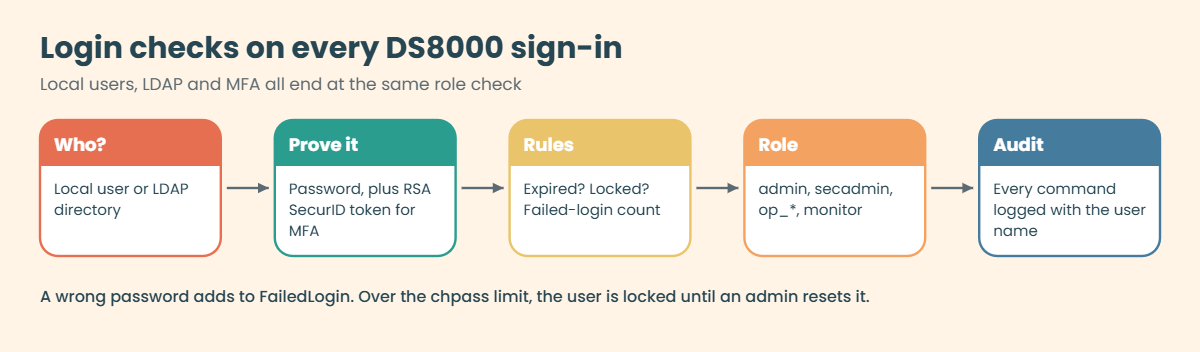
Password rules: a new user’s first password starts out expired, and so does any password an admin resets, so the user has to change it at first login. A password needs characters from at least two of the groups letters, numbers and punctuation, can’t contain the user ID, is case-sensitive and must be 6 to 64 characters long (default minimum 8). chpass -expire days -fail count sets the expiry and the number of allowed failed logins, and showpass shows them. Never set either one to 0, because that means passwords never expire and there’s no limit on attempts.
Once a user goes over the failed-login limit they’re locked, and only an administrator can reset them.
Remote authentication: in the DS GUI, Access > Remote Authentication starts a wizard that points the DS8000 at an LDAP server (primary URI, optional secondary URI, and a user search base for direct LDAP). MFA works with RSA SecurID Authentication Manager, with direct LDAP plus RSA SecurID, or with IBM Z MFA using RACF PassTickets (an admin installs the key with managepassticket).
The HMC service console (Web UI) keeps its own users, separate from all of this, and its customer user starts with a default password you have to change.
On DS8900F the role names and password rules are the same, but whether you get custom roles and Dual Control depends on the code release.
How it works, step by step
Take a new DS8A50 at an insurance company. The team has two storage admins (Priya and Arjun), two security admins (Meera and Vikram), a night operator who runs Copy Services jobs, and a monitoring tool that only needs to read.
1Map people to roles
Before you touch the system, write a small table with name, role and reason. Priya and Arjun get admin. Meera and Vikram get secadmin but never admin on top, so nobody can both manage encryption and approve their own recovery actions.
The night operator gets op_volume,op_copy_services, which is the one combination allowed, and the monitoring tool gets monitor, which is read-only.
2Set the password policy
Set the company rules with chpass before you create anyone, for example 90 days expiry and 3 to 5 failed logins, and check them with showpass. On an upgraded system the old defaults stay in place until you run chpass -reset.
3Create the users with temporary passwords
Run mkuser -pw temp -group role name for each person, ideally from a script so you can repeat the setup on the DR system. Every new password is already expired, so each person picks their own at first login and you never know what it is.
4Retire the shared admin
You still need the built-in admin account for emergencies, so give it a long password, keep it in the company password vault and stop using it for daily work. From then on every change carries a real person’s name in the audit log.
5Connect to LDAP
Once you have more than a handful of people, local users get messy: someone leaves and their DS8000 login stays active for a year. LDAP sorts that out. In the DS GUI go to Access > Remote Authentication and run the wizard with your directory’s primary URI (plus a secondary one), the user search base and the mapping from directory groups to DS8000 roles.

After that, joiners and leavers are handled by HR and the directory team instead of by you. Keep one or two local admin accounts for the day the directory can’t be reached.
6Add MFA where it matters
For the most sensitive systems you add a second factor. The DS8000 supports RSA SecurID (PIN plus token), either on its own or with direct LDAP, and mainframe shops can use IBM Z MFA with RACF PassTickets.
Last of all, don’t forget the HMC service console, which is a separate world. Its customer user has its own default password and its own user list, so change that password at handover and create personal HMC IDs if your team uses the service console.
Hands-on lab: set up named users and roles
Before you run any command, double-check it
Read every command twice before you press Enter. Check the target: the system or account, the IDs, the names and the sizes. These commands are for learning and were tested in our lab, not on your system. At work, run the read-only list commands first, follow your change process, make sure a backup exists, and ask a second person to check anything that changes or deletes data. You run them at your own risk.
On the practice DS8A50 you’ll set up the insurer’s team from the walkthrough: the password policy first, then six named users from a script, and then a check of what a read-only user can and can’t do.
Practice shell note: the practice shell is our own teaching tool, not IBM software, and real DS CLI output looks very close to this but isn’t identical. The CMUC00133I, CMUC00134I and CMUC00195I messages are IBM’s, while the first-login, lock-out, unauthorized and group-combination messages come from the practice shell. The user names and passwords are examples; never keep real passwords in a script.
1Start clean and set the password policy
Run this:
python ds8sim.py -cfg lab.profile simctl reset
python ds8sim.py -cfg lab.profile chpass -expire 90 -fail 5
python ds8sim.py -cfg lab.profile showpassYou should see this (after the notice lines):
SIM0100I simctl: factory state restored (users and passwords kept; use simctl reset -all to reset them too).
CMUC00195I chpass: Security properties successfully set.
Password Expiration 90 days
Failed Logins Allowed 5
Password Age 0 days
Minimum Length 8
Password History 8Passwords now expire after 90 days and a user gets locked after 5 failed logins. The minimum length (8) and history (8 old passwords remembered) stay at their defaults, and the SIM line is the practice shell’s own message from simctl.
✅ Checkpoint: showpass shows 90 days and 5 failed logins.
2Create the team as a script
Save this as users.txt. Using a script means the DR system gets the same users later on.
Save this as users.txt, then run it:
# users.txt - named accounts for the storage team
mkuser -pw Temp4now1 -group admin priya
mkuser -pw Temp4now2 -group admin arjun
mkuser -pw Temp4now3 -group secadmin meera
mkuser -pw Temp4now4 -group secadmin vikram
mkuser -pw Temp4now5 -group op_volume,op_copy_services nightops
mkuser -pw Temp4now6 -group monitor grafana
lsuser -lpython ds8sim.py -cfg lab.profile -script users.txtYou should see this:
CMUC00133I mkuser: User priya successfully created.
CMUC00133I mkuser: User arjun successfully created.
CMUC00133I mkuser: User meera successfully created.
CMUC00133I mkuser: User vikram successfully created.
CMUC00133I mkuser: User nightops successfully created.
CMUC00133I mkuser: User grafana successfully created.
Name Group State Scope
=================================================
admin admin active *
arjun admin active PUBLIC
grafana monitor active PUBLIC
meera secadmin active PUBLIC
nightops op_volume,op_copy_services active PUBLIC
priya admin active PUBLIC
secadmin secadmin active *
service ibm_service active *
vikram secadmin active PUBLICThe built-in users (admin, secadmin, service) have scope *, and your new users have scope PUBLIC. The night operator has the one combined role that’s allowed.
✅ Checkpoint: lsuser -l lists nine users, two admin and three secadmin.

3Check one user’s details
Run this:
python ds8sim.py -cfg lab.profile showuser nightopsYou should see this:
Name nightops
Group op_volume,op_copy_services
State active
FailedLogin 0
DaysToExpire 90
Scope PUBLICFailedLogin counts the bad passwords since the last good login, and DaysToExpire follows the policy you just set. When someone tells you “I can’t log in”, this is the first command to run.
✅ Checkpoint: DaysToExpire shows 90.
4First login of a new user
Log in as the monitoring user with its temporary password. The -newpasswd option only exists in the practice shell and answers the forced password change for you; on a real DS8000 the user types the new one.
Run this:
python ds8sim.py -hmc1 10.0.0.1 -user grafana -passwd Temp4now6 -newpasswd Graf2026ok lsserverYou should see this (after the notice):
CMUN00247W Your password has expired. You must change it now.
CMUC00249I Your password was changed successfully.
Date/Time: 24 October 2026 11:19:56 UTC IBM DSCLI Version: 7.10.10.348 DS: IBM.2107-78SV001
ID Image ID Image Name Power Control SFI State
=============================================================
server0 IBM.2107-78SV001 ds8k-g10-lab Online Online
server1 IBM.2107-78SV001 ds8k-g10-lab Online OnlineThe temporary password worked once and then had to be replaced, which matches the Redbook rule that initial passwords on new accounts are expired.
✅ Checkpoint: grafana is logged in with its own new password.
5Prove the role limits work
A monitoring account mustn’t be able to create users, so try it.
Run this:
python ds8sim.py -hmc1 10.0.0.1 -user grafana -passwd Graf2026ok mkuser -pw Abcd1234 -group admin testYou should see this:
CMUN00018E mkuser: Unauthorized: Your user group (monitor) does not have the authority to run this command.Good, that’s the test auditors like to see: a read-only account that is read-only. Do the same check for every new role you create, custom roles included.
✅ Checkpoint: mkuser is refused for the monitor user.
Break It, Then Fix It
Two user problems come up on almost every team. Someone locks themselves out on a bad morning, and someone tries to give a person “all the roles”. Do both on purpose.
1Break it: lock out a storage admin
Priya is back from leave and tries her old password six times. You’ll simulate that with a wrong password in a loop.
Run this (PowerShell):
1..6 | ForEach-Object { python ds8sim.py -hmc1 10.0.0.1 -user priya -passwd Wrong2026x$_ lssi }
python ds8sim.py -cfg lab.profile showuser priyaYou’ll get this (notice lines removed):
CMUN00244E Authentication failure: the user name or password is not correct.
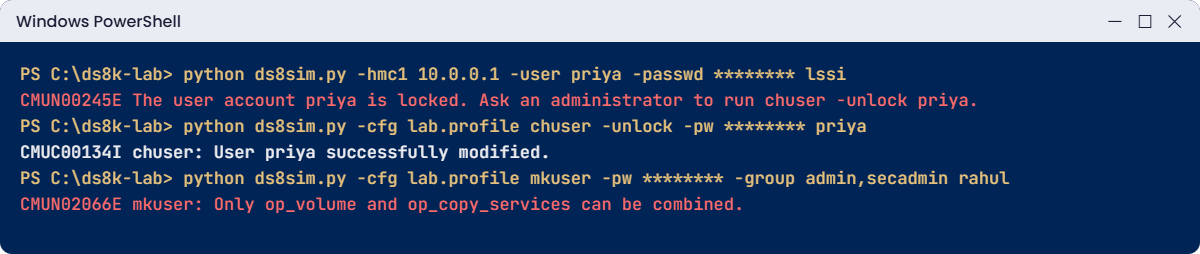
CMUN00245E The user account priya is locked. Ask an administrator to run chuser -unlock priya.
CMUN00245E The user account priya is locked. Ask an administrator to run chuser -unlock priya.Name priya
Group admin
State locked
FailedLogin 5
DaysToExpire 90
Scope PUBLICWhy: the policy allows 5 failed logins. The fifth bad attempt locked the account, and after that even the right password gets refused. On a real system this often hits a script user after a password change (Lesson 2), and every scheduled job stops at once.
Fix: another administrator resets the account with a new temporary password. Since a password reset by an admin is expired, Priya has to choose her own at the next login.
Run this:
python ds8sim.py -cfg lab.profile chuser -unlock -pw Reset2026p priya
python ds8sim.py -hmc1 10.0.0.1 -user priya -passwd Reset2026p -newpasswd Priya2026ok showuser priyaYou should see this:
CMUC00134I chuser: User priya successfully modified.
CMUN00247W Your password has expired. You must change it now.
CMUC00249I Your password was changed successfully.
Date/Time: 24 October 2026 11:20:19 UTC IBM DSCLI Version: 7.10.10.348 DS: IBM.2107-78SV001
Name priya
Group admin
State active
FailedLogin 0
DaysToExpire 90
Scope PUBLICIf the locked account is the built-in admin and nobody else has admin rights, only the security recovery utility on the HMC can reset it, which is another good reason to keep two named admins.
✅ Checkpoint: priya is active again with FailedLogin 0.
2Break it: give one person admin and secadmin
A manager asks for “a user that can do everything”. Try it, and also try the old role name people copy from forums.
Run this:
python ds8sim.py -cfg lab.profile mkuser -pw Temp4now7 -group admin,secadmin rahul
python ds8sim.py -cfg lab.profile mkuser -pw Temp4now7 -group service rahulYou’ll get this:
CMUN02066E mkuser: Only op_volume and op_copy_services can be combined.
CMUN00010E mkuser: Invalid value for -group: service. Groups: admin, ibm_engineering, ibm_service, monitor, no_access, op_copy_services, op_storage, op_volume, secadmin.Why: the DS8000 allows only one combination, op_volume plus op_copy_services. Admin and security admin are kept apart on purpose, because encryption recovery needs one person from each role. And service isn’t a role name at all; the IBM role is called ibm_service.
Fix: give Rahul the one role his job needs. He builds arrays and pools, so op_storage is the right fit.
Run this:
python ds8sim.py -cfg lab.profile mkuser -pw Temp4now7 -group op_storage rahulYou should see this:
CMUC00133I mkuser: User rahul successfully created.✅ Checkpoint: rahul exists with the single role op_storage.
This happened at work
One password, twelve people
A mid-sized insurer ran two DS8000 systems for its policy and claims platforms, and twelve people across storage, operations and a partner company all logged in with the same admin account. The password lived in a shared spreadsheet and hadn’t been changed since installation.
It came to a head during the yearly audit. The auditors pulled the DS8000 audit log and asked what sounded like an easy question: “Who deleted these four volumes in March?” The log said admin, from a jump server everyone used, and nobody in the room could answer.
The volumes turned out to be empty test LUNs, so no data was lost, but the finding was still rated high. There was no individual accountability on a system holding customer data, no password rotation, and a partner company with full admin rights it didn’t need.
The storage lead spent the next three weeks fixing it. Everyone got a named user in the smallest role they needed: two admin, two secadmin, op_volume,op_copy_services for the operators, and only monitor for the partner company. After that the DS8000 was connected to the corporate LDAP through the Remote Authentication wizard, so leavers lost access the same day HR closed their account.
The shared admin password was changed, sealed in the password vault and tested once a quarter, and the audit log now goes to the company syslog server. At the next audit, the same kind of question about any change was answered in under a minute.
Common mistakes and troubleshooting
| Symptom | Likely cause | What to check / fix |
|---|---|---|
| Audit can’t tell who made a change | Everyone shares admin | Named users per person; LDAP for joiners and leavers; keep admin in a vault. |
| Whole team locked out during an outage | Only one admin, and it got locked | Two or more named admins; the HMC security recovery utility is the last resort. |
| Scheduled jobs fail and a user shows locked | Password changed, script still uses the old one | showuser to check FailedLogin; reset, then update the password file. |
| mkuser refuses a group list | Combining roles other than op_volume + op_copy_services | One role per user, or a custom role on R10.1. |
| “Invalid value for -group: service” | Old or forum role name | Use the real names: admin, secadmin, op_storage, op_volume, op_copy_services, monitor, ibm_service, ibm_engineering, no_access. |
| Passwords never expire, unlimited attempts | chpass set to 0 | Set real values, for example chpass -expire 90 -fail 5. |
| HMC Web UI still has the default customer password | HMC users managed separately | Change it at handover; create personal HMC IDs. |
Go through the user list every quarter with lsuser -l. Anyone who has left, moved teams or not logged in for months is a risk, however convenient it feels to leave them there.
Interview questions
Click a question to open it. Each one is phrased the way an interviewer would ask it, and under it you’ll see why they ask and one way you could answer in your own words.
Fresher level
1. You’ve taken over a DS8000 where the whole team uses the admin account. What would you change first?
Why they ask this: They want to see that you understand accountability and least privilege, and not only the commands.
How you might answer: I’d create a named user for each person with the smallest role they need, say admin for the storage admins, op_volume for people who only make volumes and map hosts, and monitor for read-only tools. Then I’d change the admin password and put it in the company vault, for emergencies only.
I’d also set the password policy with chpass, something like 90 days and 5 failed logins, and plan LDAP so leavers get removed automatically.
2. What happens the first time a new DS8000 user logs in?
Why they ask this: They’re checking whether you know the temporary password rule, because it catches people out in scripts.
How you might answer: The password you set with mkuser is temporary and already expired, so the user has to pick a new one at first login. It’s the same after an admin resets a password with chuser.
So I never put a new account into a script until the person or service has logged in once and set its real password.
2–5 years experience
3. A storage admin is locked out at 2 a.m. during an incident. Walk me through what you do.
Why they ask this: They want calm, correct steps, and they want to hear that you planned for this before it happened.
How you might answer: Another admin looks at the account with showuser and resets it with chuser and a new temporary password, which the person changes at the next login. That’s the reason we always keep at least two named admins.
If the only admin left is the one that’s locked, the HMC security recovery utility can reset the admin password to default, but that’s the last resort. Afterwards I’d find out why it locked, which is often an old password sitting in a script.
4. Explain the difference between admin and secadmin, and why IBM wants them on different people.
Why they ask this: Separating security duties is a common audit question when it comes to storage roles.
How you might answer: admin manages all the storage resources and many HMC functions but not encryption, and secadmin has all the encryption functions. In encryption deadlock recovery, a secadmin does the action and an admin approves it.
If one person held both roles they could carry out and approve their own encryption recovery actions, which is why IBM recommends at least two of each and never both on the same person.
Senior level
5. How would you design DS8000 access for a bank with 40 storage and operations staff and strict auditors?
Why they ask this: Senior engineers design the whole access model, so they want LDAP, roles, MFA and audit trails in one answer.
How you might answer: I’d set up LDAP through the Remote Authentication wizard and map directory groups to DS8000 roles, so HR changes drive access. The roles follow least privilege, with custom roles on R10.1 where the built-in ones are too broad, and Dual Control for the high-risk actions.
Admins would log in with MFA using RSA SecurID. I’d keep two local admin accounts in the vault for directory outages and send audit events to syslog for the security team.
6. The directory team says LDAP will be down for maintenance on Saturday. What’s your plan?
Why they ask this: They’re checking that you think about break-glass access before the day you need it.
How you might answer: Beforehand I’d make sure our local emergency accounts work: log in with them, confirm the role and confirm the vault process for the passwords. I’d also check that no scheduled job depends on an LDAP user during that window.
Once maintenance is over I’d test an LDAP login, make sure the emergency accounts are logged out, and record that they were used.
Quick quiz
Q1. Which two roles can be combined in one DS8000 user?
- admin and secadmin
- op_storage and op_volume
- op_volume and op_copy_services
- monitor and admin
Show answer
C — op_volume and op_copy_services is the only allowed combination.
Q2. What is true about a password set with mkuser?
- It never expires
- It is temporary and must be changed at first login
- Only secadmin can change it
- It is stored in the profile
Show answer
B — Initial passwords on new accounts are expired; the user must change them at first login.
Q3. What does chpass -expire 0 -fail 0 mean?
- Strongest security
- Passwords never expire and unlimited login attempts
- Users are locked immediately
- LDAP is required
Show answer
B — IBM warns against 0: it means no expiry and unlimited failed logins.
Q4. Where do you set up LDAP for DS GUI and DS CLI users?
- In the DS GUI under Access > Remote Authentication
- In dscli.profile
- With mkuser -ldap
- On the SAN switch
Show answer
A — The Remote Authentication wizard in the DS GUI configures LDAP.
Q5. Which role can only read with list and show commands?
- op_storage
- no_access
- monitor
- ibm_engineering
Show answer
C — monitor has read-only, non-security access.
Quick recap
- Give each person a named user with one role; only op_volume + op_copy_services can be combined.
- Keep admin and secadmin on different people, at least two of each.
- New and reset passwords are expired; users set their own at the next login.
- Set chpass (for example 90 days, 5 failed logins), never 0, and check with showpass and showuser.
- Use LDAP through the Remote Authentication wizard, and MFA (RSA SecurID or IBM Z MFA) for sensitive systems.
- HMC service console users are separate; change the default customer password at handover.
Next lesson
Lesson 6: Licensed functions and activation keys → You read lskey, plan capacity licences and apply activation keys the safe way.
Further reading: DS8000 user management
For more on DS8000 user management, sections 6.6 and 8.2 of IBM’s guide cover password rules, roles, LDAP and MFA: IBM Storage DS8A00 Architecture and Implementation Guide (IBM Redbooks). To see where user setup fits in the project, go back to A DS8000 project from delivery to first LUN.
You can also see the full plan for this course on the IBM DS8000 Implementation course page.
Try it yourself: open the DS8000 user command builder, pick a role and a temporary password, and it writes the mkuser command and the check that comes after it.
