I/O port setup: FCP, FICON and topology
-
Phase 0: Before you start
-
Phase 1: Plan and install
-
Phase 2: Build the storage
-
Phase 3: Copy Services
-
Phase 4: Run it day to day
-
Phase 5: Troubleshooting and career
DS8000 I/O port configuration is where you tell every host adapter port how it’s going to talk: SCSI-FCP for open systems and replication, or FICON for IBM Z mainframes. Until a port has the right topology no host can use it, however good the zoning and the volumes are, and since it’s a small command with big consequences, storage teams plan it port by port.
You’ll learn to read a port ID, work out which card and I/O enclosure it sits on, check who’s logged in, and set topologies with setioport. You’ll also see why the DS8000 won’t change a port that already has a topology unless you add -force, and when using it would cut off live hosts.
You need Lessons 8 and 9 (the GUI tour and the DS CLI basics) behind you. Keep your lab profile from Lesson 9 handy, since every command here uses it.
| Time | You need | By the end you can |
|---|---|---|
| 60 to 75 minutes | The practice shell with lab.profile from Lesson 9, and the port plan from your Lesson 7 worksheet if you made one | Decode a port ID, check port state and logins, set SCSI-FCP and FICON with setioport, and fix a port that was changed to the wrong topology |
What it is, in one line
DS8000 I/O port configuration means setting each Fibre Channel host adapter port to SCSI-FCP or FICON, and then checking that it’s cabled, logged in and spread across adapters and I/O enclosures for redundancy.
In Simple Words
Counters at a railway station
Think of a big railway station with lots of ticket counters, each with a board on top saying what it sells, “Local trains” or “Express trains”. A passenger for an express train only walks to an express counter, and if the board says “Local” he won’t even join the queue, even though the clerk could have helped him.
The station master sets each board in the morning. Once a board is up and people are queueing, he can’t simply flip it: he has to make sure the queue is empty first, or say on purpose “I know, change it anyway”. A careful station master also opens counters on both sides of the hall, so if the left side has a power cut, passengers can still buy tickets on the right.
The counters are the DS8000 host adapter ports, with “Local” standing for SCSI-FCP (Linux, Windows and VMware) and “Express” for FICON on the mainframe, and the two sides of the hall are the two I/O enclosures.
Engineer's View
Host adapter ports on a DS8A00
Every DS8A00 host adapter is a 4-port 32 Gbps Fibre Channel card sitting in an I/O enclosure, and its ports can negotiate down to 16 or 8 Gbps. A card has either all shortwave (SW) or all longwave (LW) optics, though a system can mix SW and LW cards.
- Topologies: each port is either SCSI-FCP (switched fabric, for open systems hosts and also for Metro Mirror and Global Mirror links) or FICON (IBM Z only). A port can’t be both at once, but a single card can mix FCP and FICON ports.
- Port IDs:
Ifollowed by four hex digits that encode the I/O enclosure, the adapter and the port, for exampleI0032. Each port’s WWPN is fixed by the hardware. - Counts: a DS8A10 takes 2 to 16 host adapters (8 to 64 ports), and a DS8A50 or DS8A80 takes 2 to 32 (8 to 128 ports).
- Distance: SW on 50 µm multimode fibre covers runs inside the data centre (at 16 Gbps about 100 m on OM3, 125 m on OM4 and 150 m on OM5), while LW on 9 µm single-mode fibre reaches 10 km.
- zHyperLink isn’t a host adapter port at all. It’s a separate PCIe Gen4 link of up to 150 m that runs from IBM Z straight into the I/O enclosure.
- Security column: this shows IBM Fibre Channel Endpoint Security (in-flight encryption for IBM Z links), and on open systems ports it’s normally Disabled.
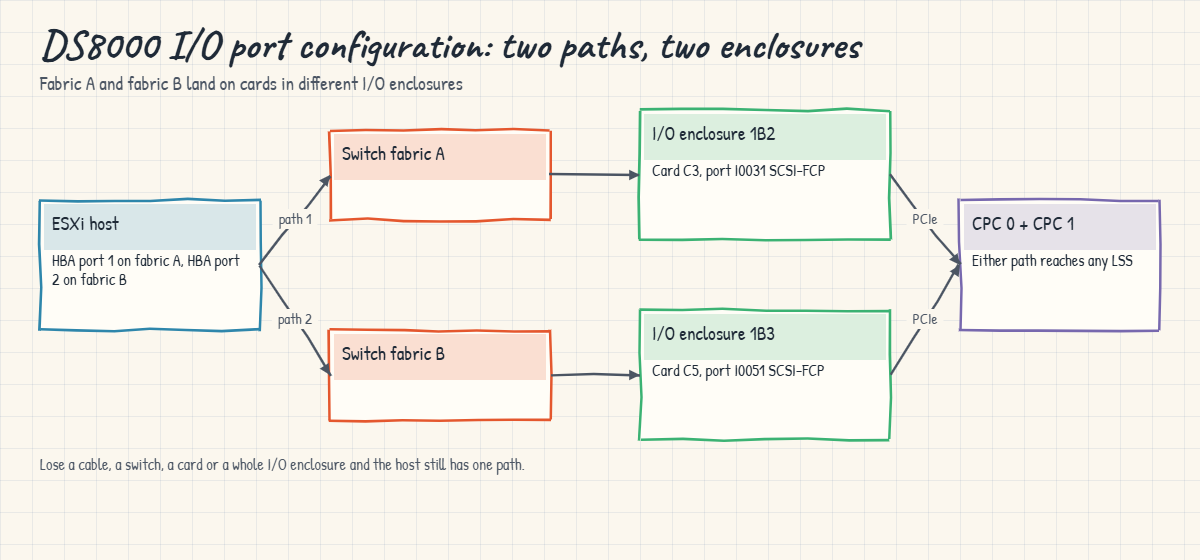
IBM’s rules of thumb: give every host at least two paths through separate host adapters in separate I/O enclosures, spread FICON and FCP connections evenly across the enclosures, keep dedicated ports for Copy Services, and use single-initiator zones. Two to four paths per LUN is enough for most servers, and going past eight adds nothing.
On DS8900F: you get the same 4-port 32 Gbps cards and the same setioport command, and only the number of enclosures and slots changes from model to model.
How it works, step by step
Port setup doesn’t take long, but the order matters. Go through these steps on every new DS8000 and for every port change after go-live.
1Start from the port plan
Before you touch a port, get the table from the planning worksheet with the port ID, where the cable goes (switch name and port), fabric A or B, and the role (FCP host, FICON or Copy Services link). Without it you’re guessing.
In a good plan the fabric A ports sit in one I/O enclosure and the fabric B ports in another, and the replication ports are kept apart from host ports.
2Read the current state
lsioport shows each port’s WWPN, state, optics type (LW or SW) and topology. Three states matter most: Communication established (light plus a switch login), No light detected (topology set but no signal, so a cable, SFP or switch port problem) and Offline (usually not cabled or not in use).
If the topology shows -, the port has never been set.
3Set topology on new ports
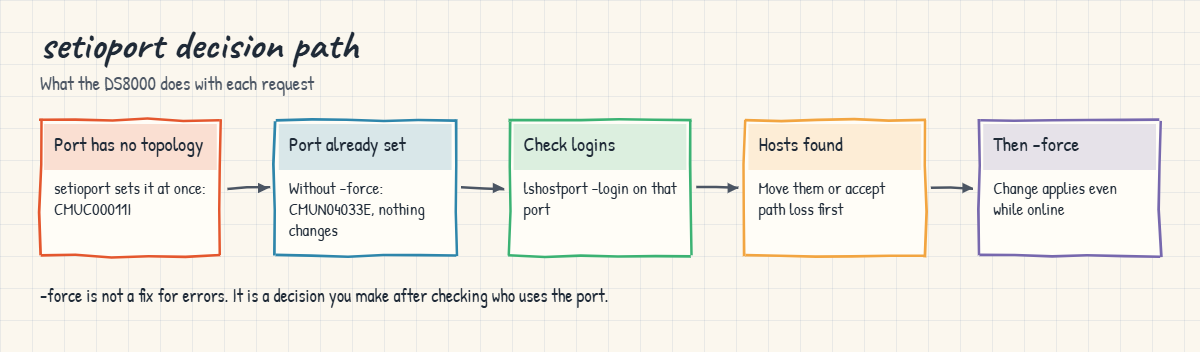
Run setioport -topology scsifcp or -topology ficon followed by one or more port IDs. On a port with no topology it just works, and the DS8000 replies once for each port.
In the GUI you do the same thing from Settings, Network, Fibre Channel Ports, then Modify Protocol.
4Changing a port that is already set needs -force
If a port already has a topology, the DS8000 refuses to change it and tells you the force option wasn’t given. That’s a safety catch, because a port with a topology might be carrying live host or mirror traffic.
Add -force and the change goes through even on an online port, and every host logged in through that port loses that path at once, so check the logins first.
5Check who is logged in
lshostport -login lists every host WWPN logged in to the DS8000 along with the I/O port it’s using, and showioport gives you the login count for one port. If a port you want to change has logins, either move those hosts off it first or get the path loss accepted in the change record.
6Check error counters on bad ports
showioport -metrics shows the Fibre Channel error counters: link failures, loss of sync, loss of signal and CRC errors. A port with no light and climbing link failure counts is a cabling job for the data centre team, not a topology job for you.
7Verify from both sides
After the change, run lsioport again and ask the SAN team to confirm that the DS8000 port logged in to the right switch port and fabric. Last of all, check that each host shows logins on at least two ports in two different I/O enclosures.
| Port role | Topology | Typical placement |
|---|---|---|
| Linux, Windows, VMware, AIX hosts | SCSI-FCP | Pairs across two I/O enclosures, fabric A and fabric B |
| Metro Mirror / Global Mirror links | SCSI-FCP | Dedicated ports, not shared with busy hosts |
| IBM Z channels | FICON | Spread evenly across enclosures, like FCP |
| IBM Z low-latency reads | zHyperLink (not a port topology) | Separate PCIe link into the I/O enclosure |
Hands-on lab: set FCP and FICON ports with setioport
Before you run any command, double-check it
Read every command twice before you press Enter. Check the target: the system or account, the IDs, the names and the sizes. These commands are for learning and were tested in our lab, not on your system. At work, run the read-only list commands first, follow your change process, make sure a backup exists, and ask a second person to check anything that changes or deletes data. You run them at your own risk.
Your lab DS8A50 has 16 ports on four host adapters. Some are already set, some are blank and two have no light. You’ll read the current state, find the hosts that are already logged in, and then set two new FCP ports and two FICON ports with each pair split across two I/O enclosures.
Practice shell note: the practice shell is our own teaching tool, not IBM software, and real DS CLI output looks very close to this but isn’t identical. The extra columns in lsioport -l and the values in showioport -metrics are ours, and messages starting with SIM come from the practice shell. All the outputs below are what the shell printed.
1Reset and list every port
Open PowerShell in your lab folder and start the shell with your Lesson 9 profile, then reset it so everyone starts with the same port layout.
Run this:
python ds8sim.py -cfg lab.profile
simctl reset
lsioportYou should see this:
dscli> simctl reset
SIM0100I simctl: factory state restored (users and passwords kept; use simctl reset -all to reset them too).
dscli> lsioport
Date/Time: 24 October 2026 11:04:16 UTC IBM DSCLI Version: 7.10.10.348 DS: IBM.2107-78SV001
ID WWPN State Type topo portgrp Security
===========================================================================================
I0010 50050763030130DD Offline Fibre Channel-LW - 0 Disabled
I0011 50050763030170DD Offline Fibre Channel-LW - 0 Disabled
I0012 500507630301B0DD Offline Fibre Channel-LW - 0 Disabled
I0013 500507630301F0DD Offline Fibre Channel-LW - 0 Disabled
I0030 50050763030330DD Communication established Fibre Channel-SW SCSI-FCP 0 Disabled
I0031 50050763030370DD Offline Fibre Channel-SW - 0 Disabled
I0032 500507630303B0DD Communication established Fibre Channel-SW SCSI-FCP 0 Disabled
I0033 500507630303F0DD No light detected Fibre Channel-SW SCSI-FCP 0 Disabled
I0040 50050763030430DD Offline Fibre Channel-SW - 0 Disabled
I0041 50050763030470DD Communication established Fibre Channel-SW FICON 0 Disabled
I0042 500507630304B0DD Communication established Fibre Channel-SW SCSI-FCP 0 Disabled
I0043 500507630304F0DD No light detected Fibre Channel-SW SCSI-FCP 0 Disabled
I0050 50050763030530DD Offline Fibre Channel-SW - 0 Disabled
I0051 50050763030570DD Offline Fibre Channel-SW - 0 Disabled
I0052 500507630305B0DD Communication established Fibre Channel-SW SCSI-FCP 0 Disabled
I0053 500507630305F0DD Offline Fibre Channel-SW - 0 DisabledRead the IDs in groups. I0010 to I0013 are the four ports of one longwave (LW) card, I0030 to I0033 are a shortwave (SW) card, and so on.
Six ports are already running SCSI-FCP, I0041 is FICON and seven still show -.
✅ Checkpoint: You can name one FCP port, one FICON port, one blank port and one port with no light.
2Find the cards and the I/O enclosures
Run this:
lshacard -sYou should see this:
dscli> lshacard -s
Date/Time: 24 October 2026 11:04:16 UTC IBM DSCLI Version: 7.10.10.348 DS: IBM.2107-78SV001
IBM.1400-1B1-78SV0/R-1-P1-C1
IBM.1400-1B2-78SV0/R-1-P1-C3
IBM.1400-1B2-78SV0/R-1-P1-C4
IBM.1400-1B3-78SV0/R-1-P1-C5There are four cards: C1 in enclosure 1B1, C3 and C4 in 1B2, and C5 in 1B3. That tells you something important before you change anything, because ports on C3 and C4 share one I/O enclosure, and a host zoned only to those two cards has no protection if enclosure 1B2 fails.
✅ Checkpoint: You know which enclosure each card sits in.
3See which hosts are already logged in
Run this:
lshostport -loginYou should see this:
dscli> lshostport -login
Date/Time: 24 October 2026 11:04:16 UTC IBM DSCLI Version: 7.10.10.348 DS: IBM.2107-78SV001
WWNN WWPN Host I/O ports ESSIOport
==========================================================
20000024FF2D0F86 21000024FF2D0F86 - - I0032
20000024FF2D0F87 21000024FF2D0F87 - - I0042
20000120FA13B914 10000090FA13B914 - - I0032
20000120FA13B915 10000090FA13B915 - - I0042Four host WWPNs (two servers with two HBA ports each) are logged in through I0032 and I0042. Host shows - because nobody has defined these hosts on the DS8000 yet, which you’ll do in Lesson 14. What matters for now is that you do not touch I0032 or I0042, because they carry live logins.
✅ Checkpoint: You found the two ports with live logins.
4Look closer at a port with no light
Run this:
showioport -metrics I0033You should see this:
dscli> showioport -metrics I0033
Date/Time: 24 October 2026 11:04:16 UTC IBM DSCLI Version: 7.10.10.348 DS: IBM.2107-78SV001
ID I0033
Date 10/24/2026 11:04:16
byteread (FICON/ESCON) 0
bytewrit (FICON/ESCON) 0
Reads (FICON/ESCON) 0
Writes (FICON/ESCON) 0
Logins (FC) 0
SecCapableLogins (FC) 0
AuthLogins (FC) 0
EncryptedLogins (FC) 0
byteread (SCSI) 0
bytewrit (SCSI) 0
Reads (SCSI) 0
Writes (SCSI) 0
LinkFailErr (FC) 7
LossSyncErr (FC) 7
LossSigErr (FC) 7
PrimSeqErr (FC) 0
(output shortened)It has zero logins and non-zero counters for link failure, loss of sync and loss of signal. The topology (SCSI-FCP) is fine and the problem is physical, so raise a ticket for the data centre team to check the cable and SFP.
Don’t try to “fix” it by changing the topology.
✅ Checkpoint: You can tell a cabling problem from a topology problem.
5Set two FICON ports and two FCP ports
The mainframe team has asked for two more FICON ports, and the open systems team wants two new FCP ports for a VMware cluster. Pick blank ports and split each pair over two enclosures: I0040 (1B2) and I0050 (1B3) for FICON, and I0031 (1B2) and I0051 (1B3) for FCP.
Run this:
setioport -topology ficon I0040 I0050
setioport -topology scsifcp I0031 I0051You should see this:
dscli> setioport -topology ficon I0040 I0050
CMUC00011I setioport: I/O Port I0040 successfully configured.
CMUC00011I setioport: I/O Port I0050 successfully configured.
dscli> setioport -topology scsifcp I0031 I0051
CMUC00011I setioport: I/O Port I0031 successfully configured.
CMUC00011I setioport: I/O Port I0051 successfully configured.✅ Checkpoint: Four “successfully configured” lines, one per port.

6Verify placement with the long listing
Run this:
lsioport -l I0031 I0040 I0050 I0051You should see this:
dscli> lsioport -l I0031 I0040 I0050 I0051
Date/Time: 24 October 2026 11:04:16 UTC IBM DSCLI Version: 7.10.10.348 DS: IBM.2107-78SV001
ID WWPN State Type topo portgrp Speed Frame I/O Enclosure HA Card Security
=============================================================================================================
I0031 50050763030370DD Offline Fibre Channel-SW SCSI-FCP 0 32 Gb/s 1 1B2 C3 Disabled
I0040 50050763030430DD Offline Fibre Channel-SW FICON 0 32 Gb/s 1 1B2 C4 Disabled
I0050 50050763030530DD Offline Fibre Channel-SW FICON 0 32 Gb/s 1 1B3 C5 Disabled
I0051 50050763030570DD Offline Fibre Channel-SW SCSI-FCP 0 32 Gb/s 1 1B3 C5 DisabledEach pair now spans enclosures 1B2 and 1B3. The ports still show Offline because nothing’s plugged in yet, and the state turns to Communication established once the data centre team connects them to the switches.
✅ Checkpoint: FICON on I0040 and I0050, SCSI-FCP on I0031 and I0051, each pair in two enclosures.

Break It, Then Fix It
Next come two classic mistakes: trying to change a port that’s already in use, and a colleague switching live ports to the wrong topology on a busy night.
1Break it: re-purpose a busy port without -force
Someone asks for “one more FICON port, just take I0032”, so try it.
Run this:
setioport -topology ficon I0032
setioport -topology fcp I0053You’ll get these errors:
dscli> setioport -topology ficon I0032
CMUN04033E setioport: I0032: The change topology request failed because the current topology is already set and force option is not provided.
dscli> setioport -topology fcp I0053
CMUN00011E setioport: Specify -topology scsifcp or -topology ficon.Why: the first error is the DS8000 safety catch, the same CMUN04033E message the IBM Redbook shows. I0032 already has a topology, and you know from Step 3 that two servers are logged in through it. The second error is a plain typo, because the topology keyword is scsifcp, not fcp.
Fix: in this case the right fix is to not force it. Use a blank port such as I0053 for the extra FICON need, and save -force for after you’ve moved every host off a port.
✅ Checkpoint: You can explain why CMUN04033E protected two servers here.
2Break it: live ports switched to FICON
This time the practice shell plays a colleague who forced I0032 and I0042 to FICON by mistake. Watch what the hosts see.
Run this:
simctl break port-topology-ficon
lsioport I0032 I0042
lshostport -loginYou’ll get this:
dscli> simctl break port-topology-ficon
SIM0123I simctl: scenario port-topology-ficon: I0032 and I0042 were changed to FICON. Open systems hosts cannot log in. Check: lsioport, lshostport -login. Fix: setioport -topology scsifcp -force I0032 I0042.
dscli> lsioport I0032 I0042
Date/Time: 24 October 2026 11:04:16 UTC IBM DSCLI Version: 7.10.10.348 DS: IBM.2107-78SV001
ID WWPN State Type topo portgrp Security
========================================================================================
I0032 500507630303B0DD Communication established Fibre Channel-SW FICON 0 Disabled
I0042 500507630304B0DD Communication established Fibre Channel-SW FICON 0 Disabled
dscli> lshostport -login
Date/Time: 24 October 2026 11:04:16 UTC IBM DSCLI Version: 7.10.10.348 DS: IBM.2107-78SV001
CMUC00234I lshostport: No Host Port found.Why: an open systems HBA speaks FCP, and a FICON port won’t accept its login, so all four host WWPNs drop off. Both servers lost every path at once, because both of their paths ran through the two ports that were changed.
At work this shows up as “all disks gone” on two hosts.
Fix: set the ports back. A normal setioport gets refused again because the ports now have a topology (FICON), and this time -force is the right call, since nothing useful is logged in on the wrong topology.
Run this:
setioport -topology scsifcp I0032 I0042
setioport -topology scsifcp -force I0032 I0042
lshostport -login
lsioport I0032 I0042You should see this:
dscli> setioport -topology scsifcp I0032 I0042
CMUN04033E setioport: I0032: The change topology request failed because the current topology is already set and force option is not provided.
dscli> setioport -topology scsifcp -force I0032 I0042
CMUC00011I setioport: I/O Port I0032 successfully configured.
CMUC00011I setioport: I/O Port I0042 successfully configured.
dscli> lshostport -login
Date/Time: 24 October 2026 11:04:16 UTC IBM DSCLI Version: 7.10.10.348 DS: IBM.2107-78SV001
WWNN WWPN Host I/O ports ESSIOport
==========================================================
20000024FF2D0F86 21000024FF2D0F86 - - I0032
20000024FF2D0F87 21000024FF2D0F87 - - I0042
20000120FA13B914 10000090FA13B914 - - I0032
20000120FA13B915 10000090FA13B915 - - I0042
dscli> lsioport I0032 I0042
Date/Time: 24 October 2026 11:04:16 UTC IBM DSCLI Version: 7.10.10.348 DS: IBM.2107-78SV001
ID WWPN State Type topo portgrp Security
===========================================================================================
I0032 500507630303B0DD Communication established Fibre Channel-SW SCSI-FCP 0 Disabled
I0042 500507630304B0DD Communication established Fibre Channel-SW SCSI-FCP 0 Disabled✅ Checkpoint: All four host WWPNs are logged in again and both ports show SCSI-FCP.

This happened at work
The FICON channel that never came online
This was a state transport department running its vehicle registration system on IBM Z, with a new DS8A50 replacing an older DS8000. The migration weekend was planned to the hour, and on Saturday morning the z/OS team varied the new channel paths online, only for two of the eight paths to stay offline with a “not operational” status.
The mainframe team blamed the FICON directors. The network team insisted the zoning was right and showed the DS8000 ports logged in to the director, and four hours went by on a conference call.
In the end a storage engineer ran lsioport against the two ports in the plan and found both set to SCSI-FCP. During the install the SSR had set every new card to FCP as a starting point, and the port setup task had been ticked off because “the ports are configured”, which was true, only not as FICON.
Since the ports already had a topology, a quick setioport -topology ficon failed with the force message. The engineer checked lshostport -login, saw no open systems hosts on those ports and ran it again with -force, and two minutes later both channel paths came online.
The migration did finish, about five hours late.
After that the team changed its plan template. The port table now has a “topology checked” column filled in from lsioport output rather than from memory, and the z/OS and storage teams sign it off together before cutover.
Common mistakes and troubleshooting
| Symptom | Likely cause | What to check / fix |
|---|---|---|
| IBM Z channel path stays offline | DS8000 port is SCSI-FCP, not FICON | lsioport; check logins, then setioport -topology ficon (-force if already set) |
| Open systems host sees no DS8000 targets | Port set to FICON or not set | lsioport; set SCSI-FCP; confirm with lshostport -login |
| CMUN04033E on setioport | Port already has a topology | Check logins first; add -force only when no live host depends on it |
| Port state “No light detected” | Cable, SFP or switch port problem | showioport -metrics for link errors; data centre checks the cable |
| Host loses all paths during one adapter repair | Both paths on one card or one I/O enclosure | Zone each host to ports in two I/O enclosures, fabric A and B |
| Mirror and host traffic slow each other | Copy Services sharing busy host ports | Give PPRC links their own SCSI-FCP ports |
| setioport rejects the topology word | Wrong keyword such as fcp | Use -topology scsifcp or -topology ficon |
One rule saves a lot of grief: don’t type -force until you’ve run lshostport -login on the same ports and read the result out loud to someone.
Interview questions
Click a question to open it. Each one is phrased the way an interviewer would ask it, and under it you’ll see why they ask and one way you could answer in your own words.
Fresher level
1. What topologies can a DS8000 host adapter port have, and which hosts use each?
Why they ask this: They’re checking the basics of FCP versus FICON, which every DS8000 admin has to know.
How you might answer: A port is either SCSI-FCP or FICON, never both at once. SCSI-FCP is for open systems like Linux, Windows, VMware and AIX, and also for Metro Mirror and Global Mirror links, while FICON is only for IBM Z. One 4-port card can have a mix, say two FCP and two FICON ports.
2. A port shows “No light detected”. What does that tell you and what do you do?
Why they ask this: They want to see that you can tell a physical problem from a configuration problem.
How you might answer: It means the topology is set but the port isn’t getting a signal, so the problem is physical: the cable, the SFP or the switch port. I’d check showioport -metrics for link and signal errors and get the data centre or SAN team to look at the cable. Changing the topology wouldn’t help.
2–5 years experience
3. You need to change a port from SCSI-FCP to FICON and setioport refuses. Walk me through it.
Why they ask this: They want to know you understand the -force safety catch and check the impact first.
How you might answer: The DS8000 refuses with CMUN04033E because the port already has a topology. Before using -force I’d run lshostport -login to see whether any host is logged in through that port, and check the port plan and the change record.
If there are hosts on it, I move them to other paths or get their owners to accept the path loss. Only after that do I run setioport -topology ficon -force and verify it with lsioport and with the z/OS team.
4. How would you lay out FCP ports for a two-node VMware cluster on a DS8A50?
Why they ask this: They’re testing whether you design for failures and not only for connectivity.
How you might answer: Each ESXi host has two HBA ports, one per fabric. On the DS8000 I’d use FCP ports on cards in at least two different I/O enclosures, with the fabric A ports in one enclosure and fabric B in another, and single-initiator zones. That gives two to four paths per LUN, so losing a card, an enclosure, a switch or a port during a code load only takes out some of the paths.
Senior level
5. A mixed site has FICON, FCP hosts and Metro Mirror on the same DS8000. How do you plan port use?
Why they ask this: Senior people have to balance performance, isolation and redundancy across several teams.
How you might answer: I’d start from the port count and the I/O enclosures. FICON and FCP hosts get spread evenly across all the enclosures, and Copy Services get their own SCSI-FCP ports so mirror traffic never queues behind host I/O.
Every group keeps ports in at least two enclosures. I’d record the plan in a table that gets checked against lsioport -l after every change, and port changes would go through the change process with a login check.
6. A colleague forced two live ports to the wrong topology and two databases went down. How do you handle the next hour and the weeks after?
Why they ask this: They want calm incident handling followed by a process fix that sticks.
How you might answer: I’d confirm the state with lsioport and lshostport -login, set the ports back with setioport -force and check every host has its paths again, then tell the application teams the paths are back. Afterwards I’d bring in a rule that any setioport with -force needs a login check and a second person, and I’d look at Dual Control, which protects Fibre Channel port changes on R10.1.
Quick quiz
Q1. Which topology does an IBM Z host need on a DS8000 port?
- SCSI-FCP
- FICON
- iSCSI
- zHyperLink
Show answer
B — IBM Z channels use FICON. zHyperLink is a separate PCIe link, not a port topology.
Q2. Which topology do Metro Mirror links use?
- FICON
- SCSI-FCP
- Either, set per link
- None, they use Ethernet
Show answer
B — Remote Mirror and Copy paths need SCSI-FCP ports.
Q3. setioport fails with CMUN04033E. What is the cause?
- The port does not exist
- The port already has a topology and -force was not given
- The user is Monitor
- The topology word is wrong
Show answer
B — A port that already has a topology can only be changed with -force.
Q4. How many ports does a DS8A00 32 Gbps host adapter have?
- 2
- 4
- 8
- 16
Show answer
B — Each DS8A00 host adapter has four ports, each set to FCP or FICON on its own.
Q5. What is the minimum for host redundancy?
- Two ports on the same card
- Two paths through separate host adapters in separate I/O enclosures
- One port per fabric on the same enclosure
- Eight paths per LUN
Show answer
B — IBM asks for at least two connections on separate adapters in separate I/O enclosures.
Quick recap
- Each DS8A00 host adapter has four 32 Gbps ports; each port is SCSI-FCP or FICON.
- SCSI-FCP serves open systems and Copy Services links; FICON serves IBM Z.
- lsioport shows state and topology; lshacard and lsioport -l show which card and enclosure a port is on.
- setioport sets a blank port straight away; a port with a topology needs -force.
- Check lshostport -login before any -force, and use showioport -metrics for cabling problems.
- Spread every host and every port type over at least two I/O enclosures.
Next lesson
Lesson 11: Create arrays and ranks → You turn array sites into RAID 6 arrays and ranks with mkarray and mkrank.
Further reading: DS8000 I/O port configuration
For more on DS8000 I/O port configuration, IBM Redbook SG24-8559, sections 9.2.3 and 10.2 shows the GUI and DS CLI steps. For the hardware behind the ports, go back to I/O enclosures and host adapters in the Architecture course.
You can also see the full plan for this course on the IBM DS8000 Implementation course page.
Try it yourself: open the DS8000 port protocol command builder, type in the port IDs and pick SCSI FCP or FICON, and it writes the setioport command with a check before and after.
