
Before you run any command, double-check it
Read every command twice before you press Enter. Check the target: the system or account, the IDs, the names and the sizes. These commands are for learning and were tested in our lab, not on your system. At work, run the read-only list commands first, follow your change process, make sure a backup exists, and ask a second person to check anything that changes or deletes data. You run them at your own risk.
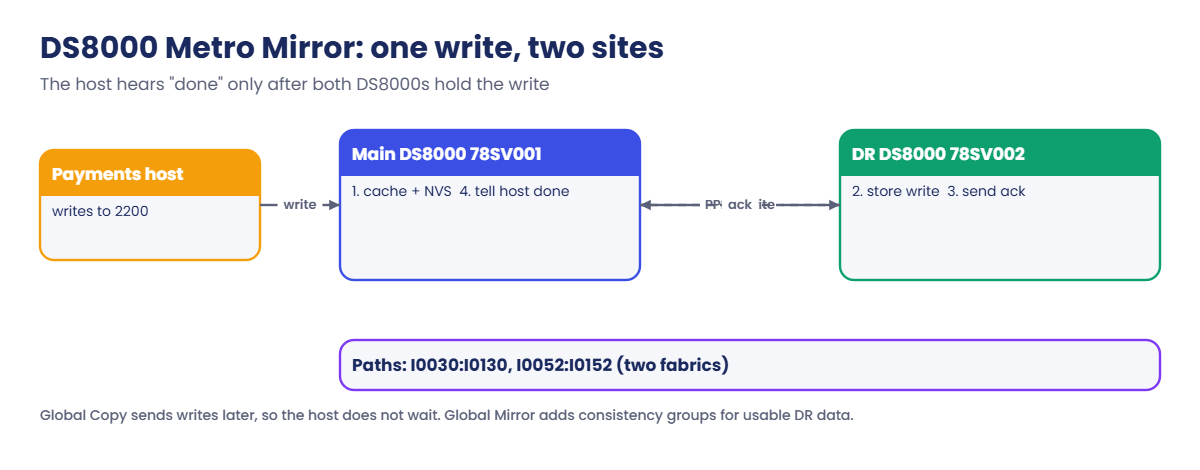
Your practice shell talks to two systems: the main box IBM.2107-78SV001 (the default) and the pretend DR box IBM.2107-78SV002, which you reach with -dev IBM.2107-78SV002. Two replication links connect them, I0030 to I0130 and I0052 to I0152.
Practice shell note: the practice shell is our own teaching tool, not IBM software. Real DS CLI output looks very close to this but isn’t identical. SIM lines and the IDs CMUN03033E and CMUN03004E come from the practice shell. A full Metro Mirror copy takes 1 to 2 simulated minutes, and simctl tick moves the clock on.
1Start clean and build volumes on both boxes
Save this as setup-19.txt. It creates a pool on the main box with two payment volumes and one reporting volume (50 GiB each) in LSS 22, and the same three volumes on the DR box.
setup-19.txt:
# setup-19.txt: production volumes on 78SV001, matching DR volumes on 78SV002 (Lesson 19)
mkarray -raidtype 6 -arsite S7
mkarray -raidtype 6 -arsite S8
mkrank -array A0 -keygrp 1 -stgtype fb
mkrank -array A1 -keygrp 1 -stgtype fb
mkextpool -rankgrp 0 -keygrp 1 -stgtype fb T2_0
chrank -extpool P0 R0
chrank -extpool P0 R1
mkfbvol -extpool p0 -cap 50 -name pay_#h 2200-2201
mkfbvol -dev IBM.2107-78SV002 -extpool p0 -cap 50 -name dr_pay_#h 2200-2201
mkfbvol -dev IBM.2107-78SV002 -extpool p0 -cap 50 -name dr_rep_#h 2202
mkfbvol -extpool p0 -cap 50 -name rep_#h 2202
Run this:
python ds8sim.py   (then: simctl reset, quit)
python ds8sim.py -hmc1 10.0.0.1 -user admin -script setup-19.txt
python ds8sim.py
The script prints CMUC00025I six times, three for each box.
✅ Checkpoint: the script ran with no errors.
2Get the DR box WWNN
Run this:
lssi -dev IBM.2107-78SV002You should see this:
dscli> lssi -dev IBM.2107-78SV002
Date/Time: 24 October 2026 11:02:37 UTC IBM DSCLI Version: 7.10.10.348 DS: IBM.2107-78SV002
Name        ID               Storage Unit     Model WWNN             State  ESSNet
===================================================================================
ds8k-g10-dr IBM.2107-78SV002 IBM.2107-78SV002 A05   5005076303FFF1DD Online Enabled
Note down 5005076303FFF1DD. Every path command needs the remote WWNN, and mixing it up with your own is the most common first mistake.
✅ Checkpoint: you have the DR WWNN 5005076303FFF1DD.
3Find usable replication ports
Run this:
lsavailpprcport -remotewwnn 5005076303FFF1DD 22:22You should see this:
dscli> lsavailpprcport -remotewwnn 5005076303FFF1DD 22:22
Date/Time: 24 October 2026 11:02:37 UTC IBM DSCLI Version: 7.10.10.348 DS: IBM.2107-78SV001
Local Port Attached Port Type
=============================
I0030      I0130         FCP
I0052      I0152         FCP
Two port pairs can reach the DR box, and they sit on different host adapters (I003x and I005x), which is what you want.
✅ Checkpoint: two FCP port pairs listed.
4Create the paths for LSS 22
Run these:
mkpprcpath -remotedev IBM.2107-78SV002 -remotewwnn 5005076303FFF1DD -srclss 22 -tgtlss 22 I0030:I0130 I0052:I0152
lspprcpath -l 22
You should see this:
dscli> mkpprcpath -remotedev IBM.2107-78SV002 -remotewwnn 5005076303FFF1DD -srclss 22 -tgtlss 22 I0030:I0130 I0052:I0152
CMUC00149I mkpprcpath: Remote Mirror and Copy path 22:22 successfully established.
dscli> lspprcpath -l 22
Date/Time: 24 October 2026 11:02:37 UTC IBM DSCLI Version: 7.10.10.348 DS: IBM.2107-78SV001
Src Tgt State   SS   Port  Attached Port Tgt WWNN         Failed Reason PPRC CG
================================================================================
22  22  Success FF22 I0030 I0130         5005076303FFF1DD -             Disabled
22  22  Success FF22 I0052 I0152         5005076303FFF1DD -             Disabled
Both paths say Success. The SS column is the subsystem ID of the target LSS, and PPRC CG shows Disabled because we didn’t use -consistgrp.
✅ Checkpoint: two paths for 22:22, both Success.
5Create the Metro Mirror pairs
Run these:
mkpprc -remotedev IBM.2107-78SV002 -type mmir -mode full 2200-2201:2200-2201
lspprc 2200-2201
You should see this:
dscli> mkpprc -remotedev IBM.2107-78SV002 -type mmir -mode full 2200-2201:2200-2201
CMUC00153I mkpprc: Remote Mirror and Copy volume pair relationship 2200:2200 successfully created.
CMUC00153I mkpprc: Remote Mirror and Copy volume pair relationship 2201:2201 successfully created.
dscli> lspprc 2200-2201
Date/Time: 24 October 2026 11:02:37 UTC IBM DSCLI Version: 7.10.10.348 DS: IBM.2107-78SV001
ID        State        Reason Type         SourceLSS Timeout (secs) Critical Mode First Pass Status
===================================================================================================
2200:2200 Copy Pending -      Metro Mirror 22        60             Disabled      Invalid
2201:2201 Copy Pending -      Metro Mirror 22        60             Disabled      Invalid
Copy Pending means the first full copy is under way, and hosts can keep writing to 2200 and 2201 the whole time.
✅ Checkpoint: two pairs in Copy Pending, type Metro Mirror.
6Wait for Full Duplex and check both sides
Run these:
simctl tick 2
lspprc 2200-2201
lspprc -dev IBM.2107-78SV002 2200-2201
You should see this:
dscli> simctl tick 2
SIM0112I simctl: clock advanced 2 minutes.
dscli> lspprc 2200-2201
Date/Time: 24 October 2026 11:04:37 UTC IBM DSCLI Version: 7.10.10.348 DS: IBM.2107-78SV001
ID        State       Reason Type         SourceLSS Timeout (secs) Critical Mode First Pass Status
==================================================================================================
2200:2200 Full Duplex -      Metro Mirror 22        60             Disabled      Invalid
2201:2201 Full Duplex -      Metro Mirror 22        60             Disabled      Invalid
dscli> lspprc -dev IBM.2107-78SV002 2200-2201
Date/Time: 24 October 2026 11:04:37 UTC IBM DSCLI Version: 7.10.10.348 DS: IBM.2107-78SV002
ID        State              Reason Type         SourceLSS Timeout (secs) Critical Mode First Pass Status
=========================================================================================================
2200:2200 Target Full Duplex -      Metro Mirror 22        60             Disabled      Invalid
2201:2201 Target Full Duplex -      Metro Mirror 22        60             Disabled      Invalid
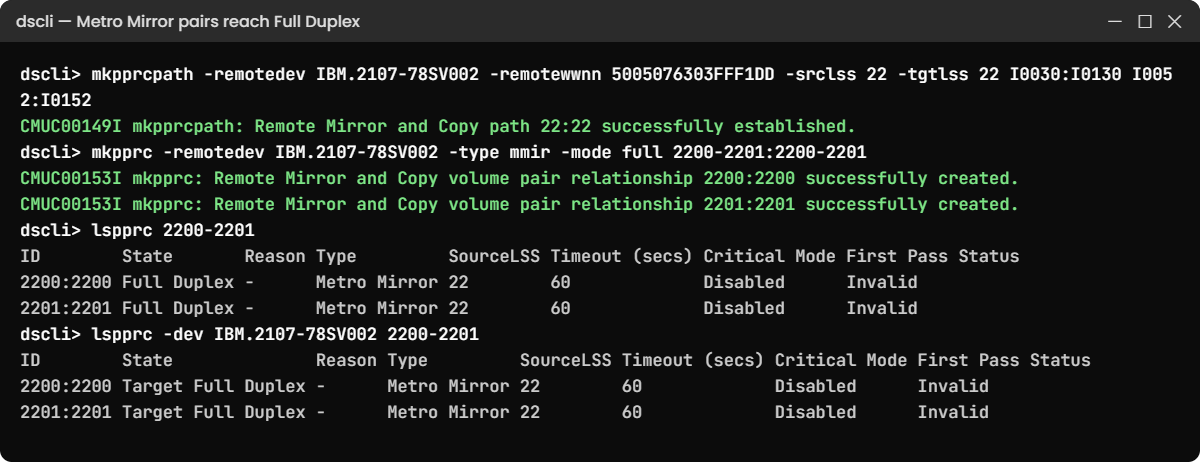
The main box says Full Duplex and the DR box says Target Full Duplex, which is the healthy state you’ll check every morning.
✅ Checkpoint: Full Duplex on 78SV001 and Target Full Duplex on 78SV002.
7Add a Global Copy pair for reporting
The reporting data can afford to lag a little, so it uses Global Copy instead.
Run these:
mkpprc -remotedev IBM.2107-78SV002 -type gcp -mode full 2202:2202
lspprc 2200-2202
You should see this:
dscli> mkpprc -remotedev IBM.2107-78SV002 -type gcp -mode full 2202:2202
CMUC00153I mkpprc: Remote Mirror and Copy volume pair relationship 2202:2202 successfully created.
dscli> lspprc 2200-2202
Date/Time: 24 October 2026 11:04:37 UTC IBM DSCLI Version: 7.10.10.348 DS: IBM.2107-78SV001
ID        State        Reason Type         SourceLSS Timeout (secs) Critical Mode First Pass Status
===================================================================================================
2200:2200 Full Duplex  -      Metro Mirror 22        60             Disabled      Invalid
2201:2201 Full Duplex  -      Metro Mirror 22        60             Disabled      Invalid
2202:2202 Copy Pending -      Global Copy  22        Unknown        Disabled      False
Global Copy pairs always show Copy Pending, even when they’ve fully caught up, so don’t raise an alarm over it. On real systems you’d add a Global Mirror session on top to get consistent DR data.
✅ Checkpoint: 2202:2202 shows Copy Pending, type Global Copy.
8Planned failover to DR
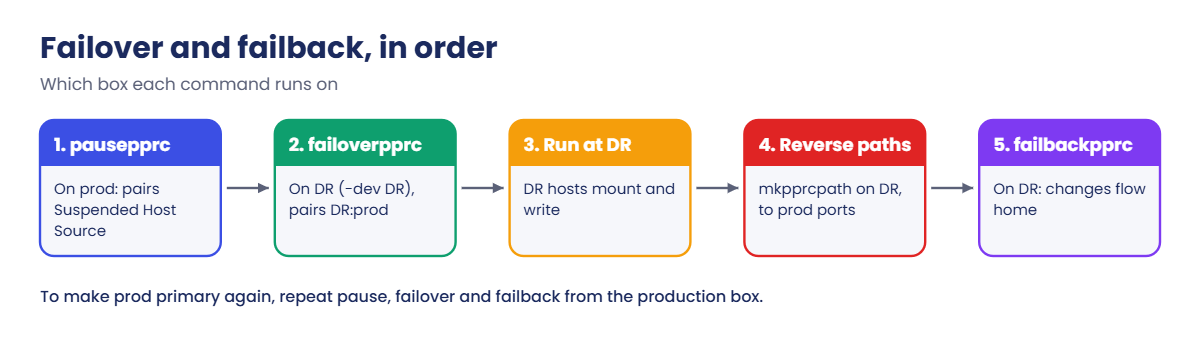
It’s DR test day and the payments app has been stopped at the main site. Pause the pairs, then fail over on the DR box.
Note that the pair is written DR:prod and -dev points at the DR box.
Run these:
pausepprc -remotedev IBM.2107-78SV002 2200-2201:2200-2201
lspprc 2200-2201
failoverpprc -dev IBM.2107-78SV002 -remotedev IBM.2107-78SV001 -type mmir 2200-2201:2200-2201
lspprc -dev IBM.2107-78SV002 2200-2201
You should see this:
dscli> pausepprc -remotedev IBM.2107-78SV002 2200-2201:2200-2201
CMUC00157I pausepprc: Remote Mirror and Copy volume pair 2200:2200 relationship successfully paused.
CMUC00157I pausepprc: Remote Mirror and Copy volume pair 2201:2201 relationship successfully paused.
dscli> lspprc 2200-2201
Date/Time: 24 October 2026 11:04:37 UTC IBM DSCLI Version: 7.10.10.348 DS: IBM.2107-78SV001
ID        State     Reason      Type         SourceLSS Timeout (secs) Critical Mode First Pass Status
=====================================================================================================
2200:2200 Suspended Host Source Metro Mirror 22        60             Disabled      Invalid
2201:2201 Suspended Host Source Metro Mirror 22        60             Disabled      Invalid
dscli> failoverpprc -dev IBM.2107-78SV002 -remotedev IBM.2107-78SV001 -type mmir 2200-2201:2200-2201
CMUC00196I failoverpprc: Remote Mirror and Copy pair 2200:2200 successfully reversed.
CMUC00196I failoverpprc: Remote Mirror and Copy pair 2201:2201 successfully reversed.
dscli> lspprc -dev IBM.2107-78SV002 2200-2201
Date/Time: 24 October 2026 11:04:37 UTC IBM DSCLI Version: 7.10.10.348 DS: IBM.2107-78SV002
ID        State     Reason      Type         SourceLSS Timeout (secs) Critical Mode First Pass Status
=====================================================================================================
2200:2200 Suspended Host Source Metro Mirror 22        60             Disabled      Invalid
2201:2201 Suspended Host Source Metro Mirror 22        60             Disabled      Invalid
On the DR box the volumes now show Suspended with reason Host Source, meaning they’re sources the DR hosts can mount, while the main site holds on to the image from the moment you paused.
✅ Checkpoint: lspprc on 78SV002 shows Suspended Host Source for 2200 and 2201.
9Fail back so changes flow home
After the test, the changes made at DR have to go back home. failbackpprc needs paths in the DR-to-prod direction, so create those first.
Run these:
mkpprcpath -dev IBM.2107-78SV002 -remotedev IBM.2107-78SV001 -remotewwnn 5005076303FFF0DD -srclss 22 -tgtlss 22 I0130:I0030 I0152:I0052
failbackpprc -dev IBM.2107-78SV002 -remotedev IBM.2107-78SV001 -type mmir 2200-2201:2200-2201
simctl tick 2
lspprc -dev IBM.2107-78SV002 2200-2201
lspprc 2200-2201
You should see this:
dscli> mkpprcpath -dev IBM.2107-78SV002 -remotedev IBM.2107-78SV001 -remotewwnn 5005076303FFF0DD -srclss 22 -tgtlss 22 I0130:I0030 I0152:I0052
CMUC00149I mkpprcpath: Remote Mirror and Copy path 22:22 successfully established.
dscli> failbackpprc -dev IBM.2107-78SV002 -remotedev IBM.2107-78SV001 -type mmir 2200-2201:2200-2201
CMUC00197I failbackpprc: Remote Mirror and Copy pair 2200:2200 successfully failed back.
CMUC00197I failbackpprc: Remote Mirror and Copy pair 2201:2201 successfully failed back.
dscli> simctl tick 2
SIM0112I simctl: clock advanced 2 minutes.
dscli> lspprc -dev IBM.2107-78SV002 2200-2201
Date/Time: 24 October 2026 11:06:37 UTC IBM DSCLI Version: 7.10.10.348 DS: IBM.2107-78SV002
ID        State       Reason Type         SourceLSS Timeout (secs) Critical Mode First Pass Status
==================================================================================================
2200:2200 Full Duplex -      Metro Mirror 22        60             Disabled      Invalid
2201:2201 Full Duplex -      Metro Mirror 22        60             Disabled      Invalid
dscli> lspprc 2200-2201
Date/Time: 24 October 2026 11:06:37 UTC IBM DSCLI Version: 7.10.10.348 DS: IBM.2107-78SV001
ID        State              Reason Type         SourceLSS Timeout (secs) Critical Mode First Pass Status
=========================================================================================================
2200:2200 Target Full Duplex -      Metro Mirror 22        60             Disabled      Invalid
2201:2201 Target Full Duplex -      Metro Mirror 22        60             Disabled      Invalid
The DR box is now the primary (Full Duplex) and the main box is the target. To make production the primary again, you’d pause, run failoverpprc on 78SV001 and then failbackpprc from 78SV001, the same steps in the opposite direction.
✅ Checkpoint: 78SV002 shows Full Duplex and 78SV001 shows Target Full Duplex.
Start fresh so no paths exist: run simctl reset in the shell, leave, and run setup-19.txt again. Then make the three mistakes new replication admins tend to make in their first month.
1Break it: pair before path, then the wrong WWNN
Try to create a pair before any path exists, and then try to create the path using the WWNN from your own lssi.
Run these:
mkpprc -remotedev IBM.2107-78SV002 -type mmir -mode full 2200:2200
mkpprcpath -remotedev IBM.2107-78SV002 -remotewwnn 5005076303FFF0DD -srclss 22 -tgtlss 22 I0030:I0130
lssi
You’ll get these errors:
dscli> mkpprc -remotedev IBM.2107-78SV002 -type mmir -mode full 2200:2200
CMUN03033E mkpprc: 2200:2200: No working Remote Mirror and Copy path exists from LSS 22 to LSS 22. Create one with mkpprcpath and check lspprcpath.
dscli> mkpprcpath -remotedev IBM.2107-78SV002 -remotewwnn 5005076303FFF0DD -srclss 22 -tgtlss 22 I0030:I0130
CMUN03004E mkpprcpath: 5005076303FFF0DD: This is the WWNN of the local storage image. Specify the WWNN of the remote storage image (run lssi on the remote box).
dscli> lssi
Date/Time: 24 October 2026 11:02:37 UTC IBM DSCLI Version: 7.10.10.348 DS: IBM.2107-78SV001
Name         ID               Storage Unit     Model WWNN             State  ESSNet
====================================================================================
ds8k-g10-lab IBM.2107-78SV001 IBM.2107-78SV000 A05   5005076303FFF0DD Online Enabled
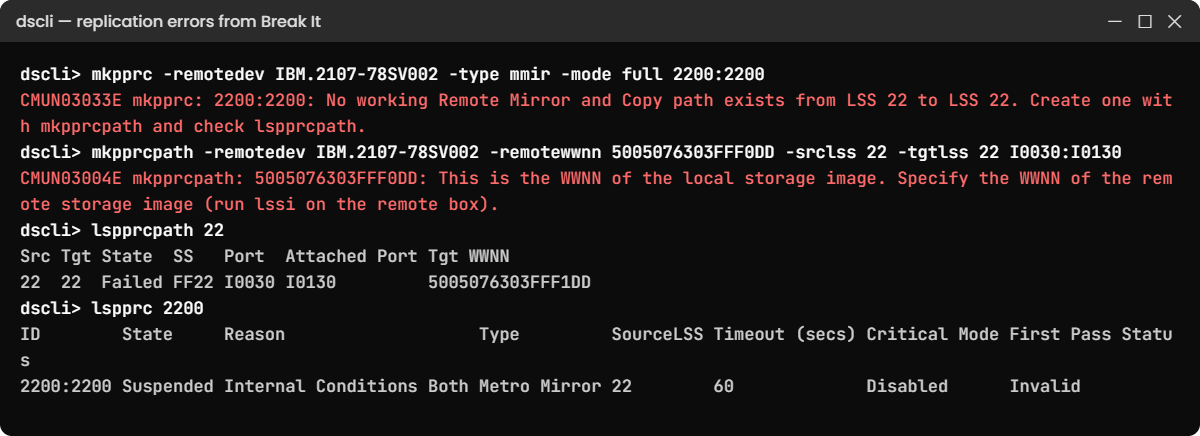
Why: a pair needs a working path between its two LSSs, and a path has to point at the other box’s WWNN. lssi on the main box shows 5005076303FFF0DD, which is the local system. (Both IDs are practice shell messages, but a real DS8000 refuses too.)
Fix: use the DR WWNN from lssi -dev IBM.2107-78SV002 and then create the pair. This time we build only one path, which sets things up for the next break.
Run these:
mkpprcpath -remotedev IBM.2107-78SV002 -remotewwnn 5005076303FFF1DD -srclss 22 -tgtlss 22 I0030:I0130
mkpprc -remotedev IBM.2107-78SV002 -type mmir -mode full 2200:2200
simctl tick 2
You should see this:
dscli> mkpprcpath -remotedev IBM.2107-78SV002 -remotewwnn 5005076303FFF1DD -srclss 22 -tgtlss 22 I0030:I0130
CMUC00149I mkpprcpath: Remote Mirror and Copy path 22:22 successfully established.
dscli> mkpprc -remotedev IBM.2107-78SV002 -type mmir -mode full 2200:2200
CMUC00153I mkpprc: Remote Mirror and Copy volume pair relationship 2200:2200 successfully created.
dscli> simctl tick 2
SIM0112I simctl: clock advanced 2 minutes.
✅ Checkpoint: 2200:2200 is created over one path.
2Break it: lose the only path
A SAN engineer swaps an SFP on the fabric that carries your only replication link.
Run these:
simctl linkfail I0030
lspprcpath 22
lspprc 2200
You’ll get this:
dscli> simctl linkfail I0030
SIM0113I simctl: replication link I0030 <-> I0130 is down.
dscli> lspprcpath 22
Date/Time: 24 October 2026 11:04:37 UTC IBM DSCLI Version: 7.10.10.348 DS: IBM.2107-78SV001
Src Tgt State  SS   Port  Attached Port Tgt WWNN
========================================================
22  22  Failed FF22 I0030 I0130         5005076303FFF1DD
dscli> lspprc 2200
Date/Time: 24 October 2026 11:04:37 UTC IBM DSCLI Version: 7.10.10.348 DS: IBM.2107-78SV001
ID        State     Reason                   Type         SourceLSS Timeout (secs) Critical Mode First Pass Status
==================================================================================================================
2200:2200 Suspended Internal Conditions Both Metro Mirror 22        60             Disabled      Invalid
Why: with every path to LSS 22 down, the DS8000 can’t send writes to DR, so it suspends the pair (reason Internal Conditions Both) and keeps production running. The DR copy is now ageing by the second, but no host sees an error, which is exactly why nobody notices.
Fix: bring the link back, recreate the paths with both port pairs in one command (mkpprcpath replaces the list rather than adding to it), and resume the pair.
Run these:
simctl linkfix I0030
mkpprcpath -remotedev IBM.2107-78SV002 -remotewwnn 5005076303FFF1DD -srclss 22 -tgtlss 22 I0030:I0130 I0052:I0152
lspprcpath 22
resumepprc -remotedev IBM.2107-78SV002 -type mmir 2200:2200
simctl tick 2
lspprc 2200
You should see this:
dscli> simctl linkfix I0030
SIM0113I simctl: replication link I0030 <-> I0130 is up.
dscli> mkpprcpath -remotedev IBM.2107-78SV002 -remotewwnn 5005076303FFF1DD -srclss 22 -tgtlss 22 I0030:I0130 I0052:I0152
CMUC00149I mkpprcpath: Remote Mirror and Copy path 22:22 successfully established.
dscli> lspprcpath 22
Date/Time: 24 October 2026 11:04:37 UTC IBM DSCLI Version: 7.10.10.348 DS: IBM.2107-78SV001
Src Tgt State   SS   Port  Attached Port Tgt WWNN
=========================================================
22  22  Success FF22 I0030 I0130         5005076303FFF1DD
22  22  Success FF22 I0052 I0152         5005076303FFF1DD
dscli> resumepprc -remotedev IBM.2107-78SV002 -type mmir 2200:2200
CMUC00158I resumepprc: Remote Mirror and Copy volume pair 2200:2200 relationship successfully resumed. This message is being returned before the copy completes.
dscli> simctl tick 2
SIM0112I simctl: clock advanced 2 minutes.
dscli> lspprc 2200
Date/Time: 24 October 2026 11:06:37 UTC IBM DSCLI Version: 7.10.10.348 DS: IBM.2107-78SV001
ID        State       Reason Type         SourceLSS Timeout (secs) Critical Mode First Pass Status
==================================================================================================
2200:2200 Full Duplex -      Metro Mirror 22        60             Disabled      Invalid
✅ Checkpoint: two Success paths and the pair back in Full Duplex.
If you’d rather writes stopped than ran unmirrored, that’s the job of -critmode on mkpprc and -consistgrp on mkpprcpath. Agree it with the business, because you’re trading availability for zero data loss.