DS CLI basics: profile, modes, help, return codes
-
Phase 0: Before you start
-
Phase 1: Plan and install
-
Phase 2: Build the storage
-
Phase 3: Copy Services
-
Phase 4: Run it day to day
-
Phase 5: Troubleshooting and career
DS CLI basics are the habits every DS8000 admin uses a hundred times a day: a profile so you don’t have to type the HMC address each time, a password file so the password never sits in a script, the three ways to run commands, the built-in help, and the return code that tells a script whether a command worked. Once you’ve got these right, every later lesson goes faster.
You installed the practice shell in Lesson 2 and read GUI screens with commands in Lesson 8, and now you’ll set the DS CLI up the way a real team does: build a profile, create a password file, run the same check in single-shot, interactive and script mode, and catch failures through return codes.
It all runs in the practice shell on your laptop. The file names, flags and modes match the real DS CLI, so the habits carry straight over to work.
| Time | You need | By the end you can |
|---|---|---|
| 60 to 75 minutes | Python 3, ds8sim.py in C:\ds8k-lab (or ~/ds8k-lab), and a text editor such as Notepad++ or VS Code | Write a DS CLI profile with a password file, run commands in all three modes, use help, -h and -s, change the output format for scripts, and read return codes 0, 2, 5 and 6 |
What it is, in one line
The DS CLI is a command-line client that logs in to a DS8000 through its HMC; a profile stores your connection settings, three modes decide how commands are fed in, and a return code tells you if each run worked.
In Simple Words
Ordering tea at the school canteen
Picture the school canteen, where there are three ways to get your food.
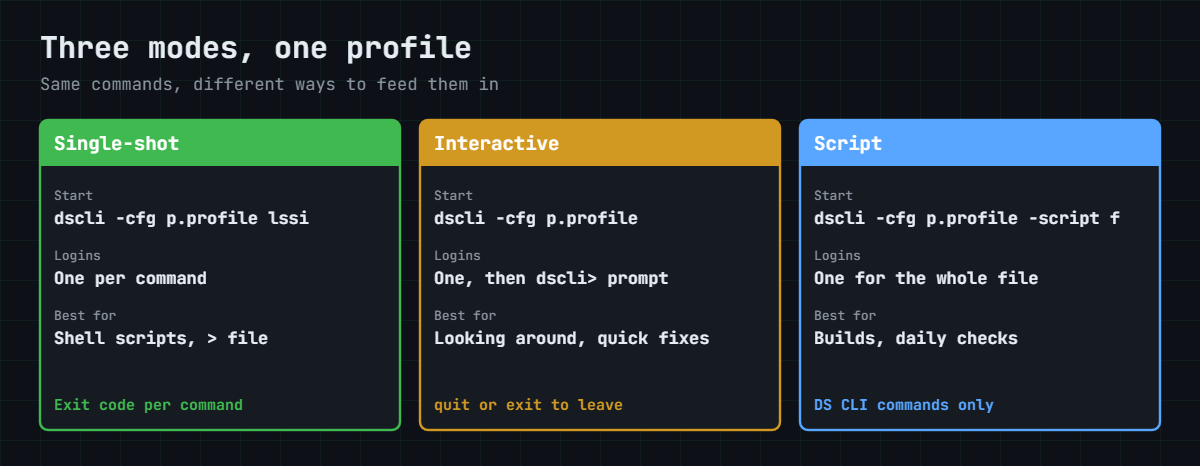
You can walk up, say “one tea”, pay and leave, and next time you queue again from the start; that’s single-shot mode. You can sit at a table while the waiter stays with you and order tea, then a samosa, then water, without queueing again, which is interactive mode. Or you can hand the waiter a written list (tea, samosa, water) and he brings it all in one go, and that’s script mode.
Your canteen card has your name and class printed on it so you don’t have to say them each time, and that card is the profile. Your secret PIN isn’t written on the card but kept in a sealed envelope, which is the password file. When the waiter comes back he either says “done” or tells you what went wrong, “no samosas left” or “wrong PIN”, and that answer is the return code.
Engineer's View
How the DS CLI client really works
The DS CLI is a Java client you install on a Windows, Linux, AIX or z/OS workstation (Lesson 2). It talks to the DS8000 over the network through an HMC and never directly to the storage servers, and there’s also an embedded DS CLI inside the DS GUI.
- Minimum login data: the HMC IP address or host name, a user name and a password.
- Profiles: the install puts a default
dscli.profilein the DS CLI profile folder. A personal copy under your home folder (for example%USERPROFILE%\dscli\profile\dscli.profile) wins over the system one. Extra named profiles are loaded with-cfg name. - Profile keys:
hmc1,hmc2,username,pwfile,devid,remotedevid, plus output settingsbanner,header,format(default, xml, delim or stanza) andpaging(24 rows by default in interactive mode). - Two HMCs: when both
hmc1andhmc2are set, the client moves over to HMC 2 on its own if HMC 1 can’t be reached. - Password file:
managepwfilewrites an encrypted file (security.datunder your profile folder by default). IBM is clear on this: keep the password out of the profile and pointpwfileat this file instead. - Command shape: the command name comes first, then the flags with their parameters, and the command parameters (IDs) go last, as in
lsrank -dev IBM.2107-78SV001 -l R1 R2 R3. - Modes: single-shot (log in, run one command, log out), interactive (a
dscli>prompt with history) and script (-script file, one login for many commands, DS CLI commands only). - Return codes: every run finishes with an exit status. IBM documents 0 for success, 2 for a syntax error, 3 for a connection error, 4 for a server error, 5 for an authentication error and 6 for an application error.
A tip from the Redbook: a new DS CLI install can overwrite the default profile, so keep your settings in your own copy.
On DS8900F: it’s the same client with the same profile keys and modes. Match the DS CLI version to the code level of the system you’re managing.
How it works, step by step
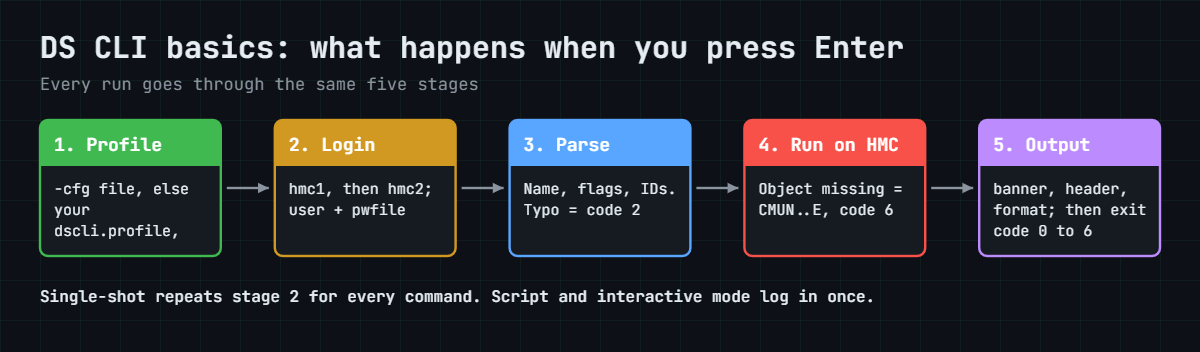
This is what happens between pressing Enter and seeing output, and knowing the order makes every error message easier to understand later.
1The client reads your profile
When you type dscli (or python ds8sim.py in our lab), the client looks for a profile first. If you used -cfg it loads that file, otherwise it takes your personal dscli.profile, and if you don’t have one it falls back to the system default.
Any flag you type on the command line beats the same key in the profile, so -fmt delim overrides format: default for that one run.
2It logs in through an HMC
The client connects to hmc1, and if that HMC doesn’t answer and hmc2 is set, it tries the second one. It then sends the user name and the password, which it takes from -passwd, from the password file or from a prompt.
The login is the slow part. In single-shot mode it happens for every single command, which is why a loop of 200 single-shot commands takes far longer than one script.
3It picks the storage image
Most commands need to know which DS8000 you mean. You can type -dev IBM.2107-78SV001 every time or put devid: IBM.2107-78SV001 in the profile once, and if you look after two or more systems, a profile per system keeps you from changing the wrong one.
4It parses the command
Every command follows the same pattern of name, flags, flag values and then the object IDs, and the client checks that shape before sending anything. A typo like -x fails right here with a syntax error and return code 2, and the DS8000 never sees it.
5The HMC runs it and answers
The HMC passes the request on to the storage servers and sends back the result. If the object doesn’t exist or the action isn’t allowed, you get an error message with an ID such as CMUN followed by digits and the letter E, and the run ends with return code 6, an application error.
6The client formats the output
Output goes through four settings: banner (the Date/Time line), header (column names), format (the default table, delim for CSV-style, stanza for one field per line, or xml) and paging for long lists. People read the default, and scripts read -bnr off -hdr off -fmt delim.
7It exits with a return code
When the client exits, the operating system gets an exit status, which you read with $LASTEXITCODE in PowerShell and $? in bash. A monitoring script checks it after every run and raises an alert whenever it isn’t 0.
| Code | Meaning | Typical cause |
|---|---|---|
| 0 | Success | The command worked |
| 2 | Syntax error | Wrong flag, missing parameter, bad profile name, non-DS CLI line in a script |
| 3 | Connection error | HMC address wrong or unreachable |
| 4 | Server error | A problem on the HMC or storage side |
| 5 | Authentication error | Wrong user or password, locked account |
| 6 | Application error | Valid syntax but the action failed, for example an object that doesn’t exist |
In interactive mode you see the message but not the code, because the client is still running, so that’s another reason to stick to script or single-shot mode for automation.
Hands-on lab: profile, password file, modes and return codes
Before you run any command, double-check it
Read every command twice before you press Enter. Check the target: the system or account, the IDs, the names and the sizes. These commands are for learning and were tested in our lab, not on your system. At work, run the read-only list commands first, follow your change process, make sure a backup exists, and ask a second person to check anything that changes or deletes data. You run them at your own risk.
You’ll build the same toolkit a storage team keeps on its jump server: one profile, one password file and one health-check script. Every step runs in the practice shell, which takes the same -cfg, -script, -fmt, -bnr and -hdr options as the real dscli command.
Practice shell note: the practice shell is our own teaching tool, not IBM software, and real DS CLI output looks very close to this but isn’t identical. The first line of every run (“SaatVedha DS8000 practice shell…”) is ours, and the real DS CLI doesn’t print it. Some CMUN messages here come from the practice shell and are listed on the practice shell page. All the outputs below are what the shell printed.
1Start from a clean practice DS8000
Open PowerShell in your lab folder. Log in once and reset the shell, then log in again with admin / admin and set the password Passw0rd1 when it asks.
Run this:
cd C:\ds8k-lab
python ds8sim.py
simctl reset -all
quit
python ds8sim.py✅ Checkpoint: You are at dscli> again with your new password. Type quit.
2Create an encrypted password file
A password typed into a script ends up in shell history, log files and Git. managepwfile keeps it in a file instead, keyed by HMC address and user name, and since you run it here in single-shot mode, the login details go on the same line.
Run this:
python ds8sim.py -hmc1 10.0.0.1 -user admin -passwd Passw0rd1 managepwfile -action add -name admin -pw Passw0rd1 -pwfile security.datYou should see this:
SaatVedha DS8000 practice shell — not IBM software. Real DS CLI output looks like this but is not identical.
CMUC00206I managepwfile: Record 10.0.0.1/admin successfully added to password file security.dat.That’s the last time the password shows up on a command line. Clear your PowerShell history afterwards with Clear-History, or better still, leave out -passwd and let the shell prompt you for it.
✅ Checkpoint: A file called security.dat now sits in your lab folder.
3Write your first profile
In the lab folder, create a text file called lab.profile with these six lines (lines starting with # are comments).
File lab.profile:
# SaatVedha lab profile
hmc1: 10.0.0.1
hmc2: 10.0.0.2
username: admin
pwfile: security.dat
devid: IBM.2107-78SV001Run this:
python ds8sim.py -cfg lab.profile lssiYou should see this:
SaatVedha DS8000 practice shell — not IBM software. Real DS CLI output looks like this but is not identical.
Date/Time: 24 October 2026 10:56:58 UTC IBM DSCLI Version: 7.10.10.348 DS: IBM.2107-78SV001
Name ID Storage Unit Model WWNN State ESSNet
====================================================================================
ds8k-g10-lab IBM.2107-78SV001 IBM.2107-78SV000 A05 5005076303FFF0DD Online EnabledThere’s no IP address, no user, no password and no -dev, because the profile and the password file took care of all of it.
✅ Checkpoint: lssi works with only -cfg lab.profile.
4Ask the shell for help
Three forms of help cover nearly everything: help lists every command, help -s name gives you one line, and name -h shows the full usage.
Run this:
python ds8sim.py -cfg lab.profile help -s lsioport
python ds8sim.py -cfg lab.profile lsioport -hYou should see this:
SaatVedha DS8000 practice shell — not IBM software. Real DS CLI output looks like this but is not identical.
lsioport Displays a list of I/O ports.
SaatVedha DS8000 practice shell — not IBM software. Real DS CLI output looks like this but is not identical.
Usage: lsioport [ { -help|-h|-? } ] [-dev storage_image_ID] [-s | -l] [port_ID ...]Read the usage line from left to right. Optional flags sit in square brackets, there’s a choice between -s and -l, and the port IDs come last, in the same order as every other DS CLI command.
✅ Checkpoint: You can tell which part of the usage line is a flag and which is a command parameter.
5Run a health check in script mode
Make a file called check.txt containing only DS CLI commands (comments and blank lines are fine too).
File check.txt:
# Morning health check for ds8k-g10-lab
# Lines that start with # are comments
lsserver
lsioportRun this:
python ds8sim.py -cfg lab.profile -script check.txtYou should see this:
SaatVedha DS8000 practice shell — not IBM software. Real DS CLI output looks like this but is not identical.
Date/Time: 24 October 2026 10:56:58 UTC IBM DSCLI Version: 7.10.10.348 DS: IBM.2107-78SV001
ID Image ID Image Name Power Control SFI State
=============================================================
server0 IBM.2107-78SV001 ds8k-g10-lab Online Online
server1 IBM.2107-78SV001 ds8k-g10-lab Online Online
Date/Time: 24 October 2026 10:56:58 UTC IBM DSCLI Version: 7.10.10.348 DS: IBM.2107-78SV001
ID WWPN State Type topo portgrp Security
===========================================================================================
I0010 50050763030130DD Offline Fibre Channel-LW - 0 Disabled
I0011 50050763030170DD Offline Fibre Channel-LW - 0 Disabled
(output shortened)That’s one login for two commands. Even with 50 commands in the file you’d still only log in once, which is why teams use scripts for builds and daily checks.
✅ Checkpoint: Both servers show Online and the port list follows.

6Change the output for people and for scripts
The same data can come out in different shapes. Stanza is easy to read when you’re looking at one object, and delimited output with no banner and no header is easy for PowerShell, Python or Excel to split up.
Run this:
python ds8sim.py -cfg lab.profile -fmt stanza lsserver
python ds8sim.py -cfg lab.profile -bnr off -hdr off -fmt delim lsioportYou should see this:
SaatVedha DS8000 practice shell — not IBM software. Real DS CLI output looks like this but is not identical.
Date/Time: 24 October 2026 10:56:59 UTC IBM DSCLI Version: 7.10.10.348 DS: IBM.2107-78SV001
ID server0
Image ID IBM.2107-78SV001
Image Name ds8k-g10-lab
Power Control Online
SFI State Online
ID server1
Image ID IBM.2107-78SV001
Image Name ds8k-g10-lab
Power Control Online
SFI State Online
SaatVedha DS8000 practice shell — not IBM software. Real DS CLI output looks like this but is not identical.
I0010,50050763030130DD,Offline,Fibre Channel-LW,-,0,Disabled
I0011,50050763030170DD,Offline,Fibre Channel-LW,-,0,Disabled
I0012,500507630301B0DD,Offline,Fibre Channel-LW,-,0,Disabled
I0013,500507630301F0DD,Offline,Fibre Channel-LW,-,0,Disabled
I0030,50050763030330DD,Communication established,Fibre Channel-SW,SCSI-FCP,0,Disabled
I0031,50050763030370DD,Offline,Fibre Channel-SW,-,0,Disabled
I0032,500507630303B0DD,Communication established,Fibre Channel-SW,SCSI-FCP,0,Disabled
(output shortened)✅ Checkpoint: The delim output has no Date/Time line and no column names, one port per line.
7Catch return codes in PowerShell
Next, let a script decide whether a command worked. $LASTEXITCODE holds the exit status of the last program PowerShell ran (in bash, use echo $?).
Run this:
python ds8sim.py -cfg lab.profile lssi
echo $LASTEXITCODE
python ds8sim.py -cfg lab.profile showioport I0099
echo $LASTEXITCODEYou should see this:
SaatVedha DS8000 practice shell — not IBM software. Real DS CLI output looks like this but is not identical.
Date/Time: 24 October 2026 10:56:58 UTC IBM DSCLI Version: 7.10.10.348 DS: IBM.2107-78SV001
Name ID Storage Unit Model WWNN State ESSNet
====================================================================================
ds8k-g10-lab IBM.2107-78SV001 IBM.2107-78SV000 A05 5005076303FFF0DD Online Enabled
0
SaatVedha DS8000 practice shell — not IBM software. Real DS CLI output looks like this but is not identical.
CMUN04034E showioport: I0099: The I/O port does not exist.
6Port I0099 doesn’t exist. The command line itself was valid, so it isn’t a syntax error; the request failed on the storage side, which makes it an application error, code 6.
✅ Checkpoint: You saw 0 for the good run and 6 for the missing port.
Break It, Then Fix It
Most broken DS CLI automation comes down to two failures: a non-DS CLI line inside a script, and a password that’s been changed while the scripts still use the old one. You’ll break both on purpose.
1Break it: put a Windows command inside a script
People often paste a dir or echo into a DS CLI script to “see where they are”. Make bad.txt like this and run it.
File bad.txt:
lsserver
dir
lsioportRun this:
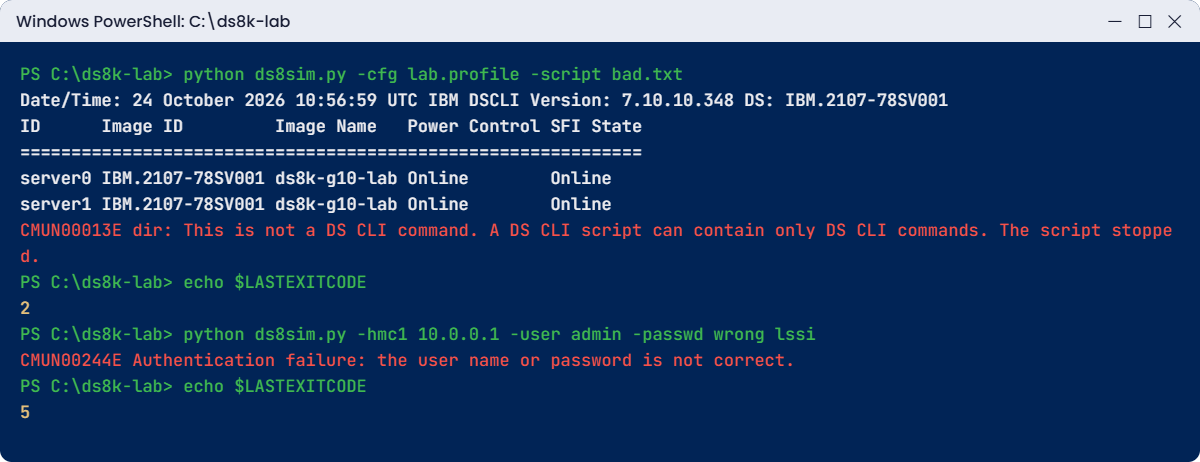
python ds8sim.py -cfg lab.profile -script bad.txt
echo $LASTEXITCODEYou’ll get this error:
SaatVedha DS8000 practice shell — not IBM software. Real DS CLI output looks like this but is not identical.
Date/Time: 24 October 2026 10:56:59 UTC IBM DSCLI Version: 7.10.10.348 DS: IBM.2107-78SV001
ID Image ID Image Name Power Control SFI State
=============================================================
server0 IBM.2107-78SV001 ds8k-g10-lab Online Online
server1 IBM.2107-78SV001 ds8k-g10-lab Online Online
CMUN00013E dir: This is not a DS CLI command. A DS CLI script can contain only DS CLI commands. The script stopped.
2Why: a DS CLI script can only contain DS CLI commands, comments and blank lines, and the IBM Redbook warns that shell commands make it fail. Notice that lsserver had already run before it stopped, so a build script that fails halfway can leave half-built objects lying around.
The practice shell stops at the bad line and returns code 2.
Fix: delete the dir line. If you need operating system commands, put them in a PowerShell or bash wrapper that calls the DS CLI, and never inside the DS CLI script itself.
Run this:
python ds8sim.py -cfg lab.profile -script check.txt
echo $LASTEXITCODEYou should see this:
SaatVedha DS8000 practice shell — not IBM software. Real DS CLI output looks like this but is not identical.
Date/Time: 24 October 2026 10:56:58 UTC IBM DSCLI Version: 7.10.10.348 DS: IBM.2107-78SV001
ID Image ID Image Name Power Control SFI State
=============================================================
server0 IBM.2107-78SV001 ds8k-g10-lab Online Online
server1 IBM.2107-78SV001 ds8k-g10-lab Online Online
(output shortened)
0✅ Checkpoint: The clean script runs both commands and returns 0.
2Break it: log in with an old password
Passwords expire (365 days on the lab system) and somebody changes them, so simulate a script that’s still sending the old one.
Run this:
python ds8sim.py -hmc1 10.0.0.1 -user admin -passwd wrong lssi
echo $LASTEXITCODEYou’ll get this error:
SaatVedha DS8000 practice shell — not IBM software. Real DS CLI output looks like this but is not identical.
CMUN00244E Authentication failure: the user name or password is not correct.
5Why: the login failed before any command ran, so the code is 5, an authentication error, and not 6. The difference matters, because a 5 means “fix the credentials” while a 6 means “fix the request”.
On a real DS8000 every failed login also counts toward the account lock limit, so a scheduled script with an old password can end up locking the account for everybody.
Fix: update the password in one place, the password file, with managepwfile -action change, and every script using the profile picks up the new password straight away.
Run this:
python ds8sim.py -cfg lab.profile lssi
echo $LASTEXITCODEYou should see this:
SaatVedha DS8000 practice shell — not IBM software. Real DS CLI output looks like this but is not identical.
Date/Time: 24 October 2026 10:56:58 UTC IBM DSCLI Version: 7.10.10.348 DS: IBM.2107-78SV001
Name ID Storage Unit Model WWNN State ESSNet
====================================================================================
ds8k-g10-lab IBM.2107-78SV001 IBM.2107-78SV000 A05 5005076303FFF0DD Online Enabled
0✅ Checkpoint: The profile login works and returns 0.
This happened at work
The night the build script published the admin password
A private bank ran four DS8000 systems across two data centres, and the storage team kept its build and check scripts in an internal Git repository so that changes got reviewed. Just before a long weekend, one engineer in a hurry wrote a new daily capacity script with dscli -hmc1 ... -user admin -passwd ... on the first line and pushed it.
Three weeks later the bank’s security scanner raised a “credential in source code” finding. By then the repository had been mirrored to a wider developer group, so around 60 people could read it, and since the team used the same admin password everywhere, all four systems were exposed.
Sorting it out took two days. The team changed the admin password on every DS8000 and then discovered that eleven scheduled scripts and two monitoring jobs were still using the old one. Several jobs failed overnight with return code 5, and one kept retrying until it locked the admin account in the middle of a Copy Services test.
The fix was simple but strict. Every script now uses -cfg with a per-system profile and a password file made by managepwfile, kept outside Git. Monitoring runs under a separate user in the monitor group, and a pre-commit hook rejects any file that contains -passwd.
What the team wrote in its runbook afterwards was that a password in a script ends up in every copy of that script, for good.
Common mistakes and troubleshooting
| Symptom | Likely cause | What to check / fix |
|---|---|---|
| The profile you edited seems ignored | A personal dscli.profile in your home folder wins over the system one, or -cfg points elsewhere | Check which file is loaded; keep one profile per system and call it with -cfg |
| Settings vanish after a DS CLI upgrade | The install replaced the default profile | Never edit the default; save your own copy and use -cfg |
| Commands go to the wrong DS8000 | devid missing, or two devid lines (the last one wins) | Keep one devid per profile; confirm with lssi before changes |
| Script stops halfway with a “not a DS CLI command” style error | Shell command or typo in the script | Only DS CLI commands, # comments and blank lines in the file |
| Return code 5 in the night job | Password changed or account locked | Update the password file with managepwfile -action change; ask an admin to release the locked account |
| Parsing script breaks after an upgrade | Columns or banner changed | Use -bnr off -hdr off -fmt delim (or xml) and parse by field |
| Interactive output stops with Press Enter | Paging is on (24 rows) | Set paging:off in the profile or use script mode |
A good habit is to start every automation script with lssi and check that the storage image ID matches the one in your change ticket, and to stop if it doesn’t.
Interview questions
Click a question to open it. Each one is phrased the way an interviewer would ask it, and under it you’ll see why they ask and one way you could answer in your own words.
Fresher level
1. What are the three ways to run DS CLI commands, and when would you use each?
Why they ask this: They want to know you’ve used the tool yourself and haven’t only read about it.
How you might answer: Single-shot runs one command with the login on the same line, which is handy inside a shell script or when I’m sending the output to a file. Interactive gives me a dscli prompt where I can type lots of commands on one login.
Script mode runs a file of DS CLI commands with -script on a single login, so that’s what I use for builds and daily checks.
2. What is a DS CLI profile and what would you put in it?
Why they ask this: Using profiles shows you work in a tidy, repeatable way and avoid typing errors.
How you might answer: It’s a text file with my connection settings that I load with -cfg. I put in hmc1 and hmc2, the username, a pwfile pointing at the password file from managepwfile, and devid with the storage image ID. I keep one profile per DS8000 so I can’t aim a command at the wrong box.
2–5 years experience
3. Your nightly DS CLI job failed. How do you use the return code to decide what to do?
Why they ask this: They want to see that you can triage automation failures quickly and correctly.
How you might answer: I’d read the exit code first. A 2 means the script or a flag is wrong, so I fix the file. A 3 means the client couldn’t reach the HMC, so I look at the network and hmc2, and a 5 means the login failed, usually because of an expired password or a locked account.
A 6 means the command was valid but the action failed, so I read the CMUN message, which might say the object doesn’t exist. Every wrapper script I write logs the code and alerts on anything other than 0.
4. A colleague put dir and echo lines inside a DS CLI script and it stopped halfway. Explain what happened and how you would redesign it.
Why they ask this: They’re checking whether you know the script mode rules and think about changes left half done.
How you might answer: A DS CLI script can only hold DS CLI commands, comments and blank lines, so the client stopped at the first line that wasn’t one. Whatever came before it had already run, so I’d check what got created. Then I’d split it into a PowerShell or bash wrapper for logging and file work and a pure DS CLI script called with -cfg and -script, with the return code checked after the call.
Senior level
5. How would you run DS CLI automation safely across ten DS8000s in two data centres?
Why they ask this: Senior engineers design for scale, security and mistakes, and not just for one box.
How you might answer: I’d keep one profile per system with its own devid and both HMCs, and the password files from managepwfile would live outside Git with tight file permissions. Automation would run under named service users with the smallest role, monitor for checks, say.
Every script would start with lssi and stop if the ID didn’t match the change record. Anything that gets parsed would use -bnr off -hdr off -fmt delim, and the wrapper would alert on any return code that isn’t zero.
6. A security review found the DS8000 admin password in a Git repository. What do you do in the first day?
Why they ask this: They want to see calm incident handling: contain it, rotate the password, work out the blast radius and stop it happening again.
How you might answer: Straight away I’d change the password on every system that shared it and check the audit log for logins I can’t explain. Then I’d track down every script and monitoring job that used it and move them to profiles with password files, so the next change only happens in one place. Last, I’d clean the repository history, add a commit check for -passwd and stop sharing one admin account.
Quick quiz
Q1. Which option loads a named DS CLI profile?
- -profile
- -cfg
- -script
- -dev
Show answer
B — -cfg name tells the DS CLI which profile file to load.
Q2. Which command creates an encrypted password file?
- mkuser
- chpass
- managepwfile
- showpass
Show answer
C — managepwfile -action add stores the password for an HMC and user in a file you point to with pwfile.
Q3. What can a DS CLI script file contain?
- Any Windows or Linux command
- DS CLI commands, comments starting with # and blank lines
- Only one command
- Only list commands
Show answer
B — Shell commands in a DS CLI script make it fail.
Q4. A script logs in with an old password. Which return code do you expect?
- 0
- 2
- 5
- 6
Show answer
C — 5 is an authentication error. The login failed before any command ran.
Q5. Which options make output easiest for another program to parse?
- -fmt stanza
- -bnr off -hdr off -fmt delim
- -l
- -s -h
Show answer
B — No banner, no header and delimited fields give one clean record per line.
Quick recap
- The DS CLI logs in through an HMC; it needs an HMC address, a user and a password.
- Profiles hold hmc1, hmc2, username, pwfile and devid; load your own with -cfg and never edit the default.
- managepwfile keeps the password out of scripts and history.
- Single-shot, interactive and script mode each fit a different job; scripts may hold only DS CLI commands.
- help, help -s and command -h answer most syntax questions.
- Return codes: 0 success, 2 syntax, 3 connection, 4 server, 5 authentication, 6 application.
Next lesson
Lesson 10: I/O port setup: FCP, FICON and topology → You set host adapter ports to SCSI-FCP or FICON with setioport and learn when you need -force.
Further reading: DS CLI basics
For more on DS CLI basics, IBM Redbook SG24-8559, sections 10.1.8 to 10.1.13 covers profiles, modes, return codes and help. If you skipped the install, go back to Lesson 2: your lab, DS CLI and the practice shell.
You can also see the full plan for this course on the IBM DS8000 Implementation course page.
Try it yourself: open the DS8000 health check command builder. It gives you ver -l, lssi, lsserver, lsarray, lsextpool and lsioport in one block to paste before and after every change.
