A DS8000 project from delivery to first LUN
-
Phase 0: Before you start
-
Phase 1: Plan and install
-
Phase 2: Build the storage
-
Phase 3: Copy Services
-
Phase 4: Run it day to day
-
Phase 5: Troubleshooting and career
A DS8000 implementation plan is the list of jobs, owners and dates that gets a new IBM DS8000 from the delivery truck to the first LUN a server can use. Without one, the storage turns up on time and then sits in a corridor for a week, but with one the hardware goes in on the planned day and your first host sees its disks on two paths.
This lesson opens the Implementation course. The Architecture course showed you what’s inside the frame, and now you’ll see how a real project runs, who does what, and in which order.
Along the way you build a small Python plan checker that tells you which tasks you can start today and warns you when someone does a step too early.
You don’t need any DS CLI commands yet, so if you can open PowerShell or Terminal and run a Python file, you’re ready.
| Time | You need | By the end you can |
|---|---|---|
| 60 to 75 minutes | A laptop with Python 3.8 or newer, the SaatVedha practice shell (optional for the last step) | Name the six phases of a DS8000 project, say who owns each one, and check a project plan for tasks done in the wrong order |
What it is, in one line
A DS8000 implementation plan lists every task from site survey to first LUN, with an owner and an order, so the hardware install and the logical setup happen right the first time.
In Simple Words
Moving into a new house
Your family is moving into a new house, and the truck with all your furniture is coming on Saturday. Before then somebody has to check that the big cupboard fits through the front door, somebody has to make sure the lights and water are on, and somebody has to decide which room each box goes into.
If nobody does this, the truck turns up, the cupboard gets stuck in the gate and the movers stand around for hours while your parents pay for the extra time.
So your mother writes a list and sticks it on the fridge, with a job, a name and a day on each line: “Measure the door: Dad, Monday. Electricity on: Mum, Wednesday. Label the boxes: you, Friday.”
A DS8000 project works the same way, except the furniture is a 924 kg storage frame, the front door is the lift and the data centre door, and the list on the fridge is the implementation plan.
Engineer's View
What the Redbook says you must plan
IBM or an IBM Business Partner installs the hardware, and that part belongs to the IBM SSR (Systems Service Representative). Nearly everything around it is your job as the client:
- Physical planning: model, frames, power, cooling and floor space. A DS8A50 model A05 ships in a package of 2.22 m × 1.00 m × 1.50 m that weighs up to 924 kg, and it draws up to 9.1 kW.
- Installation planning: the delivery route, the IP addresses for the two HMCs and the SAN cabling.
- Integrations: LDAP for logins, Assist On-site (AOS) and Call Home for IBM support, IBM Storage Insights or IBM Spectrum Control and SNMP for monitoring, and external key servers if you use them for encryption.
- Logical configuration: arrays, pools, volumes and host mapping, which you do with the DS GUI or DS CLI. IBM can also do it for you as a paid service.
Before delivery you also have to fill in the configuration worksheets (IBM sometimes calls them customization worksheets, Appendix D of the Introduction and Planning Guide G10-I53-01). They cover company contacts, the HMC network, remote support and Call Home, SNMP and email notification, power mode, and control switches for IBM i and IBM Z hosts, and IBM asks you to hand them to the SSR before the system arrives.
The people involved are the project manager, the systems and storage administrators, the installation planning engineer, the building engineer (floor load, air conditioning, power), security engineers (AOS, LDAP, key servers), operators, and the IBM SSR or Business Partner.
There are two order rules you mustn’t break. If you use data-at-rest encryption, it’s set up before any logical configuration, and the Base Function activation codes are mandatory, so get them before install day. Also, the Local Key Management option has to be chosen when the system is ordered, because you can’t add it later with a licence.
On DS8900F: the project phases and worksheets follow the same idea, and only the numbers (weights, power, models) change, so always read the planning guide for your exact model.
How it works, step by step
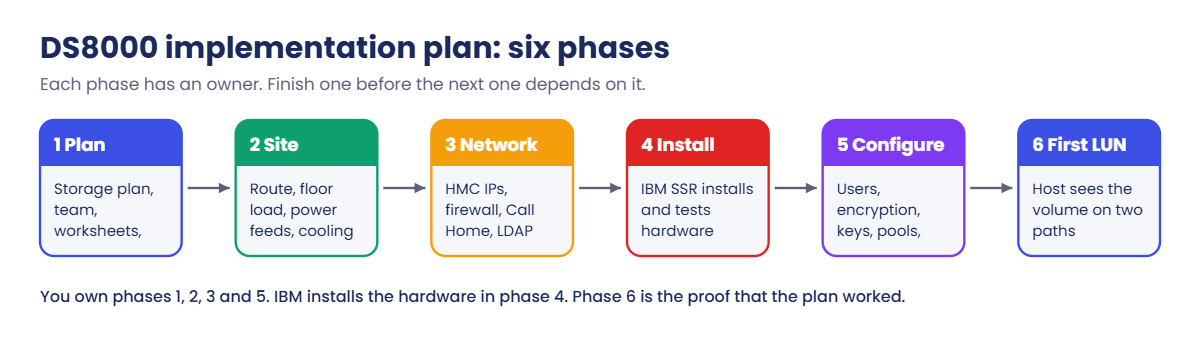
Every DS8000 project you join will follow roughly the same six phases. Companies call them different things, but the order stays the same. We’ll use a real example: a bank replacing an old DS8886 with a new DS8A50 for its core banking and card systems.
1Plan: decide what you are building
The storage administrator gathers what every application needs: how much capacity, which hosts, FCP or FICON, and how much growth over the next three to five years. The Redbook’s first piece of advice is to plan for growth, so you don’t have to stop production to add things later.
The project manager names the team and books the dates, and the storage admin asks IBM for the activation codes. The Base Function codes are mandatory, because without them you can’t create any storage.
2Site: make the room ready
The building engineer checks the route from the loading bay to the final spot, looking at door widths, lifts, ramps and floor load. A packed DS8A50 base frame is 2.22 m tall and weighs up to 924 kg, so a normal office lift may not take it.
The same engineer gets two separate power feeds ready, plus the cooling and the floor tile cut-outs for the cables. Each frame’s power cords have to go to separate AC distribution systems, so a single failed feed can’t stop the box.
3Network and security: give the HMCs a home
The network team assigns IP addresses for both HMCs and opens the firewall for remote support and Call Home, while the security team agrees on LDAP, multifactor login and, if needed, the external key servers. All of it goes into the configuration worksheets.
Hand the finished worksheets to the IBM SSR before the system arrives. Nothing else you do makes install day go as smoothly.
4Install: IBM puts it together
The IBM SSR unpacks the frame, connects power, starts both CPCs and both HMCs and tests Call Home. By the end of the day you have a working system with no arrays, no pools and no volumes, a bit like an empty building with the lights on.
5Configure: build the storage
Now it’s your turn. You follow IBM’s configuration flow from Chapter 8 of the Redbook: create your own user accounts, set up encryption if you use it, install the licence keys, create a pool pair and add arrays, set the FC ports to FCP or FICON, define hosts with their WWPNs, and then create volumes and map them.
Every step needs the one before it, so you can’t create a pool before the keys are in, and you can’t map a volume to a host that doesn’t exist yet.
6First LUN: prove it works
The project isn’t finished when the DS8000 says “volume created”. It’s finished when the server team sees the new disk on two paths, through two host adapters in two different I/O enclosures, and can write data to it, because that first LUN proves power, network, SAN and configuration all fit together.
Over the rest of this course you’ll do each of these phases yourself: physical planning in Lesson 3, the Management Console in Lesson 4, users in Lesson 5, licences in Lesson 6, and the configuration flow from Lesson 7 onwards.
A word on ownership. IBM installs the hardware, but the plan, the worksheets and the logical setup are the client’s job, and on install day the SSR can’t fill the gaps you’ve left.
Hands-on lab: build and check a project plan
Before you run any command, double-check it
Read every command twice before you press Enter. Check the target: the system or account, the IDs, the names and the sizes. These commands are for learning and were tested in our lab, not on your system. At work, run the read-only list commands first, follow your change process, make sure a backup exists, and ask a second person to check anything that changes or deletes data. You run them at your own risk.
Here you build the plan the way a project team keeps it, as a simple CSV file anyone can open in Excel, and then write a small Python checker for two things a busy project manager tends to forget: which tasks are ready to start, and which ones were marked done before the tasks they depend on.
At the end you’ll use the SaatVedha practice shell to run the “day one” check a storage admin does when IBM hands over a new system.
1Make your lab folder
Use the same folder as the Architecture course: C:\ds8k-lab on Windows or ~/ds8k-lab on macOS and Linux. Create it if it doesn’t exist yet.
Run this (Windows PowerShell):
mkdir C:\ds8k-lab -Force
cd C:\ds8k-lab
python --versionYou should see something like this:
Python 3.13.17Any Python 3.8 or newer works. On macOS and Linux use mkdir -p ~/ds8k-lab, cd ~/ds8k-lab and python3.
✅ Checkpoint: You are inside the lab folder and Python answers with a version number.
2Write the project plan as a CSV file
Open Notepad (or any text editor), paste the plan below and save it as project-plan.csv in the lab folder. Each row is one task. The depends_on column lists the tasks that must be finished first, separated by semicolons.
Save this as project-plan.csv:
id,phase,task,owner,depends_on,status
P1,Plan,Kick-off: name the project manager and the team,Project manager,,done
P2,Plan,Agree the storage plan (capacity and hosts),Storage admin,P1,done
P3,Plan,Fill in the configuration worksheets,Storage admin,P2,open
P4,Plan,Collect activation codes from IBM,Storage admin,P1,open
S1,Site,Check the delivery route: doors and lifts and floor load,Building engineer,P1,open
S2,Site,Power feeds and cooling ready,Building engineer,S1,open
S3,Site,HMC network: IP addresses and firewall,Network team,P3,open
S4,Site,SAN cables and switch ports ready,SAN team,P2,open
I1,Install,IBM SSR installs the hardware,IBM SSR,S2;S3;P3,open
I2,Install,Call Home and remote support tested,IBM SSR,I1,open
C1,Configure,Create user accounts and roles,Storage admin,I1,open
C2,Configure,Set up encryption (before any logical config),Security admin,C1,open
C3,Configure,Apply licence keys,Storage admin,I1;P4,open
C4,Configure,Create the pool pair and add arrays,Storage admin,C2;C3,open
C5,Configure,Set FC port topology,Storage admin,C3,open
C6,Configure,Create hosts with their WWPNs,Storage admin,C5;S4,open
C7,Configure,Create volumes and map them to hosts,Storage admin,C4;C6,open
L1,First LUN,Host sees the LUN on two paths,Server admin,C7,openLook at the IDs: P for plan, S for site, I for install, C for configure and L for the first LUN. Two tasks are already done, the kick-off and the storage plan.
✅ Checkpoint: project-plan.csv has a header row and 18 task rows.
3Write the checker
Save this as check_plan.py in the same folder. It only uses Python’s standard csv module, and since it’s a planning tool that runs on your laptop and never talks to a DS8000, you can use it months before the system arrives.
Save this as check_plan.py:
# check_plan.py - SaatVedha DS8000 project plan checker
# Planning tool: runs on your laptop or workstation, not on the DS8000.
# No DS8000 and no DS CLI involved: it reads only project-plan.csv.
import csv, sys
name = sys.argv[1] if len(sys.argv) > 1 else "project-plan.csv"
with open(name, newline="") as f:
tasks = list(csv.DictReader(f))
by_id = {t["id"]: t for t in tasks}
problems = []
for t in tasks:
deps = [d for d in t["depends_on"].split(";") if d]
t["deps"] = deps
for d in deps:
if d not in by_id:
problems.append(f"{t['id']}: depends on {d}, which is not in the plan")
elif t["status"] == "done" and by_id[d]["status"] != "done":
problems.append(f"{t['id']} is done but {d} ({by_id[d]['task']}) is not")
print(f"Plan: {name} ({len(tasks)} tasks)")
print()
print(f"{'Phase':<10} {'Done':>4} {'Total':>5} Progress")
for phase in dict.fromkeys(t["phase"] for t in tasks):
items = [t for t in tasks if t["phase"] == phase]
done = sum(t["status"] == "done" for t in items)
bar = "#" * done + "." * (len(items) - done)
print(f"{phase:<10} {done:>4} {len(items):>5} {bar}")
ready = [t for t in tasks if t["status"] != "done"
and all(by_id.get(d, {}).get("status") == "done" for d in t["deps"])]
print()
print("You can start these now:")
for t in ready:
print(f" {t['id']:<3} {t['task']} [{t['owner']}]")
print()
if problems:
print("ORDER PROBLEMS:")
for p in problems:
print(" " + p)
else:
print("No order problems found.")A task is ready when it’s open and all its dependencies are done, and it has an order problem when it’s marked done but something it depends on is still open.
✅ Checkpoint: check_plan.py is saved next to project-plan.csv.
4Run it: what can the team start today?
Run this:
python check_plan.pyYou should see this:
Plan: project-plan.csv (18 tasks)
Phase Done Total Progress
Plan 2 4 ##..
Site 0 4 ....
Install 0 2 ..
Configure 0 7 .......
First LUN 0 1 .
You can start these now:
P3 Fill in the configuration worksheets [Storage admin]
P4 Collect activation codes from IBM [Storage admin]
S1 Check the delivery route: doors and lifts and floor load [Building engineer]
S4 SAN cables and switch ports ready [SAN team]
No order problems found.Four tasks can start right now, owned by three different people, and that’s where a plan pays off: the storage admin, the building engineer and the SAN team can all work in parallel instead of waiting on each other.
✅ Checkpoint: You see four ready tasks and “No order problems found.”
5A week later: update the status
The worksheets are filled in, the activation codes are downloaded and the building engineer has walked the delivery route. Change open to done at the end of the P3, P4 and S1 rows, save, and run the checker again.
Run this:
python check_plan.pyYou should see this:
Plan: project-plan.csv (18 tasks)
Phase Done Total Progress
Plan 4 4 ####
Site 1 4 #...
Install 0 2 ..
Configure 0 7 .......
First LUN 0 1 .
You can start these now:
S2 Power feeds and cooling ready [Building engineer]
S3 HMC network: IP addresses and firewall [Network team]
S4 SAN cables and switch ports ready [SAN team]
No order problems found.The Plan phase is complete, so the power work (S2) and the HMC network (S3) are unblocked now. S3 had to wait for P3 because the HMC IP addresses come from the worksheets.
✅ Checkpoint: Plan shows 4 of 4 and S2 and S3 are in the ready list.

6Day one: check what IBM handed over
Once the SSR finishes phase 4, the first thing a storage admin does is look at the system and confirm it’s “empty but healthy”. You’ll do that as a DS CLI script, the way you would at work, so the check can be repeated.
Practice shell note: the practice shell is our teaching tool, not IBM software. Real DS CLI output looks very much like this but is not identical. If you have not used it yet, get it from the DS8000 practice shell page and do the first login (admin / admin, then your own password) as shown in Lesson 1 of the Architecture course. Start clean with simctl reset at the dscli> prompt.
Save these lines as day1.txt in the lab folder. A DS CLI script can only contain DS CLI commands, comments starting with # and empty lines.
Save this as day1.txt:
# day1.txt - first look at a new DS8000 after the IBM install
lssi
lsserver
lsuser
lsarray
lsextpoolRun this (type your own password when asked):
python ds8sim.py -hmc1 10.0.0.1 -user admin -script day1.txtYou should see this (the shell first prints its one-line notice):
Enter your password:
Date/Time: 24 October 2026 10:47:40 UTC IBM DSCLI Version: 7.10.10.348 DS: IBM.2107-78SV001
Name ID Storage Unit Model WWNN State ESSNet
====================================================================================
ds8k-g10-lab IBM.2107-78SV001 IBM.2107-78SV000 A05 5005076303FFF0DD Online Enabled
Date/Time: 24 October 2026 10:47:40 UTC IBM DSCLI Version: 7.10.10.348 DS: IBM.2107-78SV001
ID Image ID Image Name Power Control SFI State
=============================================================
server0 IBM.2107-78SV001 ds8k-g10-lab Online Online
server1 IBM.2107-78SV001 ds8k-g10-lab Online Online
Date/Time: 24 October 2026 10:47:40 UTC IBM DSCLI Version: 7.10.10.348 DS: IBM.2107-78SV001
Name Group State
===========================
admin admin active
secadmin secadmin active
service ibm_service active
CMUC00234I lsarray: No Array found.
CMUC00234I lsextpool: No Extent Pool found.That’s what a fresh system should look like: model A05 (DS8A50), both servers online, only the built-in users, and no arrays and no extent pools. Everything from here on is your logical configuration, and it follows the order in your plan.
✅ Checkpoint: Both servers are Online and lsarray and lsextpool report nothing found.
Break It, Then Fix It
On real projects two things go wrong again and again: somebody does a step before its turn, and somebody puts the wrong thing in a script. You’ll break both on purpose.
1Break it: mark a task done too early
An eager team member creates the pools on the first evening, before encryption is set up and before the licence keys are in. In project-plan.csv, change the end of the C4 row from open to done, save, and run the checker.
Run this:
python check_plan.pyYou’ll see this at the bottom:
ORDER PROBLEMS:
C4 is done but C2 (Set up encryption (before any logical config)) is not
C4 is done but C3 (Apply licence keys) is notWhy: C4 (pool pair) depends on C2 (encryption) and C3 (licence keys), and on a real DS8000 this is more than a paperwork problem. If data-at-rest encryption is planned, it has to be configured before any logical configuration, so pools built first must be deleted and built again, which is only easy while they’re still empty.
Fix: set C4 back to open. On a real project you’d also delete the early pools while they’re still empty, finish C2 and C3, and then rebuild.
✅ Checkpoint: The checker says “No order problems found.” again.
2Break it: put a shell command in a DS CLI script
A lot of people drop a Windows command into the middle of a script to “see the files”. Edit day1.txt so it looks like this and run it.
Change day1.txt to:
# day1.txt
lssi
dir
lsserverRun this:
python ds8sim.py -hmc1 10.0.0.1 -user admin -script day1.txtYou’ll get this error:
Enter your password:
Date/Time: 24 October 2026 10:48:08 UTC IBM DSCLI Version: 7.10.10.348 DS: IBM.2107-78SV001
Name ID Storage Unit Model WWNN State ESSNet
====================================================================================
ds8k-g10-lab IBM.2107-78SV001 IBM.2107-78SV000 A05 5005076303FFF0DD Online Enabled
CMUN00013E dir: This is not a DS CLI command. A DS CLI script can contain only DS CLI commands. The script stopped.
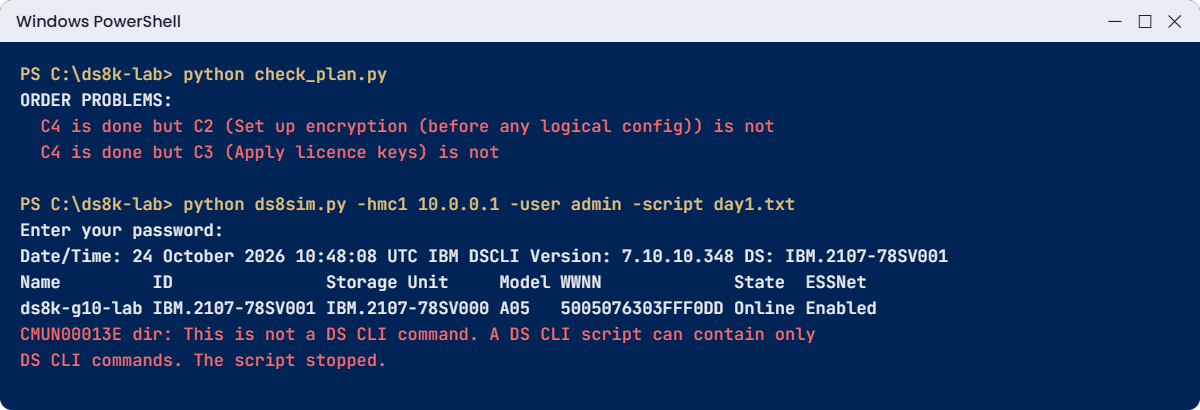
Why: the Redbook is clear that a DS CLI script can hold only DS CLI commands, and a shell command makes it fail. The message text above is a practice shell message, but the rule is IBM’s. The first command ran and then everything after dir was skipped, which is worse than a clean failure because half your check is missing.
Fix: remove the dir line (or turn it into a comment with #) and run the script again. If you need operating system commands, put them in a PowerShell or bash wrapper that calls the DS CLI, never inside the DS CLI script itself.
✅ Checkpoint: day1.txt runs all five commands again with no CMUN error.
Bonus break: open the CSV in Excel and save it as “CSV UTF-8”. Excel adds an invisible byte-order mark to the first column name, and the checker stops with something like this (the file path is yours):
Traceback (most recent call last):
File "C:\ds8k-lab\check_plan.py", line 10, in <module>
by_id = {t["id"]: t for t in tasks}
~^^^^^^
KeyError: 'id'The header now reads “\ufeffid” instead of “id”. You can fix it by opening the file with encoding="utf-8-sig" in the open() line. Small tools break on small things, which is why you test them before a real project relies on them.
This happened at work
The worksheets nobody filled in
A retail bank ordered two DS8A50 systems to replace its ageing storage before a regulator deadline. The hardware was booked, the date was fixed and everyone was busy with the data migration plan, while the configuration worksheets were “on the list” without anyone owning them.
When the IBM SSR arrived on install day and asked for the HMC network details, nobody had them. The network team had never been told the DS8000 needed two IP addresses, a gateway and firewall openings for remote support and Call Home.
The SSR could install the frames but couldn’t finish the setup, so the systems sat on the floor, powered but unreachable from the bank’s network, for six working days while the change requests went through. The migration window moved by two weeks, and the project manager had to explain the slip to the regulator’s contact.
Nothing technical had gone wrong. The plan had no line for the worksheets, no owner and no due date, so the HMC network task had nothing to depend on, and everyone assumed someone else had it covered.
For the second site the team added three rows to the plan: worksheets (owner: storage admin, due four weeks before delivery), HMC IPs and firewall (owner: network team, depends on the worksheets), and a review meeting with the SSR one week before delivery. The second install was done in one day, and they wrote a rule into their project template that every input the SSR needs is a task with a name next to it.
Common mistakes and troubleshooting
| Symptom | Likely cause | What to check / fix |
|---|---|---|
| SSR on site but can’t finish the install | Worksheets missing or incomplete (HMC network, Call Home, contacts) | Make the worksheets a task with an owner and a due date; hand them to IBM before delivery. |
| Frame can’t reach the data centre | Lift, door or floor not checked for a 924 kg, 2.22 m package | Building engineer walks the route and checks floor load weeks before delivery. |
| Pools must be rebuilt in week one | Logical configuration started before encryption was set up | Follow the order: users, encryption, licence keys, then pools. |
| mkextpool or array creation is not possible | Activation codes not applied yet | Get the Base Function codes before install day and apply them first (Lesson 6). |
| Host sees the LUN on one path only | Second SAN cable or zone missing, or both paths on one I/O enclosure | Plan two host adapters in two I/O enclosures per host and test both paths before sign-off. |
| Call Home doesn’t reach IBM | Firewall request never raised | Put the HMC firewall openings in the network team’s tasks, linked to the worksheets. |
| “Who was supposed to do that?” | Tasks without a named owner | Every row in the plan gets one name, not a team, and a date. |
Two habits help on every project. Run a short “what’s ready, what’s blocked” review every week, which is the same thing your checker prints, and write the order rules into the plan as dependencies instead of keeping them in people’s heads, because people forget and a depends_on column doesn’t.
Interview questions
Click a question to open it. Each one is worded the way an interviewer would ask it, and underneath you’ll see why they ask and one way you could answer in your own words.
Fresher level
1. You’ve just joined a storage team and a new DS8000 arrives next month. Who does what between IBM and your company?
Why they ask this: They want to see that you know the line between IBM’s job and the client’s job. New hires often think IBM does everything.
How you might answer: IBM’s SSR or a Business Partner installs and tests the hardware, Call Home included. Everything else is planning that the client owns: the site, power and cooling, the HMC network, the configuration worksheets, LDAP and monitoring integration, and the logical configuration such as arrays, pools, volumes and host mapping.
IBM will do the logical setup as a paid service, but by default it’s our work.
2. What are the DS8000 configuration worksheets, and when do you fill them in?
Why they ask this: They check whether you have seen a real install or only read about the commands. The timing matters as much as the content.
How you might answer: They’re IBM’s customization worksheets from the Introduction and Planning Guide, and they hold company contacts, the HMC IP settings, remote support and Call Home details, SNMP and email notification, power mode, and control switches for IBM i and IBM Z.
We fill them in before the system is delivered and give them to the IBM SSR, so install day doesn’t stall on missing information.
2–5 years experience
3. Walk me through the order you would follow to configure a brand-new DS8000 after IBM hands it over.
Why they ask this: Order mistakes cause rework on DS8000, so they want to hear the sequence and the reason for each step.
How you might answer: First I’d create named user accounts and roles, and then set up encryption if it’s planned, because that has to come before any logical configuration. After that I’d apply the licence keys, create a pool pair with arrays on both rank groups, set the FC ports to FCP or FICON, define the hosts with their WWPNs, and create and map the volumes.
I’d only call it done when the host team confirms the LUN on two paths. And before any of that, I’d run a quick check with lssi, lsserver and lsarray to confirm the system is healthy and empty.
4. The install date is in three weeks and the network team hasn’t started on the HMC firewall. What do you do?
Why they ask this: They want to see how you handle a dependency you don’t own, without blaming anyone.
How you might answer: I’d make it visible by showing the network lead, with the date, that the HMC IPs and remote support access are a dependency for both the install and Call Home. I’d also hand them the exact details from the worksheets so the change request is easy to raise.
If it still can’t be done in time, I’d tell the project manager early so we can move the date or agree a temporary plan, rather than finding out with the SSR standing in the room.
Senior level
5. You’re the senior engineer on a two-site DS8000 rollout. How do you structure the plan so the second site goes faster than the first?
Why they ask this: Senior people turn lessons into templates. They want to hear about repeatable plans, owners and checks.
How you might answer: I’d build one plan template with phases, owners and dependencies, and keep the configuration as DS CLI scripts so site two runs exactly the same steps. After site one I’d hold a short review and turn every surprise into a new task with an owner.
I’d also add a readiness review with the IBM SSR a week before each delivery, going through worksheets, power, network, SAN ports and activation codes.
6. A project manager wants to skip the planning phase because ‘IBM will sort it out on the day’. How do you respond?
Why they ask this: They’re testing whether you can push back on risk in business terms, not just technical ones.
How you might answer: I’d put it in terms of time and money. IBM installs the hardware, but the site, network, worksheets and keys are our inputs, and the SSR can’t make them up. If they’re missing, the system sits there unused and the project slips, and that costs far more than a few days of planning.
Then I’d offer a short plan with only the tasks that block install day, so it doesn’t feel like extra paperwork.
Quick quiz
Q1. Who installs the DS8000 hardware?
- The client’s storage admin
- The IBM SSR or an IBM Business Partner
- The building engineer
- The SAN team
Show answer
B — The DS8000 is an IBM or Business Partner installed system. The client plans and does the logical configuration.
Q2. When should the configuration worksheets be completed?
- After the first LUN is created
- On install day, with the SSR
- Before the system is delivered
- Only if Call Home fails
Show answer
C — IBM asks you to hand the completed worksheets to the SSR before delivery so the install isn’t blocked.
Q3. If data-at-rest encryption is planned, when must it be configured?
- Before any logical configuration
- After the volumes are mapped
- Any time, it doesn’t matter
- Only on DS8900F
Show answer
A — Encryption must be set up before you create arrays, pools and volumes.
Q4. What is the maximum packaged weight of a DS8A50 model A05 base frame?
- 603 kg
- 825.8 kg
- 924 kg
- 1,500 kg
Show answer
C — The packed A05, A01 and A08 frames weigh up to 924 kg. The E05 expansion frame is up to 603 kg.
Q5. What can a DS CLI script file contain?
- DS CLI commands, comments and empty lines
- Any PowerShell command
- Only one command
- DS CLI and bash commands mixed
Show answer
A — A DS CLI script holds only DS CLI commands, comments with # and empty lines. Shell commands make it fail.
Quick recap
- A DS8000 project runs in six phases: plan, site, network and security, install, configure, first LUN.
- IBM installs the hardware; the client owns planning, worksheets, integrations and the logical configuration.
- Complete the configuration worksheets and get the Base Function activation codes before delivery.
- Check the delivery route and floor: a packed DS8A50 base frame is 2.22 m tall and up to 924 kg.
- Configuration order: users, encryption (if used), licence keys, pool pair and arrays, FC ports, hosts, volumes.
- Write order rules as dependencies in the plan, and check them with a tool, not memory.
- The project ends when the host sees its first LUN on two paths.
Next lesson
Lesson 2: Your lab: DS CLI, practice shell and VirtualBox → You install the DS CLI the way you would at work, set up the practice shell profile and build the saat-host1 VM.
Further reading: DS8000 implementation plan
Want to go deeper into DS8000 implementation plan? Chapter 5 and Chapter 8 of IBM’s guide cover the planning checklist, the people involved and the configuration flow: IBM Storage DS8A00 Architecture and Implementation Guide (IBM Redbooks). If any part of the hardware is new to you, start with What an IBM DS8000 is and where you’ll meet it in our Architecture course.
You can also see the full plan for this course on the IBM DS8000 Implementation course page.
