Transforming tokens with a transformer

In Lesson 3 you saw your sentence turn into a list of token IDs, like 976, 6017, 67186. A list of numbers goes in.

A moment later, the next word comes out. This lesson opens the box in between.

That box is the transformer. Almost every chatbot you have used is built on it. The transformer architecture is less mysterious than it sounds: it’s the same small block repeated again and again.

In your llama3.2:1b model it’s repeated 16 times. You’ll read the real blueprint of your model, count its 1.2 billion numbers yourself, and run a tiny transformer that you can understand line by line.

TimeYou needBy the end you can
About 60 minutesOllama and llama3.2:1b from Lesson 1, Python from Lesson 3, and internet once to install numpyExplain what happens inside a transformer, read a model’s architecture with ollama show -v, count its parameters and work out how much memory a context window needs

What it is, in one line

A transformer is a stack of identical layers. Each layer lets every token look at the tokens before it, then think on its own. At the end, the model scores every word in its vocabulary to pick the next one.

In Simple Words

A file that moves through 16 desks

Imagine an office where a question arrives as a file. The file has one page for every word.

The file goes to desk 1. The person there reads every page so far, notices which words belong together, and writes a few notes on each page. Then they pass the file to desk 2, who does the same thing with fresh eyes.

Nobody ever erases what earlier desks wrote. They only add notes.

After 16 desks, the notes on the last page are so rich that the final person can guess the next word with confidence. “The server is…” — after all those notes, “down” looks much more likely than “banana”.

That’s a transformer. The pages are tokens. Each desk is a layer.

Reading the other pages is called attention. Writing notes on your own page is the feed-forward step. And never erasing, only adding, is the trick that lets the stack be deep.

Engineer's View

What’s really inside

The transformer was introduced by Google researchers in 2017 in the paper Attention Is All You Need, for translation. That original design had two halves: an encoder that reads, and a decoder that writes.

Chat models like GPT and Llama keep only the writing half. They’re called decoder-only transformers, and they do one job: given the tokens so far, predict the next one.

Embedding. Each token ID picks one row from the embedding table, a list of 2,048 numbers. Your sentence becomes a grid: one row per token, 2,048 columns. This grid is often called the residual stream, and its shape never changes from the first layer to the last.

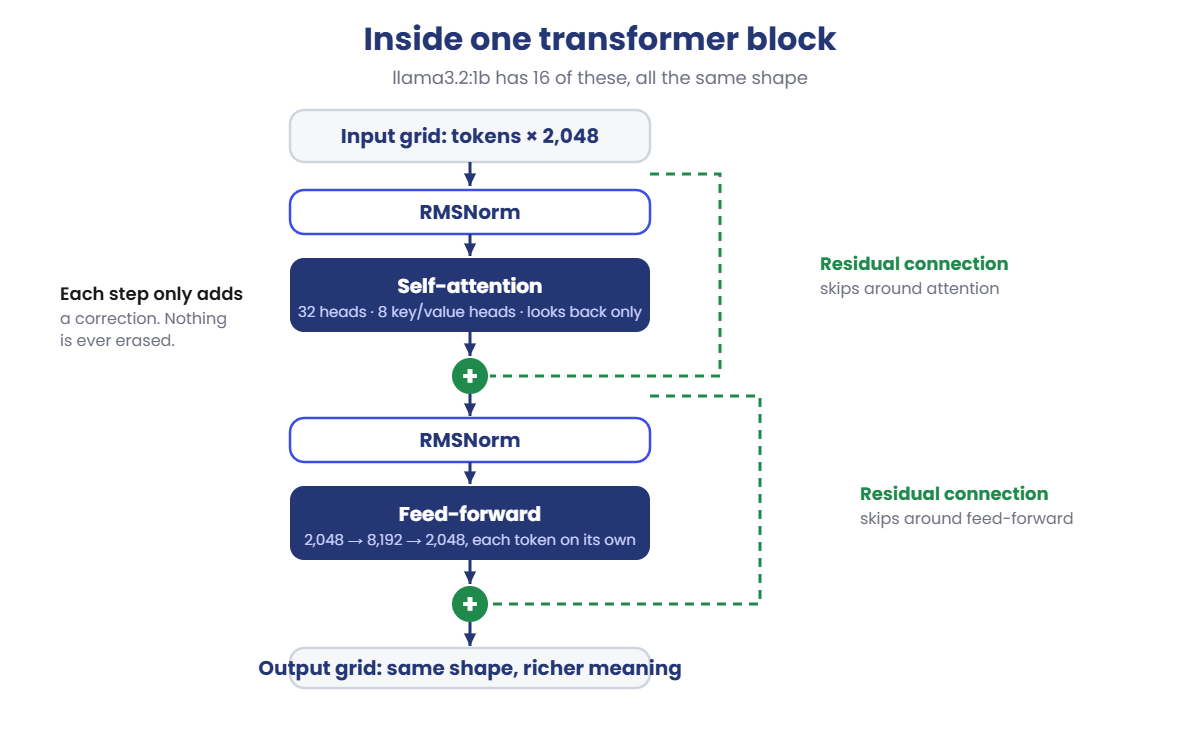
One transformer block does two things, each wrapped the same way:

  1. Self-attention. Normalise the grid (Llama uses RMSNorm), then let each token gather information from earlier tokens. A causal mask stops any token from looking at the future. The result is added back onto the grid.
  2. Feed-forward. Normalise again, then push each token’s 2,048 numbers through a small network (up to 8,192, then back down to 2,048). Llama uses a version called SwiGLU. The result is added back again.

That “add back” is the residual connection. It’s why deep models can be trained at all; you’ll see what happens without it in the Break It lab.

The output. After the last block, one more normalisation, then the final row is compared with every row of the embedding table. That gives 128,256 scores, called logits, one per possible next token.

Softmax turns the scores into probabilities. In Llama 3.2 the input and output tables are the same table, which is called tied embeddings.

Position. Attention on its own doesn’t know word order. Llama adds position information with RoPE (rotary position embeddings) inside attention.

That’s Lesson 5. How attention picks what to focus on is Lesson 6.

Metadata key in Ollamallama3.2:1bWhat it means
llama.vocab_size128256Number of different tokens the model knows (Lesson 3)
llama.embedding_length2048Width: every token is carried as 2,048 numbers
llama.block_count16Depth: how many transformer layers are stacked
llama.attention.head_count32Attention heads per layer, each looking for different patterns
llama.attention.head_count_kv8Key/value heads. 32 heads share 8 sets of keys and values (grouped-query attention)
llama.feed_forward_length8192Width inside the feed-forward step: 2,048 grows to 8,192 and back
llama.context_length131072The most tokens the model was built to handle at once

Why it matters on the job: these few numbers decide the model’s size on disk, its speed, and how much RAM the context window needs. You’ll calculate all three in the lab.

How it works, step by step

Follow the three tokens of “The server is” through your Llama model:

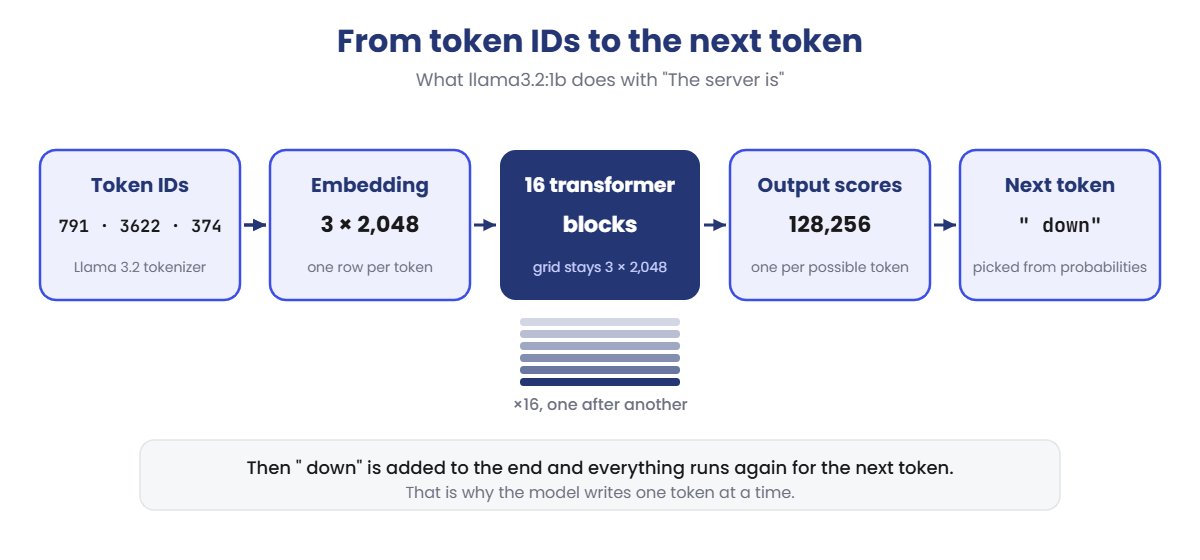
Transformer architecture: token IDs, embedding, 16 transformer blocks, output scores and the next token
  1. Token IDs in. The tokenizer from Lesson 3 gives one ID per token.
  2. Look up embeddings. Each ID becomes 2,048 numbers. Now you have a grid of 3 rows × 2,048 columns.
  3. 16 blocks, one after another. Each block reads the grid and adds its notes. The grid stays 3 × 2,048 the whole way. What changes is what the numbers mean: early layers mostly capture spelling and grammar, later layers capture meaning and context.
  4. Score every possible next token. The last row (the word “is”) is turned into 128,256 scores.
  5. Pick one. Softmax turns scores into probabilities, and one token is chosen, maybe ” down”. How it’s chosen is Lesson 7.
  6. Repeat. ” down” is added to the end and the whole thing runs again for the next token. That’s why the model writes one token at a time.

Now zoom into one of those 16 blocks:

Inside one transformer block: RMSNorm, self-attention, feed-forward and residual connections

Notice the two arrows that skip around attention and feed-forward. Those are the residual connections.

Each step only adds a correction to the grid; it never replaces it. So even after 16 layers, the original information is still there, plus everything the layers learned.

Why it doesn’t slow down as much as you’d think

When the model writes the next token, it doesn’t redo all the work for the earlier tokens. It keeps their attention keys and values in memory, called the KV cache.

That’s fast, but the cache grows with every token in the context window. You’ll measure exactly how much in step 5 of the lab.

Hands-on Lab: read your model's blueprint and build a tiny transformer

You’ll read the real blueprint of your model with Ollama, check its numbers with two small Python scripts, and then run a tiny transformer of your own. Use PowerShell as in Lesson 3. On macOS or Linux, use python3, and replace the PowerShell filter with grep.

1Read the model’s summary

Run this:

ollama show llama3.2:1b

Near the top, under Model, you’ll see architecture llama, parameters 1.2B, context length 131072 and embedding length 2048. You met this screen in Lesson 2. Now you’ll go one level deeper.

✅ Checkpoint: You can see embedding length 2048. That’s the width of the grid from the Engineer’s View.

2Read the architecture numbers

The -v flag prints everything Ollama knows about the model. It’s long, so filter it to the lines that start with llama.:

Run this:

(ollama show llama3.2:1b -v) -match "llama\." | Sort-Object

Among the lines you’ll see (there are a few more):

    llama.attention.head_count       32
    llama.attention.head_count_kv    8
    llama.block_count                16
    llama.context_length             131072
    llama.embedding_length           2048
    llama.feed_forward_length        8192
    llama.vocab_size                 128256

Match each line with the table in the Engineer’s View. 16 layers, 2,048 wide, 32 attention heads sharing 8 key/value heads, and a feed-forward step 8,192 wide. That’s the whole design of your model in seven numbers.

✅ Checkpoint: You found llama.block_count 16 and llama.embedding_length 2048.

3Look inside one layer

The same command also lists every table of numbers in the file, called tensors. Show just the ones in layer 0:

Run this:

(ollama show llama3.2:1b -v) -match "blk\.0\." | Sort-Object

You should see something like this:

    blk.0.attn_k.weight         Q8_0    [2048 512]
    blk.0.attn_norm.weight      F32     [2048]
    blk.0.attn_output.weight    Q8_0    [2048 2048]
    blk.0.attn_q.weight         Q8_0    [2048 2048]
    blk.0.attn_v.weight         Q8_0    [2048 512]
    blk.0.ffn_down.weight       Q8_0    [8192 2048]
    blk.0.ffn_gate.weight       Q8_0    [2048 8192]
    blk.0.ffn_norm.weight       F32     [2048]
    blk.0.ffn_up.weight         Q8_0    [2048 8192]

Nine tensors. attn_q, attn_k, attn_v and attn_output are attention. ffn_gate, ffn_up and ffn_down are feed-forward. The two norm tensors are the normalisation steps. Q8_0 is the 8-bit quantization from Lesson 2; the small norm tables are kept at full precision (F32).

Notice attn_k and attn_v are only 512 wide, not 2,048. That’s the 8 key/value heads × 64 numbers each.

It saves memory, and you’ll see why that matters in step 5. Now count the layers:

Run this:

((ollama show llama3.2:1b -v) -match "blk\.").Count

You should see this:

144

✅ Checkpoint: 144 tensors = 16 layers × 9 tensors each. Every layer has exactly the same shape.

4Count the 1.2 billion parameters yourself

Run this:

mkdir C:\ai-lab\transformer
cd C:\ai-lab\transformer
notepad params.py

Paste this whole block, then save:

# Numbers copied from: ollama show llama3.2:1b -v
vocab = 128256        # llama.vocab_size
width = 2048          # llama.embedding_length
layers = 16           # llama.block_count
heads = 32            # llama.attention.head_count
kv_heads = 8          # llama.attention.head_count_kv
ffn = 8192            # llama.feed_forward_length
head_dim = width // heads

embedding = vocab * width
attention = width * width * 2 + width * (kv_heads * head_dim) * 2   # q, o and k, v
feed_forward = width * ffn * 3                                      # gate, up, down
norms = width * 2

per_layer = attention + feed_forward + norms
total = embedding + layers * per_layer + width                      # + final norm

print(f"Embedding table:    {embedding:>13,}")
print(f"One layer:          {per_layer:>13,}")
print(f"All {layers} layers:      {layers * per_layer:>13,}")
print(f"Total parameters:   {total:>13,}")
print(f"Share in layers:    {layers * per_layer / total:.0%}")

Run this:

python params.py
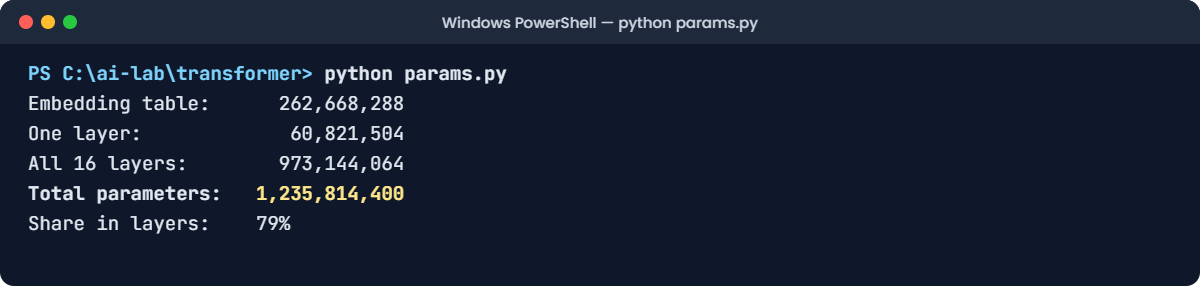
Transformer architecture lab: params.py counting the parameters of llama3.2:1b
This output is exact. The script only does arithmetic, so your numbers will match.

The text version of the same output:

Embedding table:      262,668,288
One layer:             60,821,504
All 16 layers:        973,144,064
Total parameters:   1,235,814,400
Share in layers:    79%

1,235,814,400. That’s the “1.2B” that Ollama shows.

If you look for general.parameter_count in the -v output, you’ll find 1.235814432e+09, which is 32 more. Those 32 numbers are a small table used for word positions, which you’ll meet in Lesson 5.

Two things to notice. One layer is about 61 million parameters, and 79% of the model lives in the 16 layers. The feed-forward part is the biggest piece of each layer: 50 of its 61 million.

✅ Checkpoint: Your total is 1,235,814,400, worked out from seven numbers.

5Work out how much memory the context window needs

Remember the KV cache from the How it works section. For every token in the context, every layer keeps one key and one value per key/value head. Every number in this calculation comes from step 2 (the 64 is 2,048 ÷ 32 heads):

Run this:

notepad kv_cache.py

Paste this whole block, then save:

layers, kv_heads, head_dim = 16, 8, 64      # from ollama show llama3.2:1b -v
bytes_per_number = 2                        # 16-bit cache

per_token = 2 * layers * kv_heads * head_dim * bytes_per_number   # 2 = keys + values
print(f"Memory per token: {per_token:,} bytes ({per_token / 1024:.0f} KB)")

for context in (2048, 4096, 8192, 32768, 131072):
    print(f"Context {context:>7,} tokens -> {per_token * context / 1024**3:5.2f} GB")

Run this:

python kv_cache.py

You should see this:

Memory per token: 32,768 bytes (32 KB)
Context   2,048 tokens ->  0.06 GB
Context   4,096 tokens ->  0.12 GB
Context   8,192 tokens ->  0.25 GB
Context  32,768 tokens ->  1.00 GB
Context 131,072 tokens ->  4.00 GB
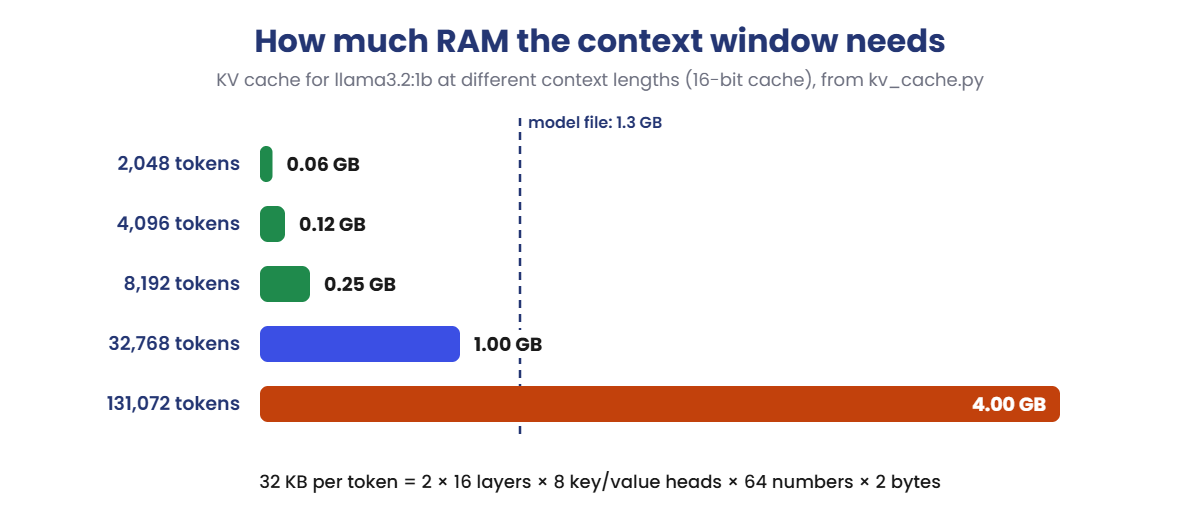
Transformer architecture: KV cache memory for llama3.2:1b by context length
Built from the kv_cache.py numbers above. The dashed line is the size of the model file itself.

32 KB for every single token. A 4,096-token context needs about 0.12 GB, small next to the 1.3 GB model. The model’s full 131,072-token context needs 4 GB, three times the size of the model itself.

Lesson 2 warned you that a maximum context window makes RAM use jump. Now you know exactly why, and how to calculate it for any model.

✅ Checkpoint: You can explain why 131,072 tokens of context needs 4 GB of RAM on top of the model.

6Run a tiny transformer you can read

Your Llama model is too big to look inside. So here is a complete transformer in about 60 lines of Python, with the same parts: embedding, attention with a causal mask, feed-forward, residual connections, normalisation and an output layer.

It’s tiny: 10 words, 16 numbers wide, 2 layers. First install numpy:

Run this:

python -m pip install numpy

Run this:

notepad tiny_transformer.py

Paste this whole block, then save:

import numpy as np

rng = np.random.default_rng(7)

vocab = ["<start>", "the", "server", "is", "down", "up", "slow", "disk", "full", "."]
d_model, n_heads, n_layers, d_ff = 16, 4, 2, 64
head_dim = d_model // n_heads


def weights(rows, cols):
    return rng.normal(0, 1 / np.sqrt(rows), (rows, cols))


def rms_norm(x):
    return x / np.sqrt((x ** 2).mean(axis=-1, keepdims=True) + 1e-5)


def softmax(x):
    e = np.exp(x - x.max(axis=-1, keepdims=True))
    return e / e.sum(axis=-1, keepdims=True)


def attention(x, w):
    t = x.shape[0]
    q = (x @ w["q"]).reshape(t, n_heads, head_dim).transpose(1, 0, 2)
    k = (x @ w["k"]).reshape(t, n_heads, head_dim).transpose(1, 0, 2)
    v = (x @ w["v"]).reshape(t, n_heads, head_dim).transpose(1, 0, 2)
    scores = q @ k.transpose(0, 2, 1) / np.sqrt(head_dim)
    future = np.triu(np.ones((t, t), dtype=bool), 1)
    scores[:, future] = -np.inf          # a token may not look ahead
    mixed = softmax(scores) @ v
    return mixed.transpose(1, 0, 2).reshape(t, d_model) @ w["o"]


def feed_forward(x, w):
    return np.maximum(0, x @ w["up"]) @ w["down"]


def block(x, w):
    x = x + attention(rms_norm(x), w)    # mix information between tokens
    x = x + feed_forward(rms_norm(x), w) # think about each token on its own
    return x


embed = rng.normal(0, 1, (len(vocab), d_model))
layers = [{"q": weights(d_model, d_model), "k": weights(d_model, d_model),
           "v": weights(d_model, d_model), "o": weights(d_model, d_model),
           "up": weights(d_model, d_ff), "down": weights(d_ff, d_model)}
          for _ in range(n_layers)]

words = ["the", "server", "is"]
ids = [vocab.index(w) for w in words]
print("Tokens:", words, "-> IDs", ids)

x = embed[ids]
print("After embedding:", x.shape)
for n, w in enumerate(layers, start=1):
    x = block(x, w)
    print(f"After layer {n}:  ", x.shape)

logits = rms_norm(x) @ embed.T
print("Logits:         ", logits.shape)

probs = softmax(logits[-1])
top = np.argsort(probs)[::-1][:3]
print("Next-token guess:", " | ".join(f"{vocab[i]} {probs[i]:.1%}" for i in top))

Run this:

python tiny_transformer.py

You should see this:

Tokens: ['the', 'server', 'is'] -> IDs [1, 2, 3]
After embedding: (3, 16)
After layer 1:   (3, 16)
After layer 2:   (3, 16)
Logits:          (3, 10)
Next-token guess: is 99.7% | . 0.1% | down 0.1%

Look at the shapes. 3 tokens go in as a 3 × 16 grid. Every layer gives back a 3 × 16 grid.

Only the last step changes the shape: 10 scores per token, one for each word in the vocabulary. Llama has the same structure, just bigger: 2,048 instead of 16, 16 layers instead of 2, and 128,256 words instead of 10. Llama also adds position information and a richer feed-forward step, which this toy leaves out.

And the guess? The model is 99.7% sure the next word is “is” again. That’s not a bug.

The weights are random, so the layers’ notes mean nothing, and what’s left in the grid is mostly the last word it read. Training, from Lesson 2, is what changes these random numbers into useful ones. The architecture is only the empty building.

✅ Checkpoint: You see the same shape, (3, 16), after every layer, and a guess that only repeats the last word.

Break It, Then Fix It

Engineers once thought “deeper is smarter” and simply stacked more layers. It didn’t work until two small tricks came along: residual connections and normalisation. You’ll remove them and watch a deep model go blind.

1Make the model deep and remove the shortcuts

Open tiny_transformer.py in Notepad and make three changes. First, change the number of layers from 2 to 48:

Change this line:

d_model, n_heads, n_layers, d_ff = 16, 4, 48, 64

Second, replace the whole block function with this version, which has no x + and no rms_norm:

Replace the block function with:

def block(x, w):
    x = attention(x, w)
    x = feed_forward(x, w)
    return x

Third, inside the for loop near the bottom, replace the print(f"After layer {n}: ", x.shape) line with these two lines, which print the size of the signal every 12 layers:

Replace the print line with:

    if n in (1, 12, 24, 36, 48):
        print(f"After layer {n:>2}: signal size {np.abs(x).mean():.10f}")

Run this:

python tiny_transformer.py

You’ll see this:

Tokens: ['the', 'server', 'is'] -> IDs [1, 2, 3]
After embedding: (3, 16)
After layer  1: signal size 0.5427249850
After layer 12: signal size 0.0094996829
After layer 24: signal size 0.0001516977
After layer 36: signal size 0.0000009355
After layer 48: signal size 0.0000000460
Logits:          (3, 10)
Next-token guess: disk 10.0% | down 10.0% | the 10.0%

The signal shrinks with every layer until it’s almost zero: 0.54, then 0.009, then 0.00000005. By layer 48 the information about “the server is” has faded away, and every word gets exactly 10.0%, the same as a random guess from 10 words.

The model has gone blind. In real training this is called the vanishing signal problem, and it makes deep networks very hard to train.

Why it happens: each layer slightly shrinks what it’s given. Without the x +, every layer replaces the grid with its own output, so the small losses multiply 48 times. Nothing from the original input survives.

2Put the residual connections back

Replace the block function with the original one. Keep 48 layers:

Replace the block function with:

def block(x, w):
    x = x + attention(rms_norm(x), w)    # mix information between tokens
    x = x + feed_forward(rms_norm(x), w) # think about each token on its own
    return x

Run this:

python tiny_transformer.py

You should see this:

Tokens: ['the', 'server', 'is'] -> IDs [1, 2, 3]
After embedding: (3, 16)
After layer  1: signal size 1.3080977285
After layer 12: signal size 3.2165886329
After layer 24: signal size 4.3642317772
After layer 36: signal size 4.4453566705
After layer 48: signal size 6.5096419293
Logits:          (3, 10)
Next-token guess: server 59.3% | down 23.0% | is 4.0%

Now the signal stays healthy all the way to layer 48. Each layer adds its notes on top of what’s already there instead of replacing it, and the normalisation keeps each layer’s input at a steady size. That’s why every block in your Llama model has those two x + arrows, and why models with 80 or more layers can work at all.

✅ Checkpoint: With residual connections back, the signal size stays above 1 at every checkpoint, and the guesses are no longer exactly 10% each.

This happened at work

The context window that ate the server

An IT team ran an internal helpdesk assistant on llama3.2:3b with Ollama, on a server with 32 GB of RAM. It handled four users at a time. One day a long ticket got cut off, so someone set the context to the model’s maximum, 131,072 tokens, “so it never happens again”.

After the restart, the model wouldn’t load properly. Ollama reported that it needed far more memory than the server had, and the first answers that did come back were painfully slow. The model file itself was only 2 GB, so nobody could see where the memory had gone.

An engineer ran the KV cache calculation from this lesson using the 3B model’s numbers: 28 layers, 8 key/value heads, 128 numbers per head. That’s 112 KB per token. At 131,072 tokens, that’s 14 GB per user, and Ollama reserves room for each of the four parallel users: 56 GB, just for the cache.

The fix: they measured real tickets. Almost all of them were under 6,000 tokens, so they set the context length to 8,192.

The cache dropped to 3.5 GB for four users. Very long tickets now get summarised in parts instead of being sent in one piece.

The lesson: the context window isn’t free. Its memory cost comes straight from the architecture, layers × key/value heads × head size, and you can calculate it before you change a setting.

Common mistakes and troubleshooting

MistakeWhat happensHow to avoid it
Thinking each layer is a different kind of thingThe architecture feels too complicated to learnEvery block is the same: normalise, attention, add, normalise, feed-forward, add. Only the learned numbers differ
Thinking a bigger model just has more layersWrong size and speed estimatesSize depends on width, depth, feed-forward size and vocabulary together. Read them with ollama show -v
Sizing RAM from the model file onlyThe model loads, then fails or slows down when the context growsAdd the KV cache: 2 × layers × key/value heads × head size × bytes × context × parallel users
Setting the context to the maximum “to be safe”Several GB of RAM reserved for tokens you’ll never sendMeasure your real inputs and choose the smallest context that fits them
Expecting an untrained or random model to say something usefulNonsense, like the tiny transformer repeating “is”The architecture only defines the shape. Training gives the numbers their meaning
Confusing GPT-style models with the original 2017 transformerMixing up encoder and decoder ideas in interviewsChat models are decoder-only: they read the tokens so far and predict the next one

Troubleshooting the lab

ProblemFix
The -match commands print nothingCheck the model name with ollama list. Older Ollama versions don’t support -v; update Ollama from ollama.com
ModuleNotFoundError: No module named 'numpy'Install it with python -m pip install numpy so it goes into the same Python you run
IndentationError when running tiny_transformer.pyNotepad or a copy/paste changed the spaces. Lines inside a function need 4 spaces; paste the whole block again
Your tiny_transformer.py guess is different from the pageCheck the first lines: the seed must be default_rng(7) and the vocabulary list exactly the same
After the Break It changes, nothing prints for the layersYou replaced the print line outside the loop. The two new lines must be indented by 4 spaces inside for n, w in ...

Interview questions

Click a question to open it. Under each one you’ll find what the interviewer is actually looking for, and one good way to answer.

Fresher level

1. What is a transformer, in simple terms?

What they’re really checking: Can you explain the core idea without jargon?

How you could answer: It’s a neural network built from a stack of identical blocks. Each block lets every token gather information from the other tokens (attention), then processes each token on its own (feed-forward).

After the last block, the model scores every possible next token. Most modern language models are built this way.

2. What does “decoder-only” mean?

What they’re really checking: Do you know how chat models differ from the original transformer?

How you could answer: The original 2017 transformer had an encoder to read the input and a decoder to write the output, for translation. GPT and Llama keep only the decoder part. They read the tokens so far and predict the next one, and a causal mask makes sure no token can look at the future.

3. What are the two main parts of a transformer block?

What they’re really checking: Basic architecture vocabulary.

How you could answer: Self-attention, which mixes information between tokens, and a feed-forward network, which processes each token separately. Each part has a normalisation step before it and a residual connection that adds its result back to the input.

2–5 years experience

4. How would you estimate the RAM a model needs for a given context length?

What they’re really checking: Can you size infrastructure from architecture numbers?

How you could answer: Model weights, roughly the file size, plus the KV cache. The cache is 2 (keys and values) × layers × key/value heads × head dimension × bytes per number × context length, times the number of parallel requests.

For llama3.2:1b that’s 32 KB per token, so 4 GB at 131,072 tokens. Then I’d add some working memory on top.

5. What is grouped-query attention and why do models like Llama use it?

What they’re really checking: Do you understand a practical efficiency trade-off?

How you could answer: Many query heads share a smaller number of key/value heads, for example 32 query heads and 8 key/value heads in Llama 3.2 1B. Quality stays close to full attention, but the KV cache is four times smaller, so you can fit longer contexts or more users in the same memory.

6. Where do most of a model’s parameters live?

What they’re really checking: Can you reason about model size instead of memorising it?

How you could answer: In the transformer blocks, and within each block, mostly in the feed-forward network. In Llama 3.2 1B, the 16 blocks hold about 79% of the 1.24 billion parameters, and about 50 of each block’s 61 million parameters are feed-forward. The embedding table is the rest, about 263 million.

Senior level

7. Why are residual connections and normalisation essential in deep transformers?

What they’re really checking: Do you understand why the architecture trains at all?

How you could answer: Without residual connections, every layer replaces its input, small shrinkages multiply through the stack, and the signal and gradients vanish, so deep models can’t learn. The residual path lets information and gradients flow straight through, and each layer only adds a correction. Normalisation, RMSNorm in Llama and applied before each sub-layer, keeps the input to each step at a steady scale so training stays stable.

8. You have a fixed RAM budget and need to serve 20 concurrent users. How do you decide model size and context length?

What they’re really checking: Can you balance quality, latency and capacity with numbers?

How you could answer: Start from the real input sizes your users send, measured in tokens. Calculate weights plus KV cache per user for each candidate model, using its layers, key/value heads and head dimension, and multiply by 20.

Pick the smallest model that passes a quality test on real tasks, set the context just above your real inputs, and consider a quantized KV cache or summarising long history. Then load-test, because latency also grows with context.

9. Why does a transformer generate text one token at a time, and how does the KV cache help?

What they’re really checking: Do you understand inference mechanics?

How you could answer: The model predicts the next token from all the tokens so far, so each new token depends on the previous ones and must be produced in order. Without a cache, the model would recompute attention keys and values for the whole sequence at every step.

The KV cache stores them, so each new step only processes the newest token. The trade-off is memory that grows with context length.

Quick quiz

Q1. In llama3.2:1b, what does llama.block_count 16 tell you?

  1. The model knows 16 languages
  2. The model has 16 transformer layers stacked one after another
  3. The model can answer 16 users at once
Show answer

B — Block count is the depth of the model: 16 identical transformer blocks.

Q2. What does a transformer block do with the grid of numbers it receives?

  1. Replaces it with a new grid
  2. Adds corrections to it, keeping the same shape
  3. Makes it smaller each time
Show answer

B — Residual connections add each step’s output back onto the grid, which stays 3 × 2,048 (or 3 × 16 in the tiny model) all the way through.

Q3. In the Break It lab, why did every word end up at exactly 10.0%?

  1. The vocabulary has 10 words and the signal faded to almost nothing, so all scores were equal
  2. numpy rounded the numbers
  3. 48 layers is too many for any model
Show answer

A — Without residual connections the signal vanished, so the model had no information left and every word scored the same.

Q4. Why does a 131,072-token context need about 4 GB for llama3.2:1b?

  1. The model file is copied 4 times
  2. Each token needs 32 KB of KV cache across the 16 layers
  3. Ollama always reserves 4 GB
Show answer

B — 2 × 16 layers × 8 key/value heads × 64 numbers × 2 bytes = 32 KB per token, × 131,072 tokens = 4 GB.

Q5. What does the final layer of the model produce?

  1. The answer as a full sentence
  2. One score for every token in the vocabulary
  3. A list of the most similar documents
Show answer

B — The logits are 128,256 scores in Llama 3.2. Softmax turns them into probabilities for the next token.

Quick recap

  • A transformer is a stack of identical blocks. Chat models are decoder-only: they predict the next token from the tokens so far.
  • Each token becomes an embedding (2,048 numbers in llama3.2:1b). The grid keeps the same shape through every layer.
  • Each block: normalise → self-attention → add back, then normalise → feed-forward → add back.
  • Residual connections and normalisation are what make deep models work. Without them the signal vanishes.
  • The output layer gives one score per vocabulary token; softmax turns them into probabilities.
  • Read any model’s design with ollama show -v. Size = embedding + layers × per-layer parameters.
  • KV cache = 2 × layers × key/value heads × head size × bytes × context. Calculate it before you raise the context window.

Next lesson

Initial vectors and positional encoding → You’ve seen each token become 2,048 numbers. Next you’ll see what those numbers mean, why similar words end up close together, and how the model knows that “dog bites man” is different from “man bites dog”.

Further reading: transformer architecture

Want to go deeper into transformer architecture? Check the official reference: the original paper, Attention Is All You Need (Vaswani et al., 2017), and the Hugging Face course: How do Transformers work? You can also follow the full Generative AI and Agents course on SaatVedha, step by step.

Scroll to Top