Predicting completions from prompts
-
Introduction to generative AI and agents
-
Large language models (LLMs)
-
Prompts
-
AI agents
After 16 layers of attention, a model like llama3.2:1b doesn’t hand you a word. It hands you 128,256 scores, one for every token it knows.
Something still has to choose one. That choice is where LLM temperature, top-k and top-p come in, and it’s why the same question can get a different answer every time you ask.
In this lesson you’ll turn scores into chances, pick words exactly the way Ollama does, look at the real top five guesses of your own model, and make it give the same answer every time. Then you’ll break it twice: once into gibberish, and once into a JSON answer that stops halfway.
| Time | You need | By the end you can |
|---|---|---|
| About 60 minutes | Python 3 and Ollama 0.12.11 or newer with llama3.2:1b | Explain how a model picks the next token, set temperature, top-k, top-p, min-p and seed for a job, read logprobs, and catch answers that were cut off |
What it is, in one line
A model predicts a completion one token at a time: it scores every possible next token, turns the scores into chances, and picks one. Temperature, top-k and top-p decide how that pick is made.
In Simple Words
A jar of marbles
Imagine the model has to finish the sentence “The server is…”. It fills a jar with marbles, one colour for each word it could say next.
Good guesses get lots of marbles: 43 red marbles for “down”, 26 blue for “running”, 14 green for “not”. Silly guesses like “banana” get almost none.
Then it closes its eyes and pulls out one marble. Most of the time it’s red, so it says “down”.
Sometimes it’s blue. That’s why you don’t always get the same answer.
The settings change the jar before the pull:
- Temperature is how much you shake things up. Low temperature: almost every marble turns red. High temperature: every colour gets nearly the same number of marbles, even the silly ones.
- Top-k says: only keep the 40 most popular colours, throw the rest away.
- Top-p says: keep the most popular colours until they make up 90% of the jar, throw the rest away.
- Seed is like recording exactly how your hand moved. Use the same seed and you pull the same marbles again.
Pull one marble, write the word down, add it to the sentence, fill a new jar, and pull again. That’s how a whole answer gets written.
Engineer's View
From logits to one token
Logits. The last layer gives a vector of 2,048 numbers for the final position. It’s multiplied by the output table (in llama3.2:1b that’s the same 128,256 × 2,048 table used for the input embeddings) to give one score per token. These raw scores are called logits.
Softmax. Each logit is turned into a probability: p = escore/T divided by the sum over all tokens. All 128,256 probabilities add up to 1. A log probability (logprob) is just ln(p), which is what APIs return because it’s easier to add up over many tokens.
Decoding. Choosing a token from those probabilities is called decoding:
- Greedy: always take the top token. That’s what
temperature 0does. Repeatable, but it can get stuck in loops on long answers. - Sampling: draw a token at random, weighted by its probability. That’s Ollama’s default.
- Temperature (T): divides every logit before softmax. T below 1 sharpens the gaps, T above 1 flattens them. It never changes the order of the tokens, only how far apart their chances are.
- Top-k: keep only the k highest tokens. Ollama’s default is 40.
- Top-p (nucleus sampling): keep the smallest set of top tokens whose probabilities add up to p. Default 0.9. When the model is sure, that might be 2 tokens; when it’s unsure, it might be 40.
- Min-p: drop any token whose chance is less than min_p times the top token’s chance. Off (0) by default in Ollama.
Order matters. llama.cpp, the engine inside Ollama, runs its samplers in this order: penalties, top-k, top-p, min-p, then temperature, then the random pick. Because the filters come first, they protect you when you raise the temperature. Some other libraries apply temperature first, so the same settings can behave a little differently from tool to tool.
The other settings you’ll meet:
seed: starts the random number generator at a fixed point. Same seed, same prompt, same settings, same model and version on the same machine: same answer.num_predict: the most tokens to generate. Ollama’s default is −1, meaning keep going until the model stops on its own.stop: text that ends the answer when it appears. Chat models also stop on their end-of-turn token,<|eot_id|>for Llama 3.repeat_penalty: lowers the scores of tokens used in the lastrepeat_last_n(64) tokens. Default 1.0, which means off.
When generation ends, Ollama tells you why in done_reason: stop means the model finished or hit a stop text, length means it ran out of num_predict.
The loop. The chosen token is added to the input, its keys and values go into the KV cache (Lesson 4), and the model runs again for the next position. A 300-token answer means 300 of these picks, which is the eval count you saw in Lesson 2.
Why it matters on the job: these few numbers decide whether a support bot gives the same answer twice, whether a JSON reply arrives complete, and whether a creative tool sounds fresh or repeats itself.
How it works, step by step
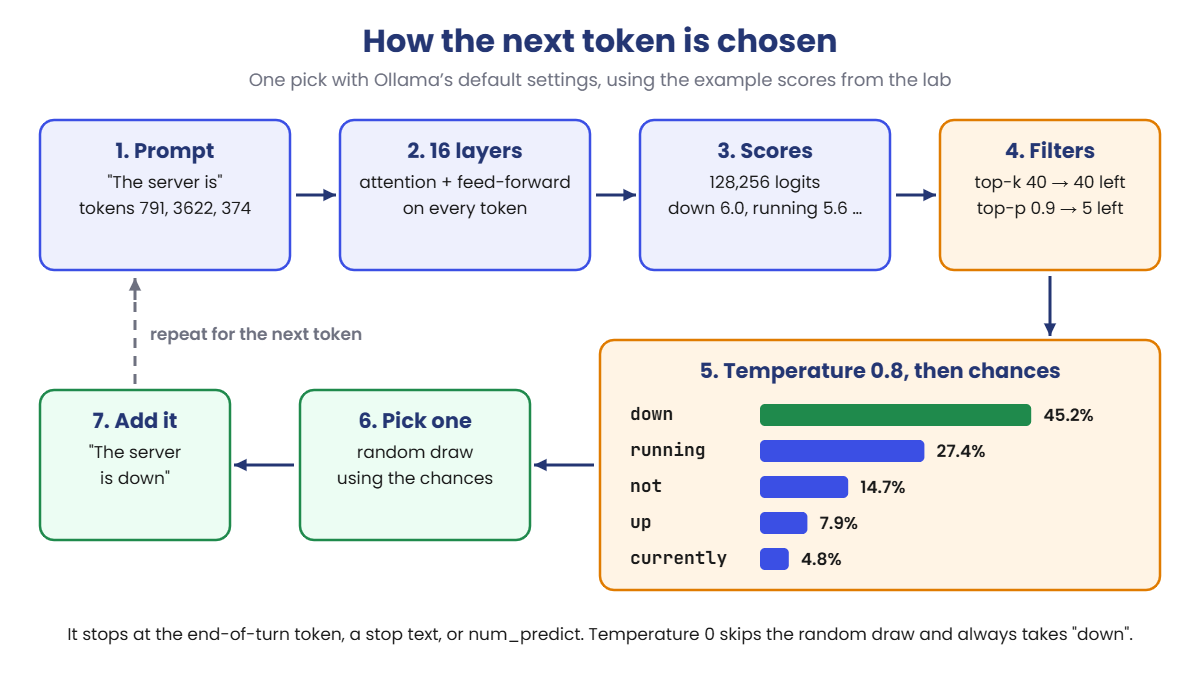
Follow one prediction for the prompt “The server is”, using the example scores from the lab:
- Read the prompt. The tokens go through all 16 layers (Lessons 3 to 6).
- Score every token. The last position produces 128,256 logits. “down” gets 6.0, “running” 5.6, “banana” −1.5, and most of the vocabulary gets a very low score.
- Filter. Top-k keeps the best 40. Top-p then keeps adding tokens from the top until they cover 90%. Here that takes just 5 tokens: down, running, not, up, currently.
- Apply temperature. Divide the scores by 0.8 and turn them into chances: down 45%, running 27%, not 15%, up 8%, currently 5%.
- Pick. Draw one token at random using those chances. Say it’s “down”.
- Repeat. The prompt is now “The server is down”, and the whole thing runs again for the next token, until the model picks its end-of-turn token, hits a stop text, or reaches
num_predict.
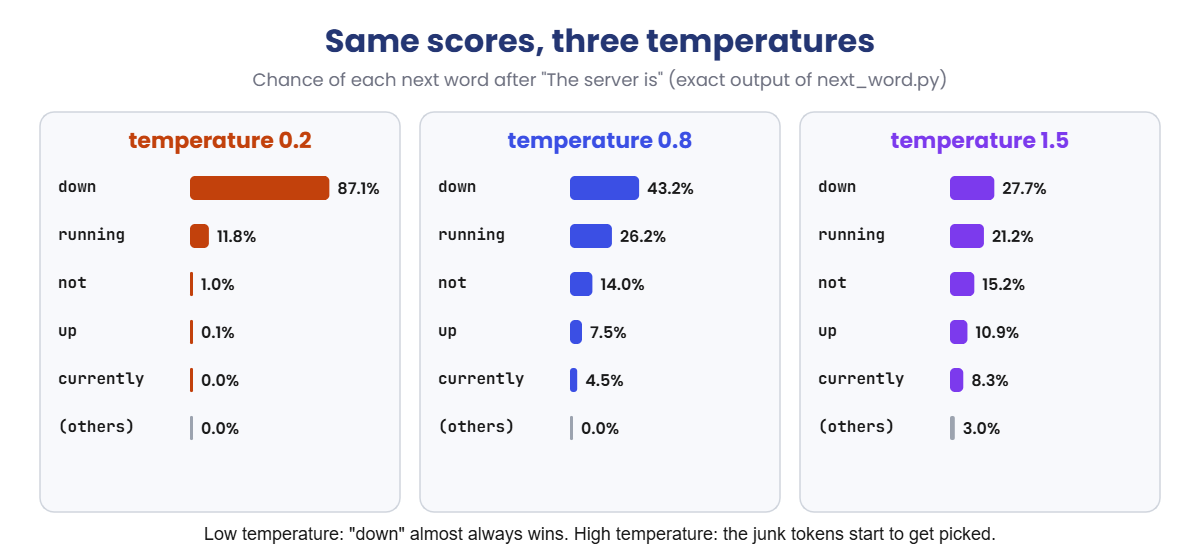
Here’s what temperature does to the same scores:
At temperature 0.2, “down” wins 87% of the time. At 1.5, it wins only 28% of the time, and the 128,247 low-scoring tokens together take 3%.
Three junk tokens in every hundred is enough to wreck a sentence. That’s what top-k and top-p are there to stop.
Completions, and where chat fits in
The model only ever does one thing: continue text. When you chat, Ollama wraps your message in the model’s template (25 hidden tokens, Lesson 3) and the model continues it with an answer, one token at a time. In the lab you’ll switch the template off with "raw": true and give the model a plain half sentence to finish, so you can see the bare prediction.
Hands-on Lab: control LLM temperature, top-k and top-p
You’ll start in Python with example scores, so every number is exact and you can see each step. Then you’ll switch to your real model in Ollama.
The Python scripts use only the standard library, so there’s nothing to install. Use PowerShell as before; on macOS or Linux, use python3 and nano, and run the Ollama steps in PowerShell 7 (pwsh), which is free for both.
1Turn scores into chances
Run this:
mkdir C:\ai-lab\sampling
cd C:\ai-lab\sampling
notepad next_word.pyPaste this whole block into next_word.py, then save:
import math
# Example scores (logits) for the word that comes after "The server is".
# A real model gives a score to every one of its 128,256 tokens.
SCORES = {
"down": 6.0, "running": 5.6, "not": 5.1, "up": 4.6, "currently": 4.2,
"offline": 3.8, "slow": 3.1, "back": 2.7, "banana": -1.5,
}
OTHERS = 128_247 # the rest of the vocabulary...
OTHER_SCORE = -15.0 # ...all with a very low score
TEMPERATURES = [0.2, 0.8, 1.5]
def chances(temperature):
top = max(SCORES.values())
e = {w: math.exp((s - top) / temperature) for w, s in SCORES.items()}
e["(the 128,247 others)"] = OTHERS * math.exp((OTHER_SCORE - top) / temperature)
total = sum(e.values())
return {w: v / total for w, v in e.items()}
tables = [chances(t) for t in TEMPERATURES]
print('Next word after "The server is"\n')
print(f"{'word':<22}" + "".join(f"{'temp ' + str(t):>11}" for t in TEMPERATURES))
for w in tables[0]:
print(f"{w:<22}" + "".join(f"{p[w] * 100:>10.1f}%" for p in tables))
print(f"{'total':<22}" + "".join(f"{sum(p.values()) * 100:>10.0f}%" for p in tables))The scores are made up for this lesson, but they’re shaped like a real model’s: a few good guesses near the top, then a huge crowd of tokens with very low scores. The script runs softmax at three temperatures.
Run this:
python next_word.pyYou should see this:
Next word after "The server is"
word temp 0.2 temp 0.8 temp 1.5
down 87.1% 43.2% 27.7%
running 11.8% 26.2% 21.2%
not 1.0% 14.0% 15.2%
up 0.1% 7.5% 10.9%
currently 0.0% 4.5% 8.3%
offline 0.0% 2.8% 6.4%
slow 0.0% 1.2% 4.0%
back 0.0% 0.7% 3.1%
banana 0.0% 0.0% 0.2%
(the 128,247 others) 0.0% 0.0% 3.0%
total 100% 100% 100%Same scores, three very different jars. At 0.2, “down” is almost certain. At 0.8, Ollama’s default, it’s 43%.
At 1.5, the crowd of junk tokens wakes up and takes 3.0%. Look at “banana” too: it never gets a real chance, at any of these temperatures.
✅ Checkpoint: “down” falls from 87.1% to 27.7% as the temperature goes up, and the others row goes from 0.0% to 3.0%.
2Pick words the way Ollama does
Run this:
notepad sample.pyPaste this whole block, then save:
import math
import random
# The same example scores as next_word.py, plus the rest of the vocabulary
SCORES = {
"down": 6.0, "running": 5.6, "not": 5.1, "up": 4.6, "currently": 4.2,
"offline": 3.8, "slow": 3.1, "back": 2.7, "banana": -1.5,
}
for n in range(128_247):
SCORES[f"#{n + 9}"] = -15.0 # junk tokens, named by number
# The settings Ollama uses unless you change them
TEMPERATURE = 0.8
TOP_K = 40 # keep only the 40 best tokens (0 = off)
TOP_P = 0.9 # keep the best tokens until they add up to 90% (1.0 = off)
MIN_P = 0.0 # drop tokens below this share of the best one's chance (0 = off)
SEED = 42 # same seed, same picks (None = different every run)
PICKS = 1000
def softmax(scores, temperature=1.0):
top = max(scores.values())
e = {w: math.exp((s - top) / temperature) for w, s in scores.items()}
total = sum(e.values())
return {w: v / total for w, v in e.items()}
# 1. Filters, in the same order as llama.cpp (the engine inside Ollama)
tokens = sorted(SCORES, key=SCORES.get, reverse=True)
if TOP_K > 0:
tokens = tokens[:TOP_K]
p = softmax({t: SCORES[t] for t in tokens})
kept, added = [], 0.0
for t in tokens:
kept.append(t)
added += p[t]
if added >= TOP_P:
break
kept = [t for t in kept if p[t] >= MIN_P * p[kept[0]]]
# 2. Temperature, then pick
rng = random.Random(SEED)
if TEMPERATURE <= 0:
final = {t: (1.0 if t == kept[0] else 0.0) for t in kept} # always the best one
else:
final = softmax({t: SCORES[t] for t in kept}, TEMPERATURE)
picks = rng.choices(list(final), weights=list(final.values()), k=PICKS)
print(f"temperature={TEMPERATURE} top_k={TOP_K} top_p={TOP_P} min_p={MIN_P} seed={SEED}")
print(f"Tokens still allowed: {len(kept):,} of {len(SCORES):,}\n")
print(f"{'token':<15}{'chance':>8}{'picked':>9}")
junk = [t for t in kept if t.startswith("#")]
for t in kept:
if not t.startswith("#"):
print(f"{t:<15}{final[t] * 100:>7.1f}%{picks.count(t):>9}")
if junk:
junk_set = set(junk)
print(f"{'junk tokens':<15}{sum(final[t] for t in junk) * 100:>7.1f}%"
f"{sum(1 for t in picks if t in junk_set):>9}")
print("\nFirst 10 picks:", " ".join(picks[:10]))This script builds a full 128,256-token vocabulary, runs the filters in llama.cpp’s order, applies the temperature, and then picks 1,000 times so you can count what comes out.
Run this:
python sample.py
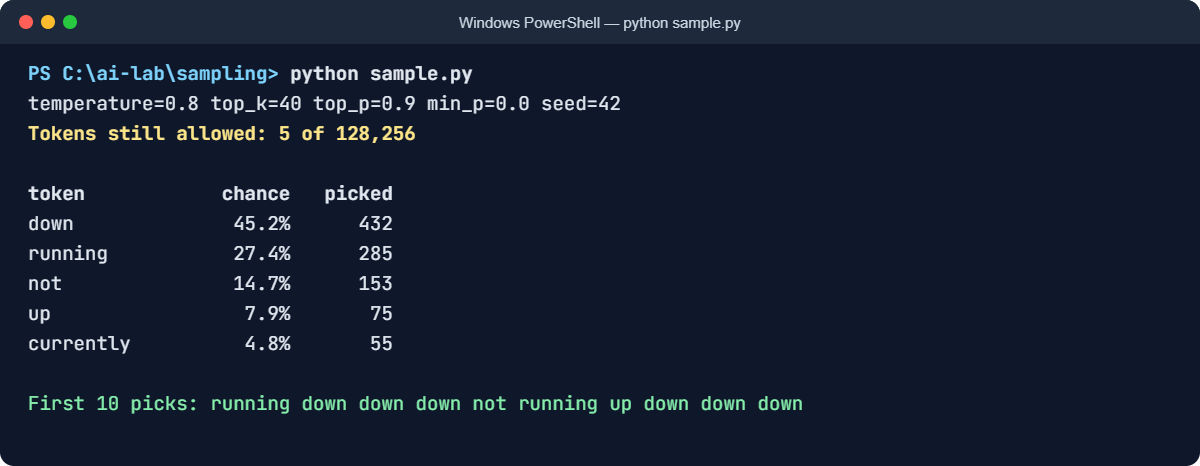
The text version of the same output:
temperature=0.8 top_k=40 top_p=0.9 min_p=0.0 seed=42
Tokens still allowed: 5 of 128,256
token chance picked
down 45.2% 432
running 27.4% 285
not 14.7% 153
up 7.9% 75
currently 4.8% 55
First 10 picks: running down down down not running up down down downOut of 128,256 tokens, only 5 survive. Top-k cut it to 40, then top-p kept adding tokens until they covered 90%. Those 5 cover 92%, and every junk token is gone. “down” was picked 432 times out of 1,000, close to its 45.2% chance.
✅ Checkpoint: 5 of 128,256 tokens are allowed, and “down” is picked 432 times.
Now make it greedy. Change the temperature line:
Change this line:
TEMPERATURE = 0Run this:
python sample.pyYou should see this:
temperature=0 top_k=40 top_p=0.9 min_p=0.0 seed=42
Tokens still allowed: 5 of 128,256
token chance picked
down 100.0% 1000
running 0.0% 0
not 0.0% 0
up 0.0% 0
currently 0.0% 0
First 10 picks: down down down down down down down down down downAll 1,000 picks are “down”. Temperature 0 means: skip the random draw, take the top token. This is what you want for answers that must be the same every time.
Change the temperature back to 0.8, and tighten top-p instead:
Change these two lines:
TEMPERATURE = 0.8
TOP_P = 0.5Run this:
python sample.pyYou should see this:
temperature=0.8 top_k=40 top_p=0.5 min_p=0.0 seed=42
Tokens still allowed: 2 of 128,256
token chance picked
down 62.2% 604
running 37.8% 396
First 10 picks: running down down down running running running down down downWith top-p at 0.5, only the two strongest words make it through. The answers are still varied, but only between safe choices.
✅ Checkpoint: At temperature 0 every pick is “down”. At top-p 0.5 only down and running are left.
3See what the seed does
Change TOP_P back to 0.9 and run the script twice. You get exactly the same counts and the same first 10 picks both times, because SEED = 42 starts the random generator at the same point. Now switch the seed off:
Change this line:
SEED = NoneRun it twice:
python sample.py
python sample.pyYou should see something like this (the counts change on every run):
PS C:\ai-lab\sampling> python sample.py
temperature=0.8 top_k=40 top_p=0.9 min_p=0.0 seed=None
Tokens still allowed: 5 of 128,256
token chance picked
down 45.2% 453
running 27.4% 284
not 14.7% 150
up 7.9% 66
currently 4.8% 47
First 10 picks: not down running running down not running not running down
PS C:\ai-lab\sampling> python sample.py
temperature=0.8 top_k=40 top_p=0.9 min_p=0.0 seed=None
Tokens still allowed: 5 of 128,256
token chance picked
down 45.2% 437
running 27.4% 277
not 14.7% 151
up 7.9% 98
currently 4.8% 37
First 10 picks: not down running running running down down down running notThe chances are identical, but the picks are different every time. That’s your laptop’s chat with Ollama: same model, same prompt, a new random draw each time. Put SEED = 42 back when you’re done.
✅ Checkpoint: With a seed, two runs match exactly. With SEED = None, the counts change but the chances don’t.
4Look inside your real model
Now ask llama3.2:1b for its real top five guesses. This uses Ollama’s logprobs option, which needs version 0.12.11 or newer. Check first:
Run this:
ollama --versionIf it’s older, download the latest Windows installer from ollama.com and run it. Your models stay where they are. Then paste this into PowerShell as one block:
Run this:
$body = @{
model = "llama3.2:1b"
prompt = "The server is"
raw = $true
stream = $false
logprobs = $true
top_logprobs = 5
options = @{ temperature = 0; num_predict = 1 }
} | ConvertTo-Json
$r = Invoke-RestMethod -Uri http://localhost:11434/api/generate -Method Post -Body $body -ContentType "application/json"
$r.logprobs[0].top_logprobs | Select-Object token, @{n="percent"; e={[math]::Round([math]::Exp($_.logprob) * 100, 1)}}
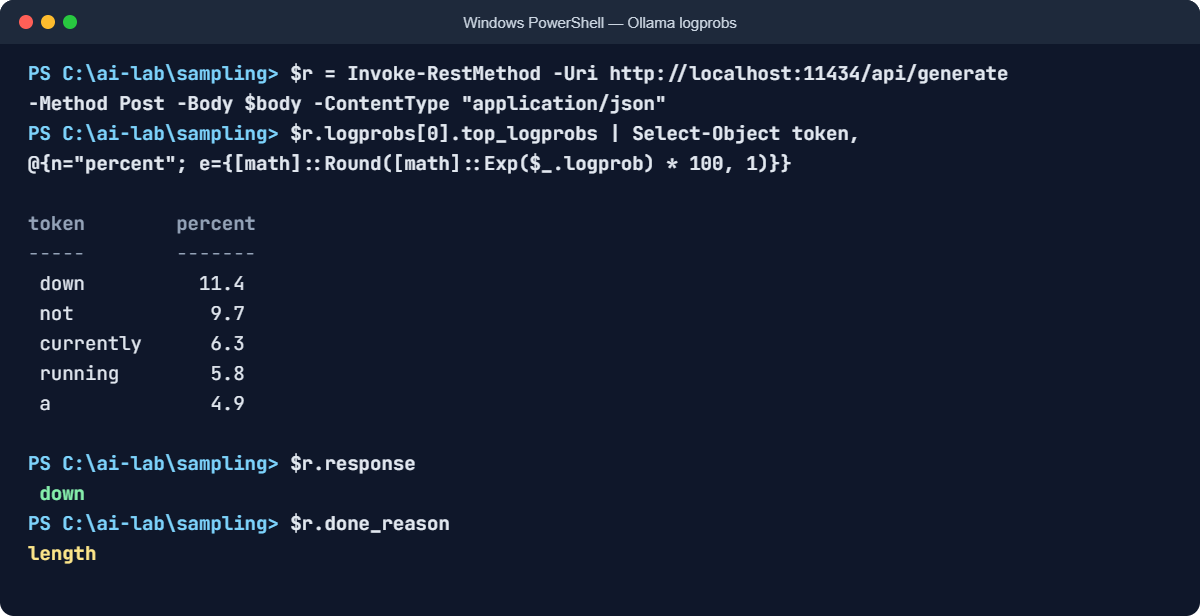
The text version (your tokens and percentages may be a little different):
token percent
----- -------
down 11.4
not 9.7
currently 6.3
running 5.8
a 4.9These are the model’s own chances before any temperature or filter. Notice how unsure it is: the favourite is only about 11%. A tiny model with a half sentence and no context has lots of reasonable ways to go on.
The space at the start of each token is real; Llama tokens carry their leading space (Lesson 3). Two settings matter here: raw = $true skips the chat template so the model just continues your text, and num_predict = 1 stops after one token.
Now check what it picked and why it stopped:
$r.response
$r.done_reasonYou should see something like this:
down
lengthAt temperature 0 it took the top token. And done_reason is length, because it hit the one-token limit, not because it had finished. Remember that word; you’ll need it in the Break It lab.
✅ Checkpoint: You can see five tokens with their percentages, and done_reason says length.
5Make Ollama repeat itself
Ask for a server name three times in a row, at the normal temperature of 0.8, but with a fixed seed:
Run this:
$body = @{
model = "llama3.2:1b"
prompt = "Suggest one name for a new backup server. Reply with the name only."
stream = $false
options = @{ temperature = 0.8; seed = 42 }
} | ConvertTo-Json
1..3 | ForEach-Object { (Invoke-RestMethod -Uri http://localhost:11434/api/generate -Method Post -Body $body -ContentType "application/json").response }You should see something like this:
VaultGuard
VaultGuard
VaultGuardThree identical answers. Now delete ; seed = 42 from the options line, so it reads options = @{ temperature = 0.8 }, and run the whole block again:
You should see something like this:
VaultGuard
BackupHive
SafeHarborThree different names. Finally, change it to options = @{ temperature = 0 } and run it once more. You get the same name three times again, this time without any seed, because greedy decoding has no random draw at all.
✅ Checkpoint: With seed 42 or temperature 0 the three answers match. Without either, they change.
Break It, Then Fix It
Two ways sampling goes wrong in real projects. The first is loud and easy to spot. The second is quiet, and it breaks programs that read the model’s answer.
1Break it: turn the heat up and the filters off
In sample.py, change three settings as if someone wanted “more creative” answers and removed the limits:
Change these three lines:
TEMPERATURE = 3.0
TOP_K = 0
TOP_P = 1.0Run this:
python sample.pyYou’ll see this:
temperature=3.0 top_k=0 top_p=1.0 min_p=0.0 seed=42
Tokens still allowed: 128,256 of 128,256
token chance picked
down 0.8% 9
running 0.7% 6
not 0.6% 3
up 0.5% 7
currently 0.4% 5
offline 0.4% 2
slow 0.3% 2
back 0.3% 2
banana 0.1% 0
junk tokens 95.8% 964
First 10 picks: #80009 up #31251 #24318 #92994 #84997 #113829 #6084 #50906 currentlyEach junk token on its own is still tiny. But there are 128,247 of them, and at temperature 3 together they take 95.8%.
Eight of the first ten picks are junk. Your real model does the same thing:
Try it in Ollama (type each line at the >>> prompt):
ollama run llama3.2:1b
/set parameter temperature 3
/set parameter top_k 0
/set parameter top_p 1You’ll see something like this:
Set parameter 'temperature' to '3'
Set parameter 'top_k' to '0'
Set parameter 'top_p' to '1'
>>> Explain what a DNS server does in two sentences.
A DNS server turns website names into IP addresses so browsers kanaal
the right machine. Opportun.getBy reconcileauen 대해 sincerity_trait
fluoride}}" Hayden ölç preserving.mdl lux.UndefIt starts fine, because the first tokens are easy, then falls apart once one bad pick sends it somewhere strange. Every new token is predicted from the broken text before it, so the damage grows.
The fix: keep the filters on. In sample.py, put top-k and top-p back and leave the temperature at 3.0:
Change these two lines:
TOP_K = 40
TOP_P = 0.9Run this:
python sample.pyYou should see this:
temperature=3.0 top_k=40 top_p=0.9 min_p=0.0 seed=42
Tokens still allowed: 5 of 128,256
token chance picked
down 26.4% 250
running 23.1% 227
not 19.5% 200
up 16.5% 167
currently 14.5% 156
First 10 picks: not down running down up not currently down running downEven at temperature 3, only the 5 good words are left, because the filters run before the temperature. Setting MIN_P = 0.1 instead of top-k and top-p works too: it leaves 6 good words and no junk.
In Ollama, type /bye to leave. Settings made with /set only last for that session.
✅ Checkpoint: With TOP_K = 40 and TOP_P = 0.9 back, no junk tokens are allowed, even at temperature 3.0.
2Break it again: an answer that stops halfway
Someone sets a small num_predict to keep replies short and cheap. Here’s what happens to a program that expects JSON:
Run this:
$body = @{
model = "llama3.2:1b"
prompt = "Return a JSON object with the keys hostname, ip and role for a web server."
stream = $false
format = "json"
options = @{ temperature = 0; num_predict = 15 }
} | ConvertTo-Json
$r = Invoke-RestMethod -Uri http://localhost:11434/api/generate -Method Post -Body $body -ContentType "application/json"
$r.response
$r.done_reason
$r.response | ConvertFrom-JsonYou’ll see something like this:
{"hostname": "web01", "ip": "192.168.
lengthFollowed by an error like this:
ConvertFrom-Json : Unterminated string passed in.The JSON stops in the middle of the IP address. format = "json" makes the model write JSON, but it can’t make it finish: after 15 tokens, Ollama simply stops. There’s no error from Ollama itself. The only clue is done_reason, which says length instead of stop.
The fix: give it room, and check why it stopped before you use the answer. Change the options line to options = @{ temperature = 0; num_predict = 200 }, run the block again, and then add a guard like this to any script that reads model output:
Run this:
if ($r.done_reason -eq "length") {
throw "The answer was cut off. Raise num_predict."
}
$server = $r.response | ConvertFrom-Json
$server.hostnameYou should see something like this:
web01With room to finish, done_reason is stop, the JSON parses, and the guard stays quiet. If the limit is ever hit again, your script fails loudly instead of passing on half an answer.
✅ Checkpoint: done_reason says stop, and ConvertFrom-Json gives you the hostname without an error.
This happened at work
Low risk on Monday, high risk on Tuesday
An IT team used an LLM to pre-check change requests. Every change was read by the model, which gave it a risk rating of low, medium or high and a short reason. Low-risk changes went straight to the weekly approval list.
Then an engineer resubmitted a firewall change after fixing a typo in the ticket. The change itself was exactly the same. The first time it was rated low.
The second time, high. The change manager asked a fair question: which one do we believe?
The team re-ran 200 old change requests three times each. About one in seven got a different rating at least once.
Nobody had touched the sampling settings, so every request was running at the default temperature of 0.8. For borderline changes, “low” and “medium” had similar chances, and the random draw decided.
The fix: temperature 0 with a fixed seed, the rating returned as JSON with only three allowed values, and the model name, settings and full answer saved with every decision. They also used logprobs: when the top rating had less than 70% of the probability, the change went to a person instead of the list.
The lesson: default settings are tuned for chatting, not for decisions. Anything that feeds a process should be repeatable, and a model that’s unsure should say so, not flip a coin.
Common mistakes and troubleshooting
| Mistake | What happens | How to avoid it |
|---|---|---|
| Leaving the default temperature for classification or data extraction | The same input gets different answers | Use temperature 0 (and a seed) for any answer a program or a process relies on |
| Thinking temperature 0 means “correct” | Wrong answers, just the same wrong answer every time | Greedy picks the most likely token, not the true one. Still validate the output |
| Raising temperature with top-k and top-p switched off | Answers drift into junk tokens and mixed languages | Raise temperature a little at a time and keep top-k, top-p or min-p on |
| Changing temperature and top-p at the same time | You can’t tell which change helped or hurt | Change one setting, test with the same prompts, then change the next |
| A small num_predict and no check on done_reason | JSON and code arrive cut off halfway | Leave enough room and treat done_reason “length” as a failure |
| A high repeat_penalty on JSON or code | Missing brackets and quotes, because they repeat a lot | Keep repeat_penalty at 1.0 for structured output; only raise it for long free text |
| Expecting a seed to match on another machine or version | Audit re-runs don’t match the saved answer | Save the answer, the model version and the settings. Don’t count on regenerating it |
Troubleshooting the lab
| Problem | Fix |
|---|---|
$r.logprobs is empty | Your Ollama is older than 0.12.11. Install the latest version and run the block again |
Invoke-RestMethod : Unable to connect to the remote server | Ollama isn’t running. Start the Ollama app, or run ollama serve in another window |
model "llama3.2:1b" not found | Run ollama pull llama3.2:1b first |
| sample.py counts don’t match | Check every setting, and that SEED = 42. Any change to the settings or scores changes the picks |
| The same seed gives different answers in Ollama | Check that the prompt and every option are identical. Answers can also change after an Ollama update or on a different machine |
The PowerShell block shows >> and waits | A quote or brace is missing. Press Ctrl+C and paste the block again |
Interview questions
Click a question to open it. Under each one you’ll find what the interviewer is actually looking for, and one good way to answer.
Fresher level
1. How does an LLM choose the next word?
What they’re really checking: Do you know it’s a probability, not a lookup?
How you could answer: The model gives a score to every token in its vocabulary. Softmax turns those scores into probabilities, and then one token is chosen, either the most likely one or a random pick weighted by the probabilities. That token is added to the text and the process repeats.
2. What does temperature do?
What they’re really checking: Can you explain it without saying “creativity” only?
How you could answer: It divides the scores before softmax. Below 1, the top tokens become even more likely, so answers are focused and repeatable.
Above 1, the chances flatten out, so answers are more varied but also more likely to go wrong. Temperature 0 means always take the top token.
3. Why does ChatGPT or Ollama give a different answer when I ask the same question again?
What they’re really checking: Do you understand sampling?
How you could answer: Because by default the next token is drawn at random from the probabilities, not always the top one. One different token early on changes everything after it. Setting temperature to 0, or fixing the seed, makes the answer repeatable.
2–5 years experience
4. What’s the difference between top-k and top-p?
What they’re really checking: Do you know why top-p adapts?
How you could answer: Top-k keeps a fixed number of top tokens, like 40. Top-p keeps the smallest group of top tokens whose probabilities add up to p, like 90%. When the model is confident, top-p may keep just two tokens; when it’s unsure, it keeps many.
So top-p adapts to the situation and top-k doesn’t. They’re often used together.
5. Your classification endpoint returns different labels for the same input. How do you fix it?
What they’re really checking: Can you make LLM output repeatable for production?
How you could answer: Set temperature to 0 and fix the seed, constrain the output to the allowed labels with JSON or a schema, and log the model version and settings with every result. I’d also use logprobs to flag low-confidence results for human review, rather than trusting a random draw.
6. How do you know if a model’s answer was cut off?
What they’re really checking: Have you handled this in real code?
How you could answer: Check the finish reason. Ollama returns done_reason “length” when it hit num_predict and “stop” when it finished normally; OpenAI-style APIs use finish_reason “length”. Treat “length” as a failure: retry with a bigger limit or reject the answer, especially for JSON or code.
Senior level
7. Is temperature 0 fully deterministic?
What they’re really checking: Do you understand where non-determinism comes from beyond sampling?
How you could answer: Not always. Greedy decoding removes the random draw, but the logits themselves can change slightly between GPUs, driver versions, batch sizes and engine versions, because floating-point maths isn’t perfectly repeatable when the order of operations changes.
When two tokens are nearly tied, that’s enough to flip the pick. For audits, store the output instead of relying on regenerating it.
8. How would you use logprobs in a product?
What they’re really checking: Can you turn model internals into a feature?
How you could answer: As a confidence signal. For a classifier, compare the probability of the top label against the others and send low-margin cases to a person.
For extraction, flag fields where the tokens had low probability. I’d be careful though: these probabilities aren’t perfectly calibrated, so I’d set thresholds by testing on labelled data, not by guessing.
9. What sampling settings would you choose for a JSON extraction service, a coding assistant and a marketing copy tool?
What they’re really checking: Can you match settings to the job?
How you could answer: Extraction: temperature 0, a schema or JSON format, a generous token limit, and a done_reason check. Coding assistant: low temperature, around 0.2, with top-p on, so it’s mostly stable but can suggest alternatives.
Copy tool: around 0.8 to 1.0 with top-p 0.9 or min-p, and several drafts so a person can choose. In every case, I’d test settings on real prompts and change one at a time.
Quick quiz
Q1. In next_word.py, what happened to “down” when the temperature went from 0.2 to 1.5?
- It stayed the same
- Its chance fell from 87.1% to 27.7%
- It disappeared
Show answer
B — Higher temperature flattens the chances. The order stays the same, but the top word wins much less often.
Q2. What does temperature 0 do?
- Always picks the most likely token
- Picks completely at random
- Turns the model off
Show answer
A — It’s greedy decoding: no random draw, just the top token, so the answer is repeatable.
Q3. With top_p = 0.9, how many tokens survived in sample.py?
- 40
- 5
- 128,256
Show answer
B — Top-p kept adding top tokens until they covered at least 90%. That took 5 tokens.
Q4. Why did temperature 3 with top-k and top-p switched off produce junk?
- The model ran out of memory
- 128,247 low-scoring tokens together took 95.8% of the chance
- The seed was wrong
Show answer
B — Each junk token is tiny, but there are so many that a flat distribution hands them almost all the chance.
Q5. Ollama returns done_reason “length”. What does that mean?
- The answer is complete
- The answer hit num_predict and was cut off
- The prompt was too long to read
Show answer
B — “length” means the token limit stopped it. “stop” means the model finished on its own.
Quick recap
- A model predicts a completion one token at a time: score all 128,256 tokens, turn the scores into chances, pick one, repeat.
- Temperature sharpens (below 1) or flattens (above 1) the chances. 0 means always take the top token.
- Top-k, top-p and min-p remove unlikely tokens before the pick. In Ollama they run before temperature, so they protect you when you raise it.
- Ollama’s defaults are temperature 0.8, top-k 40, top-p 0.9: good for chat, not for decisions.
- A seed or temperature 0 makes answers repeatable on the same setup. Save outputs you need to audit.
- Check done_reason: “length” means the answer was cut off.
Next lesson
Prompts → Now you know how the model picks every word. Next you’ll learn how to write the prompt that the model is completing: instructions, context, examples and format, and why small changes in wording change the answer.
Further reading: LLM temperature
Want to go deeper into LLM temperature and sampling? Check the official reference: the parameter list in the Ollama Modelfile documentation, and The Curious Case of Neural Text Degeneration (Holtzman et al., 2019), the paper that introduced top-p sampling. You can also follow the full Generative AI and Agents course on SaatVedha, step by step.
