Retrieval augmented generation (RAG)
-
Introduction to generative AI and agents
-
Large language models (LLMs)
-
Prompts
-
AI agents
Ask llama3.2:1b how long your company’s passwords must be, and it will happily answer. It just won’t be your company’s answer.
The model learned from public text up to the end of 2023, and it has never seen your policies, your runbooks or last week’s change notes. Retrieval augmented generation, or RAG, fixes that: before the model answers, your code searches your own documents and puts the few most relevant pieces into the prompt.
In this lesson you’ll build a small RAG system over three IT policy files: first with keyword search, then with real embeddings, then with an answer that cites its source. Then you’ll break it twice: once by cutting the documents in the wrong places, and once by asking something the documents don’t cover.
| Time | You need | By the end you can |
|---|---|---|
| About 75 minutes | Python 3, Ollama with llama3.2:1b, and the nomic-embed-text model (about 270 MB) | Explain the RAG pipeline, chunk documents, search by keywords and by meaning, build a grounded prompt with citations, and spot bad chunking and made-up answers |
What it is, in one line
RAG means: find the pieces of your own documents that match the question, paste them into the prompt, and tell the model to answer only from them.
In Simple Words
An open-book exam
In a closed-book exam, you answer from memory. If you never studied a topic, you guess, and sometimes you guess with great confidence.
In an open-book exam, you’re allowed to bring the textbook. But you can’t read the whole book for every question; there isn’t time.
So you use the index at the back, find the two or three right pages, read them, and write your answer. A good student also writes “see page 42”, so the teacher can check.
A plain LLM is a closed-book exam: it answers from memory. RAG turns it into an open-book exam. Your code is the student flipping to the right pages, the pages are your documents, and “see page 42” is the citation.
And if the book doesn’t cover the question at all? A good student says “this isn’t in the book” instead of inventing something. You’ll teach the model to do the same.
Engineer's View
Index once, retrieve every time
Why not just ask the model? A model only knows its training data. It has never seen your documents, and its knowledge stops at a cutoff date (December 2023 for Llama 3.2, the line you saw in its template in Lesson 8).
Fine-tuning can teach style, but it’s slow, costly and bad at storing exact facts. Pasting every document into the prompt fails too: it overflows the context window (Lesson 10) and the middle gets ignored (Lesson 6).
The RAG pipeline has two halves.
Indexing, done once and again whenever documents change:
- Load the documents: PDFs, wiki pages, tickets, text files.
- Chunk them into pieces small enough to search and to fit in a prompt. Paragraphs or sections work well; many teams use 200 to 500 tokens with a little overlap.
- Embed each chunk: an embedding model turns the text into a vector, like the word vectors in Lesson 5 but for whole passages.
nomic-embed-textgives 768 numbers per chunk. - Store the vectors with their text and source, in a vector database such as Chroma, Qdrant or PostgreSQL with pgvector. For a few hundred chunks, a Python list is enough.
Answering, done for every question:
- Embed the question with the same model.
- Retrieve the top-k chunks by cosine similarity (Lesson 5). Ollama’s
/api/embedreturns unit-length vectors, so a plain dot product is the cosine. - Build the prompt: rules, the chunks with their sources, and the question (Lesson 8).
- Generate the answer, with citations a person can check.
Keyword, semantic and hybrid search. Keyword search (like BM25) is fast and great for exact terms: error codes, server names, extension numbers. Embedding search finds meaning, even when the user’s words are completely different. Production systems often run both and merge the results, then use a reranker model to re-order the best few, which is how the HR bot in Lesson 6 was fixed.
Grounding. The prompt must tell the model to use only the context, cite the source, and say when the answer isn’t there. Your code can add a second guard: if the best similarity score is low, don’t call the model at all.
Things that go wrong in real systems: chunks cut in the wrong place, stale indexes after documents change, users retrieving documents they shouldn’t see (filter by permission before retrieval), and prompt injection hidden inside documents (Lesson 8).
Why it matters on the job: RAG is the most common way companies put LLMs to work: help desks, policy assistants, runbook search, code and log Q&A. Most of the engineering is in the retrieval, not the model.
How it works, step by step
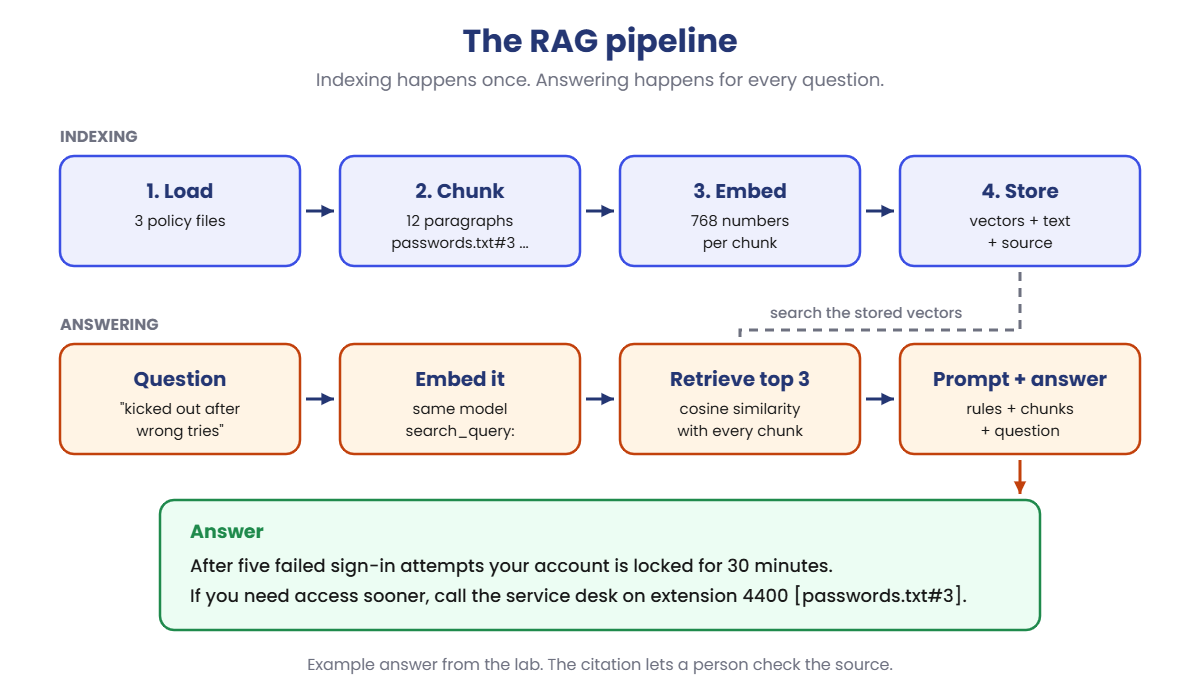
Here’s the whole pipeline for the lab’s three policy files, from indexing to a cited answer:
- Chunk. Each policy file is split into paragraphs: 12 chunks, each tagged with its source, such as
passwords.txt#3. - Embed the chunks. Each chunk becomes a vector of 768 numbers. This is done once.
- Embed the question. “I keep getting kicked out of my computer after too many wrong tries” becomes a vector too.
- Retrieve. Compare the question vector with every chunk vector and keep the top 3. The lockout paragraph wins, even though it shares almost no words with the question.
- Answer. The 3 chunks, the rules and the question go to
llama3.2:1b, which answers and cites[passwords.txt#3].
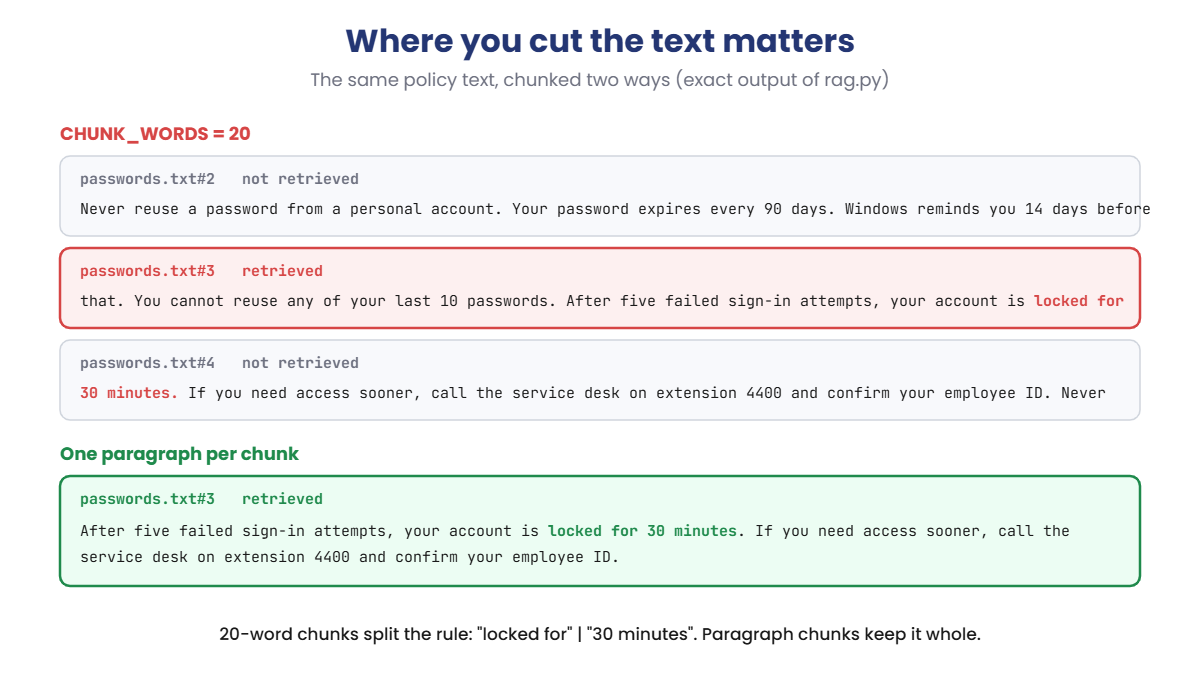
Where you cut the documents matters as much as how you search them. Here’s the same paragraph cut two ways:
Cut every 20 words, the most important sentence of the paragraph is split across two chunks: one ends with “locked for”, and the next starts with “30 minutes”. Search finds the first one, and the answer is gone.
Cut by paragraph, the whole rule stays together. You’ll see this happen in the Break It lab.
RAG or a bigger context window?
New models accept 128,000 tokens or more, so why not paste everything? Because every token costs time and money on every question, the middle of long prompts gets less attention (Lesson 6), and a 300-page manual changes every week. RAG sends the 3 paragraphs that matter, and the index can be updated without touching the prompt.
Hands-on Lab: build retrieval augmented generation
You’ll build everything in two scripts. make_docs.py writes three short IT policy files into a policies folder. rag.py chunks them, searches them, and (when you switch it on) asks llama3.2:1b for an answer. Steps 1 and 2 use keyword search in plain Python, so their output is exact.
Steps 3 and 4 use the embedding model, so the scores and words will differ a little. On macOS or Linux, use python3 and nano.
1Create the documents and search by keyword
Run this:
mkdir C:\ai-lab\rag
cd C:\ai-lab\rag
notepad make_docs.pyPaste this whole block into make_docs.py, then save:
import os
DOCS = {
"passwords.txt": [
"Passwords must be at least 14 characters long. Use a passphrase of four or more random words, such as river-lamp-cotton-seven. Never reuse a password from a personal account.",
"Your password expires every 90 days. Windows reminds you 14 days before that. You cannot reuse any of your last 10 passwords.",
"After five failed sign-in attempts, your account is locked for 30 minutes. If you need access sooner, call the service desk on extension 4400 and confirm your employee ID.",
"Never share your password, not even with the IT team. The service desk will never ask for it by phone, email or chat.",
],
"vpn.txt": [
"Staff working outside the office must connect through the company VPN before opening any internal system.",
"To connect, open the VPN client, enter vpn.example.com as the portal, and sign in with your normal account and the six-digit code from the authenticator app.",
"If the VPN connects but internal sites do not open, disconnect, restart your laptop and try again. If it still fails, check that the date and time on your laptop are correct, because the six-digit code depends on them.",
"The guest Wi-Fi in the office does not need the VPN. Its password changes every Monday and is shown on the screen at reception.",
],
"laptops.txt": [
"Every new employee receives a company laptop on their first day. Laptops are replaced every four years, or sooner if a repair would cost more than half the price of a new one.",
"Do not install software yourself. Request it in the Software Center app; most requests are approved within one working day.",
"If your laptop is lost or stolen, report it to the service desk within 24 hours so it can be locked and wiped remotely.",
"Before you travel abroad with a laptop, tell the service desk at least five working days in advance, so software licences and VPN access can be checked.",
],
}
os.makedirs("policies", exist_ok=True)
for name, paragraphs in DOCS.items():
with open(os.path.join("policies", name), "w", encoding="utf-8") as f:
f.write("\n\n".join(paragraphs) + "\n")
print(f"Wrote policies/{name}: {len(paragraphs)} paragraphs")Run this:
python make_docs.pyYou should see this:
Wrote policies/passwords.txt: 4 paragraphs
Wrote policies/vpn.txt: 4 paragraphs
Wrote policies/laptops.txt: 4 paragraphsRun this:
notepad rag.pyPaste this whole block into rag.py, then save:
import json
import math
import os
import re
import urllib.request
QUESTION = "How long must my password be?"
SEARCH = "keyword" # "keyword" or "embed"
TOP_K = 3 # how many chunks to retrieve
CHUNK_WORDS = 0 # 0 = one chunk per paragraph; N = cut every N words
ANSWER = False # True = ask llama3.2:1b to answer from the chunks
STRICT = True # True = only answer from the chunks
EMBED_MODEL = "nomic-embed-text"
CHAT_MODEL = "llama3.2:1b"
STOP = {"a", "an", "the", "is", "are", "be", "do", "does", "i", "my", "me", "to", "of", "and",
"or", "in", "on", "for", "it", "what", "how", "who", "can", "should", "must", "after", "with"}
def post(path, body):
req = urllib.request.Request("http://localhost:11434" + path, data=json.dumps(body).encode(),
headers={"Content-Type": "application/json"})
with urllib.request.urlopen(req) as r:
return json.load(r)
def load_chunks():
chunks = []
for name in sorted(os.listdir("policies")):
text = open(os.path.join("policies", name), encoding="utf-8").read()
if CHUNK_WORDS:
words = text.split()
parts = [" ".join(words[i:i + CHUNK_WORDS]) for i in range(0, len(words), CHUNK_WORDS)]
else:
parts = [p.strip() for p in text.split("\n\n") if p.strip()]
for n, part in enumerate(parts, 1):
chunks.append({"source": f"{name}#{n}", "text": part})
return chunks
def words(text):
return {w for w in re.findall(r"[a-z0-9]+", text.lower()) if w not in STOP}
def keyword_scores(question, chunks):
q = words(question)
return [len(q & words(c["text"])) for c in chunks]
def embed_scores(question, chunks):
# nomic-embed-text expects these prefixes on documents and on the question
docs = post("/api/embed", {"model": EMBED_MODEL,
"input": ["search_document: " + c["text"] for c in chunks]})["embeddings"]
q = post("/api/embed", {"model": EMBED_MODEL, "input": ["search_query: " + question]})["embeddings"][0]
return [sum(a * b for a, b in zip(q, d)) for d in docs] # vectors are unit length: dot = cosine
chunks = load_chunks()
print(f"Indexed {len(chunks)} chunks from {len(os.listdir('policies'))} files"
+ (f" ({CHUNK_WORDS}-word chunks)" if CHUNK_WORDS else " (one per paragraph)"))
print(f"Question: {QUESTION}")
scores = keyword_scores(QUESTION, chunks) if SEARCH == "keyword" else embed_scores(QUESTION, chunks)
best = sorted(zip(scores, range(len(chunks))), reverse=True)[:TOP_K]
print(f"Top {TOP_K} by {SEARCH} search:")
for score, i in best:
text = chunks[i]["text"]
print(f" {score:6.3f} {chunks[i]['source']:<15} {text[:62]}{'...' if len(text) > 62 else ''}")
if ANSWER:
context = "\n\n".join(f"[{chunks[i]['source']}] {chunks[i]['text']}" for _, i in best)
rules = ("Answer the question using only the context. Cite the source you used, like [passwords.txt#2]. "
"If the context does not contain the answer, say: I don't know, that is not in the IT policies.")
system = rules if STRICT else "You are a helpful IT assistant."
r = post("/api/chat", {"model": CHAT_MODEL, "stream": False, "options": {"temperature": 0},
"messages": [{"role": "system", "content": system},
{"role": "user", "content": f"Context:\n{context}\n\nQuestion: {QUESTION}"}]})
print(f"Prompt tokens: {r['prompt_eval_count']}")
print("Answer:", r["message"]["content"].strip())Run this:
python rag.pyYou should see this (keyword search is exact):
Indexed 12 chunks from 3 files (one per paragraph)
Question: How long must my password be?
Top 3 by keyword search:
2.000 passwords.txt#1 Passwords must be at least 14 characters long. Use a passphras...
1.000 vpn.txt#4 The guest Wi-Fi in the office does not need the VPN. Its passw...
1.000 passwords.txt#4 Never share your password, not even with the IT team. The serv...Twelve chunks, one per paragraph. The score is the number of important words the question and the chunk share: “long” and “password” both appear in passwords.txt#1, so it wins.
That’s the right paragraph. Keyword search works when you use the same words as the document.
✅ Checkpoint: 12 chunks, and passwords.txt#1 is the top result with a score of 2.000.
2Ask in your own words
Real users don’t talk like policy documents. Ask about being locked out, without using any of the document’s words:
Change the QUESTION line:
QUESTION = "I keep getting kicked out of my computer after too many wrong tries"Run this:
python rag.pyYou should see this (exact):
Indexed 12 chunks from 3 files (one per paragraph)
Question: I keep getting kicked out of my computer after too many wrong tries
Top 3 by keyword search:
0.000 vpn.txt#4 The guest Wi-Fi in the office does not need the VPN. Its passw...
0.000 vpn.txt#3 If the VPN connects but internal sites do not open, disconnect...
0.000 vpn.txt#2 To connect, open the VPN client, enter vpn.example.com as the ...Every score is zero. The answer is sitting in passwords.txt#3, but it says “failed sign-in attempts” and “locked”, and the user said “kicked out” and “wrong tries”. Keyword search can’t see that they mean the same thing, so it returns three random VPN paragraphs.
✅ Checkpoint: All three scores are 0.000, and passwords.txt#3 is not in the list.
3Search by meaning with embeddings
Download a small embedding model, then switch the search:
Run this:
ollama pull nomic-embed-textChange this line:
SEARCH = "embed"Run this:
python rag.py
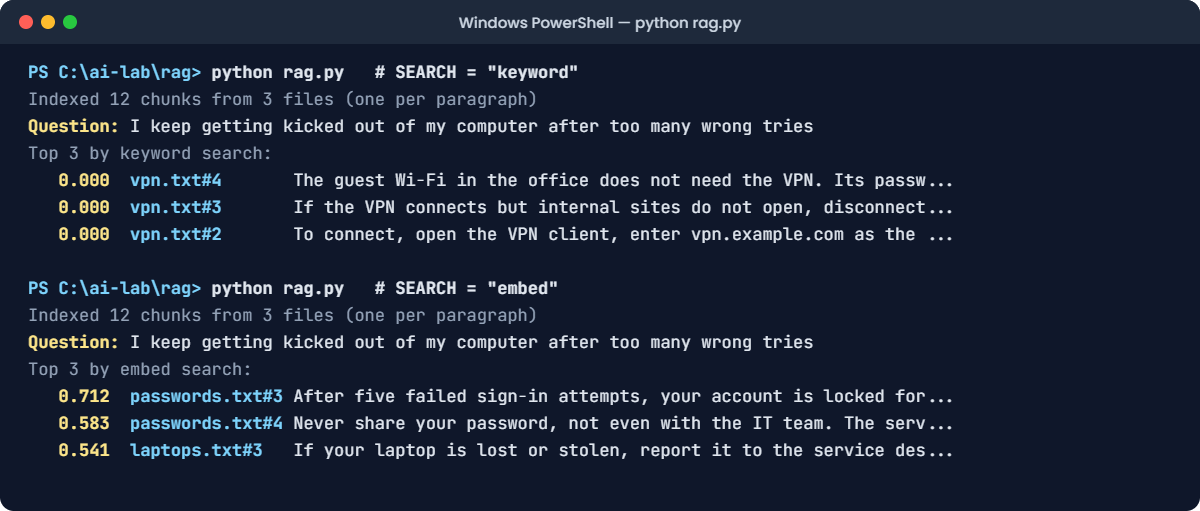
You should see something like this (your scores and the model’s words will differ a little):
Indexed 12 chunks from 3 files (one per paragraph)
Question: I keep getting kicked out of my computer after too many wrong tries
Top 3 by embed search:
0.712 passwords.txt#3 After five failed sign-in attempts, your account is locked for...
0.583 passwords.txt#4 Never share your password, not even with the IT team. The serv...
0.541 laptops.txt#3 If your laptop is lost or stolen, report it to the service des...The lockout paragraph is now first, with the highest similarity. The embedding model learned from huge amounts of text that “kicked out after wrong tries” and “locked after failed sign-in attempts” describe the same thing. Notice the search_document: and search_query: prefixes in the code: nomic-embed-text was trained with them, and leaving them out makes its results worse.
✅ Checkpoint: passwords.txt#3 is the top result.
4Answer with a source
Change this line:
ANSWER = TrueRun this:
python rag.py
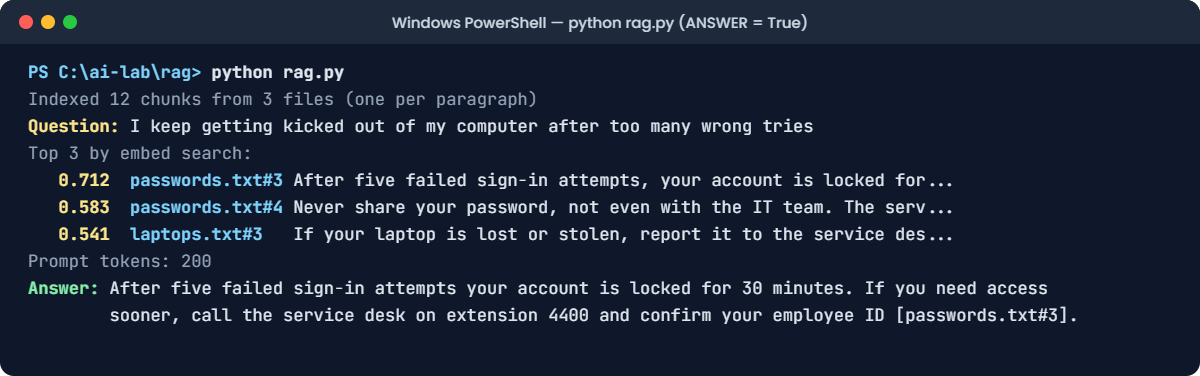
You should see something like this (your scores and the model’s words will differ a little):
Indexed 12 chunks from 3 files (one per paragraph)
Question: I keep getting kicked out of my computer after too many wrong tries
Top 3 by embed search:
0.712 passwords.txt#3 After five failed sign-in attempts, your account is locked for...
0.583 passwords.txt#4 Never share your password, not even with the IT team. The serv...
0.541 laptops.txt#3 If your laptop is lost or stolen, report it to the service des...
Prompt tokens: 200
Answer: After five failed sign-in attempts your account is locked for 30 minutes. If you need access sooner, call the service desk on extension 4400 and confirm your employee ID [passwords.txt#3].That’s RAG end to end. The answer has the real numbers from your policy, 30 minutes and extension 4400, which the model could never have guessed, and the citation tells a person exactly where to check. The prompt was about 200 tokens: three paragraphs, not the whole policy library.
✅ Checkpoint: The answer mentions 30 minutes and cites [passwords.txt#3].
Break It, Then Fix It
Two failures that turn up in almost every first RAG project. Neither one shows an error.
1Break it: chunks cut in the wrong place
A teammate switches to fixed-size chunks because “that’s what the tutorial did”. Ask a precise question, and cut every 20 words:
Change these two lines:
QUESTION = "How long is my account locked after failed sign-ins?"
CHUNK_WORDS = 20Run this:
python rag.pyYou’ll see something like this:
Indexed 18 chunks from 3 files (20-word chunks)
Question: How long is my account locked after failed sign-ins?
Top 3 by embed search:
0.774 passwords.txt#3 that. You cannot reuse any of your last 10 passwords. After fi...
0.598 passwords.txt#2 Never reuse a password from a personal account. Your password ...
0.571 laptops.txt#4 report it to the service desk within 24 hours so it can be loc...
Prompt tokens: 181
Answer: Your account is locked after five failed sign-in attempts [passwords.txt#3], but the context does not say for how long.The top chunk is the right part of the right file, and the answer still isn’t there. Look at the start of that chunk: “that. You cannot reuse…”.
It begins in the middle of one rule and ends in the middle of the next, with “your account is locked for”. The words “30 minutes” are in the next chunk, which wasn’t retrieved.
The model did the honest thing and said the context doesn’t say how long. A less careful prompt would have guessed.
The fix: cut on natural boundaries, so each chunk holds whole ideas:
Change this line:
CHUNK_WORDS = 0Run this:
python rag.pyYou should see something like this:
Indexed 12 chunks from 3 files (one per paragraph)
Question: How long is my account locked after failed sign-ins?
Top 3 by embed search:
0.801 passwords.txt#3 After five failed sign-in attempts, your account is locked for...
0.612 passwords.txt#2 Your password expires every 90 days. Windows reminds you 14 da...
0.566 passwords.txt#4 Never share your password, not even with the IT team. The serv...
Prompt tokens: 200
Answer: Your account is locked for 30 minutes after five failed sign-in attempts [passwords.txt#3].One paragraph, one complete rule, one correct answer. When you must use fixed sizes (for long pages with no paragraphs), add an overlap of 10 to 20% so a sentence cut at the edge of one chunk also appears whole in the next.
✅ Checkpoint: With 20-word chunks the answer is missing. With paragraph chunks it says 30 minutes.
2Break it again: a question the documents don’t cover
Someone asks the IT bot an HR question. And the same teammate thinks the grounding rules are “too strict” and switches them off:
Change these two lines:
QUESTION = "How many days of paid leave do I get?"
STRICT = FalseRun this:
python rag.pyYou’ll see something like this:
Indexed 12 chunks from 3 files (one per paragraph)
Question: How many days of paid leave do I get?
Top 3 by embed search:
0.418 laptops.txt#1 Every new employee receives a company laptop on their first da...
0.401 passwords.txt#2 Your password expires every 90 days. Windows reminds you 14 da...
0.395 laptops.txt#4 Before you travel abroad with a laptop, tell the service desk ...
Prompt tokens: 160
Answer: Most companies give between 18 and 24 days of paid leave a year. Full-time employees here usually get 21 days, plus public holidays. Check with HR for the exact number.A confident, specific, made-up number. Nothing in the three policies mentions leave; the top chunk is about laptops on your first day.
Without the rules, the model treated the context as a hint and filled the gap from general knowledge. An employee who books holidays based on “21 days” is going to have a bad conversation with HR.
The fix: turn the rules back on:
Change this line:
STRICT = TrueRun this:
python rag.pyYou should see something like this:
Indexed 12 chunks from 3 files (one per paragraph)
Question: How many days of paid leave do I get?
Top 3 by embed search:
0.418 laptops.txt#1 Every new employee receives a company laptop on their first da...
0.401 passwords.txt#2 Your password expires every 90 days. Windows reminds you 14 da...
0.395 laptops.txt#4 Before you travel abroad with a laptop, tell the service desk ...
Prompt tokens: 200
Answer: I don't know, that is not in the IT policies.Now it says what it doesn’t know. Look at the scores too: the best match is only about 0.42, against 0.7 to 0.8 when the answer really was there. Real systems use that as a second guard: if the top score is below a threshold you’ve tested, skip the model and reply “I couldn’t find that in our documents”, with a link to a person who can help.
✅ Checkpoint: With STRICT = False the model invents a number. With STRICT = True it says I don’t know.
This happened at work
The travel policy that changed, and the bot that didn’t
An IT team built a RAG assistant over the company’s policy documents. They loaded the PDFs, chunked and embedded them, and stored the vectors. It was accurate, it cited its sources, and people loved it.
Three months later, security changed the travel policy: laptops going abroad now needed ten working days’ notice instead of five, for a new encryption check. The new PDF went up on the intranet on Monday.
The assistant kept saying five days. For six weeks. It even cited the travel policy, which made it look trustworthy.
The index had been built once, by hand, on the day of the launch, and nobody had a job to rebuild it. Several engineers flew out with laptops that hadn’t been checked, and two were locked out abroad.
The fix: a nightly job that re-indexes any document whose modified date has changed and deletes the chunks of removed documents. Each chunk now stores the document’s version date, and every answer shows “Source: Travel policy, updated 3 March”, so readers can spot an old source themselves.
The lesson: a RAG system is only as current as its index. Treat re-indexing like backups: automatic, monitored, and tested.
Common mistakes and troubleshooting
| Mistake | What happens | How to avoid it |
|---|---|---|
| Fixed-size chunks with no overlap | Key sentences are split, and answers go missing | Chunk on paragraphs or headings; add 10–20% overlap for fixed sizes |
| Different embedding models for indexing and questions | Similarity scores are meaningless | Use the same model, and re-index everything if you change it |
| No grounding rules in the prompt | Confident answers that aren’t in your documents | Tell the model to use only the context, cite sources, and say I don’t know |
| Answering even when the best match is weak | Plausible nonsense for questions you don’t cover | Set a tested similarity threshold and reply with a hand-off instead |
| Building the index once | Answers from out-of-date documents | Re-index on change, store version dates, show them with citations |
| Indexing documents without checking permissions | Users retrieve things they shouldn’t see | Store access rights with each chunk and filter before retrieval |
| Only using embedding search | Exact codes and names are missed | Combine keyword and embedding search for IDs, error codes and hostnames |
Troubleshooting the lab
| Problem | Fix |
|---|---|
FileNotFoundError: [WinError 3] for policies | Run python make_docs.py first, from the same folder as rag.py |
urllib.error.HTTPError: HTTP Error 404: Not Found in embed mode | The embedding model isn’t downloaded. Run ollama pull nomic-embed-text |
urllib.error.URLError: <urlopen error [WinError 10061] | Ollama isn’t running. Start the Ollama app, or run ollama serve |
| Keyword results differ from the lesson | The policy text or the STOP list was changed. Keyword search is exact, so check both |
| Embedding scores differ from the lesson | Expected. Check the order: the right chunk should still be near the top |
| The answer has no citation | Small models sometimes skip it. Run again, or check that STRICT = True |
Interview questions
Click a question to open it. Under each one you’ll find what the interviewer is actually looking for, and one good way to answer.
Fresher level
1. What is RAG, and why is it used?
What they’re really checking: Can you explain the problem it solves?
How you could answer: Retrieval augmented generation searches your own documents for the parts relevant to a question and adds them to the prompt, so the model answers from that context. It’s used because models don’t know private or recent information, and putting every document in the prompt is too slow, too expensive and too long.
2. What is an embedding?
What they’re really checking: Do you understand vectors for meaning?
How you could answer: A list of numbers that represents the meaning of a piece of text. Texts with similar meanings get vectors that point in similar directions, so you can find related text by comparing vectors with cosine similarity, even when the words are different.
3. What is chunking, and why does it matter?
What they’re really checking: Do you know retrieval works on pieces, not whole files?
How you could answer: Splitting documents into smaller pieces before embedding them. Pieces need to be small enough to search precisely and fit in the prompt, but big enough to hold complete ideas. Bad chunk boundaries can split an answer in two, so retrieval finds half of it.
2–5 years experience
4. Keyword search, embedding search or hybrid: which would you use?
What they’re really checking: Do you know the strengths of each?
How you could answer: Keyword search is precise for exact terms like error codes, hostnames and IDs. Embedding search handles different wording and meaning. For most real systems I’d use hybrid search, combining both result lists, and then a reranker to order the top results before building the prompt.
5. How do you stop a RAG system from making things up?
What they’re really checking: Do you know layered grounding?
How you could answer: Tell the model to answer only from the context, cite sources, and say when it doesn’t know. Check retrieval quality with a similarity threshold, and if nothing relevant is found, don’t call the model at all. Show the citations to users, and evaluate answers for faithfulness against the retrieved chunks.
6. How would you evaluate a RAG system?
What they’re really checking: Can you measure retrieval and generation separately?
How you could answer: Build a test set of real questions with the chunk or document that contains the answer. Measure retrieval with recall at k: is the right chunk in the top k?
Then measure the answers for correctness and faithfulness to the retrieved text. Measuring the two parts separately tells you whether to fix search or the prompt.
Senior level
7. How do you handle permissions in a company-wide RAG system?
What they’re really checking: Do you understand that retrieval is a data access path?
How you could answer: Store the access rights of each source document with its chunks, and filter by the signed-in user’s permissions inside the retrieval query, before anything reaches the prompt. Filtering after retrieval or relying on the prompt isn’t safe. I’d also sync permissions when documents change and audit which chunks were retrieved for which user.
8. Your RAG assistant gives out-of-date answers. What do you change?
What they’re really checking: Do you think about the index lifecycle?
How you could answer: Make indexing incremental and automatic: detect added, changed and deleted documents, re-chunk and re-embed only those, and remove chunks of deleted documents. Store version dates with chunks, show them in citations, and monitor index freshness like any other data pipeline.
9. When would you choose fine-tuning over RAG?
What they’re really checking: Can you separate knowledge from behaviour?
How you could answer: RAG is for knowledge that changes or must be cited: policies, documentation, tickets. Fine-tuning is for behaviour: a fixed output style, a narrow task format, or domain language the base model handles badly. Often the answer is both: a fine-tuned or well-prompted model for the behaviour, with RAG for the facts.
Quick quiz
Q1. Why did keyword search score 0 for “kicked out of my computer after too many wrong tries”?
- The files were empty
- The question and the policy used completely different words
- Keyword search needs a GPU
Show answer
B — Keyword search matches words, not meaning. The policy said “failed sign-in attempts” and “locked”.
Q2. What does an embedding model do in RAG?
- Writes the final answer
- Turns text into vectors so similar meanings can be found
- Splits files into paragraphs
Show answer
B — The chat model writes the answer; the embedding model is for search.
Q3. With 20-word chunks, why was the lockout time missing?
- The sentence was split, and “30 minutes” was in a chunk that wasn’t retrieved
- The model was too small
- The policy was wrong
Show answer
A — Chunk boundaries cut the rule in half.
Q4. With STRICT = False, the model said employees get 21 days of leave. Where did that come from?
- passwords.txt
- The model’s general knowledge: it made it up
- The HR database
Show answer
B — Nothing in the policies mentions leave. Without grounding rules, the model filled the gap.
Q5. Which is the best second guard against made-up answers?
- A higher temperature
- Skip the model when the best similarity score is low
- Longer chunks
Show answer
B — A weak best match means the documents probably don’t cover the question.
Quick recap
- RAG = retrieve relevant chunks of your documents, put them in the prompt, answer only from them.
- Index once: load, chunk, embed, store. Answer every time: embed the question, retrieve top-k, prompt, generate.
- Keyword search needs the same words; embedding search finds meaning. Real systems often use both.
- Chunk on natural boundaries, or a key sentence can be split and lost.
- Ground the answer: use only the context, cite sources, say I don’t know, and skip weak matches.
- Keep the index fresh and permission-aware.
Next lesson
Tips for better prompts → You’ve now seen every part of a prompt: the template, the instructions, examples, history and retrieved context. The last lesson of this section brings it together into a checklist of habits that make prompts reliable, and a way to test them.
Further reading: retrieval augmented generation
Want to go deeper into retrieval augmented generation? Check the original paper, Retrieval-Augmented Generation for Knowledge-Intensive NLP Tasks (Lewis et al., 2020), and embeddings in the Ollama documentation. You can also follow the full Generative AI and Agents course on SaatVedha, step by step.
