Tokenization

In Lesson 2, every speed number you measured was in tokens: tokens per second, a context window of so many tokens. You’ve been counting something without seeing it. This lesson shows you what a token actually is.

LLM tokenization is the very first thing that happens to your message, before the model does any thinking. It decides how much of your text fits in the context window, how fast the answer comes back, and what an API bill costs.

It also explains some strange things models do, like failing to count the letters in a word. By the end you’ll see real token IDs on your own laptop, and you’ll know why the same sentence in Telugu can cost six times more than in English.

TimeYou needBy the end you can
About 50 minutesOllama and llama3.2:1b from Lesson 1, Python 3 (free), and internet once to install one small libraryExplain what a token is, see the token IDs for any text, count tokens in a file, and fix the two token bugs that catch most developers

What it is, in one line

Tokenization cuts your text into small pieces called tokens and gives each piece a number, because a language model can only work with numbers.

In Simple Words

Roll numbers for word pieces

When you were little and saw a long new word like unbelievable, you didn’t read it in one go. You broke it into parts you already knew: un, believ, able. Short words you know well, like cat or the, you read in one go.

A language model does the same thing. It has a fixed list of word pieces, about 128,000 of them for the Llama model you installed.

Common words are a single piece. Rare or long words get split into a few pieces.

And just like a teacher calls out “Roll number 23” instead of a name, the model never sees the pieces themselves. It only sees each piece’s number in the list.

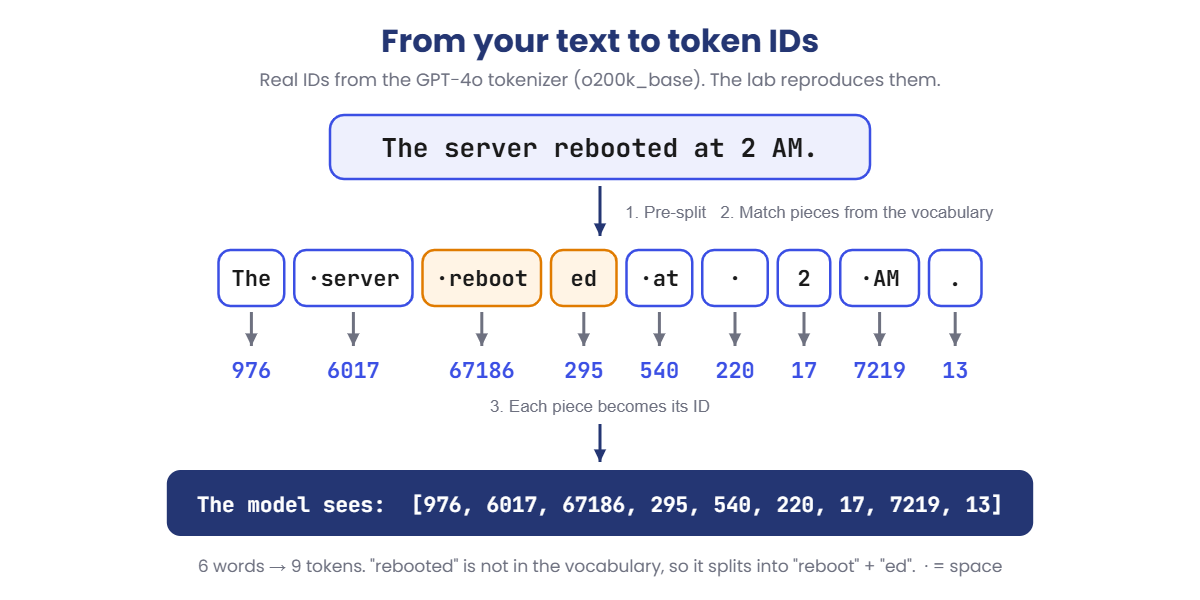
“The server rebooted” reaches the model as something like 976, 6017, 67186, 295. That’s tokenization: cut into known pieces, then swap each piece for its number.

Engineer's View

What a tokenizer really is

A tokenizer is two things shipped with every model: a vocabulary (a list of pieces, each with an ID) and the rules for cutting text into those pieces. The model and its tokenizer are a pair. Feed a model IDs from a different tokenizer and you get nonsense.

BPE (Byte Pair Encoding). Almost every modern LLM uses some version of it. Training starts with the 256 possible byte values. It then looks through a huge amount of text, finds the pair of neighbours that appears most often (say t + h), and adds th to the vocabulary as a new piece.

It repeats this, over and over, until the vocabulary reaches the target size. Frequent words end up as one piece. Rare words stay as several.

Byte-level means nothing is ever “unknown”. If a character isn’t in the vocabulary, the tokenizer falls back to its raw bytes. An emoji or a Telugu letter takes 3 or 4 bytes in UTF-8, so it can become several tokens. Remember this; it causes a real bug in the Break It lab.

Pre-split rules. Before BPE runs, a pattern splits text into chunks. A space sticks to the word after it, so server and server are different tokens.

Upper and lower case are different. Numbers are cut into groups of up to three digits, so 1234567 becomes 123 456 7.

Special tokens are reserved IDs that mark structure, not text. In Llama 3.2, <|begin_of_text|> is 128000, <|start_header_id|> is 128006 and <|eot_id|> (end of turn) is 128009.

When you chat, Ollama wraps your message in a hidden chat template made of these. You’ll measure that hidden cost in the lab.

Where the IDs go next. Each ID picks one row from a big table of numbers called the embedding table. In llama3.2:1b that table is 128,256 rows of 2,048 numbers each: about 263 million parameters, roughly a fifth of the whole model. Lessons 4 and 5 pick up from here.

Model familyVocabulary sizeMethod
GPT-2 (2019)50,257Byte-level BPE
Llama 232,000SentencePiece BPE
GPT-4 / GPT-3.5 (cl100k_base)about 100,000Byte-level BPE
Llama 3 and Llama 3.2 (your model)128,256Byte-level BPE, built on tiktoken
GPT-4o (o200k_base)about 200,000Byte-level BPE

Why it matters on the job: the context window, speed (tokens per second) and API price are all measured in tokens, never in words. A tokenizer with a bigger vocabulary needs fewer tokens for the same text, but makes the embedding table bigger. That’s a real design trade-off.

How it works, step by step

Here is what happens to “The server rebooted at 2 AM.” from the moment you press Enter. The IDs below are real; you’ll reproduce them in the lab.

LLM tokenization steps: a sentence split into tokens and turned into token IDs
  1. Pre-split. The text is cut into rough chunks: The server rebooted at 2 AM .. Notice the spaces stay attached to the front of words.
  2. Look up known pieces. Each chunk is matched against the vocabulary. server is common, so it’s a single piece. rebooted isn’t in the list, so it becomes reboot + ed.
  3. Swap pieces for IDs. Every piece becomes its number: 976, 6017, 67186, 295, and so on. Six words have become 9 tokens.
  4. Wrap in the chat template. Special tokens are added around your message so the model knows who is speaking and where your turn ends.
  5. The model works only on the numbers. It predicts the next ID, then the next, one at a time.
  6. Detokenize. Each ID the model produces is turned back into text and printed. That’s why answers appear word by word in your terminal.

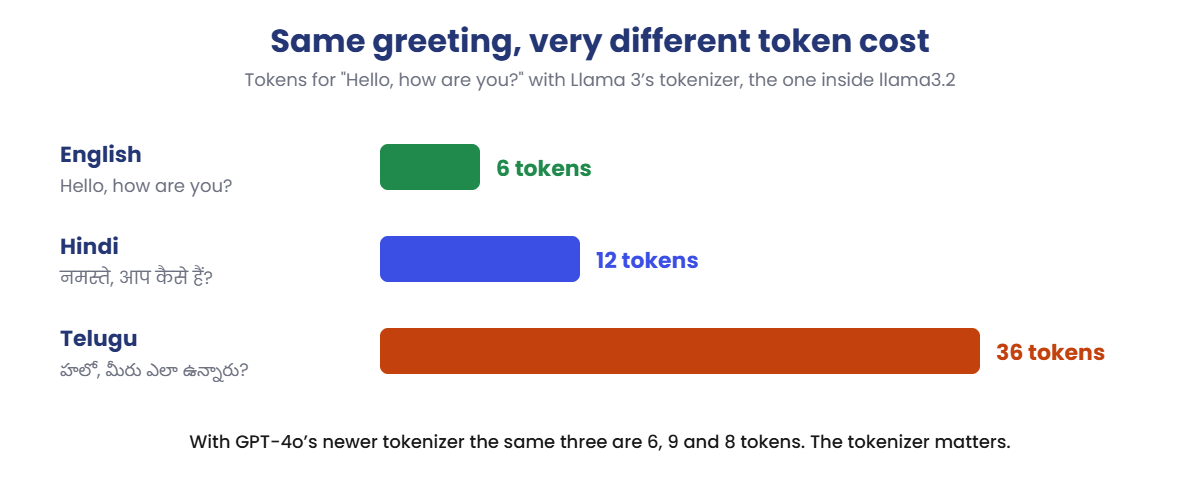
The vocabulary was built mostly from English text, so English words usually get their own piece. Other languages often don’t. Look at the same short greeting in three languages with the tokenizer inside your Llama model:

LLM tokenization cost for English, Hindi and Telugu with the Llama 3 tokenizer

Same meaning, very different cost. The Telugu greeting uses 36 tokens where English uses 6, because most Telugu letters aren’t in Llama 3’s vocabulary and fall back to raw bytes.

For a Telugu chatbot that means a context window that fills six times faster, slower answers and, on a paid API, a bigger bill. Newer tokenizers are better at this: GPT-4o’s needs only 8 tokens for the same Telugu sentence.

Why models are bad at counting letters

Ask a model how many r’s are in “strawberry” and it often gets it wrong. In the question “How many r letters are in strawberry?”, the word strawberry is a single token (ID 101830 in the GPT-4o tokenizer). The model never sees s-t-r-a-w-b-e-r-r-y.

It sees one number. For exact character work like counting, spelling or checking passwords, write code instead.

Hands-on Lab: see real tokens on your laptop

You’ll use tiktoken, a free, open-source tokenizer library from OpenAI, to see the pieces and IDs for any text. Then you’ll use Ollama to count tokens the way your Llama model counts them.

Everything runs on your laptop. The steps use Windows PowerShell; on macOS or Linux, use python3 where you see python.

1Install Python

Download Python 3 from python.org and run the installer. On the first screen, tick Add python.exe to PATH before you click Install. Then open a new PowerShell window.

Run this:

python --version

You should see this:

Python 3.13.1

✅ Checkpoint: You see Python 3.10 or newer. Any 3.x version from the last few years works.

2Install tiktoken

Run this:

python -m pip install tiktoken

The last line should look like this (versions may differ):

Successfully installed ... tiktoken-0.14.0

✅ Checkpoint: No red error text, and the last line says Successfully installed.

3See the tokens in a sentence

Make a folder for this lesson and open Notepad in it:

Run this:

mkdir C:\ai-lab\tokens
cd C:\ai-lab\tokens
notepad tokens.py

Click Yes when Notepad asks to create the file. Paste this, save, and close Notepad:

Paste this whole block:

import tiktoken

enc = tiktoken.get_encoding("o200k_base")
text = input("Type a sentence: ")
ids = enc.encode(text)
print("Characters:", len(text), "| Words:", len(text.split()), "| Tokens:", len(ids))
for i in ids:
    print(f"{i:>7}  {enc.decode([i])!r}")

Run it and type the sentence when asked:

Run this:

python tokens.py
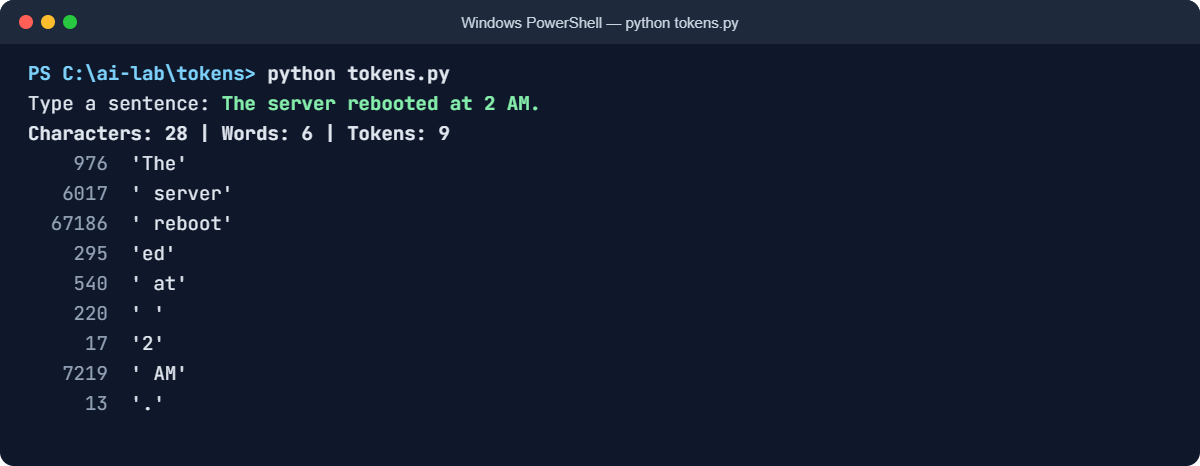
LLM tokenization example: tokens.py showing token IDs in PowerShell
Example output. Your numbers and the model’s exact words will be a little different.

The text version of the same output:

Type a sentence: The server rebooted at 2 AM.
Characters: 28 | Words: 6 | Tokens: 9
    976  'The'
   6017  ' server'
  67186  ' reboot'
    295  'ed'
    540  ' at'
    220  ' '
     17  '2'
   7219  ' AM'
     13  '.'

The first run takes a few seconds longer because tiktoken downloads its vocabulary file (about 3.6 MB) once and caches it. Every run after that works offline.

✅ Checkpoint: 6 words became 9 tokens. rebooted was split into reboot and ed, and the space before the 2 is a token of its own.

4Try words that split in surprising ways

Run python tokens.py again for each line below. These are the results you should get:

You typeTokensThe pieces
unbelievable3un bel ievable
Kubernetes pod CrashLoopBackOff7K ubernetes pod Crash Loop Back Off
ping 192.168.10.259ping 192 . 168 . 10 . 25
server Server SERVER server5IDs 5282, 13261, 89769, 220, 6017. Four different IDs for the same word

Notice that “unbelievable” doesn’t split the way you’d split it at school. The pieces come from statistics, not grammar.

An IP address costs 9 tokens because every dot is a token of its own. And the last line shows that case, and even a leading space, change the ID completely.

✅ Checkpoint: You can explain why server (5282) and server (6017) have different IDs.

5Compare languages and tokenizers

Run this:

notepad langs.py

Paste this whole block, then save:

import tiktoken

new = tiktoken.get_encoding("o200k_base")   # newer tokenizer (GPT-4o family)
old = tiktoken.get_encoding("cl100k_base")  # older tokenizer (GPT-4, GPT-3.5)

samples = {
    "English": "Hello, how are you?",
    "Hindi": "नमस्ते, आप कैसे हैं?",
    "Telugu": "హలో, మీరు ఎలా ఉన్నారు?",
}
for lang, text in samples.items():
    print(f"{lang:<8} characters={len(text):>3}   new={len(new.encode(text)):>3}   old={len(old.encode(text)):>3}")

Run this:

python langs.py

You should see this:

English  characters= 19   new=  6   old=  6
Hindi    characters= 20   new=  9   old= 20
Telugu   characters= 22   new=  8   old= 36

The older tokenizer needs 36 tokens for the Telugu greeting; the newer one needs 8. Same text, 4.5 times the cost, just from changing the tokenizer. When someone quotes you “tokens per word”, always ask: with which tokenizer?

✅ Checkpoint: English costs about the same in both. Hindi and Telugu cost far less with the newer tokenizer.

6Count tokens in real files

At work you’ll rarely tokenize one sentence. You’ll want to know whether a whole document or log will fit. Create three files in the same folder:

Run this:

notepad count_file.py

Paste this into count_file.py:

import sys
import tiktoken

enc = tiktoken.get_encoding("o200k_base")
text = open(sys.argv[1], encoding="utf-8").read()
tokens = len(enc.encode(text))
words = len(text.split())
print(f"{sys.argv[1]}: {words} words, {tokens} tokens, {tokens / words:.2f} tokens per word")

Run this:

notepad incident.txt

Paste this into incident.txt (a short incident report):

At 02:10 the monitoring team noticed that the payment service was slow. Users were waiting more than ten seconds for a page to load. The on-call engineer checked the dashboards and saw that one database server was using all of its memory. She restarted the reporting job that was running on the same server, and the memory came back down within a few minutes. Payments were normal again by 02:35. The root cause was a new report that loaded a full year of data into memory instead of reading it in small parts. The team has asked the developers to fix the report and has moved it to a separate server so it cannot affect payments again.

Run this:

notepad app.log

Paste this into app.log (five lines from the same incident):

2026-10-18T02:10:04.118Z ERROR [payment-api-7f9c] db-pool timeout after 5000ms host=10.20.4.17:5432 req_id=8c1e2f0a
2026-10-18T02:10:04.392Z WARN  [payment-api-7f9c] retry 1/3 for req_id=8c1e2f0a latency_ms=10412
2026-10-18T02:10:05.006Z ERROR [payment-api-2b11] db-pool timeout after 5000ms host=10.20.4.17:5432 req_id=91d07c3b
2026-10-18T02:10:05.771Z INFO  [report-job-01] loaded rows=48211934 mem_used=31.6GiB
2026-10-18T02:10:06.240Z ERROR [kernel] Out of memory: Killed process 22841 (postgres) total-vm:33554432kB

Run this:

python count_file.py incident.txt
python count_file.py app.log

You should see this:

incident.txt: 117 words, 132 tokens, 1.13 tokens per word
app.log: 43 words, 242 tokens, 5.63 tokens per word

Plain English costs a little over 1 token per word. The log costs more than 5 tokens per word, because timestamps, IDs, IP addresses and numbers break into many small pieces. If you plan a log-analysis tool using word counts, you’ll be wrong by a factor of five.

✅ Checkpoint: Your log file uses roughly five times more tokens per word than the English report.

7Count tokens the way your Llama model does

tiktoken shows OpenAI’s tokenizers. Your llama3.2:1b model has its own. Ollama can tell you how many tokens it read.

Run these two commands. Copy the Telugu text from this page:

Run this:

ollama run llama3.2:1b --verbose "Hello, how are you?"
ollama run llama3.2:1b --verbose "హలో, మీరు ఎలా ఉన్నారు?"
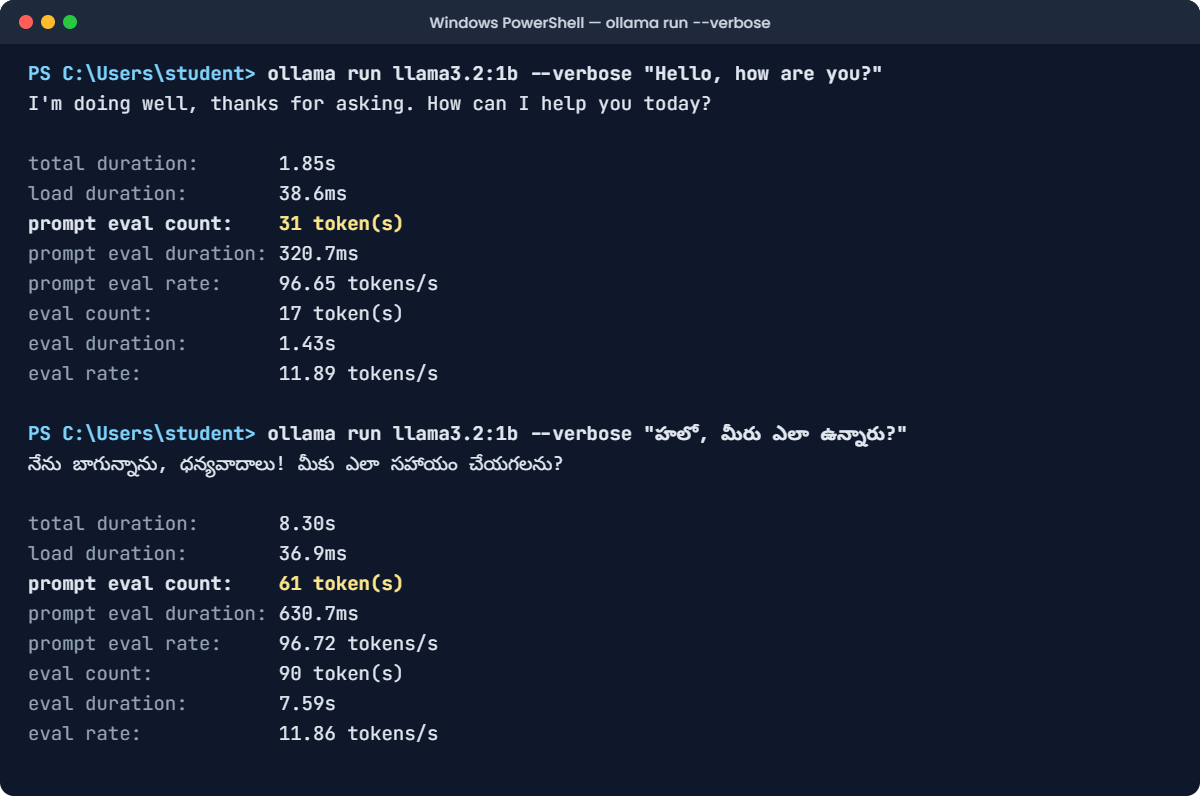
LLM tokenization in Ollama: prompt eval count for English and Telugu
Example output. Your numbers and the model’s exact words will be a little different.

Look at the prompt eval count line. You might expect 6 tokens for the English greeting, but Ollama reports 31.

The extra 25 are the hidden chat template: the special tokens, plus a short system header that the Llama 3.2 template always adds. You pay for those on every single message.

Now subtract: 61 minus 31 is 30. The Telugu greeting costs 30 more tokens than the English one, so 36 tokens in total with Llama’s tokenizer. That matches the chart in the section above.

If your count is smaller the second time

Ollama keeps recent work in memory and can skip re-reading a start it has already seen. If you run the same command twice, the second count can come out lower. For a clean comparison, use the first run of each command, or close Ollama from the system tray and start it again.

✅ Checkpoint: You found the hidden template cost (25 tokens) and the extra cost of Telugu (about 30 tokens) on your own machine.

Break It, Then Fix It

Two bugs that catch almost everyone who builds on top of an LLM. You’ll cause both, on purpose, and fix them.

1The crash on a harmless-looking log line

Imagine your tool counts tokens in uploaded log files. One file happens to contain the text <|endoftext|>.

Maybe it’s a log from another AI system. Create special.py:

Paste this into special.py:

import tiktoken

enc = tiktoken.get_encoding("o200k_base")
line = "Log line 4512: <|endoftext|> found in upload"
ids = enc.encode(line)
print(len(ids), "tokens")

Run this:

python special.py

You’ll get this error (the middle of the traceback is trimmed):

Traceback (most recent call last):
  File "C:\ai-lab\tokens\special.py", line 5, in <module>
    ids = enc.encode(line)
  ...
ValueError: Encountered text corresponding to disallowed special token '<|endoftext|>'.
If you want this text to be encoded as a special token, pass it to `allowed_special`, e.g. `allowed_special={'<|endoftext|>', ...}`.
If you want this text to be encoded as normal text, disable the check for this token by passing `disallowed_special=(enc.special_tokens_set - {'<|endoftext|>'})`.
To disable this check for all special tokens, pass `disallowed_special=()`.

Why it happens: <|endoftext|> is a special token, a control signal that means “this document is finished”. tiktoken refuses to guess whether you meant the control signal or just the characters. If text typed by a user could turn into real control tokens, a user could fake the end of a conversation or slip in instructions. That’s a prompt-injection hole, so the library stops you.

The fix: text from users or files is always plain text, never control signals.

Change line 5 to:

ids = enc.encode(line, disallowed_special=())

Run this:

python special.py

You should see this:

16 tokens

The angle brackets and words are now ordinary pieces ( < | end …), which is exactly what you want for user text. Only your own code should ever add real special tokens.

✅ Checkpoint: special.py prints 16 tokens instead of crashing.

2Broken characters while streaming

Chat apps print the answer token by token as it arrives. Here’s the simple way most people write that loop:

Paste this into stream_bad.py:

import tiktoken

enc = tiktoken.get_encoding("o200k_base")
ids = enc.encode("Deploy done 🚀 All 12 pods are healthy ✅")
print("Token IDs:", ids)

# Pretend the model is sending us one token at a time
for i in ids:
    print(enc.decode([i]), end="", flush=True)
print()

Run this:

python stream_bad.py

You’ll see this:

Token IDs: [76929, 4167, 169883, 222, 2545, 220, 899, 88596, 553, 10509, 91349]
Deploy done �� All 12 pods are healthy ✅

The rocket has turned into ��. Look at the IDs: the rocket emoji is 4 bytes in UTF-8, and the tokenizer split them across two tokens (169883 and 222). Decoded on its own, half an emoji isn’t valid text, so Python prints the replacement character instead.

The same thing happens with Telugu or Hindi letters on older tokenizers. Users see junk while the answer streams in.

The fix: work in bytes, and let an incremental decoder hold back an incomplete character until the rest of it arrives:

Paste this into stream_good.py:

import codecs
import tiktoken

enc = tiktoken.get_encoding("o200k_base")
ids = enc.encode("Deploy done 🚀 All 12 pods are healthy ✅")

decoder = codecs.getincrementaldecoder("utf-8")()
for i in ids:
    piece = enc.decode_single_token_bytes(i)
    print(decoder.decode(piece), end="", flush=True)
print()

Run this:

python stream_good.py

You should see this:

Deploy done 🚀 All 12 pods are healthy ✅

If your terminal shows a small box instead of the rocket, that’s only the console font. The text itself is correct now. In Windows Terminal the emoji shows properly.

✅ Checkpoint: stream_good.py prints the rocket correctly, with no �.

This happened at work

The Telugu chatbot that ran out of room

A support team built a chatbot for customers of a regional internet provider. Most customers wrote in Telugu or Hindi. The team tested it in English, saw short answers in about two seconds, and sized the server for that.

In the first week, complaints came in. Answers in Telugu took three times longer. Long conversations “forgot” what the customer had said at the start.

The team checked the server: CPU and RAM were fine. They checked the model’s settings: also fine.

An engineer finally counted tokens on real customer messages with the model’s own tokenizer. A typical Telugu message used about six times as many tokens as the same message in English.

Every message filled the context window six times faster, and the model had to read six times more tokens before answering. The test plan had measured English only, and estimated everything in words.

The fix: they collected 200 real messages in each language and measured token counts before choosing a model. They moved to a model whose tokenizer handles Indian languages much better, summarised older chat history instead of keeping all of it, and added a dashboard that tracks tokens per conversation.

The lesson: test with the language and the kind of text your users actually send, and measure in tokens with the model’s own tokenizer. Words and characters will mislead you.

Common mistakes and troubleshooting

MistakeWhat happensHow to avoid it
Estimating in words, not tokensInputs that “should fit” get cut off, and cost estimates come out too lowCount with the tokenizer. Plain English is a bit over 1 token per word; logs, code and other languages can be 3 to 6
Using one model’s tokenizer to count for anotherCounts are off. The Telugu greeting is 8 tokens with GPT-4o’s tokenizer but 36 with Llama’sUse the model’s own tokenizer, or keep a safety margin of 20 to 30 percent
Forgetting the hidden template and system prompt“Hello, how are you?” costs 31 tokens, not 6. Long system prompts are paid on every messageCount the full request the model really receives, not just the user’s text
Decoding one token at a timeEmojis and Indian-language letters show up as � while streamingCollect bytes and use an incremental UTF-8 decoder
Letting user text become special tokensUsers can fake turn endings or inject instructionsAlways encode user text as plain text (disallowed_special=() in tiktoken)
Expecting the model to count or spell lettersWrong answers to “how many r’s in strawberry”The model sees whole tokens, not letters. Use code for exact character work

Troubleshooting the lab

ProblemFix
'python' is not recognized as the name of a cmdletPython isn’t on PATH. Run the installer again and tick Add python.exe to PATH, or use py instead of python. Open a new PowerShell window afterwards
ModuleNotFoundError: No module named 'tiktoken'It was installed for a different Python. Install with python -m pip install tiktoken so pip matches the Python you run
First run fails with a connection or proxy error mentioning openaipublic.blob.core.windows.nettiktoken downloads its vocabulary once. On an office network, ask for that address to be allowed. On a server with no internet, copy the file from a machine that has it and set TIKTOKEN_CACHE_DIR to its folder
Telugu or Hindi shows as ??? in PowerShellThat’s the console font, not your data. Use Windows Terminal, or check the counts, which are still correct
prompt eval count is much smaller than expectedOllama reused cached work from your previous run. Compare first runs, or restart Ollama

Interview questions

Click a question to open it. Under each one you’ll find what the interviewer is actually looking for, and one good way to answer.

Fresher level

1. What is a token?

What they’re really checking: Do you know a token is neither a word nor a letter?

How you could answer: A token is a piece of text from the model’s fixed vocabulary: a whole common word, part of a word, a number chunk, a space or a symbol. The model turns text into token IDs and works only with those numbers. In English, one token is a little under one word on average.

2. Why don’t LLMs just use whole words, or single letters?

What they’re really checking: Do you understand the trade-off behind subword tokenization?

How you could answer: Whole words would need a gigantic vocabulary and still fail on new words, names and typos. Single letters would make every text very long, which is slow and uses up the context window. Subword pieces sit in between: common words are one token, rare words split into a few known pieces, and nothing is ever unknown.

3. Why is a model’s context window given in tokens?

What they’re really checking: Do you link tokens to real limits?

How you could answer: Because the model only ever sees tokens. A 128K context window means 128,000 tokens in total, including the system prompt, chat history, the question and the answer. How many words that is depends on the language and the kind of text.

2–5 years experience

4. Your team wants to send application logs to an LLM for summaries. How do you estimate whether they’ll fit and what it costs?

What they’re really checking: Do you measure, rather than guess from words or file size?

How you could answer: Take real sample logs and count tokens with the model’s own tokenizer. Logs are token-heavy because of timestamps, IDs and IPs, often around 5 tokens per word.

Add the system prompt and template overhead, and leave room for the answer. Then filter: keep ERROR and WARN lines, remove duplicates, and keep the newest lines if you have to cut.

5. The same prompt costs 500 tokens on one model and 900 on another. Is something wrong?

What they’re really checking: Do you know tokenizers differ between model families?

How you could answer: Not necessarily. Each model family has its own tokenizer with a different vocabulary, so the same text gives different counts.

Indian languages, code and numbers vary the most. Compare costs per task, using each model’s real token counts, not price per token alone.

6. What are special tokens, and why must user input never be allowed to create them?

What they’re really checking: Security awareness around prompt construction.

How you could answer: Special tokens are reserved IDs that mark structure, such as the start of text, the end of a turn or role headers. If user text could become those tokens, a user could fake the end of their turn and write text that looks like system or assistant messages: prompt injection. User text should always be encoded as plain text, and only the application should add special tokens.

Senior level

7. How does vocabulary size affect a model, and what would you pick for a product used mainly in Indian languages?

What they’re really checking: Can you reason about tokenizer design trade-offs and fairness?

How you could answer: A bigger vocabulary means fewer tokens per text, so faster responses and more room in the context window, but a bigger embedding table and output layer. In Llama 3.2 1B, the embedding table alone is about 263 million parameters.

For Indian languages I’d benchmark candidate models on real user text and compare tokens per message, because a tokenizer trained mostly on English can cost several times more for Telugu or Hindi. That affects latency, capacity and cost directly.

8. Users report garbled characters in streamed answers, but the final saved answer is fine. What’s happening?

What they’re really checking: Can you debug encoding issues across the stack?

How you could answer: Characters that take several bytes in UTF-8, like emojis or Telugu letters, can be split across tokens. Decoding each token on its own produces replacement characters.

The final answer is decoded all at once, so it looks fine. The fix is to stream bytes and use an incremental UTF-8 decoder, on the server and in the client, so incomplete characters are held back until they’re complete.

9. How would you design a token budget for a RAG chatbot?

What they’re really checking: Can you turn tokenization into a practical system design?

How you could answer: Start from the context window, then subtract the system prompt, template overhead and the space reserved for the answer. Split what’s left between retrieved chunks and chat history.

Size chunks in tokens, not characters. Count with the model’s own tokenizer at request time, trim history first, and log tokens per request so you can spot drift and cost spikes.

Quick quiz

Q1. What does a language model actually receive when you type a message?

  1. Your text exactly as you typed it
  2. A list of numbers, one for each token
  3. A list of letters
Show answer

B — The tokenizer turns your text into token IDs. The model only works with numbers.

Q2. Why are server and server different tokens?

  1. A typo in the vocabulary
  2. The space is part of the token, so they are different pieces
  3. One of them is a special token
Show answer

B — The pre-split rules attach the space to the word that follows it, so the two pieces get different IDs (5282 and 6017).

Q3. In the lab, the log file cost about 5.6 tokens per word. Why?

  1. Logs are written in capital letters
  2. Timestamps, IDs and IP addresses split into many small pieces
  3. tiktoken has a bug with log files
Show answer

B — Numbers are cut into chunks of up to 3 digits, and every dot, colon and dash is a separate token.

Q4. Ollama reported 31 prompt tokens for “Hello, how are you?”, which is only 6 tokens of text. Where did the rest come from?

  1. The chat template and system header Ollama adds around your message
  2. Ollama counts letters, not tokens
  3. The model’s answer
Show answer

A — Special tokens and the template’s system header are added on every request. You pay for them each time.

Q5. A streamed answer shows �� where an emoji should be. What’s the right fix?

  1. Use a bigger model
  2. Decode bytes with an incremental UTF-8 decoder instead of decoding each token on its own
  3. Remove all emojis from the training data
Show answer

B — An emoji can be split across two tokens. An incremental decoder waits until all its bytes have arrived.

Quick recap

  • Tokenization cuts text into pieces from a fixed vocabulary and turns each piece into an ID. The model only sees the IDs.
  • Most LLMs use byte-level BPE: frequent text becomes one token, rare text splits into several, and nothing is ever unknown.
  • Spaces, case and digits matter: server and server are different tokens, and numbers split into groups of up to three digits.
  • Token counts depend on the tokenizer and the kind of text. Logs, code and Indian languages can cost several times more than plain English.
  • Every chat message carries a hidden template of special tokens. User text must never be allowed to turn into special tokens.
  • When streaming, decode bytes with an incremental decoder, or emojis and Telugu letters break.
  • At work, measure with the model’s own tokenizer on real samples before you plan capacity or cost.

Next lesson

Transforming tokens with a transformer → You now know the model receives a list of numbers. Next you’ll see what the transformer does with them, layer by layer, to predict the next token.

Further reading: LLM tokenization

Want to go deeper into LLM tokenization? Check the official reference: Hugging Face: Tokenization algorithms, and the tiktoken project on GitHub you used in the lab. You can also follow the full Generative AI and Agents course on SaatVedha, step by step.

Scroll to Top