
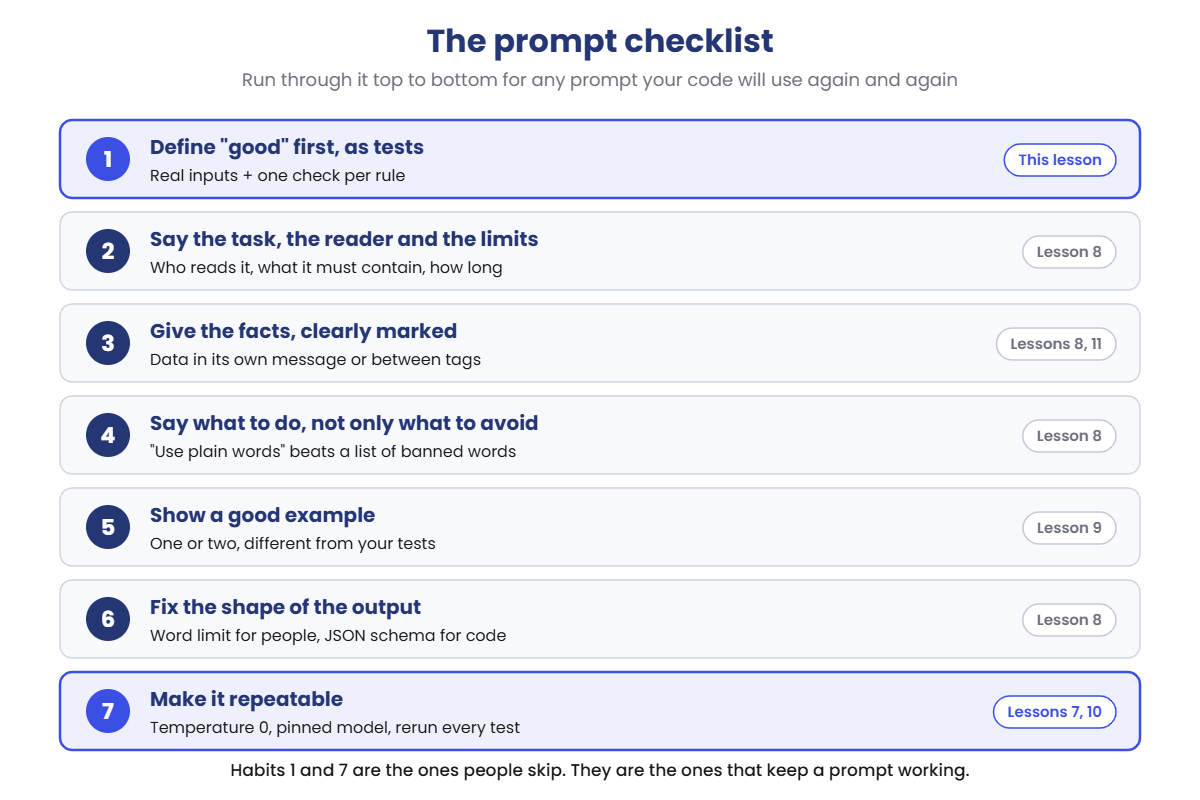
One script does everything. update_test.py holds six real-style incident notes, builds the prompt, sends each note to the model, and checks every update against four rules. The checks run in your Python, so the PASS and FAIL lines are always correct for the text the model wrote.
The model’s words will differ a little on your laptop, so your score may be off by one; the prompt token counts below are exact. On macOS or Linux, use python3 and nano.
1Write the tests, then the shortest prompt
Run this:
mkdir C:\ai-lab\prompt-tips
cd C:\ai-lab\prompt-tips
notepad update_test.py
Paste this whole block into update_test.py, then save:
import json
import re
import urllib.request

MODEL = "llama3.2:1b"
PROMPT = "short"      # "short", "clear" or "example"
EXTRA = ""            # one more instruction, added after the rules
TEMPERATURE = 0
RUNS = 1              # how many times to run each test

RULES = """You write status updates about IT incidents for all staff.
The readers are not technical, so use plain words.
Write at most 60 words, as plain text with no headings.
Say which service is affected, what staff should do now, and the time of the next update.
Leave out IP addresses, server names and people's names."""

EXAMPLE = """Here is an example.
Notes: 13:05 vpn-gw-01 CPU 100%, users dropping. Restarted service, still failing. Vendor case 88213 opened. Workaround: work from office. Next update 13:45.
Update: The VPN is dropping connections for staff working from home. We are working on it with our supplier. If you can, please work from the office until it is fixed. Next update at 13:45."""

TESTS = [
    {"service": "email", "next": "09:40",
     "notes": "09:10 srv-mail-02 not accepting connections, Outlook stuck on 'Trying to connect'. Log disk on 10.20.4.15 full, clearing old logs. Ravi on it. Next update 09:40."},
    {"service": "wi-fi", "next": "11:50",
     "notes": "11:20 Staff and guest Wi-Fi down on floors 2 to 4. Controller wlc-core-01 rebooted itself, access points rejoining slowly. Wired network fine. Next update 11:50."},
    {"service": "print", "next": "14:30",
     "notes": "14:00 Print queue on prn-srv-03 stuck, all jobs pending across the building. Spooler restart failed. Priya checking the driver update from last night. Next update 14:30."},
    {"service": "payroll", "next": "16:45",
     "notes": "16:15 Payroll app gives error 500 for everyone. sql-prod-03 (10.20.8.7) failed over, app pool not reconnecting. Payday is tomorrow. Next update 16:45."},
    {"service": "teams", "next": "10:35",
     "notes": "10:05 Teams calls drop after 2 or 3 minutes for all users. Chat works. fw-edge-02 firmware updated last night, suspect a UDP rule. Next update 10:35."},
    {"service": "laptop", "next": "09:00",
     "notes": "08:30 Staff can't sign in to laptops: 'The trust relationship failed'. dc-hyd-01 clock 9 minutes out. Workaround: unplug the network cable and sign in, then plug it back. Next update 09:00."},
]


def ask(messages):
    body = {"model": MODEL, "messages": messages, "stream": False,
            "options": {"temperature": TEMPERATURE}}
    req = urllib.request.Request("http://localhost:11434/api/chat", data=json.dumps(body).encode(),
                                 headers={"Content-Type": "application/json"})
    with urllib.request.urlopen(req) as r:
        return json.load(r)


def build(notes):
    if PROMPT == "short":
        return [{"role": "user", "content": "Write a status update from these notes:\n" + notes}]
    system = RULES + ("\n" + EXTRA if EXTRA else "")
    if PROMPT == "example":
        system += "\n\n" + EXAMPLE
    return [{"role": "system", "content": system},
            {"role": "user", "content": "Notes: " + notes}]


def check(update, test):
    problems = []
    words = len(update.split())
    if words > 60:
        problems.append(f"too long ({words} words)")
    if test["service"] not in update.lower():
        problems.append(f"doesn't name the service ({test['service']})")
    if test["next"] not in update:
        problems.append(f"no next update time ({test['next']})")
    if re.search(r"\b\d{1,3}(\.\d{1,3}){3}\b|\b[a-z]+-[a-z0-9]+-\d+\b", update.lower()):
        problems.append("shows an IP address or server name")
    return problems, words


print(f"Prompt: {PROMPT} | model: {MODEL} | temperature: {TEMPERATURE} | {len(TESTS)} tests x {RUNS} run(s)")
passed = total = tokens = 0
for n, test in enumerate(TESTS, 1):
    for run in range(RUNS):
        r = ask(build(test["notes"]))
        update = r["message"]["content"].strip()
        problems, words = check(update, test)
        total += 1
        tokens += r["prompt_eval_count"]
        if problems:
            print(f"FAIL  {n} {test['service']:<8} " + "; ".join(problems))
            shown = " ".join(update.split())
            print(f"      {shown[:88]}{'...' if len(shown) > 88 else ''}")
        else:
            passed += 1
            print(f"PASS  {n} {test['service']:<8} ({words} words)")
print(f"Passed {passed} of {total} | prompt tokens per test: {tokens / total:.0f} on average")
Read TESTS and check first. That’s habit 1: before writing any prompt, you’ve written down what a good update must do.
The settings at the top choose the prompt. Start with the shortest one: “Write a status update from these notes”.
Run this:
python update_test.pyYou should see something like this (prompt tokens exactly 79):
Prompt: short | model: llama3.2:1b | temperature: 0 | 6 tests x 1 run(s)
FAIL  1 email    too long (66 words); shows an IP address or server name
      **Status Update: Email Service Disruption** At 09:10, our mail server srv-mail-02 stoppe...
FAIL  2 wi-fi    shows an IP address or server name
      **Network Status Update** At 11:20, staff and guest Wi-Fi went down on floors 2 to 4. Th...
FAIL  3 print    too long (63 words); shows an IP address or server name
      **IT Incident Update - Printing** We are currently experiencing an issue with the print ...
FAIL  4 payroll  shows an IP address or server name
      **Urgent: Payroll Application Outage** The payroll application is currently returning er...
FAIL  5 teams    shows an IP address or server name
      **Microsoft Teams Call Issues** Since 10:05, Teams calls are dropping after 2 to 3 minut...
FAIL  6 laptop   shows an IP address or server name
      **Laptop Sign-In Issue** Staff are currently unable to sign in to their laptops and are ...
Passed 0 of 6 | prompt tokens per test: 79 on average
Nothing passes. Read the updates: markdown headings, “srv-mail-02”, an internal IP address, “UDP rule”. These are engineer’s notes in nicer sentences.
The model isn’t wrong; nobody told it who reads the update or what to leave out. 79 tokens is 25 hidden template tokens plus a one-line prompt and the notes.
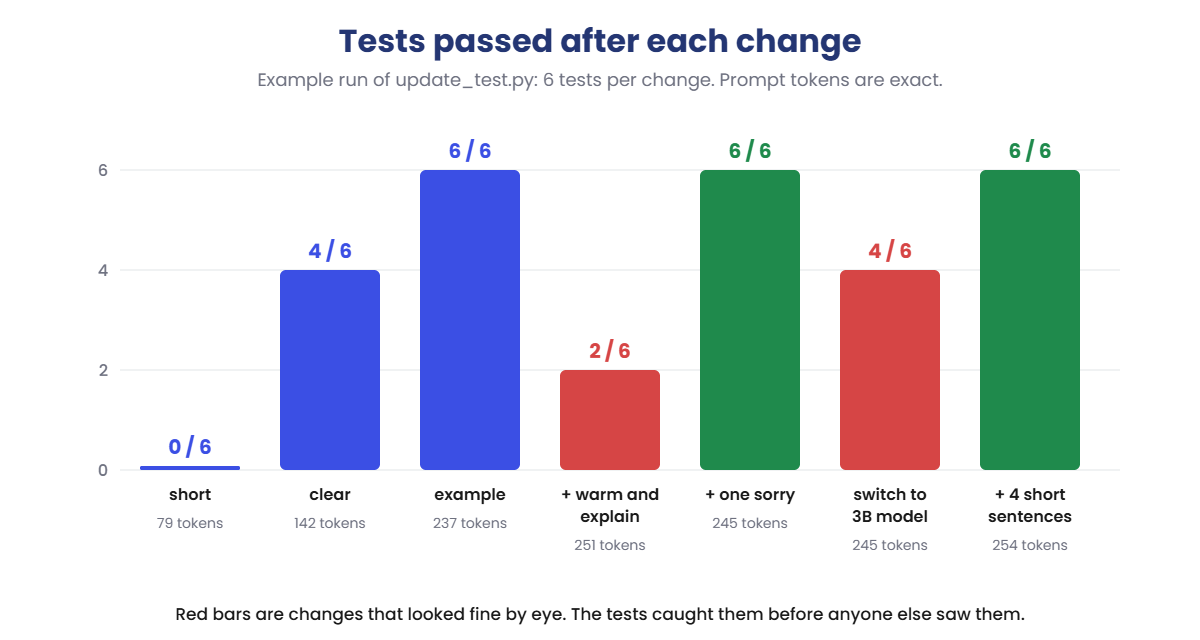
✅ Checkpoint: Passed 0 of 6, and every update fails the IP address or server name check.
2Say who it’s for and what good looks like
Switch to the prompt with the RULES text: the readers, the length, what to include and what to leave out. The notes now go in their own user message, after the label Notes:.
Change this line:
PROMPT = "clear"Run this:
python update_test.py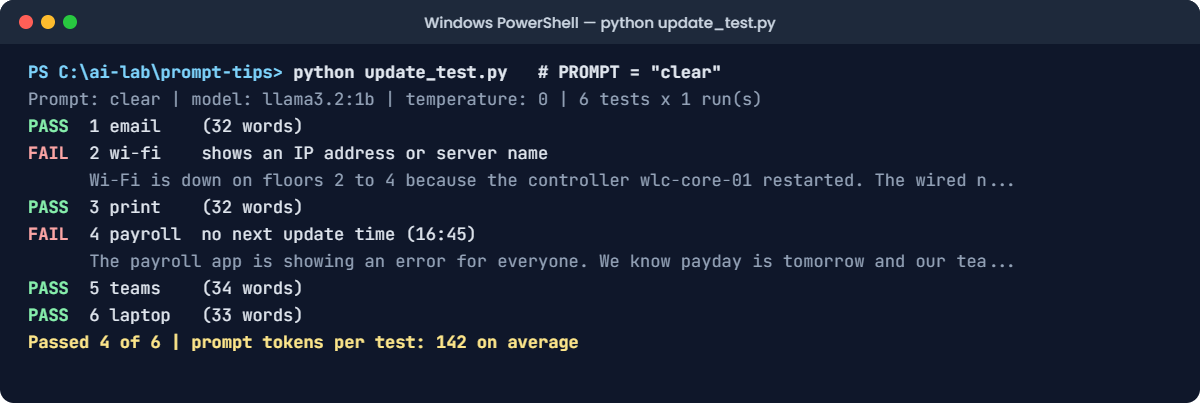
You should see something like this (prompt tokens exactly 142 on average):
Prompt: clear | model: llama3.2:1b | temperature: 0 | 6 tests x 1 run(s)
PASS  1 email    (32 words)
FAIL  2 wi-fi    shows an IP address or server name
      Wi-Fi is down on floors 2 to 4 because the controller wlc-core-01 restarted. The wired n...
PASS  3 print    (32 words)
FAIL  4 payroll  no next update time (16:45)
      The payroll app is showing an error for everyone. We know payday is tomorrow and our tea...
PASS  5 teams    (34 words)
PASS  6 laptop   (33 words)
Passed 4 of 6 | prompt tokens per test: 142 on average
Four out of six, and the updates now read like something staff can use. Two still fail. Test 2 explains the cause and names the controller, wlc-core-01, even though the rules say no server names.
Test 4 forgot the next update time and said “soon”. A small model follows most rules most of the time; your checks find the ones it missed.
✅ Checkpoint: Passed 4 of 6. The failures are a server name in test 2 and a missing time in test 4.
3Show one good example
The EXAMPLE text shows one set of notes and one good update. It’s about the VPN, which isn’t in any test, so the model has to learn the style instead of copying an answer.
Change this line:
PROMPT = "example"Run this:
python update_test.pyYou should see something like this (prompt tokens exactly 237 on average):
Prompt: example | model: llama3.2:1b | temperature: 0 | 6 tests x 1 run(s)
PASS  1 email    (32 words)
PASS  2 wi-fi    (33 words)
PASS  3 print    (32 words)
PASS  4 payroll  (31 words)
PASS  5 teams    (34 words)
PASS  6 laptop   (33 words)
Passed 6 of 6 | prompt tokens per test: 237 on average
Six out of six. The example showed what the rules only described: “vpn-gw-01 CPU 100%” becomes “the VPN is dropping connections”, and the update ends with “Next update at 13:45”.
The price is 95 more tokens on every call. For a status update that’s fine; for a million calls a day, you’d measure whether a shorter example works as well.
✅ Checkpoint: Passed 6 of 6 with the example prompt.
4Make sure it passes every time
One good run proves less than you think. Run every test three times at Ollama’s default temperature:
Change these two lines:
TEMPERATURE = 0.8
RUNS = 3
Run this:
python update_test.pyYou should see something like this (the model’s words will differ a little):
Prompt: example | model: llama3.2:1b | temperature: 0.8 | 6 tests x 3 run(s)
PASS  1 email    (32 words)
PASS  1 email    (31 words)
PASS  1 email    (30 words)
PASS  2 wi-fi    (33 words)
PASS  2 wi-fi    (34 words)
FAIL  2 wi-fi    shows an IP address or server name
      Wi-Fi is down on floors 2 to 4 after the controller wlc-core-01 restarted itself. Please...
PASS  3 print    (32 words)
PASS  3 print    (32 words)
PASS  3 print    (25 words)
PASS  4 payroll  (31 words)
FAIL  4 payroll  no next update time (16:45)
      The payroll app is showing an error for everyone. We are working on it urgently because ...
PASS  4 payroll  (29 words)
PASS  5 teams    (34 words)
PASS  5 teams    (24 words)
PASS  5 teams    (29 words)
PASS  6 laptop   (33 words)
PASS  6 laptop   (31 words)
PASS  6 laptop   (29 words)
Passed 16 of 18 | prompt tokens per test: 237 on average
Same prompt, same notes, and two of 18 runs fail. At temperature 0.8 the model picks different words each time (Lesson 7), and sometimes those words break a rule.
If you’d tested once and seen 6 out of 6, you’d have shipped a prompt that fails about one time in nine. Status updates should be predictable, so turn the randomness off:
Change this line:
TEMPERATURE = 0Run this:
python update_test.pyYou should see something like this (the model’s words will differ a little):
Prompt: example | model: llama3.2:1b | temperature: 0 | 6 tests x 3 run(s)
PASS  1 email    (32 words)
PASS  1 email    (32 words)
PASS  1 email    (32 words)
PASS  2 wi-fi    (33 words)
PASS  2 wi-fi    (33 words)
PASS  2 wi-fi    (33 words)
PASS  3 print    (32 words)
PASS  3 print    (32 words)
PASS  3 print    (32 words)
PASS  4 payroll  (31 words)
PASS  4 payroll  (31 words)
PASS  4 payroll  (31 words)
PASS  5 teams    (34 words)
PASS  5 teams    (34 words)
PASS  5 teams    (34 words)
PASS  6 laptop   (33 words)
PASS  6 laptop   (33 words)
PASS  6 laptop   (33 words)
Passed 18 of 18 | prompt tokens per test: 237 on average
At temperature 0 the model always takes the most likely token, so all three runs give the same update, and 18 out of 18 pass. For creative jobs you might keep some randomness, and then you’d test several runs every time.
✅ Checkpoint: Passed 16 of 18 at temperature 0.8, and 18 of 18 at temperature 0.
Both of these changes look harmless. Neither shows an error. Only the tests notice.
1Break it: a friendly change that breaks four tests
The service manager reads a few updates and says they feel cold. A teammate adds one line to make them warmer, checks one update by eye, and it looks lovely:
Change these two lines:
EXTRA = "Be warm and friendly, say sorry, and explain what went wrong."
RUNS = 1
Run this:
python update_test.pyYou’ll see something like this:
Prompt: example | model: llama3.2:1b | temperature: 0 | 6 tests x 1 run(s)
FAIL  1 email    shows an IP address or server name
      We're so sorry! We know how frustrating it is when email stops working. Here's what happ...
PASS  2 wi-fi    (37 words)
FAIL  3 print    too long (78 words)
      We're really sorry about this! Printing isn't working anywhere in the building. Here's w...
FAIL  4 payroll  shows an IP address or server name
      We're very sorry, and we know payday is tomorrow, so this is our top priority. The payro...
FAIL  5 teams    shows an IP address or server name
      Sorry about the dropped calls! Teams calls are cutting off after two or three minutes. W...
PASS  6 laptop   (40 words)
Passed 2 of 6 | prompt tokens per test: 251 on average
From 6 out of 6 to 2. “Explain what went wrong” asked for the technical cause, and the cause is where the server names live: srv-mail-02, sql-prod-03, fw-edge-02. The printing update grew to 78 words.
The new instruction fought the old rules, and the model followed the newest one. Now read the full update for test 1:
Test 1, in full:
We're so sorry! We know how frustrating it is when email stops working. Here's
what happened: the log disk on our mail server srv-mail-02 filled up, so it
stopped accepting connections and Outlook got stuck on 'Trying to connect'. Ravi
is clearing old logs right now. Please use Teams chat for anything urgent. Next
update at 09:40.
It also names Ravi, and none of your checks noticed, because there’s no check for people’s names. A rule without a check is a rule you’re hoping for. In a real system you’d add one, for example a list of staff names from your directory.
The fix: keep the warm tone, drop the part that fights the rules:
Change this line:
EXTRA = "Start with one short, friendly sorry."Run this:
python update_test.pyYou should see something like this (the model’s words will differ a little):
Prompt: example | model: llama3.2:1b | temperature: 0 | 6 tests x 1 run(s)
PASS  1 email    (36 words)
PASS  2 wi-fi    (37 words)
PASS  3 print    (36 words)
PASS  4 payroll  (35 words)
PASS  5 teams    (38 words)
PASS  6 laptop   (37 words)
Passed 6 of 6 | prompt tokens per test: 245 on average
Every update now starts with “Sorry for the trouble.” and all six pass. The manager gets the warmer tone, and the rules still hold. The real lesson is the process: change one thing, then run every test, not just the one you were looking at.
✅ Checkpoint: The warm, explaining version passes 2 of 6. The one-sorry version passes 6 of 6.
2Break it again: a bigger model, a worse score
The team decides the 3B model is “better” and switches to it without running the tests. If you don’t have it from Lesson 2, download it first:
Run this:
ollama pull llama3.2:3bChange this line:
MODEL = "llama3.2:3b"Run this:
python update_test.py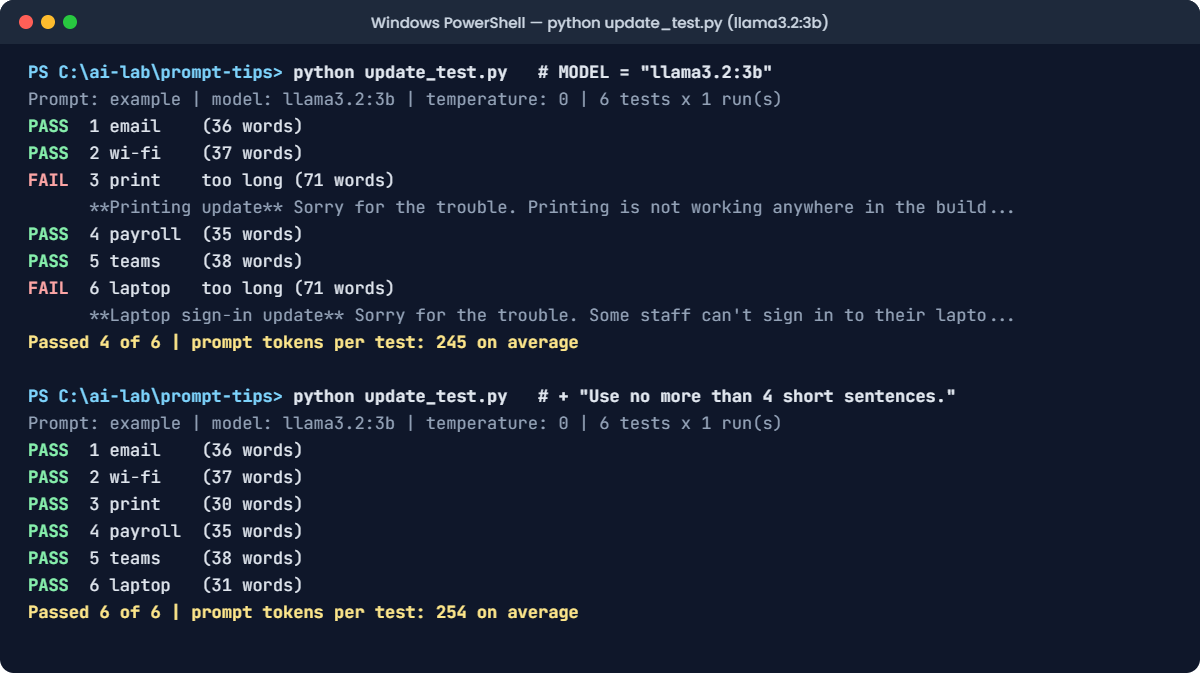
You’ll see something like this:
Prompt: example | model: llama3.2:3b | temperature: 0 | 6 tests x 1 run(s)
PASS  1 email    (36 words)
PASS  2 wi-fi    (37 words)
FAIL  3 print    too long (71 words)
      **Printing update** Sorry for the trouble. Printing is not working anywhere in the build...
PASS  4 payroll  (35 words)
PASS  5 teams    (38 words)
FAIL  6 laptop   too long (71 words)
      **Laptop sign-in update** Sorry for the trouble. Some staff can't sign in to their lapto...
Passed 4 of 6 | prompt tokens per test: 245 on average
A bigger model, and two tests fail. The 3B model writes longer, more thorough updates and adds a bold heading, even though the rules say no headings.
It’s not worse at language; it reads the same prompt differently. Prompts are tuned to a model, and every model change is a prompt change.
The fix: make the length rule something the model can count more easily:
Change this line:
EXTRA = "Start with one short, friendly sorry. Use no more than 4 short sentences."Run this:
python update_test.pyYou should see something like this (the model’s words will differ a little):
Prompt: example | model: llama3.2:3b | temperature: 0 | 6 tests x 1 run(s)
PASS  1 email    (36 words)
PASS  2 wi-fi    (37 words)
PASS  3 print    (30 words)
PASS  4 payroll  (35 words)
PASS  5 teams    (38 words)
PASS  6 laptop   (31 words)
Passed 6 of 6 | prompt tokens per test: 254 on average
Six out of six on the 3B model. Now check the new rule didn’t break the small model:
Change this line:
MODEL = "llama3.2:1b"Run this:
python update_test.pyYou should see something like this (the model’s words will differ a little):
Prompt: example | model: llama3.2:1b | temperature: 0 | 6 tests x 1 run(s)
PASS  1 email    (36 words)
PASS  2 wi-fi    (37 words)
PASS  3 print    (36 words)
PASS  4 payroll  (35 words)
PASS  5 teams    (38 words)
PASS  6 laptop   (37 words)
Passed 6 of 6 | prompt tokens per test: 254 on average
One prompt, two models, all tests passing. Notice that the extra sentence costs 9 tokens on every call (245 to 254). When you move to a new model, run the tests on both, fix the prompt, and keep the test results with the change.
✅ Checkpoint: With the 4-sentence rule, both llama3.2:3b and llama3.2:1b pass 6 of 6.