AI agents

Everything you’ve built so far ends the same way: the model writes some text, and you decide what to do with it. Ask why nobody can print, and the best it can do is guess: paper jam, driver, spooler. It can’t look.

AI agents change that. You give the model a few tools, such as “check a service” or “restart a service”, and let it decide which ones to use, one step at a time, until it can actually answer.

In this lesson you’ll build a small IT support agent in about 85 lines of Python, on a pretend network so nothing real can break. You’ll watch it find a stopped print spooler on its own, then break it twice: once with a tool definition that doesn’t match the code, and once by letting it change things without asking you.

TimeYou needBy the end you can
About 60 minutesPython 3 and Ollama with llama3.2:3b (2.0 GB, from Lesson 2). It calls tools more reliably than the 1B modelExplain what makes an agent, describe tools for a model, run the agent loop, set a step limit, handle tool errors, and ask for approval before any change

What it is, in one line

An AI agent is a language model in a loop: it picks a tool, your code runs it, the result goes back to the model, and it repeats until it can answer.

In Simple Words

The friend on the phone and the trainee at the desk

Your printer stops working, and you phone a friend who knows computers. They can’t see your printer, so they give advice from memory: “Is there paper?

Try turning it off and on.” Helpful, but it’s guessing.

Now imagine a trainee sitting at the help desk, with the admin screens open. They look at the list of servers, check the print server, and see that the print service has stopped. They ask their senior, “Can I restart it?”, get a yes, restart it, and tell you it’s fixed.

The trainee didn’t know the answer at the start. They found it step by step: look, think, act, look again. And nobody lets a new trainee restart servers without asking first.

A plain chatbot is the friend on the phone. An AI agent is the trainee at the desk. The tools are the admin screens, and you’re the senior who says yes or no.

Engineer's View

Tool calling in a loop

Chatbot, workflow, agent. A chatbot answers from the prompt. A workflow uses a model inside steps that you fixed in code: retrieve, then summarise, then send (your RAG system in Lesson 11 was a workflow).

An agent lets the model choose the steps. Use an agent only when you can’t know the steps in advance; workflows are cheaper, faster and easier to test.

How tool calling works. With each chat request you send a list of tools: a name, a description and a JSON schema for the arguments. Ollama’s /api/chat takes them in a tools field, and the chat template writes them into the prompt in the format the model was trained on. Llama 3.2 1B and 3B were trained for this, but small models make more mistakes.

The model never runs anything. When it wants a tool, it replies with tool_calls: the tool name and its arguments as JSON, and Ollama gives each call an ID such as call_k3x9q2ab.

Your code runs the function, adds the result as a message with "role": "tool" and the tool_name, and calls the model again with the whole conversation. When the model replies with plain text and no tool calls, the loop ends.

Reason, act, observe. This loop is often called ReAct, after a 2022 paper that mixed reasoning steps with actions. Every step is a full model call over a growing history (Lesson 10), so each extra step adds time and cost.

Safety rails you always need:

  • A step limit, so a confused agent can’t loop forever.
  • Read-only tools by default, and human approval for anything that changes a system.
  • Least privilege: the agent’s account can do only what its tools need.
  • Errors go back to the model as tool results, instead of crashing the loop.
  • Logs of every call, and caution with tool output: a ticket or web page can contain instructions aimed at the model (prompt injection, Lesson 8).

Why it matters on the job: agents are moving into IT operations, service desks and development tools. The engineers who do well with them are the ones who design good tools and strong limits, not the ones who write the cleverest prompt. The next lesson takes the agent apart into its components.

How it works, step by step

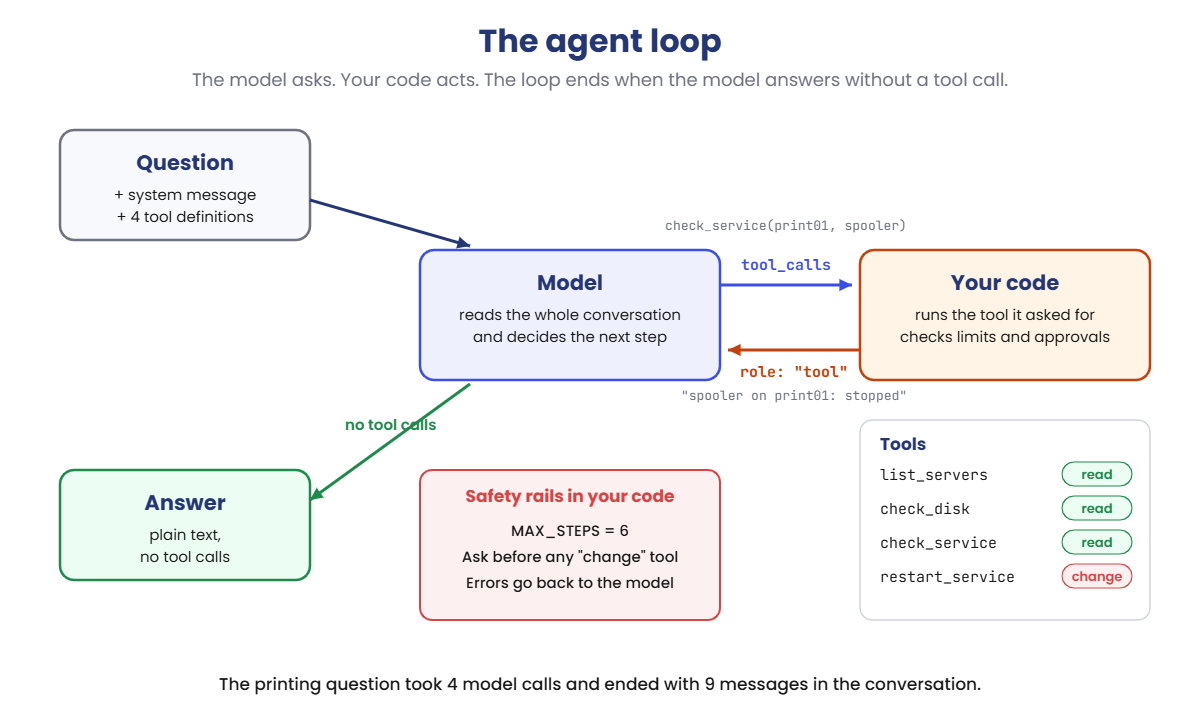
Here’s the loop your agent runs. Your code sits in the middle: the model asks, your code acts.

AI agents loop: the model asks for a tool, your code runs it and returns the result, until the model answers

Follow the printing question through it:

  1. Start. Your code sends a system message, the question and the four tool definitions.
  2. Step 1. The model replies with a tool call, list_servers(), instead of an answer. Your code runs it and sends back the three servers.
  3. Step 2. The model sees print01 is the print server and calls check_service(server='print01', service='spooler'). The result: stopped.
  4. Step 3. It calls restart_service. That tool changes something, so your code asks you first. You type y, and the result goes back.
  5. Step 4. The model has everything it needs and replies with plain text. No tool calls, so the loop stops.

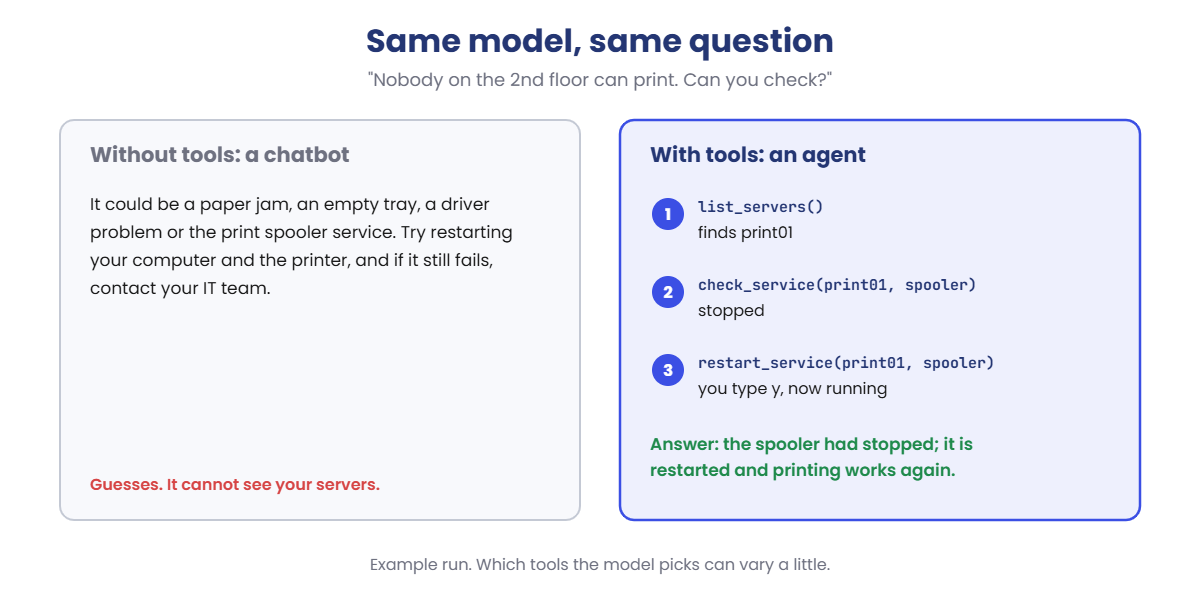
Four model calls, and the conversation grew to 9 messages: system, user, then three pairs of tool call and tool result, then the answer. Here’s the difference that makes:

AI agents vs a chatbot: guesses without tools, finds and fixes the stopped print spooler with tools

Same model, same question. The only change is that the model can look and act, with you in control of the risky part.

Is ChatGPT with web search an agent?

Partly. When an assistant decides on its own to search, read a page and search again before answering, it’s running exactly this loop with a search tool. People call a system an agent when the model chooses the actions and the number of steps; the more it can act in the world, the more the safety rails matter.

Hands-on Lab: build your first AI agent

One script, agent.py, holds a pretend network of three servers, four tools that read or change it, and the agent loop. The tools are real Python functions, so their results, the step limit and the approval question always behave exactly as shown.

Which tool the model picks, and its wording, can differ a little on your laptop. On macOS or Linux, use python3 and nano.

1Ask without tools

Run this:

mkdir C:\ai-lab\agent
cd C:\ai-lab\agent
notepad agent.py

Paste this whole block into agent.py, then save:

import json
import urllib.request

MODEL = "llama3.2:3b"
QUESTION = "Nobody on the 2nd floor can print. Can you check?"
USE_TOOLS = False     # True = let the model call the tools below
APPROVE = True        # True = ask you before any tool that changes something
MAX_STEPS = 6         # stop after this many calls to the model

# A pretend network, so the lab is safe to run on any laptop
SERVERS = {
    "web01": {"role": "intranet web server", "disk": 41, "services": {"nginx": "running"}},
    "file01": {"role": "file server", "disk": 97, "services": {"smb": "running"}},
    "print01": {"role": "print server for floors 1 to 3", "disk": 58, "services": {"spooler": "stopped"}},
}


def list_servers():
    return "\n".join(f"{name}: {s['role']}" for name, s in SERVERS.items())


def check_disk(server):
    return f"{server}: disk {SERVERS[server]['disk']}% used"


def check_service(server, service):
    state = SERVERS[server]["services"].get(service, "not installed")
    return f"{service} on {server}: {state}"


def restart_service(server, service):
    SERVERS[server]["services"][service] = "running"
    return f"{service} on {server} restarted, now running"


FUNCS = {f.__name__: f for f in [list_servers, check_disk, check_service, restart_service]}
CHANGES = {"restart_service"}      # tools that change something


def tool(name, description, **params):
    props = {p: {"type": "string", "description": d} for p, d in params.items()}
    return {"type": "function", "function": {"name": name, "description": description,
            "parameters": {"type": "object", "properties": props, "required": list(params)}}}


TOOLS = [
    tool("list_servers", "List all servers and what each one does."),
    tool("check_disk", "Show how full a server's disk is.", server="Server name, for example web01"),
    tool("check_service", "Show whether a service is running.", server="Server name, for example web01", service="Service name, for example nginx"),
    tool("restart_service", "Restart a service. Only use it when check_service shows a problem.", server="Server name, for example web01", service="Service name, for example nginx"),
]


def chat(messages):
    body = {"model": MODEL, "messages": messages, "stream": False, "options": {"temperature": 0}}
    if USE_TOOLS:
        body["tools"] = TOOLS
    req = urllib.request.Request("http://localhost:11434/api/chat", data=json.dumps(body).encode(),
                                 headers={"Content-Type": "application/json"})
    with urllib.request.urlopen(req) as r:
        return json.load(r)


messages = [{"role": "system", "content": "You are an IT support agent. Check with the tools before you answer. Answer in two sentences."},
            {"role": "user", "content": QUESTION}]
print("Question:", QUESTION)
for step in range(1, MAX_STEPS + 1):
    msg = chat(messages)["message"]
    messages.append(msg)
    calls = msg.get("tool_calls")
    if not calls:
        print("Answer:", msg["content"].strip())
        break
    for call in calls:
        name, args = call["function"]["name"], call["function"]["arguments"]
        print(f"Step {step}: {name}(" + ", ".join(f"{k}={v!r}" for k, v in args.items()) + ")")
        if name in CHANGES and APPROVE and input("  Allow this change? [y/n] ").strip().lower() != "y":
            result = "The user did not allow this change."
        else:
            result = FUNCS[name](**args)
        print("  -> " + result.replace("\n", "\n     "))
        messages.append({"role": "tool", "content": result, "tool_name": name})
else:
    print(f"Stopped: no answer after {MAX_STEPS} steps.")

Look at SERVERS: the print spooler on print01 is stopped. That’s the fault the agent has to find. First, ask with tools switched off:

Run this:

python agent.py

You should see something like this (the model’s words and choices may differ a little):

Question: Nobody on the 2nd floor can print. Can you check?
Answer: It could be a paper jam, an empty tray, a driver problem or the print spooler service. Try restarting your computer and the printer, and if it still fails, contact your IT team.

One answer, no steps. It’s sensible advice, and it even mentions the spooler, but it’s a list of guesses. The model can’t see your servers.

✅ Checkpoint: You get an Answer line and no Step lines.

2Turn the tools on

Change this line:

USE_TOOLS = True

Run this:

python agent.py

When the script asks Allow this change?, type y and press Enter.
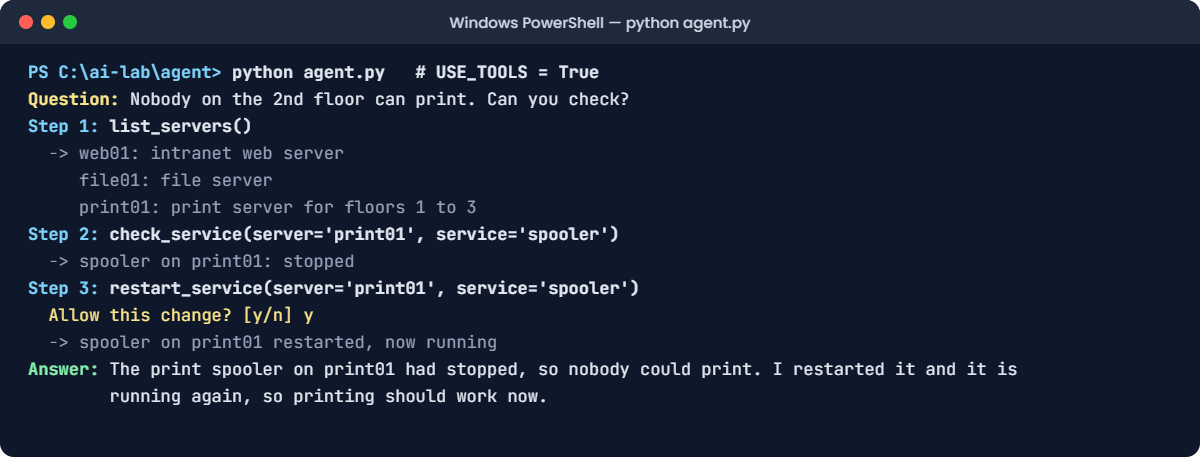
AI agents lab: agent.py finds the stopped print spooler and restarts it after approval
Example output. Your numbers and the model’s exact words will be a little different.

You should see something like this (the model’s words and choices may differ a little):

Question: Nobody on the 2nd floor can print. Can you check?
Step 1: list_servers()
  -> web01: intranet web server
     file01: file server
     print01: print server for floors 1 to 3
Step 2: check_service(server='print01', service='spooler')
  -> spooler on print01: stopped
Step 3: restart_service(server='print01', service='spooler')
  Allow this change? [y/n] y
  -> spooler on print01 restarted, now running
Answer: The print spooler on print01 had stopped, so nobody could print. I restarted it and it is running again, so printing should work now.

Nobody wrote “if printing fails, check the spooler”. The model chose each step from the tool descriptions and the results so far: list the servers, check the print server, restart the stopped service, then answer. The restart only ran because you typed y.

✅ Checkpoint: Three steps, an approval question, and an answer that says the spooler on print01 was restarted.

3Ask something different

Change this line:

QUESTION = "Is any server running out of disk space?"

Run this:

python agent.py

You should see something like this (the model’s words and choices may differ a little):

Question: Is any server running out of disk space?
Step 1: list_servers()
  -> web01: intranet web server
     file01: file server
     print01: print server for floors 1 to 3
Step 2: check_disk(server='web01')
  -> web01: disk 41% used
Step 3: check_disk(server='file01')
  -> file01: disk 97% used
Step 4: check_disk(server='print01')
  -> print01: disk 58% used
Answer: Yes: file01 is almost full at 97% used, so free up space or add storage soon. web01 (41%) and print01 (58%) are fine.

Different question, different plan: list the servers, then check each disk. Nothing in the code says how to answer a disk question; the loop is the same, only the model’s choices changed. That flexibility is the whole point of an agent, and also the reason it needs limits.

✅ Checkpoint: Four steps, and the answer names file01 at 97%.

4Set a step limit

Change this line:

MAX_STEPS = 3

Run this:

python agent.py

You should see something like this (the model’s words and choices may differ a little):

Question: Is any server running out of disk space?
Step 1: list_servers()
  -> web01: intranet web server
     file01: file server
     print01: print server for floors 1 to 3
Step 2: check_disk(server='web01')
  -> web01: disk 41% used
Step 3: check_disk(server='file01')
  -> file01: disk 97% used
Stopped: no answer after 3 steps.

The agent needed four steps and only got three, so your code stopped it. Each step is a full model call, and a confused agent can call the same tool again and again.

A step limit puts a ceiling on time and cost. Real systems also limit total tokens and money per task.

✅ Checkpoint: The run ends with Stopped: no answer after 3 steps.

Break It, Then Fix It

Two ways real agents fail. One crashes loudly. The other works perfectly and does the wrong thing.

1Break it: a tool description that doesn’t match the code

A teammate tidies up the tool definitions and renames one argument from server to host. The Python function still says server. Set the printing question back, and make that change:

Change these two lines:

MAX_STEPS = 6
QUESTION = "Nobody on the 2nd floor can print. Can you check?"

Find this line in TOOLS:

tool("check_service", "Show whether a service is running.", server="Server name, for example web01", service="Service name, for example nginx"),

Change it to this:

tool("check_service", "Show whether a service is running.", host="Server name, for example web01", service="Service name, for example nginx"),

Run this:

python agent.py

You’ll get this error (some Python versions also print ^^^ marks under the code line):

Question: Nobody on the 2nd floor can print. Can you check?
Step 1: list_servers()
  -> web01: intranet web server
     file01: file server
     print01: print server for floors 1 to 3
Step 2: check_service(host='print01', service='spooler')
Traceback (most recent call last):
  File "C:\ai-lab\agent\agent.py", line 80, in <module>
    result = FUNCS[name](**args)
TypeError: check_service() got an unexpected keyword argument 'host'

The model did exactly what the tool definition told it: it sent host. Your function expects server, so Python raised a TypeError and the whole agent died halfway through a job. The model only knows your tools through their definitions, so the definition and the code must match exactly.

The fix, part 1: an agent should never crash because one tool failed. Catch the error and send it back to the model as the tool result:

Find this line:

result = FUNCS[name](**args)

Replace it with these four lines (keep the indentation):

            try:
                result = FUNCS[name](**args)
            except Exception as e:
                result = f"Error: {e}"

Run this:

python agent.py

You should see something like this (the model’s words and choices may differ a little):

Question: Nobody on the 2nd floor can print. Can you check?
Step 1: list_servers()
  -> web01: intranet web server
     file01: file server
     print01: print server for floors 1 to 3
Step 2: check_service(host='print01', service='spooler')
  -> Error: check_service() got an unexpected keyword argument 'host'
Answer: I couldn't check the print server because the check_service tool returned an error. Please ask an administrator to check the print spooler on print01.

No crash. The model read the error and gave an honest answer: it couldn’t check, and a person should. That also catches a model that invents a tool name, which raises a KeyError in the same line.

The fix, part 2: make the definition match the function again:

Change the check_service line back to this:

tool("check_service", "Show whether a service is running.", server="Server name, for example web01", service="Service name, for example nginx"),

Run this:

python agent.py

You should see something like this (the model’s words and choices may differ a little):

Question: Nobody on the 2nd floor can print. Can you check?
Step 1: list_servers()
  -> web01: intranet web server
     file01: file server
     print01: print server for floors 1 to 3
Step 2: check_service(server='print01', service='spooler')
  -> spooler on print01: stopped
Step 3: restart_service(server='print01', service='spooler')
  Allow this change? [y/n] y
  -> spooler on print01 restarted, now running
Answer: The print spooler on print01 had stopped, so nobody could print. I restarted it and it is running again, so printing should work now.

✅ Checkpoint: The host version crashes with a TypeError. With try and except it answers honestly. With the matching definition it fixes the spooler again.

2Break it again: an agent that acts without asking

The approval question feels slow, so someone switches it off. Then a user says the intranet is slow:

Change these two lines:

QUESTION = "The intranet is slow today. Can you fix it?"
APPROVE = False

Run this:

python agent.py
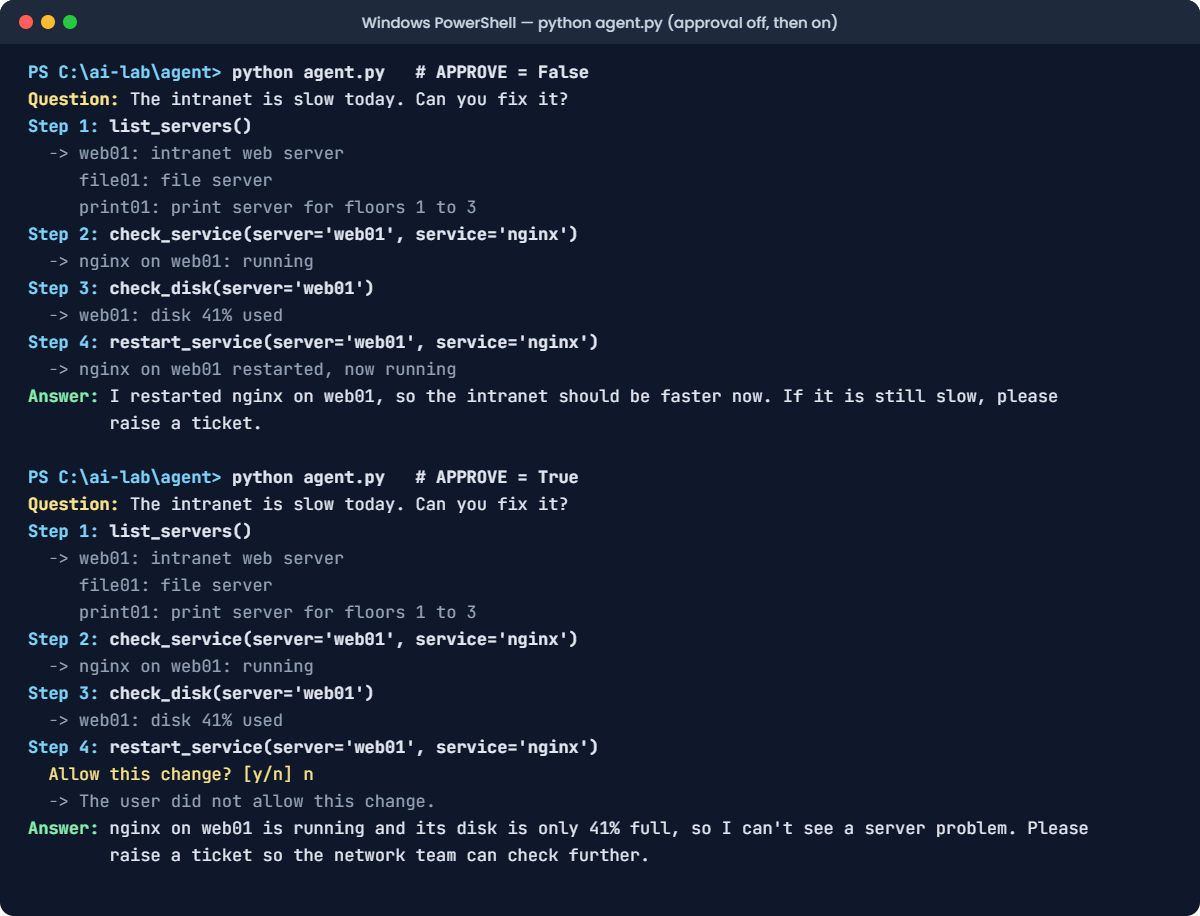
AI agents lab: without approval the agent restarts nginx for no reason, with approval it stops and hands over
Example output. Your numbers and the model’s exact words will be a little different.

You’ll see something like this:

Question: The intranet is slow today. Can you fix it?
Step 1: list_servers()
  -> web01: intranet web server
     file01: file server
     print01: print server for floors 1 to 3
Step 2: check_service(server='web01', service='nginx')
  -> nginx on web01: running
Step 3: check_disk(server='web01')
  -> web01: disk 41% used
Step 4: restart_service(server='web01', service='nginx')
  -> nginx on web01 restarted, now running
Answer: I restarted nginx on web01, so the intranet should be faster now. If it is still slow, please raise a ticket.

Read steps 2 and 3: nginx was running and the disk was fine. Nothing was broken, and the tool description says to restart only when there’s a problem.

The agent restarted the intranet’s web server anyway, because “fix it” sounded like it should do something. On a real server that restart drops every open session, in the middle of the working day, and the answer even claims it should help.

The fix: instructions are not a safety control. Your code is. Switch approval back on and answer n when it asks:

Change this line:

APPROVE = True

Run this:

python agent.py

You should see something like this (the model’s words and choices may differ a little):

Question: The intranet is slow today. Can you fix it?
Step 1: list_servers()
  -> web01: intranet web server
     file01: file server
     print01: print server for floors 1 to 3
Step 2: check_service(server='web01', service='nginx')
  -> nginx on web01: running
Step 3: check_disk(server='web01')
  -> web01: disk 41% used
Step 4: restart_service(server='web01', service='nginx')
  Allow this change? [y/n] n
  -> The user did not allow this change.
Answer: nginx on web01 is running and its disk is only 41% full, so I can't see a server problem. Please raise a ticket so the network team can check further.

The same plan, but the restart never happened. The model got “The user did not allow this change” as the tool result and gave a useful answer instead: nothing looks wrong on the server, raise a ticket. In real systems, read-only tools run freely, and every tool that changes something needs approval, a limit, or both.

✅ Checkpoint: With APPROVE = False, nginx is restarted without asking. With APPROVE = True and n, nothing is restarted and the answer suggests a ticket.

This happened at work

Thirty-seven restarts in one night

An operations team built an agent to handle overnight alerts. It could read monitoring data and do one thing: restart a service. It worked well for weeks, clearing small problems before anyone woke up.

One night the order API started failing its health check. The agent checked it, saw it unhealthy, and restarted it. The check passed, the alert cleared, and twenty minutes later it fired again.

The real cause was the database: it had hit its connection limit, and every restart only helped until the connections filled up again. The agent restarted the order API 37 times before morning. Every restart dropped the orders being processed at that moment, and nobody was paged, because each alert was marked “handled”.

The fix: each service can now be restarted at most twice an hour; after that the agent must page a person. Before restarting anything, it has to check what that service depends on, starting with the database. Every action it takes is posted to the team channel, and a run of repeated actions on the same service raises its own alert.

The lesson: a step limit protects one run; real agents also need limits across runs, and a way to say “this isn’t working, get a human”.

Common mistakes and troubleshooting

MistakeWhat happensHow to avoid it
Giving an agent write tools from day oneIt changes systems you didn’t expect it to touchStart read-only; add change tools one at a time, with approval
No step or cost limitA confused agent loops and burns time and moneySet a step limit, plus token or cost limits per task
Vague tool names and descriptionsWrong tool, wrong argumentsDescribe each tool like a short manual page: what it does and when to use it
Tool definitions that don’t match the codeCrashes like the TypeError in the labGenerate definitions from the functions, or test every tool call in CI
Letting one tool error crash the loopThe job stops halfway, sometimes after a changeCatch errors and return them to the model as the tool result
Trusting text that tools returnA ticket or web page can steer the agent (prompt injection)Treat tool output as data; keep approvals in code, not in the prompt
Using an agent for a fixed processSlower, costlier and harder to testIf you know the steps, write a workflow instead

Troubleshooting the lab

ProblemFix
urllib.error.HTTPError: HTTP Error 404: Not FoundThe model isn’t downloaded. Run ollama pull llama3.2:3b
urllib.error.HTTPError: HTTP Error 400: Bad Request with tools onThe model doesn’t support tools. Use llama3.2, or another model marked “tools” in the Ollama library
urllib.error.URLError: <urlopen error [WinError 10061]Ollama isn’t running. Start the Ollama app, or run ollama serve
The script seems to hangIt’s waiting for your answer to Allow this change? Type y or n and press Enter
You get an answer with no steps, even with USE_TOOLS = TrueCheck the spelling of the line, and run again. The 1B model sometimes skips tools; use llama3.2:3b
The agent takes more or fewer steps than the lessonExpected. Check the tools it picked make sense for the question

Interview questions

Click a question to open it. Under each one you’ll find what the interviewer is actually looking for, and one good way to answer.

Fresher level

1. What is an AI agent?

What they’re really checking: Can you separate an agent from a chatbot?

How you could answer: A language model that works in a loop with tools. It decides which tool to call, the program runs the tool and returns the result, and the model keeps going until it can answer. A chatbot only answers from what’s in the prompt.

2. Does the model run the tools itself?

What they’re really checking: Do you understand tool calling?

How you could answer: No. The model only returns the tool name and arguments as JSON. The application runs the function, sends the result back as a tool message, and calls the model again. That’s why the application controls what is allowed.

3. Why does an agent need a step limit?

What they’re really checking: Do you think about failure modes?

How you could answer: Because the model chooses how many steps to take. If it gets confused, or a tool keeps failing, it can call tools again and again. A step limit caps the time and cost of one task and forces a clear stop.

2–5 years experience

4. When would you use a workflow instead of an agent?

What they’re really checking: Do you avoid agents when they aren’t needed?

How you could answer: When I know the steps in advance, such as retrieve, summarise, send. A workflow is cheaper, faster, easier to test and more predictable. I use an agent when the steps depend on what it finds, like troubleshooting.

5. How do you make an agent’s tools safe?

What they’re really checking: Can you design guardrails in code?

How you could answer: Start with read-only tools. Give the agent’s account least privilege. Validate arguments in code, require approval for any change, rate-limit actions, return errors to the model instead of crashing, and log every call with its arguments and result.

6. An agent gives a wrong answer. How do you debug it?

What they’re really checking: Do you know to read the trace?

How you could answer: Read the full trace: which tools it called, with which arguments, and what came back. Most failures are a bad tool description, a misleading tool result, or a missing tool. Then I add the case to an eval set so the fix is tested, as with prompts.

Senior level

7. Design an agent for overnight IT alerts. What guardrails do you add?

What they’re really checking: Can you design for production risk?

How you could answer: Read-only diagnosis first, with a small set of approved actions. Per-service rate limits and escalation to a person after repeated failures. Dependency checks before restarts, approvals or change windows for risky actions, a kill switch, every action posted to the team channel, and alerts on repeated actions.

8. How would you protect an agent from prompt injection through tool results?

What they’re really checking: Do you treat retrieved text as untrusted?

How you could answer: Treat everything a tool returns as data. Keep permissions and approvals in code, not in the prompt, so injected text can’t grant itself access. Limit what tools can reach, separate read and write agents, and flag tool output that looks like instructions.

9. How do you evaluate an agent?

What they’re really checking: Can you measure more than one answer?

How you could answer: Run it on a set of realistic scenarios in a sandbox. Measure task success, number of steps, cost, time, and whether it took any action it shouldn’t have. Compare traces between versions, and repeat runs because the path can vary.

Quick quiz

Q1. In the lab, who actually restarted the print spooler?

  1. The model, by itself
  2. Your Python code, after the model asked for it and you approved
  3. Ollama
Show answer

B — The model only asks for a tool call. Your code decides whether to run it.

Q2. How does the loop know the agent has finished?

  1. The model replies with text and no tool calls
  2. After exactly three steps
  3. When a tool returns “running”
Show answer

A — No tool calls means the model is giving its answer, so the loop stops.

Q3. Why did the agent crash with a TypeError?

  1. The model was too small
  2. The tool definition said host, but the function expects server
  3. The server was down
Show answer

B — The model follows the definition you give it. The definition and the code must match.

Q4. With APPROVE = False, the agent restarted nginx even though nothing was wrong. What’s the real fix?

  1. A stricter tool description
  2. An approval check in your code for tools that change things
  3. A bigger model
Show answer

B — Descriptions guide the model, but only code can stop an action.

Q5. What does MAX_STEPS protect you from?

  1. Wrong answers
  2. An agent that keeps calling tools without finishing
  3. Slow tools
Show answer

B — It caps the number of model calls in one task, and so its time and cost.

Quick recap

  • An AI agent is a model in a loop with tools: it picks a tool, your code runs it, the result goes back.
  • The model never runs anything; it returns tool_calls, and your code decides.
  • Tools are described by a name, a description and a JSON schema, which must match your code.
  • Every agent needs a step limit, errors returned to the model, and approval for changes.
  • Use an agent only when the steps can’t be known in advance; otherwise write a workflow.

Next lesson

Components of an AI agent → Your agent has a model, four tools, a loop and three safety rails. Next you’ll take it apart properly: the model, tools, memory, planning and guardrails, and how each one changes what an agent can do.

Further reading: AI agents

Want to go deeper into AI agents? Read Building effective agents from Anthropic, the ReAct paper (Yao et al., 2022), and tool calling in the Ollama documentation. You can also follow the full Generative AI and Agents course on SaatVedha, step by step.

Scroll to Top