
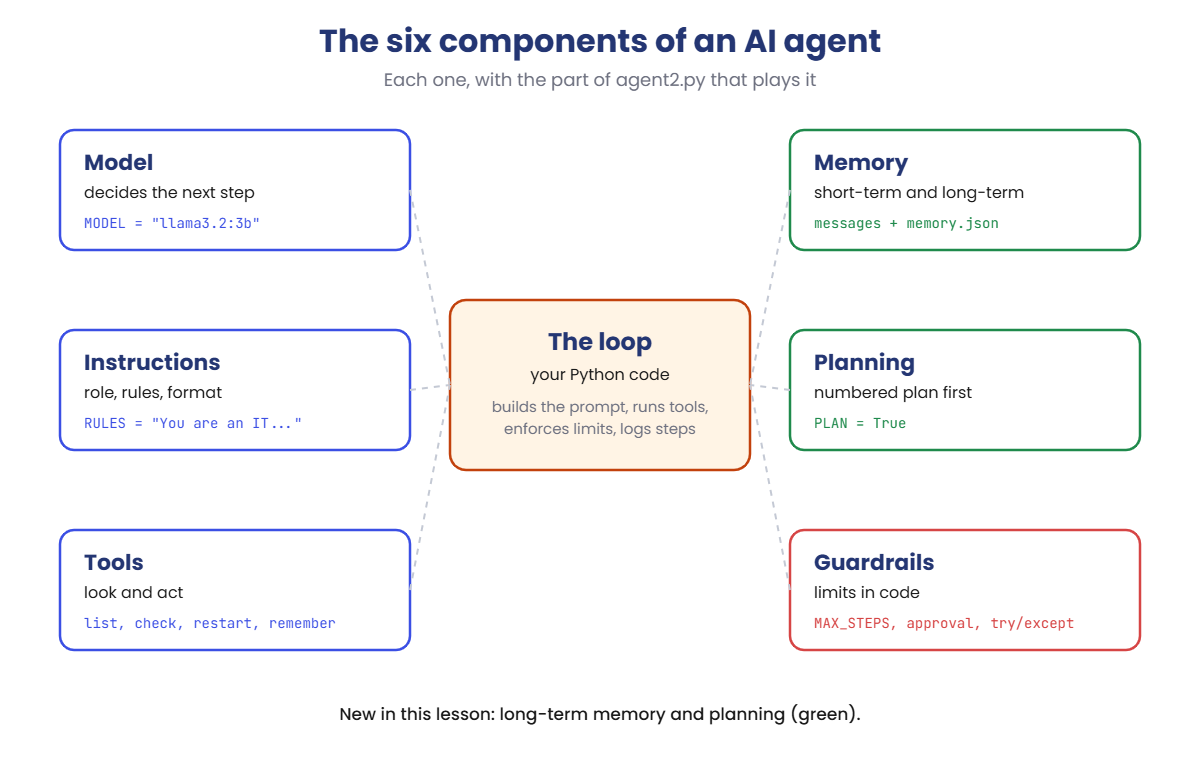
You’ll use agent2.py, the Lesson 13 agent with two new parts: long-term memory in memory.json and an optional planning step. Error handling for tools is already built in.
The tools, the memory file and the step limit always behave exactly as shown. Which tools the model picks, and its wording, can differ a little on your laptop. On macOS or Linux, use python3, nano and cat instead of type.
1Run the agent and read its parts
Run this:
cd C:\ai-lab\agent
notepad agent2.py
Paste this whole block into agent2.py, then save:
import datetime
import json
import os
import urllib.request

MODEL = "llama3.2:3b"
QUESTION = "Nobody on the 2nd floor can print. Can you check?"
MEMORY = False        # True = load memory.json and add a remember tool
PLAN = False          # True = write a short plan before using any tools
APPROVE = True        # True = ask you before any tool that changes something
MAX_STEPS = 6         # stop after this many calls to the model
RULES = "You are an IT support agent. Check with the tools before you answer. Answer in two sentences."

# A pretend network, so the lab is safe to run on any laptop
SERVERS = {
    "web01": {"role": "intranet web server", "disk": 41, "services": {"nginx": "running"}},
    "file01": {"role": "file server", "disk": 97, "services": {"smb": "running"}},
    "print01": {"role": "print server for floors 1 to 3", "disk": 58, "services": {"spooler": "stopped"}},
}


def list_servers():
    return "\n".join(f"{name}: {s['role']}" for name, s in SERVERS.items())


def check_disk(server):
    return f"{server}: disk {SERVERS[server]['disk']}% used"


def check_service(server, service):
    state = SERVERS[server]["services"].get(service, "not installed")
    return f"{service} on {server}: {state}"


def restart_service(server, service):
    SERVERS[server]["services"][service] = "running"
    return f"{service} on {server} restarted, now running"


def load_memory():
    if not os.path.exists("memory.json"):
        return []
    with open("memory.json") as f:
        return json.load(f)


def remember(note):
    notes = load_memory()
    notes.append({"note": note, "saved": datetime.date.today().isoformat()})
    with open("memory.json", "w") as f:
        json.dump(notes, f, indent=2)
    return "Saved to memory."


FUNCS = {f.__name__: f for f in [list_servers, check_disk, check_service, restart_service, remember]}
CHANGES = {"restart_service"}      # tools that change something


def tool(name, description, **params):
    props = {p: {"type": "string", "description": d} for p, d in params.items()}
    return {"type": "function", "function": {"name": name, "description": description,
            "parameters": {"type": "object", "properties": props, "required": list(params)}}}


TOOLS = [
    tool("list_servers", "List all servers and what each one does."),
    tool("check_disk", "Show how full a server's disk is.", server="Server name, for example web01"),
    tool("check_service", "Show whether a service is running.", server="Server name, for example web01", service="Service name, for example nginx"),
    tool("restart_service", "Restart a service. Only use it when check_service shows a problem.", server="Server name, for example web01", service="Service name, for example nginx"),
]
if MEMORY:
    TOOLS.append(tool("remember", "Save a useful fact for future conversations.", note="The fact to save, in one sentence"))


def chat(messages, use_tools=True):
    body = {"model": MODEL, "messages": messages, "stream": False, "options": {"temperature": 0}}
    if use_tools:
        body["tools"] = TOOLS
    req = urllib.request.Request("http://localhost:11434/api/chat", data=json.dumps(body).encode(),
                                 headers={"Content-Type": "application/json"})
    with urllib.request.urlopen(req) as r:
        return json.load(r)


notes = load_memory() if MEMORY else []
system = RULES
if notes:
    system += "\n\nNotes from earlier conversations:\n" + "\n".join(f"- {n['note']} (saved {n['saved']})" for n in notes)
print(f"Model: {MODEL} | Tools: {len(TOOLS)} | Notes in memory: {len(notes)} | Plan: {'on' if PLAN else 'off'} | "
      f"Approval: {'on' if APPROVE else 'off'} | Step limit: {MAX_STEPS}")
messages = [{"role": "system", "content": system}, {"role": "user", "content": QUESTION}]
print("Question:", QUESTION)
if PLAN:
    ask = messages + [{"role": "user", "content": "Before you use any tools, write a numbered plan of at most 4 steps."}]
    plan = chat(ask, use_tools=False)["message"]["content"].strip()
    print("Plan:\n  " + plan.replace("\n", "\n  "))
    messages.append({"role": "assistant", "content": "My plan:\n" + plan})
for step in range(1, MAX_STEPS + 1):
    msg = chat(messages)["message"]
    messages.append(msg)
    calls = msg.get("tool_calls")
    if not calls:
        print("Answer:", msg["content"].strip())
        break
    for call in calls:
        name, args = call["function"]["name"], call["function"]["arguments"]
        print(f"Step {step}: {name}(" + ", ".join(f"{k}={v!r}" for k, v in args.items()) + ")")
        if name in CHANGES and APPROVE and input("  Allow this change? [y/n] ").strip().lower() != "y":
            result = "The user did not allow this change."
        else:
            try:
                result = FUNCS[name](**args)
            except Exception as e:
                result = f"Error: {e}"
        print("  -> " + result.replace("\n", "\n     "))
        messages.append({"role": "tool", "content": result, "tool_name": name})
else:
    print(f"Stopped: no answer after {MAX_STEPS} steps.")
Run this:
python agent2.pyWhen the script asks Allow this change?, type y and press Enter.
You should see something like this (the model’s words and choices may differ a little):
Model: llama3.2:3b | Tools: 4 | Notes in memory: 0 | Plan: off | Approval: on | Step limit: 6
Question: Nobody on the 2nd floor can print. Can you check?
Step 1: list_servers()
  -> web01: intranet web server
     file01: file server
     print01: print server for floors 1 to 3
Step 2: check_service(server='print01', service='spooler')
  -> spooler on print01: stopped
Step 3: restart_service(server='print01', service='spooler')
  Allow this change? [y/n] y
  -> spooler on print01 restarted, now running
Answer: The print spooler on print01 had stopped, so nobody could print. I restarted it and it is running again, so printing should work now.
The first line lists the components: model, tools, memory, planning and guardrails. Memory is off, so it takes three steps, like in Lesson 13.
✅ Checkpoint: The first line shows Tools: 4 and Notes in memory: 0, and the agent takes three steps.
2Turn on memory and teach it something
Change these two lines:
MEMORY = True
QUESTION = "Remember this: on print01 the spooler stops after Windows updates. Restarting it is safe."
Run this:
python agent2.pyYou should see something like this (the model’s words and choices may differ a little):
Model: llama3.2:3b | Tools: 5 | Notes in memory: 0 | Plan: off | Approval: on | Step limit: 6
Question: Remember this: on print01 the spooler stops after Windows updates. Restarting it is safe.
Step 1: remember(note='On print01 the print spooler stops after Windows updates, and restarting it is safe.')
  -> Saved to memory.
Answer: Got it. I've saved that note, so next time I'll know the spooler on print01 can stop after Windows updates.
Memory on adds a fifth tool, remember. The model decided this message was worth saving and called it. Now look at the file it wrote:
Run this:
type memory.jsonYou should see something like this (your date will be today’s date):
[
  {
    "note": "On print01 the print spooler stops after Windows updates, and restarting it is safe.",
    "saved": "2026-10-19"
  }
]
The note is stored with the date it was saved. That date matters later in this lesson.
✅ Checkpoint: memory.json exists and holds one note about the print01 spooler.
3Ask again with memory
Change this line:
QUESTION = "Nobody on the 2nd floor can print. Can you check?"Run this:
python agent2.py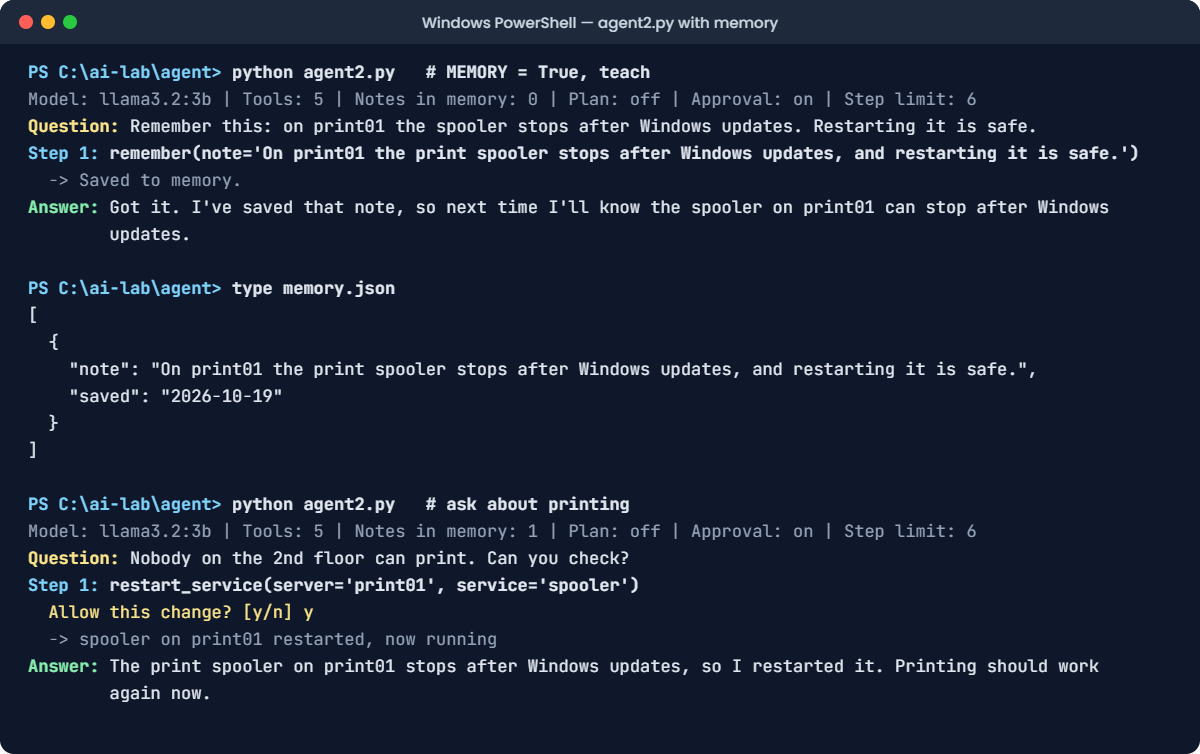
You should see something like this (the model’s words and choices may differ a little):
Model: llama3.2:3b | Tools: 5 | Notes in memory: 1 | Plan: off | Approval: on | Step limit: 6
Question: Nobody on the 2nd floor can print. Can you check?
Step 1: restart_service(server='print01', service='spooler')
  Allow this change? [y/n] y
  -> spooler on print01 restarted, now running
Answer: The print spooler on print01 stops after Windows updates, so I restarted it. Printing should work again now.
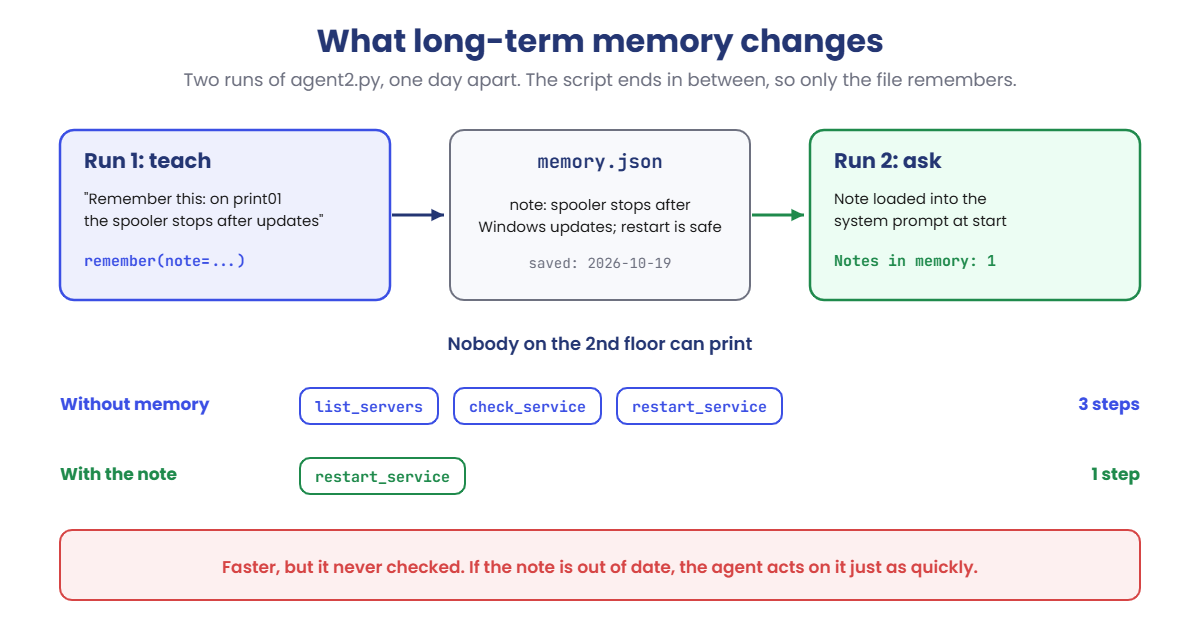
One step instead of three. The note was in the system prompt, so the model went straight to the restart and even explained why.
Look closely, though: it didn’t check anything first. Keep that in mind for the second Break It lab.
✅ Checkpoint: Notes in memory: 1, and the agent restarts the spooler in one step.
4Add a planning step
Change these two lines:
PLAN = True
QUESTION = "Check every server and tell me what needs attention."
Run this:
python agent2.py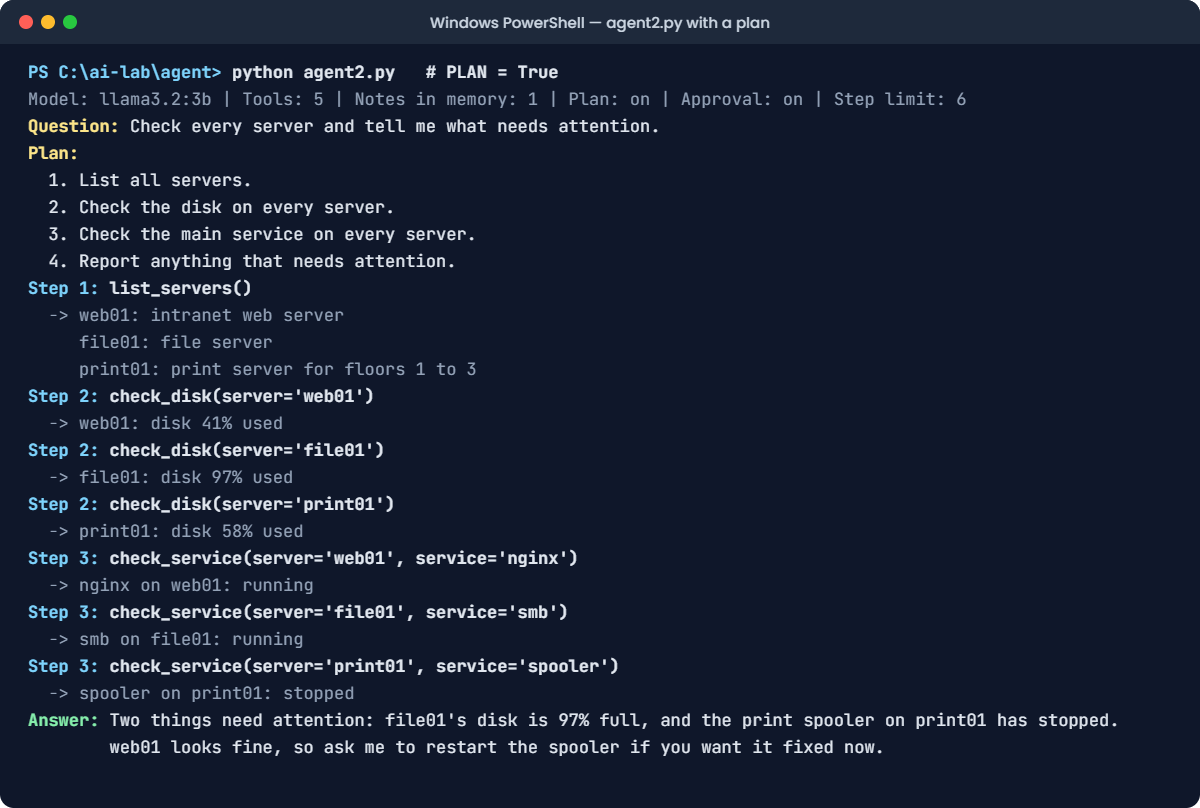
You should see something like this (the model’s words and choices may differ a little):
Model: llama3.2:3b | Tools: 5 | Notes in memory: 1 | Plan: on | Approval: on | Step limit: 6
Question: Check every server and tell me what needs attention.
Plan:
  1. List all servers.
  2. Check the disk on every server.
  3. Check the main service on every server.
  4. Report anything that needs attention.
Step 1: list_servers()
  -> web01: intranet web server
     file01: file server
     print01: print server for floors 1 to 3
Step 2: check_disk(server='web01')
  -> web01: disk 41% used
Step 2: check_disk(server='file01')
  -> file01: disk 97% used
Step 2: check_disk(server='print01')
  -> print01: disk 58% used
Step 3: check_service(server='web01', service='nginx')
  -> nginx on web01: running
Step 3: check_service(server='file01', service='smb')
  -> smb on file01: running
Step 3: check_service(server='print01', service='spooler')
  -> spooler on print01: stopped
Answer: Two things need attention: file01's disk is 97% full, and the print spooler on print01 has stopped. web01 looks fine, so ask me to restart the spooler if you want it fixed now.
The model wrote a four-line plan before using any tool, then followed it. In steps 2 and 3 it asked for three tools in one reply, so seven checks took only three model calls.
It also didn’t restart the spooler, because this question asked for a report, not a fix. The plan kept it on task.
✅ Checkpoint: A numbered plan appears first, and the answer names file01’s disk and the stopped spooler.
Memory makes an agent faster. It also gives you two new ways to fail.
1Break it: a memory file edited by hand
A teammate wants to add a note without asking the agent, so they edit memory.json in Notepad. They copy the first note and forget one comma.
Change these two lines:
PLAN = False
QUESTION = "Nobody on the 2nd floor can print. Can you check?"
Run this:
notepad memory.jsonReplace everything in memory.json with this, then save (note there’s no comma after the first }):
[
  {
    "note": "On print01 the print spooler stops after Windows updates, and restarting it is safe.",
    "saved": "2026-10-19"
  }
  {
    "note": "file01 is cleaned up every Friday evening.",
    "saved": "2026-10-19"
  }
]
Run this:
python agent2.pyYou’ll get an error like this (the middle lines come from Python’s json module and vary by version):
Traceback (most recent call last):
  File "C:\ai-lab\agent\agent2.py", line 85, in <module>
    notes = load_memory() if MEMORY else []
  File "C:\ai-lab\agent\agent2.py", line 44, in load_memory
    return json.load(f)
  ...
json.decoder.JSONDecodeError: Expecting ',' delimiter: line 6 column 3 (char 138)
One missing comma, and the whole agent stops before it does anything. Python is precise: line 6, column 3 is where it expected a comma.
Memory is data from outside your code. Treat it like any other input that can be broken.
The fix, part 1: a broken memory file shouldn’t stop the agent. Replace the load_memory function so it warns and carries on:
Find this function:
def load_memory():
    if not os.path.exists("memory.json"):
        return []
    with open("memory.json") as f:
        return json.load(f)
Replace it with this:
def load_memory():
    if not os.path.exists("memory.json"):
        return []
    try:
        with open("memory.json") as f:
            return json.load(f)
    except json.JSONDecodeError as e:
        print(f"WARNING: memory.json is broken ({e}). Running without memory.")
        return []
Run this:
python agent2.pyYou should see something like this (the model’s words and choices may differ a little):
WARNING: memory.json is broken (Expecting ',' delimiter: line 6 column 3 (char 138)). Running without memory.
Model: llama3.2:3b | Tools: 5 | Notes in memory: 0 | Plan: off | Approval: on | Step limit: 6
Question: Nobody on the 2nd floor can print. Can you check?
Step 1: list_servers()
  -> web01: intranet web server
     file01: file server
     print01: print server for floors 1 to 3
Step 2: check_service(server='print01', service='spooler')
  -> spooler on print01: stopped
Step 3: restart_service(server='print01', service='spooler')
  Allow this change? [y/n] y
  -> spooler on print01 restarted, now running
Answer: The print spooler on print01 had stopped, so nobody could print. I restarted it and it is running again, so printing should work now.
The agent warns you, works without memory, and still fixes the spooler the long way. That’s the right behaviour, but don’t leave it here.
The fix, part 2: repair the file. Add the missing comma after the first }:
Run this:
notepad memory.jsonmemory.json should now look like this:
[
  {
    "note": "On print01 the print spooler stops after Windows updates, and restarting it is safe.",
    "saved": "2026-10-19"
  },
  {
    "note": "file01 is cleaned up every Friday evening.",
    "saved": "2026-10-19"
  }
]
Run this:
python agent2.pyYou should see something like this (the model’s words and choices may differ a little):
Model: llama3.2:3b | Tools: 5 | Notes in memory: 2 | Plan: off | Approval: on | Step limit: 6
Question: Nobody on the 2nd floor can print. Can you check?
Step 1: restart_service(server='print01', service='spooler')
  Allow this change? [y/n] y
  -> spooler on print01 restarted, now running
Answer: The print spooler on print01 stops after Windows updates, so I restarted it. Printing should work again now.
Both notes load again, and the agent is back to one step. If the agent called remember while the file was broken, it would have saved over your old notes, which is why you fix the file straight away.
✅ Checkpoint: The missing comma gives a JSONDecodeError. The new load_memory warns instead, and the repaired file loads 2 notes.
2Break it again: a note that’s out of date
A month later, the problem on print01 is different. The spooler is running, but the disk is full. Change the pretend network to match:
Find this line in SERVERS:
"print01": {"role": "print server for floors 1 to 3", "disk": 58, "services": {"spooler": "stopped"}},Change it to this:
"print01": {"role": "print server for floors 1 to 3", "disk": 100, "services": {"spooler": "running"}},Run this:
python agent2.py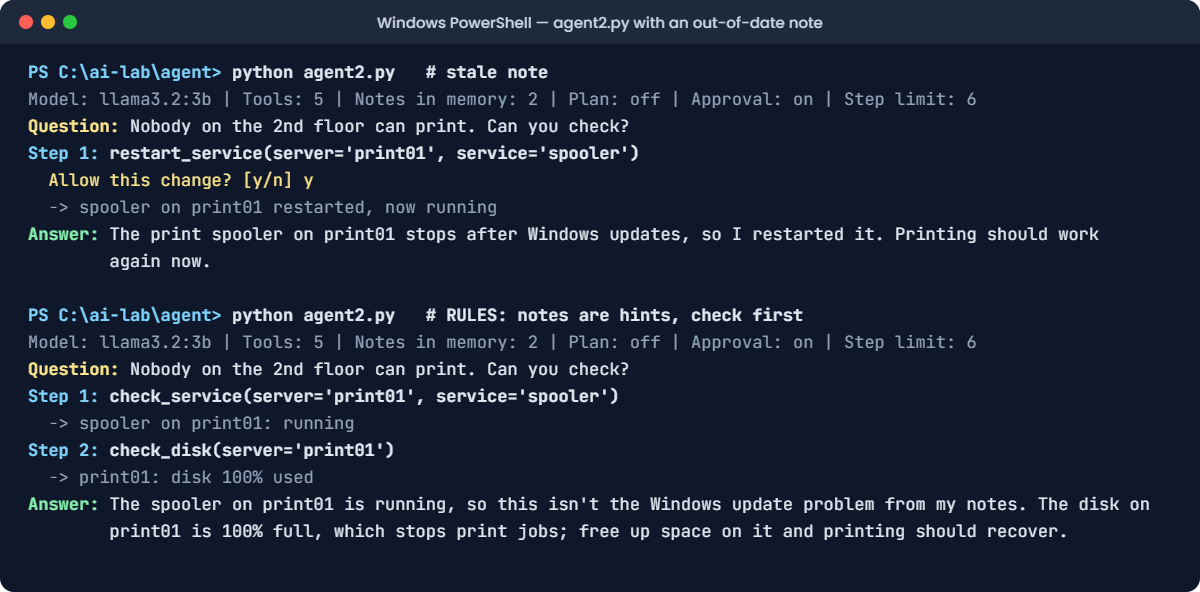
You’ll see something like this:
Model: llama3.2:3b | Tools: 5 | Notes in memory: 2 | Plan: off | Approval: on | Step limit: 6
Question: Nobody on the 2nd floor can print. Can you check?
Step 1: restart_service(server='print01', service='spooler')
  Allow this change? [y/n] y
  -> spooler on print01 restarted, now running
Answer: The print spooler on print01 stops after Windows updates, so I restarted it. Printing should work again now.
The agent trusted its note, restarted a spooler that was already running, and told the user printing should work. It doesn’t, because the disk is still 100% full. It never looked.
The note was true when it was saved, but nothing in the system knew it had gone stale.
The fix: tell the model what notes are, and make checking the current state part of its instructions:
Change the RULES line to this:
RULES = "You are an IT support agent. Notes are hints from the past: always check the current state with a tool before you change anything. Answer in two sentences."Run this:
python agent2.pyYou should see something like this (the model’s words and choices may differ a little):
Model: llama3.2:3b | Tools: 5 | Notes in memory: 2 | Plan: off | Approval: on | Step limit: 6
Question: Nobody on the 2nd floor can print. Can you check?
Step 1: check_service(server='print01', service='spooler')
  -> spooler on print01: running
Step 2: check_disk(server='print01')
  -> print01: disk 100% used
Answer: The spooler on print01 is running, so this isn't the Windows update problem from my notes. The disk on print01 is 100% full, which stops print jobs; free up space on it and printing should recover.
Now the note is a hint, not an order. The agent checked the spooler, saw it running, checked the disk and found the real cause. Notice it didn’t ask to restart anything, because nothing needed restarting.
In real systems you’d also give notes an expiry date and record which server version they apply to.
✅ Checkpoint: With the stale note, the agent restarts the spooler and misses the full disk. With the new rule, it checks first and reports the disk at 100%.