Large language models (LLMs)
-
Introduction to generative AI and agents
-
Large language models (LLMs)
-
Prompts
-
AI agents
In Lesson 1 you downloaded a file called llama3.2:1b. It was 1.3 GB, and it could answer questions about DNS servers.
But what is actually inside that file? It isn’t a database of answers, and it isn’t a list of rules.
This lesson opens it up. You’ll learn what a large language model really is, why some models are 1 GB and others are 40 GB, and how to pick the right size for the machine you have. Then you’ll put two models side by side on your laptop and measure the difference yourself.
| Time | You need | By the end you can |
|---|---|---|
| About 50 minutes | Ollama from Lesson 1, about 2 GB more free disk space, and internet for one more download | Explain what parameters and quantization are, read a model’s details with ollama show, and choose a model that fits your RAM |
What it is, in one line
A large language model (LLM) is a huge set of numbers, learned from billions of sentences, that predicts the next piece of text. “Large” means billions of those numbers.
In Simple Words
Your phone keyboard, grown up
Open WhatsApp and type “Happy”. Your keyboard suggests “birthday”.
It isn’t magic. It has seen “happy birthday” thousands of times, so it guesses that word comes next.
Now imagine a keyboard that has read almost every book, website and help page ever written. You type a whole question, and it keeps guessing the next word, then the next, then the next, until a full answer appears.
That is a large language model. It learned by reading, not by being told the answers. Everything it learned is stored as numbers.
A small model has about a billion of them. A big one has hundreds of billions.
Think of each number as a tiny dial. Training is the process of turning billions of dials, little by little, until the guesses come out right.
Engineer's View
What is really inside the file
- Parameters (weights). The model is a stack of layers, and each layer is mostly big tables of numbers (matrices). Those numbers are the parameters. Llama 3.2 1B has about 1.24 billion of them. When you see 1B, 3B, 8B or 70B, that’s the parameter count.
- Architecture. The shape of the network: how many layers, how wide each layer is (the embedding length), and how the layers connect. Almost every modern LLM uses the transformer architecture. Lesson 4 walks through it.
- Tokenizer. The model doesn’t read letters. It reads tokens, which are chunks of words. The tokenizer and its vocabulary ship inside the model file. That’s Lesson 3.
- Context length. The most tokens the model can look at in one go: your question, the chat history and its own answer together. Llama 3.2 supports up to 131,072 tokens, but Ollama uses a much smaller window by default, because a bigger window needs more RAM.
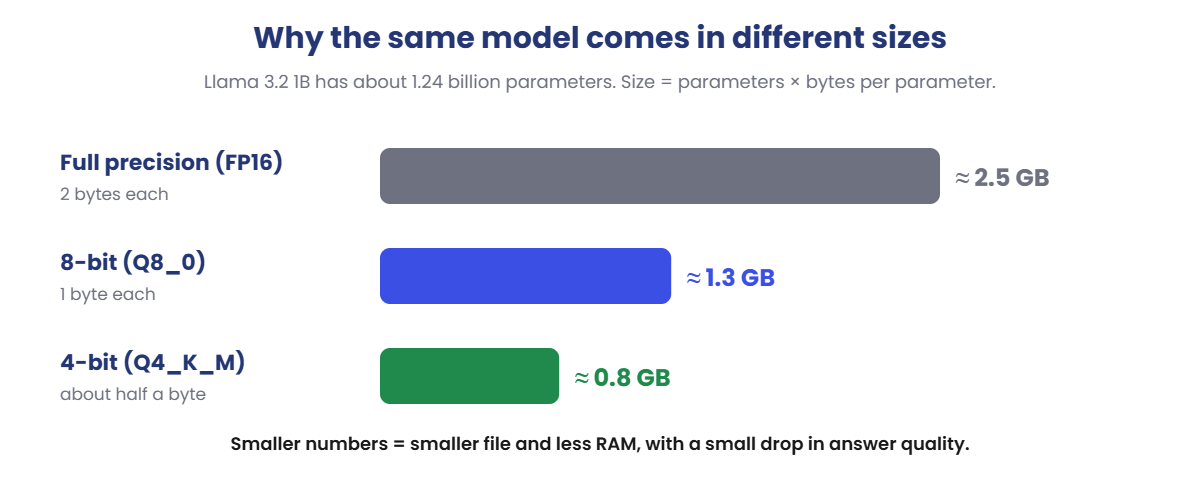
- Quantization. Storing each parameter with fewer bits. Full precision (FP16) uses 2 bytes per parameter. 8-bit (Q8_0) uses 1 byte. 4-bit (Q4_K_M) uses a little over half a byte. Smaller numbers mean a smaller file and less RAM, with a small loss in quality.
- Base vs instruct models. A base model only continues text. An instruct (chat) model has been fine-tuned to follow instructions and answer politely. The Ollama models you use are instruct models.
- Open-weight vs closed. Llama, Qwen and Gemma publish their weights, so you can download and run them. GPT, Claude and Gemini keep their weights private, and you use them through an app or API.
| Model | Parameters | Download | Fits on |
|---|---|---|---|
llama3.2:1b | 1.2B | 1.3 GB | Any 8 GB laptop |
llama3.2:3b | 3.2B | 2.0 GB | 8 GB laptop, a bit slower |
llama3.1:8b | 8B | 4.9 GB | 16 GB laptop, or a GPU |
| 70B class models | 70B | 40 GB+ | Servers with large GPUs |
How it works, step by step
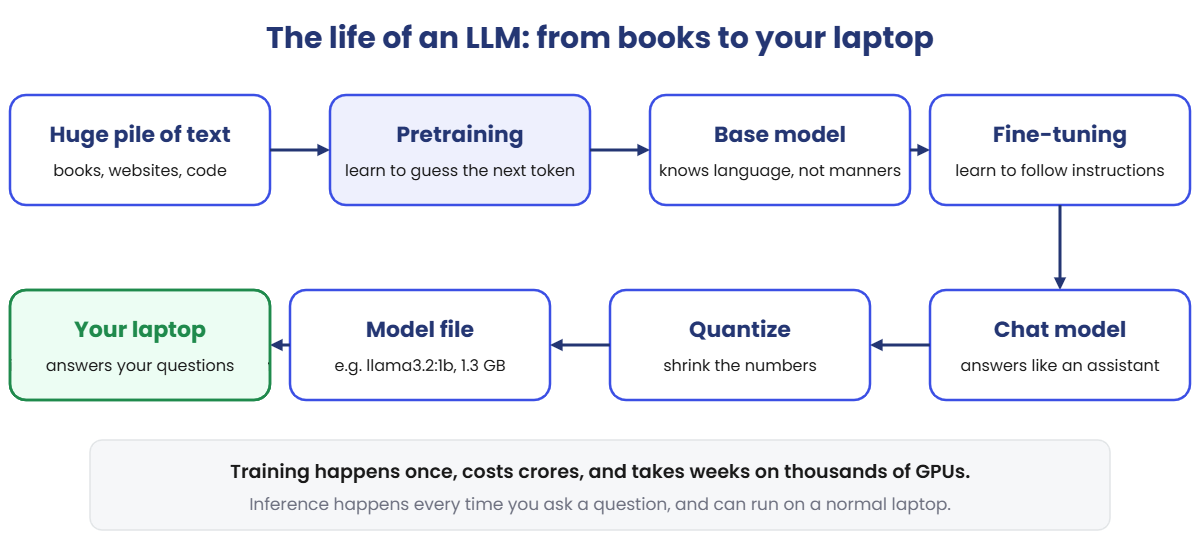
An LLM has two very different lives. First it is trained, once, by a big company.
Then it is used, millions of times, by people like you. Using a model is called inference.
- Collect text. Trillions of tokens from books, websites, documentation and code.
- Pretraining. The model reads a piece of text, hides the next token, and guesses it. When the guess is wrong, every parameter is nudged a tiny bit so the next guess is better. Repeat this trillions of times. This is the expensive part: weeks on thousands of GPUs.
- Base model. Now it knows grammar, facts and patterns, but it just continues text. Ask it a question and it might reply with three more questions.
- Fine-tuning. It is trained further on examples of good instructions and good answers, plus human feedback on which answers are better. Now it behaves like an assistant.
- Quantize. The full model is too big for a laptop, so the numbers are compressed into fewer bits.
- Inference on your laptop. Ollama loads the file into RAM and predicts one token at a time. Nothing is learned here. The parameters stay frozen.
Why the same model comes in different sizes: it’s simple multiplication.
A quick rule you can use at work: RAM needed ≈ download size + 20 to 50% extra. The extra is working space, mostly for the context window. So a 2 GB model wants roughly 2.5 to 3 GB of free RAM.
Bigger isn’t always better
A bigger model usually gives better answers, but it is slower and needs more memory. For a task like “summarise this ticket in two lines”, a small model is often good enough and ten times faster. Pick the smallest model that does the job well, then test it on real examples.
Hands-on Lab: compare two models on your laptop
You’ll look inside the 1B model from Lesson 1, measure how fast it runs, then download the 3B model and compare. By the end you’ll have real numbers from your machine, which is exactly how engineers choose models at work.
1Check what you already have
Run this:
ollama listYou should see something like this:
NAME ID SIZE MODIFIED
llama3.2:1b xxxxxxxxxxxx 1.3 GB 2 days ago✅ Checkpoint: you can see llama3.2:1b. If not, run ollama pull llama3.2:1b first (Lesson 1, step 3).
2Look inside the model file
Run this:
ollama show llama3.2:1b
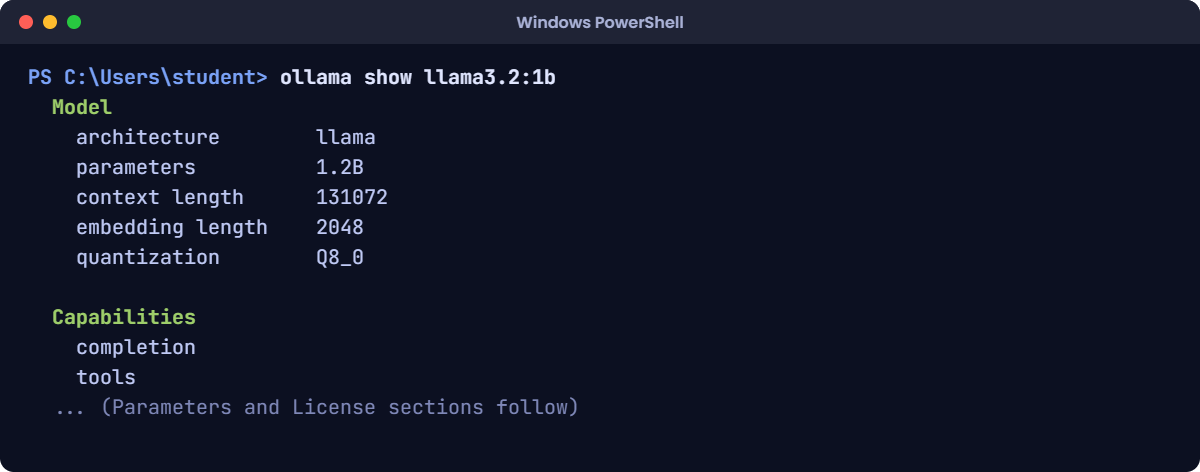
Here’s how to read it:
| Line | What it tells you |
|---|---|
architecture llama | The family of network design. Ollama uses this to know how to run the file. |
parameters 1.2B | About 1.2 billion learned numbers. |
context length 131072 | The most tokens this model was built to handle at once. |
embedding length 2048 | Each token is turned into a list of 2,048 numbers inside the model. Bigger models use longer lists. |
quantization Q8_0 | Each parameter is stored in 8 bits (1 byte). That’s why 1.2 billion parameters ≈ 1.3 GB. |
Capabilities: tools | The model can call tools, which agents need. You’ll use this in Section 4. |
✅ Checkpoint: you can point to the parameter count and the quantization in your own output.
3Measure how fast it runs
The --verbose flag makes Ollama print timing details after every answer.
Run this:
ollama run llama3.2:1b --verboseType this at the >>> prompt:
In one sentence, what does RAID 1 do?
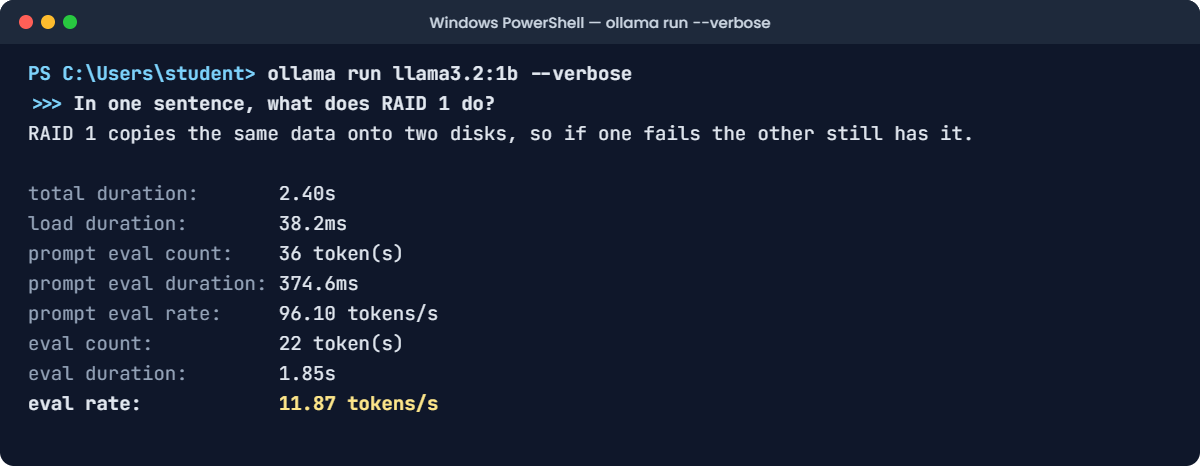
The line that matters most is eval rate: how many tokens per second the model writes. Around 10 or more feels smooth to read.
Below about 5 feels slow. Write your number down, then type /bye.
✅ Checkpoint: you have an eval rate number for the 1B model.
4Download the bigger 3B model
Run this:
ollama pull llama3.2:3bYou should see something like this:
pulling manifest
pulling ... 100% ▕████████████████▏ 2.0 GB
...
verifying sha256 digest
writing manifest
success✅ Checkpoint: the download ends with success.
5Compare the details
Run this:
ollama show llama3.2:3bYou should see something like this:
Model
architecture llama
parameters 3.2B
context length 131072
embedding length 3072
quantization Q4_K_MNotice something interesting. The 3B model has almost three times the parameters, but the file is only about 1.5 times bigger. That’s because it uses 4-bit quantization (Q4_K_M) instead of 8-bit.
The 1B model got the gentle compression. The 3B model got the strong one.
✅ Checkpoint: you can explain why 3.2B parameters fit in 2.0 GB.
6Ask the same question to the 3B model
Run this:
ollama run llama3.2:3b --verboseType this at the >>> prompt:
In one sentence, what does RAID 1 do?Leave this chat open. In a second terminal, run:
Run this:
ollama psYou should see something like this:
NAME ID SIZE PROCESSOR UNTIL
llama3.2:3b xxxxxxxxxxxx 3.x GB 100% CPU 4 minutes from nowNow fill in this table with your own numbers:
| llama3.2:1b | llama3.2:3b | |
|---|---|---|
| Download size | 1.3 GB | 2.0 GB |
RAM used (from ollama ps) | (yours) | (yours) |
| Eval rate (tokens/s) | (yours) | (yours) |
| Answer quality, 1 to 5 | (your opinion) | (your opinion) |
On a normal laptop without a GPU, the 3B model is usually two to three times slower, and its answers are a bit more careful and complete.
✅ Checkpoint: you have numbers for both models side by side.
7Free up the memory
Models stay in RAM for a few minutes after you stop chatting. You can unload one straight away:
Run this:
ollama stop llama3.2:3bRun this:
ollama psYou should see something like this:
NAME ID SIZE PROCESSOR UNTIL✅ Checkpoint: the list is empty, so the RAM is free again. Useful before starting a heavy app or another model.
Break It, Then Fix It
Two problems you will meet in real projects: a model that “forgets” what you told it, and a model that won’t even start.
ABreak #1: make the model forget
Every model has a context window, the number of tokens it can see at once. Let’s shrink it on purpose. Start a chat with the 1B model:
Run this:
ollama run llama3.2:1bType this at the >>> prompt:
/set parameter num_ctx 256You should see something like this:
Set parameter 'num_ctx' to '256'256 tokens is roughly 190 English words. Now copy this whole message and paste it into the chat as one message. The server name is in the very first line, and the question is at the end:
Paste this whole block:
My server is called PROD-DB-07. Please remember that name.
Here is the maintenance note from last night. The team started work at 10 PM. First we took a full backup of the database and copied it to the backup server. The copy took about forty minutes because the network was busy with the nightly report jobs. After the backup finished, we checked the file size and compared the checksum with the original. Both matched. Next we stopped the application services one by one, starting with the web front end, then the API layer, then the background workers. We waited five minutes to make sure no connections were still open. Then we applied the operating system patches and rebooted the machine. The reboot took longer than usual because the disk check ran on the data volume. When the server came back, we started the database service and watched the logs for errors. There were two warnings about slow queries, which we noted for the morning team. We started the background workers, then the API layer, then the web front end. Finally we ran the smoke tests. All twelve tests passed. We sent the all-clear message to the support channel at 1:15 AM and closed the change ticket.
Question: What is the name of my server?Watch the answer. The model will probably say it doesn’t know the server name, or it will invent one, like “PROD-DB-01” or “the backup server”.
Why it happened: the message is longer than 256 tokens. When text doesn’t fit, Ollama keeps the end and drops the beginning. The first line, with the server name, was cut off before the model ever saw it.
The model didn’t forget. It never received it.
Fix: give it a bigger window, then paste the same message again.
Type this at the >>> prompt:
/set parameter num_ctx 4096✅ Checkpoint: after pasting again, the model answers PROD-DB-07. Type /bye when you’re done.
Why this matters on the job
This is the number one reason a chatbot “ignores” a long document or forgets the start of a long conversation. Before blaming the model, check the context size.
A bigger window costs more RAM, so don’t just set it to the maximum. You’ll go deeper in Lesson 10.
BBreak #2: a model that’s too big for your RAM
This one is easiest to try in your Ubuntu VM, because you can change its RAM safely. If you’re not using a VM, read along. You’ll recognise this error when you see it.
- Shut down the VM.
- In VirtualBox, open Settings → System → Motherboard and set Base Memory to 3072 MB.
- Start the VM and run:
Run this:
ollama run llama3.2:3bYou’ll get this error:
Error: model requires more system memory (3.x GiB) than is available (2.x GiB)Your exact numbers will be different, but the message will look like this.
Why it happened: the model plus its working space needs more free RAM than the machine has. Ollama checks this before loading and refuses, instead of letting the whole system freeze.
Fix: pick one.
- Use a smaller model:
ollama run llama3.2:1b. - Free RAM: close browsers and other heavy apps, and run
ollama stopon any model you aren’t using. - Give the VM more memory again (6144 MB or more), then retry.
✅ Checkpoint: after the fix, the model loads and you get the >>> prompt.
This happened at work
The 70B model that made everyone wait
An infrastructure team wanted to auto-summarise incident tickets. Each ticket had long logs and chat updates, and the on-call engineer needed a two-line summary at handover.
They decided bigger was safer and installed a 70-billion-parameter model on a spare server. It had plenty of RAM but no GPU. The summaries were excellent.
They also took three to four minutes each. During a busy night, 40 tickets queued up, and the summaries arrived after the shift had already ended.
How they fixed it:
- They picked 50 real past tickets and wrote down what a good summary should say. This became their test set.
- They tried an 8B model with 4-bit quantization and a clearer prompt (“two lines: what broke, what was done”).
- They compared both models on the same 50 tickets. The 8B model got 46 of 50 right. The 70B model got 48.
- The 8B model took about six seconds per ticket on the same server. They switched to it, and a human checked any summary marked “unsure”.
The lesson: model size is a trade-off between quality, speed and cost. Don’t guess. Measure on your own real data, then choose.
Common mistakes and troubleshooting
| Mistake | What happens | How to avoid it |
|---|---|---|
| Thinking the model looks up facts in a database | You trust it on facts it never stored exactly | Remember: it’s patterns in numbers. Give it real documents when facts matter (RAG, Lesson 11). |
| Picking the biggest model by default | Slow answers, high RAM, high cost | Start small, test on real examples, size up only if quality isn’t good enough. |
| Judging size by parameters alone | A “3B” model surprises you by being only 2 GB, or a “7B” one by being 14 GB | Check the quantization with ollama show. Size = parameters × bytes per parameter. |
| Setting the context window to the maximum | RAM use jumps and the model may not load | Use the smallest window that fits your real inputs. |
| Thinking the model learns from your chats | You expect it to remember corrections tomorrow | Inference never changes the weights. Memory has to be added by your app (Lesson 10). |
| Comparing models with one question | You pick a model based on luck | Use the same set of 20 to 50 real questions for every model you test. |
Quick troubleshooting
| You see… | Do this |
|---|---|
| “model requires more system memory” | Use a smaller model or a smaller quantization, close heavy apps, or run ollama stop on idle models. |
| Answers are very slow (eval rate below 5) | Normal for bigger models on CPU. Try the 1B model or a Q4 version. |
| The model ignores the start of a long message | Your text is bigger than the context window. Raise num_ctx a little, or send shorter text. |
ollama show says the model is not found | Check the exact name and tag with ollama list. |
| Disk filling up | Each model is GBs. List them with ollama list and remove ones you don’t need with ollama rm name:tag. |
Interview questions
Click a question to open it. Under each one you’ll find what the interviewer is actually looking for, and one good way to answer.
Fresher level
1. What is a large language model?
What they’re really checking: Can you explain it without buzzwords, and do you know it predicts tokens rather than looking up answers?
How you could answer: A neural network with billions of learned parameters, trained on huge amounts of text to predict the next token. By predicting one token at a time, it can write answers, summaries and code.
2. What does “7B” or “70B” mean in a model’s name?
What they’re really checking: Do you understand the basic size vocabulary every AI team uses?
How you could answer: The number of parameters: 7 billion or 70 billion learned numbers. More parameters usually means more capability, but also more memory and slower answers.
3. What’s the difference between training and inference?
What they’re really checking: Do you know your chats don’t train the model, and why training is so expensive?
How you could answer: Training is when the model learns: its parameters are adjusted using huge datasets and lots of GPUs, usually once. Inference is using the finished model to answer questions. Parameters don’t change during inference.
2–5 years experience
4. What is quantization, and when would you use it?
What they’re really checking: Can you reason about memory, speed and quality trade-offs in practice?
How you could answer: Storing parameters with fewer bits, for example 8-bit or 4-bit instead of 16-bit. It shrinks memory use and often speeds up inference, with a small quality loss. I’d use it to run models on CPUs, laptops or smaller GPUs, after testing that quality is still acceptable for the task.
5. Roughly how much memory does an 8B model need at 4-bit and at 16-bit?
What they’re really checking: Can you do the back-of-the-envelope maths before buying hardware or picking a cloud instance?
How you could answer: At 16-bit, about 2 bytes per parameter, so roughly 16 GB for the weights. At 4-bit, a little over half a byte, so about 4.5 to 5 GB. Then add working memory for the context window, often 20 to 50% more.
6. A user says the chatbot ignores the first part of a long document. What do you check?
What they’re really checking: Do you troubleshoot from how the system works, instead of blaming the model?
How you could answer: The context window. If the input is longer than the configured context length, the beginning gets dropped. I’d check the configured context size against the token count of the input, then raise it if RAM allows, or split the document, or use retrieval so only the relevant parts are sent.
Senior level
7. How would you choose between a self-hosted open-weight model and a paid API model for a company project?
What they’re really checking: Can you make an architecture decision with numbers and trade-offs, not opinions?
How you could answer: Look at data sensitivity, expected volume, latency needs, quality needed and team skills. APIs give top quality with no hardware to run, but cost grows with usage and data leaves your network.
Self-hosting keeps data in-house and can be cheaper at high volume, but you own GPUs, upgrades, scaling and monitoring. I’d build a small evaluation set and compare both on quality, cost per 1,000 requests and latency before deciding.
8. How do you evaluate whether a smaller model is good enough to replace a bigger one?
What they’re really checking: Do you run evaluations instead of relying on demos or gut feeling?
How you could answer: Build a test set from real requests with expected outputs. Run both models on it with the same prompts. Score accuracy, either automatically or by human review, and also measure latency and cost.
Look at where the small model fails. If those failures are rare and low-risk, or can be routed to the big model, switch.
9. What drives GPU memory use during inference besides the weights?
What they’re really checking: Do you understand production capacity planning beyond the download size?
How you could answer: Mainly the KV cache, which stores attention data for every token in the context, so it grows with context length and the number of parallel requests. Batch size, runtime overhead and any extra adapters add more. That’s why long contexts and many concurrent users need far more memory than the model file size suggests.
Quick quiz
Q1. What are the “parameters” of an LLM?
- The settings you type into Ollama
- The billions of learned numbers that store what the model knows
- The list of questions the model can answer
Show answer
B — Parameters (weights) are the numbers adjusted during training.
Q2. Why is llama3.2:3b only 2.0 GB when it has 3.2 billion parameters?
- It skips half of its layers
- It uses 4-bit quantization, so each parameter takes about half a byte
- Ollama compresses it into a zip file
Show answer
B — Q4_K_M stores each parameter in about 4.5 to 5 bits.
Q3. Does chatting with a model in Ollama change its parameters?
- Yes, it learns from every chat
- Only if you chat for a long time
- No. Inference uses frozen weights
Show answer
C — Only training changes the weights. Memory across chats must be built by your app.
Q4. A model can’t recall a name from the first line of a long message. What’s the most likely cause?
- The context window is too small, so the start was dropped
- The model is broken
- The name was misspelt
Show answer
A — Text beyond the context length is cut, and Ollama keeps the end of the input.
Q5. Which command shows how much RAM a loaded model is using right now?
ollama showollama psollama list
Show answer
B — ollama ps shows loaded models and their memory. ollama show shows a model’s details, and ollama list shows downloaded models.
Quick recap
- An LLM is a huge set of parameters, numbers learned from text, that predicts the next token.
- Training is expensive and happens once. Inference is cheap, happens on every question, and never changes the weights.
- Size depends on parameters × bytes per parameter. Quantization (Q8, Q4) shrinks the file and the RAM needed.
- The context window limits how much text the model sees at once. Too small, and the start of your input is dropped.
- Use
ollama showto read a model’s details,--verboseto measure speed, andollama psandollama stopto manage RAM. - At work, pick the smallest model that does the job well, and prove it with a test set of real examples.
Next lesson
Tokenization → You’ve seen the word “token” many times now. Next you’ll see exactly how text gets chopped into tokens, why some languages cost more tokens than others, and why that affects speed and cost.
Further reading: Large language models (LLMs)
Want to go deeper into large language models? Check the official reference: Ollama: Llama 3.2 model page. You can also follow the full Generative AI and Agents course on SaatVedha, step by step.
