Types of prompt
-
Introduction to generative AI and agents
-
Large language models (LLMs)
-
Prompts
-
AI agents
In Lesson 8 you built one clear prompt, and it had a single example inside it. That example wasn’t decoration. Showing the model a few worked answers is called few-shot prompting, and it’s one of a handful of prompt types every engineer should know: zero-shot, few-shot, role prompts and step-by-step prompts.
Most articles tell you which one is best. This lesson doesn’t.
You’ll build a small test set, run each type against it, and read the score, the token cost and the time yourself. Then you’ll break it twice: once with a measurement bug that makes a good prompt look useless, and once with examples that quietly teach the wrong lesson.
| Time | You need | By the end you can |
|---|---|---|
| About 60 minutes | Python 3 and Ollama with llama3.2:1b | Explain zero-shot, few-shot, role and step-by-step prompts, measure them on a test set, pick the right one for a job, and spot biased examples and broken scoring |
What it is, in one line
Prompt types are different ways of asking: just the instruction (zero-shot), the instruction plus worked examples (few-shot), a job title for the model (role), or a request to show its working (step by step).
In Simple Words
Four ways to ask for help with homework
Your younger cousin has to fill in a table of animals and what they eat. You can help in four ways.
- Zero-shot: “Fill in what each animal eats.” They try, but some answers are a word, some are a full sentence, some are in the wrong column.
- Few-shot: you fill in the first three rows yourself. “Cow: grass. Lion: meat. Rabbit: carrots.” Now they copy your style perfectly for the rest.
- Role: “Pretend you’re a zookeeper.” They feel important, but they still don’t know your table needs one word.
- Step by step: for the maths sheet, you say “Write your working.” They slow down, and fewer sums go wrong.
One warning. If all three rows you filled in say “meat”, your cousin may start writing “meat” for everything. Examples are powerful, so they have to be good examples.
Engineer's View
What each type changes inside the model
Zero-shot. Instructions only. It works when the task looks like something the model saw a lot during training: summarising, translating, simple questions. It’s the cheapest prompt, and it’s where you start.
Few-shot (in-context learning). You add 2 to 5 input-and-answer pairs before the real input. The model’s weights don’t change. Attention (Lesson 6) simply lets the last tokens copy the pattern of the earlier ones.
The GPT-3 paper, Language Models are Few-Shot Learners (Brown et al., 2020), made this famous. Few-shot is best at fixing format and labels: exact spelling, casing, separators, which word to use for what.
Its weaknesses are known too. Models lean towards the label that appears most often in the examples and towards the last example shown, which Zhao et al. (2021) called majority label bias and recency bias.
Role prompts. “You are a senior network engineer.” A role changes the tone and the words the model reaches for, and often makes it less chatty.
On its own it rarely fixes accuracy or format. Treat it as seasoning, not the meal.
Step-by-step (chain of thought). You ask the model to write its reasoning before the answer. Every token it writes becomes input for the next one, so writing “4 × 2 = 8” gives the model something to build on, instead of jumping straight to a number.
Wei et al. (2022) showed large gains on maths word problems, mainly in very large models; Kojima et al. (2022) found that just adding “Let’s think step by step” helps. The price is answer tokens, which are the slow part (Lesson 2): the answer can be 20 times longer.
Reasoning models. Some newer models do this on their own and return the working separately. In Ollama they’re called thinking models, and they put the working in a separate thinking field. llama3.2:1b isn’t one of them, so you’ll ask for the steps yourself.
Two more you’ll meet:
- Prompt chaining: split a big job into several calls, each with its own short prompt, and pass the output of one into the next. Easier to test, and each step can use the cheapest prompt type that works.
- Self-consistency: ask for several step-by-step answers at a higher temperature (Lesson 7) and take the most common final answer. More accurate, and several times more expensive.
Why measure. Which type wins depends on the model, the task and even the wording. The only reliable way to choose is a small labelled test set, a scoring function you trust, and a table of score, tokens and time for each option. That’s what an evaluation is, and it’s what you’ll build in the lab.
Why it matters on the job: picking the wrong type costs real money and time. Step-by-step on a simple classifier makes it many times slower for nothing; zero-shot on a strict format makes your parser fail.
How it works, step by step
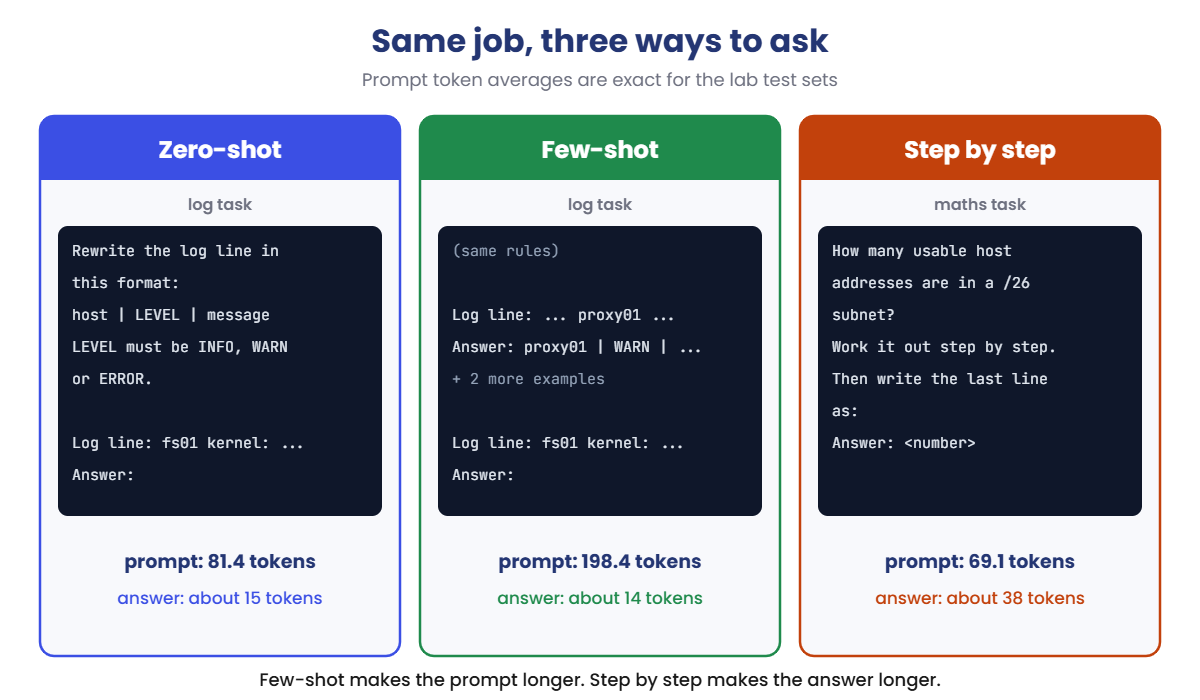
Here’s the same job asked three ways. Notice what each type adds to the prompt, and what it costs:
- Start zero-shot. Write the clearest instruction you can. Measure it.
- If the format or labels are wrong, add examples. Two to five, covering every label, in a mixed order. The prompt gets longer (81 to 198 tokens on average in the lab), but answers usually stay short.
- If the logic is wrong, ask for steps. The prompt barely changes (56 to 69 tokens), but the answer gets much longer, and you must change how you read it: the final answer now sits at the end.
- Add a role if the tone matters. Then measure again; don’t assume it helped.
- Keep the winner, and keep the test set. When the model or the prompt changes, re-run it.
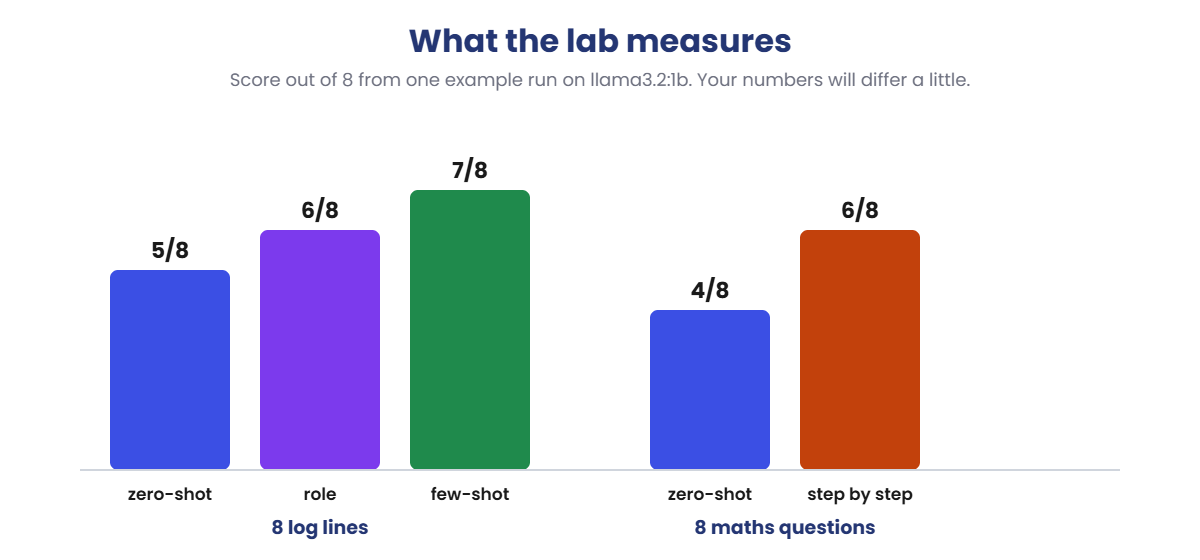
After you run the lab, your own results will look something like this:
The pattern matters more than the exact numbers: examples fixed the log format, steps fixed most of the maths, and a role on its own did very little. Your laptop may give a slightly different score.
If step-by-step doesn’t help on your run, that’s a real result too: small models gain less from it than large ones. That’s exactly why you measure.
Zero, one, few
The names count the examples. Zero-shot has none, one-shot has one (like Lesson 8’s ticket prompt), and few-shot has a handful. More isn’t always better: after about five, you mostly pay for extra tokens.
Hands-on Lab: measure zero-shot vs few-shot prompting
You’ll run one script, measure.py, with different settings. It sends each test to llama3.2:1b at temperature 0, checks the reply against the right answer, and prints a score with the average prompt tokens, answer tokens and time. There are two test sets: 8 messy log lines to rewrite in one fixed format, and 8 small IT maths questions.
The prompt token averages are exact, so yours will match. Replies, scores and times will vary a little. On macOS or Linux, use python3 and nano.
1Set up and run zero-shot
Run this:
mkdir C:\ai-lab\prompt-types
cd C:\ai-lab\prompt-types
notepad measure.pyPaste this whole block into measure.py, then save:
import json
import re
import time
import urllib.request
MODEL = "llama3.2:1b"
TASK = "logs" # "logs" or "math"
STYLE = "zero" # logs: "zero" or "few" math: "zero" or "steps"
EXAMPLES = "good" # few-shot examples: "good" or "biased"
ROLE = "" # optional system message
LOGS = [ # (log line, expected host, expected level)
("Oct 19 09:14:02 web01 nginx: [error] upstream timed out while reading response header", "web01", "ERROR"),
("2026-10-19T09:15:40Z db02 postgres WARNING: checkpoints are occurring too frequently", "db02", "WARN"),
("[INFO] 19/10/2026 09:16 backup01 - nightly backup finished in 42 minutes", "backup01", "INFO"),
("fs01 kernel: EXT4-fs warning: disk usage at 91%", "fs01", "WARN"),
("09:18:11 mail01 postfix/smtpd: connect from unknown[203.0.113.7]", "mail01", "INFO"),
("ERR vpn01 tunnel to branch-office went down", "vpn01", "ERROR"),
("app03 | level=info | user login ok for user=ravi", "app03", "INFO"),
("Oct 19 09:21:55 dns01 named: error (network unreachable) resolving 'example.com'", "dns01", "ERROR"),
]
GOOD = [
("Oct 18 22:01:13 proxy01 squid: [warn] cache disk is 85% full", "proxy01 | WARN | cache disk is 85% full"),
("2026-10-18T22:05:00Z auth02 sshd: error: too many failed logins for admin", "auth02 | ERROR | too many failed logins for admin"),
("[INFO] print01 - queue cleared by helpdesk", "print01 | INFO | queue cleared by helpdesk"),
]
BIASED = [
("Oct 18 22:01:13 proxy01 squid: [error] cache disk is full", "proxy01 | ERROR | cache disk is full"),
("2026-10-18T22:05:00Z auth02 sshd: error: too many failed logins for admin", "auth02 | ERROR | too many failed logins for admin"),
("[ERROR] print01 - print spooler crashed", "print01 | ERROR | print spooler crashed"),
]
MATH = [ # (question, expected number)
("A RAID 5 array has 4 disks of 2 TB each. How many TB of usable space does it have?", 6),
("A RAID 1 mirror uses 2 disks of 4 TB each. How many TB are usable?", 4),
("How many usable host addresses are in a /26 subnet?", 62),
("A 30 GB backup is copied at 100 MB per second. How many seconds does it take? Use 1 GB = 1000 MB.", 300),
("A rack has 42 units. Each server needs 2 units and one switch needs 1 unit. How many servers fit next to one switch?", 20),
("A log file grows 250 MB per day and the disk has 9 GB free. After how many days is the disk full? Use 1 GB = 1000 MB.", 36),
("A RAID 6 array has 6 disks of 3 TB each. How many TB of usable space does it have?", 12),
("A /24 network is split into /27 subnets. How many subnets do you get?", 8),
]
LOG_RULES = ("Rewrite the log line in this format: host | LEVEL | message\n"
"LEVEL must be INFO, WARN or ERROR. Reply with that one line only.")
def ask(prompt):
messages = [{"role": "user", "content": prompt}]
if ROLE:
messages.insert(0, {"role": "system", "content": ROLE})
body = {"model": MODEL, "messages": messages, "stream": False, "options": {"temperature": 0}}
req = urllib.request.Request("http://localhost:11434/api/chat", data=json.dumps(body).encode(),
headers={"Content-Type": "application/json"})
with urllib.request.urlopen(req) as r:
return json.load(r)
def log_prompt(line):
text = LOG_RULES + "\n\n"
if STYLE == "few":
for example, answer in (GOOD if EXAMPLES == "good" else BIASED):
text += f"Log line: {example}\nAnswer: {answer}\n\n"
return text + f"Log line: {line}\nAnswer:"
def math_prompt(question):
if STYLE == "steps":
return question + "\nWork it out step by step. Then write the last line as: Answer: <number>"
return question + "\nReply with the number only."
def get_number(reply):
found = re.findall(r"-?\d+(?:\.\d+)?", reply)
return float(found[0]) if found else None
tests = LOGS if TASK == "logs" else MATH
score, p_tokens, a_tokens = 0, 0, 0
start = time.time()
print(f"Task: {TASK} | Style: {STYLE}" + (f" | Examples: {EXAMPLES}" if STYLE == "few" else ""))
for i, test in enumerate(tests, 1):
if TASK == "logs":
line, host, level = test
r = ask(log_prompt(line))
reply = r["message"]["content"].strip().splitlines()[0].strip()
parts = [p.strip() for p in reply.split("|")]
ok = len(parts) == 3 and parts[0] == host and parts[1] == level
shown = reply
else:
question, expected = test
r = ask(math_prompt(question))
reply = r["message"]["content"].strip()
got = get_number(reply)
ok = got == expected
shown = f"expected {expected}, got {got if got is None else f'{got:g}'}"
score += ok
p_tokens += r["prompt_eval_count"]
a_tokens += r["eval_count"]
print(f"{i:>2} {'ok' if ok else 'WRONG':<6} {shown}")
n = len(tests)
print(f"Score: {score}/{n} | Avg prompt tokens: {p_tokens / n:.1f} | "
f"Avg answer tokens: {a_tokens / n:.1f} | Time: {time.time() - start:.1f} s")Run this:
python measure.py
You should see something like this (the prompt tokens are exact; the replies and score may differ a little):
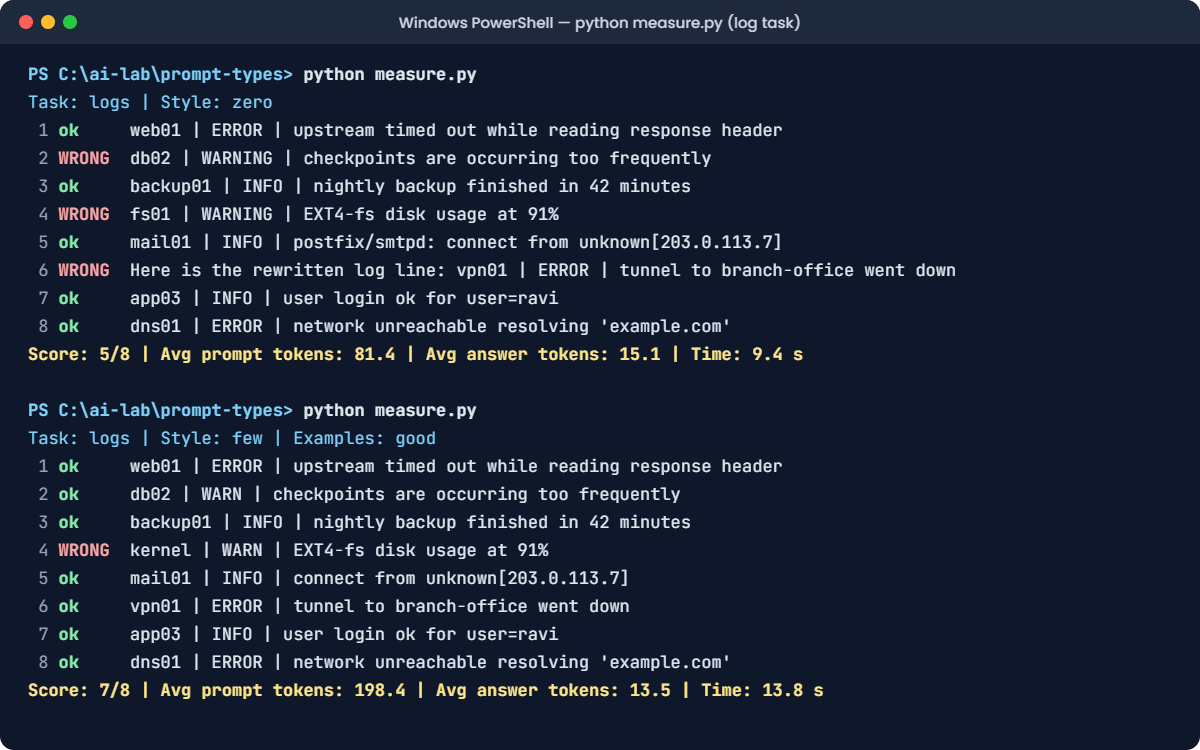
Task: logs | Style: zero
1 ok web01 | ERROR | upstream timed out while reading response header
2 WRONG db02 | WARNING | checkpoints are occurring too frequently
3 ok backup01 | INFO | nightly backup finished in 42 minutes
4 WRONG fs01 | WARNING | EXT4-fs disk usage at 91%
5 ok mail01 | INFO | postfix/smtpd: connect from unknown[203.0.113.7]
6 WRONG Here is the rewritten log line: vpn01 | ERROR | tunnel to branch-office went down
7 ok app03 | INFO | user login ok for user=ravi
8 ok dns01 | ERROR | network unreachable resolving 'example.com'
Score: 5/8 | Avg prompt tokens: 81.4 | Avg answer tokens: 15.1 | Time: 9.4 sRead the WRONG lines. The model understood every log, but it wrote WARNING instead of WARN twice, and once it chatted before the answer.
A program reading these lines would fail on 3 of 8. That’s a format problem, and format problems are what examples fix.
✅ Checkpoint: You get a score out of 8, and Avg prompt tokens shows 81.4.
2Add examples: few-shot
Change this line:
STYLE = "few"Run this:
python measure.pyYou should see something like this (the prompt tokens are exact; the replies and score may differ a little):
Task: logs | Style: few | Examples: good
1 ok web01 | ERROR | upstream timed out while reading response header
2 ok db02 | WARN | checkpoints are occurring too frequently
3 ok backup01 | INFO | nightly backup finished in 42 minutes
4 WRONG kernel | WARN | EXT4-fs disk usage at 91%
5 ok mail01 | INFO | connect from unknown[203.0.113.7]
6 ok vpn01 | ERROR | tunnel to branch-office went down
7 ok app03 | INFO | user login ok for user=ravi
8 ok dns01 | ERROR | network unreachable resolving 'example.com'
Score: 7/8 | Avg prompt tokens: 198.4 | Avg answer tokens: 13.5 | Time: 13.8 sThree examples, and the score jumps. WARN is now spelled the way the examples spell it, and the chatty reply is gone.
The remaining miss is interesting: on fs01 kernel: ... the model took “kernel” as the host. That line starts straight with the host, and none of the three examples do.
One more example with that shape would fix it. The cost: the prompt grew from 81.4 to 198.4 tokens on average.
✅ Checkpoint: Avg prompt tokens shows 198.4, and the WARN lines are now ok.
3Try a role instead
Go back to zero-shot, and give the model a job title instead of examples:
Change these two lines:
STYLE = "zero"
ROLE = "You are a senior Linux administrator who reads server logs all day."Run this:
python measure.pyYou should see something like this (the prompt tokens are exact; the replies and score may differ a little):
Task: logs | Style: zero
1 ok web01 | ERROR | upstream timed out while reading response header
2 WRONG db02 | WARNING | checkpoints are occurring too frequently
3 ok backup01 | INFO | nightly backup finished in 42 minutes
4 WRONG fs01 | WARNING | EXT4-fs disk usage at 91%
5 ok mail01 | INFO | connect from unknown[203.0.113.7]
6 ok vpn01 | ERROR | tunnel to branch-office went down
7 ok app03 | INFO | user login ok for user=ravi
8 ok dns01 | ERROR | network unreachable resolving 'example.com'
Score: 6/8 | Avg prompt tokens: 94.4 | Avg answer tokens: 13.6 | Time: 9.3 sThe role made the model less chatty, so the vpn01 line is fixed. But it still writes WARNING, because nothing in a job title tells it your format says WARN.
The role added 13 prompt tokens and bought one point. The examples bought two.
✅ Checkpoint: Avg prompt tokens shows 94.4: 13 more than step 1, for the system message.
4Zero-shot on maths
Now switch to the maths questions. Remove the role and change the task:
Change these two lines:
ROLE = ""
TASK = "math"Run this:
python measure.pyYou should see something like this (the prompt tokens are exact; the replies and score may differ a little):
Task: math | Style: zero
1 WRONG expected 6, got 8
2 ok expected 4, got 4
3 WRONG expected 62, got 64
4 ok expected 300, got 300
5 WRONG expected 20, got 21
6 ok expected 36, got 36
7 WRONG expected 12, got 18
8 ok expected 8, got 8
Score: 4/8 | Avg prompt tokens: 56.1 | Avg answer tokens: 2.0 | Time: 3.1 sFast, with about 2 answer tokens each, and half wrong. Look at the mistakes: 8 instead of 6 for RAID 5 (it forgot the parity disk), 64 instead of 62 for a /26 (it forgot the two reserved addresses).
These are reasoning slips, not format problems, so examples of the format won’t help much. Asking for the working might.
✅ Checkpoint: Avg prompt tokens shows 56.1, and Avg answer tokens is around 2.
Break It, Then Fix It
Two failures that happen to real teams when they compare prompts. Both look like the model’s fault, and neither is.
1Break it: the score that lied
Ask for the working on the maths questions:
Change this line:
STYLE = "steps"Run this:
python measure.py
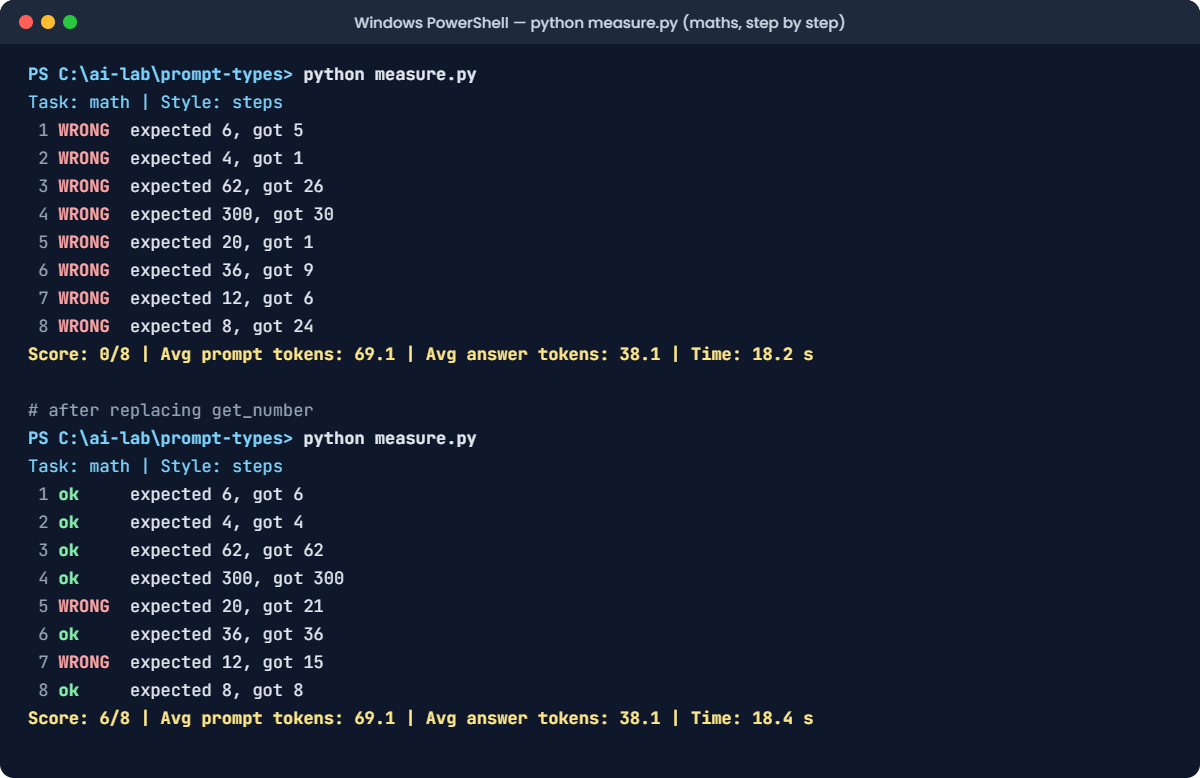
You’ll see something like this:
Task: math | Style: steps
1 WRONG expected 6, got 5
2 WRONG expected 4, got 1
3 WRONG expected 62, got 26
4 WRONG expected 300, got 30
5 WRONG expected 20, got 1
6 WRONG expected 36, got 9
7 WRONG expected 12, got 6
8 WRONG expected 8, got 24
Score: 0/8 | Avg prompt tokens: 69.1 | Avg answer tokens: 38.1 | Time: 18.2 sZero out of eight? Step by step made it worse? Before you write that in a report, look at what the model actually wrote for question 1:
A step-by-step reply looks like this:
A RAID 5 array uses one disk's worth of space for parity.
Total space: 4 x 2 = 8 TB.
Parity: 2 TB.
Usable: 8 - 2 = 6 TB.
Answer: 6The model got it right. The scorer is wrong. get_number takes the first number in the reply, which worked for “reply with the number only”, and now picks up the 5 in “RAID 5”. Every “got” value above is just the first number the model wrote, and each one comes straight from the question.
The fix: read the number on the Answer: line, and fall back to the last number. Replace the whole get_number function with this:
Find this function:
def get_number(reply):
found = re.findall(r"-?\d+(?:\.\d+)?", reply)
return float(found[0]) if found else NoneReplace it with this:
def get_number(reply):
found = re.findall(r"Answer:\s*(-?\d+(?:\.\d+)?)", reply)
if not found:
found = re.findall(r"-?\d+(?:\.\d+)?", reply)
return float(found[-1]) if found else NoneRun this:
python measure.pyYou should see something like this:
Task: math | Style: steps
1 ok expected 6, got 6
2 ok expected 4, got 4
3 ok expected 62, got 62
4 ok expected 300, got 300
5 WRONG expected 20, got 21
6 ok expected 36, got 36
7 WRONG expected 12, got 15
8 ok expected 8, got 8
Score: 6/8 | Avg prompt tokens: 69.1 | Avg answer tokens: 38.1 | Time: 18.4 sNow it’s a fair comparison: 6 out of 8, against 4 for zero-shot. It cost about 38 answer tokens per question instead of 2, so the run took roughly six times as long. Run STYLE = "zero" once more with the new function and you’ll still get 4 out of 8, so the fix didn’t change the old result, only the new one.
✅ Checkpoint: With the fixed get_number, step by step scores higher than zero-shot.
2Break it again: examples that teach the wrong lesson
A teammate wants better examples and copies three from yesterday’s outage. Every one of them is an ERROR:
Change these three lines:
TASK = "logs"
STYLE = "few"
EXAMPLES = "biased"Run this:
python measure.pyYou’ll see something like this:
Task: logs | Style: few | Examples: biased
1 ok web01 | ERROR | upstream timed out while reading response header
2 WRONG db02 | ERROR | checkpoints are occurring too frequently
3 ok backup01 | INFO | nightly backup finished in 42 minutes
4 WRONG fs01 | ERROR | disk usage at 91%
5 WRONG mail01 | ERROR | connect from unknown[203.0.113.7]
6 ok vpn01 | ERROR | tunnel to branch-office went down
7 ok app03 | INFO | user login ok for user=ravi
8 ok dns01 | ERROR | network unreachable resolving 'example.com'
Score: 5/8 | Avg prompt tokens: 192.4 | Avg answer tokens: 13.1 | Time: 13.5 sEvery WARN became an ERROR, and even a normal mail connection got called an ERROR. The model didn’t read the log lines more carefully; it copied the most common label in its examples.
That’s majority label bias. In production this means a monitoring channel full of false alarms, and people learning to ignore it.
The fix: use examples that cover every label, in a mixed order, and that look like your real inputs. Switch back:
Change this line:
EXAMPLES = "good"Run this:
python measure.pyYou should see something like this:
Task: logs | Style: few | Examples: good
1 ok web01 | ERROR | upstream timed out while reading response header
2 ok db02 | WARN | checkpoints are occurring too frequently
3 ok backup01 | INFO | nightly backup finished in 42 minutes
4 WRONG kernel | WARN | EXT4-fs disk usage at 91%
5 ok mail01 | INFO | connect from unknown[203.0.113.7]
6 ok vpn01 | ERROR | tunnel to branch-office went down
7 ok app03 | INFO | user login ok for user=ravi
8 ok dns01 | ERROR | network unreachable resolving 'example.com'
Score: 7/8 | Avg prompt tokens: 198.4 | Avg answer tokens: 13.5 | Time: 13.7 s✅ Checkpoint: With the biased examples, WARN lines turn into ERROR. With the good examples, they’re WARN again.
This happened at work
Think step by step, slowly
A support team ran an LLM that tagged every incoming ticket with one of eight categories. It answered in one word, took under a second, and was right about 90% of the time.
Then someone read that “think step by step” makes models smarter, and added it to the prompt. Nobody ran the test set. Within a day, the ticket queue was falling behind.
Every reply had grown from about 3 tokens to over 150, so each ticket now took 8 to 10 seconds on the team’s GPU server, and tickets arrived faster than they were tagged. Worse, some replies ended with “The category is probably Network or Access”, which the parser couldn’t read.
When they finally ran the old test set of 300 tickets, accuracy had gone from 90% to 91%. One point, for fifty times the answer tokens.
The fix: they went back to the one-word prompt and added three more examples for the two categories it confused most, which took accuracy to 93%. Step by step stayed, but only in a second pass for the few tickets where the first answer had low confidence (Lesson 7’s logprobs).
The lesson: every prompt type has a price. Measure the score and the cost before you change a prompt in production, and use the expensive type only where it pays.
Common mistakes and troubleshooting
| Mistake | What happens | How to avoid it |
|---|---|---|
| Choosing a prompt type because an article said it’s best | Slower, costlier, or worse results on your task | Build a small labelled test set and measure every option on it |
| Few-shot examples that all share one label | The model copies that label everywhere | Cover every label, mix the order, and use realistic inputs |
| Examples that don’t look like real inputs | It copies their style but fails on real data | Take examples from real (cleaned) data, including messy cases |
| Adding step by step to simple tasks | Many times more answer tokens and slower replies for little gain | Use it where reasoning is the problem, and measure the cost |
| Scoring step-by-step replies with the old parser | A good prompt looks broken | Ask for a fixed final line (Answer: …) and parse that; look at the raw replies |
| Expecting a role to fix format or facts | Same errors in a more confident voice | Use a role for tone; use examples and schemas for format, and context for facts |
| Comparing prompts on 2 or 3 inputs | Random luck decides the winner | Use at least dozens of tests for real decisions; 8 is only for learning |
Troubleshooting the lab
| Problem | Fix |
|---|---|
urllib.error.URLError: <urlopen error [WinError 10061] | Ollama isn’t running. Start the Ollama app, or run ollama serve in another window |
IndexError: list index out of range | The model returned an empty reply for a log line. Run it again; if it repeats, check the line was pasted completely |
| Avg prompt tokens doesn’t match | A test line or example was changed or wrapped while pasting. Every character counts |
| Your scores differ from the examples | That’s expected. Compare the pattern between styles, not the exact numbers |
| Step by step still scores 0 | You haven’t replaced the whole get_number function. Check it uses the Answer: line |
| A run takes much longer than the times shown | Step-by-step answers are long. Close other programs, or use a smaller test set while experimenting |
Interview questions
Click a question to open it. Under each one you’ll find what the interviewer is actually looking for, and one good way to answer.
Fresher level
1. What’s the difference between zero-shot and few-shot prompting?
What they’re really checking: Do you know the basic terms?
How you could answer: Zero-shot gives the model only the instruction. Few-shot adds a few worked examples of input and answer before the real input, so the model can copy the pattern. Few-shot usually fixes format and labels, at the cost of a longer prompt.
2. What is chain-of-thought prompting?
What they’re really checking: Do you know why it can help?
How you could answer: It asks the model to write its reasoning before the final answer. Because each new token is predicted from everything before it, the written steps give the model something to build on. It helps most on multi-step problems like maths, and it makes answers much longer.
3. Does telling a model “You are an expert” make it more accurate?
What they’re really checking: Can you avoid repeating myths?
How you could answer: Not reliably. A role changes the tone and vocabulary and can make replies more focused, but it doesn’t give the model knowledge or teach it your format. If accuracy matters, measure with and without the role on a test set.
2–5 years experience
4. How do you choose good few-shot examples?
What they’re really checking: Do you know about example bias?
How you could answer: Use examples that look like real inputs, cover every label or case, and are mixed in order, because models lean towards the most common label and the last example. Keep them short, usually 2 to 5. Then measure, and replace the examples that don’t move the score.
5. How would you decide between zero-shot, few-shot and chain-of-thought for a new task?
What they’re really checking: Do you have a method, not a favourite?
How you could answer: Start with a clear zero-shot prompt and a labelled test set. If the errors are format or label errors, add examples.
If they’re reasoning errors, try step by step. For each option I’d record accuracy, prompt tokens, answer tokens and latency, and pick the cheapest one that meets the target.
6. Your evaluation says the new prompt is worse. What do you check before believing it?
What they’re really checking: Have you been fooled by a metric before?
How you could answer: I’d read a sample of the raw replies, check the scoring code handles the new answer format, confirm both prompts ran on the same test set, model and settings, and check the test set is big enough that the difference isn’t noise.
Senior level
7. What is self-consistency, and when is it worth the cost?
What they’re really checking: Do you understand accuracy versus cost trade-offs?
How you could answer: You sample several step-by-step answers at a non-zero temperature and take the most common final answer. It often improves accuracy on reasoning tasks, but it multiplies the cost by the number of samples. It’s worth it for high-value, low-volume decisions, or as a second pass only when the first answer looks uncertain.
8. How would you build a prompt evaluation pipeline for a team?
What they’re really checking: Can you make prompt work repeatable?
How you could answer: A versioned test set of real, labelled cases including edge cases and known failures, a scoring function with its own tests, and a runner that records score, tokens, latency and cost per prompt and model version. Run it in CI on every prompt change, and review a sample of raw outputs, not just the number.
9. When would you use a reasoning model instead of asking for steps in the prompt?
What they’re really checking: Are you up to date with how models have changed?
How you could answer: When the task needs real multi-step reasoning and the latency and cost are acceptable. Reasoning models are trained to work things out and return the reasoning separately, which is usually better than prompting a normal model to do it. For simple, high-volume tasks like classification, a normal model with a good few-shot prompt is faster and cheaper.
Quick quiz
Q1. In step 2, what did the three examples fix?
- The model’s knowledge of Linux
- The format: WARN instead of WARNING, and no chatty text
- The time taken
Show answer
B — Few-shot examples are best at fixing format and labels.
Q2. Why did the step-by-step run first score 0 out of 8?
- The model forgot how to do maths
- The scorer took the first number in the reply, not the final answer
- Temperature was too high
Show answer
B — A measurement bug made a better prompt look worse. Always read some raw replies.
Q3. What did the biased examples (all ERROR) do?
- Nothing
- Made the model call WARN and INFO lines ERROR
- Made the replies longer
Show answer
B — Models lean towards the label that appears most often in the examples.
Q4. What is the main cost of step-by-step prompts?
- Many more answer tokens, so slower replies
- A much longer prompt
- They need a bigger model file
Show answer
A — The prompt barely changes, but the answer can be many times longer.
Q5. Which is the best way to choose a prompt type?
- Use few-shot for everything
- Use the newest technique
- Measure each option on a labelled test set
Show answer
C — The winner depends on the task and the model. Only a test set tells you.
Quick recap
- Zero-shot: instruction only. Cheapest, and where you start.
- Few-shot prompting: add 2 to 5 good examples. Best for format and labels. Cover every label, or the model copies the most common one.
- Role: changes tone, rarely accuracy. Measure before you trust it.
- Step by step: helps reasoning, costs many answer tokens, and needs a parser that reads the final answer.
- Pick a type with a test set: score, prompt tokens, answer tokens and time, side by side.
- When a score surprises you, read the raw replies before you believe it.
Next lesson
Conversation history → So far every prompt has been a single question. Next you’ll see how chatbots “remember”: the whole conversation is sent again with every message, and you’ll watch the prompt tokens grow until something has to give.
Further reading: few-shot prompting
Want to go deeper into few-shot prompting and step-by-step reasoning? Check the original papers: Language Models are Few-Shot Learners (Brown et al., 2020) and Chain-of-Thought Prompting Elicits Reasoning in Large Language Models (Wei et al., 2022). You can also follow the full Generative AI and Agents course on SaatVedha, step by step.