Attention and embeddings

Lesson 5 ended with a problem. In a word-vector list, “windows” has only one vector, so Microsoft → Windows, Apple → ? came back as window, boxes, kitchen. One fixed set of numbers can’t know whether you mean the software or the glass.

The attention mechanism is how transformers solve that. Before a word is used, it looks at the other words in the sentence and borrows meaning from the ones that matter. Next to “Microsoft” and “laptop”, windows becomes software.

Next to “doors” and “kitchen”, it becomes glass. In this lesson you’ll build attention yourself with real word vectors and watch that happen, then break it in the two ways that catch real engineers.

TimeYou needBy the end you can
About 60 minutesPython, numpy and the GloVe file from Lesson 5Explain queries, keys and values, calculate attention by hand, read an attention table with a causal mask, and explain why long prompts are slow

What it is, in one line

Attention lets every token look at the other tokens, decide which ones matter most, and mix their meaning into its own vector.

In Simple Words

Asking the class for help

Imagine a classroom where every child holds a card with one word on it. The sentence is “Microsoft Windows update failed on the laptop”.

The child holding “windows” isn’t sure what their word means. So they stand up and ask a question: “Who here can tell me what kind of windows I am?” That question is the query.

Every other child holds up a little sign that says what they know about. “Microsoft” says computers, “laptop” says computers, “the” says nothing much. Those signs are the keys.

The child with “windows” listens most to the children whose signs match the question best, Microsoft and laptop, and only a little to the rest. They write down what those children whisper, which is the value, and add it to their own card. Now the card clearly means software.

Every child does this at the same time, for their own word. That’s attention.

Engineer's View

Queries, keys and values

Every token’s vector is turned into three new vectors by three learned tables of numbers (weight matrices):

  • Query (Q): what this token is looking for.
  • Key (K): what this token offers, used for matching.
  • Value (V): the information this token passes on if it’s chosen.

Then, for every token:

  1. Compare: dot product of its query with every key. Bigger means a better match.
  2. Scale: divide by √d, the square root of the vector size. Without this, scores grow with the size of the vectors and softmax picks one winner.
  3. Mask: in a chat model, scores for later tokens are set to −∞, so no token can see the future.
  4. Softmax: turn the scores into weights that add up to 100%.
  5. Mix: add up the values, each multiplied by its weight. The result is added back to the token’s vector (the residual connection from Lesson 4).

In one line, that’s the formula from the 2017 paper: softmax(QKᵀ / √d) × V.

Multi-head attention. One attention pattern isn’t enough: a word may need to know its subject, the word just before it, and what a pronoun refers to, all at once. So each layer runs many small attentions side by side, called heads. Researchers have found heads that mostly look at the previous word, and others that link pronouns to nouns.

In llama3.2:1b each layer has 32 heads of 64 numbers. Those are the attn_q (2,048 × 2,048), attn_k and attn_v (2,048 × 512, because 32 query heads share 8 key/value heads) and attn_output tensors you found in Lesson 4.

Contextual embeddings. After attention, each token’s vector depends on its neighbours. That’s the difference between the initial vectors of Lesson 5 and the contextual vectors that come out of the layers. Sentence-embedding models, the kind used for search and RAG, are transformers whose final vectors are averaged or pooled, which is why they understand “not working” and word order.

The cost. Every token is compared with every token, so the work grows with the square of the length. A 4,096-token prompt means 16.8 million scores per head, per layer. For llama3.2:1b that’s 16.8 million × 32 heads × 16 layers, about 8.6 billion scores, just to read the prompt once.

Tricks like FlashAttention compute this in small tiles so the full table is never stored, but the amount of work doesn’t go away. While writing the answer, the KV cache (Lesson 4) means each new token only needs one new row of scores.

Why it matters on the job: attention explains why long prompts are slow and expensive, why models sometimes miss facts buried in the middle of a long input, and how search systems understand meaning.

How it works, step by step

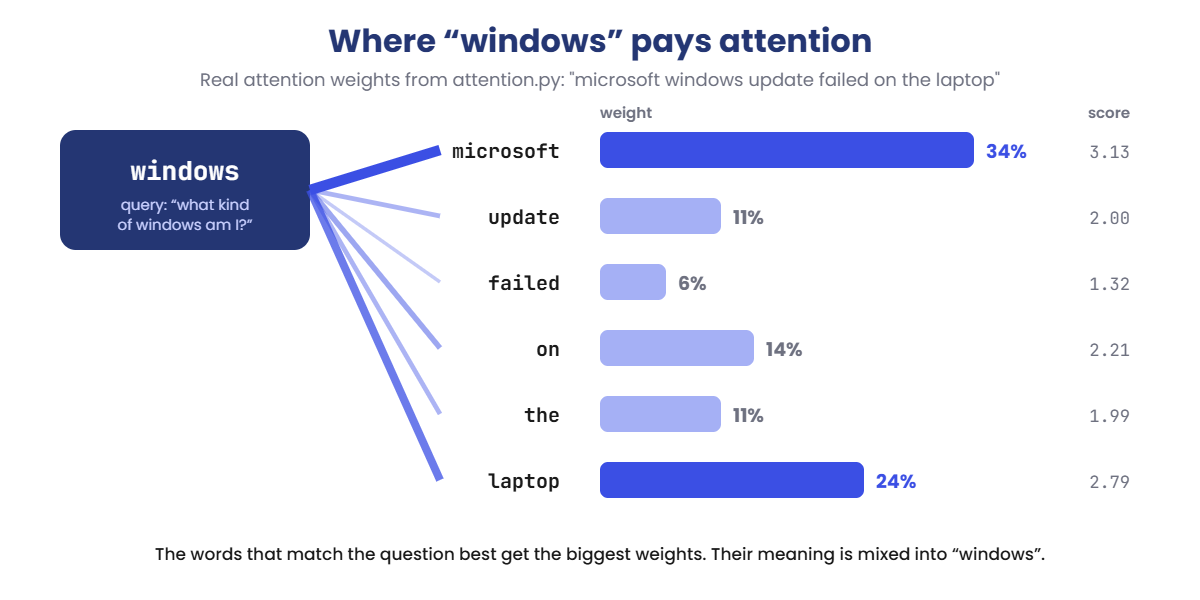
Follow the word “windows” in “microsoft windows update failed on the laptop”. These are real numbers from the lab, using the GloVe vectors from Lesson 5:

Attention mechanism weights: windows attends to microsoft 34% and laptop 24%
  1. Ask. “windows” turns its vector into a query.
  2. Score every other word. Its query is compared with each word’s key. “microsoft” scores 3.13, “laptop” 2.79, “failed” only 1.32.
  3. Turn scores into weights. Softmax turns them into percentages: microsoft 34%, laptop 24%, and the small words share the rest.
  4. Mix and add. The values are blended using those weights, and the blend is added to the original “windows” vector.
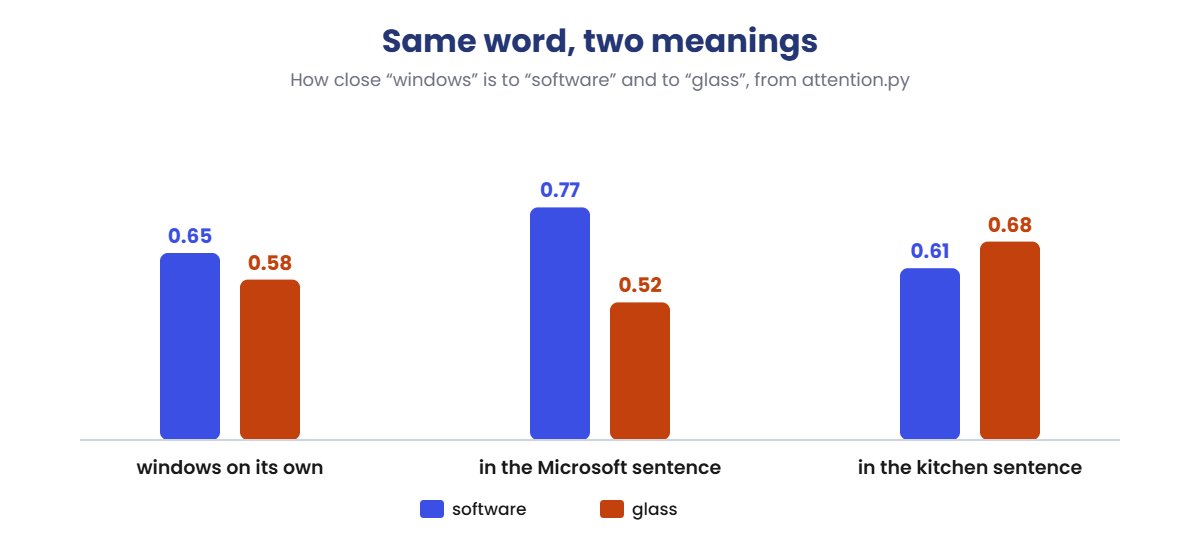
  5. Check the result. The new vector is closer to “software” than before, and further from “glass”. Put the same word in a kitchen sentence and it moves the other way:
Attention mechanism changes meaning: windows moves towards software or glass depending on the sentence

Same word, same starting vector, two different meanings, decided only by the neighbours. A real model does this in every one of its 16 layers, with 32 heads per layer and learned query, key and value tables, so the effect is far stronger than in this hand-made version.

Why every word can’t look ahead

In a chat model, a word may only look at the words before it. When the model is writing word number 10, words 11 onwards don’t exist yet. During training, the full sentence is available, so a causal mask hides the future.

Without it, the model would learn to cheat by copying the next word, and then fail completely when it has to write on its own. You’ll catch that bug in the Break It lab.

Hands-on Lab: build attention with real word vectors

You’ll build attention from the four steps in the Engineer’s View: compare, scale, softmax, mix. You’ll use the same GloVe word vectors as Lesson 5, so the results are real, not made up. One simplification: a real model learns separate query, key and value tables, while here each word’s own vector plays all three parts.

That’s enough to see the idea working. Use PowerShell as before; on macOS or Linux, use python3 and cp.

1Set up the folder

Make a new folder and copy the 66 MB word-vector file from Lesson 5, so you don’t download it again:

Run this:

mkdir C:\ai-lab\attention
cd C:\ai-lab\attention
copy ..\embeddings\glove-wiki-gigaword-50.gz .
notepad glove.py

Paste this whole block into glove.py, then save:

import gzip, os, urllib.request
import numpy as np

URL = ("https://github.com/RaRe-Technologies/gensim-data/releases/download/"
       "glove-wiki-gigaword-50/glove-wiki-gigaword-50.gz")
FILE = "glove-wiki-gigaword-50.gz"

if not os.path.exists(FILE):
    print("Downloading word vectors (66 MB, only the first time)...")
    urllib.request.urlretrieve(URL, FILE)

words, rows = [], []
with gzip.open(FILE, "rt", encoding="utf-8") as f:
    next(f)
    for line in f:
        parts = line.rstrip().split(" ")
        words.append(parts[0])
        rows.append(np.array(parts[1:], dtype=np.float32))
        if len(words) == 50000:
            break

vecs = np.array(rows)
index = {w: i for i, w in enumerate(words)}

This file only loads the vectors and prints nothing. The other scripts in this lesson import it.

✅ Checkpoint: Your folder has glove.py and glove-wiki-gigaword-50.gz. If you skipped Lesson 5, the file downloads on the first run.

2Watch “windows” pay attention

Run this:

notepad attention.py

Paste this whole block, then save:

import numpy as np
from glove import vecs, index           # the same 50,000 GloVe words as Lesson 5

WORD = "windows"
SENTENCE = "microsoft windows update failed on the laptop"
COMPARE = ("software", "glass")


def softmax(x):
    e = np.exp(x - x.max())
    return e / e.sum()


def cos(a, b):
    return float(a @ b / (np.linalg.norm(a) * np.linalg.norm(b)))


others = [w for w in SENTENCE.split() if w != WORD]
query = vecs[index[WORD]]                       # what WORD is looking for
keys = np.array([vecs[index[w]] for w in others])   # what each other word offers
values = keys                                   # what each word passes on

scores = keys @ query / np.sqrt(len(query))     # 1. compare, 2. scale
weights = softmax(scores)                       # 3. turn into percentages
new_vector = query + weights @ values           # 4. mix in, add to the original

print("Attention from", repr(WORD) + ":")
for w, s, p in zip(others, scores, weights):
    print(f"  {w:<10} score {s:5.2f}   weight {p:4.0%}")
print()
a, b = COMPARE
print(f"Alone:      {a} {cos(query, vecs[index[a]]):.2f}   {b} {cos(query, vecs[index[b]]):.2f}")
print(f"In context: {a} {cos(new_vector, vecs[index[a]]):.2f}   {b} {cos(new_vector, vecs[index[b]]):.2f}")

Run this:

python attention.py
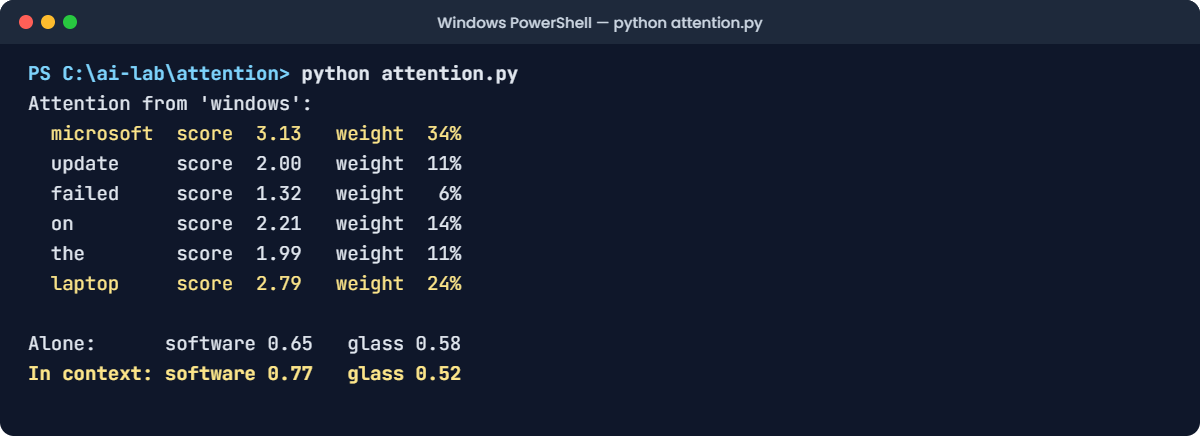
Attention mechanism lab: attention.py showing attention weights for windows
This output is exact. The word vectors and the maths never change, so your numbers will match.

The text version of the same output:

Attention from 'windows':
  microsoft  score  3.13   weight  34%
  update     score  2.00   weight  11%
  failed     score  1.32   weight   6%
  on         score  2.21   weight  14%
  the        score  1.99   weight  11%
  laptop     score  2.79   weight  24%

Alone:      software 0.65   glass 0.58
In context: software 0.77   glass 0.52

Read the weights. “windows” listens most to microsoft (34%) and laptop (24%), and least to “failed” (6%). After mixing, it’s closer to software (0.65 → 0.77) and further from glass (0.58 → 0.52).

✅ Checkpoint: microsoft gets the biggest weight, and the software score goes up from 0.65 to 0.77.

3Change the sentence and watch the meaning flip

Change only the SENTENCE line near the top of attention.py:

Change this line:

SENTENCE = "she cleaned the windows and doors of the kitchen"

Run this:

python attention.py

You should see this:

Attention from 'windows':
  she        score  1.26   weight   5%
  cleaned    score  1.68   weight   8%
  the        score  1.99   weight  11%
  and        score  1.85   weight   9%
  doors      score  3.09   weight  33%
  of         score  1.56   weight   7%
  the        score  1.99   weight  11%
  kitchen    score  2.32   weight  15%

Alone:      software 0.65   glass 0.58
In context: software 0.61   glass 0.68

Now “windows” listens most to doors (33%) and kitchen (15%), and the meaning flips: glass wins, 0.68 to 0.61. This is exactly what failed in Lesson 5’s analogy. Attention fixes it, because the word now reads its neighbours.

Try one more. Change the first three settings to:

Change these three lines:

WORD = "apple"
SENTENCE = "apple pie with banana and fresh cream"
COMPARE = ("microsoft", "fruit")

Run this:

python attention.py

You should see this:

Attention from 'apple':
  pie        score  1.88   weight  16%
  with       score  1.63   weight  12%
  banana     score  2.04   weight  19%
  and        score  1.51   weight  11%
  fresh      score  2.09   weight  20%
  cream      score  2.24   weight  23%

Alone:      microsoft 0.73   fruit 0.59
In context: microsoft 0.58   fruit 0.76

On its own, “apple” is closer to Microsoft (0.73) than to fruit (0.59), probably because the company is mentioned so often in the news text these vectors learned from. In a dessert sentence, fruit wins clearly: 0.76 against 0.58.

✅ Checkpoint: In the kitchen sentence glass beats software, and in the pie sentence fruit beats microsoft.

4See the causal mask

Now look at a whole sentence at once. Every word attends to every word allowed by the mask:

Run this:

notepad mask.py

Paste this whole block, then save:

import numpy as np
from glove import vecs, index

words = "the server crashed last night".split()
x = np.array([vecs[index[w]] for w in words])

scores = x @ x.T / np.sqrt(x.shape[1])
future = np.triu(np.ones((len(words), len(words)), dtype=bool), 1)
scores[future] = -np.inf                    # the causal mask: no peeking ahead

weights = np.exp(scores - scores.max(axis=1, keepdims=True))
weights = weights / weights.sum(axis=1, keepdims=True)

print(" " * 10 + "".join(f"{w:>9}" for w in words))
for w, row in zip(words, weights):
    print(f"{w:<10}" + "".join(f"{p:>9.0%}" for p in row))

Run this:

python mask.py

You should see this:

                the   server  crashed     last    night
the            100%       0%       0%       0%       0%
server           4%      96%       0%       0%       0%
crashed          9%       2%      89%       0%       0%
last            23%       2%      10%      65%       0%
night           13%       2%       8%      23%      53%
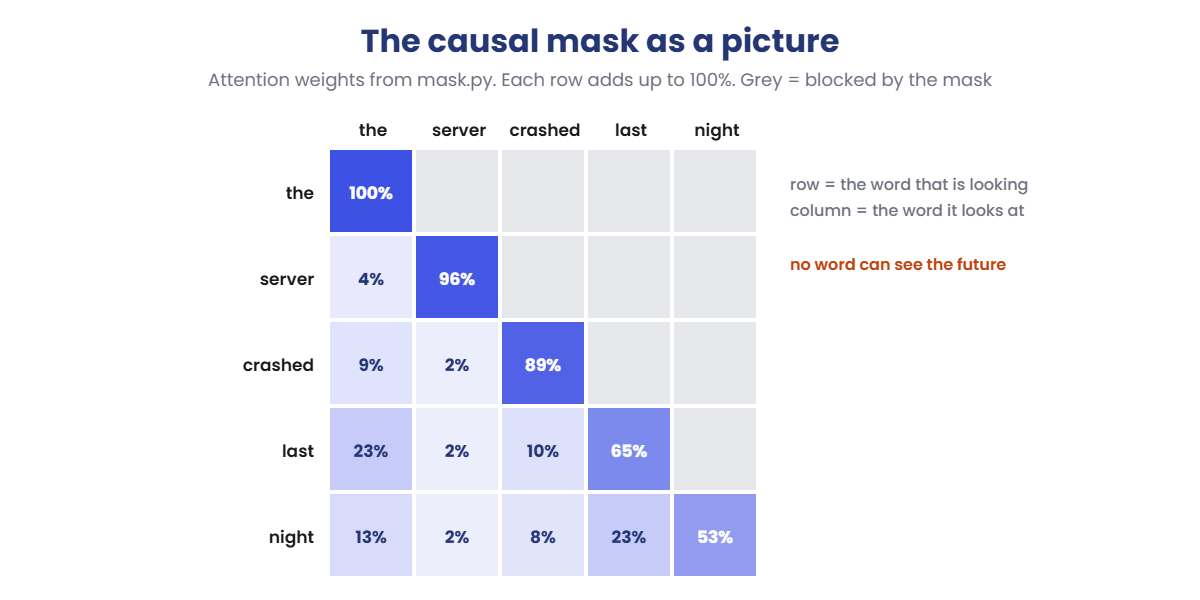
Attention mechanism causal mask: attention weights with future words blocked
The same table as a picture. Grey squares are blocked by the causal mask.

Each row is one word, and the row shows where its attention goes. Everything above the diagonal is 0%: “the” can only see itself, “server” can see “the” and itself, and “night” can see the whole sentence. Each row adds up to 100%.

Here every word gives most of its attention to itself, because we used the raw word vectors for queries and keys. A trained model has separate tables, so it can learn to look elsewhere.

✅ Checkpoint: Every number above the diagonal is 0%, and every row adds up to 100%.

5Measure why long prompts are slow

Run this:

notepad cost.py

Paste this whole block, then save:

import time
import numpy as np

rng = np.random.default_rng(0)
head_dim = 64

print(f"{'tokens':>7} {'scores per head':>16} {'time':>9}")
for n in (512, 1024, 2048, 4096):
    q = rng.normal(size=(n, head_dim)).astype(np.float32)
    k = rng.normal(size=(n, head_dim)).astype(np.float32)
    start = time.perf_counter()
    scores = q @ k.T                       # every token against every token
    ms = (time.perf_counter() - start) * 1000
    print(f"{n:>7,} {scores.size:>16,} {ms:>7.1f} ms")

Run this:

python cost.py

You should see something like this (your times depend on your laptop):

 tokens  scores per head      time
    512          262,144     1.0 ms
  1,024        1,048,576     2.4 ms
  2,048        4,194,304     7.6 ms
  4,096       16,777,216    25.8 ms

The middle column is exact: double the tokens and the scores go up four times. The times on your laptop will be different, but they’ll grow in roughly the same way, about three to four times for each doubling once the numbers get big.

This is for one head in one layer. Your Llama model has 32 heads in each of 16 layers, which is why Ollama’s prompt eval time from Lesson 2 jumps when you paste a long document.

✅ Checkpoint: You can explain why going from 2,048 to 4,096 tokens means four times as many scores.

Break It, Then Fix It

Two bugs that turn up in real projects whenever someone writes or changes attention code. Both are silent: nothing crashes, the numbers just quietly become wrong.

1Write a test that catches peeking

A good attention layer must never let a token see the future. Here is a simple test: run a sentence, change only the last token, and check that the earlier tokens didn’t change at all.

Run this:

notepad leak_test.py

Paste this whole block, then save:

import numpy as np

rng = np.random.default_rng(5)
d = 8
wq, wk, wv = (rng.normal(size=(d, d)) for _ in range(3))


def attention(x):
    q, k, v = x @ wq, x @ wk, x @ wv
    scores = q @ k.T / np.sqrt(d)
    future = np.triu(np.ones((len(x), len(x)), dtype=bool), 1)
    scores[future] = -np.inf               # the causal mask
    w = np.exp(scores - scores.max(axis=1, keepdims=True))
    return (w / w.sum(axis=1, keepdims=True)) @ v


sentence = rng.normal(size=(4, d))         # 4 tokens
changed = sentence.copy()
changed[3] = rng.normal(size=d)            # change only the LAST token

a, b = attention(sentence), attention(changed)
for t in range(4):
    print(f"Token {t + 1}: changed by {np.abs(a[t] - b[t]).sum():.4f}")

Run this:

python leak_test.py

You should see this:

Token 1: changed by 0.0000
Token 2: changed by 0.0000
Token 3: changed by 0.0000
Token 4: changed by 13.0987

Tokens 1 to 3 changed by exactly 0.0000. Only token 4, the one we edited, changed. The mask works.

2Break it: remove the mask

Put a # in front of the mask line, as if someone deleted it by accident:

Change the mask line to:

    # scores[future] = -np.inf             # the causal mask

Run this:

python leak_test.py

You’ll see this:

Token 1: changed by 2.9721
Token 2: changed by 2.3881
Token 3: changed by 4.2895
Token 4: changed by 13.0987

Now changing the last token changes every token. Token 1 can see token 4, so it knows the future.

A model trained like this learns to copy the next word instead of predicting it. Its training scores look amazing, and then it writes nonsense when it has to generate on its own.

The fix: remove the # to put the mask back, and run the test again to see the zeros return. Keep a test like this in any project that touches attention code.

✅ Checkpoint: With the mask back, tokens 1 to 3 change by 0.0000 again.

3Break it again: forget the scaling

Run this:

notepad scaling.py

Paste this whole block, then save:

import numpy as np

rng = np.random.default_rng(2)
head_dim = 128                       # the size of one head in llama3.2:3b
q = rng.normal(size=head_dim)
keys = rng.normal(size=(6, head_dim))

scores = keys @ q / np.sqrt(head_dim)
weights = np.exp(scores - scores.max())
weights = weights / weights.sum()

print("Scores: ", np.round(scores, 1))
print("Weights:", " ".join(f"{w:.0%}" for w in weights))

Run this:

python scaling.py

You should see this:

Scores:  [-1.1  0.5 -1.4  0.4 -1.  -0.6]
Weights: 7% 36% 5% 32% 8% 12%

A healthy spread: two words get about a third each, the rest get a little. Now remove / np.sqrt(head_dim) from the scores line:

Change the scores line to:

scores = keys @ q

Run this:

python scaling.py

You’ll see this:

Scores:  [-12.2   5.7 -16.2   4.5 -11.7  -7.1]
Weights: 0% 77% 0% 23% 0% 0%

The scores are about 11 times bigger (the square root of 128 is 11.3), and softmax overreacts. Four of the six words drop to 0%; attention only sees two words.

With bigger vectors it gets worse, until one word takes 100%. In training, this makes learning slow and unstable, because tiny changes flip which word wins.

The fix: put / np.sqrt(head_dim) back. That one division is the “scaled” in “scaled dot-product attention”.

✅ Checkpoint: With the scaling back, the weights are 7% 36% 5% 32% 8% 12% again.

This happened at work

The answer that was right there in the middle

A company built a RAG chatbot for its HR policies. For each question, it searched the policy documents, took the top 20 matching chunks, pasted them all into the prompt, and asked the model to answer.

Most answers were good. But employees kept getting the wrong notice period for resignations.

The engineers checked the search results: the correct policy chunk was in the prompt every time. It was usually around chunk 9 or 10, in the middle of a long wall of text.

They tested it. With the same 20 chunks, they moved the correct one to the very start of the prompt, and the model answered correctly.

Moved it back to the middle, and the answer went wrong again. Researchers had already described this in a 2023 paper called Lost in the Middle: models use information at the start and end of a long prompt much better than information in the middle.

The fix: they sent 5 chunks instead of 20, after a second step that re-ranked them, and put the best match first. The prompts got four times shorter, so the answers also came back faster and cost less, because attention work grows with the square of the length.

The lesson: attention isn’t spread evenly across a long prompt. Fewer, better chunks, with the most important first, beat a big pile of text.

Common mistakes and troubleshooting

MistakeWhat happensHow to avoid it
Thinking attention means the model “understands” like a personOver-trusting answersAttention is weighted mixing of vectors. It’s powerful, but it’s maths, and it can mix in the wrong thing
Forgetting the causal mask in custom codeTraining looks perfect, generation is nonsenseAdd a leak test: change a later token and check earlier outputs stay the same
Forgetting to divide by √dAttention locks onto one word; training is unstableAlways use scaled dot-product attention, or a library function that does it for you
Pasting as much text as possible into the promptSlow, expensive answers that miss facts in the middleSend fewer, well-ranked chunks and put the most important first
Expecting long prompts to cost the same as short onesLatency and bills jump with long documentsReading the prompt grows with the square of its length. Measure with real document sizes
Reading one attention head as “the reason” for an answerWrong conclusions when debuggingThere are hundreds of heads across the layers. One head’s pattern is a clue, not an explanation

Troubleshooting the lab

ProblemFix
ModuleNotFoundError: No module named 'glove'glove.py must be in the same folder, and you must run the scripts from that folder (cd C:\ai-lab\attention)
KeyError with a word, for example KeyError: 'kubernetes'Every word in WORD, SENTENCE and COMPARE must be in the 50,000-word list. Use lowercase, common words
The copy command says the file wasn’t foundYour Lesson 5 folder has a different name. Skip the copy; glove.py will download the file instead
Your numbers are slightly differentCheck that the sentence is exactly the same, including spaces. For leak_test.py and scaling.py, check the seeds
cost.py times jump aroundOther programs are using the CPU. Run it twice. The scores column never changes

Interview questions

Click a question to open it. Under each one you’ll find what the interviewer is actually looking for, and one good way to answer.

Fresher level

1. What is attention in a transformer?

What they’re really checking: Can you explain the core idea simply?

How you could answer: It’s the step where each token looks at the other tokens, decides how much each one matters, and mixes their information into its own vector. That’s how the same word can mean different things in different sentences, like “windows” next to Microsoft versus next to doors.

2. What are queries, keys and values?

What they’re really checking: Do you know the three roles?

How you could answer: Each token produces three vectors through learned weight matrices. The query is what it’s looking for, the key is what it offers for matching, and the value is what it passes on. Queries are compared with keys to get weights, and the values are mixed using those weights.

3. What is the causal mask?

What they’re really checking: Do you know why chat models can’t look ahead?

How you could answer: It blocks each token from attending to tokens after it, by setting those scores to minus infinity before softmax. A chat model writes one token at a time, so during training it must learn to predict without seeing the future.

2–5 years experience

4. Why do we divide by the square root of the head dimension?

What they’re really checking: Do you understand the numerical reason?

How you could answer: Dot products of random vectors grow with the vector size, roughly with its square root. Big scores push softmax towards one winner, so attention becomes too sharp and gradients become tiny. Dividing by √d keeps the scores around the same scale whatever the head size.

5. Why are long prompts slow and expensive?

What they’re really checking: Can you connect architecture to cost?

How you could answer: During prompt processing, every token is compared with every earlier token in every head of every layer, so the work grows with the square of the length. Doubling the prompt means about four times the attention work. During generation the KV cache helps, but the cache grows with the context, so memory goes up too.

6. In a RAG system, does it matter where you put the retrieved chunks in the prompt?

What they’re really checking: Awareness of practical attention behaviour.

How you could answer: Yes. Research such as “Lost in the Middle” shows models use information at the start and end of long prompts better than in the middle. Send fewer, re-ranked chunks, put the most relevant first, and test answer quality with the real chunk order.

Senior level

7. Compare multi-head, multi-query and grouped-query attention.

What they’re really checking: Do you know the efficiency trade-offs in modern models?

How you could answer: Multi-head attention gives every query head its own key and value head. Multi-query attention shares one key/value head across all query heads, which makes the KV cache tiny but can lose quality.

Grouped-query attention is in between: groups of query heads share key/value heads, like 32 query heads and 8 key/value heads in Llama 3.2. It keeps most of the quality with a much smaller cache.

8. What does FlashAttention change, and what doesn’t it change?

What they’re really checking: Can you separate memory optimisation from compute?

How you could answer: It computes attention in small tiles that fit in fast on-chip memory, and never stores the full n × n score table. That cuts memory use and memory traffic, so it’s much faster in practice.

It doesn’t change the result or the number of comparisons. The work still grows with the square of the length.

9. You’re reviewing a team’s custom transformer. Its training loss is suspiciously low but generation is poor. What do you check?

What they’re really checking: Can you debug from first principles?

How you could answer: First, the causal mask: I’d run a leak test that changes a later token and checks earlier outputs stay identical. Then the targets: are they shifted by one position, so each token predicts the next one? I’d also check the attention scaling, and whether padding tokens are masked, before looking at data or hyperparameters.

Quick quiz

Q1. In the lab, why did “windows” end up closer to “software” in the Microsoft sentence?

  1. It gave the most attention to microsoft and laptop and mixed in their meaning
  2. The word list changed
  3. Software appears in the sentence
Show answer

A — Attention weights of 34% and 24% pulled software-related meaning into the vector.

Q2. What does softmax do in attention?

  1. Sorts the words alphabetically
  2. Turns the scores into weights that add up to 100%
  3. Removes the small words
Show answer

B — Softmax turns any list of scores into positive weights that sum to 1.

Q3. In mask.py, why is everything above the diagonal 0%?

  1. Those words are not important
  2. The causal mask stops each word from seeing words that come after it
  3. Rounding
Show answer

B — Scores for future tokens are set to minus infinity, which softmax turns into 0%.

Q4. The leak test showed tokens 1 to 3 changing when only token 4 was edited. What does that mean?

  1. The model is working normally
  2. The causal mask is missing, so earlier tokens can see the future
  3. numpy has a bug
Show answer

B — With a correct mask, earlier tokens can’t be affected by later ones at all.

Q5. A prompt goes from 2,048 to 4,096 tokens. Roughly how much more attention work is needed to read it?

  1. The same
  2. Twice as much
  3. Four times as much
Show answer

C — Every token is compared with every token, so the work grows with the square of the length.

Quick recap

  • Attention lets each token look at the others and mix in what matters, so the same word can take different meanings.
  • Each token makes a query, a key and a value. Compare, scale by √d, mask, softmax, mix.
  • The causal mask stops tokens from seeing the future. Test for leaks whenever you touch attention code.
  • Multi-head attention runs many attentions in parallel: 32 heads per layer in llama3.2:1b, sharing 8 key/value heads.
  • The vectors after attention are contextual embeddings, the kind search and RAG systems use.
  • Attention work grows with the square of the length, and facts in the middle of long prompts are easy to miss.

Next lesson

Predicting completions from prompts → You now know everything that happens inside the model up to the last layer. Next you’ll see how it turns 128,256 scores into one chosen word, and what temperature and top-p really do to the answer.

Further reading: attention mechanism

Want to go deeper into the attention mechanism? Check the official reference: section 3.2 of Attention Is All You Need (Vaswani et al., 2017), and Lost in the Middle: How Language Models Use Long Contexts (Liu et al., 2023) for the work story. You can also follow the full Generative AI and Agents course on SaatVedha, step by step.

Scroll to Top