Initial vectors and positional encoding

In Lesson 4 you saw the very first step inside the transformer: every token ID picks a row of 2,048 numbers from the embedding table. You counted that table yourself, 263 million numbers. But what do those numbers mean?

And there’s a second puzzle. The 16 layers look at all the tokens together, so how does the model know which word came first?

This lesson answers both. You’ll explore real word vectors on your laptop and watch meaning turn into maths: king − man + woman really does land on queen.

Then you’ll see positional encoding, the trick that tells the model the order of the words. Without it, “dog bit man” and “man bit dog” look exactly the same, and you’ll prove that with code.

TimeYou needBy the end you can
About 60 minutesPython and numpy from Lesson 4, Ollama with llama3.2:1b, and internet once for a 66 MB downloadExplain what an embedding is, measure how similar two words are, explain why models need position information, and describe how RoPE works in Llama

What it is, in one line

An embedding is a list of numbers that stands for a token’s meaning, and positional encoding adds information about where the token sits in the sentence.

In Simple Words

Every word gets a home address

Imagine a giant city map where every word has a house. Words with similar meanings live on the same street. “Server”, “computer” and “network” are neighbours.

“Banana” and “mango” live across town, in the fruit market. The address of each house is just a few numbers, like the latitude and longitude on your phone’s map. That address is the word’s embedding.

Now, a sentence is like a train of words. If you only knew which words were on the train, but not which seat each one sat in, you couldn’t tell “dog bit man” from “man bit dog”.

So every word also gets a seat number. That’s positional encoding.

A language model needs both: the house address tells it what a word means, the seat number tells it where the word is.

Engineer's View

What the numbers really are

Embeddings are learned, not designed. Before training, every row of the embedding table is random. During training, the model nudges the rows so that tokens used in similar ways end up with similar numbers.

Nobody decides that dimension 7 means “technical”. Meaning is spread across all the numbers, and it only shows up when you compare vectors.

Cosine similarity is how you compare them. It measures the angle between two vectors: 1.0 means they point the same way, 0 means unrelated, and negative means opposite. Search engines, RAG systems and recommendation engines all rank results this way.

Static vs contextual. The embedding table gives every token one fixed vector, whatever the sentence. That’s why they’re called initial vectors. The 16 transformer layers then change each vector based on the words around it.

The word-vector set you’ll use in the lab, GloVe from Stanford (2014), is only the static kind: 400,000 words, 50 numbers each. It’s small enough for a laptop and works the same way as the first layer of an LLM. Llama’s table has 128,256 tokens and 2,048 numbers each.

Why position is needed. Attention compares every token with every other token, as a set. If you shuffle the words, a single attention layer gets exactly the same set and gives exactly the same answer. Deeper models with a causal mask can pick up a little order on their own, but every major model still adds position information on purpose.

MethodUsed byHow it works
Sine and cosine waves (fixed)Original transformer, 2017Adds a pattern of waves to each token’s vector. Nothing to learn
Learned position tableGPT-2, BERTA second embedding table, one row per position (1,024 rows in GPT-2). Can’t go past the last row
RoPE (rotary)Llama, Mistral, Qwen and most modern modelsRotates the query and key vectors inside attention by an angle that grows with position

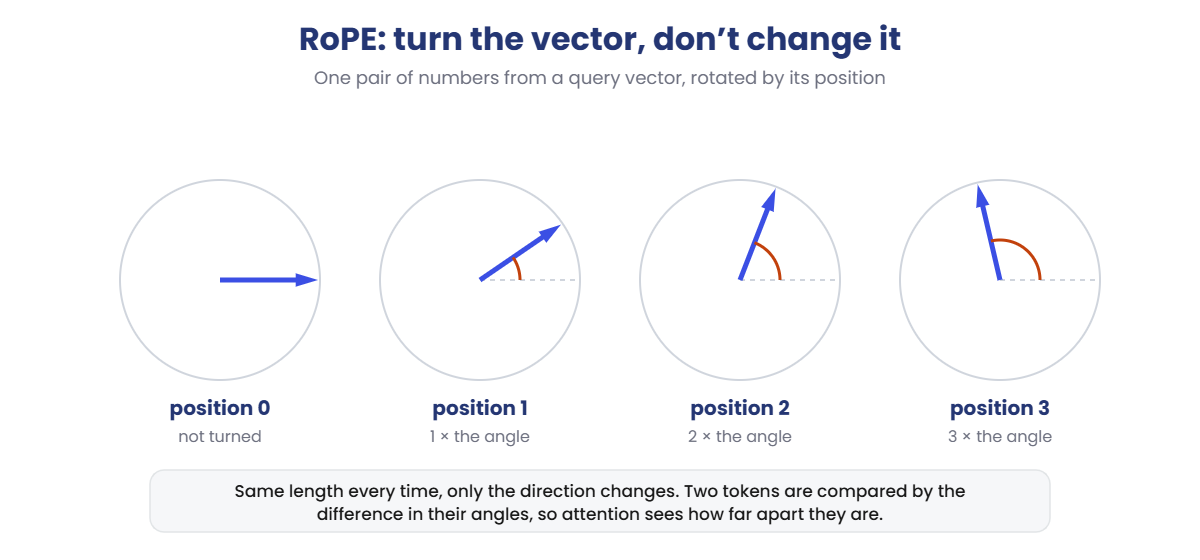
RoPE in Llama. RoPE doesn’t add anything to the embedding. Inside every attention layer, it takes the query and key vectors, splits them into pairs of numbers, and turns each pair like the hand of a clock.

The angle depends on the token’s position, and each pair turns at a different speed. When two tokens are compared, only the difference between their angles matters, so attention sees how far apart the words are, not just where they are.

Llama 3.2 uses 32 pairs per head (64 numbers) and a base of 500,000, which makes the slow pairs turn slowly enough for 131,072 tokens. Remember the 32 extra parameters you found in Lesson 4? They’re rope_freqs: one stretch factor for each of those 32 pairs, used to reach the long context.

Why it matters on the job: every search box, chatbot memory and RAG pipeline you build will store embeddings and compare them with cosine similarity. And knowing how position works explains why models get worse beyond the context length they were trained for.

How it works, step by step

Here is what happens to the token IDs of “The server is” before the first transformer layer, and inside it:

  1. Look up each token’s row. ID 791 (“The”), 3622 (” server”) and 374 (” is”) each pick their row from the embedding table: 2,048 numbers per token.
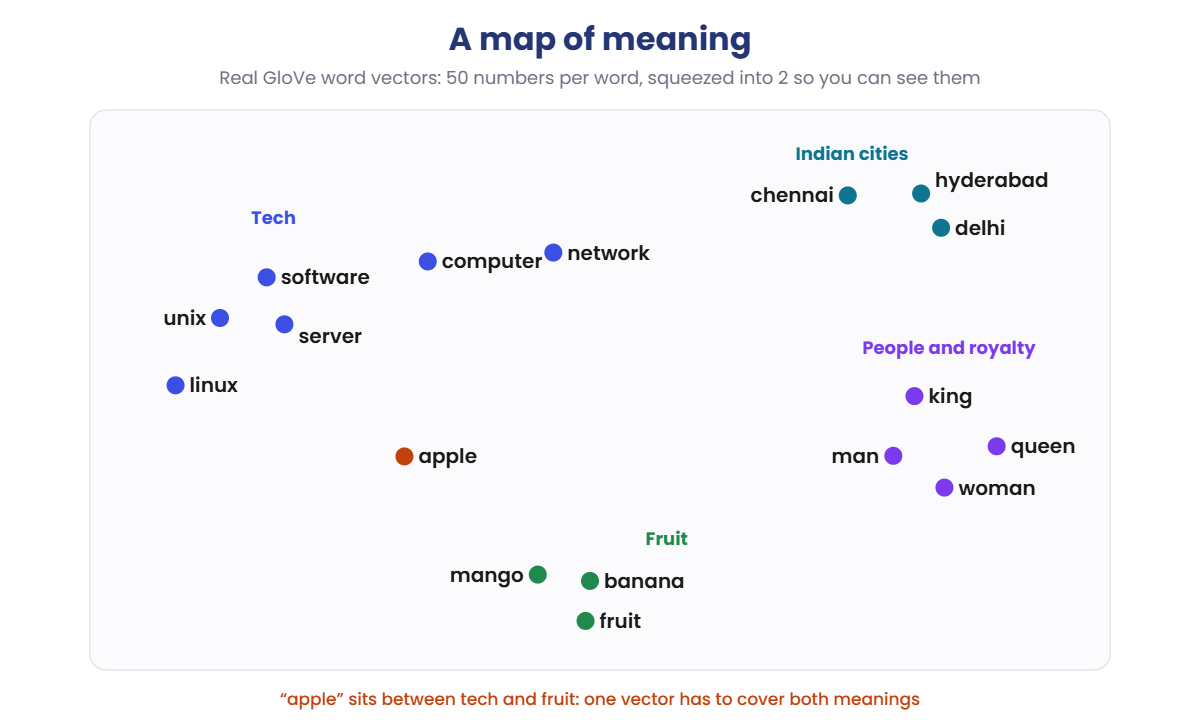
  2. Similar tokens have similar rows. In a trained table, tokens used in similar ways end up with similar rows. Here is the same idea in a real set of word vectors, with their 50 numbers squeezed into 2 so you can see them:
Word embeddings map: tech words, fruit, people and Indian cities form groups, apple sits between tech and fruit

Each group is a neighbourhood: tech words top left, fruit at the bottom, people and royalty on the right, Indian cities top right. Look at “apple”. It sits between the tech words and the fruit, because the same word is used for both.

One fixed vector has to cover every meaning of a word. Lesson 6 shows how attention fixes that.

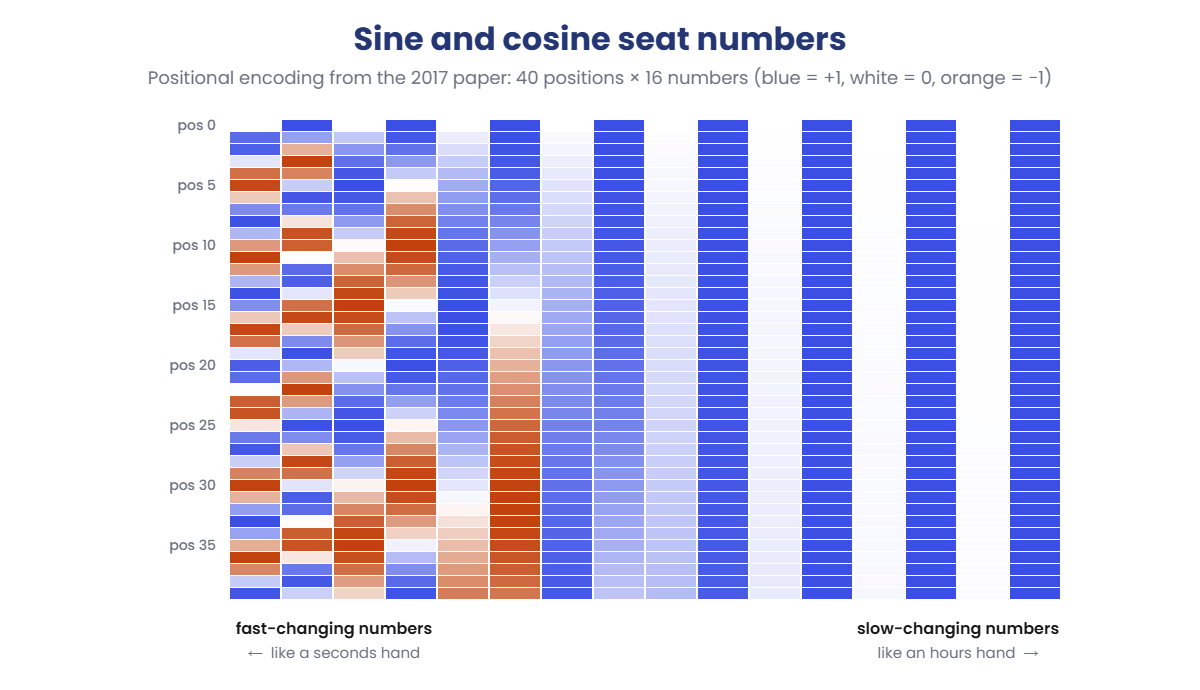
  1. Add the seat number. In the original transformer, a fixed pattern of sine and cosine waves was added to each token’s vector. Every position gets its own unique pattern:
Positional encoding heatmap: sine and cosine values for 40 positions and 16 dimensions

Each row is one position, each column one of the 16 numbers. The left columns change quickly from row to row, the right ones slowly, a bit like the seconds, minutes and hours hands on a clock. Together they give every position a unique pattern, and nearby positions look alike.

  1. Or rotate, like Llama. With RoPE, the vectors aren’t changed at the start. Inside attention, each token’s query and key are rotated by an angle based on its position:
RoPE rotary position embedding: the same vector rotated more for each position
  1. Compare. When the word at position 5 looks at the word at position 3, the score depends only on the gap of 2. The same pair of words at positions 105 and 103 gets exactly the same score. You’ll check this with real numbers in the lab.

Hands-on Lab: explore word vectors and build position codes

You’ll explore 50,000 real word vectors, test the famous word maths, and then build both kinds of position code yourself. You only need Python and numpy from Lesson 4. Use PowerShell as before; on macOS or Linux, use python3.

1Load real word vectors

Run this:

mkdir C:\ai-lab\embeddings
cd C:\ai-lab\embeddings
notepad word_vectors.py

Paste this whole block, then save:

import gzip, os, urllib.request
import numpy as np

URL = ("https://github.com/RaRe-Technologies/gensim-data/releases/download/"
       "glove-wiki-gigaword-50/glove-wiki-gigaword-50.gz")
FILE = "glove-wiki-gigaword-50.gz"

if not os.path.exists(FILE):
    print("Downloading word vectors (66 MB, only the first time)...")
    urllib.request.urlretrieve(URL, FILE)

words, vectors = [], []
with gzip.open(FILE, "rt", encoding="utf-8") as f:
    next(f)                                  # first line is a header
    for line in f:
        parts = line.rstrip().split(" ")
        words.append(parts[0])
        vectors.append(np.array(parts[1:], dtype=np.float32))
        if len(words) == 50000:              # the 50,000 most common words
            break

vecs = np.array(vectors)
unit = vecs / np.linalg.norm(vecs, axis=1, keepdims=True)
index = {w: i for i, w in enumerate(words)}


def similarity(a, b):
    return float(unit[index[a]] @ unit[index[b]])


def nearest(vector, skip=(), n=5):
    scores = unit @ (vector / np.linalg.norm(vector))
    best = [i for i in np.argsort(-scores) if words[i] not in skip]
    return [(words[i], round(float(scores[i]), 2)) for i in best[:n]]


print("Loaded", len(words), "words, each with", vecs.shape[1], "numbers")
print("'server' starts with:", np.round(vecs[index["server"]][:6], 2))
print()
for a, b in [("server", "computer"), ("server", "network"), ("server", "banana")]:
    print(f"similarity({a}, {b}) = {similarity(a, b):.2f}")
print()
print("Closest to 'linux':", nearest(vecs[index["linux"]], skip={"linux"}))
print()
v = vecs[index["king"]] - vecs[index["man"]] + vecs[index["woman"]]
print("king - man + woman =", nearest(v, skip={"king", "man", "woman"}, n=3))

The script downloads GloVe, a free, public-domain set of word vectors from Stanford University, trained on Wikipedia and news text. It keeps the 50,000 most common words.

Run this:

python word_vectors.py
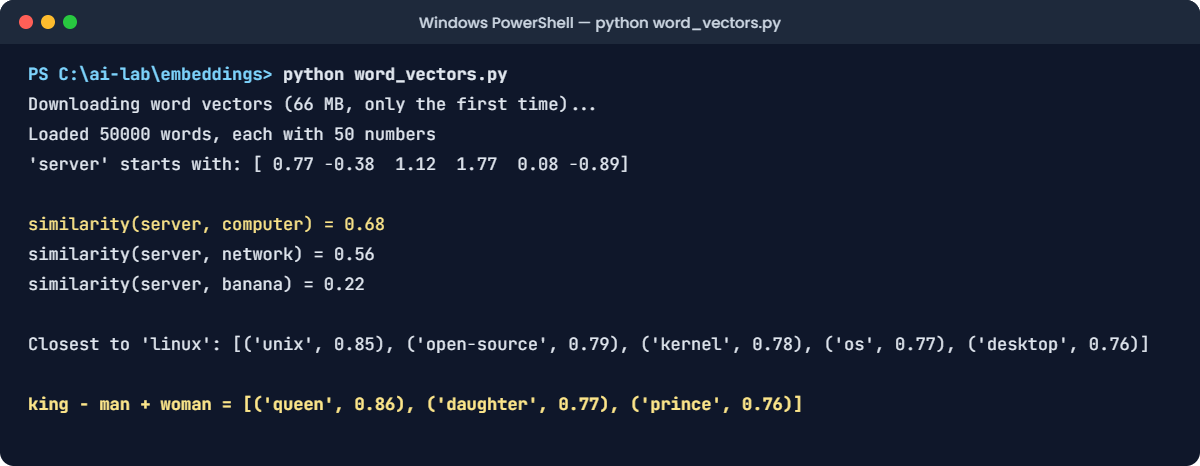
Word embeddings and positional encoding lab: word_vectors.py output in PowerShell
This output is exact. The word vectors never change, so your numbers will match.

The text version of the same output:

Downloading word vectors (66 MB, only the first time)...
Loaded 50000 words, each with 50 numbers
'server' starts with: [ 0.77 -0.38  1.12  1.77  0.08 -0.89]

similarity(server, computer) = 0.68
similarity(server, network) = 0.56
similarity(server, banana) = 0.22

Closest to 'linux': [('unix', 0.85), ('open-source', 0.79), ('kernel', 0.78), ('os', 0.77), ('desktop', 0.76)]

king - man + woman = [('queen', 0.86), ('daughter', 0.77), ('prince', 0.76)]

Each word is 50 numbers. The numbers on their own mean nothing to you or me: 0.77, −0.38, 1.12. But compare two words and meaning appears.

“Server” is much closer to “computer” (0.68) than to “banana” (0.22). The nearest neighbours of “linux” are unix, open-source, kernel and os. Nobody told the model that; it learned it from how the words are used.

✅ Checkpoint: You see queen at the top of the king − man + woman line, with a score of 0.86.

2Do maths with meaning

That last line was an analogy: man is to king as woman is to …? Try a few more. Add these lines to the end of word_vectors.py:

Add this to the end of the file:

def analogy(a, b, c):
    """a is to b, as c is to ...?"""
    v = vecs[index[b]] - vecs[index[a]] + vecs[index[c]]
    return nearest(v, skip={a, b, c}, n=3)


print()
print("france -> paris, india ->", analogy("france", "paris", "india"))
print("walk -> walked, run ->", analogy("walk", "walked", "run"))
print("microsoft -> windows, apple ->", analogy("microsoft", "windows", "apple"))

Run this:

python word_vectors.py

At the end you’ll now also see:

france -> paris, india -> [('delhi', 0.89), ('bombay', 0.82), ('mumbai', 0.81)]
walk -> walked, run -> [('went', 0.79), ('ran', 0.79), ('drove', 0.79)]
microsoft -> windows, apple -> [('window', 0.73), ('boxes', 0.72), ('kitchen', 0.69)]

France is to Paris as India is to Delhi. Walk is to walked as run is to ran (tied with “went”). The grammar and the geography are both hiding in the numbers.

But the last one fails: Microsoft is to Windows as Apple is to … window, boxes, kitchen? The word-vector list has only one vector for “windows”, and it leans towards the glass kind.

A fixed vector can’t know which meaning you want. That’s exactly the limit of initial vectors, and the reason the transformer layers exist.

✅ Checkpoint: Delhi comes first for France → Paris, India → ?, and the Windows/Apple line gives household words.

3Make a seat number for every position

Run this:

notepad positions.py

Paste this whole block, then save:

import numpy as np

d_model = 16


def position_vector(pos):
    """Sine/cosine position code from the 2017 transformer paper."""
    i = np.arange(d_model // 2)
    angle = pos / (10000 ** (2 * i / d_model))
    v = np.zeros(d_model)
    v[0::2] = np.sin(angle)
    v[1::2] = np.cos(angle)
    return v


def similarity(a, b):
    return float(a @ b / (np.linalg.norm(a) * np.linalg.norm(b)))


print("Position 0 :", np.round(position_vector(0)[:6], 2))
print("Position 1 :", np.round(position_vector(1)[:6], 2))
print("Position 2 :", np.round(position_vector(2)[:6], 2))
print()
for other in (11, 15, 30, 100):
    print(f"similarity(position 10, position {other:>3}) = {similarity(position_vector(10), position_vector(other)):.2f}")

Run this:

python positions.py

You should see this:

Position 0 : [0. 1. 0. 1. 0. 1.]
Position 1 : [0.84 0.54 0.31 0.95 0.1  1.  ]
Position 2 : [ 0.91 -0.42  0.59  0.81  0.2   0.98]

similarity(position 10, position  11) = 0.94
similarity(position 10, position  15) = 0.77
similarity(position 10, position  30) = 0.72
similarity(position 10, position 100) = 0.03

Position 0 is a simple pattern of 0s and 1s, and every position after it is different. Now look at the similarities: position 10 looks a lot like position 11 (0.94), less like 15 and 30, and almost nothing like 100 (0.03).

So the code doesn’t just label positions. It also tells the model which positions are close to each other.

✅ Checkpoint: Position 10 is most similar to position 11 and least similar to position 100.

4Rotate instead of adding, the RoPE way

Run this:

notepad rope.py

Paste this whole block, then save:

import numpy as np

rng = np.random.default_rng(3)
head_dim = 8
q = rng.normal(size=head_dim)          # what one token is looking for
k = rng.normal(size=head_dim)          # what another token offers


def rotate(v, pos):
    """RoPE: turn each pair of numbers by an angle that grows with the position."""
    i = np.arange(head_dim // 2)
    angle = pos / (10000 ** (2 * i / head_dim))
    x, y = v[0::2], v[1::2]
    out = np.empty_like(v)
    out[0::2] = x * np.cos(angle) - y * np.sin(angle)
    out[1::2] = x * np.sin(angle) + y * np.cos(angle)
    return out


def score(q_pos, k_pos):
    return rotate(q, q_pos) @ rotate(k, k_pos)


print(f"Word at 5 looks at word at 3:     {score(5, 3):.4f}")
print(f"Word at 105 looks at word at 103: {score(105, 103):.4f}")
print(f"Word at 5 looks at word at 25:    {score(5, 25):.4f}")
print(f"Length before and after rotating: {np.linalg.norm(q):.4f} {np.linalg.norm(rotate(q, 105)):.4f}")

Run this:

python rope.py

You should see this:

Word at 5 looks at word at 3:     11.2093
Word at 105 looks at word at 103: 11.2093
Word at 5 looks at word at 25:    -6.0356
Length before and after rotating: 3.9471 3.9471

Look at the first two lines. Positions 5 and 3 give exactly the same score as positions 105 and 103: 11.2093. RoPE only cares about the distance between the two words, which is 2 in both cases.

A gap of 20 gives a completely different score. And rotating never changes the length of the vector, so the word’s meaning isn’t damaged, only turned.

✅ Checkpoint: The 5→3 and 105→103 scores are identical, and the vector length stays 3.9471.

5Find RoPE in your own Llama model

Run this:

(ollama show llama3.2:1b -v) -match "rope" | Sort-Object

You should see something like this:

    llama.rope.dimension_count       64
    llama.rope.freq_base             500000
    rope_freqs.weight                F32     [32]

That’s the same idea as your rope.py, just bigger. dimension_count 64 means 64 numbers per head are rotated, as 32 pairs. freq_base 500000 sets how slowly the slowest pairs turn; your script used 10,000, like the 2017 paper. A bigger base makes the slow pairs turn more slowly, so positions stay distinguishable across 131,072 tokens. And rope_freqs.weight [32] is the 32-number table from Lesson 4: one stretch factor per pair.

✅ Checkpoint: You found llama.rope.freq_base 500000 and the 32-number rope_freqs table.

Break It, Then Fix It

Time to prove that word order really is invisible without positions. You’ll build a one-layer model, feed it “dog bit man” and “man bit dog”, and compare what it understands at the end of each sentence.

1Run a model with no position information

Run this:

notepad who_bit_whom.py

Paste this whole block, then save:

import numpy as np

USE_POSITIONS = False

rng = np.random.default_rng(11)
vocab = ["dog", "bit", "man", "."]
d_model, n_heads = 16, 4
head_dim = d_model // n_heads


def weights(rows, cols):
    return rng.normal(0, 1 / np.sqrt(rows), (rows, cols))


def softmax(x):
    e = np.exp(x - x.max(axis=-1, keepdims=True))
    return e / e.sum(axis=-1, keepdims=True)


def rms_norm(x):
    return x / np.sqrt((x ** 2).mean(axis=-1, keepdims=True) + 1e-5)


def position_vector(pos):
    i = np.arange(d_model // 2)
    angle = pos / (10000 ** (2 * i / d_model))
    v = np.zeros(d_model)
    v[0::2], v[1::2] = np.sin(angle), np.cos(angle)
    return v


embed = rng.normal(0, 1, (len(vocab), d_model))
w = {name: weights(d_model, d_model) for name in ("q", "k", "v", "o")}


def understand(sentence):
    x = embed[[vocab.index(t) for t in sentence.split()]]
    if USE_POSITIONS:
        x = x + np.array([position_vector(p) for p in range(len(x))])
    t = len(x)
    h = rms_norm(x)
    q = (h @ w["q"]).reshape(t, n_heads, head_dim).transpose(1, 0, 2)
    k = (h @ w["k"]).reshape(t, n_heads, head_dim).transpose(1, 0, 2)
    v = (h @ w["v"]).reshape(t, n_heads, head_dim).transpose(1, 0, 2)
    s = q @ k.transpose(0, 2, 1) / np.sqrt(head_dim)
    s[:, np.triu(np.ones((t, t), dtype=bool), 1)] = -np.inf
    mixed = (softmax(s) @ v).transpose(1, 0, 2).reshape(t, d_model) @ w["o"]
    x = x + mixed
    return x[-1]                       # what the model knows after reading the "."


a = understand("dog bit man .")
b = understand("man bit dog .")
print("Positions used:", USE_POSITIONS)
print("dog bit man . ->", np.round(a[:6], 3))
print("man bit dog . ->", np.round(b[:6], 3))
print("Difference between the two:", f"{np.abs(a - b).sum():.6f}")

Run this:

python who_bit_whom.py

You’ll see this:

Positions used: False
dog bit man . -> [ 0.717 -0.438  1.262  0.669  0.612  1.113]
man bit dog . -> [ 0.717 -0.438  1.262  0.669  0.612  1.113]
Difference between the two: 0.000000

Two sentences with opposite meanings, and the model ends up with exactly the same numbers. The difference is 0.000000. As far as this model is concerned, the dog and the man are interchangeable.

Why it happens: attention takes a weighted mix of the tokens it can see. Both sentences contain the same four tokens, so the mix is identical, no matter which seat each word sits in. A real chatbot with this bug couldn’t tell “transfer ₹500 from savings to current” from “transfer ₹500 from current to savings”.

2Give every word its seat number

Change the line near the top of the file:

Change this line:

USE_POSITIONS = True

Run this:

python who_bit_whom.py

You should see this:

Positions used: True
dog bit man . -> [ 1.522 -2.449  2.645  1.906  0.771  0.652]
man bit dog . -> [ 1.473 -2.426  2.686  1.846  0.815  0.522]
Difference between the two: 1.278578

Now the two sentences end up in different places. Same words, different order, different meaning.

The only change was adding the sine and cosine seat numbers from step 3 of the lab to each word’s vector. Llama solves the same problem with RoPE instead.

✅ Checkpoint: With positions on, the difference is 1.278578 instead of 0.000000.

This happened at work

The duplicate finder that closed real problems

A service desk team got hundreds of tickets a day, many of them repeats. A developer built a quick duplicate finder: turn each ticket title into one vector by averaging its word vectors, then mark any new ticket that was more than 0.95 similar to an open one as a duplicate and close it automatically.

It worked well for a week. Then a user complained that their ticket had been closed without anyone looking at it.

Their title was “printer is not working after the restart”. It had been closed as a duplicate of “printer is working after the restart”, a happy update from someone else.

An engineer checked the numbers with the same GloVe vectors from this lesson. The two titles scored 0.993.

One extra word, “not”, barely moves an average of seven vectors. And because averaging ignores order completely, “dog bites man” and “man bites dog” scored exactly 1.0.

The fix: they switched to a proper sentence-embedding model, a small transformer that reads the words in order and in context. They built a test set of 300 real ticket pairs, including negations and swapped words, and chose the similarity threshold from that test. They also stopped auto-closing: possible duplicates are now suggested to the agent, who decides.

The lesson: word vectors know what words mean, not what sentences mean. Order and small words like “not” need a model that reads the whole sentence.

Common mistakes and troubleshooting

MistakeWhat happensHow to avoid it
Expecting each number in an embedding to mean somethingConfusion when dimension 7 isn’t “technical”Meaning lives in how vectors compare. Use cosine similarity, not single numbers
Averaging word vectors to compare sentences“working” and “not working” look the same; word order is lostUse a sentence-embedding model that reads the whole sentence
Comparing embeddings from two different modelsSimilarity scores are meaninglessEvery model has its own space. Store which model made each vector, and re-embed if you switch
Forgetting to normalise before a dot productLong vectors win just because they’re longUse cosine similarity, or normalise vectors once when you store them
Thinking a model handles any length because positions are just mathsAnswers get worse past the trained context lengthStay within the model’s context length, or use a model built for longer context
Assuming a word list knows new wordsLookups fail for new terms like KubernetesThat’s why LLMs use subword tokens (Lesson 3). Every word can be built from pieces

Troubleshooting the lab

ProblemFix
KeyError: 'kubernetes'That word isn’t in the 50,000-word list. GloVe is from 2014 and only has whole words. Try a more common word
urllib.error.URLError during the first runThe download from github.com was blocked. Check your internet or office proxy, or download the file in a browser from the URL in the script and put it in the same folder
The first run is slow or seems stuckIt’s downloading 66 MB. The next runs take about a second
Your numbers don’t match the pageFor word_vectors.py they should match exactly. Check you kept the first 50,000 words. For who_bit_whom.py, check the seed default_rng(11) and the vocabulary list
The -match "rope" command prints nothingCheck the model name with ollama list and update Ollama if -v isn’t recognised

Interview questions

Click a question to open it. Under each one you’ll find what the interviewer is actually looking for, and one good way to answer.

Fresher level

1. What is an embedding?

What they’re really checking: Can you explain vectors without hiding behind jargon?

How you could answer: A list of numbers that represents a token, word or sentence, learned so that similar meanings get similar numbers. In an LLM, each token ID picks one row of the embedding table, 2,048 numbers in Llama 3.2 1B. You compare embeddings with cosine similarity.

2. Why does a transformer need positional encoding?

What they’re really checking: Do you understand that attention on its own ignores order?

How you could answer: Attention mixes the tokens as a set, so without position information “dog bit man” and “man bit dog” look the same. Positional encoding gives every token information about where it sits, so the model can use word order.

3. What does a cosine similarity of 0.9 versus 0.2 tell you?

What they’re really checking: Basic practical understanding for search and RAG work.

How you could answer: 0.9 means the two vectors point in almost the same direction, so the texts are very similar in meaning for that model. 0.2 means they’re mostly unrelated. The exact threshold for “similar enough” depends on the model, so you set it with real test data.

2–5 years experience

4. What’s the difference between static and contextual embeddings?

What they’re really checking: Do you know why modern models beat word2vec and GloVe?

How you could answer: Static embeddings give a word one vector everywhere, so “apple” the company and “apple” the fruit share it. Contextual embeddings come out of the transformer layers, after attention has mixed in the surrounding words, so the same word gets different vectors in different sentences. An LLM’s embedding table is static; its layer outputs are contextual.

5. Compare sinusoidal, learned and rotary position encodings.

What they’re really checking: Do you know the main design options and their trade-offs?

How you could answer: Sinusoidal codes are fixed sine and cosine waves added to the input; nothing to learn. Learned position embeddings are a trainable table, as in GPT-2 and BERT, but they stop at the last trained position.

RoPE rotates queries and keys inside attention, so scores depend on the distance between tokens. It’s used by Llama and most modern models, and it can be stretched for longer context.

6. Why shouldn’t you build a duplicate detector by averaging word vectors?

What they’re really checking: Can you spot a common real-world trap?

How you could answer: Averaging throws away word order and dilutes small but important words like “not”. “printer is working” and “printer is not working” score about 0.99. Use a sentence-embedding model, test with real pairs including negations, and keep a human in the loop for actions like closing tickets.

Senior level

7. Why does RoPE give relative position information?

What they’re really checking: Can you explain the mechanism, not just the name?

How you could answer: RoPE rotates each pair of numbers in the query and key by an angle proportional to the token’s position. The dot product of two rotated vectors depends only on the difference between their angles, so the attention score between positions m and n depends on m − n, not on m and n separately. Rotation also keeps vector lengths the same, so content isn’t distorted.

8. How do models like Llama 3 handle a much longer context than they were first trained on?

What they’re really checking: Awareness of long-context techniques and their limits.

How you could answer: Mainly by changing RoPE: a larger base frequency (500,000 in Llama 3), so slow rotations don’t wrap around, plus frequency scaling for long context, which is the 32-number rope_freqs table in the GGUF file. The model is then trained further on long documents. Even so, quality can drop for information in the middle of very long inputs, so long-context claims should be tested on your own tasks.

9. You’re designing a semantic search system for 10 million documents. What do you decide about embeddings?

What they’re really checking: Can you turn embedding knowledge into an architecture?

How you could answer: Choose an embedding model by testing it on real queries from my domain and language. Fix the dimension and normalise vectors when storing them, so I can use cosine or dot product in a vector index.

Record the model name and version with every vector, because switching models means re-embedding everything. Chunk documents to fit the embedding model’s context, and combine vector search with keyword search for exact terms like error codes.

Quick quiz

Q1. In the lab, “server” scored 0.68 with “computer” and 0.22 with “banana”. What does that show?

  1. The model was told that servers are computers
  2. Words used in similar ways end up with similar vectors
  3. Shorter words always score higher
Show answer

B — Nobody labels the meanings. Training places words that appear in similar contexts close together.

Q2. Why did Microsoft → Windows, Apple → ? give “window” and “kitchen”?

  1. The maths is wrong
  2. One fixed vector has to cover every meaning of “windows”
  3. Apple isn’t in the word list
Show answer

B — Static word vectors give one vector per word. The transformer layers are what add context.

Q3. Without position information, what did the one-layer model think about “dog bit man” and “man bit dog”?

  1. They were exactly the same
  2. They were opposites
  3. It crashed
Show answer

A — Same four tokens, same attention mix, difference 0.000000.

Q4. In rope.py, why did positions 5→3 and 105→103 get the same score?

  1. Rounding
  2. RoPE scores depend only on the distance between the two tokens
  3. The vectors were reset at position 100
Show answer

B — Both pairs are 2 apart, so the rotation angles differ by the same amount.

Q5. Where does Llama apply its position information?

  1. By adding a position table to the embeddings at the start
  2. By rotating the query and key vectors inside every attention layer
  3. It doesn’t use position information
Show answer

B — That’s RoPE. The embedding table itself only holds the token’s meaning.

Quick recap

  • An embedding is a list of numbers for a token. Training places similar meanings close together.
  • Compare embeddings with cosine similarity: 1 = same direction, 0 = unrelated.
  • The embedding table gives initial (static) vectors, one per token. The transformer layers make them contextual.
  • Attention ignores order on its own, so models add positional encoding: sine waves, a learned table, or RoPE.
  • RoPE rotates queries and keys by position, so attention sees the distance between words. Llama 3.2 uses 64 dimensions, base 500,000 and a 32-number stretch table.
  • At work: never average word vectors to compare sentences, and never mix embeddings from different models.

Next lesson

Attention and embeddings → You’ve seen that one vector per word can’t tell Windows the software from windows in a kitchen. Next you’ll see how attention lets every word look at its neighbours and change its own vector to fit the sentence.

Further reading: positional encoding

Want to go deeper into positional encoding? Check the official reference: the RoPE paper, RoFormer: Enhanced Transformer with Rotary Position Embedding (Su et al.), and the GloVe project at Stanford for the word vectors you used. You can also follow the full Generative AI and Agents course on SaatVedha, step by step.

Scroll to Top