DS8000 models: DS8A10, DS8A50, DS8A80 and the family tree

The current family has three DS8000 models: the DS8A10, the DS8A50 and the DS8A80. From the front they look nearly the same, but inside they differ in processor cores, memory and how many host ports they can carry, and that decides how far your company can grow on them.

Here you’ll learn to tell the three apart, read their model codes and place them in the DS8000 family tree. After that you check which model your lab system is, using the commands an engineer runs on day one at a new site, and a small Python checker tells you whether a model can carry the host ports a project needs.

You need the practice shell working from Lesson 1. If it isn’t, set it up there first, which takes about ten minutes.

TimeYou needBy the end you can
60 to 75 minutesThe practice shell from Lesson 1 and Python 3.8 or newerName the three DS8A00 models and their codes, read the model from lssi and lspnode, and check if a model has enough host ports for a project

What it is, in one line

DS8000 models are three sizes of the same storage design: DS8A10 (small), DS8A50 (medium) and DS8A80 (largest), which differ in cores, memory, host ports and how many flash drives they can hold.

In Simple Words

Three school buses from the same factory

Say your school orders buses from one factory. Every bus has two drivers, the same seats and the same safety brakes, and only the size changes: the mini bus carries one class, the standard bus three, and the big bus takes the whole school and has the biggest engine.

If the school buys the mini bus and then gets two new classes, the extra children won’t fit. You can’t add seats to a mini bus, so you need a bigger one, and that costs time and money.

DS8000 models work the same way. Every model has two servers (the two drivers) and the same way of keeping your data safe, and the DS8A10, DS8A50 and DS8A80 are the mini, standard and big bus, with host ports and flash drives as the seats. So pick the size for where the school will be in five years, not only for today.

Engineer's View

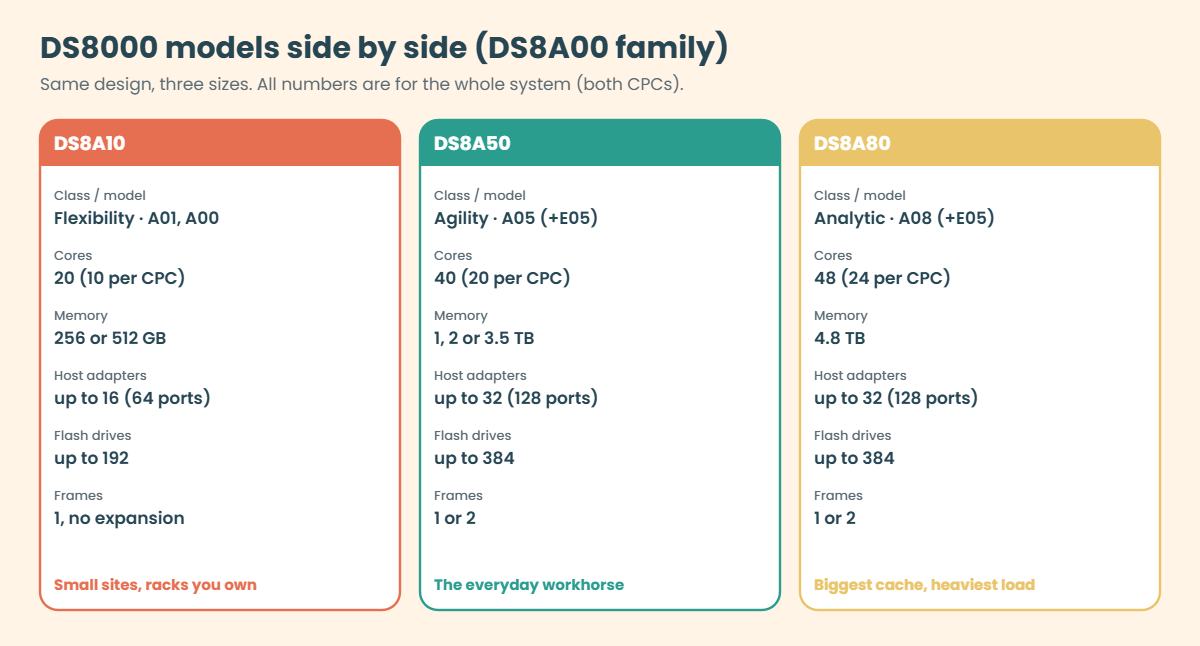
The three DS8A00 models in numbers

The current DS8000 models all belong to the DS8000 G10 generation and the DS8A00 family. They share one machine type, 5341, and the model code tells you which one you have:

DS8A10DS8A50DS8A80
ClassFlexibilityAgilityAnalytic
Model codesA01 (racked), A00 (rack-mounted in your own rack)A05, optional E05 expansion frameA08, optional E05 expansion frame
CPC servers2 × Power9+ 9009-22G (S922, 2U)2 × Power9+ 9009-42G (S924, 4U)2 × Power9+ 9009-42G (S924)
Cores (system)20 (10 per CPC)40 (20 per CPC)48 (24 per CPC)
System memory256 or 512 GB1,024, 2,048 or 3,584 GB4,864 GB
NVS16 or 32 GB64 to 192 GB256 GB
Host adapters / ports2–16 / 8–642–32 / 8–1282–32 / 8–128
zHyperLink adapters (max)41012
Flash drives16–192 (up to 4 HPFE Gen3 pairs)16–384 (up to 8 pairs)16–384 (up to 8 pairs)
Max raw capacity3,686.4 TB7,372.8 TB7,372.8 TB

A few rules sit behind that table. Each host adapter has 4 ports at 32 Gbps, and each port can be FCP or FICON. The base frame holds at most 16 host adapters (64 ports), so the DS8A50 and DS8A80 need the E05 expansion frame to reach 32 adapters and 128 ports, and the DS8A10 can’t take an expansion frame at all.

NVS, the protected copy of new writes, is normally 1/16 of system memory (1,024 GB gives 64 GB), but the edges behave differently: the smallest 256 GB system uses only 16 GB, the biggest DS8A50 tops out at 192 GB and the 4.8 TB DS8A80 stays at 256 GB. Maximum raw capacity is counted with 19.2 TB FlashCore Modules before compression: 384 × 19.2 TB = 7,372.8 TB.

You can upgrade memory and cores inside a model while the system runs, for example a DS8A50 from 512 GB to 1,024 GB or 1,792 GB per server. What you can’t do is turn a 20-core DS8A10 into a DS8A50 by adding a card, because the model sets the ceiling and the hardware you can install depends on the cores and memory you bought.

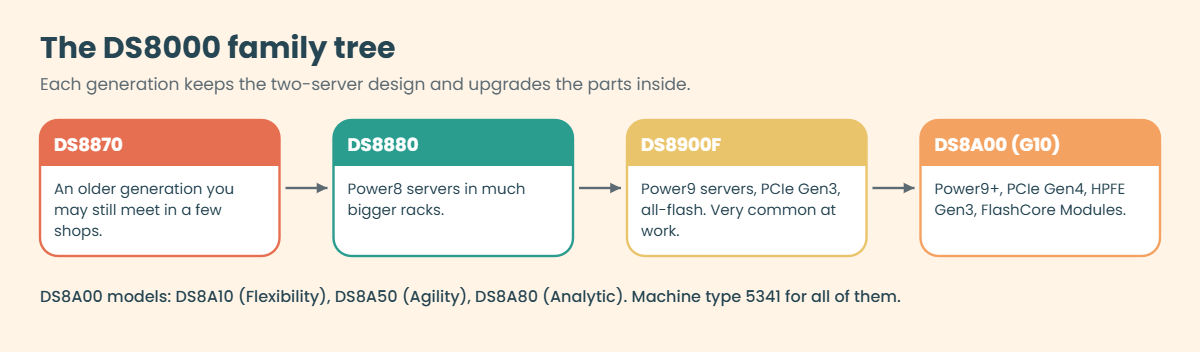
On DS8900F (the previous family, still common at work) you get the same two-server idea with Power9 servers and PCIe Gen3. DS8A00 racks are a little smaller than a DS8900F and much smaller than the older DS8880, which used Power8 servers.

How it works, step by step

Picking a model has nothing to do with the logo. It’s a short chain of questions where each answer narrows the choice, and below is how a storage architect walks through it and then confirms the result on a running box.

1Count what must plug in

Start with connections rather than capacity. List every server, every mainframe channel and every replication link that needs a host port, allow at least two ports per open-systems host (one per fabric), and remember that Metro Mirror and Global Copy links use FCP ports too.

Then divide by 4, since every host adapter has 4 ports. If you need more than 64 ports the DS8A10 is out, and on a DS8A50 or DS8A80 anything over 64 ports also means the E05 expansion frame.

2Check the mainframe needs

If IBM Z is involved, look at FICON ports and zHyperLink. zHyperLink is a short point-to-point cable (up to 150 m) from the mainframe straight into an I/O enclosure, used for very fast reads and small writes, and the DS8A10 takes at most 4 zHyperLink adapters, the DS8A50 10 and the DS8A80 12.

DS8000 models compared: DS8A10, DS8A50 and DS8A80 cores, memory, host adapters and drives

3Size the cache and the cores for the workload

More cores and memory mean more I/O work per second and more cache hits. The DS8A80, with 48 cores, 4.8 TB of memory and 256 GB of NVS, is there for the heaviest analytic and transaction loads, while most enterprise shops end up on a DS8A50 with 1 to 3.5 TB because it can grow memory without an outage.

Capacity comes last. Drives come in sets of 16 and each HPFE Gen3 pair takes 16, 32 or 48 of them; the DS8A10 holds up to 4 pairs (192 drives) and the bigger two up to 8 pairs (384 drives).

4Think about the rack and the floor

The DS8A10 A00 goes into a rack you already own, while the A01 and every DS8A50 and DS8A80 come in IBM’s own 42U rack. An E05 expansion frame normally sits next to the base frame on copper PCIe cables (up to 2 m), or up to 20 m away on optical PCIe cables if the floor is crowded.

5Confirm what you really have

At a new site, don’t trust the purchase order or the label on the door; log in and ask the box. lssi shows the model code (A05, A08, A01 or A00), lspnode shows the cores and memory of each CPC, and lshacard and lsioenclosure show the host adapters and how many I/O enclosure slots are already in use.

DS8000 family tree from DS8870 and DS8880 to DS8900F and DS8A00 G10

The family tree, quickly: the DS8870 and DS8880 came first, and the DS8880 used Power8 servers. The DS8900F moved to Power9 and all-flash, and then the DS8A00 (G10) moved to Power9+ with PCIe Gen4 inside, which typically doubles the throughput of each internal link; IBM says up to 60% more IOPS than Power8 in transaction workloads.

The core design never changed: two servers, mirrored write cache and pairs of everything, which is why what you learned on a DS8880 still helps on a DS8A50. Commands like lssi, lsfbvol and mkhostconnect look the same across generations, and it’s mostly the hardware list commands that got new names on G10.

About IDs: the machine type is 5341, but the DS CLI storage image ID still starts with IBM.2107, for example IBM.2107-78SV001. You’ll only see 5341 in fields like MTS in showsi. Mixing the two up is a classic first-week error, and you’ll make it on purpose in the break lab.

Hands-on lab: find out which DS8000 model you have

Before you run any command, double-check it

Read every command twice before you press Enter. Check the target: the system or account, the IDs, the names and the sizes. These commands are for learning and were tested in our lab, not on your system. At work, run the read-only list commands first, follow your change process, make sure a backup exists, and ask a second person to check anything that changes or deletes data. You run them at your own risk.

You’re the new engineer at a telecom company. Your manager says “we have a DS8A50, right?” and wants proof before a project of 96 host ports is signed off, so you check the box in the practice shell and then run a small model checker in Python.

Practice shell note: the practice shell is our teaching tool, not IBM software. Real DS CLI output is similar but not identical, the hardware names, serial numbers and location codes are made up for the lab, and lines starting with SIM are practice shell messages.

1Start clean and log in

Open PowerShell in C:\ds8k-lab (or Terminal in ~/ds8k-lab), start the shell with python ds8sim.py, log in with the password you set in Lesson 1 and then reset the lab system.

Run this:

simctl reset

You should see this:

SIM0100I simctl: factory state restored (users and passwords kept; use simctl reset -all to reset them too).

✅ Checkpoint: You are at the dscli> prompt with a clean lab system.

2Read the model code

Run this:

lssi

You should see this:

Date/Time: 24 October 2026 10:45:18 UTC IBM DSCLI Version: 7.10.10.348 DS: IBM.2107-78SV001
Name         ID               Storage Unit     Model WWNN             State  ESSNet
====================================================================================
ds8k-g10-lab IBM.2107-78SV001 IBM.2107-78SV000 A05   5005076303FFF0DD Online Enabled

The Model column says A05, and the Engineer’s View table tells you A05 is a DS8A50. A DS8A80 would show A08, and a DS8A10 would show A01 or A00.

✅ Checkpoint: You can say “model A05, so this is a DS8A50” without looking it up.

3See the machine type and memory

Run this:

showsi IBM.2107-78SV001

You should see this (output shortened):

Date/Time: 24 October 2026 10:45:18 UTC IBM DSCLI Version: 7.10.10.348 DS: IBM.2107-78SV001
Name             ds8k-g10-lab
desc             SaatVedha practice DS8A50
ID               IBM.2107-78SV001
Storage Unit     IBM.2107-78SV000
Model            A05
WWNN             5005076303FFF0DD
...
NVS Memory       64.0 GB
Cache Memory     832.0 GB
Processor Memory 1015.6 GB
MTS              IBM.5341-78SV000
...

Notice two things here. MTS shows machine type 5341, while the ID you type in commands starts with IBM.2107, and NVS Memory is 64 GB, which is 1/16 of a 1,024 GB system.

✅ Checkpoint: You found 5341 in the MTS line and NVS = 64 GB.

4Count cores and memory per CPC

Run this:

lspnode

You should see this:

Date/Time: 24 October 2026 10:45:18 UTC IBM DSCLI Version: 7.10.10.348 DS: IBM.2107-78SV001
ID State  Release Processor       Memory   Location
==============================================================
00 Online R10.1   Power9+ 20-core 512.0 GB U9009.42A.78SV00-P1
01 Online R10.1   Power9+ 20-core 512.0 GB U9009.42A.78SV01-P1

Each line is one CPC (processor node) with 20 cores and 512 GB, so the whole system has 40 cores and 1,024 GB, which matches the smallest DS8A50 memory option.

Remember: lspnode shows numbers per CPC.

✅ Checkpoint: You worked out 40 cores and 1,024 GB for the whole system.

5Count the host adapters you already have

Run this:

lsioenclosure
lshacard

You should see this:

Date/Time: 24 October 2026 10:45:18 UTC IBM DSCLI Version: 7.10.10.348 DS: IBM.2107-78SV001
ID                 Frame State  Host adapters Device adapters Location code   S/N
========================================================================================
IBM.1400-1B1-78SV0 1     Online 1             2               U1400.1B1.78SV0 YE10SV0001
IBM.1400-1B2-78SV0 1     Online 1             2               U1400.1B2.78SV0 YE10SV0002
IBM.1400-1B3-78SV0 1     Online 2             0               U1400.1B3.78SV0 YE10SV0003
IBM.1400-1B4-78SV0 1     Online 0             0               U1400.1B4.78SV0 YE10SV0004
Date/Time: 24 October 2026 10:45:18 UTC IBM DSCLI Version: 7.10.10.348 DS: IBM.2107-78SV001
ID                           I/O enclosure      Frame State  Type  Speed   Fibre Channel ports
==========================================================================================
IBM.1400-1B1-78SV0/R-1-P1-C1 IBM.1400-1B1-78SV0 1     Online FC-LW 32 Gb/s 4
IBM.1400-1B2-78SV0/R-1-P1-C3 IBM.1400-1B2-78SV0 1     Online FC-SW 32 Gb/s 4
IBM.1400-1B2-78SV0/R-1-P1-C4 IBM.1400-1B2-78SV0 1     Online FC-SW 32 Gb/s 4
IBM.1400-1B3-78SV0/R-1-P1-C5 IBM.1400-1B3-78SV0 1     Online FC-SW 32 Gb/s 4
(lshacard output shortened: Encryption capable, Location code and S/N columns removed)

Four I/O enclosures (two pairs) and four host adapters with 4 ports each give you 16 ports today. Each enclosure has room for 4 host adapters, so this base frame can take 16 adapters and 64 ports, and enclosure 1B4 doesn’t have any yet.

✅ Checkpoint: You counted 4 host adapters and 16 host ports.

Type quit to leave the shell.

6Build the model checker

Now let a script do this check the way storage teams do: it asks the DS8000 through the DS CLI, reads the answers and does the maths. It runs on your laptop in the lab folder, next to ds8sim.py, and not on the DS8000.

A script can’t answer password prompts, so first save your password in a password file. If security.dat is already in your lab folder from an earlier lesson, skip this command (the shell would say the record already exists).

Run this (PowerShell):

python ds8sim.py -hmc1 10.0.0.1 -user admin -passwd YOURPASSWORD managepwfile -action add -name admin -pw YOURPASSWORD -pwfile security.dat

You should see this:

CMUC00206I managepwfile: Record 10.0.0.1/admin successfully added to password file security.dat.

Then save these eight lines as auto.profile in the same folder. With banner: off, header: on and format: delim, every list comes back as one header row plus comma-separated rows, which Python reads easily, and Implementation Lesson 2 covers profiles in full.

auto.profile:

hmc1: 10.0.0.1
username: admin
pwfile: security.dat
devid: IBM.2107-78SV001
banner: off
header: on
format: delim
delim: ,

Now save this as model_check.py (Notepad is fine; choose “All files” so it doesn’t turn into .txt). It runs lssi, lspnode and lshacard through the profile and adds up both CPCs for you.

The shell can’t show you a DS8A10 or a DS8A80, so the script also has a what-if mode, --plan, where you type the cores and memory per CPC yourself. All its model numbers come from IBM’s model tables.

# model_check.py - SaatVedha DS8000 model checker
# Runs on your workstation or jump server, not on the DS8000.
# It talks to the DS8000 only through the DS CLI (auto.profile: banner off, header on, format delim).
# Numbers come from the IBM Redbook SG24-8559-01 (DS8A00, Release 10.1).
# Usage: python model_check.py [host ports you need]                     reads the box
#        python model_check.py --plan <cores per CPC> <GB memory per CPC> [host ports you need]
import csv, re, subprocess, sys
DSCLI = ["python", "ds8sim.py", "-cfg", "auto.profile"]   # at work: ["dscli", "-cfg", "auto.profile"]

def dscli(*args):
    """Run one DS CLI command and return its rows as dictionaries."""
    out = subprocess.run(DSCLI + list(args), capture_output=True, text=True).stdout
    lines = [l for l in out.splitlines() if l and not l.startswith("SaatVedha") and not l.startswith("CMUC")]
    return list(csv.DictReader(lines))

MODELS = [
    # name,    code,        total cores, total memory options (GB), max host adapters, max frames, max drives
    ("DS8A10", "A00 / A01", 20, [256, 512],         16, 1, 192),
    ("DS8A50", "A05",       40, [1024, 2048, 3584], 32, 2, 384),
    ("DS8A80", "A08",       48, [4864],             32, 2, 384),
]
PORTS_PER_HA = 4

# NVS (protected write cache) per system memory size, from the Redbook model tables.
# Usually 1/16 of memory; the smallest and the two largest sizes are exceptions.
NVS = {256: 16, 512: 32, 1024: 64, 2048: 128, 3584: 192, 4864: 256}

def report(cores, mem, need, have=None):
    for name, code, c, mems, ha_max, frames, drives in MODELS:
        if c == cores and mem in mems:
            print(f"Model          : {name} (model {code})")
            print(f"Cores (2 CPCs) : {cores}")
            print(f"System memory  : {mem} GB")
            print(f"NVS            : {NVS[mem]} GB")
            if have:
                print(f"Host ports now : {have[1]} on {have[0]} adapters (lshacard)")
            print(f"Max host ports : {ha_max * PORTS_PER_HA} ({ha_max} adapters x {PORTS_PER_HA} ports)")
            if frames == 2:
                print(f"  base frame   : {16 * PORTS_PER_HA} (16 adapters); the rest needs the E05 expansion frame")
            print(f"Max flash      : {drives} drives, {frames} frame(s)")
            if need:
                if need <= ha_max * PORTS_PER_HA:
                    print(f"Ports needed   : {need} -> fits")
                else:
                    print(f"Ports needed   : {need} -> does NOT fit. Look at a bigger model.")
            return code
    print(f"No DS8A00 model has {cores} cores with {mem} GB memory.")
    print("Check: lspnode shows cores and memory PER CPC. Type those numbers, not the totals.")

if len(sys.argv) > 1 and sys.argv[1] == "--plan":
    # What-if mode for a model you don't have: you type the numbers PER CPC.
    if len(sys.argv) < 4:
        print("Usage: python model_check.py --plan <cores per CPC> <GB memory per CPC> [host ports you need]")
        sys.exit(1)
    cores = int(sys.argv[2]) * 2
    mem = int(float(sys.argv[3]) * 2)
    need = int(sys.argv[4]) if len(sys.argv) > 4 else 0
    report(cores, mem, need)
    sys.exit(0)

# Normal mode: read the real box. lspnode gives one row per CPC, so add both rows up.
need = int(sys.argv[1]) if len(sys.argv) > 1 else 0
nodes = dscli("lspnode")
if not nodes:
    print("No answer from the DS CLI. Check auto.profile and the password file.")
    sys.exit(2)
si = dscli("lssi")[0]
cards = dscli("lshacard")
cores = sum(int(re.search(r"(\d+)-core", n["Processor"]).group(1)) for n in nodes)
mem = int(sum(float(n["Memory"].split()[0]) for n in nodes))
print(f"Storage image  : {si['ID']}, model code {si['Model']}, {len(nodes)} CPCs (lssi, lspnode)")
ports = sum(int(c["Fibre Channel ports"]) for c in cards)
code = report(cores, mem, need, have=(len(cards), ports))
if code and si["Model"] not in code:
    print(f"WARNING        : lssi says model {si['Model']}, but cores and memory match {code}. Ask IBM.")

✅ Checkpoint: model_check.py, auto.profile and security.dat sit next to ds8sim.py.

7Check the 96-port project

Give it only the 96 ports the project needs; it reads the cores, memory and adapters from the box itself.

Run this (PowerShell):

python model_check.py 96

You should see this:

Storage image  : IBM.2107-78SV001, model code A05, 2 CPCs (lssi, lspnode)
Model          : DS8A50 (model A05)
Cores (2 CPCs) : 40
System memory  : 1024 GB
NVS            : 64 GB
Host ports now : 16 on 4 adapters (lshacard)
Max host ports : 128 (32 adapters x 4 ports)
  base frame   : 64 (16 adapters); the rest needs the E05 expansion frame
Max flash      : 384 drives, 2 frame(s)
Ports needed   : 96 -> fits

So you get good news and a warning together. A DS8A50 can carry 96 ports, but the base frame stops at 64, and the other 32 ports need 8 more host adapters in an E05 expansion frame with its own I/O enclosures, power and floor space. That means a purchase and a floor plan, not a quick card swap.

At work the same script runs from a jump server with dscli in place of ds8sim.py and one profile per DS8000, so a single command gives you the model and port count of every box you look after.

✅ Checkpoint: You can explain why 96 ports on this box means an expansion frame.
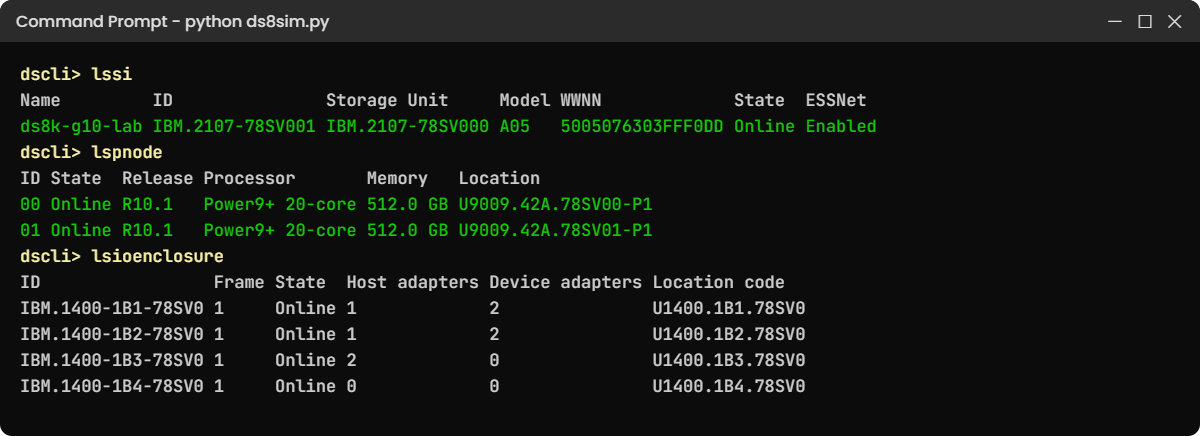
Practice shell output of lssi, lspnode and lsioenclosure on the lab DS8A50
The lab DS8A50 in the practice shell: model A05, two 20-core CPCs, four I/O enclosures.

Break It, Then Fix It

Here are two mistakes nearly every new DS8000 engineer makes in the first week. Make them now, on purpose, while they cost nothing.

1Break it: use the machine type as the storage image ID

The order papers say “5341-A05”, so it feels natural to type that into a command. Start the shell again and try it.

Run this:

lspnode -dev IBM.5341-78SV000

You’ll get this error:

dscli> lspnode -dev IBM.5341-78SV000
CMUN00016E lspnode: IBM.5341-78SV000: The storage image ID is not valid or is not managed by this management console.

Why: the machine type (5341) is for ordering, warranty and service. The DS CLI addresses the storage image, whose ID still uses the 2107 format with a serial ending in 1, and the value from the MTS line ends in 0, which is the storage unit rather than the image.

This wording comes from the practice shell. A real DS8000 rejects the ID too, though its message may read differently.

Fix: take the ID from lssi and use it as is.

Run this:

lssi
lspnode -dev IBM.2107-78SV001

You should see this:

dscli> lssi
Date/Time: 24 October 2026 10:45:18 UTC IBM DSCLI Version: 7.10.10.348 DS: IBM.2107-78SV001
Name         ID               Storage Unit     Model WWNN             State  ESSNet
====================================================================================
ds8k-g10-lab IBM.2107-78SV001 IBM.2107-78SV000 A05   5005076303FFF0DD Online Enabled
dscli> lspnode -dev IBM.2107-78SV001
Date/Time: 24 October 2026 10:45:18 UTC IBM DSCLI Version: 7.10.10.348 DS: IBM.2107-78SV001
ID State  Release Processor       Memory   Location
==============================================================
00 Online R10.1   Power9+ 20-core 512.0 GB U9009.42A.78SV00-P1
01 Online R10.1   Power9+ 20-core 512.0 GB U9009.42A.78SV01-P1

Put that ID in your DS CLI profile as devid and you’ll rarely need -dev again (profiles are set up in the Implementation course).

✅ Checkpoint: lspnode -dev IBM.2107-78SV001 lists both CPCs.

2Break it: type the totals and size the wrong model

Next comes the planning mistake. One colleague reads “40 cores, 1 TB” off a sales slide and types the totals, and another wants to save money and checks the 96-port project on the smallest DS8A10 (10 cores and 128 GB per CPC).

There’s no DS8A10 in the lab to read, so both of them use the what-if mode, --plan, and type the numbers in by hand. Run both.

Run this (PowerShell, in C:\ds8k-lab):

python model_check.py --plan 40 1024
python model_check.py --plan 10 128 96

You’ll get this:

No DS8A00 model has 80 cores with 2048 GB memory.
Check: lspnode shows cores and memory PER CPC. Type those numbers, not the totals.
Model          : DS8A10 (model A00 / A01)
Cores (2 CPCs) : 20
System memory  : 256 GB
NVS            : 16 GB
Max host ports : 64 (16 adapters x 4 ports)
Max flash      : 192 drives, 1 frame(s)
Ports needed   : 96 -> does NOT fit. Look at a bigger model.
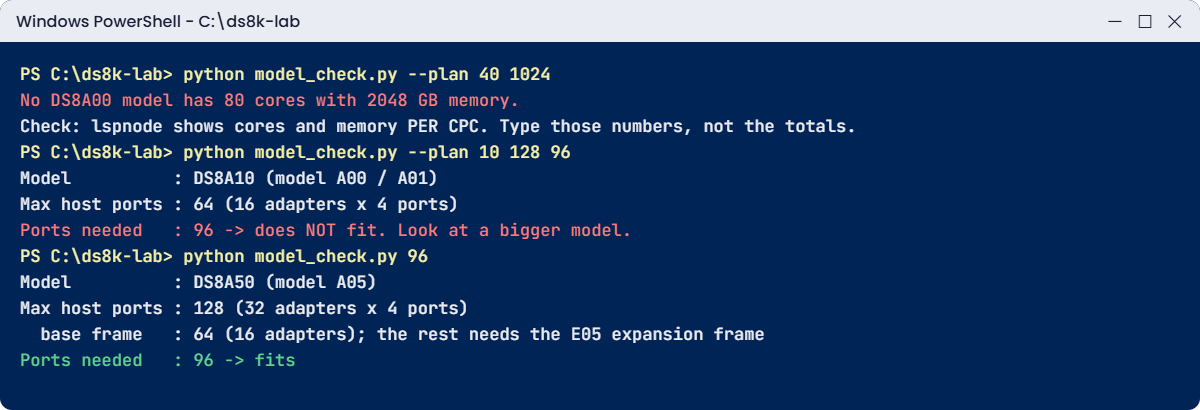
Model checker errors: DS8A10 out of host ports and totals typed instead of per-CPC values
Both planning mistakes and the fixed run in PowerShell.

Why: the first error doubles everything, because a DS8000 always has two CPCs and lspnode reports each one, and no real model has 80 cores. The second error is the expensive one: a DS8A10 tops out at 16 host adapters, 64 ports, with no expansion frame, and no upgrade inside the model gets you past that.

Fix: type the per-CPC numbers and size for the port count you need, not the price you hoped for. Better still, let the script read the box, because without --plan it takes cores and memory from lspnode itself and the first mistake can’t happen.

Run this:

python model_check.py 96

You should see the last line:

Ports needed   : 96 -> fits

✅ Checkpoint: You can name the smallest model that carries 96 host ports (DS8A50, with an E05 frame).

This happened at work

The telco that ran out of slots

A mobile operator bought a DS8000 for its billing and customer-care systems. The project team compared quotes and went with a DS8A10, which was cheaper and on day one had more than enough flash for the databases.

Eighteen months later the company launched a 5G service, and with it came two new VMware clusters, a new analytics platform and a second Metro Mirror link to the disaster-recovery site, so the storage team asked for 24 more host ports.

The order came straight back. The DS8A10 already had 14 of its 16 host adapter slots full, two more adapters would only give 8 ports, and the model has no expansion frame.

For a quarter the analytics platform ran on shared ports that were already busy, and night batch jobs took 40 minutes longer. The 5G launch date only held because the team moved two old test clusters off the array in a weekend change.

When they looked back, the hardware wasn’t the real cause. Nobody had written down a port forecast, the sizing had been done on capacity alone, and capacity was never the problem.

What fixed it was a DS8A50 the following year and a data migration that took three months. Since then every storage request at that company starts with one line, “ports today, ports in three years”, because a DS8000 model choice is a ceiling and you check ports, zHyperLink and frames before you check terabytes.

Common mistakes and troubleshooting

SymptomLikely causeWhat to check / fix
New host adapters can’t be orderedModel ceiling reached (DS8A10: 16 adapters, no expansion frame)Run lshacard and count, and plan ports for 3 to 5 years before you pick a model.
Expansion frame quote is rejectedDS8A10 doesn’t support E05Only DS8A50 (A05) and DS8A80 (A08) take one E05 frame.
Command fails with an “ID not valid” errorMachine type 5341 used in place of the IBM.2107 storage image IDCopy the ID from lssi; 5341 only shows up in fields like MTS.
Sizing sheet shows 80 coresPer-CPC numbers doubled twicelspnode is per CPC, so multiply by two once.
Team expects a big NVS jump after a memory upgrade on the biggest systemAssuming NVS is always 1/16NVS is 1/16 for most sizes, but 16 GB on 256 GB systems and capped at 256 GB on the DS8A80.
Mainframe team wants more zHyperLink than the box allowsModel limit (4, 10 or 12 adapters)Check the zHyperLink max for the model and the number of I/O enclosures before you promise.
DS8A10 A00 arrives and doesn’t fitRack-mount model needs your own EIA-310-D rack spacePlan rack units, power and cooling in your rack before delivery.

The habit that helps most is a one-page “box card” for every DS8000 you look after, with the model code, cores per CPC, memory, host adapters used and free, frames and code level, filled in from lssi, lspnode and lshacard. Then when someone asks “can we add X?”, you can answer in minutes instead of days.

Interview questions

Click a question to open it. Each is worded the way an interviewer would ask it, and underneath you’ll find why they ask it and one way you could answer in your own words.

Fresher level

1. Can you name the current DS8000 models and tell me how they differ?

Why they ask this: They want to know you understand the product family you’ll be supporting and not only the brand name, and a short, clear answer shows you did your homework.

How you might answer: There are three DS8A00 models in the G10 generation, all machine type 5341. The DS8A10 has 20 cores and up to 512 GB, the DS8A50 has 40 cores and up to 3.5 TB, and the DS8A80 has 48 cores and 4.8 TB. The bigger two can add one E05 expansion frame and go to 32 host adapters and 384 drives, while the DS8A10 stays at one frame, 16 adapters and 192 drives.

2. You log in to a DS8000 you have never seen. How do you find out which model it is?

Why they ask this: They’re checking whether you verify facts on the system itself, because interviewers like people who check before they act.

How you might answer: I’d run lssi and read the Model column: A05 is a DS8A50, A08 a DS8A80, and A01 or A00 a DS8A10. Then lspnode gives me the cores and memory per CPC, and lshacard shows how many host adapters are installed.

2–5 years experience

3. A project needs 96 host ports. Which DS8000 models can do it, and what else does it need?

Why they ask this: They want to see you turn a requirement into hardware limits, which is everyday work for a storage engineer on a project.

How you might answer: Each host adapter has 4 ports, so 96 ports means 24 adapters, and the DS8A10 stops at 16 adapters, 64 ports, so it’s out. A DS8A50 or DS8A80 can do it, but the base frame only holds 16 adapters and the other 8 need an E05 expansion frame, so I’d add floor space, power and the PCIe cable set to the plan.

4. What is the difference between the machine type 5341 and the IBM.2107 ID you see in DS CLI?

Why they ask this: It shows whether you’ve used the DS CLI hands-on. People who’ve only read brochures often mix the two up.

How you might answer: 5341 is the machine type, used for ordering, warranty and service, and you see it in the MTS field of showsi. The DS CLI addresses the storage image, whose ID looks like IBM.2107-78SV001. If I pass the 5341 value to -dev the command fails, so I always copy the ID from lssi.

Senior level

5. Your CIO asks: DS8A50 or DS8A80 for a new core banking platform? How do you decide?

Why they ask this: At a senior level you have to justify a big spend with data, so they want a method that ties workload, growth and risk to the model.

How you might answer: I’d start with workload data: IOPS, read/write mix, cache hit ratio and five years of growth, plus FICON and zHyperLink needs if IBM Z is involved. If a DS8A50 with 3.5 TB of memory covers the peak with headroom, it’s the cheaper choice and it can grow memory without an outage. I’d go for the DS8A80 when cache and core demand go beyond that, or when the mainframe needs up to 12 zHyperLink adapters. Either way I’d model it with IBM’s sizing tools before ordering, and plan ports as well as capacity.

6. An application team says a DS8000 memory upgrade will double their write cache. Is that right?

Why they ask this: They’re testing whether you understand NVS and its limits rather than repeating marketing numbers, and how carefully you check a claim before a change.

How you might answer: Partly. NVS is usually 1/16 of system memory, so on a DS8A50 going from 1,024 GB to 2,048 GB takes NVS from 64 GB to 128 GB, but it isn’t always linear: the smallest 256 GB system uses 16 GB and the DS8A80 stays at 256 GB. I’d also tell them more cache only helps if the workload is cache-friendly, so I’d look at the performance data first.

Quick quiz

Q1. Which model code belongs to the DS8A50?

  1. A01
  2. A05
  3. A08
  4. E05
Show answer

B — The DS8A50 is model A05. A08 is the DS8A80, A01 and A00 are the DS8A10, and E05 is the expansion frame.

Q2. How many host ports can a DS8A10 have at most?

  1. 32
  2. 64
  3. 96
  4. 128
Show answer

B — The DS8A10 takes up to 16 host adapters with 4 ports each, so 64 ports, and it has no expansion frame.

Q3. lspnode shows two lines, each with 24 cores and 2,432 GB. Which model is it?

  1. DS8A10
  2. DS8A50
  3. DS8A80
  4. DS8900F
Show answer

C — 48 cores and 4,864 GB of system memory is the DS8A80 (model A08).

Q4. Where do you find the machine type 5341 in DS CLI?

  1. In the ID column of lssi
  2. In the MTS line of showsi
  3. In the Location column of lspnode
  4. You type it after -dev
Show answer

B — The MTS line of showsi shows IBM.5341-… . Commands use the IBM.2107 storage image ID instead.

Q5. What do you need to give a DS8A50 more than 16 host adapters?

  1. A memory upgrade
  2. An E05 expansion frame
  3. A second HMC
  4. RAID 10 arrays
Show answer

B — The base frame holds 16 host adapters. The E05 expansion frame adds I/O enclosures for up to 16 more.

Quick recap

  • The DS8A00 (G10) family has three DS8000 models: DS8A10 (Flexibility), DS8A50 (Agility) and DS8A80 (Analytic), all machine type 5341.
  • Model codes: A01 and A00 for the DS8A10, A05 for the DS8A50, A08 for the DS8A80, E05 for the expansion frame.
  • Cores and memory set the ceiling: 20 cores and up to 512 GB, 40 cores and up to 3.5 TB, 48 cores and 4.8 TB.
  • Each host adapter has 4 ports and the base frame holds 16 adapters; only the DS8A50 and DS8A80 can add an E05 frame for 16 more.
  • lssi gives the model code, lspnode gives cores and memory per CPC, lshacard and lsioenclosure show the slots in use.
  • Size a DS8000 on ports and growth first and on capacity second.

Next lesson

Lesson 3: Inside the frame: the main hardware parts → You open the frame and meet every part, from the HMCs at the bottom to the flash enclosures at the top.

Further reading: DS8000 models

To go deeper into DS8000 models, IBM Storage DS8A00 Architecture and Implementation Guide (IBM Redbooks) has the full model tables in chapter 2. If you missed the setup, go back to Lesson 1: What an IBM DS8000 is and install the DS8000 practice shell.

You can also see the full plan for this course on the IBM DS8000 Architecture course page.

Scroll to Top

This website uses cookies

We use a few cookies to keep this site working. If you allow it, we also use Google Analytics to count visits so we can improve our lessons. You can accept all, deny the optional ones, or choose what to allow.