
Before you run any command, double-check it
Read every command twice before you press Enter. Check the target: the system or account, the IDs, the names and the sizes. These commands are for learning and were tested in our lab, not on your system. At work, run the read-only list commands first, follow your change process, make sure a backup exists, and ask a second person to check anything that changes or deletes data. You run them at your own risk.
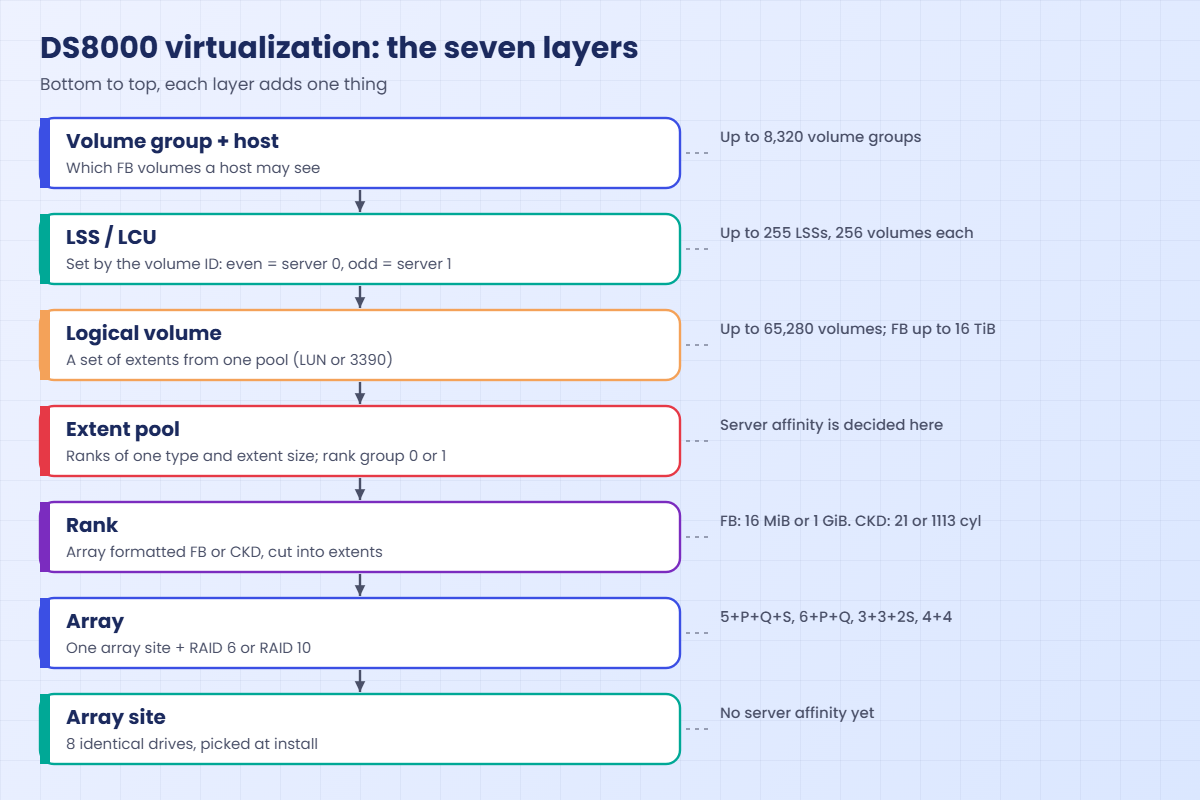
In the lab you’ll build the whole ladder once: one array site → one RAID 6 array → one rank → one extent pool → two volumes → one host that can see them. Open PowerShell, go to your lab folder and log in to the practice shell the same way as in Lesson 1 (cd C:\ds8k-lab, then python ds8sim.py). If it isn’t installed yet, you can get it from the DS8000 practice shell page.
Practice shell note: the practice shell is our own teaching tool, not IBM software. Real DS CLI output looks very close to this but isn’t identical. Messages starting with SIM, plus a few CMU messages listed on the practice shell page (in this lesson, CMUN02805E and CMUN02030E in the break lab), come from the practice shell. The boxes below show what the shell printed for us, and only the date and time will be different for you.
1Start clean and pick an array site
Every lab starts from the factory state. After the reset, look only at the FlashTier2 array sites, because those are the ones you’ll use today.
Type these at the dscli> prompt:
simctl reset
lsarraysite -l -diskclass FlashTier2
You should see this:
dscli> simctl reset
SIM0100I simctl: factory state restored (users and passwords kept; use simctl reset -all to reset them too).
dscli> lsarraysite -l -diskclass FlashTier2
Date/Time: 24 October 2026 10:41:07 UTC IBM DSCLI Version: 7.10.10.348 DS: IBM.2107-78SV001
arsite DA Pair dkcap (10^9B) diskrpm State      Array diskclass  encrypt
==========================================================================
S7     2       3840.0        65000   Unassigned -     FlashTier2 supported
S8     2       3840.0        65000   Unassigned -     FlashTier2 supported
simctl is a practice shell command, not part of DS CLI. In the table, S7 and S8 are two array sites of 8 drives each, dkcap 3840.0 means 3.84 TB drives (decimal, 10^9 bytes), and DA Pair 2 is the flash RAID adapter pair that drives them.
State Unassigned and Array - tell you no RAID has been built yet. This is layer 1, which is all you get out of the box.
✅ Checkpoint: Both FlashTier2 array sites show State Unassigned.
2Turn an array site into a RAID 6 array
Type these at the dscli> prompt:
mkarray -raidtype 6 -arsite S7
lsarray -l
You should see this:
dscli> mkarray -raidtype 6 -arsite S7
CMUC00004I mkarray: Array A0 successfully created.
dscli> lsarray -l
Date/Time: 24 October 2026 10:41:07 UTC IBM DSCLI Version: 7.10.10.348 DS: IBM.2107-78SV001
Array State      Data   RAIDtype    arsite Rank DA Pair DDMcap (10^9B) diskclass  encrypt
===========================================================================================
A0    Unassigned Normal 6 (5+P+Q+S) S7     -    2       3840.0         FlashTier2 supported
A0 is your first array, built from S7. Its RAIDtype 6 (5+P+Q+S) shows the system kept one drive of this site as a spare, since spares come from the first array sites in each enclosure pair. Rank - and State Unassigned mean the array hasn’t been formatted yet.
✅ Checkpoint: A0 exists with RAIDtype 6 (5+P+Q+S).
3Format the array as an FB rank
This lab DS8000 encrypts data at rest, which means every rank has to name the encryption key group, so check its number first.
Type these at the dscli> prompt:
lskeygrp
mkrank -array A0 -keygrp 1 -stgtype fb
lsrank -l
You should see this:
dscli> lskeygrp
Date/Time: 24 October 2026 10:41:07 UTC IBM DSCLI Version: 7.10.10.348 DS: IBM.2107-78SV001
ID state      reckeystate reckeydate datakeydate keyprotocol type name
=======================================================================
1  accessible disabled    -          10/01/2026  LOCAL       DAR  DAR_1
dscli> mkrank -array A0 -keygrp 1 -stgtype fb
CMUC00007I mkrank: Rank R0 successfully created.
dscli> lsrank -l
Date/Time: 24 October 2026 10:41:07 UTC IBM DSCLI Version: 7.10.10.348 DS: IBM.2107-78SV001
ID Group State      datastate Array RAIDtype extpoolID extpoolnam stgtype exts    usedexts keygrp marray extsize totalLogicalCap(MiB/cyl) usedLogicalCap(MiB/cyl) totalPhysicalCap(MiB/cyl) usedPhysicalCap(MiB/cyl) compressionRatio compressionType
=====================================================================================================================================================================================================================================================
R0 -     Unassigned Normal    A0    6        -         -          fb      1132965 0        1      MA1    16MiB   18127440                 0                       18127441                  0                        1.00             none
Take a moment over the long line. R0 sits on array A0, its stgtype is fb and its extsize is 16MiB, the default small extent. exts 1132965 is the number of 16 MiB slices in the rank, and usedexts 0 tells you none of them are in use yet.
Now look at Group - and extpoolID -: the rank has no server yet. This is the Redbook rule at work, where server affinity comes from the pool and not from the rank.
✅ Checkpoint: R0 shows extsize 16MiB, Group – and State Unassigned.
4Create a pool for server 0 and give it the rank
Type these at the dscli> prompt:
mkextpool -rankgrp 0 -keygrp 1 -stgtype fb lab_fb_0
chrank -extpool P0 R0
lsextpool
You should see this:
dscli> mkextpool -rankgrp 0 -keygrp 1 -stgtype fb lab_fb_0
CMUC00000I mkextpool: Extent pool P0 successfully created.
dscli> chrank -extpool P0 R0
CMUC00008I chrank: Rank R0 successfully modified.
dscli> lsextpool
Date/Time: 24 October 2026 10:41:07 UTC IBM DSCLI Version: 7.10.10.348 DS: IBM.2107-78SV001
Name     ID stgtype rankgrp status availstor (2^30B) %allocated available reserved numvols
==========================================================================================
lab_fb_0 P0 fb      0       below  17701             0          1132901   64       0
The pool got ID P0 and rankgrp 0, so server 0 now manages R0. availstor 17701 is roughly 17.3 TiB you can hand out, and available 1132901 is the free extent count, 64 fewer than the rank because the shell holds back a small reserve per rank (you’ll see it under reserved).
status below means the pool is under its warning threshold, which is where you want it.
✅ Checkpoint: lsextpool shows P0 with rankgrp 0 and about 17,701 GiB available.
5Carve two volumes and look at their LSS
Type these at the dscli> prompt:
mkfbvol -extpool P0 -cap 100 -name app_#h 2000-2001
lsfbvol
lslss
You should see this:
dscli> mkfbvol -extpool P0 -cap 100 -name app_#h 2000-2001
CMUC00025I mkfbvol: FB volume 2000 successfully created.
CMUC00025I mkfbvol: FB volume 2001 successfully created.
dscli> lsfbvol
Date/Time: 24 October 2026 10:41:07 UTC IBM DSCLI Version: 7.10.10.348 DS: IBM.2107-78SV001
Name     ID   accstate datastate configstate deviceMTM datatype extpool cap (2^30B) cap (10^9B) cap (blocks)
============================================================================================================
app_2000 2000 Online   Normal    Normal      2107-900  FB 512   P0      100.0       -           209715200
app_2001 2001 Online   Normal    Normal      2107-900  FB 512   P0      100.0       -           209715200
dscli> lslss
Date/Time: 24 October 2026 10:41:07 UTC IBM DSCLI Version: 7.10.10.348 DS: IBM.2107-78SV001
ID Group addrgrp stgtype confgvols subsys
=========================================
20 0     2       fb      2         0xFF20
The #h in the name was replaced by each volume’s hex ID, which is how you ended up with app_2000 and app_2001. Each is 100 GiB, or 209,715,200 blocks of 512 bytes, and deviceMTM 2107-900 is the device type the host will report.
You never ran a command to make an LSS, and yet lslss shows LSS 20, because FB LSSs appear on their own with their first volume. Group 0 matches the even number, and addrgrp 2 is the address group (the first digit of the ID).
✅ Checkpoint: lslss shows LSS 20 in Group 0 with 2 volumes.
6Give a host access to the volumes
The Linux server saat_host1 has two HBA ports, and their WWPNs are already logged in to the lab DS8000.
Type these at the dscli> prompt:
mkhost -type "Linux Server" -hostport 10000090FA13B914,10000090FA13B915 saat_host1
chhost -action map -volume 2000-2001 saat_host1
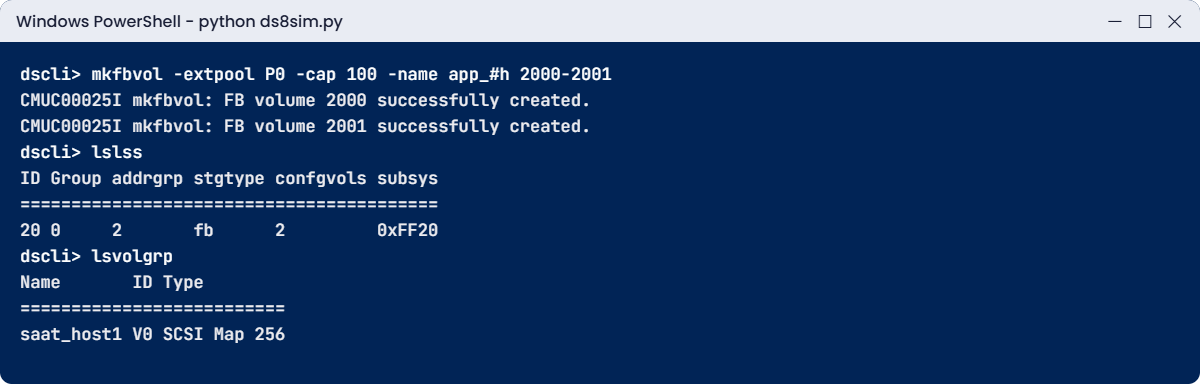
lsvolgrp
showhost saat_host1
You should see this:
dscli> mkhost -type "Linux Server" -hostport 10000090FA13B914,10000090FA13B915 saat_host1
CMUC00530I mkhost: The host saat_host1 is successfully created.
dscli> chhost -action map -volume 2000-2001 saat_host1
CMUC00531I chhost: The host saat_host1 is successfully modified.
dscli> lsvolgrp
Date/Time: 24 October 2026 10:41:07 UTC IBM DSCLI Version: 7.10.10.348 DS: IBM.2107-78SV001
Name       ID Type
==========================
saat_host1 V0 SCSI Map 256
dscli> showhost saat_host1
Date/Time: 24 October 2026 10:41:07 UTC IBM DSCLI Version: 7.10.10.348 DS: IBM.2107-78SV001
Name          saat_host1
Type          Linux Server
State         Online
AddrMode      scsimap256
Volumes       2
Host ports    2
I/O ports     16 (all)
AddrDiscovery lunpolling
LBS           512
Cluster       -
You mapped volumes to a host, and the DS8000 quietly created volume group V0 for it, type SCSI Map 256, which is the hidden top layer. State Online means the host ports are logged in, and AddrDiscovery lunpolling is the way a Linux host finds its LUNs.
I/O ports 16 (all) means the host is allowed to log in through any DS8000 port, and the SAN zoning decides which ones it ends up using. You’ll look at volume groups properly in Lesson 17.
✅ Checkpoint: showhost shows Volumes 2 and State Online.
7Check every layer with a script
So why 1,132,965 extents? Let a script walk the whole ladder for you, the way storage teams check a new box: it asks the DS CLI about each layer and puts the maths next to the real numbers.
Save it on your laptop as C:\ds8k-lab\layers.py, next to ds8sim.py. It runs on the laptop, not on the DS8000.
A script can’t answer password prompts, so you need to save your password in a password file first. If security.dat and auto.profile are already in your lab folder from an earlier lesson, skip this part (the shell would only tell you the record already exists).
Run this (PowerShell, with your own password both times):
python ds8sim.py -hmc1 10.0.0.1 -user admin -passwd YourPassw0rd managepwfile -action add -name admin -pw YourPassw0rd -pwfile security.datYou should see this:
CMUC00206I managepwfile: Record 10.0.0.1/admin successfully added to password file security.dat.Then save these eight lines as auto.profile in the same folder. With banner: off, header: on and format: delim, every list comes back as one header row followed by comma-separated rows, which Python reads easily. Implementation Lesson 2 covers profiles in full.
auto.profile:
hmc1: 10.0.0.1
username: admin
pwfile: security.dat
devid: IBM.2107-78SV001
banner: off
header: on
format: delim
delim: ,
Now save the script. It runs lsarraysite, lsarray, lsrank, lsextpool, lsfbvol and lsvolgrp through the profile, one layer after another.
The script:
# layers.py - walk the DS8000 virtualization ladder: array site -> array -> rank -> pool -> volumes -> volume group
# Runs on your workstation or jump server, not on the DS8000.
# It talks to the DS8000 only through the DS CLI (auto.profile: banner off, header on, format delim).
import csv, re, subprocess
DSCLI = ["python", "ds8sim.py", "-cfg", "auto.profile"]   # at work: ["dscli", "-cfg", "auto.profile"]

def dscli(*args):
    """Run one DS CLI command and return its rows as dictionaries."""
    out = subprocess.run(DSCLI + list(args), capture_output=True, text=True).stdout
    lines = [l for l in out.splitlines() if l and not l.startswith("SaatVedha") and not l.startswith("CMUC")]
    return list(csv.DictReader(lines))

TB, GiB, MiB = 10**12, 2**30, 2**20   # drive makers use decimal TB
DRIVES_PER_SITE = 8                   # every DS8A00 array site has 8 drives

def data_drives(raidtype):            # "6 (5+P+Q+S)" -> 5, "10 (4x2)" -> 4
    m = re.search(r"\((\d+)", raidtype)
    return int(m.group(1))

def show(layer, what, text):
    print(f"{layer} {what:<16}: {text}")

sites = {s["arsite"]: s for s in dscli("lsarraysite", "-l")}
ranks = {r["Array"]: r for r in dscli("lsrank", "-l")}
pools = {p["ID"]: p for p in dscli("lsextpool", "-l")}
vols = dscli("lsfbvol", "-l")

for a in dscli("lsarray", "-l"):
    drive = float(a["DDMcap (10^9B)"]) * 10**9
    raw = DRIVES_PER_SITE * drive
    usable = data_drives(a["RAIDtype"]) * drive
    show(1, f"Array site {a['arsite']}", f"{DRIVES_PER_SITE} x {drive/TB:.2f} TB {sites[a['arsite']]['diskclass']} = {raw/TB:.2f} TB raw")
    show(2, f"Array {a['Array']}", f"RAID {a['RAIDtype']} -> {usable/TB:.2f} TB = {usable/GiB:,.0f} GiB")
    r = ranks.get(a["Array"])
    if not r:
        show(3, "Rank", "none yet")
        continue
    ext = 16 * MiB if r["extsize"] == "16MiB" else GiB
    maths = int(usable // ext)
    exts = int(r["exts"])
    show(3, f"Rank {r['ID']}", f"{exts:,} extents of {r['extsize']} (pure maths {maths:,}, {100*(maths-exts)/maths:.1f}% less)")
    p = pools.get(r["extpoolID"])
    if not p:
        show(4, "Pool", "none yet")
        continue
    avail = int(p["available"])
    show(4, f"Pool {p['ID']} {p['Name']}", f"rank group {p['rankgrp']}, {avail:,} extents available = {int(p['availstor (2^30B)']):,} GiB")
    for v in vols:
        if v["extpool"] == p["ID"]:
            gib = int(v["cap (blocks)"]) * 512 / GiB
            show(5, f"Volume {v['ID']}", f"{v['Name']}, {gib:.0f} GiB = {int(gib*GiB // ext):,} extents")
    print(f"  Room left in {p['ID']} for {avail // int(100*GiB // ext)} more 100 GiB volumes")
groups = dscli("lsvolgrp")
show(6, "Volume groups", ", ".join(f"{g['ID']} {g['Name']} ({g['Type']})" for g in groups) or "none")
Run this in a second PowerShell window in C:\ds8k-lab:
python layers.pyYou should see this:
1 Array site S7   : 8 x 3.84 TB FlashTier2 = 30.72 TB raw
2 Array A0        : RAID 6 (5+P+Q+S) -> 19.20 TB = 17,881 GiB
3 Rank R0         : 1,132,965 extents of 16MiB (pure maths 1,144,409, 1.0% less)
4 Pool P0 lab_fb_0: rank group 0, 1,120,101 extents available = 17,501 GiB
5 Volume 2000     : app_2000, 100 GiB = 6,400 extents
5 Volume 2001     : app_2001, 100 GiB = 6,400 extents
  Room left in P0 for 175 more 100 GiB volumes
6 Volume groups   : V0 saat_host1 (SCSI Map 256)
The raw 30.72 TB shrinks to 19.20 TB after RAID 6 and the spare, since only 5 of the 8 drives hold data. On paper that gives 1,144,409 extents, but the rank has 1,132,965, about 1% less, because the practice shell keeps that 1% back as a stand-in for formatting and metadata.
A real DS8000 also gives up some space to metadata, but its figures come from IBM’s own formulas, so expect a different number on a real box. What you should remember is that each layer costs a bit of capacity, and the host never gets the raw TB.
At work you’d run the same script from a jump server with dscli instead of ds8sim.py, so after each build you can print the full ladder of a box in one go and attach it to the change record.
✅ Checkpoint: Your script prints 6,400 extents for each 100 GiB volume and room for 175 more.
Type quit when you’re done.
Keep the shell open from the lab. You’ll add a second array and then try to put a volume on the wrong server, two mistakes that turn up in real projects, usually because someone skipped a layer.
1Break it: build a rank and forget a layer
Make an array from the second site, then create the rank the way a lot of people type it the first time.
Type these at the dscli> prompt:
mkarray -raidtype 6 -arsite S8
mkrank -array A1 -stgtype fb
You’ll get this error:
dscli> mkarray -raidtype 6 -arsite S8
CMUC00004I mkarray: Array A1 successfully created.
dscli> mkrank -array A1 -stgtype fb
CMUN02805E mkrank: The -keygrp parameter is required because data-at-rest encryption is enabled. Run lskeygrp to see the encryption key group ID.
Why: this lab system has an encryption group, and the Redbook rule is “all or nothing”. Every rank has to belong to that one encryption group, so the rank command needs to be told which one. The wording of this message comes from the practice shell; a real DS8000 refuses too, but may phrase it differently.
The bigger point is about layers. Encryption is decided before the first rank exists, and if a company wants it later, it has to delete the whole logical configuration and rebuild it, then restore the data from backup.
Fix it:
mkrank -array A1 -keygrp 1 -stgtype fb
lsrank
You should see this:
dscli> mkrank -array A1 -keygrp 1 -stgtype fb
CMUC00007I mkrank: Rank R1 successfully created.
dscli> lsrank
Date/Time: 24 October 2026 10:41:07 UTC IBM DSCLI Version: 7.10.10.348 DS: IBM.2107-78SV001
ID Group State      datastate Array RAIDtype extpoolID stgtype
==============================================================
R0 0     Normal     Normal    A0    6        P0        fb
R1 -     Unassigned Normal    A1    6        -         fb
Compare the two rows. R0 is in pool P0, so it shows Group 0 and State Normal, while R1 has no pool and therefore no group and no server yet.
✅ Checkpoint: lsrank shows R1 with Group – and State Unassigned.
2Break it: put an odd LSS volume in a server 0 pool
The web team asks for a 50 GiB disk, and you give it ID 2100 so it lands on server 1, then type the pool you already have.
Type these at the dscli> prompt:
mkfbvol -extpool P0 -cap 50 -name web_#h 2100You’ll get this error:
dscli> mkfbvol -extpool P0 -cap 50 -name web_#h 2100
CMUN02030E mkfbvol: 21: Volumes in an odd LSS must be created in an extent pool of rank group 1. Extent pool P0 belongs to rank group 0.
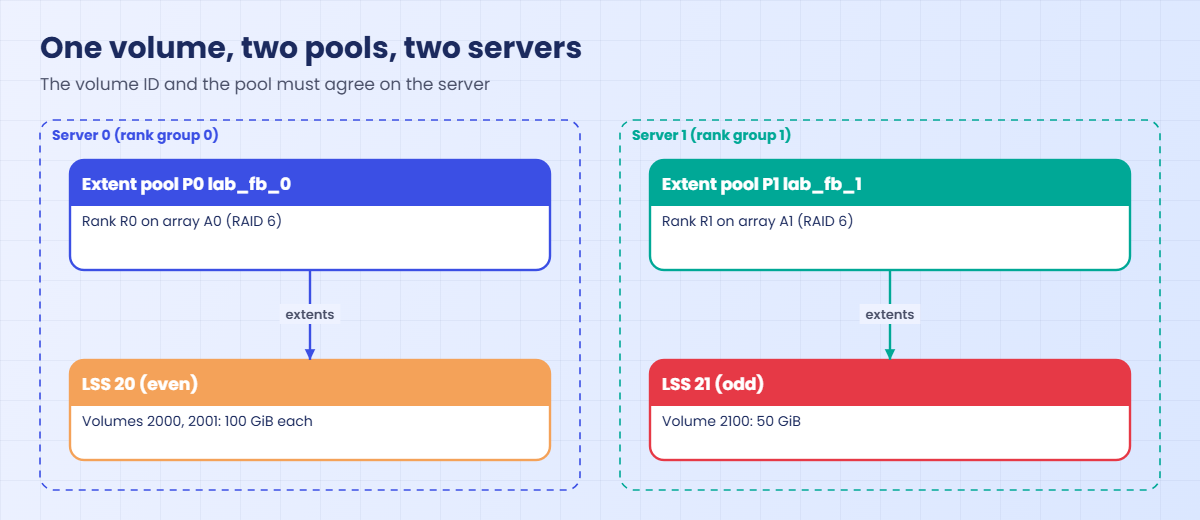
Why: ID 2100 puts the volume in LSS 21, which is odd, so server 1 has to own it, but P0 is a rank group 0 pool owned by server 0. The DS8000 won’t let one server manage a volume whose extents sit in the other server’s pool.
(The message text is from the practice shell.)
People forget this rule more than any other: the volume ID and the pool have to agree on the server.
To fix it, build the server 1 pool, give it R1, and create the volume there:
mkextpool -rankgrp 1 -keygrp 1 -stgtype fb lab_fb_1
chrank -extpool P1 R1
mkfbvol -extpool P1 -cap 50 -name web_#h 2100
lsextpool
lslss
You should see this:
dscli> mkextpool -rankgrp 1 -keygrp 1 -stgtype fb lab_fb_1
CMUC00000I mkextpool: Extent pool P1 successfully created.
dscli> chrank -extpool P1 R1
CMUC00008I chrank: Rank R1 successfully modified.
dscli> mkfbvol -extpool P1 -cap 50 -name web_#h 2100
CMUC00025I mkfbvol: FB volume 2100 successfully created.
dscli> lsextpool
Date/Time: 24 October 2026 10:41:07 UTC IBM DSCLI Version: 7.10.10.348 DS: IBM.2107-78SV001
Name     ID stgtype rankgrp status availstor (2^30B) %allocated available reserved numvols
==========================================================================================
lab_fb_0 P0 fb      0       below  17501             1          1120101   64       2
lab_fb_1 P1 fb      1       below  17651             0          1129701   64       1
dscli> lslss
Date/Time: 24 October 2026 10:41:07 UTC IBM DSCLI Version: 7.10.10.348 DS: IBM.2107-78SV001
ID Group addrgrp stgtype confgvols subsys
=========================================
20 0     2       fb      2         0xFF20
21 1     2       fb      1         0xFF21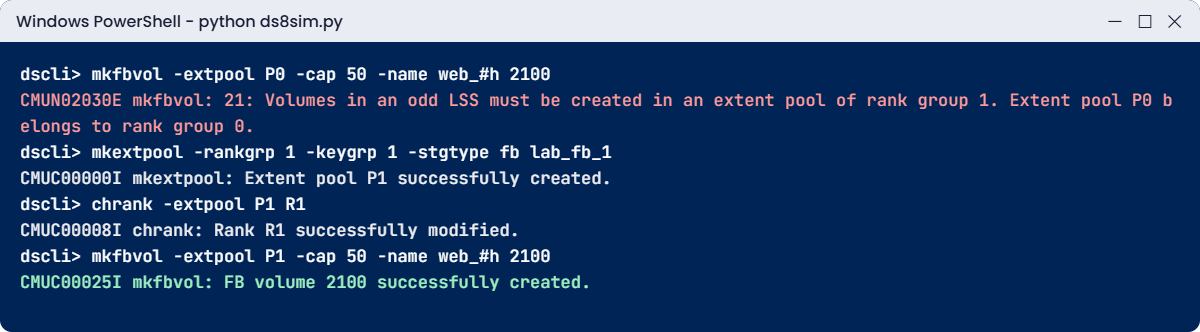
Now you have the shape every real DS8000 should have, a pool pair with one pool per server. LSS 20 (even, Group 0) holds two volumes and LSS 21 (odd, Group 1) holds one, and both sit in address group 2, which has now become an FB address group.
Check the pools as well. P0’s availstor went down from 17,701 to 17,501 GiB, which is the 200 GiB of your two volumes, and P1 shows 17,651 GiB, the same size rank minus the 50 GiB web volume.
✅ Checkpoint: lslss shows LSS 20 in Group 0 and LSS 21 in Group 1.