Slack, Telegram and webhook alerts in Zabbix
-
Phase 1: Zabbix server and agents
-
Phase 2: Items, triggers, templates and dashboards
-
Phase 3: Alerts, proxies, SNMP and automation
Zabbix Telegram alerts are what most small teams ask for after email, because nobody watches an inbox at 2 am but everybody looks at their phone. In this lesson you learn how Zabbix webhook media types work under the hood (a small JavaScript program that the server runs for every alert), then you use the same idea for Telegram, Slack and your own HTTP receiver.
The lab doesn’t need any Telegram or Slack account. You write a tiny Python receiver on web01, point a custom webhook at it and watch real problem and recovery messages arrive as JSON, and if you do have a Telegram bot you can switch it on at the end in five minutes.
You’ll also break the webhook three ways (a wrong chat ID, a JavaScript bug and blocked network traffic) because that’s what you’ll be fixing at work.
Where this lesson fits
Lesson 17 of 24 in Zabbix Monitoring · Phase 3: Alerts, proxies, SNMP and automation · Before this: Lesson 16, email alerts · Next: Lesson 18, users, roles and global scripts
| Time | You need | By the end you can |
|---|---|---|
| About 90 minutes | zbx01 and web01 from Lessons 1 to 16, the Email media type and Admin user media from Lesson 16, a trigger on web01 (the Nginx trigger from Lesson 8 is ideal). Optional: a Telegram account | A working “Lab webhook” media type, a trigger action that sends web01 problems to it, and the skill to read webhook errors in the Action log |
What it is, in one line
A webhook media type is a JavaScript script stored in Zabbix that the server runs for each alert, using parameters filled from macros, to send the message to any HTTP API such as Telegram, Slack or your own service.
In Simple Words
The society watchman and his phone list
Picture the watchman at the gate of a big housing society in Hyderabad. When a delivery boy arrives for flat 1204, he doesn’t run up twelve floors. He picks up the intercom, and for some flats he sends a WhatsApp message instead, because that family is out and prefers their phone.
The watchman has one small card per flat that says how to reach them: intercom number, phone number or a family group. The message is always the same (who came, for which flat, at what time), only the way of delivering it changes.
In Zabbix the action is the watchman, the media type is that delivery card, and a webhook is the card that says “send it to this app”.
Engineer's View
What a webhook media type is made of
A media type of type Webhook has two important parts: a list of Parameters (name and value pairs, where values usually contain macros such as {ALERT.SENDTO}, {EVENT.ID} or {HOST.NAME}) and a Script written in JavaScript. When an action sends a message, the alerter process resolves the macros, turns the parameters into one JSON string and calls your script with it in a variable called value. The server wraps your code as function(value){ ... }, so a bare return at the top level is legal.
Zabbix runs the script in its embedded Duktape engine, which speaks ECMAScript 5.1 with a few additions. That means var, function, JSON.parse and try/catch are fine, but arrow functions and template strings with backticks fail with a parse error. For HTTP the script gets an HttpRequest object (addHeader, post, getStatus, setProxy), and Zabbix.log(level, text) writes to the server log.
| Field on the media type | What it controls | Lab value |
|---|---|---|
| Parameters | Values passed to the script as JSON; macros are resolved per alert | url, token, subject, message, host, severity… |
| Script | Your JavaScript; whatever you throw becomes the error in the Action log | The receiver script from step 3 |
| Timeout | How long one run may take, HTTP calls included (default 30s) | 10s |
| Process tags | If the script returns JSON with a tags object, Zabbix adds those tags to the event | Off for our script, on for Telegram and Slack |
| Include event menu entry | Adds a link (for example to a ticket) to the event menu in Problems | Off |
| Message templates tab | Default subject and message per event type (problem, recovery, update) | Problem, Problem recovery, Problem update |
| Options tab | Concurrent sessions, Attempts (default 3) and Attempt interval (default 10s) | Defaults |
Zabbix 8.0 ships ready-made webhooks for Telegram, Slack, MS Teams Workflow, Jira, PagerDuty and many more under Alerts > Media types, all disabled until you configure them. The 8.0 versions add a tls_verify parameter that reads {$HTTP.TLS.VERIFY:"Telegram"} (with the media type name as context); if you don’t define that macro, the script falls back to full certificate checking and refuses plain http:// URLs. Older 7.0 media types had no such check, so a 7.0 webhook that posted to an internal HTTP endpoint may fail after an upgrade until you set the macro or switch to HTTPS.
How it works, step by step
1A trigger fires and an action matches
A trigger on web01 goes to PROBLEM and creates an event. The trigger action you build in this lesson checks its conditions (host group “Lab/Web”, severity Warning or higher) and starts an escalation. Its operation says “send a message to user Admin via media type Lab webhook”, so Zabbix looks at Admin’s media list, checks the severity filter and the “When active” period, and picks the matching entry.
2The alert is queued for the alerter
The escalator writes an alert row with the recipient (the user’s Send to value), the subject and the message from the message template. The alert manager hands it to an alerter process, which resolves the parameter macros and builds the JSON string for value. The diagram below follows one alert from trigger to your receiver.
3The script runs and calls the API
The alerter compiles your script, runs it with value and waits up to the Timeout. Inside, the script parses the JSON, builds the request body the remote API expects, sets headers and posts it. For Telegram that’s https://api.telegram.org/bot<token>/sendMessage with chat_id and text; for Slack it’s the chat.postMessage Web API call with a bot token; for your own receiver it’s whatever JSON you decide.
4Success, retry or failure
If the script returns normally, the alert is marked Sent. If it throws, Zabbix records the thrown text as the error, waits the Attempt interval and tries again, up to Attempts (3 by default), and then marks the alert Failed with that last error. Everything you see in Reports > Action log comes from this step, so a webhook that throws clear messages is much easier to support.
The second diagram compares the three webhooks you meet in this lesson.
5Keeping people from muting you
A webhook that posts every small blip to a busy Telegram group gets muted within a week, and then real outages are missed. Alert fatigue is mostly fixed before the media type: triggers with a recovery expression (hysteresis, from Lesson 8) so a value hovering at 80% doesn’t flap, a severity filter on the user media, and actions that send only Warning and above to chat.
| Setting | Where | What it does against noise |
|---|---|---|
| Recovery expression | Trigger, OK event generation | Stops PROBLEM/OK ping-pong around a threshold |
| Problem event generation mode: Single | Trigger | One open problem per trigger, not a new one per check |
| Use if severity | User > Media | A chat channel gets only High and Disaster, email gets the rest |
| Default operation step duration and steps | Action > Operations | Chat first, then email the team lead only if still unresolved after 30 minutes |
| Pause operations for suppressed problems | Action | No messages for hosts in maintenance |
| Event processing | Data collection > Event processing (new in 8.0) | Correlation rules that can close or group related events; check your version’s docs before using it |
Hands-on lab: a webhook to your own receiver, then Telegram
Before you run any command, double-check it
Read every command twice before you press Enter. Check the target: the server name, the user, the disk or device name, the path and the sizes. These commands are for learning and were tested in our lab, not on your system. At work, run the read-only commands first, follow your change process, make sure a backup exists, and ask a second person to check anything that changes or deletes data. You run them at your own risk.
You’ll build a custom webhook called Lab webhook that posts JSON to a small Python receiver on web01 (192.168.56.81, port 8088). Zabbix server on zbx01 (192.168.56.80) runs the script, so the traffic goes from zbx01 to web01, which is the same direction as a real call to Telegram or Slack, only shorter.
1Write the test receiver on web01
The receiver prints every JSON body it gets, with the time, the sender’s IP and a lab token header, and answers {"ok":true}. It uses only the Python standard library, which Ubuntu Server already has.
Paste this whole block on web01:
sudo mkdir -p /opt/zbx-hook
sudo tee /opt/zbx-hook/zbx_receiver.py >/dev/null <<'EOF'
#!/usr/bin/env python3
# Tiny test receiver for Zabbix webhooks (lab only, no auth)
import json, sys
from datetime import datetime
from http.server import BaseHTTPRequestHandler, HTTPServer
PORT = int(sys.argv[1]) if len(sys.argv) > 1 else 8088
class Hook(BaseHTTPRequestHandler):
def do_POST(self):
size = int(self.headers.get('Content-Length', 0))
body = self.rfile.read(size).decode('utf-8', 'replace')
try:
data = json.loads(body)
except ValueError:
self.send_response(400); self.end_headers()
self.wfile.write(b'{"ok":false,"error":"invalid JSON"}')
return
now = datetime.now().strftime('%H:%M:%S')
print(f"{now} from {self.client_address[0]} token={self.headers.get('X-Lab-Token')}")
print(json.dumps(data, indent=2), flush=True)
self.send_response(200)
self.send_header('Content-Type', 'application/json')
self.end_headers()
self.wfile.write(b'{"ok":true}')
def log_message(self, *args):
pass
print(f"Listening on 0.0.0.0:{PORT}", flush=True)
HTTPServer(('0.0.0.0', PORT), Hook).serve_forever()
EOF
sudo ufw allow from 192.168.56.80 to any port 8088 proto tcp
python3 /opt/zbx-hook/zbx_receiver.py 8088You should see:
Rule added
Listening on 0.0.0.0:8088Leave this SSH session open, because the receiver runs in the foreground and you’ll watch messages land here. The ufw rule lets only zbx01 reach port 8088, the same way you would allow only your Zabbix server to reach a real internal API.
✅ Checkpoint: web01 shows “Listening on 0.0.0.0:8088” and ufw has a rule for 8088 from 192.168.56.80.
2Test the receiver from zbx01 with curl
Before Zabbix is involved, prove the network path works. If this fails, no webhook setting will help.
Run this on zbx01:
curl -sS -X POST http://192.168.56.81:8088/zabbix \
-H 'Content-Type: application/json' -H 'X-Lab-Token: lab-7d41' \
-d '{"source":"curl","subject":"hello from zbx01"}'You should see this on zbx01:
{"ok":true}And this in the web01 session:
14:20:11 from 192.168.56.80 token=lab-7d41
{
"source": "curl",
"subject": "hello from zbx01"
}The receiver logs the source address 192.168.56.80, which tells you the request came from zbx01 over the host-only network. If curl hangs instead, check the ufw rule on web01 and that you used the 192.168.56.81 address.
✅ Checkpoint: curl on zbx01 prints {“ok”:true} and web01 prints the JSON with token=lab-7d41.
3Create the Lab webhook media type
In the frontend go to Alerts > Media types and click Create media type. Set Name Lab webhook and Type Webhook. In Parameters add these rows (Name on the left, Value on the right):
| Name | Value |
|---|---|
| url | http://192.168.56.81:8088/zabbix |
| token | lab-7d41 |
| send_to | {ALERT.SENDTO} |
| subject | {ALERT.SUBJECT} |
| message | {ALERT.MESSAGE} |
| event_id | {EVENT.ID} |
| status | {EVENT.STATUS} |
| severity | {EVENT.SEVERITY} |
| host | {HOST.NAME} |
| http_proxy | (leave empty) |
Paste this into Script, set Timeout to 10s, leave Process tags off and click Add.
Paste this whole block into the Script field:
var params = JSON.parse(value);
try {
if (!params.url) {
throw 'parameter "url" is empty';
}
var req = new HttpRequest();
req.addHeader('Content-Type: application/json');
req.addHeader('X-Lab-Token: ' + params.token);
if (params.http_proxy) {
req.setProxy(params.http_proxy);
}
var body = JSON.stringify({
source: 'zabbix',
event_id: params.event_id,
status: params.status,
severity: params.severity,
host: params.host,
send_to: params.send_to,
subject: params.subject,
message: params.message.trim()
});
Zabbix.log(4, '[Lab webhook] sending: ' + body);
var resp = req.post(params.url, body);
if (req.getStatus() !== 200) {
throw 'receiver returned HTTP ' + req.getStatus() + ': ' + resp;
}
return 'OK';
}
catch (error) {
Zabbix.log(3, '[Lab webhook] notification failed: ' + error);
throw 'Sending failed: ' + error;
}Every failure path ends in a throw with a readable sentence, which is what Zabbix will show in the Action log. Level 3 in Zabbix.log is a warning and level 4 is debug, so the “sending” line only appears when you raise the alerter’s log level.
✅ Checkpoint: Alerts > Media types lists “Lab webhook” with type Webhook and status Enabled.
4Add message templates
Open Lab webhook again and go to the Message templates tab. Click Add three times and choose Problem, Problem recovery and Problem update, keeping the default text Zabbix offers. Without a template for the event type, an action that uses this media type has no subject or message to send.
Click Update.
Problem Subject: Problem: {EVENT.NAME}
Problem recovery Subject: Resolved in {EVENT.DURATION}: {EVENT.NAME}
Problem update Subject: Updated problem in {EVENT.AGE}: {EVENT.NAME}✅ Checkpoint: The Message templates tab of Lab webhook lists Problem, Problem recovery and Problem update.
5Test the media type from the frontend
In the Media types list click Test in the Lab webhook row. The dialog shows every parameter with its value; the macros are not resolved here because there’s no real event, so type noc-hyd for send_to and leave the others. Click Test.
You should see this in the web01 session:
14:24:37 from 192.168.56.80 token=lab-7d41
{
"source": "zabbix",
"event_id": "{EVENT.ID}",
"status": "{EVENT.STATUS}",
"severity": "{EVENT.SEVERITY}",
"host": "{HOST.NAME}",
"send_to": "noc-hyd",
"subject": "{ALERT.SUBJECT}",
"message": "{ALERT.MESSAGE}"
}The frontend shows Media type test successful. with Response OK (Response type: String). The literal macros in the receiver are expected in a test, and they prove each parameter reached the script. Click Open log in the dialog to see the Zabbix.log lines from your script, which is the fastest way to debug a new webhook.

✅ Checkpoint: The test dialog says “Media type test successful.” and web01 printed a JSON body with send_to “noc-hyd”.
6Give the Admin user a Lab webhook media
Go to Users > Users, open Admin, Media tab, Add. Choose Type Lab webhook, Send to noc-hyd, keep When active 1-7,00:00-24:00, and under Use if severity untick Not classified and Information. Click Add, then Update.
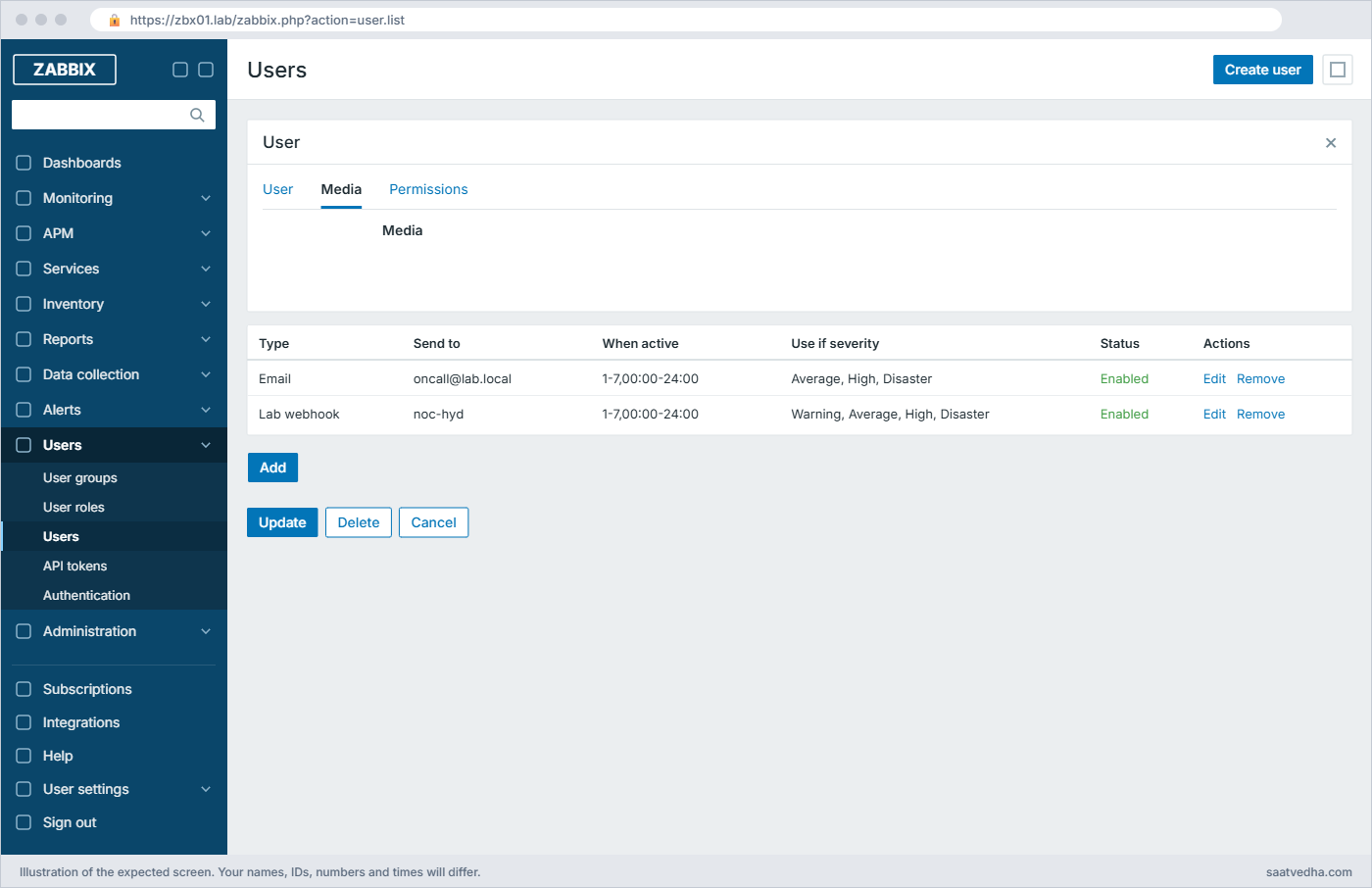
The Email media from Lesson 16 stays as it is. Send to can be anything your script understands; for Telegram it’s the chat ID and for Slack the channel.
✅ Checkpoint: Admin has two media rows: Email and Lab webhook (Warning and above).
7Create a trigger action for web01 problems
Go to Alerts > Actions > Trigger actions and click Create action. Name it Webhook to NOC (Lab/Web). On the Action tab add two conditions: Host group equals Lab/Web and Trigger severity is greater than or equals Warning.
On the Operations tab add an operation: Send to users Admin, Send to media type Lab webhook. Under Recovery operations and Update operations add Notify all involved. Click Add.
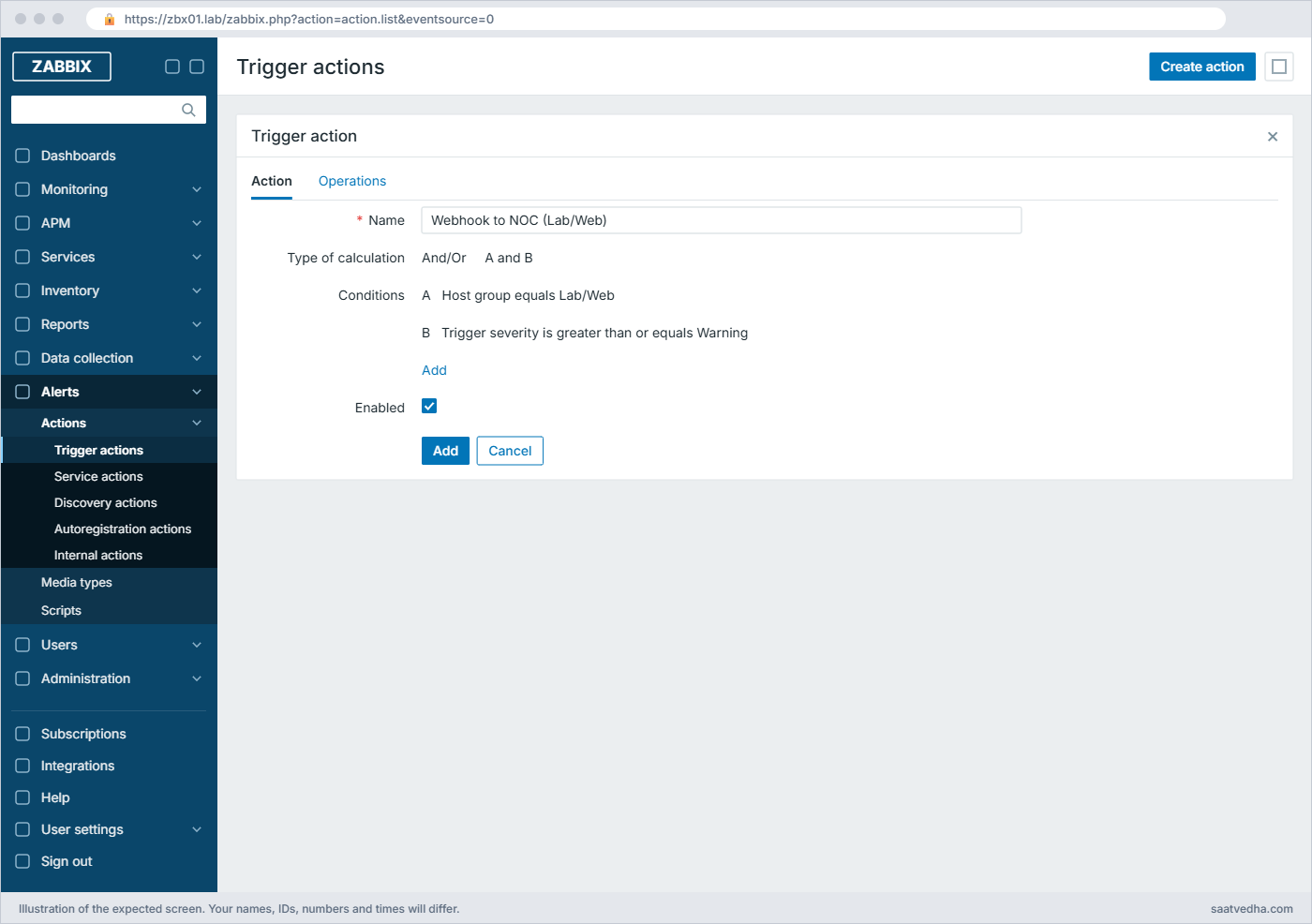
Choosing the media type in the operation matters. If you leave it at “All”, Admin also gets the email from Lesson 16 for these problems, which is fine at home and doubles the noise at work.
✅ Checkpoint: Trigger actions lists “Webhook to NOC (Lab/Web)” as Enabled with two conditions.
8Fire a real problem and watch it arrive
Stop Nginx on web01 from a second SSH session. The Nginx trigger from Lesson 8 fires within a minute or two, depending on your item interval. If you skipped that lesson, any trigger on web01 with Warning or higher severity works.
Run this in a second session on web01:
sudo systemctl stop nginxThe receiver session prints this (your event ID and times will differ):
14:31:52 from 192.168.56.80 token=lab-7d41
{
"source": "zabbix",
"event_id": "2417",
"status": "PROBLEM",
"severity": "High",
"host": "web01",
"send_to": "noc-hyd",
"subject": "Problem: Nginx is down on web01",
"message": "Problem started at 14:31:46 on 2026.11.08\nProblem name: Nginx is down on web01\nHost: web01\nSeverity: High\nOperational data: 0\nOriginal problem ID: 2417"
}Now the macros are real values: the event ID, status, severity and host name. Start Nginx again with sudo systemctl start nginx and within a minute a second body arrives with status RESOLVED and a subject starting “Resolved in”.
✅ Checkpoint: The receiver printed a PROBLEM body for web01 and, after Nginx started, a RESOLVED body with the same event_id.

9Read the result in the Action log
Open Reports > Action log and filter on the last hour. You should see your two webhook messages with status Sent, next to the emails from Lesson 16 if those actions also matched.
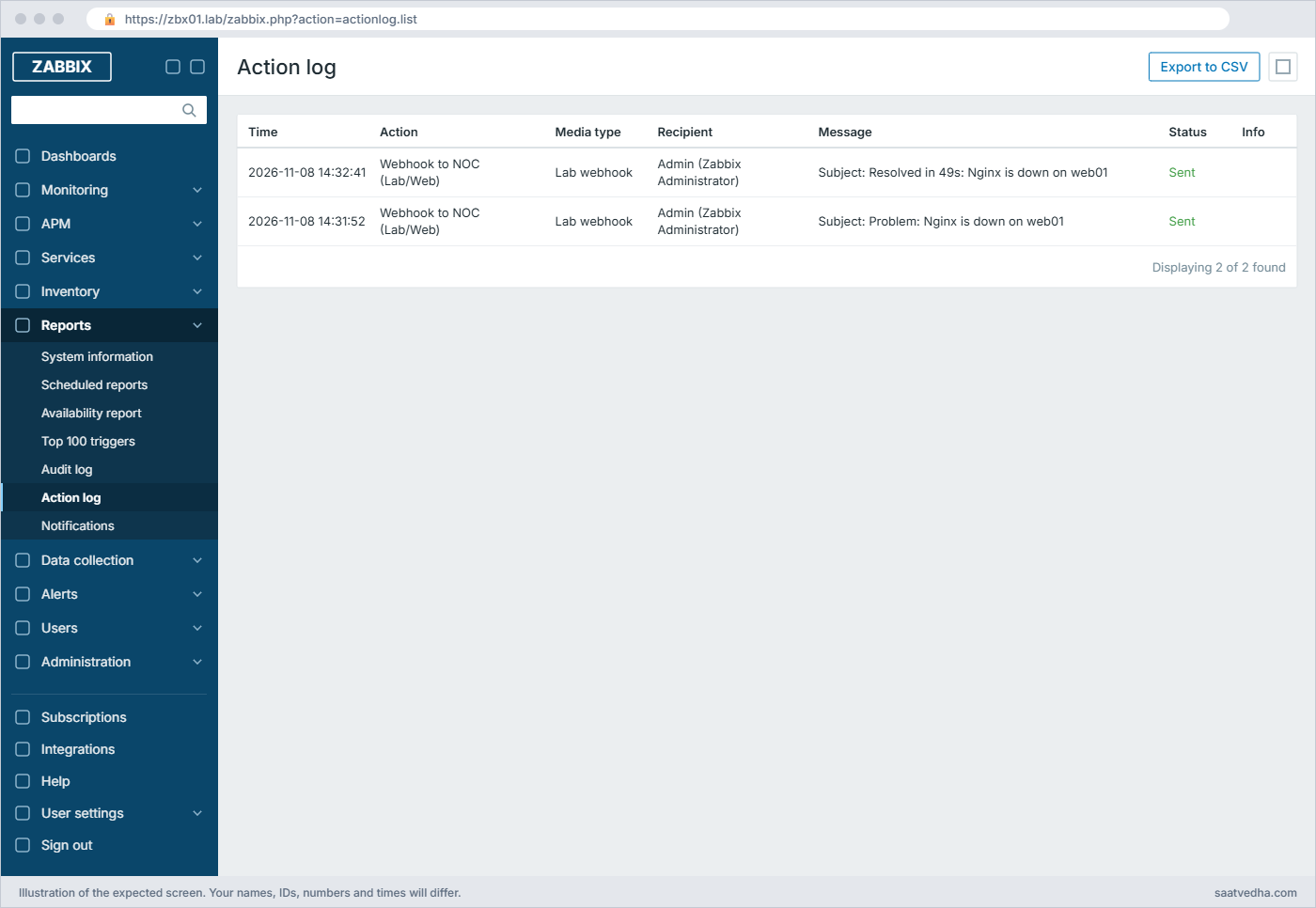
This page is your first stop whenever someone says “I didn’t get the alert”. It tells you whether an action matched at all, which media type was used, and the exact error text if the script threw.
✅ Checkpoint: Reports > Action log shows two Lab webhook rows for web01 with status Sent.
10Optional: switch on Telegram
If you have Telegram, open a chat with @BotFather, send /newbot, choose a name and a username ending in “bot”, and copy the token it gives you. Then open a chat with your new bot and send it /start, because a bot can’t start a conversation with you. Find your chat ID with the Bot API from zbx01 (replace the token):
Run this on zbx01:
TOKEN='1234567890:AAH-your-bot-token'
curl -s "https://api.telegram.org/bot$TOKEN/getUpdates" | python3 -m json.tool | grep -A2 '"chat"'You should see this (with your own chat ID and name):
"chat": {
"id": 512345678,
"first_name": "Ravi",In Alerts > Media types open the built-in Telegram media type, set api_token to your token and api_parse_mode to markdown, tick Enabled and click Update. Click Test, put your chat ID in api_chat_id and you get a message from your bot. For a group, add the bot to the group and use the group’s negative ID (supergroups start with -100); for a topic in a supergroup, 8.0 accepts <group_id>:<topic_id>.
✅ Checkpoint: Your phone shows the Zabbix test message from your bot, or you skipped this optional step.
Break It, Then Fix It
Three failures you’ll see at work. None of them needs a snapshot, but keep the receiver running on web01.
1Telegram says “chat not found”
Open the Telegram media type, click Test, and put a wrong chat ID in api_chat_id, for example 512345679 (one digit off), or use the right ID for a user who never sent /start to the bot.
You’ll get this error (in the test dialog and the Action log):
Media type test failed.
Sending failed: Bad Request: chat not foundThe Telegram API answered HTTP 400 with "description":"Bad Request: chat not found", and the 8.0 Telegram script throws that description as it is. The same text appears when the bot was removed from a group, or when someone pasted a group ID without its minus sign. If the ID isn’t even a number or an @name, the script stops earlier with “Invalid format for api_chat_id”.
Fix:
# 1. send /start to the bot (personal) or add the bot to the group again
# 2. read the real ID again
curl -s "https://api.telegram.org/bot$TOKEN/getUpdates" | python3 -m json.tool | grep -A2 '"chat"'
# 3. put that ID (with the minus sign for groups) in the user's Send to field✅ Checkpoint: The Telegram test succeeds with the corrected chat ID.
2A typo in the webhook script
Open Lab webhook and change params.message.trim() to params.mesage.trim(), then click Update and run Test again.
You’ll get this error:
Media type test failed.
Sending failed: TypeError: cannot read property 'trim' of undefinedparams.mesage doesn’t exist, so it’s undefined, and calling a method on it throws a TypeError, which our catch block wraps with “Sending failed:”. A real alert would retry three times and then show this text as Failed in the Action log. A different classic: write a modern line such as Object.keys(params).map(k => k.toUpperCase()) and the script won’t even compile, because Duktape doesn’t support arrow functions:
cannot compile script: SyntaxError: parse error (line 2)Fix:
// correct the property name
message: params.message.trim()
// and write ES5 instead of arrow functions
var keys = Object.keys(params).map(function (k) { return k.toUpperCase(); });Test again and click Open log to check your own Zabbix.log lines. Line numbers in Duktape errors count from the top of your script, so “line 2” points straight at the bad line.
✅ Checkpoint: The Lab webhook test is successful again and the receiver prints the body.
3Outbound traffic is blocked
Most company servers can’t reach the internet directly, so a Telegram or Slack webhook from zbx01 fails until someone opens a firewall rule or configures a proxy. Simulate that by removing the ufw rule on web01 (stop the receiver with Ctrl+C first, then start it again after this command).
Run this on web01, then click Test on Lab webhook:
sudo ufw delete allow from 192.168.56.80 to any port 8088 proto tcp
python3 /opt/zbx-hook/zbx_receiver.py 8088You’ll get this error after about 10 seconds:
Media type test failed.
Sending failed: Error: cannot get URL: Connection timed out after 10002 milliseconds.ufw on web01 drops the packets, so curl inside Zabbix waits until the media type Timeout (10s) and gives up. With Telegram you’d see the same timeout, or “Could not resolve host: api.telegram.org” if the server has no DNS for outside names. Test from the server itself before blaming Zabbix: curl -sv https://api.telegram.org on zbx01 tells you in five seconds whether the network path exists.
Fix (lab): put the rule back.
sudo ufw allow from 192.168.56.80 to any port 8088 proto tcpAt work the fix is a firewall request for the API host on 443, or a proxy. All 8.0 webhooks read an http_proxy parameter: add it to the Telegram or Slack media type with a value like http://proxy.corp.local:3128, which our Lab webhook also supports through req.setProxy().
✅ Checkpoint: ufw on web01 again allows 8088 from 192.168.56.80 and the Lab webhook test succeeds.
This happened at work
The rider app alerts that nobody read
A friend of mine runs the on-call rota at a food delivery company in Hyderabad. During the IPL final last year, order placement slowed down for about twenty minutes around 9:40 pm, and the first person to notice was a restaurant partner who called the support line. Zabbix had raised the problem at 9:41, and the Telegram group “noc-alerts” had the message within seconds.
Nobody looked at it. That group got roughly four hundred messages a day: disk at 81%, then OK, then 82%, then OK, plus every Information-level trigger from two hundred hosts. Half the team had muted it months ago, and the first thing they tried that night, adding more people to the group, made no difference.
The real cause wasn’t Telegram at all. One action sent every severity to the group, and the disk triggers had no recovery expression, so they flapped all day. The team split it into two actions: High and Disaster to a small “noc-critical” group with the event menu link to the problem, everything else to email, and they added hysteresis to the noisy disk and CPU triggers.
The group went from four hundred messages a day to about fifteen, and people unmuted it on their own. My friend’s rule now is that if a chat channel needs muting, the alerting design is wrong, not the people.
Common mistakes and troubleshooting
| Mistake | What happens | What to do instead |
|---|---|---|
| Using arrow functions, let/const tricks or backtick strings in the script | “cannot compile script: SyntaxError” and nothing is sent | Write ES5 (var, function), test with the Test button and Open log |
| Forgetting /start to the Telegram bot | “Bad Request: chat not found” even with the right ID | Each user sends /start to the bot, or add the bot to the group |
| Sending every severity to a chat group | People mute the group and miss real outages | Use “Use if severity” on the media and separate actions per severity |
| Leaving the operation media type at “All” | The same problem arrives by email and by chat, doubling noise | Pick the media type in each operation |
| Putting the bot token in the script | The token shows up in exports and Git and is hard to rotate | Keep it in a parameter, or better in a secret global macro used as the parameter value |
| Testing only from the browser, never from the server | The test works on your laptop network but alerts fail from zbx01 | curl the API from the Zabbix server first; set http_proxy if needed |
| Pointing a built-in 8.0 webhook at a plain http:// URL | “TLS certificate verification is enabled by {$HTTP.TLS.VERIFY}, but the URL uses plain HTTP” | Use HTTPS, or set the macro with the media type context to none for that internal endpoint only |
Interview questions
Click a question to open it. Each one is written the way an interviewer would ask it. Under it you will see why they ask it and one way you could answer, in your own words.
Fresher level
1. What is a webhook media type in Zabbix, and how is it different from the Email media type?
Why they ask this: They want to know you understand that a webhook is code run by the server, not just a URL.
How you might answer: A webhook media type is a JavaScript script stored in Zabbix plus a list of parameters. For each alert the server resolves the macros in the parameters, passes them to the script as a JSON string in the value variable, and the script makes the HTTP call to Telegram, Slack or any API.
Email is built in and only needs SMTP settings, while a webhook can talk to anything that has an HTTP API. Whatever the script throws becomes the error in the Action log.
2. A user says Telegram alerts stopped. Where do you look first?
Why they ask this: A check that you know Reports > Action log and the usual Telegram errors.
How you might answer: I open Reports > Action log and filter on that user or the Telegram media type. If there are no rows, the action didn’t match or the user media is disabled or filtered by severity; if the rows say Failed, the error text tells me the reason.
Common ones are “Bad Request: chat not found” when the bot was removed from the group, “Unauthorized” when someone revoked the token, and connection timeouts when the firewall changed. Then I run the media type Test to confirm the fix.
2–5 years experience
3. Walk me through building a webhook to an internal ticketing API that needs a bearer token.
Why they ask this: They are checking that you can design parameters, error handling and secrets, not just copy a template.
How you might answer: I’d create a Webhook media type with parameters for the URL, the token taken from a secret global macro, and the event macros I need, like {EVENT.ID}, {EVENT.SEVERITY} and {HOST.NAME}. The script parses value, builds the JSON body, adds the Authorization header, posts it and checks getStatus; anything not 200 or 201 throws a clear message with the HTTP code and body.
If the API returns a ticket ID, I return JSON with a tags object and tick Process tags, so the ticket number becomes an event tag. I test with the Test button and Open log, then with a real trigger on a lab host before linking it to production actions.
4. Your team gets hundreds of chat alerts a day and people have muted the channel. How would you fix it?
Why they ask this: They want concrete Zabbix settings for alert fatigue, not general advice.
How you might answer: First I’d pull the Action log and the Top 100 triggers report to see which triggers send most. Usually it’s a few flapping triggers, so I add recovery expressions for hysteresis and check the problem generation mode.
Then I split the routing: only High and Disaster go to the chat through a severity filter on the user media and a separate action, the rest go to email or a daily report, and maintenance periods pause operations for planned work. I’d measure messages per day before and after.
Senior level
5. Your Zabbix servers can’t reach the internet, but the business wants Slack alerts. What options do you offer?
Why they ask this: They are checking architecture judgement and security awareness.
How you might answer: The simplest is to set the http_proxy parameter on the Slack media type so the script goes through the corporate proxy, with a proxy rule that allows only slack.com on 443. If even that isn’t allowed, I’d point the webhook at an internal relay service in the DMZ that has egress and forwards to Slack.
In both cases I keep TLS verification on, store the bot token as a secret macro, and alert on failed notifications through an internal action so a broken path is noticed.
6. After upgrading from 7.0 to 8.0 a webhook to an internal HTTP endpoint fails. What do you suspect?
Why they ask this: They want to see that you know 8.0 changed TLS defaults for webhooks.
How you might answer: The 8.0 media types add a tls_verify parameter that reads {$HTTP.TLS.VERIFY} with the media type name as context, and when that macro isn’t defined they default to full verification and refuse plain HTTP URLs. So I’d check the Action log for the “uses plain HTTP” message.
The clean fix is HTTPS on the endpoint. If that isn’t possible quickly, I’d define the macro with that one media type’s context set to none, document it, and note that imported media types are not upgraded automatically.
Quick quiz
Q1. In a webhook script, how does Zabbix pass the parameters to your code?
- As environment variables
- As a JSON string in a variable called value
- As command-line arguments
- In a file under /tmp
Show answer
B — The server wraps the script as function(value){…} and value holds the parameters as JSON.
Q2. Which line will fail to compile in a Zabbix webhook script?
- var p = JSON.parse(value);
- Zabbix.log(4, “x”);
- var k = list.map(x => x.id);
- throw “Sending failed”;
Show answer
C — The embedded Duktape engine is ES5.1 based and arrow functions give “SyntaxError: parse error”.
Q3. A Telegram test fails with “Bad Request: chat not found”. What is the most likely cause?
- The bot token is wrong
- The user never sent /start to the bot or the chat ID is wrong
- The Zabbix server is down
- Markdown parse mode is wrong
Show answer
B — Telegram returns this when the bot cannot see that chat, usually a wrong ID or no /start.
Q4. Where do you see whether a webhook message was Sent or Failed, with the error text?
- Monitoring > Latest data
- Reports > Action log
- Data collection > Hosts
- Administration > Queue
Show answer
B — Reports > Action log lists every message and remote command with status and error.
Q5. What does the http_proxy parameter on the 8.0 Telegram and Slack media types do?
- Sends alerts through a Zabbix proxy
- Makes the script use an HTTP proxy for its outbound call
- Turns off TLS checks
- Changes the Zabbix frontend URL
Show answer
B — The webhook calls setProxy() with that value so the request goes through your corporate proxy.
Quick recap
- A webhook media type is JavaScript plus parameters; the server resolves macros, passes them as JSON in value and records whatever the script throws.
- The embedded engine is ES5.1 based, so write var and function, and use the Test button and Open log while developing.
- Telegram needs a bot token from BotFather, a chat ID and a /start from each user; Slack in 8.0 needs a bot token with chat:write and the bot invited to the channel.
- Most webhook failures are network (firewall, proxy, DNS) or recipient problems, and Reports > Action log shows the exact text.
- Alert fatigue is fixed with hysteresis, severity filters on user media and separate actions per audience, not by adding more people to a group.
Next lesson
Lesson 18: Users, groups, roles and global scripts → You create a NOC user who can see and acknowledge problems but change nothing, and you add safe one-click scripts like ping and an Nginx restart.
Further reading: Zabbix Telegram alerts
Want to go deeper into Zabbix Telegram alerts? The Zabbix manual pages on webhook media types and webhook script examples list every JavaScript object you can use. The Telegram Bot API sendMessage page explains chat IDs and parse modes.
Email alerts were set up in Lesson 16, and if you also use Prometheus, compare this with Alertmanager receivers. You can also see the full plan for this course on the Zabbix Monitoring course page.
