Web scenarios and HTTP agent for websites and APIs

Zabbix web monitoring checks your sites and APIs from the outside, the way a customer or another system sees them. An agent can tell you Nginx is running and the port is open, but only a real HTTP request tells you the login page loads, the reply contains the right text, the API answers with valid JSON in under a second, and the certificate isn’t about to expire.

In this lesson you build a two-step web scenario against web01, set up a small JSON health API behind HTTPS on web01, read it with an HTTP agent item and JSONPath, and add certificate-expiry monitoring with agent 2. Then you break it the three ways web checks break at work: the wrong text on the page, a self-signed certificate, and a missing API key.

Where this lesson fits

Lesson 12 of 24 in Zabbix Monitoring · Phase 2: Items, triggers, templates and dashboards · Before this: Lesson 11, preprocessing · Next: Lesson 13, log monitoring

TimeYou needBy the end you can
About 85 minuteszbx01 and web01 from Lessons 1 to 11 (Nginx on web01), the frontend at https://zbx01.labBuild web scenarios and HTTP agent items with sensible triggers, monitor certificate expiry, and fix the usual 401, SSL and required-string failures

What it is, in one line

Zabbix web monitoring uses web scenarios (multi-step HTTP checks run by the server) and HTTP agent items (single requests that return data) to test websites and APIs from the outside, including status codes, page content, response time and certificates.

In Simple Words

The mystery shopper

A sweet-shop chain in Delhi sends a mystery shopper to each branch every morning. She walks in, checks the counter is open, asks for a box of kaju katli, checks the box has the right sticker, notes how long the billing took, and leaves.

The branch manager’s own report might say “all staff present, lights on”, but only the shopper knows whether a customer could buy sweets.

A web scenario is the mystery shopper for your website: it follows the customer’s steps and writes down what went wrong and how long each step took.

Engineer's View

Web scenarios and HTTP agent items

Both are run by the Zabbix server (or proxy) using libcurl, not by the agent. A web scenario (Data collection > Hosts > Web) is a list of steps that share cookies and variables; each step has a URL, optional post data or headers, required status codes, a required string (a regular expression) and a timeout. The server creates items for it automatically, and the scenario stops at the first failed step.

Generated itemKeyWhat it holds
Download speed for scenario “X”.web.test.in[X,,bps]Average download speed of all steps
Failed step of scenario “X”.web.test.fail[X]0 if all steps passed, otherwise the number of the failed step
Last error message of scenario “X”.web.test.error[X]The error text of the last failure
Response time for step “S” of scenario “X”.web.test.time[X,S,resp]Seconds for that step
Response code for step “S” of scenario “X”.web.test.rspcode[X,S]HTTP code of that step
Download speed for step “S” of scenario “X”.web.test.in[X,S,bps]Bytes per second for that step

An HTTP agent item is one request whose reply becomes the item’s value, so it’s the right tool for APIs: add headers, choose Retrieve mode (Body, Headers, or Body and headers), set required status codes, and parse the reply with JSONPath. Certificates have their own agent 2 key, web.certificate.get[hostname,port,address], which returns the certificate details and a validation result as JSON. All three exist in 7.0 LTS too; 8.0 mainly adds an optional redirect_limit parameter to the agent web.page.* keys.

How it works, step by step

1The server walks the scenario steps

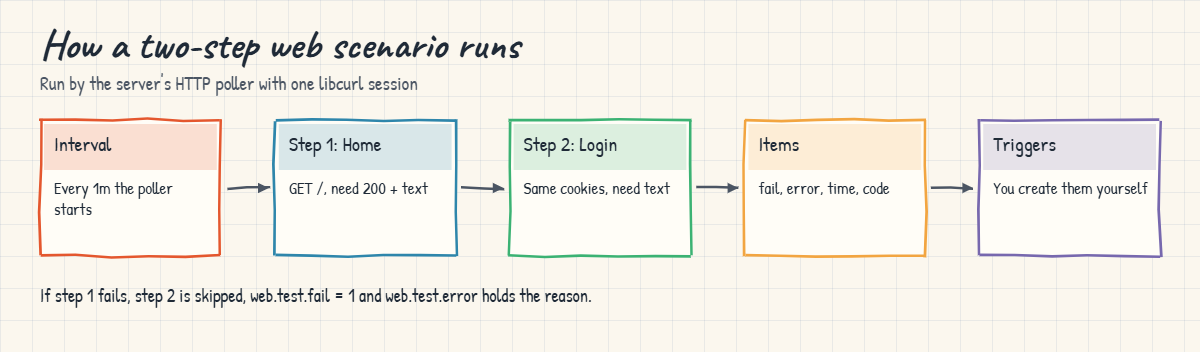
At each update interval, the HTTP poller on the server opens a libcurl session, runs step 1, checks its status code and required string, saves any variables, and moves to step 2 with the same cookies. If a step fails, the rest are skipped and the failed step number and error are stored. The first diagram follows a two-step scenario.

2Triggers watch the generated items

Zabbix never creates triggers for a scenario. The usual pair is “scenario failed” on web.test.fail and “too slow” on a step’s web.test.time, and the error item gives the on-call engineer the reason in plain text.

Zabbix web monitoring: how a two-step web scenario runs and which items it creates

3HTTP agent items read APIs

For a JSON API you want numbers as well as pass or fail. One HTTP agent item fetches the reply, a JSONPath step pulls a field out, and dependent items (Lesson 11) can pull more fields from the same reply. Keep secrets such as API keys in a Secret text user macro so they don’t show in the frontend or exports.

4Certificates are checked separately

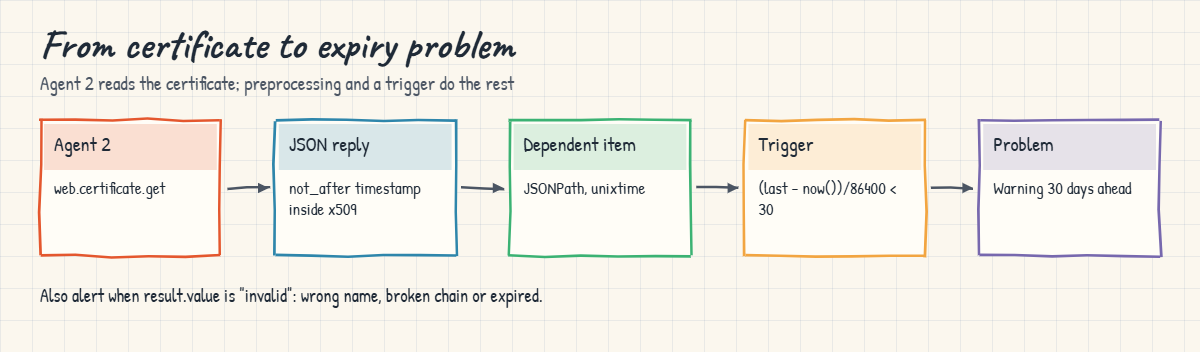
A site can answer 200 OK for weeks while its certificate quietly approaches expiry. Agent 2’s web.certificate.get connects, reads the certificate chain, and reports subject, issuer, alternative names, not_after as a Unix timestamp, and a validation result such as valid, valid-but-self-signed or invalid. The second diagram shows how that JSON becomes an expiry trigger.

Zabbix web monitoring of certificate expiry with agent 2 web.certificate.get

5Which tool for which job

NeedUseExample
Is the site usable, step by step?Web scenarioHome page, then login page, required strings on both
A value from an APIHTTP agent item + JSONPathorders_pending from /api/health
Response time of one URL from the agent’s sideAgent key web.page.perf or net.tcp.service.perfCheck from inside the server room
Certificate expiry and validityAgent 2 web.certificate.get or the “Website certificate by Zabbix agent 2” templateDays left on web01.lab

Remember where the request comes from: web scenarios and HTTP agent items run from the Zabbix server (or proxy), so they test the network path from there, not from your users’ browsers.

Hands-on lab: monitor the lab shop, its JSON API and its certificate

Before you run any command, double-check it

Read every command twice before you press Enter. Check the target: the server name, the user, the disk or device name, the path and the sizes. These commands are for learning and were tested in our lab, not on your system. At work, run the read-only commands first, follow your change process, make sure a backup exists, and ask a second person to check anything that changes or deletes data. You run them at your own risk.

You’ll create a small site and API on web01, then the checks in the frontend at https://zbx01.lab. web01 already runs Nginx from Lesson 7. The lab key lab-secret-123 is for this lab only. Add 192.168.56.81 web01.lab to /etc/hosts on zbx01 if Lesson 1 didn’t already.

1Give the web01 home page a known text

Run this on web01:

echo '<html><body><h1>SaatVedha Lab Shop</h1><a href="/login.html">Login</a></body></html>' | sudo tee /var/www/html/index.html >/dev/null
echo '<html><body><form><input name="user"><input name="pass" type="password"></form>Please sign in</body></html>' | sudo tee /var/www/html/login.html >/dev/null
curl -s http://192.168.56.81/ ; echo; curl -s -o /dev/null -w '%{http_code}\n' http://192.168.56.81/login.html

You should see:

<html><body><h1>SaatVedha Lab Shop</h1><a href="/login.html">Login</a></body></html>
200

Two pages, each with a phrase you can test for: “SaatVedha Lab Shop” and “Please sign in”. Real sites use a phrase that only appears when the page rendered properly, never something from the error template.

✅ Checkpoint: Both pages load from web01 and the login page returns 200.

2Create the web scenario

Open Data collection > Hosts, click Web in the web01 row and then Create web scenario. On the Scenario tab set Name Lab shop, Update interval 1m, Attempts 2, Agent “Zabbix”, and add the tag component = web. On the Steps tab add two steps:

Step nameURLRequired stringRequired status codesTimeout
Homehttp://192.168.56.81/SaatVedha Lab Shop20015s
Login pagehttp://192.168.56.81/login.htmlPlease sign in20015s

Press Add. Attempts 2 means a step is retried once before it counts as failed, which hides a single dropped packet without hiding a real outage.

✅ Checkpoint: web01 has the web scenario Lab shop with two steps.

3Read the scenario results

Wait a minute, then open Monitoring > Hosts and click Web in the web01 row, and then the scenario name.
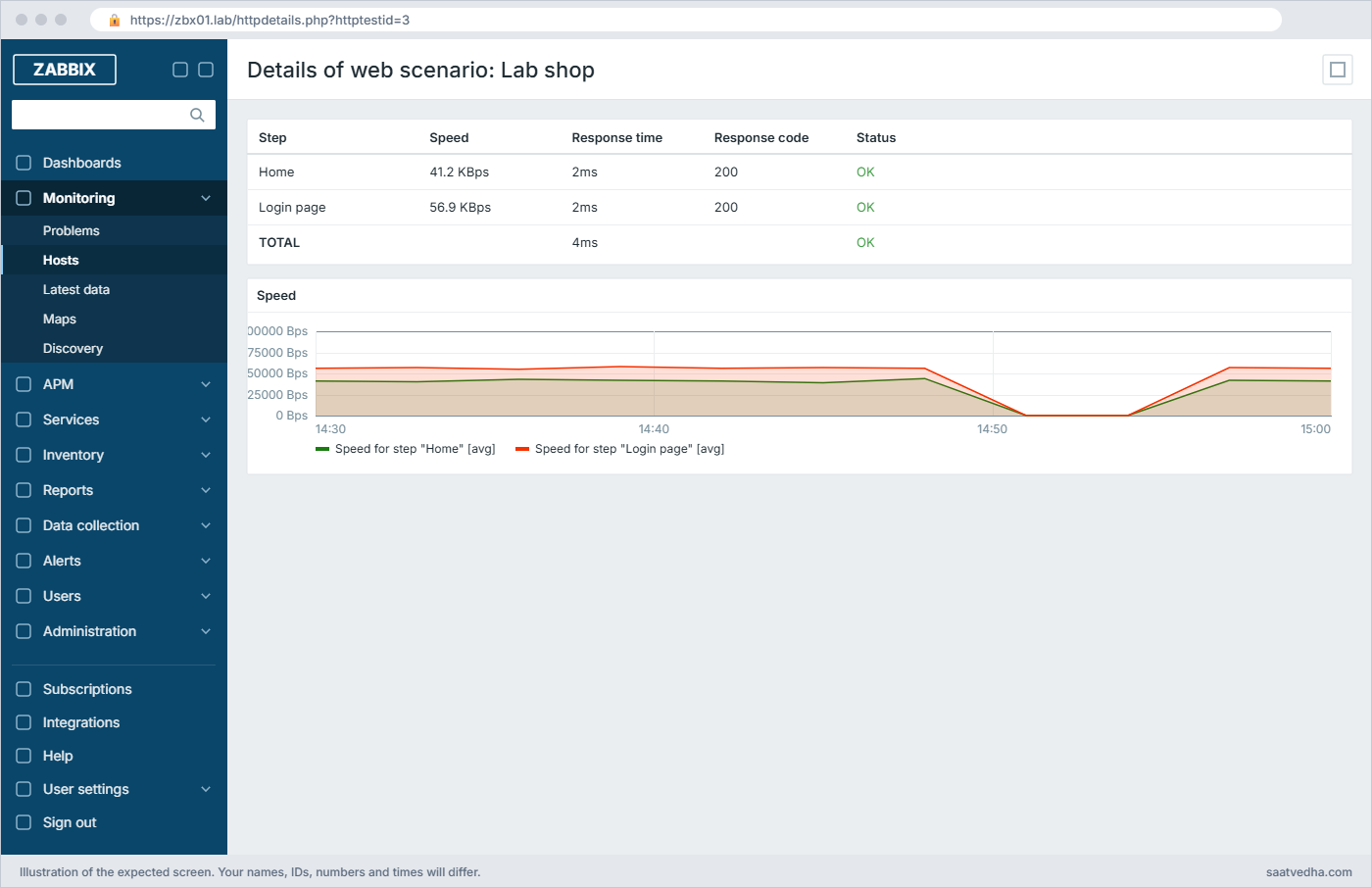
Zabbix web monitoring: Lab shop scenario details with both steps OK and response code 200
Details of web scenario: Lab shop with both steps OK (your speeds and times will differ)

The six generated items are now in Latest data for web01 under the tag component = web. Two triggers turn them into problems:

Trigger nameExpressionSeverity
Lab shop is failing on {HOST.NAME}: {ITEM.LASTVALUE2}last(/web01/web.test.fail[Lab shop])<>0 and length(last(/web01/web.test.error[Lab shop]))>0High
Lab shop home page is slow on {HOST.NAME}avg(/web01/web.test.time[Lab shop,Home,resp],5m)>2Warning

{ITEM.LASTVALUE2} is the last value of the second item in the expression, the error message, so the problem title says why the scenario failed.

✅ Checkpoint: The web view shows both steps OK and the two triggers exist on web01.

4Add an HTTPS JSON health API on web01

Now a small API that needs a key. Create a self-signed certificate (like the one for zbx01 in Lesson 3), a JSON file, and an HTTPS server block.

Run this on web01:

sudo mkdir -p /etc/nginx/tls /var/www/api
sudo openssl req -x509 -newkey rsa:2048 -nodes -days 365 -subj "/CN=web01.lab" \
  -addext "subjectAltName=DNS:web01.lab,DNS:web01,IP:192.168.56.81" \
  -keyout /etc/nginx/tls/web01.key -out /etc/nginx/tls/web01.crt
echo '{"status":"ok","version":"2.4.1","orders_pending":12,"db":{"connected":true,"latency_ms":3.7}}' | sudo tee /var/www/api/health.json >/dev/null
sudo tee /etc/nginx/conf.d/api.conf >/dev/null <<'EOF'
server {
    listen 443 ssl;
    server_name web01.lab;
    ssl_certificate     /etc/nginx/tls/web01.crt;
    ssl_certificate_key /etc/nginx/tls/web01.key;
    location = /api/health {
        if ($http_x_api_key != "lab-secret-123") { return 401 '{"error":"unauthorized"}'; }
        default_type application/json;
        alias /var/www/api/health.json;
    }
}
EOF
sudo nginx -t && sudo systemctl reload nginx
sudo ufw allow from 192.168.56.80 to any port 443 proto tcp 2>/dev/null || true

Test it from zbx01, once with the key and once without:

Run this on zbx01:

curl -sk -H 'X-API-Key: lab-secret-123' https://web01.lab/api/health
curl -sk -o /dev/null -w '%{http_code}\n' https://web01.lab/api/health
curl -sS https://web01.lab/api/health

You should see:

{"status":"ok","version":"2.4.1","orders_pending":12,"db":{"connected":true,"latency_ms":3.7}}
401
curl: (60) SSL certificate problem: self-signed certificate
More details here: https://curl.se/docs/sslcerts.html

curl failed to verify the legitimacy of the server and therefore could not
establish a secure connection to it. To learn more about this situation and
how to fix it, please visit the webpage mentioned above.

All three are real outputs: the key works, no key gets 401, and without -k curl refuses the self-signed certificate. Keep that error in mind for the Break It section.

✅ Checkpoint: The API returns JSON with the key, 401 without it, and curl complains about the self-signed certificate without -k.

5Read the API with an HTTP agent item

On web01 open the Macros tab and add {$API.KEY} with type Secret text and value lab-secret-123. Then create an item:

FieldValue
NameShop API: health JSON
TypeHTTP agent
Keyshop.api.health
URLhttps://web01.lab/api/health
HeadersX-API-Key = {$API.KEY}
Required status codes200
SSL verify peer / SSL verify hostunticked for now (self-signed lab certificate)
Type of informationText
Update interval1m
History1d

Then add dependent items on it with JSONPath (as in Lesson 11): shop.api.orders_pending with $.orders_pending (Numeric unsigned), shop.api.db_latency with $.db.latency_ms (Numeric float, units ms), and shop.api.status with $.status (Character). A trigger last(/web01/shop.api.status)<>"ok" named “Shop API reports {ITEM.LASTVALUE}” completes it. Because this item type is polled by the server, the Test button’s Get value and test works here.

In the Test window the Value box fills with the JSON from the API, and because this item has no preprocessing steps, the Result is the same JSON.

✅ Checkpoint: Shop API: health JSON tests with a 200 reply, and orders_pending shows 12 in Latest data.

6Monitor certificate expiry with agent 2

Agent 2 on web01 can read the certificate locally. Test the key first:

Run this on web01:

sudo zabbix_agent2 -t 'web.certificate.get[web01.lab,443,127.0.0.1]'

You should see this (your serial, dates and fingerprints will differ):

web.certificate.get[web01.lab,443,127.0.0.1][s|{"x509":{"version":3,"serial_number":"05e83d5d324e1f62cb471f9338789a92a729469f","signature_algorithm":"SHA256-RSA","issuer":"CN=web01.lab","not_before":{"value":"Nov 08 06:27:21 2026 GMT","timestamp":1794119241},"not_after":{"value":"Nov 08 06:27:21 2027 GMT","timestamp":1825655241},"subject":"CN=web01.lab","public_key_algorithm":"RSA","alternative_names":["web01.lab","web01"]},"result":{"value":"valid-but-self-signed","message":"certificate verified successfully, but determined to be self signed"},"sha1_fingerprint":"d112f166af60865879f8496164f0cb73aa15c2e3","sha256_fingerprint":"b7313744093b157430d248e2d5230345f1b4cd0480d31c235149fa0c4164fb4c"}]

That’s real agent 2 output for a certificate made the same way (your serial, dates and fingerprints will differ). The third parameter is the address to connect to, and the first is the name to check the certificate against. Create an item Cert: web01.lab of type Zabbix agent (active), key web.certificate.get[web01.lab,443,127.0.0.1], Text, interval 1h, and a dependent item cert.not_after[web01.lab] with JSONPath $.x509.not_after.timestamp, units unixtime.

The expiry trigger, the same formula the official “Website certificate by Zabbix agent 2” template uses: (last(/web01/cert.not_after[web01.lab]) - now()) / 86400 < 30, name "Certificate for web01.lab expires in less than 30 days", severity Warning. For many sites at work, link that official template and list the sites in its macros instead of building items by hand.

✅ Checkpoint: Latest data shows "Cert: web01.lab" and cert.not_after shows a date about one year ahead.
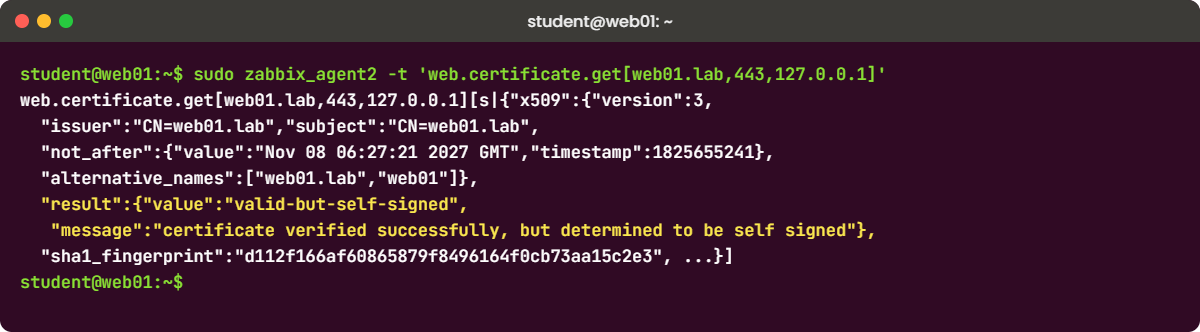
Zabbix web monitoring lab: agent 2 web.certificate.get output for a self-signed certificate
Agent 2 reports the certificate details and that it is valid but self-signed

7Watch a real outage

Stop Nginx on web01 for two minutes and watch both kinds of check fail:

Run this on web01:

sudo systemctl stop nginx; sleep 150; sudo systemctl start nginx

Monitoring > Problems shows two High problems for web01: Lab shop is failing on web01: Failed to connect to 192.168.56.81 port 80 after 0 ms: Couldn't connect to server and Nginx is down on web01.

The web scenario and the template trigger from Lesson 10 both fire, and both recover a minute or two after Nginx starts. The HTTP agent item goes Not supported with a similar "Couldn't connect" error and recovers by itself on its next successful check.
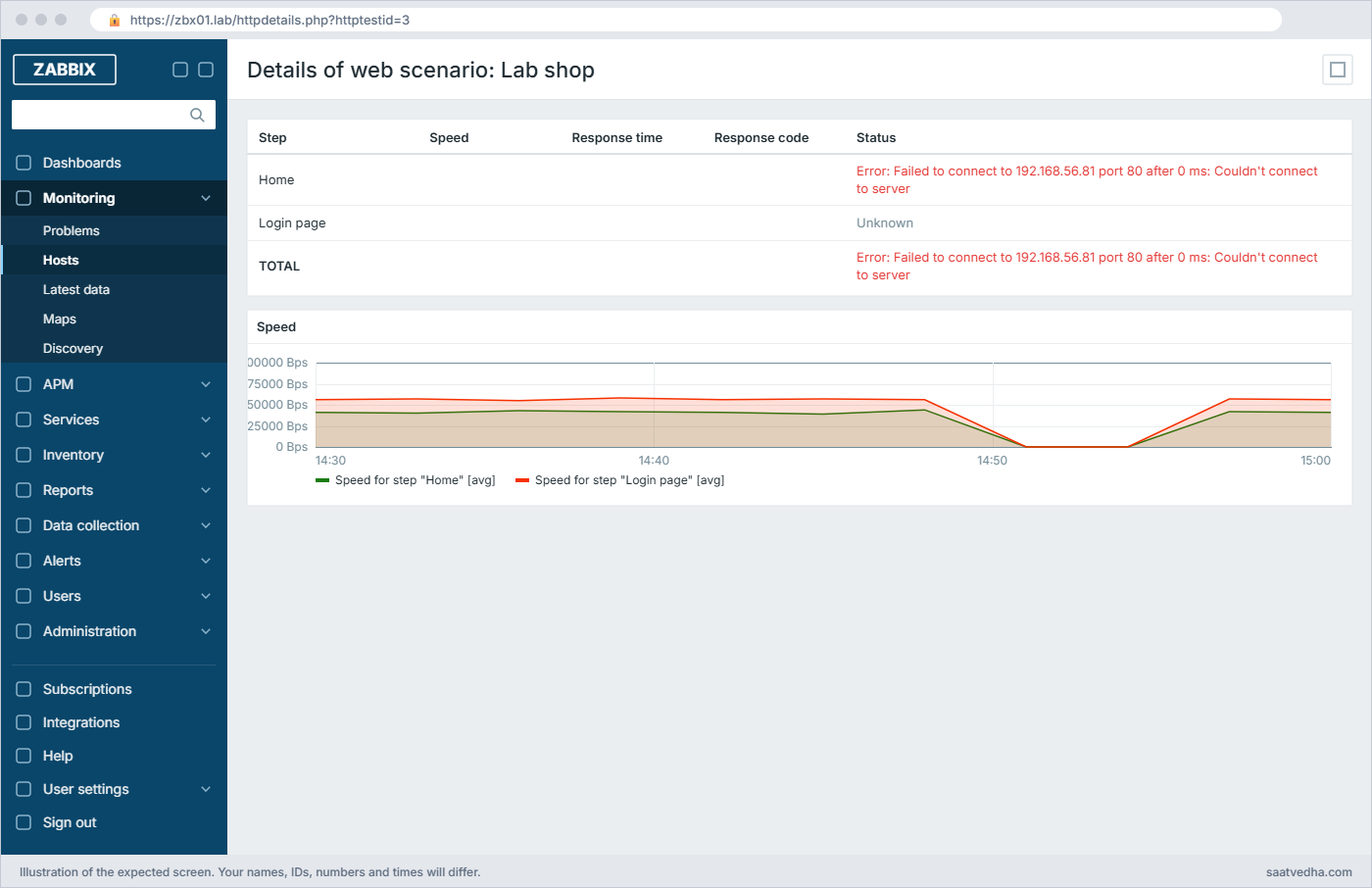
Zabbix web monitoring: Lab shop scenario details with the Home step failing while Nginx is stopped
Details of web scenario: Lab shop during the Nginx stop. Home fails with the connection error and Login page is Unknown

✅ Checkpoint: Problems showed the scenario failure with its reason, and everything recovered after Nginx started.

Break It, Then Fix It

Three failures you’ll meet in real life. None of them need a snapshot.

1“required pattern … was not found”

A developer changes the shop title. Simulate it on web01:

Run this on web01:

sudo sed -i 's/SaatVedha Lab Shop/SaatVedha Shop/' /var/www/html/index.html

You’ll get this error (Last error message of scenario “Lab shop”):

required pattern "SaatVedha Lab Shop" was not found on http://192.168.56.81/

The page still answers 200, so a simple port or status check would stay green, which is the whole reason required strings exist. The required string is a regular expression matched against the whole reply, so it fails the moment the text changes, and the scenario stops at step 1 (web.test.fail = 1).

Fix:

Agree a stable marker with the developers (for example a hidden comment, or a fixed element ID) and test for that instead of visible marketing text. For the lab, put the title back with sudo sed -i 's/SaatVedha Shop/SaatVedha Lab Shop/' /var/www/html/index.html.

✅ Checkpoint: web.test.fail[Lab shop] is back to 0 and the problem resolved.

2SSL verification fails on the self-signed certificate

Edit the HTTP agent item Shop API: health JSON and tick SSL verify peer. Press Test with Get value and test.

You’ll get this error (wording depends on the TLS library libcurl was built with):

Cannot perform request: SSL certificate problem: self-signed certificate
or
Cannot perform request: server certificate verification failed. CAfile: none CRLfile: none

Both lines are real libcurl messages for the same failure, from OpenSSL and GnuTLS builds. With verify peer on, the server checks the certificate against its CA bundle, and nobody signed this one. Turning verification off works, but it also hides a man-in-the-middle or a wrong certificate, so it’s a lab shortcut, not a fix.

Fix:

Trust the certificate properly: copy /etc/nginx/tls/web01.crt from web01 to zbx01 as /usr/local/share/ca-certificates/web01-lab.crt, run sudo update-ca-certificates, and restart zabbix-server. At work, use certificates from your company CA or a public CA, and keep SSL verify peer and SSL verify host ticked. If verify host still fails, the name in the URL isn’t in the certificate’s SAN list.

✅ Checkpoint: With SSL verify peer and verify host ticked, the item tests cleanly after the CA is trusted.

3API returns 401

Change the value of {$API.KEY} on web01 to wrong-key and wait a minute.

You’ll get this error on Shop API: health JSON:

Response code "401" did not match any of the required status codes "200"
{"error":"unauthorized"}

The server got a reply, but its status code isn’t in the Required status codes list, so the item goes Not supported, and the reply body is attached to the error to help you. Every dependent item stops getting values, and their last values stay on screen, which is the same trap as in the Lesson 11 work story.

Fix:

Put the right key back in the macro. Then add a nodata(/web01/shop.api.orders_pending,5m)=1 trigger so a broken master never hides behind old values, and ask the API owners to tell you before they rotate keys (or give monitoring its own key).

✅ Checkpoint: Shop API: health JSON is supported again and orders_pending updates.

This happened at work

The certificate that expired on results day

A colleague who ran monitoring for a government services portal in New Delhi told me this one. On the morning board exam results were published, the portal’s results subdomain started showing browser certificate warnings at 6:10 am, and the helpline was flooded within minutes.

Zabbix had a web scenario on that subdomain, but it ran with SSL verify peer turned off. Somebody had turned it off two years earlier when a test certificate caused alerts, and nobody turned it back on. So the scenario kept reporting 200 OK and green while every real browser refused the site.

The team first suspected the CDN, then a DNS change, and lost about forty minutes. The cause was plain: the certificate on that one subdomain had been renewed by hand the year before, missed in the automated renewal list, and expired at midnight.

After the incident they turned SSL verification back on for every scenario, linked the agent 2 certificate template to the web servers with a 30-day warning and 7-day high-severity trigger, and added a review of all “verify off” items to their monthly checklist.

Common mistakes and troubleshooting

MistakeWhat happensWhat to do instead
Testing only the status codeError pages that return 200 look healthyAdd a required string that only appears on a working page
Turning off SSL verify peer to silence an alertExpired or wrong certificates go unnoticedTrust your CA on the Zabbix server and keep verification on
Putting API keys in plain macros or URLsKeys show in the frontend, exports and logsUse Secret text macros (or a vault) and send keys in headers
No trigger on web.test.failThe scenario fails silently in Latest dataCreate the failure and slowness triggers yourself; Zabbix doesn’t
Using visible marketing text as the required stringEvery content change breaks monitoringAgree a stable marker with developers
Assuming the check runs from the user’s locationNetwork problems near users are missedRemember it runs from the server or proxy; use proxies in other locations if needed
Very short update intervals on heavy pagesExtra load on the site and on the server’s HTTP pollers1 to 5 minutes is enough for most sites

Interview questions

Click a question to open it. Each one is written the way an interviewer would ask it. Under it you will see why they ask it and one way you could answer, in your own words.

Fresher level

1. What is the difference between a web scenario and an HTTP agent item?

Why they ask this: They want to know when to use which.

How you might answer: A web scenario is a multi-step check, like home page then login page, sharing cookies, and it gives pass or fail per step with response time, code and an error message. An HTTP agent item is one request whose reply becomes the item value, so it suits APIs where I want data, like a JSON field.

Both are run by the Zabbix server or proxy with libcurl, not by the agent.

2. Why use a required string when the page already returns 200?

Why they ask this: Checks that you understand soft failures.

How you might answer: Many failures still return 200, like an error template, a maintenance page or an empty page from a broken backend. A required string, which is a regex, proves the page rendered the content I expect.

I pick a stable marker for it, not visible text that marketing may change.

2–5 years experience

3. Your web scenario is green, but users say the site is down. What could be happening?

Why they ask this: Troubleshooting thinking: vantage point and check design.

How you might answer: First, the check runs from the Zabbix server, so if the problem is the internet link, a CDN region or DNS outside our network, the server may still reach the site. Second, the check might be too weak, like no required string, or SSL verify peer turned off while browsers reject the certificate.

I’d check from outside with curl, compare DNS answers, review the scenario settings, and consider a proxy in another location for an outside view.

4. How do you monitor certificate expiry for 200 websites in Zabbix?

Why they ask this: They want a scalable approach, not one item per site by hand.

How you might answer: I’d use agent 2’s web.certificate.get, ideally through the official “Website certificate by Zabbix agent 2” template, which discovers sites from a macro list and creates items and triggers per site. The expiry trigger is (not_after minus now) divided by 86400 below the warning days.

I’d set a 30-day warning and a 7-day high trigger, and also alert on the validation result being invalid, which catches wrong names and broken chains.

Senior level

5. An API you monitor needs an OAuth token that expires every hour. How would you handle it in Zabbix?

Why they ask this: Senior design: script items, secrets and failure handling.

How you might answer: I’d use a Script item or an HTTP agent item preceded by a token step: the script requests a token with the client secret stored in a Secret text macro or a vault, then calls the API and returns the JSON. Dependent items parse the fields.

I’d keep the client secret in HashiCorp Vault or CyberArk if we have it, add a validation step with a clear error, and a nodata trigger so token failures don’t hide behind old values.

6. Developers want Zabbix to check 30 user journeys every minute. What do you tell them?

Why they ask this: Judgement on load, value and the right tool.

How you might answer: I’d ask which journeys matter to the business and which already have application metrics. For the important ones I’d build web scenarios at a 1 to 5 minute interval, with stable markers agreed with the developers, and move heavier flows to the Browser item type or a synthetic monitoring tool if they need JavaScript.

I’d also watch the server’s HTTP poller busy percent and spread scenarios across proxies if the load grows.

Quick quiz

Q1. Who runs a web scenario’s HTTP requests?

  1. The agent on the monitored host
  2. The Zabbix server or proxy
  3. The browser of the logged-in user
  4. The database
Show answer

B — Web scenarios and HTTP agent items are executed by the server or proxy using libcurl.

Q2. What value does web.test.fail[Lab shop] hold when step 2 fails?

  1. 0
  2. 1
  3. 2
  4. The error text
Show answer

C — It holds the number of the failed step, and 0 when all steps pass.

Q3. A page returns 200 but shows an error template. What catches it?

  1. Required status codes 200
  2. A required string that only appears on a good page
  3. A shorter timeout
  4. A higher Attempts value
Show answer

B — The required string is matched against the reply, so an error page fails the step.

Q4. Which agent 2 key returns certificate details including not_after?

  1. web.page.get
  2. net.tcp.service
  3. web.certificate.get
  4. vfs.file.cksum
Show answer

C — web.certificate.get returns x509 details and a validation result as JSON.

Q5. The HTTP agent item says Response code “401” did not match. What is the most likely cause?

  1. DNS failure
  2. Missing or wrong authentication header or key
  3. Expired certificate
  4. Server out of memory
Show answer

B — 401 means the API rejected the credentials sent with the request.

Quick recap

  • Web scenarios test user journeys step by step with status codes, required strings and timeouts, and Zabbix generates their items.
  • You must create triggers yourself, usually on web.test.fail and on step response time.
  • HTTP agent items fetch API replies; JSONPath and dependent items turn them into numbers.
  • web.certificate.get with an expiry trigger catches certificates before browsers do.
  • Keep SSL verification on, keep keys in Secret text macros, and add nodata() triggers for broken masters.

Next lesson

Lesson 13: Log monitoring: Nginx access logs and Windows event logs → You watch Nginx access logs for 5xx and 404 bursts with log and logrt items, and failed Windows logons with eventlog.

Further reading: Zabbix web monitoring

Want to go deeper into Zabbix web monitoring? The official Web monitoring, HTTP agent and agent 2 item keys pages cover every field, and curl’s SSL certificate guide explains the verification errors. For the certificate side of HTTPS, see Zabbix frontend HTTPS, and for parsing the API reply, Zabbix preprocessing.

You can also see the full plan for this course on the Zabbix Monitoring course page.

Scroll to Top

This website uses cookies

We use a few cookies to keep this site working. If you allow it, we also use Google Analytics to count visits so we can improve our lessons. You can accept all, deny the optional ones, or choose what to allow.