Install Zabbix 8.0 server, database and frontend on Ubuntu
-
Phase 1: Zabbix server and agents
-
Phase 2: Items, triggers, templates and dashboards
-
Phase 3: Alerts, proxies, SNMP and automation
In this lesson you’ll install Zabbix on Ubuntu the way it’s done at work: the official Zabbix 8.0 repository, a MySQL database with the right character set, the schema import, the server config, Nginx with PHP-FPM for the frontend, and agent 2 on the server itself. Every step has a check, so when something goes wrong you know which piece to look at.
At the end you’ll log in to the frontend at http://zbx01.lab, see “Zabbix server is running: Yes” under Reports > System information, and take a snapshot called zabbix-installed. Lesson 3 then puts HTTPS and a firewall in front of it.
Where this lesson fits
Lesson 2 of 24 in Zabbix Monitoring · Phase 1: Zabbix server and agents · Before this: Lesson 1, what is Zabbix · Next: Lesson 3, Zabbix frontend HTTPS
| Time | You need | By the end you can |
|---|---|---|
| About 90 minutes | zbx01 from Lesson 1 (Ubuntu 26.04, 3 GB RAM) with internet through the NAT card | Install and connect the Zabbix server, MySQL database and frontend, and read the server log when it refuses to start |
What it is, in one line
Installing Zabbix means four connected jobs: add the official package repository, create and fill the database, point the server at that database, and serve the PHP frontend through a web server.
In Simple Words
Opening a new branch office
Think of a company opening a branch office. First the stationery arrives from head office in sealed, numbered boxes (the official repository). Then someone sets up the record room with empty, labelled cupboards in the right order (the database and its schema).
Only then can the branch manager start work, and he needs the key to the record room (the database password) or he can’t do anything.
The reception desk is set up last, so visitors can walk in and ask questions (the web frontend). If the manager is on leave, reception still opens, but it puts up a notice saying the information may be old, which is exactly what Zabbix does when the server isn’t running.
Engineer's View
What gets installed where
| Package or piece | What it gives you | Where it lives |
|---|---|---|
| zabbix-release | The apt source and signing key for repo.zabbix.com | /etc/apt/sources.list.d/zabbix*.sources (or .list) |
| zabbix-server-mysql | The server daemon built for MySQL/MariaDB, its config and systemd unit | /usr/sbin/zabbix_server, /etc/zabbix/zabbix_server.conf, zabbix-server.service |
| zabbix-sql-scripts | Schema and initial data for each database type | /usr/share/zabbix/sql-scripts/mysql/server.sql.gz |
| zabbix-frontend-php | The PHP web interface | /usr/share/zabbix/ui |
| zabbix-nginx-conf | Nginx server block and the PHP-FPM pool for Zabbix | /etc/zabbix/nginx.conf, /etc/zabbix/php-fpm.conf |
| php8.5-mysql | PHP’s MySQL driver (Ubuntu 26.04 ships PHP 8.5) | php8.5-fpm service |
| zabbix-agent2 | Agent 2 so the server can monitor itself | /etc/zabbix/zabbix_agent2.conf |
| mysql-server | MySQL 8.4 from Ubuntu 26.04 | mysql.service, /var/lib/mysql |
Zabbix 8.0 supports MySQL 8.4 to 9.7, MariaDB 10.11 to 12.3 and PostgreSQL 15 to 18, and its frontend needs PHP 8.2 or newer. The server checks the database version every time it starts, and it refuses to start on MySQL older than 8.4, which is why Ubuntu 24.04 with its MySQL 8.0 is a poor fit for 8.0.
Two paths moved in 7.2 and stay that way in 8.0, so old 7.0 guides will mislead you: the schema is in /usr/share/zabbix/sql-scripts/ (7.0 used /usr/share/zabbix-sql-scripts/) and the frontend files are in /usr/share/zabbix/ui.
How it works, step by step
1apt trusts the Zabbix repository
The zabbix-release package drops an apt source file and Zabbix’s signing key on the system. After apt update, packages from repo.zabbix.com are trusted and preferred over Ubuntu’s own (older) Zabbix packages, because the Zabbix repository carries a higher version.
2MySQL gets an empty database with a binary collation
Zabbix needs utf8mb4 with the utf8mb4_bin collation, because item keys and host names are compared case-sensitively and must hold any language. The blueprint below shows the order: database and user first, schema import second, server config third, frontend last.
3The schema import creates 230 tables
server.sql.gz creates every table, then loads templates, the default “Zabbix server” host, users and images. The MySQL schema also creates database triggers, and with binary logging on (the MySQL 8.4 default) an ordinary user may only create triggers when log_bin_trust_function_creators is 1. You switch it on for the import and off straight after.
4The server, the frontend and the database meet
The server reads DBName, DBUser and DBPassword from zabbix_server.conf, connects over the local MySQL socket and checks the database version. The frontend has its own copy of those details in /etc/zabbix/web/zabbix.conf.php, written by the web installer, and it talks to the server on port 10051 only to show status and the queue. The diagram below shows who talks to whom.
5Services and their logs
| Service | Log to check first | What a healthy one shows |
|---|---|---|
| zabbix-server | /var/log/zabbix/zabbix_server.log | “server #0 started [main process]” and no repeating “database is down” |
| mysql | sudo journalctl -u mysql | active (running), listening on 3306 on localhost |
| nginx | /var/log/nginx/error.log | sudo nginx -t says “syntax is ok” |
| php8.5-fpm | /var/log/php8.5-fpm.log | the zabbix pool socket /var/run/php/zabbix.sock exists |
| zabbix-agent2 | /var/log/zabbix/zabbix_agent2.log | “Starting Zabbix Agent 2 (8.0.0)” with no errors after it, listening on 10050 |
When the frontend shows a problem, read the logs in this order: Zabbix server, then MySQL, then PHP-FPM, then Nginx. Nine times out of ten the first log already tells you.
Hands-on lab: install Zabbix 8.0 with MySQL and Nginx on zbx01
Before you run any command, double-check it
Read every command twice before you press Enter. Check the target: the server name, the user, the disk or device name, the path and the sizes. These commands are for learning and were tested in our lab, not on your system. At work, run the read-only commands first, follow your change process, make sure a backup exists, and ask a second person to check anything that changes or deletes data. You run them at your own risk.
Everything in this lab runs on zbx01 (192.168.56.80). Use the lab password Zbx@Lab2026 for the database, and only in the lab: at work, generate a long random one and keep it in your password manager or a vault.
1Add the Zabbix 8.0 repository
Run this on zbx01:
cd /tmp
wget https://repo.zabbix.com/zabbix/8.0/release/ubuntu/pool/main/z/zabbix-release/zabbix-release_latest_8.0+ubuntu26.04_all.deb
sudo dpkg -i zabbix-release_latest_8.0+ubuntu26.04_all.deb
sudo apt update
apt-cache policy zabbix-server-mysql | head -3You should see:
zabbix-server-mysql:
Installed: (none)
Candidate: 2:8.0.0-1+ubuntu26.04The candidate must be an 8.0 version ending in ubuntu26.04. If it shows an older version with “ubuntu” only, apt is looking at Ubuntu’s own archive and the release package didn’t install, so run apt update again and read its output for repo.zabbix.com lines. The 2: in front is the package epoch, and the number after 8.0.0 goes up as Zabbix ships fixes, so a later 8.0.x is fine.
✅ Checkpoint: apt-cache policy shows an 8.0 candidate from the Zabbix repository.
2Install the server, frontend, agent 2 and MySQL
Run this on zbx01:
sudo apt install -y zabbix-server-mysql zabbix-frontend-php php8.5-mysql zabbix-nginx-conf zabbix-sql-scripts zabbix-agent2 mysql-server
mysql --version
ls /usr/share/zabbix/sql-scripts/mysql/server.sql.gzYou should see:
mysql Ver 8.4.11-0ubuntu0.26.04.1 for Linux on x86_64 ((Ubuntu))
/usr/share/zabbix/sql-scripts/mysql/server.sql.gzApt pulls in Nginx, PHP 8.5 FPM and the PHP extensions the frontend needs (gd, bcmath, mbstring, xml, ldap and so on). MySQL 8.4 is in the supported range for 8.0, and you can see the schema file you’ll import next.
✅ Checkpoint: MySQL reports version 8.4 and server.sql.gz exists under /usr/share/zabbix/sql-scripts/mysql/.
3Create the database and user
Run this on zbx01:
sudo mysql <<'EOF'
create database zabbix character set utf8mb4 collate utf8mb4_bin;
create user zabbix@localhost identified by 'Zbx@Lab2026';
grant all privileges on zabbix.* to zabbix@localhost;
set global log_bin_trust_function_creators = 1;
select @@log_bin, @@log_bin_trust_function_creators;
EOFYou should see this:
@@log_bin @@log_bin_trust_function_creators
1 1On Ubuntu, root logs in to MySQL through the Unix socket, so sudo mysql needs no password. Binary logging is on (1), which is why the second setting must be 1 for the import. The zabbix user can only connect from localhost, which is all the server and frontend need on a single box.
✅ Checkpoint: The zabbix database and user exist and log_bin_trust_function_creators is 1.
4Import the schema and switch the setting back off
Run this on zbx01 (enter Zbx@Lab2026 when asked):
zcat /usr/share/zabbix/sql-scripts/mysql/server.sql.gz | mysql --default-character-set=utf8mb4 -uzabbix -p zabbix
sudo mysql -e "set global log_bin_trust_function_creators = 0;"
sudo mysql -e "select count(*) as tables from information_schema.tables where table_schema='zabbix'; select mandatory from zabbix.dbversion;"You should see this:
Enter password:
tables
230
mandatory
8000000The import is quiet when it works and takes about 20 to 60 seconds, depending on your disk. 230 tables and a database version of 8000000 (8.0.0) mean the schema and data are in. Turning the trust setting off again closes a door you only needed open for those seconds.
✅ Checkpoint: The zabbix database has 230 tables and dbversion mandatory is 8000000.
5Give the server its database password
Run this on zbx01:
sudo sed -i 's/^# DBPassword=$/DBPassword=Zbx@Lab2026/' /etc/zabbix/zabbix_server.conf
sudo grep -E '^DB(Name|User|Password)=' /etc/zabbix/zabbix_server.conf
sudo zabbix_server -T -c /etc/zabbix/zabbix_server.confYou should see this:
DBName=zabbix
DBUser=zabbix
DBPassword=Zbx@Lab2026
Validating configuration file "/etc/zabbix/zabbix_server.conf"DBName and DBUser are already set to zabbix in the shipped file, and DBHost stays commented out, so the server uses the local socket. -T checks the file without starting the server: a typo in a parameter name would print “unknown parameter” with the line number here instead of failing silently later. The file is readable only by root and the zabbix group, which matters because it now holds a password.
✅ Checkpoint: zabbix_server -T prints only the “Validating configuration file” line.
6Configure Nginx for the frontend
The zabbix-nginx-conf package ships a server block with the listen and server_name lines commented out. Set them for the lab name, then remove Ubuntu’s default site so it doesn’t grab port 80 first.
Run this on zbx01:
sudo sed -i -E 's/^#?\s*listen\s+[0-9]+;/ listen 80;/; s/^#?\s*server_name\s+\S+;/ server_name zbx01.lab;/' /etc/zabbix/nginx.conf
sudo rm -f /etc/nginx/sites-enabled/default
grep -nE '^\s*(listen|server_name|root)\s' /etc/zabbix/nginx.conf
sudo nginx -tYou should see:
2: listen 80;
3: server_name zbx01.lab;
5: root /usr/share/zabbix/ui;
nginx: the configuration file /etc/nginx/nginx.conf syntax is ok
nginx: configuration file /etc/nginx/nginx.conf test is successfulThe root points at /usr/share/zabbix/ui, and with Nginx the frontend sits at the top of the site (http://zbx01.lab/), not under /zabbix as with Apache. The PHP limits for the frontend (memory_limit, post_max_size, max_execution_time) live in the PHP-FPM pool file /etc/zabbix/php-fpm.conf; the time zone isn’t set there, you’ll pick it in the installer.
✅ Checkpoint: nginx -t reports “syntax is ok” and the Zabbix server block listens on 80 for zbx01.lab.
7Start and enable everything
Run this on zbx01:
sudo systemctl restart zabbix-server zabbix-agent2 nginx php8.5-fpm
sudo systemctl enable zabbix-server zabbix-agent2 nginx php8.5-fpm
systemctl is-active zabbix-server zabbix-agent2 nginx php8.5-fpm mysql
sudo grep -E 'Starting Zabbix Server|database version|server #0 started' /var/log/zabbix/zabbix_server.log | tail -4The last two commands print this (your PIDs and times will differ):
active
active
active
active
active
4211:20261108:113021.402 Starting Zabbix Server. Zabbix 8.0.0 (revision c81e276e505).
4211:20261108:113021.418 current database version (mandatory/optional): 08000000/08000000
4211:20261108:113021.418 required mandatory version: 08000000
4211:20261108:113021.436 server #0 started [main process]Each Zabbix log line starts with the process ID, then the date and time as YYYYMMDD:HHMMSS.milliseconds. Matching database versions mean no upgrade was needed. If you see “database is down: reconnecting in 10 seconds” instead, jump to Break It number 2.
✅ Checkpoint: All five services are active and the server log shows “server #0 started [main process]”.
8Run the web installer
On your laptop open http://zbx01.lab/ (the hosts entry from Lesson 1 makes the name work). The installer has six steps:
| Installer step | What to do |
|---|---|
| Welcome | Pick the language and click Next step |
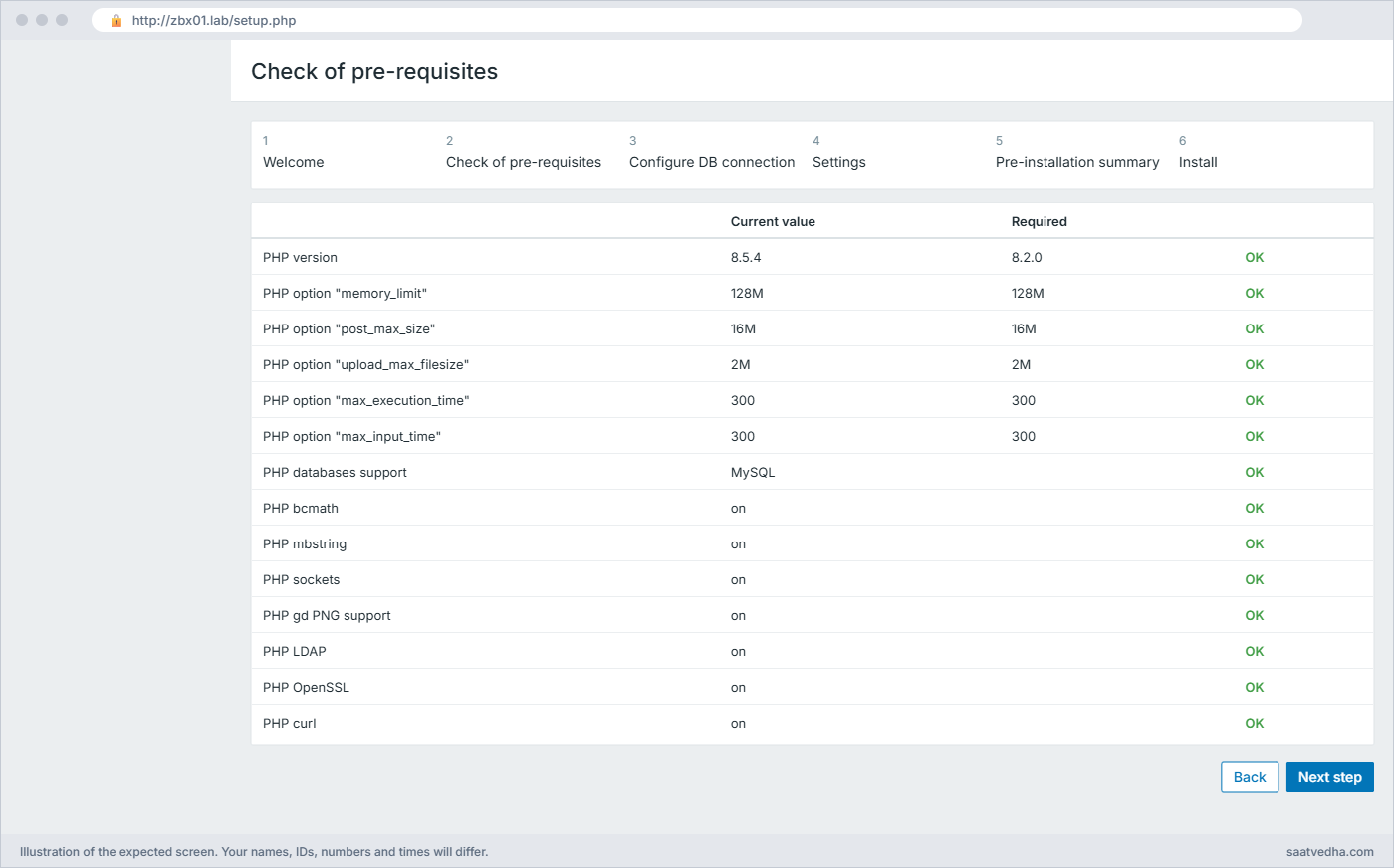
| Check of pre-requisites | Every row should say OK (PHP version, memory_limit, post_max_size, extensions). A red row means a missing PHP module |
| Configure DB connection | Database type MySQL, host localhost, port 0 (default), database zabbix, user zabbix, password Zbx@Lab2026 |
| Settings | Zabbix server name: zbx01, Default time zone: (UTC+05:30) Asia/Kolkata or yours, Default theme: Blue |
| Pre-installation summary | Check the values and click Next step |
| Install | You should see “Congratulations! You have successfully installed Zabbix frontend.” |
The installer writes /etc/zabbix/web/zabbix.conf.php. Click Finish and log in as Admin with password zabbix (the user name is case-sensitive). Lesson 3 changes this password, so don’t leave it like this on anything that’s reachable from a real network.
✅ Checkpoint: You are logged in to the Zabbix frontend as Admin and see the Global view dashboard.
9Check System information and take a snapshot
Open Reports > System information. This page is the first place to look whenever the frontend and server seem to disagree.
Parameter Value Details
Zabbix server is running Yes localhost:10051
Zabbix server version 8.0.0
Zabbix frontend version 8.0.0
Number of hosts (enabled/disabled) 1 1 / 0
Number of templates 390
Number of items (enabled/disabled/not supported) 126 115 / 0 / 11
Number of triggers (enabled/disabled [problem/ok]) 70 70 / 0 [0 / 70]
Number of users (online) 2 1
Required server performance, new values per second 1.96The one host is “Zabbix server” itself, already linked to the templates Linux by Zabbix agent and Zabbix server health. Your counts may differ a little, because a few items need things this VM doesn’t have and show as not supported, which is normal. Shut zbx01 down and take a snapshot called zabbix-installed.
✅ Checkpoint: System information shows “Zabbix server is running: Yes” with server and frontend version 8.0.0, and the snapshot zabbix-installed exists.
Break It, Then Fix It
Three failures you’ll meet sooner or later. Restore the zabbix-installed snapshot first if you want a clean start, and use a throwaway database name for the first one so you don’t touch the real schema.
1The schema import fails with ERROR 1419
Run this on zbx01:
sudo mysql -e "create database zbxtest character set utf8mb4 collate utf8mb4_bin; grant all privileges on zbxtest.* to zabbix@localhost; set global log_bin_trust_function_creators = 0;"
zcat /usr/share/zabbix/sql-scripts/mysql/server.sql.gz | mysql --default-character-set=utf8mb4 -uzabbix -p zbxtestYou’ll get this error:
ERROR 1419 (HY000) at line 2676: You do not have the SUPER privilege and binary logging is enabled (you *might* want to use the less safe log_bin_trust_function_creators variable)The import stopped part-way, at the first create trigger statement. Binary logging is on, so MySQL won’t let a user without SUPER create triggers unless you relax the check. The tables created before line 2676 are already there, so re-running into the same database would hit “table already exists”.
Fix: drop the half-filled database, switch the setting on, import, switch it off:
sudo mysql -e "drop database zbxtest; set global log_bin_trust_function_creators = 1;"
# for a real install you would recreate and re-import here
sudo mysql -e "set global log_bin_trust_function_creators = 0;"✅ Checkpoint: You can explain why ERROR 1419 appears and the zbxtest database is gone.

2Wrong DBPassword: “Access denied”
Run this on zbx01:
sudo sed -i 's/^DBPassword=.*/DBPassword=WrongPass1/' /etc/zabbix/zabbix_server.conf
sudo systemctl restart zabbix-server
sudo tail -3 /var/log/zabbix/zabbix_server.logYou’ll get this error:
4512:20261108:114210.067 [Z3001] connection to database 'zabbix' failed: [1045] Access denied for user 'zabbix'@'localhost' (using password: YES)
4512:20261108:114210.067 Failed to retrieve MySQL version
4512:20261108:114210.067 database is down: reconnecting in 10 secondsNotice that systemctl said nothing and the service even shows active: the server stays up and retries every 10 seconds, so you must read the log. [1045] is MySQL’s code for a bad user or password. The frontend still works (it has its own password in zabbix.conf.php), which confuses a lot of people.
Fix:
sudo sed -i 's/^DBPassword=.*/DBPassword=Zbx@Lab2026/' /etc/zabbix/zabbix_server.conf
sudo systemctl restart zabbix-server
sudo tail -2 /var/log/zabbix/zabbix_server.log✅ Checkpoint: The log shows the server starting again with no “Access denied” line.
3“Zabbix server is not running” banner
Run this on zbx01, then reload the frontend:
sudo systemctl stop zabbix-serverYou’ll see this at the bottom of every frontend page within a minute:
Zabbix server is not running: the information displayed may not be current.The frontend asks the server for its status on port 10051. With the server stopped nobody answers, so System information shows “Zabbix server is running: No” and no new data arrives, even though you can still browse old graphs from the database. The same banner appears when $ZBX_SERVER or $ZBX_SERVER_PORT in /etc/zabbix/web/zabbix.conf.php point at the wrong place, or when SELinux or a firewall blocks the frontend from reaching 10051 on another machine.
Fix:
sudo systemctl start zabbix-server
systemctl is-active zabbix-server
sudo ss -ltnp | grep 10051active
LISTEN 0 4096 0.0.0.0:10051 0.0.0.0:* users:(("zabbix_server",pid=4630,fd=8),...)✅ Checkpoint: The banner is gone and System information shows “Zabbix server is running: Yes” again.
One more you may meet if you try this on Ubuntu 24.04: Zabbix 8.0 stops at start-up with “Unable to start Zabbix server due to unsupported MySQL database version (8.0.x). Must be at least (8.4.0).” The fix is MySQL 8.4 or MariaDB 10.11 or newer, or the course OS, Ubuntu 26.04. The AllowUnsupportedDBVersions=1 override exists, but don’t use it outside a lab.
This happened at work
The upgrade that waited three hours
A colleague of mine was on the monitoring team at a logistics company in Ahmedabad when they moved Zabbix to a new VM over a weekend. The plan was simple: install fresh packages, restore the database dump, start the server. At 11 pm on Saturday everything was installed, the restore finished, and the frontend loaded fine, but it showed “Zabbix server is not running” and no data came in.
The first two hours went on Nginx and PHP, because that’s where the banner appears. They restarted php-fpm, compared configs with the old server and even reinstalled the frontend package. Nobody opened /var/log/zabbix/zabbix_server.log until the on-call DBA joined and asked for it.
The log had one line repeating every 10 seconds: “Access denied for user ‘zabbix’@’localhost'”. The dump had restored the tables but not the MySQL users, and the new zabbix user had been created with a slightly different password from the one in zabbix_server.conf. Fixing the password took two minutes.
After that night the team wrote a short runbook with the order of checks (server log, then database, then PHP and web server) and added a step to the migration checklist to log in once with mysql -uzabbix -p zabbix using the exact password from the config file before starting the server.
Common mistakes and troubleshooting
| Mistake | What happens | What to do instead |
|---|---|---|
| Creating the database without utf8mb4_bin | Case-sensitive keys clash, odd duplicate errors and a warning in System information | Always create it with character set utf8mb4 collate utf8mb4_bin |
| Copying the 7.0 schema path /usr/share/zabbix-sql-scripts/… | zcat: No such file or directory | Use /usr/share/zabbix/sql-scripts/mysql/server.sql.gz on 7.2 and later |
| Leaving log_bin_trust_function_creators=1 | A relaxed security setting stays on for the whole MySQL server | Turn it back to 0 straight after the import |
| Debugging the frontend first when data stops | Hours lost on Nginx and PHP while the real error is in the server log | Read /var/log/zabbix/zabbix_server.log first |
| Keeping the default Nginx site enabled | Port 80 shows the “Welcome to nginx” page instead of Zabbix | Remove /etc/nginx/sites-enabled/default or give Zabbix its own server_name |
| Running Zabbix 8.0 on MySQL 8.0 | The server refuses to start: “Must be at least (8.4.0)” | Use MySQL 8.4+, MariaDB 10.11+ or PostgreSQL 15+ |
| Keeping Admin / zabbix | Anyone who reaches the page logs in as Super admin | Change it straight away (Lesson 3) |
Interview questions
Click a question to open it. Each one is written the way an interviewer would ask it. Under it you will see why they ask it and one way you could answer, in your own words.
Fresher level
1. After installing, the frontend loads but data never arrives. Where do you look first?
Why they ask this: They want to see that you know the server and the frontend are separate processes.
How you might answer: I check whether zabbix-server is running and read /var/log/zabbix/zabbix_server.log, because the frontend can load from the database even when the server is down. Reports > System information also tells me if the frontend can reach the server on 10051.
The usual causes are a wrong DBPassword, which shows as Access denied in the log, or the service stopped after a failed start.
2. Why must the Zabbix database use utf8mb4_bin?
Why they ask this: A basic check that you follow the install guide for a reason.
How you might answer: Zabbix compares host names, item keys and macros case-sensitively, and utf8mb4_bin gives binary, case-sensitive comparison. utf8mb4 also stores any character, including Indian languages and emoji in trigger names. With a case-insensitive collation, two items that differ only in case would clash.
2–5 years experience
3. The schema import stops with ERROR 1419. What is happening and how do you fix it safely?
Why they ask this: They are checking that you understand the error, not only the copy-paste fix.
How you might answer: The MySQL schema creates triggers, and with binary logging on MySQL won’t let a non-SUPER user create them unless log_bin_trust_function_creators is 1. I drop the half-filled database, recreate it, set the variable to 1, import again and set it back to 0 straight after.
I don’t turn binary logging off for this, because we want binlogs for point-in-time recovery and replication.
4. Walk me through what the Zabbix web installer writes and what happens if you need to change the DB password later.
Why they ask this: They want to know you understand there are two places holding DB credentials.
How you might answer: The installer writes /etc/zabbix/web/zabbix.conf.php with the database type, host, name, user and password, plus the server address and port for status checks. The server has its own copy in zabbix_server.conf.
If the DB password changes I update it in MySQL, then in zabbix_server.conf and restart zabbix-server, then in zabbix.conf.php. Missing either one gives Access denied in that component’s log.
Senior level
5. You must install Zabbix 8.0 for 3,000 hosts on a company standard of Ubuntu 24.04. What would you raise in the design review?
Why they ask this: They are testing whether you check version requirements before you promise a date.
How you might answer: Zabbix 8.0 needs MySQL 8.4 or newer and refuses to start on older versions, and Ubuntu 24.04 ships MySQL 8.0, so I’d propose MySQL 8.4 from Oracle’s repository, MariaDB 10.11 or later, PostgreSQL 15 or later with TimescaleDB, or Ubuntu 26.04 for the Zabbix VMs. The frontend needs PHP 8.2 or newer, which 24.04 does meet with 8.3.
For 3,000 hosts I’d also separate the database onto its own server, size the history cache and pollers, and plan proxies per site.
6. How would you make a Zabbix install repeatable across dev, test and production?
Why they ask this: They want to hear about automation and configuration as code, not manual clicks.
How you might answer: I’d script the install with Ansible: repository, packages, database creation, schema import and config templates with secrets from a vault. The web installer can be skipped by templating zabbix.conf.php directly.
Templates and host groups I’d keep as YAML exports in Git and import them through the API, so each environment gets the same configuration.
Quick quiz
Q1. Which collation should the Zabbix MySQL database use?
- utf8_general_ci
- utf8mb4_unicode_ci
- utf8mb4_bin
- latin1_swedish_ci
Show answer
C — Zabbix needs utf8mb4 with the binary, case-sensitive utf8mb4_bin collation.
Q2. Why is log_bin_trust_function_creators set to 1 during the import?
- To speed up the import
- So a non-SUPER user can create the schema’s triggers while binary logging is on
- To turn off binary logging
- To allow remote connections
Show answer
B — The schema creates triggers, and binary logging blocks that for non-SUPER users unless the variable is 1.
Q3. Where is the schema file in Zabbix 8.0 packages?
- /usr/share/zabbix-sql-scripts/mysql/server.sql.gz
- /usr/share/zabbix/sql-scripts/mysql/server.sql.gz
- /etc/zabbix/server.sql.gz
- /var/lib/zabbix/schema.sql
Show answer
B — Since 7.2 the scripts live under /usr/share/zabbix/sql-scripts/.
Q4. The server log repeats “database is down: reconnecting in 10 seconds” after “[1045] Access denied”. What is wrong?
- MySQL is not installed
- The DBPassword in zabbix_server.conf does not match the MySQL user
- PHP is missing the MySQL module
- Port 10051 is blocked
Show answer
B — MySQL error 1045 means the user or password is wrong.
Q5. What is the default frontend login after installation?
- root / root
- admin / admin
- Admin / zabbix
- zabbix / Zbx@Lab2026
Show answer
C — The default Super admin is Admin with password zabbix; change it straight away.
Quick recap
- The zabbix-release package adds the official 8.0 repository; check that the candidate version ends in ubuntu26.04.
- Create the database with utf8mb4 and utf8mb4_bin, set log_bin_trust_function_creators to 1 for the import and back to 0 after.
- The server needs DBPassword in /etc/zabbix/zabbix_server.conf; the frontend keeps its own copy in /etc/zabbix/web/zabbix.conf.php.
- Zabbix 8.0 refuses to start on MySQL older than 8.4, and its frontend needs PHP 8.2 or newer.
- When data stops, read /var/log/zabbix/zabbix_server.log before touching Nginx or PHP.
Next lesson
Lesson 3: Secure the Zabbix frontend: HTTPS, firewall and first settings → You change the Admin password, move the frontend to HTTPS with a proper certificate and open only the ports Zabbix needs.
Further reading: install Zabbix on Ubuntu
Want to go deeper into install Zabbix on Ubuntu? The official Zabbix download page builds the exact commands for your OS, database and web server, and the 8.0 requirements list supported database and PHP versions. The frontend installation page walks through the installer.
For a refresher on MySQL users and grants on Linux, see the Linux administration course. You can also see the full plan for this course on the Zabbix Monitoring course page.
