Custom checks: UserParameter, system.run, zabbix_get and zabbix_sender

A Zabbix UserParameter teaches the agent a brand-new item key: you write one line that maps a key name to a shell command, and the agent runs that command whenever the server asks. It’s how teams monitor the things no template covers, like the queue of unsent bills on a shop’s billing server, the age of last night’s backup, or a number only your own script knows how to calculate.

In this lesson you add UserParameters to agent 2 on web01 (with and without parameters, calling a script), test them with zabbix_get, see why system.run is blocked by default and how to allow one command safely, and build a calculated item. Then you push values from a backup script with zabbix_sender into trapper items, which is how batch jobs report to Zabbix. Agent and sender outputs here were captured from real Zabbix binaries.

Where this lesson fits

Lesson 14 of 24 in Zabbix Monitoring · Phase 2: Items, triggers, templates and dashboards · Before this: Lesson 13, log monitoring · Next: Lesson 15, low-level discovery

TimeYou needBy the end you can
About 80 minuteszbx01 and web01 from Lessons 1 to 13 with agent 2, sudo on both VMsWrite, test and secure custom agent keys, push values from scripts with zabbix_sender, and fix Unsupported item key, permission and trapper errors

What it is, in one line

A Zabbix UserParameter is a line in the agent configuration that defines a new item key and the shell command the agent runs to get its value; zabbix_get tests keys from the server side, and zabbix_sender pushes values into trapper items.

In Simple Words

The kirana shop owner’s helper

A kirana shop owner tells his new helper, “If anyone asks how much rice is left, go to the back room, count the bags and tell them.” Nobody had to teach the customer anything; the helper now knows one more question and how to answer it.

Some answers come the other way: the delivery boy rings the owner after his evening round and says “all 40 orders delivered”, without being asked.

A UserParameter is a new question the agent knows how to answer, and zabbix_sender is the delivery boy calling in with the result.

Engineer's View

Four ways to get custom data into Zabbix

Agent 2 reads UserParameters from its config and from any file included by Include=/etc/zabbix/zabbix_agent2.d/*.conf. The syntax is UserParameter=KEY,COMMAND, or UserParameter=KEY[*],COMMAND using $1 $2 ... for a flexible key with parameters. The command runs as the zabbix user through /bin/sh -c, and its standard output becomes the value.

MethodWho starts itGood forWatch out for
UserParameterThe agent, when the item is checkedSmall commands and scripts on the hostMust finish within the item timeout; runs as zabbix
system.run[cmd]The agent, any command in the keyQuick one-offsDenied by default (DenyKey=system.run[*]); a security risk
Script itemThe server or proxy, JavaScriptCalling APIs, maths across HTTP callsRuns on the server, not on the host
Trapper + zabbix_senderYour script, whenever it finishesCron jobs, backups, batch resultsIn 8.0, Allowed hosts defaults to {$TRAPPER.ALLOWED_HOSTS}, which is 127.0.0.1,::1

Timeouts changed in 7.0: the timeout is set per item type in Administration > General > Timeouts (default 3 seconds, maximum 600) and can be overridden per item, and the server sends it to the agent with each check. Two 8.0 changes matter here: trapper items get the macro {$TRAPPER.ALLOWED_HOSTS} in Allowed hosts by default, so only the server itself may send unless you widen it, and agents gained AllowKeyRegexp and DenyKeyRegexp next to AllowKey and DenyKey.

How it works, step by step

1The server asks for a key the agent doesn’t have built in

For a passive check the server connects to port 10050 and sends the key, for example pos.queue; for an active check the key is in the agent’s list. Agent 2 looks the key up in its built-in plugins first and then in the UserParameter list it loaded at startup.

2The agent runs the command and returns stdout

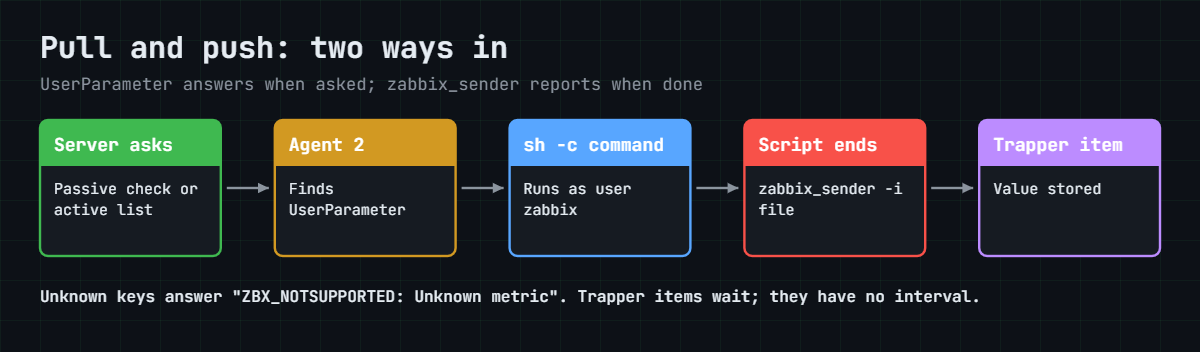
The agent runs the command with /bin/sh -c, waits up to the item’s timeout, trims the output, and returns it. If the key isn’t in the list it answers ZBX_NOTSUPPORTED: Unsupported item key.. The diagram below shows both directions: pull through UserParameters and push through zabbix_sender.

Zabbix UserParameter pull and zabbix_sender push paths into Zabbix

3Flexible keys pass parameters

With [*] after the key name, whatever is inside the brackets is split on commas and handed to the command as $1, $2 and so on. That’s why a dollar sign meant for the shell has to be written as $$ in a flexible UserParameter, and why the agent rejects parameters containing characters like ; | & unless you set UnsafeUserParameters=1, which you shouldn’t.

4zabbix_sender pushes into trapper items

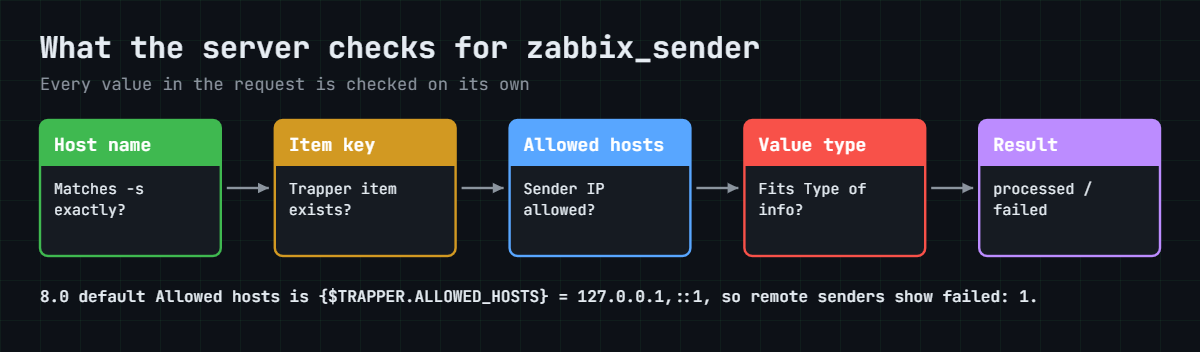
A trapper item has no interval; it waits. Your script runs zabbix_sender -z SERVER -s HOST -k KEY -o VALUE (or -i file for many values), the server checks the host name, the key and the sender’s IP against the item’s Allowed hosts, and stores the value. The second diagram shows that check.

Zabbix UserParameter lesson: what the server checks for each zabbix_sender value

5Calculated items combine what you already have

A calculated item runs on the server and computes a value from other items with a formula such as 100*last(//backup.size)/last(//vfs.fs.size[/,total]). The double slash means “this host”, so the same formula works in a template. Nothing extra runs on the host.

You needUse
A value only a shell command or script on the host can produceUserParameter
A result at the end of a cron job or backupTrapper item + zabbix_sender
A sum, ratio or percentage of existing itemsCalculated item
To call a remote API with logicScript item or HTTP agent (Lessons 11 and 12)
A one-time command during troubleshootingzabbix_get with a built-in key, not system.run

Hands-on lab: custom keys for the POS queue and backup results

Before you run any command, double-check it

Read every command twice before you press Enter. Check the target: the server name, the user, the disk or device name, the path and the sizes. These commands are for learning and were tested in our lab, not on your system. At work, run the read-only commands first, follow your change process, make sure a backup exists, and ask a second person to check anything that changes or deletes data. You run them at your own risk.

Agent work happens on web01, testing from zbx01, and items in the frontend at https://zbx01.lab. Agent 2 on Ubuntu reads /etc/zabbix/zabbix_agent2.d/*.conf, so all custom keys go into their own files there, which survive package upgrades.

1Write a first UserParameter

Run this on web01:

sudo tee /etc/zabbix/zabbix_agent2.d/userparameter_lab.conf >/dev/null <<'EOF'
# SaatVedha lab custom keys
UserParameter=nginx.workers,pgrep -c -f 'nginx: worker process'
EOF
sudo zabbix_agent2 -t nginx.workers

You should see:

nginx.workers                                 [s|1]

-t loads the config and runs the key once without needing the service. [s|1] means a successful string result of 1, one worker for a 1 vCPU VM. The running agent doesn’t know the key yet, which you’ll see in the Break It section.

✅ Checkpoint: zabbix_agent2 -t nginx.workers returns a number on web01.

2Reload and test from zbx01

Run this on web01, then the second command on zbx01:

sudo zabbix_agent2 -R userparameter_reload
zabbix_get -s 192.168.56.81 --tls-connect psk --tls-psk-identity "PSK web01" --tls-psk-file /tmp/web01.psk -k nginx.workers          # on zbx01

You should see:

User parameters reloaded
1

-R userparameter_reload tells the running agent to re-read UserParameter lines without a restart; other config changes still need systemctl restart zabbix-agent2. zabbix_get is the server’s view: if it works here, a passive item on web01 will work too. Since Lesson 6 web01 accepts only PSK connections, so every zabbix_get in this lesson passes web01’s key from /tmp/web01.psk.

✅ Checkpoint: zabbix_get from zbx01 returns the worker count.

3A flexible key: age of any file

Run this on web01:

echo 'UserParameter=file.age[*],echo $$(( $$(date +%s) - $$(stat -c %Y "$1") ))' | sudo tee -a /etc/zabbix/zabbix_agent2.d/userparameter_lab.conf
sudo zabbix_agent2 -R userparameter_reload
zabbix_get -s 192.168.56.81 --tls-connect psk --tls-psk-identity "PSK web01" --tls-psk-file /tmp/web01.psk -k 'file.age[/etc/hostname]'     # on zbx01

You should see this (the age in seconds will differ):

UserParameter=file.age[*],echo $$(( $$(date +%s) - $$(stat -c %Y "$1") ))
User parameters reloaded
8057

The answer is the file’s age in seconds. Every $ meant for the shell is doubled, because in a flexible key Zabbix replaces $1 to $9 itself and turns $$ into a single $ before the shell sees it. Create the item on web01: Name “Age of last backup”, Type Zabbix agent, key file.age[/var/backups/pos/latest.tar.gz], Numeric (unsigned), Units s, interval 5m.

✅ Checkpoint: file.age[/etc/hostname] returns a number of seconds.

4Call a script for the POS queue

Real checks are usually a script. Here a “billing queue” is a folder of .txn files that a POS sync job should empty:

Run this on web01:

sudo mkdir -p /var/spool/pos /etc/zabbix/scripts
sudo touch /var/spool/pos/{1001,1002,1003}.txn
sudo tee /etc/zabbix/scripts/pos_queue.sh >/dev/null <<'EOF'
#!/bin/bash
# number of unsent POS transactions
find /var/spool/pos -maxdepth 1 -name '*.txn' | wc -l
EOF
sudo chmod 755 /etc/zabbix/scripts/pos_queue.sh
echo 'UserParameter=pos.queue,/etc/zabbix/scripts/pos_queue.sh' | sudo tee -a /etc/zabbix/zabbix_agent2.d/userparameter_lab.conf
sudo zabbix_agent2 -R userparameter_reload
zabbix_get -s 192.168.56.81 --tls-connect psk --tls-psk-identity "PSK web01" --tls-psk-file /tmp/web01.psk -k pos.queue      # on zbx01

You should see:

UserParameter=pos.queue,/etc/zabbix/scripts/pos_queue.sh
User parameters reloaded
3

Add an item pos.queue (Zabbix agent, Numeric unsigned, 1m) and a trigger min(/web01/pos.queue,15m)>50 named “POS queue stuck on {HOST.NAME}”. Using min() over 15 minutes means the queue must stay high, so a normal burst at closing time doesn’t page anyone.

✅ Checkpoint: pos.queue returns 3 and the item and trigger exist on web01.

5Allow one system.run command, safely

system.run lets the server ask the agent to run any command written in the key, which is why it’s denied by default. If you need one specific command, allow only that pattern:

Run this on web01, then the tests on zbx01:

echo 'AllowKey=system.run[uptime -p]' | sudo tee /etc/zabbix/zabbix_agent2.d/allowkey.conf
sudo systemctl restart zabbix-agent2
zabbix_get -s 192.168.56.81 --tls-connect psk --tls-psk-identity "PSK web01" --tls-psk-file /tmp/web01.psk -k 'system.run[uptime -p]'       # on zbx01
zabbix_get -s 192.168.56.81 --tls-connect psk --tls-psk-identity "PSK web01" --tls-psk-file /tmp/web01.psk -k 'system.run[cat /etc/shadow]' # on zbx01

You should see this (your uptime will differ):

AllowKey=system.run[uptime -p]
up 2 hours, 14 minutes
ZBX_NOTSUPPORTED: Unsupported item key.

The exact allowed command works, and anything else is refused with the same message as an unknown key, so an attacker learns nothing. Rules are checked in order, and once you add any rule for system.run the automatic DenyKey=system.run[*] is applied after yours. Prefer a named UserParameter over system.run whenever you can, because the command then lives on the host, not in a key anyone with frontend rights can edit.

✅ Checkpoint: system.run[uptime -p] works from zbx01 and system.run[cat /etc/shadow] is refused.

6Create trapper items and widen Allowed hosts

Create three items on web01 with Type Zabbix trapper:

NameKeyType of informationUnits
Backup: status (0 = OK)backup.statusNumeric (unsigned)
Backup: sizebackup.sizeNumeric (unsigned)B
Backup: durationbackup.durationNumeric (unsigned)s

Look at Allowed hosts on each: in 8.0 it’s pre-filled with {$TRAPPER.ALLOWED_HOSTS}, a global macro (Administration > Macros) whose default is 127.0.0.1,::1. web01 sends from 192.168.56.81, so change Allowed hosts on these three items to 192.168.56.81. In 7.0 the field was empty, which meant any host could send.

In 8.0 an empty field rejects every sender, and an upgrade from 7.0 rewrites empty fields to 0.0.0.0/0,::/0 so old senders keep working.
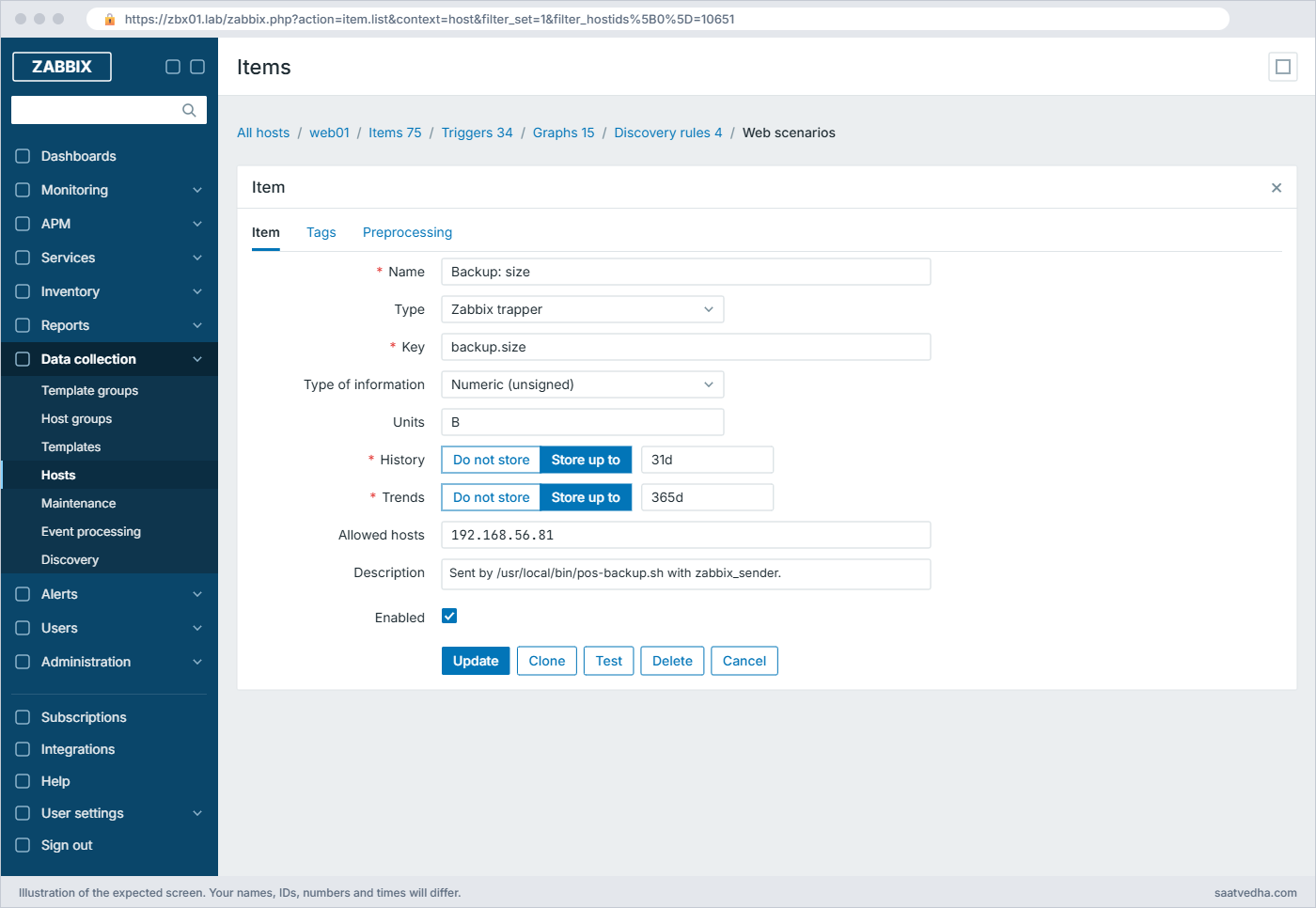
Zabbix UserParameter lab: trapper item backup.size with Allowed hosts 192.168.56.81
The trapper item form in 8.0: Allowed hosts changed from the global macro to web01’s address

✅ Checkpoint: Three trapper items exist on web01 with Allowed hosts 192.168.56.81.

7Send values from a backup script

Run this on web01:

sudo apt install -y zabbix-sender
sudo mkdir -p /var/backups/pos
sudo tee /usr/local/bin/pos-backup.sh >/dev/null <<'EOF'
#!/bin/bash
# nightly POS backup, then report the result to Zabbix
START=$(date +%s)
DEST=/var/backups/pos/pos-$(date +%F).tar.gz
if tar -czf "$DEST" -C /var/spool/pos . 2>/dev/null; then STATUS=0; else STATUS=1; fi
ln -sf "$DEST" /var/backups/pos/latest.tar.gz
SIZE=$(stat -c %s "$DEST" 2>/dev/null || echo 0)
DUR=$(( $(date +%s) - START ))
zabbix_sender -z 192.168.56.80 -s web01 -i - <<END
web01 backup.status $STATUS
web01 backup.size $SIZE
web01 backup.duration $DUR
END
EOF
sudo chmod 755 /usr/local/bin/pos-backup.sh
sudo /usr/local/bin/pos-backup.sh; echo "exit code: $?"

You should see this (seconds spent will differ):

Response from "192.168.56.80:10051": "processed: 3; failed: 0; total: 3; seconds spent: 0.000016"
sent: 3; skipped: 0; total: 3
exit code: 0

That’s the real sender output format. “processed: 3; failed: 0” means the server accepted all three values; “sent” only counts what left the client. Add the trigger last(/web01/backup.status)<>0 or nodata(/web01/backup.status,26h)=1 named “POS backup failed or did not run on {HOST.NAME}”, and schedule the script with echo '30 1 * * * root /usr/local/bin/pos-backup.sh' | sudo tee /etc/cron.d/pos-backup.

✅ Checkpoint: Latest data on web01 shows backup.status 0, a backup size and a duration.

Zabbix UserParameter lab: zabbix_sender result and the Unsupported item key error
Terminal output: a successful zabbix_sender run from the backup script, and the Unsupported item key error you meet in Break It

8A calculated item from what you have

Create an item on web01: Name “Backup size as % of root disk”, Type Calculated, key backup.size.pct, Formula 100*last(//backup.size)/last(//vfs.fs.size[/,total]), Numeric (float), Units %, interval 1h.

The formula needs an item with the key vfs.fs.size[/,total] on the host. The Linux template discovers file systems with keys like vfs.fs.dependent.size[/,total], so if your host has no exact match, add a small Zabbix agent (active) item with that key first. Calculated items run on the server, so they also work for hosts without an agent.
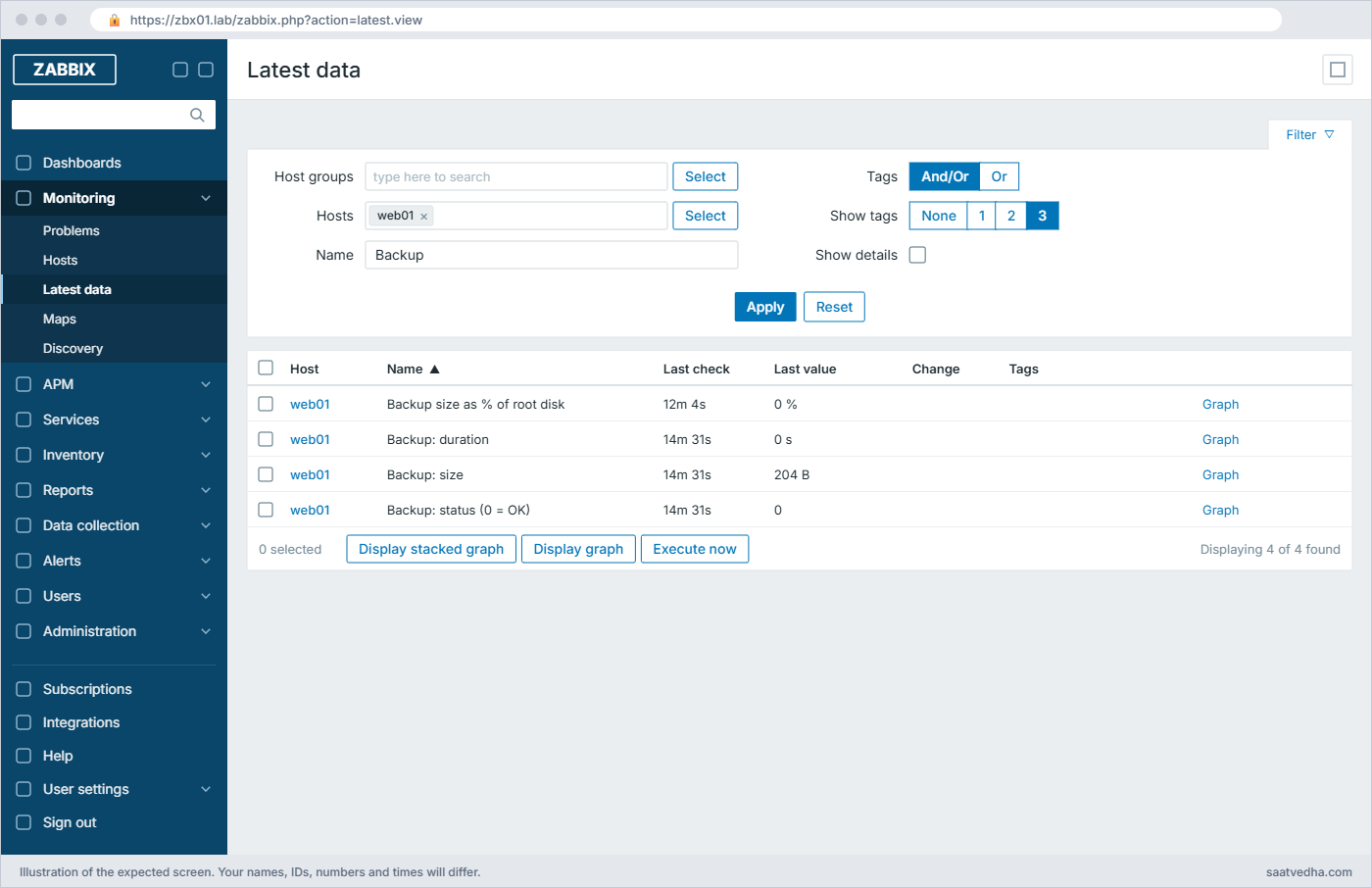
Zabbix UserParameter lab: Latest data for the backup trapper items on web01
Latest data filtered on “Backup”: the trapper values and the calculated item

✅ Checkpoint: The calculated item shows a small percentage in Latest data.

Break It, Then Fix It

Three failures you’ll see within your first month of writing custom checks. None of them need a snapshot.

1“ZBX_NOTSUPPORTED: Unsupported item key.” after adding a key

Run this on web01 (add a key without reloading), then the test on zbx01:

echo 'UserParameter=backup.age,echo 42' | sudo tee -a /etc/zabbix/zabbix_agent2.d/userparameter_lab.conf
zabbix_get -s 192.168.56.81 --tls-connect psk --tls-psk-identity "PSK web01" --tls-psk-file /tmp/web01.psk -k backup.age      # on zbx01

You’ll get this error:

ZBX_NOTSUPPORTED: Unsupported item key.

The running agent loaded its UserParameters at startup and hasn’t seen the new line. zabbix_agent2 -t backup.age works at this point, because -t reads the files fresh, which fools a lot of people. The same message appears when the file isn’t in the Include path, when the name has a typo, or on a different host than you think.

Fix:

sudo zabbix_agent2 -R userparameter_reload
zabbix_get -s 192.168.56.81 --tls-connect psk --tls-psk-identity "PSK web01" --tls-psk-file /tmp/web01.psk -k backup.age      # on zbx01, now prints 42

✅ Checkpoint: backup.age returns 42 after the reload. Remove the test line afterwards.

2Permission denied running the script

Run this on web01, then the test on zbx01:

sudo chmod 644 /etc/zabbix/scripts/pos_queue.sh
zabbix_get -s 192.168.56.81 --tls-connect psk --tls-psk-identity "PSK web01" --tls-psk-file /tmp/web01.psk -k pos.queue        # on zbx01

You’ll get this:

sh: 1: /etc/zabbix/scripts/pos_queue.sh: Permission denied

That’s real agent 2 output, and it’s sneaky: the agent returns the shell’s error text as the value, so a Numeric item goes Not supported with a “not suitable for value type” message, and a Text item happily stores the error. The script lost its execute bit; the same happens when the zabbix user can’t read a file the script needs, such as a log or a database socket.

Fix:

sudo chmod 755 /etc/zabbix/scripts/pos_queue.sh
sudo -u zabbix /etc/zabbix/scripts/pos_queue.sh   # always test as the zabbix user

Testing with sudo -u zabbix catches most of these before the item does. If the script truly needs root, give the zabbix user one exact sudo rule for that script (zabbix ALL=(root) NOPASSWD: /etc/zabbix/scripts/pos_queue.sh in a file under /etc/sudoers.d) instead of running the agent as root.

✅ Checkpoint: pos.queue returns a number again and sudo -u zabbix runs the script.

3system.run blocked, and zabbix_sender “failed: 1”

First the agent side. Remove the AllowKey file and try the command again:

Run this on web01, then the test on zbx01:

sudo rm /etc/zabbix/zabbix_agent2.d/allowkey.conf && sudo systemctl restart zabbix-agent2
zabbix_get -s 192.168.56.81 --tls-connect psk --tls-psk-identity "PSK web01" --tls-psk-file /tmp/web01.psk -k 'system.run[uptime -p]'     # on zbx01

You’ll get this error:

ZBX_NOTSUPPORTED: Unsupported item key.

That’s the default DenyKey=system.run[*] at work. Put the AllowKey line back if you need it, and remember that global scripts in Lesson 18 also use system.run under the hood.

Now the sender side. Set Allowed hosts on backup.size back to the default {$TRAPPER.ALLOWED_HOSTS} and run the backup again:

Run this on web01:

sudo /usr/local/bin/pos-backup.sh; echo "exit code: $?"

You’ll get this:

Response from "192.168.56.80:10051": "processed: 2; failed: 1; total: 3; seconds spent: 0.000034"
sent: 3; skipped: 0; total: 3
exit code: 2

The server accepted two values and rejected one, and zabbix_sender exits with 2 so a cron wrapper can tell. The reply never says which value or why; with LogLevel raised the server log explains, for example cannot process item "backup.size" trap: connection from "192.168.56.81" rejected, allowed hosts: "127.0.0.1,::1". The same “failed” count appears when the key has a typo, the item is disabled, or the host name after -s doesn’t match the host’s technical name character for character.

Fix:

Set Allowed hosts back to 192.168.56.81, or change the global macro {$TRAPPER.ALLOWED_HOSTS} to include your lab subnet (127.0.0.1,::1,192.168.56.0/24) if many hosts send. Then check the key and host name character by character.

✅ Checkpoint: pos-backup.sh reports processed: 3; failed: 0 and exits with 0.

This happened at work

The billing counters that went quiet on Sunday

My team lead supported the POS servers for a retail chain with about 300 stores around Chennai. Each store server had a UserParameter that counted unsent billing transactions, and a trigger fired if the queue stayed above 50 for 15 minutes. One Sunday, head office noticed that the previous day’s sales hadn’t reached the central system from 40 stores, and Zabbix showed no problems at all.

The on-call engineer checked the trigger first, then the items: they all showed 0. Running the script by hand as root gave 380 for one store. Running it as sudo -u zabbix gave 0, along with a permission error that the script hid with 2>/dev/null.

A vendor patch on Friday had moved the queue folder and tightened its permissions to the POS application user. The script couldn’t read the folder, find printed nothing to count, and wc -l happily answered 0, so every store looked perfect.

The team changed the script to exit with an error when the folder isn’t readable, so the item goes Not supported instead of returning 0, added a nodata() trigger, and made “test as the zabbix user” part of every vendor patch checklist.

Common mistakes and troubleshooting

MistakeWhat happensWhat to do instead
Editing a UserParameter and not reloadingUnsupported item key, or the old command keeps runningRun zabbix_agent2 -R userparameter_reload after UserParameter changes
Testing scripts only as rootWorks by hand, fails or lies in ZabbixTest with sudo -u zabbix before creating the item
Scripts that print 0 on errorMonitoring shows healthy while the check is brokenExit non-zero or print nothing so the item goes Not supported
Allowing system.run[*]Anyone who can edit an item can run any command as zabbixUse named UserParameters, or AllowKey for one exact command
Slow scripts with the default 3 second timeoutTimeout occurred while gathering dataMake the script faster, or set a per-item timeout, or move it to cron plus zabbix_sender
Forgetting Allowed hosts on trapper items in 8.0zabbix_sender shows failed: 1 for remote hostsSet Allowed hosts or widen {$TRAPPER.ALLOWED_HOSTS} on purpose
Single $ in a flexible UserParameterShell variables vanish or become parametersWrite $$ for every dollar meant for the shell

Interview questions

Click a question to open it. Each one is written the way an interviewer would ask it. Under it you will see why they ask it and one way you could answer, in your own words.

Fresher level

1. How do you add a custom metric to a Linux host in Zabbix?

Why they ask this: The basic UserParameter workflow.

How you might answer: I add a UserParameter line in a file under /etc/zabbix/zabbix_agent2.d/, like UserParameter=pos.queue,/etc/zabbix/scripts/pos_queue.sh, then run zabbix_agent2 -R userparameter_reload. I test it from the server with zabbix_get -s host -k pos.queue.

Then I create an item with that key on the host or in a template, and a trigger on it.

2. What is the difference between a UserParameter and zabbix_sender?

Why they ask this: Pull versus push.

How you might answer: A UserParameter is pulled: the agent runs the command when the item is checked, on its interval. zabbix_sender is pushed: my script sends the value whenever it finishes, into a Zabbix trapper item that has no interval.

For a backup that runs once a night at a varying time, I use zabbix_sender with a nodata() trigger in case it never runs.

2–5 years experience

3. A custom item returns 0 but you know the real value is higher. How do you debug it?

Why they ask this: Real troubleshooting, especially the zabbix user context.

How you might answer: I run the command myself as the zabbix user with sudo -u zabbix, because the agent runs it as zabbix, not root. Usually a permission or PATH difference makes the command fail and the script hides the error.

Then I fix the access, and change the script so an error produces no output or a non-zero exit, which makes the item Not supported instead of a fake 0.

4. Why is system.run disabled by default, and when would you enable it?

Why they ask this: Security awareness.

How you might answer: system.run runs whatever command is in the item key, so anyone who can edit items or global scripts could run commands on every agent. Agent 2 adds DenyKey=system.run[*] by default.

If I must, I allow one exact pattern with AllowKey, such as system.run[systemctl restart nginx] for a reviewed global script, and log remote commands. Usually a named UserParameter is the better answer.

Senior level

5. Your batch jobs on 200 servers need to report success, duration and row counts to Zabbix. Design it.

Why they ask this: Senior design: templates, trapper items, missing-data alerts.

How you might answer: I’d build a template with trapper items such as batch.status, batch.duration and batch.rows, linked to those 200 hosts, with Allowed hosts set to {HOST.CONN} or a subnet. Each job ends with one zabbix_sender -i call that sends all values together and checks the exit code.

Triggers would cover status not 0, duration above a baseline, and nodata over the schedule plus a margin. For large fleets I’d send through the site’s proxy and keep the sender call in a shared wrapper script.

6. After upgrading to 8.0, all zabbix_sender calls from your app servers show failed: 1. What changed?

Why they ask this: Checks awareness of the 8.0 trapper default.

How you might answer: In 8.0 new trapper items get {$TRAPPER.ALLOWED_HOSTS} in Allowed hosts, and its default is only 127.0.0.1 and ::1, so only the server itself can send. If the items were recreated or imported from a new template, remote senders are rejected.

I’d set the global macro to our sender networks, or set Allowed hosts per item to {HOST.CONN} so each host can only send its own data, and confirm in the server log with a higher log level.

Quick quiz

Q1. Which command makes a running agent 2 pick up new UserParameter lines?

  1. zabbix_agent2 -t key
  2. zabbix_agent2 -R userparameter_reload
  3. zabbix_get -R reload
  4. systemctl reload zabbix-server
Show answer

B — userparameter_reload re-reads UserParameter lines without a restart.

Q2. In a flexible UserParameter, how do you pass a literal $ to the shell?

  1. \$
  2. $$
  3. ${$}
  4. You cannot
Show answer

B — Zabbix turns $$ into $ after replacing $1 to $9 with the key parameters.

Q3. Which user runs UserParameter commands on Ubuntu?

  1. root
  2. www-data
  3. zabbix
  4. nobody
Show answer

C — Agent 2 runs as the zabbix user, so commands must work for that user.

Q4. zabbix_sender prints “processed: 2; failed: 1”. What does that tell you?

  1. The network failed
  2. The server rejected one value (key, host name or Allowed hosts)
  3. The agent is down
  4. All values were stored
Show answer

B — Failed counts values the server refused, for example from a host not in Allowed hosts.

Q5. In 8.0, what is the default Allowed hosts value for a new trapper item?

  1. Empty, any host
  2. {$TRAPPER.ALLOWED_HOSTS}, which defaults to 127.0.0.1,::1
  3. The host’s IP
  4. 0.0.0.0/0
Show answer

B — 8.0 added the global macro {$TRAPPER.ALLOWED_HOSTS} as the default.

Quick recap

  • UserParameter=key,command (or key[*] with $1, $2) adds keys to agent 2; keep them in files under /etc/zabbix/zabbix_agent2.d/.
  • Reload with zabbix_agent2 -R userparameter_reload, test with zabbix_get, and always test scripts as the zabbix user.
  • system.run is denied by default; allow one exact command with AllowKey only when a UserParameter won’t do.
  • Trapper items plus zabbix_sender report batch results; check processed and failed, and use nodata() for missed runs.
  • In 8.0, trapper Allowed hosts defaults to {$TRAPPER.ALLOWED_HOSTS} (127.0.0.1,::1), so remote senders need it widened.

Next lesson

Lesson 15: Low-level discovery: custom LLD rules and prototypes → You let Zabbix find file systems and services by itself and create items and triggers for each, using built-in and script-based discovery.

Further reading: Zabbix UserParameter

Want to go deeper into Zabbix UserParameter? The official User parameters, Zabbix trapper and zabbix_sender pages cover every option, and Restricting agent checks explains AllowKey and DenyKey rules. Revisit Zabbix agent 2 on Linux for the basics, and for permission troubleshooting see Too many open files.

You can also see the full plan for this course on the Zabbix Monitoring course page.

Scroll to Top

This website uses cookies

We use a few cookies to keep this site working. If you allow it, we also use Google Analytics to count visits so we can improve our lessons. You can accept all, deny the optional ones, or choose what to allow.