Zabbix templates: build, link, import and export
-
Phase 1: Zabbix server and agents
-
Phase 2: Items, triggers, templates and dashboards
-
Phase 3: Alerts, proxies, SNMP and automation
Zabbix templates are how one person’s careful work on one host becomes the standard for a hundred hosts. In Lessons 7 to 9 you built Nginx items, triggers and a graph directly on web01, which is fine for learning and painful at work, because the next web server would need the same clicks again and you’d never keep them in step.
Today you move that work into a template called SaatVedha Nginx web with its own macros, a value map and a template dashboard, link it to web01, and see what linking does to the host’s existing items. Then you export it to YAML, keep it in Git, import it back, and break things the three ways people usually break templates at work.
Where this lesson fits
Lesson 10 of 24 in Zabbix Monitoring · Phase 2: Items, triggers, templates and dashboards · Before this: Lesson 9, dashboards and maps · Next: Lesson 11, preprocessing
| Time | You need | By the end you can |
|---|---|---|
| About 85 minutes | zbx01 and web01 from Lessons 1 to 9, Nginx running on web01 (Lesson 7), the frontend at https://zbx01.lab, Git on zbx01 | Build, link, export and import a Zabbix template safely, and explain unlink versus unlink and clear without losing history |
What it is, in one line
A Zabbix template is a reusable set of items, triggers, graphs, discovery rules, macros and dashboards that you link to hosts, so every linked host gets the same monitoring and one change in the template updates all of them.
In Simple Words
The tiffin service menu card
A tiffin service in Pune cooks for two hundred offices. The owner doesn’t write a new recipe for every customer; she has one menu card (“North Indian thali: two rotis, dal, sabzi, rice”) and each office gets that card, with small notes like “less spicy” or “no onion” written for that customer.
When she changes the card, say she adds buttermilk on Fridays, every office on that card gets buttermilk the next Friday without anyone phoning them one by one.
The template is the menu card, the linked hosts are the offices, and macros are the little notes that change one detail for one customer.
Engineer's View
What a template holds and how inheritance works
A template is stored in the same hosts table as a host, with a special status, and it lives in a template group (for example Templates/Applications) instead of a host group. When you link it to a host, the server copies every item, trigger, graph and discovery rule onto the host as an inherited object that remembers its parent through a templateid. You can’t edit an inherited item’s key on the host, only in the template, and every change you make in the template is pushed down to all linked hosts.
| Part | What it is | Example in this lesson |
|---|---|---|
| Items, triggers, graphs | Copied to each linked host as inherited objects | proc.num[nginx], “Nginx is down on {HOST.NAME}” |
| Template macros | Default values that hosts can override | {$NGINX.PORT}=80, {$NGINX.RESP.MAX}=2 |
| Value maps | Turn raw numbers into words, stored inside the template | 0 = Down, 1 = Up |
| Template dashboard | A page that appears on every linked host under Monitoring > Hosts | “Nginx overview” |
| Nested template | A template linked inside another template | A future “SaatVedha Linux web server” = Linux + Nginx |
| Vendor and version | Free text so you can tell which export is installed | SaatVedha, 8.0-1 |
Macros resolve from the most specific level outward: host macro first, then the template’s macro, then a global macro. That’s how one template serves a host on port 80 and another on port 8080 without copying anything. Exports are plain YAML (or XML or JSON) with a version: '8.0' header and a UUID on every object, and the UUIDs are what let an import update an existing template instead of creating a duplicate.
How it works, step by step
1You build the template once
Items in a template are written the same way as host items, but trigger expressions name the template instead of a host, for example last(/SaatVedha Nginx web/net.tcp.service[http,,{$NGINX.PORT}])=0. Anything that differs between hosts (port, path, thresholds) goes into a user macro so it can be overridden later.
2Linking copies it onto the host
When you add the template to a host and press Update, the API looks for host items with the same key that aren’t already inherited from somewhere else. A matching hand-made item is adopted: it becomes inherited from the template, keeping its history. Items that don’t exist yet are created.
If the same key is already inherited from a different template, the link is refused. The diagram below shows this decision.
3Changes flow down, never up
Edit an item interval or a trigger threshold in the template and the server pushes it to every linked host at the next configuration sync (the server’s config cache refreshes every 10 seconds by default, and the agent fetches its active check list every 5 seconds by default). Editing an inherited item on the host is limited to things like status and history settings, which keeps all hosts in line.
4Unlink or unlink and clear
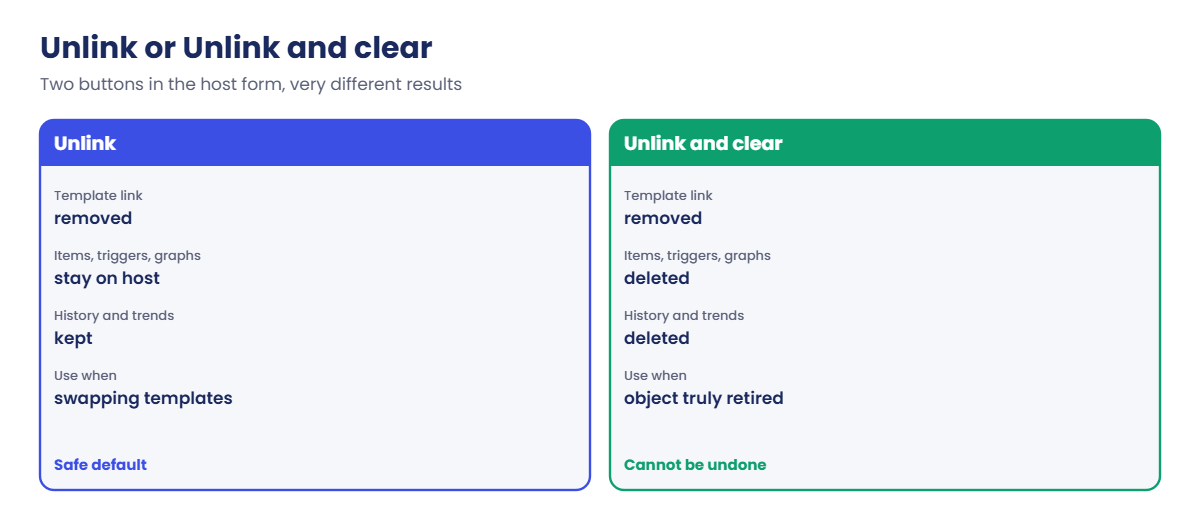
Removing a template from a host has two buttons in the host form, and they behave very differently. Unlink cuts the parent link but leaves the items, triggers and graphs on the host as ordinary host objects, history included. Unlink and clear deletes every object that came from that template, and with them their history and trends.
The second diagram shows both paths.
5Export, import and Git
Data collection > Templates > select > Export gives you YAML, XML or JSON. Import (the Import button on the same page) matches the incoming template first by UUID and then by technical name; the rules table decides whether existing objects are updated, missing ones created, and objects missing from the file deleted. In 8.0 the import window can show a diff of what will change before you confirm, which is the moment to read carefully.
| Import rule | Default for templates | What it means for you |
|---|---|---|
| Update existing | On | Objects already present are overwritten from the file |
| Create new | On | Objects in the file but not in Zabbix are added |
| Delete missing | On for items, triggers, graphs, discovery rules, web scenarios, value maps, template dashboards and linkage | Objects in Zabbix but not in the file are deleted, with their history |
Hands-on lab: build the SaatVedha Nginx web template and keep it in Git
Before you run any command, double-check it
Read every command twice before you press Enter. Check the target: the server name, the user, the disk or device name, the path and the sizes. These commands are for learning and were tested in our lab, not on your system. At work, run the read-only commands first, follow your change process, make sure a backup exists, and ask a second person to check anything that changes or deletes data. You run them at your own risk.
All the frontend work happens at https://zbx01.lab as Admin, and the Git and YAML work runs on zbx01. You need Nginx running on web01 and the items from Lesson 7. If you skipped it, run sudo apt install -y nginx on web01 and create the three host items from the table in step 1 directly on web01 first, because part of this lab is seeing what happens to existing host items.
1Check what web01 already has
Open Data collection > Hosts, click Items in the web01 row and type nginx in the Name filter. You should have these items (names may differ slightly from yours, the keys are what matter):
| Name | Key | Type |
|---|---|---|
| Nginx: number of processes | proc.num[nginx] | Zabbix agent (active) |
| Nginx: HTTP port status | net.tcp.service[http,,80] | Zabbix agent (active) |
| Nginx: response time | net.tcp.service.perf[http,,80] | Zabbix agent (active) |
Run this on zbx01 to confirm the agent answers (web01 needs PSK since Lesson 6, and /tmp/web01.psk is the copy from Lesson 7):
P="--tls-connect psk --tls-psk-identity 'PSK web01' --tls-psk-file /tmp/web01.psk"
eval zabbix_get -s 192.168.56.81 -k "'proc.num[nginx]'" $P
eval zabbix_get -s 192.168.56.81 -k "'net.tcp.service[http,,80]'" $PYou should see:
2
1Two nginx processes (one master, one worker on a 1 vCPU VM) and the HTTP port is up. If you get cannot connect, passive checks are blocked; go back to Lesson 4, or skip this test, because the template uses active checks anyway. Without the PSK options you get “Received empty response from Zabbix Agent”, because web01 accepts only encrypted connections.
✅ Checkpoint: web01 has the three Nginx items and zabbix_get returns numbers for them.
2Create the template and its macros
Go to Data collection > Templates and click Create template. Fill in:
| Field | Value |
|---|---|
| Template name | SaatVedha Nginx web |
| Template groups | Templates/Applications |
| Description | Nginx availability, response time and processes for SaatVedha lab web servers. |
| Vendor and version | SaatVedha / 8.0-1 |
| Macros tab | {$NGINX.PORT} = 80 and {$NGINX.RESP.MAX} = 2 (description: seconds, warn above this for 5 minutes) |
| Value mapping tab | Add: name “Service state”, 0 = Down, 1 = Up |
Press Add.
You should see this message:
Template added✅ Checkpoint: SaatVedha Nginx web is listed under Templates/Applications with two macros and a value map.
3Copy the host items into the template
Back in web01’s item list, tick the three Nginx items and press Copy at the bottom. Choose Target type Templates, Target SaatVedha Nginx web, and press Copy. Now open the template’s items and edit each copy so it uses the macros:
| Name | Key in the template | Extra |
|---|---|---|
| Nginx: number of processes | proc.num[nginx] | Tag component = nginx |
| Nginx: HTTP port status | net.tcp.service[http,,{$NGINX.PORT}] | Value mapping: Service state |
| Nginx: response time | net.tcp.service.perf[http,,{$NGINX.PORT}] | Units s, Numeric (float) |
Notice two keys changed: 80 became {$NGINX.PORT}. That matters in the next step, because linking matches by key text.
✅ Checkpoint: The template has three items, two of them using {$NGINX.PORT}.
4Add triggers, a graph and a template dashboard
In the template, open Triggers > Create trigger twice, and Graphs > Create graph once:
| Object | Name | Expression or items | Severity |
|---|---|---|---|
| Trigger | Nginx is down on {HOST.NAME} | last(/SaatVedha Nginx web/net.tcp.service[http,,{$NGINX.PORT}])=0 | High |
| Trigger | Nginx is slow on {HOST.NAME} | min(/SaatVedha Nginx web/net.tcp.service.perf[http,,{$NGINX.PORT}],5m)>{$NGINX.RESP.MAX} | Warning |
| Graph | Nginx: response time | Nginx: response time (colour 1A7C11) |
Then open Dashboards in the template’s row on the Templates list and Create dashboard, name it Nginx overview. Add a Graph (classic) widget showing the “Nginx: response time” graph and an Item value widget for “Nginx: HTTP port status”. You won’t pick a host anywhere: a template dashboard always shows the host it’s opened from.
Save changes.
✅ Checkpoint: The template has 3 items, 2 triggers, 1 graph and the dashboard Nginx overview.
5Link the template to web01 and read the result
Open web01 (Data collection > Hosts > web01). In Templates add SaatVedha Nginx web next to Linux by Zabbix agent active and press Update.
You should see this message:
Host updatedNow look at web01’s items filtered by nginx:
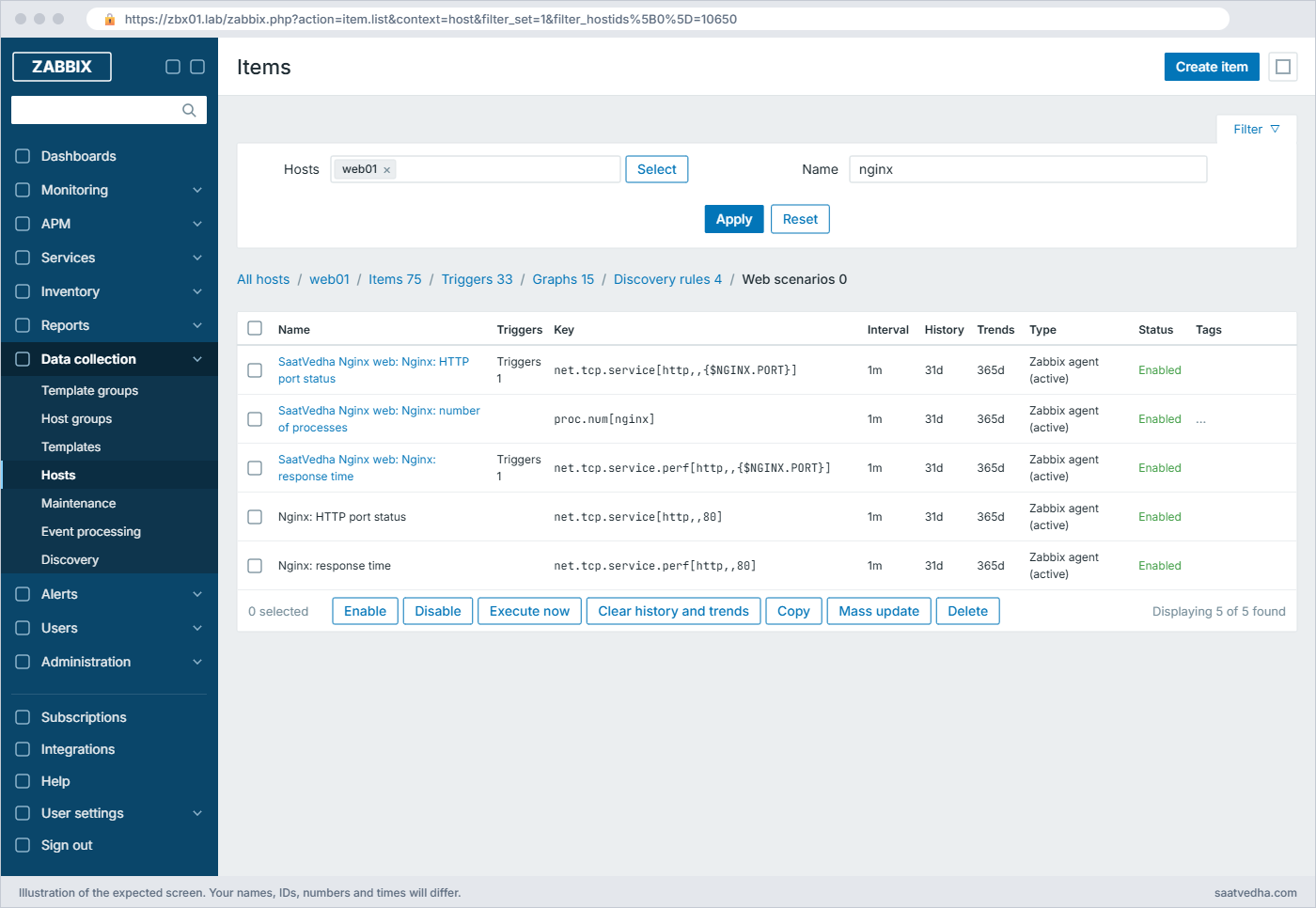
The process item had the same key in both places, so Zabbix adopted the host item: it now shows the template name in front (a link to the template) and keeps all its history. The two port items had different key text (80 versus the macro), so the template created new ones next to the old host items, and their history starts from zero. Delete the two old host items (the ones without a prefix) once the new ones show values.
✅ Checkpoint: web01 shows three Nginx items with the SaatVedha Nginx web prefix and you deleted the two old host-only copies.
6Override a macro on one host
Suppose web01 is slow by design and you want it to warn only above 3 seconds. Open web01, go to the Macros tab, choose Inherited and host macros, and press Change next to {$NGINX.RESP.MAX}. Set it to 3 and press Update.
In the {$NGINX.RESP.MAX} row the Effective value is 3, and the Template value column shows SaatVedha Nginx web: "2". The {$NGINX.PORT} row has no host value, so it keeps 80 from the template.
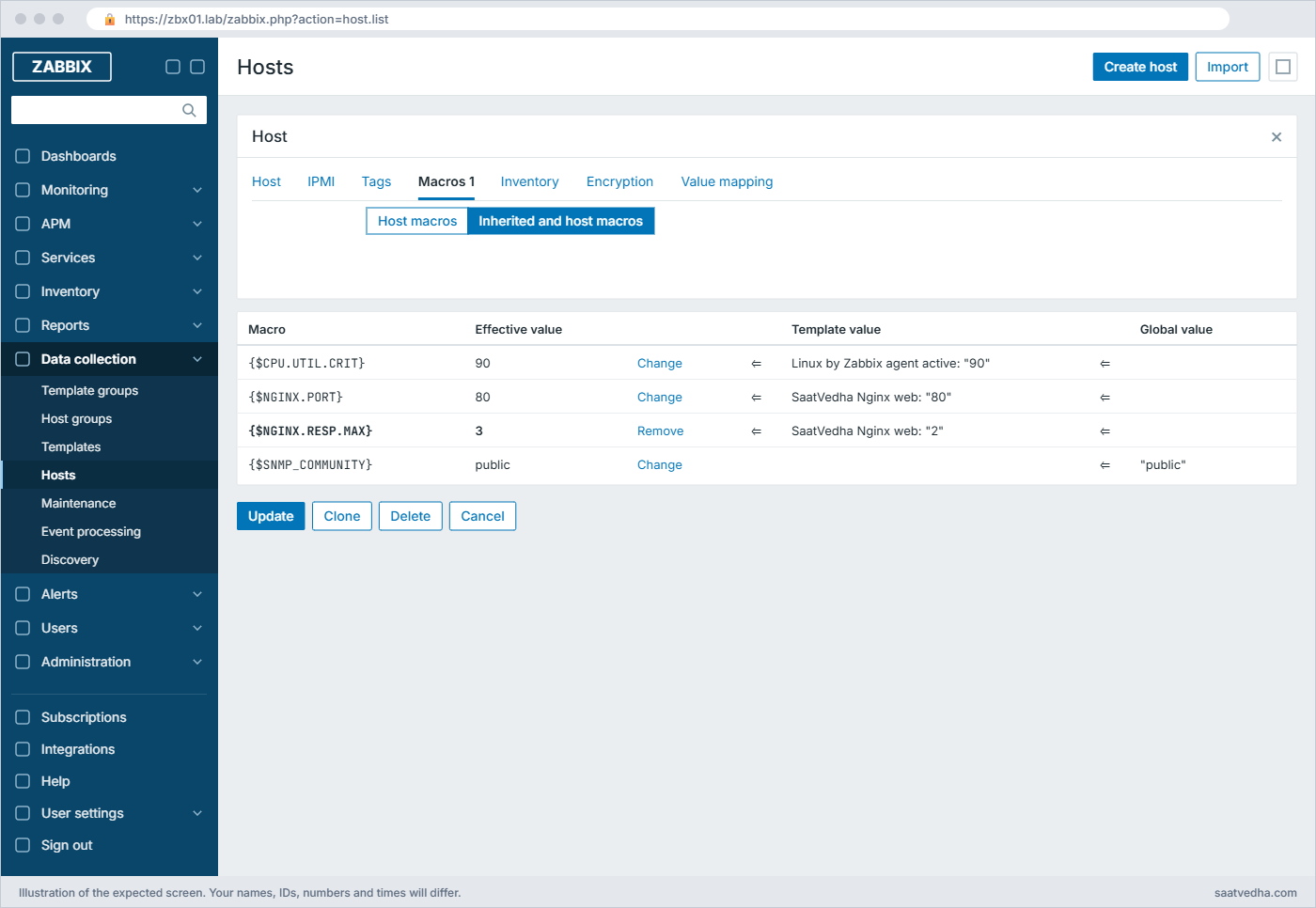
The template still says 2 and every other linked host keeps 2. Only web01 uses 3, and you didn’t touch the template to do it.
✅ Checkpoint: web01 shows {$NGINX.RESP.MAX} effective value 3 while the template value stays 2.
7Export the template and put it in Git
In Data collection > Templates tick SaatVedha Nginx web, press Export and choose YAML. Your browser downloads zbx_export_templates.yaml. Copy it to zbx01 (for example scp zbx_export_templates.yaml student@zbx01.lab: from your laptop) and start a repository:
Run this on zbx01:
sudo apt install -y git
mkdir -p ~/zabbix-templates && cd ~/zabbix-templates
mv ~/zbx_export_templates.yaml saatvedha_nginx_web.yaml
head -12 saatvedha_nginx_web.yaml
git init -b main
git config user.email student@zbx01.lab && git config user.name student
git add saatvedha_nginx_web.yaml
git commit -m "SaatVedha Nginx web 8.0-1: first export"You should see this (your template UUID and commit hash will differ):
zabbix_export:
version: '8.0'
template_groups:
- uuid: a571c0d144b14fd4a87a9d9b2aa9fcd6
name: Templates/Applications
templates:
- uuid: 6d0c9f2be4e14b0c9b1a8f0a3c7f51e2
template: 'SaatVedha Nginx web'
name: 'SaatVedha Nginx web'
description: 'Nginx availability, response time and processes for SaatVedha lab web servers.'
vendor:
name: SaatVedha
Initialized empty Git repository in /home/student/zabbix-templates/.git/
[main (root-commit) 0c72b47] SaatVedha Nginx web 8.0-1: first export
1 file changed, 73 insertions(+)
create mode 100644 saatvedha_nginx_web.yamlThe UUIDs and commit hash on your machine will differ (Templates/Applications has the same UUID everywhere because it ships with Zabbix). Keep the UUIDs: they let a later import update this template instead of creating a second one.
✅ Checkpoint: ~/zabbix-templates on zbx01 has one commit containing the YAML export.
8Change the template in Git and import it back
Edit the file to lower the threshold and bump the version, then look at the change before you import it:
Run this on zbx01:
cd ~/zabbix-templates
sed -i "s/version: 8.0-1/version: 8.0-2/; s/value: '2'$/value: '1'/" saatvedha_nginx_web.yaml
git diff
git commit -qam "Lower response time threshold to 1s"
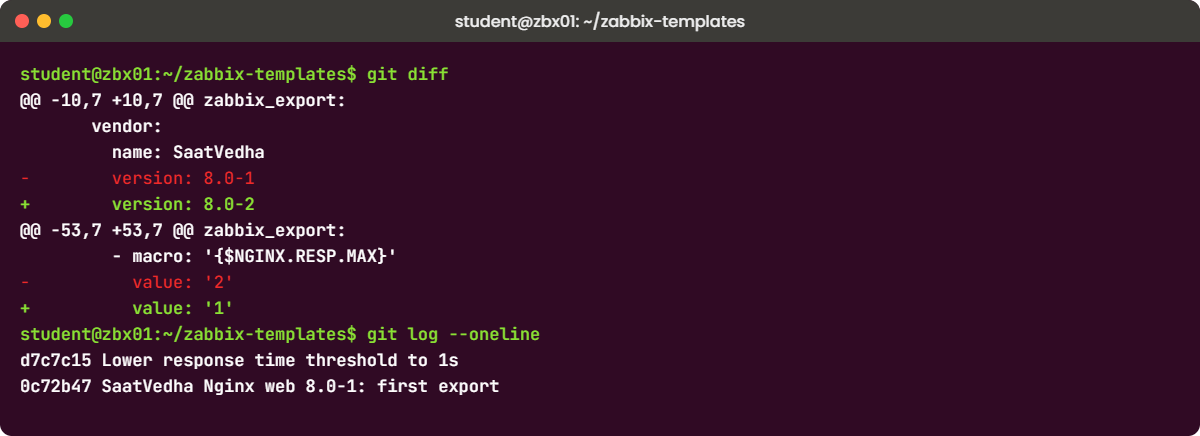
git log --onelinegit diff shows the two changed pairs of lines among its context lines, and git log lists both commits (your hashes will differ):
- version: 8.0-1
+ version: 8.0-2
- value: '2'
+ value: '1'
d7c7c15 Lower response time threshold to 1s
0c72b47 SaatVedha Nginx web 8.0-1: first exportCopy the file back to your laptop, then in Data collection > Templates press Import, choose the file, leave the rules at their defaults and press Import. Because the file has changes for an existing template, Zabbix shows a compare window with the differences; read it and press Import again.
You should see this message:
Imported successfullyOpen the template: Vendor and version shows 8.0-2 and {$NGINX.RESP.MAX} is 1. web01 still uses 3, because a host macro beats a template macro.
✅ Checkpoint: The template shows version 8.0-2 and macro value 1 after the import, and Git has two commits.
Break It, Then Fix It
Take a VirtualBox snapshot of zbx01 called before-templates-break first; break 3 deletes history on purpose.
1“An item with the same key is already inherited”
Clone the template: open SaatVedha Nginx web, press Clone, name it SaatVedha Nginx copy and press Add. Now try to link the copy to web01 as well.
You’ll get this error:
Cannot update host
Cannot inherit item with key "proc.num[nginx]" of template "SaatVedha Nginx copy" to host "web01", because an item with the same key is already inherited from template "SaatVedha Nginx web".The key named may be any of the three, depending on which one Zabbix checks first. An item key must be unique on a host, and web01 already has proc.num[nginx] from the first template. If you try to link both templates in the same save, the message is “Cannot inherit items with key … of both … templates, because the key must be unique on host”.
At work this happens when two teams each build an Nginx template, or when someone links both “Linux by Zabbix agent” and “Linux by Zabbix agent active” to one host.
Fix:
Link only one template that owns each key. If you need extra items, put them in a small template with different keys and nest it, or change the key (for example add a parameter). Delete the copy template now.
✅ Checkpoint: web01 is linked only to Linux by Zabbix agent active and SaatVedha Nginx web, and the copy template is deleted.
2Import fails: “linked template does not exist”
A colleague on another Zabbix server nested your template inside a bigger one and sends you the export. Simulate it on zbx01: add a templates: block that links a template you don’t have, then import the file.
Run this on zbx01:
cd ~/zabbix-templates
cp saatvedha_nginx_web.yaml /tmp/nested-test.yaml
sed -i "/^ groups:/i\ templates:\n - name: 'SaatVedha Linux base'" /tmp/nested-test.yaml
sed -n 8,16p /tmp/nested-test.yamlYou should see:
template: 'SaatVedha Nginx web'
name: 'SaatVedha Nginx web'
description: 'Nginx availability, response time and processes for SaatVedha lab web servers.'
vendor:
name: SaatVedha
version: 8.0-2
templates:
- name: 'SaatVedha Linux base'
groups:Copy /tmp/nested-test.yaml to your laptop and import it from Data collection > Templates > Import with the default rules.
You’ll get this error:
Import failed
Cannot import template "SaatVedha Nginx web", linked template "SaatVedha Linux base" does not exist.An export carries only the template you selected, not the templates nested inside it, and the importer looks up each nested template by its technical name on this server. The same thing happens when a template from the Zabbix integrations page or a community repo was built on a newer version that depends on a template your server doesn’t have, or when someone renamed a template on one server.
Fix:
Import the parent templates first (export them together, or ask for the whole set), or remove the templates: block if you don’t need the nesting. Nothing was changed by the failed import, so you can retry safely. Also check the header: a file with a newer version: than your server gives Invalid tag "/zabbix_export/version": unsupported version number.
✅ Checkpoint: The test file is discarded or imported after its parent exists, and the real template is unchanged.
3Unlink and clear wipes history
Look at Monitoring > Latest data for web01, open the graph of “Nginx: number of processes” and note that it has data going back to Lesson 7 (it was adopted in step 5). Now open web01, and in Templates press Unlink and clear next to SaatVedha Nginx web, then Update. Link the template again and open the same graph.
You get the message Host updated. Nginx: number of processes is back in the item list with the template prefix, but Latest data and its graph start at the moment you re-linked, with nothing before it.
Unlink and clear deleted every item that came from the template, including the old host item it had adopted, and with them all history and trends. Re-linking created brand-new items with new IDs, so the old data is gone and dashboards pointing at the old item IDs show “No permissions to referred object or it does not exist!”. Plain Unlink would have left the items on the host with their history.
Fix:
Restore the snapshot before-templates-break if you need the history back (in real life, from a database backup). From now on use Unlink when replacing a template, then delete leftover items only after the new template’s items have been collecting for a while.
✅ Checkpoint: You restored the snapshot (or accepted the loss), and you can explain why Unlink keeps history while Unlink and clear does not.
This happened at work
The template swap that ate three months of graphs
A colleague at an IT services company in Chennai told me this over filter coffee. They managed about 140 customer web servers, and a junior engineer was asked to replace an old home-made “Web servers” template with the newer official Nginx template on a Friday evening.
He opened each host, clicked Unlink and clear on the old template, linked the new one and moved on. Everything looked green by 8 pm. On Monday the account manager opened the monthly capacity report for a large retail customer and every Nginx graph started on Friday, three months of history gone, two days before a quarterly review.
They first thought the housekeeper was misconfigured and spent an hour on that. The real cause was in the audit log: “Unlink and clear” on 140 hosts, which deletes inherited items and their history in one go. There was a nightly database backup, but restoring one customer’s history from it would have meant restoring everyone’s.
The team changed two things. Template swaps now go through a short checklist (Unlink, link the new template, wait a week, then delete leftovers), and every template lives in Git with a version string, so they can see what changed between versions before they import anything.
Common mistakes and troubleshooting
| Mistake | What happens | What to do instead |
|---|---|---|
| Building items directly on hosts and never making a template | Every new server is set up by hand and they drift apart | Build on one host to learn, then move it into a template and link that |
| Hard-coding ports and thresholds in item keys | You need a second template for every variation | Use user macros like {$NGINX.PORT} and override them per host |
| Using Unlink and clear to swap templates | All history and trends of those items are deleted | Use Unlink, link the new template, delete leftovers later |
| Linking two templates that share item keys | Cannot inherit item … already inherited from template | One owner per key; nest small templates instead |
| Importing with Delete missing ticked without reading the compare view | Objects you added by hand in the frontend vanish with their history | Read the diff in the import compare window, or untick Delete missing |
| Editing templates only in the frontend | No record of who changed what or why | Export after every change and commit it to Git with a clear message |
| Changing UUIDs by hand in exports | Import creates duplicates or fails to match | Leave UUIDs alone; change the version string instead |
Interview questions
Click a question to open it. Each one is written the way an interviewer would ask it. Under it you will see why they ask it and one way you could answer, in your own words.
Fresher level
1. What is a Zabbix template and why would you use one instead of adding items to each host?
Why they ask this: The basic purpose of templates and inheritance.
How you might answer: A template is a reusable set of items, triggers, graphs, discovery rules, macros and dashboards. I link it to hosts and each host gets inherited copies, so 50 web servers get the same checks from one place.
If I change a threshold in the template, every linked host gets the change automatically, which I can’t do when items are built host by host.
2. What is the difference between Unlink and Unlink and clear?
Why they ask this: A classic trap question; they want to know you won’t delete history by accident.
How you might answer: Unlink removes the template link but leaves its items, triggers and graphs on the host as normal host objects, history included. Unlink and clear deletes everything that came from the template on that host, so history and trends for those items are gone.
When I swap templates I use Unlink, and I clean up leftovers later once the new items have data.
2–5 years experience
3. You link a template and get “an item with the same key is already inherited from template”. Walk me through it.
Why they ask this: They want you to read the error and know the one-key-per-host rule.
How you might answer: Item keys must be unique on a host, and that key already comes from another linked template. I check which two templates overlap, usually two versions of the same template or the passive and active Linux templates together.
I keep one template as the owner of that key, unlink the other with plain Unlink so history stays, and if I need both sets of items I move the extras into a template with different keys.
4. How do you keep Zabbix templates under version control?
Why they ask this: They want a practical change process, not a one-word answer.
How you might answer: I export templates as YAML after every change and commit them to a Git repo with a meaningful message and an updated vendor version like 8.0-2. Reviews happen on the YAML diff, which shows changed thresholds, intervals and triggers clearly.
To deploy I import the reviewed file and read the compare window before confirming, with Delete missing in mind. For many templates the same can be scripted with configuration.import through the API.
Senior level
5. Your company has 30 templates written by different teams, many overlapping. How would you clean this up?
Why they ask this: Senior design question: standards, migration and risk.
How you might answer: I’d first inventory what each template collects and which hosts use it, using template.get through the API or the Hosts column on the Templates list. Then I’d define a small set of layered templates: OS, application, and site-specific overrides via macros, nested where it makes sense.
Migration would go host group by host group: link the new template, use Unlink on the old one so history survives, compare data for a week, then delete leftovers. Everything lives in Git with owners per template.
6. A template import deleted items people had added by hand on hosts. What happened and how do you prevent it?
Why they ask this: Checks you understand import rules and inheritance.
How you might answer: Most likely the items were added directly to the template in the frontend, not on hosts, and the YAML didn’t have them, so Delete missing removed them from the template and so from every linked host. Host-only items aren’t touched by a template import.
To prevent it I make Git the single source of truth for templates, block direct edits by limiting who has Admin rights, and always read the import compare view before confirming.
Quick quiz
Q1. Where do the items of a linked template live on a host?
- Only in the template; the host only points at it
- As inherited copies on the host, linked back to the template
- In a separate database
- On the agent
Show answer
B — Linking creates inherited copies on the host that keep a reference to their template.
Q2. You link a template whose item key is identical to a hand-made host item. What happens?
- Link fails
- A duplicate item is created
- The host item is adopted and keeps its history
- The host item is deleted
Show answer
C — A host item with the same key that is not already inherited gets adopted by the template.
Q3. Which action deletes the history of a template’s items on a host?
- Unlink
- Unlink and clear
- Disable host
- Export
Show answer
B — Unlink and clear deletes all objects that came from the template, including their history and trends.
Q4. A host macro {$NGINX.PORT}=8080 and the template macro {$NGINX.PORT}=80. Which value does the host use?
- 80
- 8080
- Both
- Neither, it fails
Show answer
B — Host macros override template macros, which override global macros.
Q5. How does a template import decide it is updating an existing template?
- By file name
- By UUID first, then by technical template name
- By vendor version
- By creation date
Show answer
B — Import matches by UUID, then by the template field, and then applies the rules you chose.
Quick recap
- A template holds items, triggers, graphs, macros, value maps and dashboards, and linking creates inherited copies on each host.
- Linking adopts host items with the same key and keeps their history; different key text means new items and new history.
- Use macros for anything that differs between hosts, and override them on the host instead of copying templates.
- Unlink keeps items and history; Unlink and clear deletes them.
- Export to YAML, keep it in Git with a version string, and read the import compare window before you confirm.
Next lesson
Lesson 11: Zabbix preprocessing: regex, JSONPath, JavaScript and dependent items → You turn one Nginx stub_status request into many clean numbers with a master item, dependent items and preprocessing steps.
Further reading: Zabbix templates
Want to go deeper into Zabbix templates? The official Templates and template groups and template export and import pages cover every field and rule, and Zabbix publishes its own templates in the templates folder of the Zabbix source and the community templates repository. Revisit how these items and triggers were built in Zabbix items and Zabbix triggers.
You can also see the full plan for this course on the Zabbix Monitoring course page.
