Zabbix API with Python: automate hosts and reports

The Zabbix API is how teams stop clicking. Everything the frontend does (create hosts, read problems, add maintenance, export templates) goes through the same JSON-RPC endpoint, /api_jsonrpc.php, and anything you can do in the browser you can script in a few lines of curl or Python.

In this lesson you call the API with curl, create a least-privilege API user with a token, then use Python and the official zabbix_utils library to bulk-create hosts from a CSV, put a host into maintenance and export current problems to a CSV report. You’ll also meet the errors every API script hits sooner or later.

Where this lesson fits

Lesson 22 of 24 in Zabbix Monitoring · Phase 3: Alerts, proxies, SNMP and automation · Before this: Lesson 21, database monitoring · Next: Lesson 23, Zabbix in Grafana and Prometheus exporters

TimeYou needBy the end you can
About 100 minuteszbx01 from Lessons 1 to 21 with HTTPS from Lesson 3 (https://zbx01.lab), Admin password Zbx@Secure2026An “API read-only” role and api-bot user with a token, three Python scripts on zbx01 (add_hosts.py, maint.py, report.py), and three test hosts created from CSV

What it is, in one line

The Zabbix API is a JSON-RPC 2.0 web service on the frontend that lets scripts read and change everything in Zabbix, authenticated by a session or an API token and limited by the user’s role and permissions.

In Simple Words

The bank’s token counter

At a busy bank branch in Pune you don’t walk behind the counter and open the cash drawer yourself. You fill a slip that says what you want (“withdraw 5,000 from account 1234”), show your ID, and the clerk checks whether that ID may do that before doing it.

Every slip has the same shape, and the clerk’s answer comes back in the same shape too: either the cash and a receipt, or a short note saying why not.

The JSON request is the slip, the API token is your ID, and the role decides which kinds of slips the clerk will accept from you.

Engineer's View

JSON-RPC, tokens and roles

Every call is an HTTP POST to https://zbx01.lab/api_jsonrpc.php with header Content-Type: application/json-rpc and a body like {"jsonrpc":"2.0","method":"host.get","params":{...},"id":1}. The answer has either result or error (with code, message and data). Since 6.4 you authenticate with an Authorization: Bearer TOKEN header; the old "auth" field in the body is gone.

You can get a token two ways: user.login returns a session ID (tied to a login, expires with the session), or you create an API token under Users > API tokens, which belongs to a user, can have an expiry date and survives restarts. Scripts should use API tokens. The token’s user decides what it can see (user group host permissions) and its role decides which methods it may call.

SettingWhere8.0 behaviour
Access to APIUsers > User roles > roleOff by default in every shipped role except Super admin role (new in 8.0)
API methods: Allow list / Deny listSame role pageOnly listed methods (or all except listed) can be called
Host permissionsUsers > User groupsA read-only token on Lab/Web sees only Lab/Web hosts
Frontend access: DisabledUsers > User groupsThe bot can use the API but can’t log in to the web UI
Token expiryUsers > API tokensSet one; expired tokens get “Not authorized.”

Methods follow object.action naming: host.get, host.create, problem.get, maintenance.create. Two 8.0 API changes bite old scripts: the mass update methods (host.massupdate and friends) and hostinterface.update were removed, so interfaces are changed through host.update with an interfaces array.

How it works, step by step

1Your script sends a JSON request

The script builds a JSON body with the method name and parameters and POSTs it over HTTPS to the frontend, with the token in the Authorization header. Nothing talks to the Zabbix server directly: the API is PHP code inside the frontend, and it reads and writes the database.

2The frontend checks who you are and what you may call

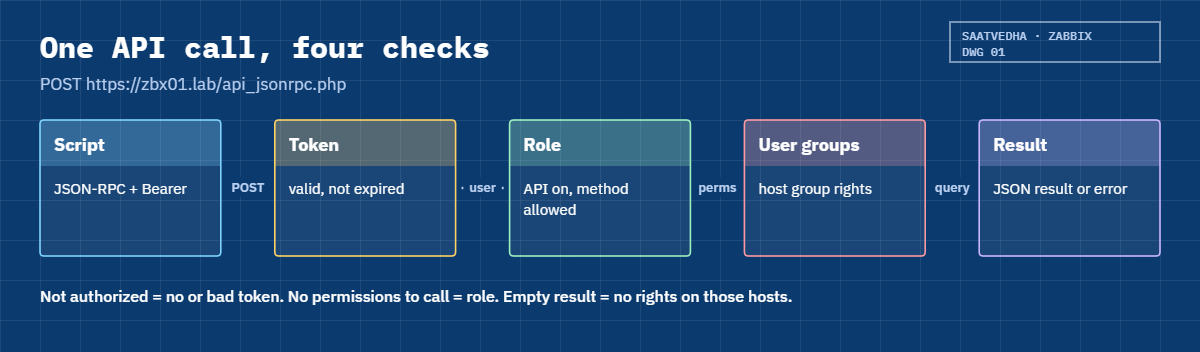
The API looks up the token, finds its user, then checks the role: is API access on, and is this method allowed? Then it applies the user groups’ host permissions to the query. The diagram below shows this chain of checks.

Zabbix API request checks: token, role API access, method allow list and host permissions

3Parameters are validated

Write methods (create, update, delete) check every parameter strictly, and a wrong name or missing field gives Invalid params. with a JSON path to the problem, like /1/groups/1. Read methods (get) are lenient: unknown fields in output are quietly dropped, which can hide typos.

4The result comes back as JSON

For get methods the result is a list of objects with only the fields you asked for in output, plus any select* sub-objects. For write methods it’s the new or changed IDs. Every value comes back as a string, even numbers, so "severity":"4" needs int() in Python.

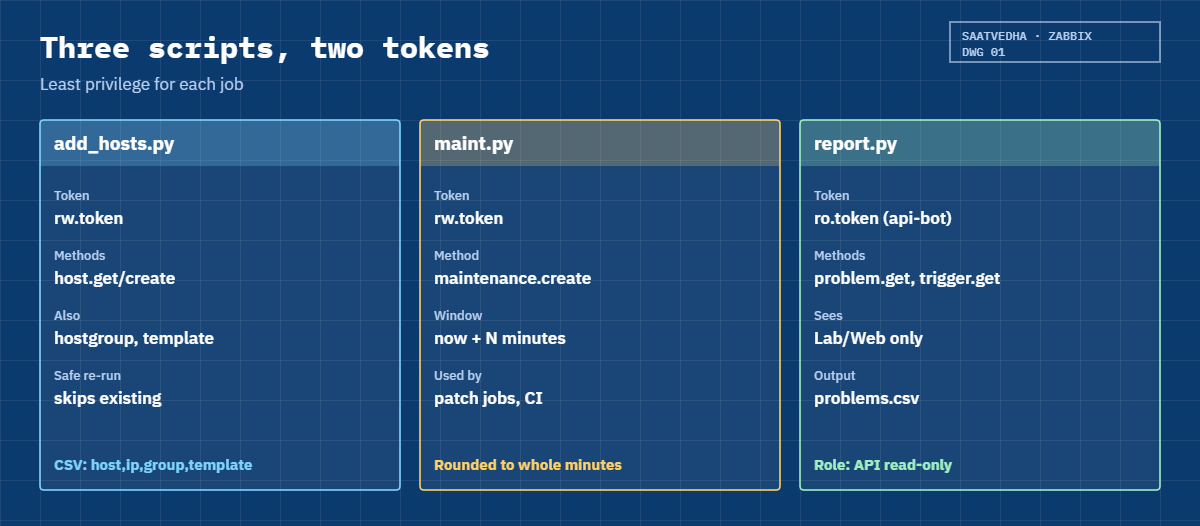
The second diagram shows the three scripts you’ll write and the token each one uses.

Zabbix API Python scripts for hosts, maintenance and problem reports with read-only and write tokens

5curl, requests or zabbix_utils?

curl is perfect for testing one call. Python with requests works but you write the JSON-RPC plumbing yourself. zabbix_utils is the official library from Zabbix (PyPI name zabbix_utils, version 2.0.4 at the time of writing): you write api.host.get(output=["host"]) and it builds the request, adds the token and raises APIRequestError on errors.

TaskMethodNeeds
Check the API is aliveapiinfo.versionNo authentication
List hosts in a grouphost.get with groupids or filterRead on that host group
Current problemsproblem.get (+ trigger.get for host names)Read on the hosts
Create a hosthost.createWrite on the host group, method allowed
Planned downtimemaintenance.createWrite on the hosts
Back up configurationconfiguration.exportRead on the objects

Hands-on lab: API tokens, zabbix_utils scripts and a problem report

Before you run any command, double-check it

Read every command twice before you press Enter. Check the target: the server name, the user, the disk or device name, the path and the sizes. These commands are for learning and were tested in our lab, not on your system. At work, run the read-only commands first, follow your change process, make sure a backup exists, and ask a second person to check anything that changes or deletes data. You run them at your own risk.

All commands run on zbx01 against its own HTTPS frontend at https://zbx01.lab, using the self-signed certificate from Lesson 3 as the trusted CA. The outputs were captured from a real Zabbix 8.0.0 API and zabbix_utils 2.0.4; IDs and tokens will differ on your system.

1Call the API with curl

Run this on zbx01:

API=https://zbx01.lab/api_jsonrpc.php
CA=/etc/ssl/certs/zbx01.lab.crt
curl -sS --cacert $CA -X POST $API -H 'Content-Type: application/json-rpc' \
  -d '{"jsonrpc":"2.0","method":"apiinfo.version","params":{},"id":1}'; echo
curl -sS --cacert $CA -X POST $API -H 'Content-Type: application/json-rpc' \
  -d '{"jsonrpc":"2.0","method":"host.get","params":{"output":["host"]},"id":1}'; echo

You should see this:

{"jsonrpc":"2.0","result":"8.0.0","id":1}
{"jsonrpc":"2.0","error":{"code":-32602,"message":"Invalid params.","data":"Not authorized."},"id":1}

apiinfo.version is the only method that works without authentication, which makes it a good health check. Everything else answers “Not authorized.” until you send a token.

✅ Checkpoint: apiinfo.version returns “8.0.0” and host.get without a token returns “Not authorized.”
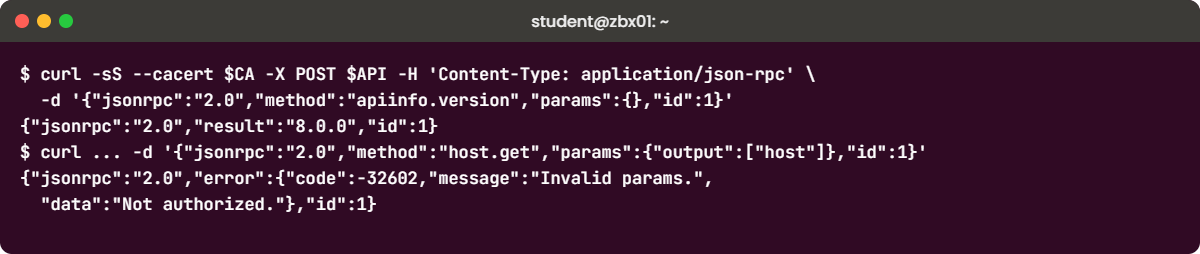
Zabbix API with curl: apiinfo.version and the Not authorized error
Terminal output: the first two curl calls to the Zabbix API on zbx01

2Log in once with user.login

Run this on zbx01:

curl -sS --cacert $CA -X POST $API -H 'Content-Type: application/json-rpc' \
  -d '{"jsonrpc":"2.0","method":"user.login","params":{"username":"Admin","password":"Zbx@Secure2026"},"id":1}'; echo

You should see this (your session ID will differ):

{"jsonrpc":"2.0","result":"5d84cb5983f57a36866a605fb48a0b6c","id":1}

That 32-character string is a session ID; you could send it as Authorization: Bearer 5d84.... Older guides use "user":"Admin", which 8.0 rejects with Invalid parameter "/": unexpected parameter "user".. Sessions are fine for a quick test, but scripts should not store your Admin password, so next you create a proper API user.

✅ Checkpoint: user.login with username/password returns a session ID.

3Create the “API read-only” role

Go to Users > User roles > Create user role. Name API read-only, User type User. Untick all UI elements and actions (the bot doesn’t use the web pages).

Under Access to API tick Enabled, set API methods to Allow list and add:
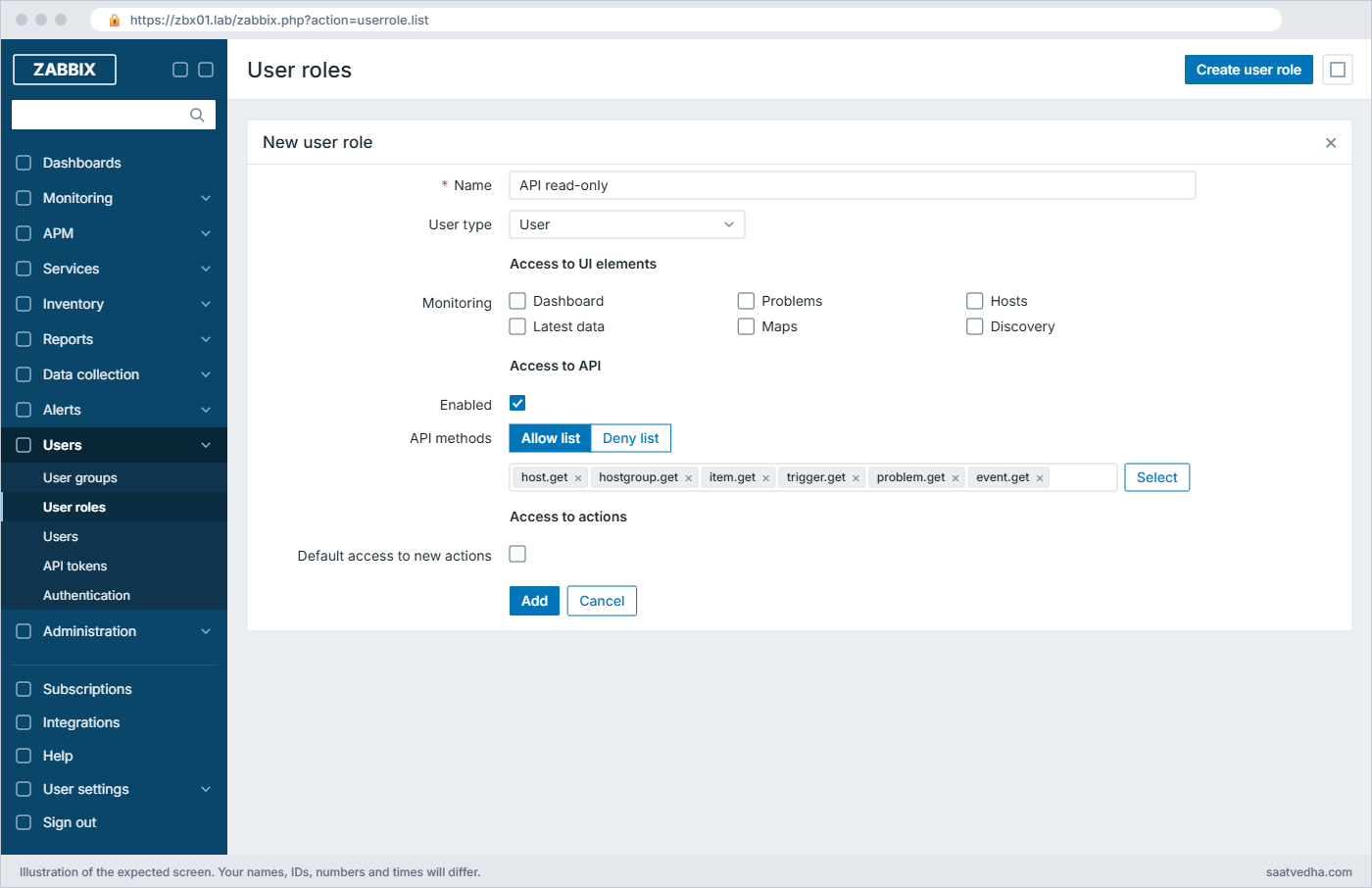
Zabbix API with Python: API read-only user role with an allow list of six get methods
The “API read-only” role: no UI elements, API access enabled with an allow list of six methods

Click Add. Don’t add apiinfo.version: it needs no authentication, and 8.0 refuses it in a role list with “Invalid API method “apiinfo.version” for user role”. Then create user group API bots with Frontend access Disabled and Host permissions Lab/Web: Read.

✅ Checkpoint: Users > User roles shows “API read-only” with Access to API Enabled (Allow list, 6 methods), and user group “API bots” has Lab/Web Read.

4Create api-bot and its token

In Users > Users > Create user: Username api-bot, Groups API bots, a long random password (it’s never used to log in), and on the Permissions tab role API read-only. Then go to Users > API tokens > Create API token: Name reporting, User api-bot, tick Set expiration date and time and choose a date 90 days out. Click Add and copy the token from the dialog: it’s shown only once.

Then store it on zbx01:

mkdir -p ~/zbx-api && chmod 700 ~/zbx-api
read -rs -p 'Token: ' T && echo "$T" > ~/zbx-api/ro.token && chmod 600 ~/zbx-api/ro.token; echo
RO=$(cat ~/zbx-api/ro.token)
curl -sS --cacert $CA -X POST $API -H 'Content-Type: application/json-rpc' -H "Authorization: Bearer $RO" \
  -d '{"jsonrpc":"2.0","method":"host.get","params":{"output":["hostid","host","status"],"selectInterfaces":["ip","port"]},"id":1}'; echo

You should see this (your host ID will differ):

{"jsonrpc":"2.0","result":[{"hostid":"10818","host":"web01","status":"0","interfaces":[{"ip":"192.168.56.81","port":"10050"}]}],"id":1}

Only web01 comes back, because api-bot can read only Lab/Web. The same call with your Admin session would return every host, which is the point of a separate API user.

✅ Checkpoint: host.get with the api-bot token returns web01 and nothing outside Lab/Web.

5Create a write token for automation

The read-only token can’t create anything, so for the next scripts create a second token as Admin: User settings > API tokens > Create API token, name automation, expiry 30 days. Save it as ~/zbx-api/rw.token the same way. At work this token would belong to a dedicated automation user with its own role and host groups, not to a Super admin.

✅ Checkpoint: ~/zbx-api/rw.token exists with mode 600.

6Install zabbix_utils in a virtual environment

Run this on zbx01:

sudo apt install -y python3-venv
python3 -m venv ~/zbx-api/venv
~/zbx-api/venv/bin/pip install zabbix_utils
~/zbx-api/venv/bin/python -c "from zabbix_utils import ZabbixAPI; print('ok')"

The last lines of the pip output are:

Installing collected packages: zabbix_utils
Successfully installed zabbix_utils-2.0.4
ok

Ubuntu 26.04 doesn’t let pip install into the system Python, so a venv is the clean way. The library has no dependencies for the synchronous API.

✅ Checkpoint: Importing ZabbixAPI from the venv prints ok.

7Bulk-create hosts from a CSV

Paste this whole block on zbx01:

cd ~/zbx-api
cat > hosts.csv <<'EOF'
host,ip,group,template
pos-jpr-01,10.20.1.11,Lab/Branch POS,Linux by Zabbix agent active
pos-jpr-02,10.20.1.12,Lab/Branch POS,Linux by Zabbix agent active
pos-pun-01,10.30.1.11,Lab/Branch POS,Linux by Zabbix agnet active
EOF
cat > add_hosts.py <<'EOF'
#!/usr/bin/env python3
"""Create hosts from a CSV file: host,ip,group,template (write token)."""
import csv, os, ssl, sys
from zabbix_utils import ZabbixAPI, APIRequestError

ctx = ssl.create_default_context(cafile="/etc/ssl/certs/zbx01.lab.crt")
api = ZabbixAPI(url="https://zbx01.lab", token=os.environ["ZBX_TOKEN"],
                ssl_context=ctx, skip_version_check=True)

def group_id(name):
    found = api.hostgroup.get(filter={"name": [name]}, output=["groupid"])
    return found[0]["groupid"] if found else api.hostgroup.create(name=name)["groupids"][0]

def template_id(name):
    found = api.template.get(filter={"host": [name]}, output=["templateid"])
    if not found:
        raise ValueError(f'template "{name}" not found')
    return found[0]["templateid"]

with open(sys.argv[1]) as f:
    for row in csv.DictReader(f):
        if api.host.get(filter={"host": [row["host"]]}, output=["hostid"]):
            print(f"skip   {row['host']}: already exists")
            continue
        try:
            r = api.host.create(
                host=row["host"],
                groups=[{"groupid": group_id(row["group"])}],
                templates=[{"templateid": template_id(row["template"])}],
                interfaces=[{"type": 1, "main": 1, "useip": 1, "ip": row["ip"], "dns": "", "port": "10050"}],
                tags=[{"tag": "source", "value": "csv"}])
            print(f"added  {row['host']}: hostid {r['hostids'][0]}")
        except (APIRequestError, ValueError) as e:
            print(f"error  {row['host']}: {e}")
EOF
ZBX_TOKEN=$(cat rw.token) venv/bin/python add_hosts.py hosts.csv

You should see this (your host IDs will differ):

added  pos-jpr-01: hostid 10821
added  pos-jpr-02: hostid 10822
error  pos-pun-01: template "Linux by Zabbix agnet active" not found

The third row has a typo on purpose (“agnet”), and the script reports it instead of crashing halfway through the file. Fix the CSV and run it again: it skips the two existing hosts and adds the third, so the script is safe to re-run. skip_version_check=True is explained in Break It step 3.

Run this on zbx01:

sed -i 's/agnet/agent/' hosts.csv
ZBX_TOKEN=$(cat rw.token) venv/bin/python add_hosts.py hosts.csv
skip   pos-jpr-01: already exists
skip   pos-jpr-02: already exists
added  pos-pun-01: hostid 10823

✅ Checkpoint: Data collection > Hosts shows pos-jpr-01, pos-jpr-02 and pos-pun-01 in Lab/Branch POS with tag source: csv.

8Schedule maintenance from a script

Paste this whole block on zbx01:

cat > maint.py <<'EOF'
#!/usr/bin/env python3
"""Put one host into maintenance for N minutes, starting now (write token)."""
import os, ssl, sys, time
from zabbix_utils import ZabbixAPI

host, minutes = sys.argv[1], int(sys.argv[2])
ctx = ssl.create_default_context(cafile="/etc/ssl/certs/zbx01.lab.crt")
api = ZabbixAPI(url="https://zbx01.lab", token=os.environ["ZBX_TOKEN"],
                ssl_context=ctx, skip_version_check=True)

hostid = api.host.get(filter={"host": [host]}, output=["hostid"])[0]["hostid"]
now = int(time.time())
r = api.maintenance.create(
    name=f"Patching {host} {time.strftime('%Y-%m-%d %H:%M')}",
    active_since=now, active_till=now + minutes * 60,
    hosts=[{"hostid": hostid}],
    timeperiods=[{"timeperiod_type": 0, "start_date": now, "period": minutes * 60}])
print(f"maintenance {r['maintenanceids'][0]} created for {host}, {minutes} min")
EOF
ZBX_TOKEN=$(cat rw.token) venv/bin/python maint.py pos-jpr-01 60

You should see this (your maintenance ID will differ):

maintenance 2 created for pos-jpr-01, 60 min

Within a minute Data collection > Maintenance lists the period as Active and pos-jpr-01 shows the orange maintenance icon. Zabbix rounds the start and end down to the whole minute. This is the script a patching job or a CI pipeline calls before rebooting a server, so nobody gets paged for planned work.

✅ Checkpoint: Data collection > Maintenance shows “Patching pos-jpr-01 …” with state Active.

9Export current problems to CSV with the read-only token

Paste this whole block on zbx01:

cat > report.py <<'EOF'
#!/usr/bin/env python3
"""Export current problems to a CSV file (read-only token)."""
import csv, os, ssl, sys
from datetime import datetime
from zabbix_utils import ZabbixAPI

SEV = ["Not classified", "Information", "Warning", "Average", "High", "Disaster"]
ctx = ssl.create_default_context(cafile="/etc/ssl/certs/zbx01.lab.crt")
api = ZabbixAPI(url="https://zbx01.lab", token=os.environ["ZBX_TOKEN"],
                ssl_context=ctx, skip_version_check=True)
print("Connected to Zabbix API", api.version)

problems = api.problem.get(output=["eventid", "objectid", "name", "severity", "clock", "acknowledged"],
                           sortfield=["eventid"], sortorder="DESC")
triggers = api.trigger.get(triggerids=[p["objectid"] for p in problems],
                           output=["triggerid"], selectHosts=["host"])
host_of = {t["triggerid"]: t["hosts"][0]["host"] for t in triggers}

out = sys.argv[1] if len(sys.argv) > 1 else "problems.csv"
with open(out, "w", newline="") as f:
    w = csv.writer(f)
    w.writerow(["time", "host", "severity", "problem", "acknowledged"])
    for p in problems:
        w.writerow([datetime.fromtimestamp(int(p["clock"])).strftime("%Y-%m-%d %H:%M"),
                    host_of.get(p["objectid"], "?"), SEV[int(p["severity"])],
                    p["name"], "yes" if p["acknowledged"] == "1" else "no"])
print(f"Wrote {len(problems)} problems to {out}")
EOF
ZBX_TOKEN=$(cat ro.token) venv/bin/python report.py && cat problems.csv

You should see this (your problem list will differ):

Connected to Zabbix API 8.0.0
Wrote 3 problems to problems.csv
time,host,severity,problem,acknowledged
2026-11-08 12:30,web01,Warning,Linux: Number of installed packages has been changed,no
2026-11-08 12:00,web01,Information,Linux: /etc/passwd has been changed,no
2026-11-08 11:51,web01,Average,"Linux: FS [/var]: Space is low (used > 80%, total 14.6GB)",no

problem.get gives the trigger ID in objectid but not the host, so the script makes one extra trigger.get call for all of them, instead of one call per problem. Your list will show whatever problems your web01 has; if it’s empty, stop Nginx on web01 for a minute and run it again.
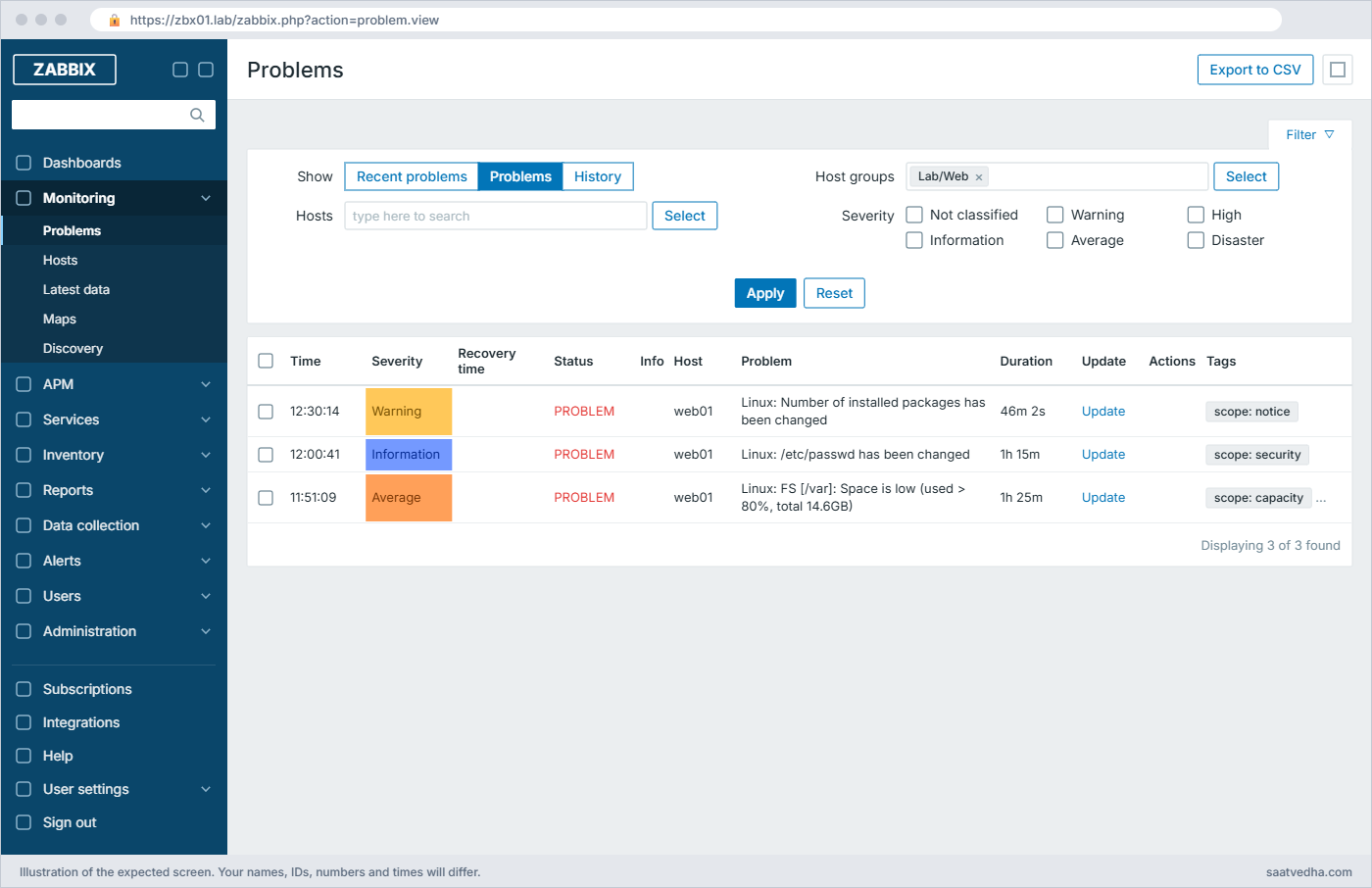
Zabbix API with Python: Monitoring > Problems for Lab/Web matching problems.csv” class=”wp-image-10134″ width=”1400″ height=”906″ style=”width:100%;height:auto;border-radius:10px;” /><figcaption style=Monitoring > Problems for Lab/Web: the same three problems the script wrote to problems.csv

✅ Checkpoint: problems.csv on zbx01 has a header row and one line per current problem on Lab/Web hosts.

Break It, Then Fix It

Three API errors you’ll see in real scripts. None of them changes your lab, so no snapshot is needed.

1“No permissions to call” (role blocks the method)

Run the CSV script with the read-only token instead of the write token.

Run this on zbx01:

cd ~/zbx-api && ZBX_TOKEN=$(cat ro.token) venv/bin/python add_hosts.py hosts.csv

You’ll get this:

error  pos-jpr-01: Application error. No permissions to call "hostgroup.create".
error  pos-jpr-02: Application error. No permissions to call "hostgroup.create".
error  pos-pun-01: Application error. No permissions to call "hostgroup.create".

api-bot can’t see “Lab/Branch POS” (it only reads Lab/Web), so the script thinks the group is missing and tries to create it, and the role’s allow list doesn’t include hostgroup.create. You get the same message when Access to API is switched off for the role, so check both the API switch and the method list. An expired or deleted token gives a different message, “Not authorized.” or “Session terminated, re-login, please.”

Fix:

Use the right token for the job (rw.token for changes), or add the method to the role's
allow list and give the user group Read-write on the target host group.

✅ Checkpoint: You can explain why the read-only token failed and the write token worked.

2“Invalid params” and the silent typo

Send two wrong host.create calls with curl and the write token: one with a group given by name, one with interface instead of interfaces.

Run this on zbx01:

RW=$(cat ~/zbx-api/rw.token)
curl -sS --cacert $CA -X POST $API -H 'Content-Type: application/json-rpc' -H "Authorization: Bearer $RW" \
  -d '{"jsonrpc":"2.0","method":"host.create","params":{"host":"pos-test-01","groups":[{"name":"Lab/Web"}]},"id":1}'; echo
curl -sS --cacert $CA -X POST $API -H 'Content-Type: application/json-rpc' -H "Authorization: Bearer $RW" \
  -d '{"jsonrpc":"2.0","method":"host.create","params":{"host":"pos-test-02","groups":[{"groupid":"24"}],"interface":[{"type":1,"main":1,"useip":1,"ip":"10.20.1.99","dns":"","port":"10050"}]},"id":1}'; echo

You’ll get this:

{"jsonrpc":"2.0","error":{"code":-32602,"message":"Invalid params.","data":"Invalid parameter \"/1/groups/1\": unexpected parameter \"name\"."},"id":1}
{"jsonrpc":"2.0","result":{"hostids":["10824"]},"id":1}

The first error is helpful: /1/groups/1 means “first host, first group”, and groups take groupid, not a name. The second call is worse: it succeeded, because the misspelt interface key was quietly ignored, and you now have a host with no interface that can never be polled. Use your own Lab/Web group ID (from hostgroup.get) instead of 24.

Fix:

curl -sS --cacert $CA -X POST $API -H 'Content-Type: application/json-rpc' -H "Authorization: Bearer $RW" \
  -d '{"jsonrpc":"2.0","method":"host.get","params":{"filter":{"host":["pos-test-02"]},"output":["host"],"selectInterfaces":"count"},"id":1}'; echo
# delete it (Data collection > Hosts) and send the request again with "interfaces"
{"jsonrpc":"2.0","result":[{"hostid":"10824","host":"pos-test-02","interfaces":"0"}],"id":1}

The lesson is to read the result back after every create in automation, as add_hosts.py does by using a library and checking the objects it builds.

✅ Checkpoint: pos-test-01 doesn’t exist, and pos-test-02 is deleted or recreated with one interface.

3zabbix_utils refuses a “not tested” version

Remove skip_version_check=True from report.py and run it.

Run this on zbx01:

sed 's/, skip_version_check=True//' report.py > report_strict.py
ZBX_TOKEN=$(cat ro.token) venv/bin/python report_strict.py 2>&1 | tail -1

You’ll get this error:

zabbix_utils.exceptions.APINotSupported: Version of Zabbix API [8.0.0] was not tested with the library. The latest tested version is 7.4.0. If you're sure zabbix_utils will work properly with your current Zabbix version you can skip this check by specifying skip_version_check=True when create ZabbixAPI object.

zabbix_utils 2.0.4 was released before Zabbix 8.0, so it stops on purpose. Everything in this lesson works with the flag set, because the methods used haven’t changed; when a newer zabbix_utils release lists 8.0 as tested, upgrade with venv/bin/pip install -U zabbix_utils and you can drop the flag. The same thing will happen to every API library after each major Zabbix upgrade, so pin and test your library version together with the server.

Fix:

Keep skip_version_check=True (as in the lesson's scripts) after testing your calls,
or upgrade zabbix_utils to a release that lists your Zabbix version.

✅ Checkpoint: report.py (with the flag) runs and report_strict.py shows the APINotSupported message.

This happened at work

Six hundred hosts and a Friday afternoon script

A friend runs the automation team at an MSP in Pune that onboards customer servers into a shared Zabbix. One Friday a junior engineer wrote a quick script to import 600 hosts for a new retail customer from a spreadsheet, tested it on two rows and ran it on the rest at 5:30 pm. It printed “done” and everyone went home.

On Monday the customer called: none of the new servers had any data. Every host existed in Zabbix, in the right group, with the right template, and not one of them had an availability icon or a single value. The first guess was the customer’s firewall, and half a day went on calls with their network team.

The real cause was one word. The script built "interface" instead of "interfaces" when the spreadsheet had a second IP column, the API silently ignored it, and 600 hosts were created with no interface at all. The two rows tested earlier came from a different code path.

They fixed it with host.update and an interfaces array in ten minutes. The bigger change was in how they write scripts now: every create is followed by a read-back check (interfaces count, templates, groups), scripts run with a read-only dry-run mode first, and the write token belongs to an automation user that can only touch the customer’s host groups.

Common mistakes and troubleshooting

MistakeWhat happensWhat to do instead
Putting the Admin password in a scriptAnyone who reads the script or its Git history has full controlUse an API token of a dedicated user, stored in a file with mode 600 or a secrets store
Using the old “auth” field or “user” parameter from 5.x guides“Not authorized.” or “unexpected parameter \”user\””Send Authorization: Bearer TOKEN and user.login with “username”
Giving the API user Super adminA bug in a script can delete anythingA custom role with Access to API and an allow list, plus group permissions
Forgetting that 8.0 roles have API access offEvery call fails with “No permissions to call …”Enable Access to API in the custom role
Disabling certificate checks with verify=FalseTokens can be stolen by anyone in the middlePass the lab CA (ssl_context in Python, the cacert option in curl) or use a real certificate
Trusting a successful createTypos in optional keys are ignored and objects come out half-configuredRead the object back and check the fields you care about
One API call per item in a loop of thousandsSlow scripts and a busy frontendAsk for many objects in one call (lists of IDs, select* options)

Interview questions

Click a question to open it. Each one is written the way an interviewer would ask it. Under it you will see why they ask it and one way you could answer, in your own words.

Fresher level

1. What is the Zabbix API and how do you authenticate to it?

Why they ask this: They want JSON-RPC basics and modern token auth.

How you might answer: It is a JSON-RPC 2.0 API on the frontend at /api_jsonrpc.php; every request has jsonrpc, method, params and id. I authenticate with an API token created under Users > API tokens and send it as an Authorization: Bearer header.

For a quick test I can call user.login with username and password and use the session ID the same way, and apiinfo.version works without any authentication.

2. A script gets “No permissions to call host.create”. What do you check?

Why they ask this: A check that you know roles control API methods.

How you might answer: I check the role of the token’s user: Access to API must be enabled, and host.create must be in the allow list or not in the deny list. In 8.0 API access is off by default for all roles except Super admin.

Then I check the user group has Read-write on the host group the host goes into, because a role allowing the method isn’t enough on its own.

2–5 years experience

3. Walk me through onboarding 500 servers from a CSV with the API.

Why they ask this: They want a safe, repeatable design, not just a loop.

How you might answer: I’d write a Python script with zabbix_utils that reads the CSV, looks up group and template IDs once, skips hosts that already exist, and creates the rest with interfaces, templates and tags, catching APIRequestError per row so one bad line doesn’t stop the run.

I run it first in a dry-run mode, then on a small batch, read the hosts back to check interfaces and templates, and use a token of an automation user limited to the target host groups. For very large estates autoregistration with host metadata is often better than API imports.

4. How would you put hosts into maintenance automatically during patching?

Why they ask this: They are checking maintenance.create and integration with other tools.

How you might answer: The patching job calls a small script before it starts: it looks up the host IDs and calls maintenance.create with active_since now, active_till now plus the window, and a one-time time period. Maintenance with data collection keeps the graphs, and actions with “Pause operations for suppressed problems” stay quiet.

After patching, the script can delete the maintenance early, and I log the maintenance ID so I can audit it later.

Senior level

5. How do you secure API automation across several teams?

Why they ask this: They want least privilege, token lifecycle and auditability.

How you might answer: Each team or pipeline gets its own API user with a role that has only the methods it needs and user groups limited to its host groups, and frontend access disabled. Tokens have expiry dates, live in a vault or CI secrets, and are rotated.

The audit log records API changes by user, so separate users per tool make it clear who changed what, and I alert on failed logins and unusual API activity.

6. After upgrading Zabbix from 7.0 to 8.0 some API scripts break. What do you look for?

Why they ask this: They want concrete upgrade knowledge.

How you might answer: I check for removed methods first: in 8.0 the massupdate methods and hostinterface.update are gone, so those calls must move to host.update with full arrays. Then roles: API access is now off by default for non-Super admin roles, so custom roles need it enabled.

Libraries matter too; zabbix_utils refuses an untested server version unless skip_version_check is set, so I test scripts against a staging 8.0 before the production upgrade.

Quick quiz

Q1. Which API method works without any authentication?

  1. host.get
  2. user.login
  3. apiinfo.version
  4. problem.get
Show answer

C — apiinfo.version is the only method that needs no token, and user.login only needs credentials.

Q2. How do you send an API token in Zabbix 6.4 and later?

  1. In the “auth” field of the JSON body
  2. As an Authorization: Bearer header
  3. As a URL parameter
  4. As a cookie
Show answer

B — The Bearer header replaced the auth field.

Q3. In 8.0, a new custom role can’t call any API method. Why?

  1. The frontend is HTTP only
  2. Access to API is off by default for roles except Super admin
  3. Tokens are disabled
  4. The user has no media
Show answer

B — 8.0 ships API access disabled in all roles except Super admin role.

Q4. host.create returns success but the host has no interface. What is the likely cause?

  1. A wrong groupid
  2. A misspelt optional key such as “interface” that was ignored
  3. An expired token
  4. The server is down
Show answer

B — Unknown optional keys can be ignored silently; read the object back after creating it.

Q5. Why does zabbix_utils 2.0.4 stop with APINotSupported on Zabbix 8.0.0?

  1. 8.0 has no API
  2. The library was not tested with that version and checks it by default
  3. The token is read-only
  4. TLS is disabled
Show answer

B — Set skip_version_check=True after testing, or upgrade the library.

Quick recap

  • The API is JSON-RPC 2.0 at /api_jsonrpc.php; use API tokens in an Authorization: Bearer header, not passwords in scripts.
  • In 8.0 Access to API is off in every role except Super admin, so custom roles must enable it, ideally with an allow list.
  • What a token sees comes from its user’s groups; what it may call comes from its role.
  • zabbix_utils is the official Python library; 2.0.4 needs skip_version_check=True on 8.0 until a newer release lists it.
  • Write calls validate strictly, get calls are lenient, and some typos are silently ignored, so read objects back after creating them.

Next lesson

Lesson 23: Zabbix in Grafana, and Prometheus exporters in Zabbix → You connect Grafana to Zabbix with the Zabbix app plugin and an API token, then let Zabbix scrape a Prometheus node_exporter.

Further reading: Zabbix API

Want to go deeper into Zabbix API? The Zabbix manual has the full API reference with every method and parameter, and the official Python library is on PyPI as zabbix_utils. Roles and permissions were set up in Lesson 18, and you’ll reuse an API token for Grafana in Lesson 23.

You can also see the full plan for this course on the Zabbix Monitoring course page.

Scroll to Top

This website uses cookies

We use a few cookies to keep this site working. If you allow it, we also use Google Analytics to count visits so we can improve our lessons. You can accept all, deny the optional ones, or choose what to allow.