HPFE Gen3, flash drives and FlashCore Modules

HPFE Gen3 (High-Performance Flash Enclosure, third generation) is where a DS8A00 keeps your data. The 2U drawers come in pairs, hold NVMe flash drives in sets of 16 and connect to the device adapters over PCIe Gen4, and every write you followed in Lesson 5 ends up here.

You’ll meet the three flash tiers, see what makes IBM FlashCore Modules (FCMs) different from ordinary flash, and find out why an FCM pool has two kinds of capacity, logical and physical. Then you watch compression in the practice shell, run into the rule that FCM pools only take thin volumes, and see how data that won’t compress can fill a pool far faster than planned.

You need the practice shell from Lesson 1, and Lesson 3 showed you how drive sets turn into array sites.

TimeYou needBy the end you can
60 to 75 minutesThe practice shell from Lesson 1 and Python 3.8 or newerName the HPFE Gen3 drive options, explain FCM compression, read logical and physical capacity on an FCM rank, and predict when a pool will fill

What it is, in one line

HPFE Gen3 is the DS8A00 flash enclosure: 2U drawers installed in pairs that hold 16, 32 or 48 NVMe drives, either industry-standard flash or IBM FlashCore Modules that compress data in hardware.

In Simple Words

Packing a school trip suitcase

Two children pack for the same school trip with the same size suitcase. The first folds clothes the normal way and the suitcase is full after five days’ worth, while the second rolls every shirt tightly and fits fifteen days of clothes in the same space. That rolling is compression.

Then the second child adds a football and a hard lunchbox. You can’t roll a football, it takes the same space whatever you do, and suddenly the suitcase is full after eight days instead of fifteen.

A FlashCore Module is the child who rolls everything, so normal data shrinks a lot, but data that’s already squeezed, like encrypted backups or zip files, is the football and doesn’t shrink at all. The suitcase stayed the same size; only what you tried to pack changed.

Engineer's View

HPFE Gen3 and the three flash tiers

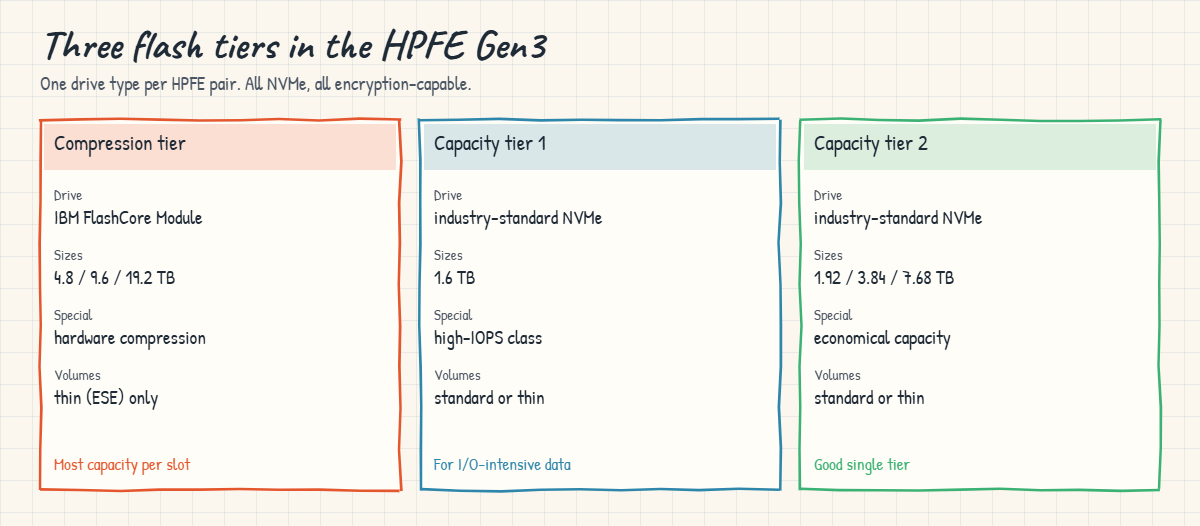
Each HPFE Gen3 enclosure is 2U with up to 24 slots for 2.5-inch NVMe drives. Enclosures go in as pairs, each pair connected to one device adapter pair through redundant NVMe over PCIe Gen4 links, and a pair holds 16, 32 or 48 drives, which is one, two or three drive sets of 16 split 8 and 8 across the two enclosures. Each pair also keeps two global spares.

TierDriveSizesNotes
Compression tierIBM FlashCore Module (4th generation)4.8, 9.6, 19.2 TBHardware compression, always on. Thin (ESE) volumes only.
Capacity tier 1Industry-standard NVMe1.6 TBHigh-IOPS class for I/O-intensive work.
Capacity tier 2Industry-standard NVMe1.92, 3.84, 7.68 TBMore economical; often enough as a single tier.

Every drive is encryption-capable and always encrypts internally, and full encryption with keys is an option you switch on (Lesson 20). RAID 6 is the default and RAID 10 is optional for every drive type. With Release 10.1 you can’t mix FCMs and industry-standard drives in one HPFE pair or in one extent pool.

FlashCore Modules are small computers in their own right. Each has its own processor and DRAM, compresses data with LZ77 and dynamic Huffman coding on 16 KB blocks, and mixes SLC and QLC flash inside to keep latency low. You can’t switch off compression and thin provisioning inside an FCM, Easy Tier automatic mode has to stay enabled, and space is reclaimed on track boundaries (64 KB for open systems, 56 KB for CKD). The same extra compute also runs Ransomware Threat Detection (Lesson 23 of the Implementation course).

On size, a DS8A10 holds up to 4 HPFE pairs (192 drives) and a DS8A50 or DS8A80 up to 8 pairs (384 drives). On single-phase power, FCMs are limited to 2 drive sets (32 drives) per HPFE pair.

On DS8900F you’ll find an earlier generation of HPFE with industry-standard flash. The DS8A00 is the first DS8000 generation to support FlashCore Modules, and its PCIe Gen4 back end roughly doubles typical per-HPFE throughput compared with the generation before.

How it works, step by step

Follow a block of data from the device adapter down to the flash, and notice how an FCM pool counts space differently from a normal one.

1The device adapter writes a RAID stripe

When the CPC destages a write, the device adapter pair builds a RAID 6 stripe and writes it to the drives of one array. The parity “floats” across all the drives in the array, so no single drive takes every parity write.

2Industry-standard flash stores it as is

On capacity tier 1 or 2 drives, 1 GB written takes 1 GB of flash, and usable capacity is raw capacity minus RAID parity and spares, which you worked out with drive_sets.py in Lesson 3.

HPFE Gen3 flash tiers: FlashCore Modules, capacity tier 1 and capacity tier 2 drives

3An FCM compresses it inside the drive

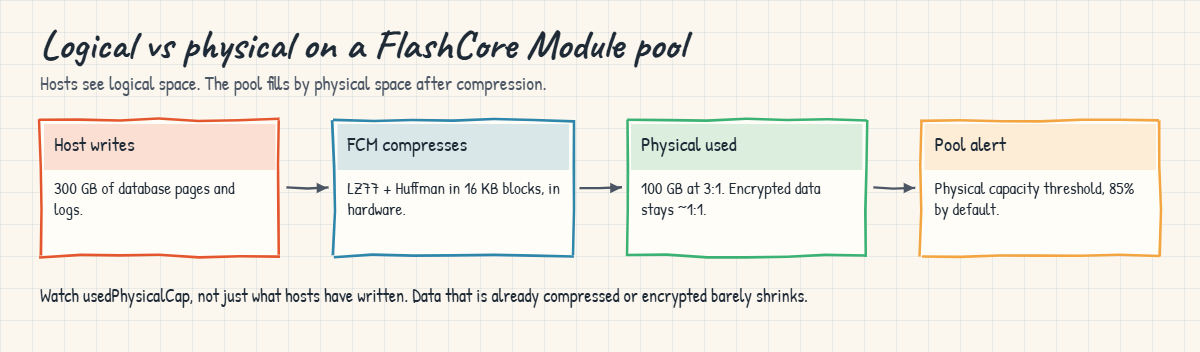
On a FlashCore Module the drive compresses each block in hardware before it reaches the flash chips, so if the data compresses 3:1, 1 GB written uses about a third of a GB of flash. The host never notices and the CPCs spend no CPU on it. This is also why every FCM volume has to be thin provisioned (ESE), since the system only knows how much physical space a volume uses once it sees how well the data compresses.

4Two numbers for every FCM pool

An FCM rank has a logical capacity (how much hosts can write, also called effective capacity) and a physical capacity (how much compressed data the flash can hold). In DS CLI you’ll see these as totalLogicalCap, usedLogicalCap, totalPhysicalCap and usedPhysicalCap.

5Physical space is what runs out

The pool is full when physical space is full, whatever the logical number says. By default the system raises a compression threshold alert at 85% physical, and after that comes “Pool Physical Capacity Full” with emergency reserves. You can move the threshold, but the maths stays the same.

FlashCore Module pool: logical writes, hardware compression and physical capacity alert

The trap is that the compression ratio belongs to your data, not to the drive. Database pages and logs usually compress well, but data that’s already compressed or encrypted, like encrypted backups, media files or zip archives, hardly compresses at all. So an FCM pool sized at a healthy 3:1 can fill suddenly when a new application writes 1:1 data into it, and because the hosts’ volumes are thin they still see plenty of logical space while the physical space has gone and new writes fail.

So on FCM pools, watch usedPhysicalCap and the compression ratio as closely as logical usage, and before you give any new application space, ask its owner whether the data is already compressed or encrypted.

Hands-on lab: watch FlashCore Module compression

Before you run any command, double-check it

Read every command twice before you press Enter. Check the target: the system or account, the IDs, the names and the sizes. These commands are for learning and were tested in our lab, not on your system. At work, run the read-only list commands first, follow your change process, make sure a backup exists, and ask a second person to check anything that changes or deletes data. You run them at your own risk.

You’ll find the flash in the lab system, build one FCM rank and pool, write data to it and read the logical and physical numbers. The lab DS8A50 has six array sites of 4.8 TB FlashCore Modules and two of 3.84 TB tier 2 flash.

Practice shell note: the practice shell is our teaching tool, not IBM software, and real DS CLI output is similar but not identical. The shell uses a fixed 4.5:1 compression for every FCM write, whereas on a real system the ratio depends on your data. simctl write exists only in the shell, and SIM lines are practice shell messages.

1Find the HPFE pairs and drive types

Start the shell, log in and run simctl reset, then:

Run this:

lsstgencl IBM.2107-78SV001
lsarraysite -l

You should see this:

Date/Time: 24 October 2026 11:19:30 UTC IBM DSCLI Version: 7.10.10.348 DS: IBM.2107-78SV001
ID                    Frame Enclnum Loc   FC Interfaces State  DA pair
======================================================================
IBM.2107-D04-8SV01/R1 1     1       R1-D1 HPFE Gen3     Normal 0
IBM.2107-D04-8SV01/R2 1     2       R1-D2 HPFE Gen3     Normal 0
IBM.2107-D04-8SV02/R1 1     3       R1-D3 HPFE Gen3     Normal 2
IBM.2107-D04-8SV02/R2 1     4       R1-D4 HPFE Gen3     Normal 2
Date/Time: 24 October 2026 11:19:30 UTC IBM DSCLI Version: 7.10.10.348 DS: IBM.2107-78SV001
arsite DA Pair dkcap (10^9B) diskrpm State      Array diskclass       encrypt
===============================================================================
S1     0       4800.0        65000   Unassigned -     FlashCoreModule supported
S2     0       4800.0        65000   Unassigned -     FlashCoreModule supported
S3     0       4800.0        65000   Unassigned -     FlashCoreModule supported
S4     0       4800.0        65000   Unassigned -     FlashCoreModule supported
S5     2       4800.0        65000   Unassigned -     FlashCoreModule supported
S6     2       4800.0        65000   Unassigned -     FlashCoreModule supported
S7     2       3840.0        65000   Unassigned -     FlashTier2      supported
S8     2       3840.0        65000   Unassigned -     FlashTier2      supported

There are two HPFE Gen3 pairs. The diskclass column gives the tier, FlashCoreModule for the compression tier and FlashTier2 for capacity tier 2, and every site says encrypt supported. The diskrpm value is left over from spinning disks and means nothing for flash.

One thing looks odd: DA pair 2 has both FCM sites (S5, S6) and tier 2 sites (S7, S8). That’s a simplification in the lab system, and on a real Release 10.1 system one HPFE pair holds only one drive type.

✅ Checkpoint: You can name the drive class of each array site.

2Build an FCM rank, pool and thin volume

Type quit, save these lines as setup-07.txt and run them. Each step is explained from Lesson 10 onward, and for now you only need the result.

setup-07.txt:

mkarray -raidtype 6 -arsite S1
mkrank -array A0 -stgtype fb -extsize 16MiB -keygrp 1
mkextpool -rankgrp 0 -stgtype fb -keygrp 1 fcm_pool
chrank -extpool P0 R0
mkfbvol -extpool P0 -cap 2000 -sam ese -name backup_vol 2000

Run this (PowerShell):

python ds8sim.py -hmc1 10.0.0.1 -user admin -passwd YOURPASSWORD -script setup-07.txt

You should see this:

CMUC00004I mkarray: Array A0 successfully created.
CMUC00007I mkrank: Rank R0 successfully created.
CMUC00000I mkextpool: Extent pool P0 successfully created.
CMUC00008I chrank: Rank R0 successfully modified.
CMUC00025I mkfbvol: FB volume 2000 successfully created.

✅ Checkpoint: Volume 2000 (2,000 GiB, thin) exists in pool P0.

3Read logical and physical capacity

Start the shell again and look at the rank before any data has been written.

Run this:

lsrank -l

You should see this:

Date/Time: 24 October 2026 11:19:30 UTC IBM DSCLI Version: 7.10.10.348 DS: IBM.2107-78SV001
ID Group State  datastate Array RAIDtype extpoolID extpoolnam stgtype exts    usedexts keygrp marray extsize totalLogicalCap(MiB/cyl) usedLogicalCap(MiB/cyl) totalPhysicalCap(MiB/cyl) usedPhysicalCap(MiB/cyl) compressionRatio compressionType
=================================================================================================================================================================================================================================================
R0 0     Normal Normal    A0    6        P0        fcm_pool   fb      6372928 0        1      MA1    16MiB   101966848                1024                    22659301                  1024                     1.00             compression

Divide the MiB values by 1,048,576 to get TiB. totalPhysicalCap comes to about 21.6 TiB, which is what the five data drives of this 5+P+Q+S array can physically hold, and totalLogicalCap is about 97.2 TiB, roughly 4.5 times more, because the shell assumes 4.5:1 compression.

✅ Checkpoint: You worked out about 21.6 TiB physical and 97.2 TiB logical.

4Write data and watch both numbers move

Run this:

simctl write 2000 500
lsrank -l

You should see this (columns shortened):

SIM0102I simctl: volume 2000 now has 32000 allocated extents (500 GiB written).
Date/Time: 24 October 2026 11:19:30 UTC IBM DSCLI Version: 7.10.10.348 DS: IBM.2107-78SV001
ID ... usedexts ... totalLogicalCap(MiB/cyl) usedLogicalCap(MiB/cyl) totalPhysicalCap(MiB/cyl) usedPhysicalCap(MiB/cyl) compressionRatio
R0 ... 32000    ... 101966848                513024                  22659301                  114802                   4.47

The host wrote 500 GiB. usedLogicalCap grew to 513,024 MiB (about 501 GiB), but usedPhysicalCap only grew to 114,802 MiB (about 112 GiB), and the ratio column says 4.47:1. On a real FCM pool, that ratio is the number you check every week.
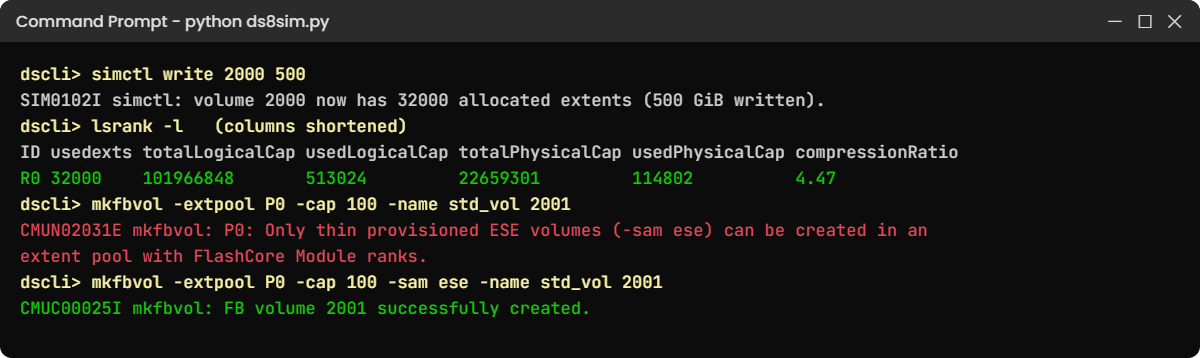
Practice shell lsrank -l on a FlashCore Module rank with compression ratio, and the ESE-only rule
An FCM rank in the practice shell: logical and physical capacity, and the thin-only rule.

✅ Checkpoint: You can explain why 500 GiB written used only about 112 GiB of flash.

Type quit to leave the shell.

Break It, Then Fix It

FCM pools catch new admins out in two ways: someone tries to create a normal (fully allocated) volume, or someone fills the pool with data that won’t compress. You’ll do both.

1Break it: create a standard volume in an FCM pool

An application team asks for a “normal, fully allocated” 100 GiB LUN. Start the shell (the lab setup is still there) and try it without -sam ese.

Run this:

mkfbvol -extpool P0 -cap 100 -name std_vol 2001

You’ll get this error:

CMUN02031E mkfbvol: P0: Only thin provisioned ESE volumes (-sam ese) can be created in an extent pool with FlashCore Module ranks.

Why: FCMs always compress and always store data thin, and you can’t turn that off, so a fully allocated volume would promise physical space the system can’t know about in advance. This wording is a practice shell message; a real DS8000 refuses as well, in its own words.

Fix: create the volume as ESE (thin) and tell the team the host still sees the full 100 GiB.

Run this:

mkfbvol -extpool P0 -cap 100 -sam ese -name std_vol 2001

You should see this:

CMUC00025I mkfbvol: FB volume 2001 successfully created.

If a team does need standard (fully allocated) volumes, put them in a pool built on industry-standard flash, such as array sites S7 and S8.

✅ Checkpoint: Volume 2001 exists as a thin (ESE) volume.

2Break it: fill an FCM pool with data that won’t compress

The shell always compresses at 4.5:1, so this one needs a model. Save it as fcm_space.py on your laptop, in the lab folder next to ds8sim.py; it’s a planning model that runs there and not on the DS8000, and you give it the physical TB of the pool and, for each kind of data, the TB written and its compression ratio.

# fcm_space.py - SaatVedha FlashCore Module physical space check (a teaching model, not an IBM tool)
# A planning tool: it runs on your laptop or jump server, not on the DS8000.
# With --check it starts from a real pool, read through the DS CLI with lsextpool -l
# (auto.profile: banner off, header on, format delim), and adds the data you plan to write.
# FCMs compress every write in hardware. What fills the pool is the PHYSICAL space after compression.
# Usage: python fcm_space.py <physical TB in the pool> <TB written>:<ratio> [<TB written>:<ratio> ...]
#        python fcm_space.py --check <pool ID> [<TiB to write>:<ratio> ...]
#   ratio = how well that data compresses, for example 3 for 3:1, 1 for data that does not compress
import csv, subprocess, sys
DSCLI = ["python", "ds8sim.py", "-cfg", "auto.profile"]   # at work: ["dscli", "-cfg", "auto.profile"]

def dscli(*args):
    """Run one DS CLI command and return its rows as dictionaries."""
    out = subprocess.run(DSCLI + list(args), capture_output=True, text=True).stdout
    lines = [l for l in out.splitlines() if l and not l.startswith("SaatVedha") and not l.startswith("CMUC")]
    return list(csv.DictReader(lines))

THRESHOLD = 85   # % physical capacity; IBM's default alert threshold for the pool
MIB_PER_TIB = 1024 * 1024

if len(sys.argv) < 3:
    print("Usage: python fcm_space.py <physical TB> <TB written>:<ratio> [...]")
    print("       python fcm_space.py --check <pool ID> [<TiB to write>:<ratio> ...]")
    sys.exit(1)

unit, written, used, items = "TB", 0.0, 0.0, sys.argv[2:]
if sys.argv[1] == "--check":
    unit, pid = "TiB", sys.argv[2].upper()
    pool = [p for p in dscli("lsextpool", "-l") if p["ID"] == pid]
    if not pool:
        print(f"Pool {pid} not found. Check the ID with lsextpool.")
        sys.exit(2)
    p = pool[0]
    phys = float(p["totalPhysicalCap(MiB/cyl)"]) / MIB_PER_TIB
    written = float(p["usedLogicalCap(MiB/cyl)"]) / MIB_PER_TIB
    used = float(p["usedPhysicalCap(MiB/cyl)"]) / MIB_PER_TIB
    items = sys.argv[3:]
    print(f"Pool {pid} ({p['Name']}) from lsextpool -l: {phys:.1f} TiB physical")
    if used:
        print(f"  {written:7.1f} TiB in the pool now at {written / used:.1f}:1 -> {used:7.1f} TiB physical")
else:
    phys = float(sys.argv[1])

for item in items:
    tb, ratio = (float(x) for x in item.split(":"))
    written += tb
    used += tb / ratio
    print(f"  {tb:7.1f} {unit} written at {ratio:.1f}:1 -> {tb / ratio:7.1f} {unit} physical")
if not used:
    print(f"Used physical     : 0.0 {unit} of {phys:.1f} {unit}. The pool is empty.")
    sys.exit(0)
pct = 100 * used / phys
print(f"Written (logical) : {written:.1f} {unit}")
print(f"Used physical     : {used:.1f} {unit} of {phys:.1f} {unit} ({pct:.0f} %)")
print(f"Overall ratio     : {written / used:.2f}:1")
if pct >= 100:
    print("Status            : PHYSICAL CAPACITY FULL. New writes to this pool fail.")
elif pct >= THRESHOLD:
    print(f"Status            : ABOVE THRESHOLD ({THRESHOLD} %). Act now: add capacity or move data.")
else:
    print(f"Status            : OK, below the {THRESHOLD} % threshold.")

Say a pool has 100 TB of physical flash and holds 150 TB of databases that compress 3:1.

Run this (PowerShell):

python fcm_space.py 100 150:3

You should see this:

    150.0 TB written at 3.0:1 ->    50.0 TB physical
Written (logical) : 150.0 TB
Used physical     : 50.0 TB of 100.0 TB (50 %)
Overall ratio     : 3.00:1
Status            : OK, below the 85 % threshold.

It’s half full. Now the backup team lands 80 TB of encrypted backups in the same pool, and since encrypted data looks random it compresses at about 1:1.

Run this:

python fcm_space.py 100 150:3 80:1

You’ll get this:

    150.0 TB written at 3.0:1 ->    50.0 TB physical
     80.0 TB written at 1.0:1 ->    80.0 TB physical
Written (logical) : 230.0 TB
Used physical     : 130.0 TB of 100.0 TB (130 %)
Overall ratio     : 1.77:1
Status            : PHYSICAL CAPACITY FULL. New writes to this pool fail.
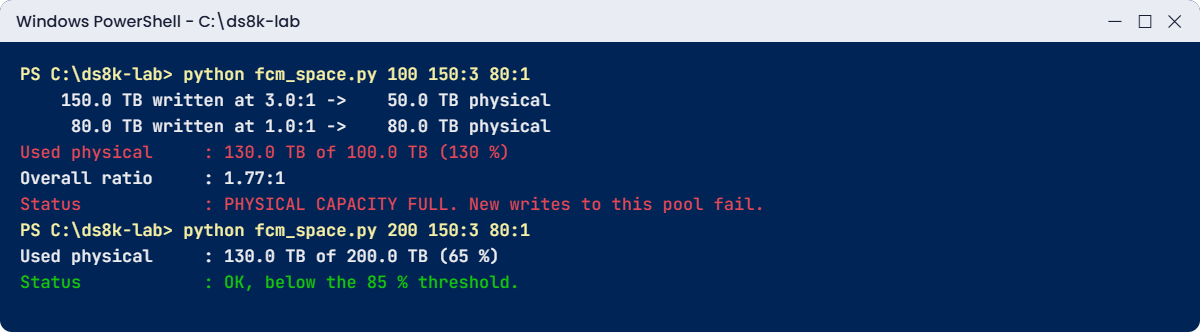
FCM space model: encrypted backups at 1:1 fill the physical capacity, a bigger pool fixes it
The FCM space model: encrypted backups fill the physical capacity; a bigger pool fixes it.

Why: the hosts were only using 230 TB of logical space and their thin volumes may still show lots left, but the 80 TB of backups took 80 TB of physical flash. The real pool would have crossed the 85% alert after only part of the backup run (try python fcm_space.py 100 150:3 40:1 to see it at 90%) and then hit Pool Physical Capacity Full.

Fix: keep data that’s already encrypted or compressed off FCM pools, or size the pool at 1:1 for that data. Moving the backups to their own pool on industry-standard flash works, and so does adding physical capacity:

Run this:

python fcm_space.py 200 150:3 80:1

You should see this:

    150.0 TB written at 3.0:1 ->    50.0 TB physical
     80.0 TB written at 1.0:1 ->    80.0 TB physical
Written (logical) : 230.0 TB
Used physical     : 130.0 TB of 200.0 TB (65 %)
Overall ratio     : 1.77:1
Status            : OK, below the 85 % threshold.

The model works from numbers you type, and its --check part starts from a real pool instead, reading lsextpool -l through the DS CLI and adding what you plan to write on top. Type quit in the shell if it’s still open.

A script can’t answer password prompts, so save your password in a password file first. If security.dat is already in your lab folder from an earlier lesson, skip this command (the shell would tell you the record already exists).

Run this (PowerShell):

python ds8sim.py -hmc1 10.0.0.1 -user admin -passwd YOURPASSWORD managepwfile -action add -name admin -pw YOURPASSWORD -pwfile security.dat

You should see this:

CMUC00206I managepwfile: Record 10.0.0.1/admin successfully added to password file security.dat.

Then save these eight lines as auto.profile in the same folder. banner: off, header: on and format: delim make every list come back as one header row plus comma-separated rows, which Python reads easily. Implementation Lesson 2 explains profiles in full.

auto.profile:

hmc1: 10.0.0.1
username: admin
pwfile: security.dat
devid: IBM.2107-78SV001
banner: off
header: on
format: delim
delim: ,

Run this (PowerShell):

python fcm_space.py --check P0
python fcm_space.py --check P0 20:1

You should see this:

Pool P0 (fcm_pool) from lsextpool -l: 21.6 TiB physical
      0.5 TiB in the pool now at 4.5:1 ->     0.1 TiB physical
Written (logical) : 0.5 TiB
Used physical     : 0.1 TiB of 21.6 TiB (1 %)
Overall ratio     : 4.47:1
Status            : OK, below the 85 % threshold.
Pool P0 (fcm_pool) from lsextpool -l: 21.6 TiB physical
      0.5 TiB in the pool now at 4.5:1 ->     0.1 TiB physical
     20.0 TiB written at 1.0:1 ->    20.0 TiB physical
Written (logical) : 20.5 TiB
Used physical     : 20.1 TiB of 21.6 TiB (93 %)
Overall ratio     : 1.02:1
Status            : ABOVE THRESHOLD (85 %). Act now: add capacity or move data.

Pool P0 holds the 500 GiB you wrote in the lab, about 0.1 TiB of flash at 4.5:1. Plan 20 TiB of encrypted backups at 1:1 on top of that and the same pool jumps to 93 %, past the alert threshold. The script shows TiB here because the DS CLI reports the pool in MiB.

At work, a scheduler on the jump server runs --check for every FCM pool each morning and mails out the pools that are over the threshold.

✅ Checkpoint: You can explain why the overall ratio fell from 3:1 to 1.77:1 and what that did to the pool, and --check shows pool P0 at 93 % with 20 TiB of backups added.

This happened at work

The backup that broke the ratio

A retail bank moved its core databases to a DS8A50 with FlashCore Modules. The sizing assumed 3:1 compression, and for a year the pool sat at a steady 3.2:1 with lots of headroom.

Then the security team made encryption mandatory for all backups, so the backup software started writing encrypted, already-compressed images. And because the DS8000 pool had “plenty of space”, the backup team got new thin LUNs in the same FCM pool for a faster restore copy.

Within three weeks the pool’s overall compression ratio had dropped from 3.2:1 to 1.9:1, and the physical capacity alert went off at 85% on a Sunday morning. Nobody had a runbook for it, so by Monday the pool had reached Pool Physical Capacity Full, Emergency Reserve 1, and two database volumes started failing writes during the morning batch.

Looking back, the team had only ever watched capacity in logical terms. The physical numbers and the ratio sat on a GUI page nobody opened, and nobody had asked the backup team what kind of data they’d be writing. That same day the backup LUNs were moved to a pool on industry-standard flash and the restore copies rebuilt there. Afterwards the bank put physical capacity and the compression ratio in its weekly report, set a policy for the 85% alert and added one question to every storage request: “Is the data already compressed or encrypted?” On FCMs, your capacity depends on your data as much as your drives.

Common mistakes and troubleshooting

SymptomLikely causeWhat to check / fix
Compression ratio drops week by weekNew data that is already compressed or encryptedFind the new volumes with the lowest ratio and move that data to a pool on industry-standard flash.
Pool physical capacity alert at 85%Physical space nearly full even though hosts show space leftAct when the alert fires: add capacity, move data or release space, and don’t wait for Full.
mkfbvol refuses a standard volumeFCM pools take thin (ESE) volumes onlyUse -sam ese, or use a pool on industry-standard flash for fully allocated volumes.
Order for 40 drives is rejectedDrives come in sets of 16 per HPFE pairOrder 16, 32 or 48 drives per pair.
Plan to mix FCMs and tier 2 drives in one poolNot allowed in Release 10.1One drive type per HPFE pair and per extent pool.
Capacity planned with FCM 19.2 TB “raw” onlyIgnoring compression, RAID and sparesPlan physical capacity after RAID and spares, then apply a realistic ratio per data type.
More than 32 FCMs ordered for one HPFE pair on single-phase powerSingle-phase power limitFCMs are limited to 2 drive sets per HPFE on single-phase power, so use three-phase power if you need more.

Put two numbers in every capacity report for an FCM pool, physical used percentage and compression ratio, and if either moves quickly, find out why before the alert tells you.

Interview questions

Click a question to open it. Each is worded the way an interviewer would ask it, and underneath you’ll find why they ask it and one way you could answer in your own words.

Fresher level

1. What is HPFE Gen3, and how are drives installed in it?

Why they ask this: It’s a basic hardware question about where the data lives on a DS8A00.

How you might answer: HPFE Gen3 is the DS8A00 flash enclosure: 2U drawers installed in pairs, with each pair connected to a device adapter pair over PCIe Gen4. Drives go in as sets of 16, split 8 and 8 across the two enclosures, so a pair holds 16, 32 or 48 drives, and every pair keeps two global spares.

2. What is special about IBM FlashCore Modules compared with normal flash drives?

Why they ask this: They want to know you understand the compression tier and the rules that come with it.

How you might answer: FCMs compress data in hardware inside the drive, with their own processor and memory, so the CPCs spend no CPU on it. They come in 4.8, 9.6 and 19.2 TB. You can’t switch off compression or thin provisioning, so volumes on FCM pools have to be ESE, and you need to watch physical capacity as well as logical.

2–5 years experience

3. An FCM pool shows 40% logical used but the physical capacity alert fired. How is that possible?

Why they ask this: It tests whether you understand logical versus physical capacity on compressing flash.

How you might answer: Logical used counts what hosts wrote before compression, and physical used counts what that data takes after compression. If new data compresses badly, say encrypted backups at about 1:1, physical space fills much faster than logical. I’d look at the compression ratio trend, find the volumes with the poorest ratio, and then move that data or add physical capacity.

4. A team asks for fully allocated volumes on the DS8000, but the only pool is FCM. What do you do?

Why they ask this: It’s practical problem-solving around a real product rule.

How you might answer: On an FCM pool I can only create thin ESE volumes, though the host still sees the full size. If they need fully allocated volumes, say for an application guarantee, I’d create them in a pool on industry-standard flash, and I’d also explain why thin on FCM is normally fine.

Senior level

5. How would you size a new DS8A50 flash layout for a mix of databases, VMware and encrypted backups?

Why they ask this: At senior level you have to design tiers and pools around the data and not only around terabytes.

How you might answer: I’d sample the data first, because databases and VMware usually compress well on FCMs and encrypted backups don’t. So databases and VMware go to FCM pool pairs sized on a measured ratio with headroom, and backups go to a separate pool pair on tier 2 flash sized at 1:1. And I’d keep the rules in mind: one drive type per HPFE pair and per pool, sets of 16, RAID 6 by default, and up to 8 HPFE pairs on a DS8A50.

6. What would you put in a monitoring policy for FCM pools?

Why they ask this: They’re looking for proactive operations rather than reacting after an outage.

How you might answer: I’d track physical used percentage, logical used percentage and the compression ratio for every FCM pool weekly, with alerts at the 85% physical threshold, and each alert would have an owner and a runbook: add capacity, release space on ESE volumes, or move data that compresses poorly. I’d also put an “is your data compressed or encrypted?” question on every new storage request.

Quick quiz

Q1. How many drives can one HPFE Gen3 pair hold?

  1. 8, 16 or 24
  2. 16, 32 or 48
  3. Any number up to 48
  4. 24 only
Show answer

B — Drives come in sets of 16, so a pair holds 16, 32 or 48.

Q2. Which drive sizes are IBM FlashCore Modules?

  1. 1.6, 1.92 and 3.84 TB
  2. 4.8, 9.6 and 19.2 TB
  3. 7.68 TB only
  4. 2.4 and 4.8 TB
Show answer

B — FCMs come in 4.8, 9.6 and 19.2 TB; industry-standard drives in 1.6, 1.92, 3.84 and 7.68 TB.

Q3. What kind of volume can you create in an FCM pool?

  1. Only standard (fully allocated)
  2. Only thin (ESE)
  3. Either
  4. Only CKD
Show answer

B — FCMs always compress and store thin, so volumes must be ESE.

Q4. What usually happens to the compression ratio when encrypted backups land on an FCM pool?

  1. It goes up
  2. It goes down
  3. It stays the same
  4. It becomes zero
Show answer

B — Encrypted data compresses about 1:1, so the pool’s overall ratio falls.

Q5. Can you mix FCMs and industry-standard drives in one extent pool in Release 10.1?

  1. Yes, always
  2. Only with RAID 10
  3. No
  4. Only on DS8A80
Show answer

C — In Release 10.1 there is no intermix of FCMs and industry-standard NVMe in an HPFE or a pool.

Quick recap

  • HPFE Gen3 is the DS8A00 flash enclosure: 2U drawers in pairs, 16, 32 or 48 NVMe drives per pair, two global spares per pair.
  • Three tiers: FlashCore Modules (4.8, 9.6, 19.2 TB), capacity tier 1 (1.6 TB) and capacity tier 2 (1.92, 3.84, 7.68 TB).
  • FCMs compress in hardware; volumes on FCM pools must be thin (ESE).
  • FCM ranks and pools show logical and physical capacity; the pool fills when physical space runs out.
  • Data that’s already compressed or encrypted barely shrinks, so it can pull the ratio down and fill a pool fast.
  • One drive type per HPFE pair and per extent pool in Release 10.1.

Next lesson

Lesson 8: Power, cooling and the HMC network → You finish the hardware tour with power, cooling and the consoles that manage it all.

Further reading: HPFE Gen3

To go deeper into HPFE Gen3, IBM Storage DS8A00 Architecture and Implementation Guide (IBM Redbooks) covers flash enclosures in chapter 2 and capacity terms in chapter 3. For the cards that bring data into the frame, go back to Lesson 6: I/O enclosures and host adapters.

You can also see the full plan for this course on the IBM DS8000 Architecture course page.

Scroll to Top

This website uses cookies

We use a few cookies to keep this site working. If you allow it, we also use Google Analytics to count visits so we can improve our lessons. You can accept all, deny the optional ones, or choose what to allow.