I/O enclosures and host adapters (FC, FICON, zHyperLink)

DS8000 host adapters are the cards where every SAN cable plugs into the storage system. Each has four 32 Gbps ports and sits in an I/O enclosure connected to both CPCs, and every byte a server reads or writes goes through one of those ports.

This lesson covers what lives in an I/O enclosure, how FCP and FICON ports differ, what zHyperLink is, and the one cabling rule IBM prints in bold: every host needs paths on separate host adapters in separate I/O enclosures. After that you find the weak spot in the lab system’s cabling, break it on purpose and fix it.

You need the practice shell from Lesson 1, and you first saw the I/O enclosures in Lesson 3.

TimeYou needBy the end you can
60 to 75 minutesThe practice shell from Lesson 1 and Python 3.8 or newerRead lsioport and lshostport output, explain FCP, FICON and zHyperLink, and check whether a host is cabled across two adapters and two I/O enclosures

What it is, in one line

DS8000 host adapters are 4-port, 32 Gbps Fibre Channel cards in the I/O enclosures; each port runs FCP for open systems or FICON for IBM Z, and every host should use ports on two adapters in two different enclosures.

In Simple Words

The gates of a big school

Imagine a big school with two buildings. Each building has a few gates with four doors each, buses drop children at the doors, and inside, the corridors of both buildings lead to the same classrooms. Some doors are for the small children and some for the big ones, and a door can be set for one group at a time, never both.

Now think about one bus that always uses two doors of the same building. When that building is closed for painting, the bus has nowhere to stop and its children miss school, whereas a smart driver uses one door in each building, so one is always open.

In a DS8000 the buildings are I/O enclosures, the gates are host adapters and the doors are ports, the small and big children are open-systems servers (FCP) and mainframes (FICON), and the smart driver is a host zoned to two enclosures.

Engineer's View

Host adapters, I/O enclosures and zHyperLink

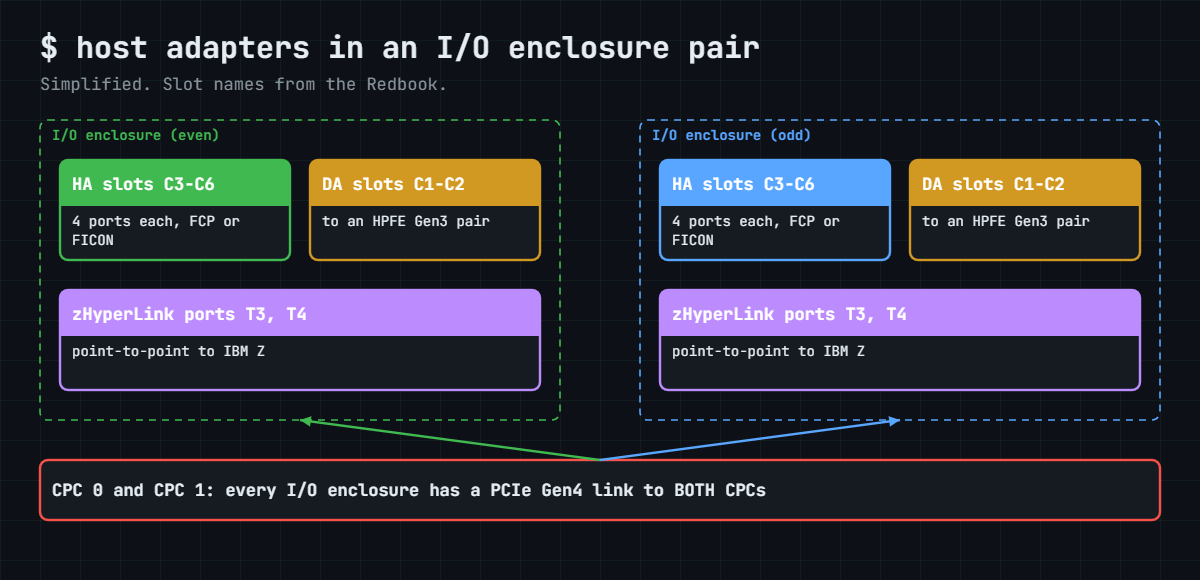
An I/O enclosure is a 3U box, always installed in pairs, with two PCIe Gen4 connections, one to each CPC. Inside are slots for up to 4 host adapters (slots C3 to C6), 2 device adapters for the flash enclosures and 2 zHyperLink adapters (ports T3 and T4), and it has redundant power supplies and fans, with each adapter slot able to be powered off on its own for a repair.

Each host adapter has four ports. The short-wave (SW) and long-wave (LW) versions both run at 32 Gbps and auto-negotiate down to 16 or 8 Gbps, and all four ports on one card are the same type.

Key numbers:

ItemValue
Ports per adapter4 (all SW or all LW)
Port topologyFCP (SCSI-FCP) or FICON, one per port, never both at once. FC-AL (arbitrated loop) is not supported.
Logins per portup to 509 host logins and 1,280 paths
Distance, LWup to 10 km without repeaters
Distance, SW at 32 Gbps70 m on OM3, 100 m on OM4, 150 m on OM5
Max adaptersDS8A10: 16 (64 ports). DS8A50 / DS8A80: 16 in the base frame, 32 with E05 (128 ports)
zHyperLink adaptersDS8A10: 4, DS8A50: 10, DS8A80: 12; cables of 40 m or 150 m

FCP ports also carry Metro Mirror and Global Copy traffic between DS8000 systems, while FICON ports are for IBM Z only. The 32 Gbps adapter supports IBM Fibre Channel Endpoint Security, which can authenticate and encrypt traffic at line rate when the host supports it as well.

zHyperLink isn’t Fibre Channel. It’s a short, direct optical link from an IBM Z server into an I/O enclosure, up to 150 m, built for very low latency on reads and small writes, and it works alongside FICON, which you still need. zHyperLink adapters go in pairs, in two different enclosures.

IBM gives two placement rules. Put one host adapter in each I/O enclosure before you add a second to any enclosure, and connect every host to ports on separate host adapters in separate I/O enclosures, because a code update can take a host adapter port offline for a while.

On DS8900F you get the same 32 Gbps adapter technology in a different form factor, on PCIe Gen3 I/O enclosures.

How it works, step by step

Follow one host from the cable to the volume. It’s the path every SAN engineer traces when someone says “the server can’t see its disks”.

1The host’s HBA logs in to a DS8000 port

The server has an HBA (host bus adapter) with its own WWPN, a world-wide port name that works like a MAC address for Fibre Channel. The SAN team zones that WWPN to a DS8000 port WWPN in the switch, and once the zone is active the HBA logs in to the port.

On the DS8000, lshostport -login shows these logins, telling you which host WWPN is logged in through which I/O port.

2The port must have the right topology

A port set to FCP accepts open-systems hosts (Linux, Windows, VMware, AIX) and mirroring links, a port set to FICON accepts only IBM Z channels, and a port with no topology (- in lsioport) accepts nothing. You set it with setioport.

DS8000 host adapters, device adapters and zHyperLink ports in an I/O enclosure pair

3The host adapter passes the I/O to the right CPC

The host adapter is shared by both CPCs. It checks which LSS the volume belongs to and passes the I/O over PCIe Gen4 to server0 (even) or server1 (odd), so a single path can reach every volume, which is how people get away with bad cabling until the day something breaks.

4Port IDs tell you where the port is

DS8000 ports have IDs like I0032. On a real system the digits map to the I/O enclosure, the adapter slot and the port, and IBM’s installation documents give the exact layout for your frame, but you don’t need to memorise them because lsioport -l prints the enclosure and card for every port.

In the lab system, I0030 to I0033 are the four ports of card C3 in enclosure 1B2, I0040 to I0043 are card C4 in the same enclosure, and I0050 to I0053 are card C5 in enclosure 1B3.

5Two adapters, two enclosures

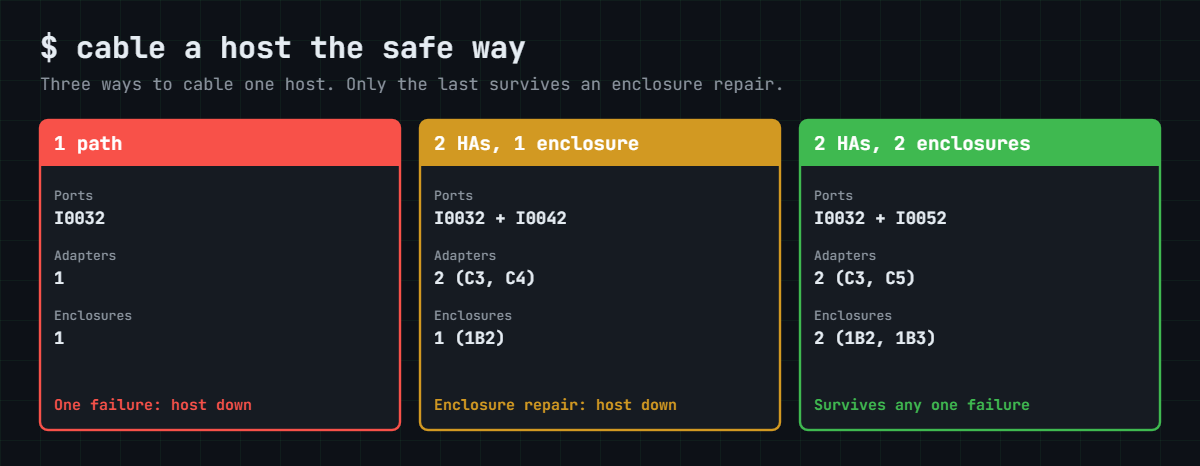
The safe design zones each host to two ports on different host adapters in different I/O enclosures, ideally through two separate SAN fabrics. That way the host survives losing a cable, a switch port, an SFP, a whole host adapter or even a whole I/O enclosure.

Two adapters in the same enclosure is a trap. It looks redundant on a diagram and it does survive a card failure, but when IBM needs to repair or update that enclosure, both paths go at once.

Three host cabling designs: one path, two adapters in one enclosure, two adapters in two enclosures

Mainframes add one more path type. A FICON channel from IBM Z goes through a FICON director (switch) to a FICON port, much like FCP, but a zHyperLink cable runs straight from the IBM Z server into ports T3 and T4 of an I/O enclosure with no switch at all. That gives z/OS very fast synchronous access for reads and small writes, and FICON stays the main path for everything else.

So the host adapter is the door, the topology decides who may use it, and the enclosure decides what else goes down with it. Before you approve a new zoning request, ask which enclosure each port is in, and you’ll avoid the outage in this lesson’s story.

Hands-on lab: find the weak spot in the host cabling

Before you run any command, double-check it

Read every command twice before you press Enter. Check the target: the system or account, the IDs, the names and the sizes. These commands are for learning and were tested in our lab, not on your system. At work, run the read-only list commands first, follow your change process, make sure a backup exists, and ask a second person to check anything that changes or deletes data. You run them at your own risk.

You’ll read the ports of the lab DS8A50, find which host is logged in where and check the cabling against IBM’s rule. Two hosts are already logged in to the lab system, each with two HBA ports.

Practice shell note: the practice shell is our teaching tool, not IBM software. Real DS CLI output is similar but not identical, and the extra columns of lsioport -l and the location codes are ours. Lines starting with SIM are practice shell messages, and simctl commands exist only in the shell.

1Start clean

Start the shell with python ds8sim.py, log in and reset.

Run this:

simctl reset

You should see this:

SIM0100I simctl: factory state restored (users and passwords kept; use simctl reset -all to reset them too).

✅ Checkpoint: You are at the dscli> prompt.

2List the host adapters

Run this:

lshacard

You should see this:

Date/Time: 24 October 2026 11:11:13 UTC IBM DSCLI Version: 7.10.10.348 DS: IBM.2107-78SV001
ID                           I/O enclosure      Frame State  Type  Speed   Fibre Channel ports Encryption capable Location code         S/N
==================================================================================================================================================
IBM.1400-1B1-78SV0/R-1-P1-C1 IBM.1400-1B1-78SV0 1     Online FC-LW 32 Gb/s 4                   yes                U1400.1B1.78SV0-P1-C1 YH10SV0001
IBM.1400-1B2-78SV0/R-1-P1-C3 IBM.1400-1B2-78SV0 1     Online FC-SW 32 Gb/s 4                   yes                U1400.1B2.78SV0-P1-C3 YH10SV0003
IBM.1400-1B2-78SV0/R-1-P1-C4 IBM.1400-1B2-78SV0 1     Online FC-SW 32 Gb/s 4                   yes                U1400.1B2.78SV0-P1-C4 YH10SV0004
IBM.1400-1B3-78SV0/R-1-P1-C5 IBM.1400-1B3-78SV0 1     Online FC-SW 32 Gb/s 4                   yes                U1400.1B3.78SV0-P1-C5 YH10SV0005

There are four adapters: one long-wave card in 1B1, two short-wave cards in 1B2 and one in 1B3. You can already smell a design problem, since 1B2 has two adapters while 1B4 has none, which breaks IBM’s “one per enclosure first” rule.

✅ Checkpoint: You can name the enclosure of each of the four adapters.

3List the ports with their location

Run this:

lsioport -l

You should see this:

Date/Time: 24 October 2026 11:11:13 UTC IBM DSCLI Version: 7.10.10.348 DS: IBM.2107-78SV001
ID    WWPN             State                     Type             topo     portgrp Speed   Frame I/O Enclosure HA Card Security
===============================================================================================================================
I0010 50050763030130DD Offline                   Fibre Channel-LW -        0       32 Gb/s 1     1B1           C1      Disabled
I0011 50050763030170DD Offline                   Fibre Channel-LW -        0       32 Gb/s 1     1B1           C1      Disabled
I0012 500507630301B0DD Offline                   Fibre Channel-LW -        0       32 Gb/s 1     1B1           C1      Disabled
I0013 500507630301F0DD Offline                   Fibre Channel-LW -        0       32 Gb/s 1     1B1           C1      Disabled
I0030 50050763030330DD Communication established Fibre Channel-SW SCSI-FCP 0       32 Gb/s 1     1B2           C3      Disabled
I0031 50050763030370DD Offline                   Fibre Channel-SW -        0       32 Gb/s 1     1B2           C3      Disabled
I0032 500507630303B0DD Communication established Fibre Channel-SW SCSI-FCP 0       32 Gb/s 1     1B2           C3      Disabled
I0033 500507630303F0DD No light detected         Fibre Channel-SW SCSI-FCP 0       32 Gb/s 1     1B2           C3      Disabled
I0040 50050763030430DD Offline                   Fibre Channel-SW -        0       32 Gb/s 1     1B2           C4      Disabled
I0041 50050763030470DD Communication established Fibre Channel-SW FICON    0       32 Gb/s 1     1B2           C4      Disabled
I0042 500507630304B0DD Communication established Fibre Channel-SW SCSI-FCP 0       32 Gb/s 1     1B2           C4      Disabled
I0043 500507630304F0DD No light detected         Fibre Channel-SW SCSI-FCP 0       32 Gb/s 1     1B2           C4      Disabled
I0050 50050763030530DD Offline                   Fibre Channel-SW -        0       32 Gb/s 1     1B3           C5      Disabled
I0051 50050763030570DD Offline                   Fibre Channel-SW -        0       32 Gb/s 1     1B3           C5      Disabled
I0052 500507630305B0DD Communication established Fibre Channel-SW SCSI-FCP 0       32 Gb/s 1     1B3           C5      Disabled
I0053 500507630305F0DD Offline                   Fibre Channel-SW -        0       32 Gb/s 1     1B3           C5      Disabled

Read three columns together: topo says who may log in (SCSI-FCP or FICON), State says whether the cable is live, and I/O Enclosure and HA Card tell you where the port is. I0041 is a FICON port for a mainframe, and I0032, I0042 and I0052 are live FCP ports.

✅ Checkpoint: You found one FICON port and three live FCP ports, and know the enclosure of each.

4See who is logged in where

Run this:

lshostport -login

You should see this:

Date/Time: 24 October 2026 11:11:13 UTC IBM DSCLI Version: 7.10.10.348 DS: IBM.2107-78SV001
WWNN             WWPN             Host I/O ports ESSIOport
==========================================================
20000024FF2D0F86 21000024FF2D0F86 -    -         I0032
20000024FF2D0F87 21000024FF2D0F87 -    -         I0042
20000120FA13B914 10000090FA13B914 -    -         I0032
20000120FA13B915 10000090FA13B915 -    -         I0042

Two servers, each with two HBA ports. The WWPNs ending in 0F86 and 0F87 belong to one server (call it db01) and those ending in B914 and B915 to another (app07). The Host column is empty because no host objects exist yet, and you’ll create them in the Implementation course.

Now look at ESSIOport: every login lands on I0032 or I0042, and both of those are in enclosure 1B2.

Practice shell lsioport -l and lshostport -login: host logins on ports in one I/O enclosure
Live ports and host logins in the practice shell: all logins land on ports in enclosure 1B2.

✅ Checkpoint: You noticed that both hosts use only ports in enclosure 1B2.

5Check the cabling against the rule

Type quit to leave the shell. Now a script can check the cabling the way you would at work, reading the logins and port locations through the DS CLI and applying IBM’s rule.

A script can’t answer password prompts, so save your password in a password file first. If security.dat is already in your lab folder from an earlier lesson, skip this command (the shell would tell you the record already exists).

Run this (PowerShell):

python ds8sim.py -hmc1 10.0.0.1 -user admin -passwd YOURPASSWORD managepwfile -action add -name admin -pw YOURPASSWORD -pwfile security.dat

You should see this:

CMUC00206I managepwfile: Record 10.0.0.1/admin successfully added to password file security.dat.

Then save these eight lines as auto.profile in the same folder. banner: off, header: on and format: delim make every list come back as one header row plus comma-separated rows, which Python reads easily. Implementation Lesson 2 explains profiles in full.

auto.profile:

hmc1: 10.0.0.1
username: admin
pwfile: security.dat
devid: IBM.2107-78SV001
banner: off
header: on
format: delim
delim: ,

Save this checker as path_check.py on your laptop, in the lab folder next to ds8sim.py (it runs there, not on the DS8000). You give it a host name and the host’s WWPNs, and it finds where each WWPN is logged in with lshostport -login and looks up that port’s enclosure and card in lsioport -l.

# path_check.py - SaatVedha host path checker (rule from the IBM Redbook SG24-8559-01)
# Runs on your workstation or jump server, not on the DS8000.
# It talks to the DS8000 only through the DS CLI (auto.profile: banner off, header on, format delim).
# Rule: a host needs at least two connections to I/O ports on separate host adapters
# in separate I/O enclosures. The script reads the logins (lshostport -login) and the
# enclosure and card of each port (lsioport -l), so you only give it the host's WWPNs.
# Usage: python path_check.py <host> <WWPN> [<WWPN> ...]
import csv, subprocess, sys
DSCLI = ["python", "ds8sim.py", "-cfg", "auto.profile"]   # at work: ["dscli", "-cfg", "auto.profile"]

def dscli(*args):
    """Run one DS CLI command and return its rows as dictionaries."""
    out = subprocess.run(DSCLI + list(args), capture_output=True, text=True).stdout
    lines = [l for l in out.splitlines() if l and not l.startswith("SaatVedha") and not l.startswith("CMUC")]
    return list(csv.DictReader(lines))

if len(sys.argv) < 3:
    print("Usage: python path_check.py <host> <WWPN> [<WWPN> ...]")
    sys.exit(1)

host, wwpns = sys.argv[1], [w.upper() for w in sys.argv[2:]]
ports = {p["ID"]: p for p in dscli("lsioport", "-l")}
logins = dscli("lshostport", "-login")

paths = []                      # (wwpn, I/O port, card, enclosure)
for w in wwpns:
    mine = [l["ESSIOport"] for l in logins if l["WWPN"].upper() == w]
    if not mine:
        print(f"  {w} is not logged in to any DS8000 port")
    for io in mine:
        paths.append((w, io, ports[io]["HA Card"], ports[io]["I/O Enclosure"]))

encls = {p[3] for p in paths}
cards = {(p[3], p[2]) for p in paths}
print(f"Host {host}: {len(paths)} path(s), {len(cards)} host adapter(s), {len(encls)} I/O enclosure(s)")
for w, io, c, e in paths:
    print(f"  {w} -> {io} on card {c} in enclosure {e}")
ok = True
if len(paths) < 2:
    print("FAIL: fewer than two paths. One cable, port or switch failure stops this host."); ok = False
if len(cards) < 2:
    print("FAIL: all paths on one host adapter. A card replacement stops this host."); ok = False
if len(encls) < 2:
    print("FAIL: all paths in one I/O enclosure. An enclosure repair or code load can stop this host."); ok = False
if ok:
    print("PASS: two or more adapters in two or more I/O enclosures.")
sys.exit(0 if ok else 1)

Run this (PowerShell):

python path_check.py db01 21000024FF2D0F86 21000024FF2D0F87

You should see this:

Host db01: 2 path(s), 2 host adapter(s), 1 I/O enclosure(s)
  21000024FF2D0F86 -> I0032 on card C3 in enclosure 1B2
  21000024FF2D0F87 -> I0042 on card C4 in enclosure 1B2
FAIL: all paths in one I/O enclosure. An enclosure repair or code load can stop this host.

Two paths and two adapters, and it still fails. This is the most common hidden risk in DS8000 cabling, and the break lab shows you what it costs.

At work you keep each host’s WWPNs in a small list, and the jump server runs the checker for every host from cron or Task Scheduler after each zoning change.

✅ Checkpoint: The checker reports FAIL for db01 because both paths are in 1B2.

Break It, Then Fix It

Now make the risk real. First you take away enclosure 1B2’s ports, as an enclosure repair or a code load might, and then you’ll meet the most common port setup error.

1Break it: lose both ports in enclosure 1B2

In the shell, simctl portfail takes the light away from a port. Fail both live ports in 1B2 and see who’s still logged in.

Run this:

simctl portfail I0032
simctl portfail I0042
lshostport -login

You’ll see this:

SIM0105I simctl: I/O port I0032 has no light (cable or SFP problem).
SIM0105I simctl: I/O port I0042 has no light (cable or SFP problem).
Date/Time: 24 October 2026 11:11:13 UTC IBM DSCLI Version: 7.10.10.348 DS: IBM.2107-78SV001
CMUC00234I lshostport: No Host Port found.

Why: both servers had both paths in one enclosure, so when that enclosure’s ports went dark every login disappeared. On a real system db01 and app07 would lose all their disks at once, even though the DS8000, its other enclosures and both CPCs were perfectly healthy.

Fix: the SAN team rezones one HBA port of each server to a port in another enclosure, here I0052 in 1B3. In the shell you play the SAN team: bring the ports back, log out one HBA port of each server and log it in to I0052.

Run this:

simctl portfix I0032
simctl portfix I0042
simctl logout 21000024FF2D0F87
simctl login 21000024FF2D0F87 I0052 20000024FF2D0F86
simctl logout 10000090FA13B915
simctl login 10000090FA13B915 I0052 20000120FA13B914
lshostport -login

You should see this (SIM lines shortened to the last command):

SIM0103I simctl: host port 10000090FA13B915 logged in to I0052.
Date/Time: 24 October 2026 11:11:13 UTC IBM DSCLI Version: 7.10.10.348 DS: IBM.2107-78SV001
WWNN             WWPN             Host I/O ports ESSIOport
==========================================================
20000024FF2D0F86 21000024FF2D0F86 -    -         I0032
20000024FF2D0F86 21000024FF2D0F87 -    -         I0052
20000120FA13B914 10000090FA13B914 -    -         I0032
20000120FA13B914 10000090FA13B915 -    -         I0052

Now each server has one path in 1B2 and one in 1B3. Repeat the failure:

Run this:

simctl portfail I0032
simctl portfail I0042
lshostport -login

You should see this (SIM lines left out):

Date/Time: 24 October 2026 11:11:13 UTC IBM DSCLI Version: 7.10.10.348 DS: IBM.2107-78SV001
WWNN             WWPN             Host I/O ports ESSIOport
==========================================================
20000024FF2D0F86 21000024FF2D0F87 -    -         I0052
20000120FA13B914 10000090FA13B915 -    -         I0052

Both servers survive on I0052. Bring the ports back now, and run the checker after the fix, because it reads live logins and while 1B2 is dark it would find only one path per server.

Run this:

simctl portfix I0032
simctl portfix I0042

You should see this:

SIM0106I simctl: I/O port I0032 has light again.
SIM0106I simctl: I/O port I0042 has light again.

Type quit and check the new design with the script:

Run this (PowerShell):

python path_check.py db01 21000024FF2D0F86 21000024FF2D0F87

You should see this:

Host db01: 2 path(s), 2 host adapter(s), 2 I/O enclosure(s)
  21000024FF2D0F86 -> I0032 on card C3 in enclosure 1B2
  21000024FF2D0F87 -> I0052 on card C5 in enclosure 1B3
PASS: two or more adapters in two or more I/O enclosures.

Start the shell again for the next break.

✅ Checkpoint: Both servers stay logged in through I0052 while 1B2 is down, and the checker says PASS.

2Break it: set the wrong topology

A mainframe colleague needs FICON ports and changes two of the wrong ones. The shell has this scenario built in.

Run this:

simctl reset
simctl break port-topology-ficon
lshostport -login

You’ll see this (SIM0100I line left out):

SIM0123I simctl: scenario port-topology-ficon: I0032 and I0042 were changed to FICON. Open systems hosts cannot log in. Check: lsioport, lshostport -login. Fix: setioport -topology scsifcp -force I0032 I0042.
Date/Time: 24 October 2026 11:11:13 UTC IBM DSCLI Version: 7.10.10.348 DS: IBM.2107-78SV001
CMUC00234I lshostport: No Host Port found.

Run lsioport and you’ll see FICON in the topo column for I0032 and I0042. The cables are fine (Communication established), but an open-systems HBA can’t log in to a FICON port. Try fixing it the obvious way:

Run this:

setioport -topology scsifcp I0032

You’ll get this error:

CMUN04033E setioport: I0032: The change topology request failed because the current topology is already set and force option is not provided.
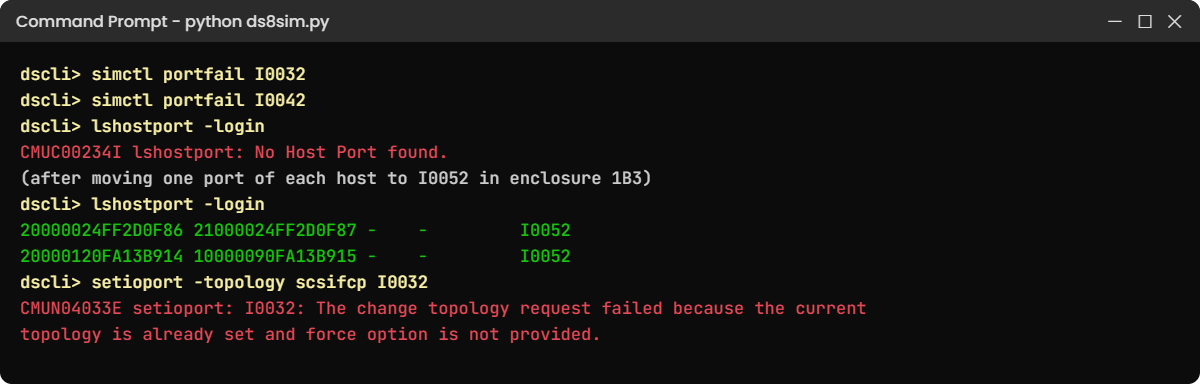
Practice shell break lab: both host ports in one enclosure fail, then rezoning and a topology error
Both break steps: an enclosure-wide port loss, the rezoned fix, and the topology error.

Why: the port already has a topology, so the DS8000 wants you to confirm the change with -force. This is a real DS CLI message, taken from IBM’s Redbook example, and it stops you changing a live port by accident.

Fix: make sure you have the right ports, then use -force.

Run this:

setioport -topology scsifcp -force I0032 I0042
lshostport -login

You should see this:

CMUC00011I setioport: I/O Port I0032 successfully configured.
CMUC00011I setioport: I/O Port I0042 successfully configured.
Date/Time: 24 October 2026 11:11:13 UTC IBM DSCLI Version: 7.10.10.348 DS: IBM.2107-78SV001
WWNN             WWPN             Host I/O ports ESSIOport
==========================================================
20000024FF2D0F86 21000024FF2D0F86 -    -         I0032
20000024FF2D0F87 21000024FF2D0F87 -    -         I0042
20000120FA13B914 10000090FA13B914 -    -         I0032
20000120FA13B915 10000090FA13B915 -    -         I0042

✅ Checkpoint: All four host ports are logged in again.

This happened at work

Both doors in one building

A national airline ran its booking and check-in systems on VMware clusters with DS8000 storage. Every ESXi host had two HBA ports on two SAN fabrics, every datastore showed two paths, and years earlier the design review had ticked “dual path”.

One spring IBM scheduled a repair on an I/O enclosure that had logged a power supply fault. Everyone rated it low risk, since the DS8000 is built for this and the procedure is concurrent.

The moment the enclosure went offline, 14 ESXi hosts lost all their paths. Check-in kiosks at three airports froze for 25 minutes until the enclosure came back, flights left late and the call centre was swamped.

When they dug into it, the cause was zoning. While the clusters were being built, the SAN team had picked the two unused DS8000 ports with the lowest numbers on each fabric, and those happened to sit on two different host adapters in the same I/O enclosure: two paths, two fabrics, one enclosure.

It took two weekends to rezone every host so its two paths land on adapters in two different enclosures, and a check like path_check.py went onto the zoning request form. Since then the team asks which enclosure each port is in every time, because “two paths” doesn’t mean “no single point of failure”.

Common mistakes and troubleshooting

SymptomLikely causeWhat to check / fix
Hosts lose all paths during an enclosure repair or code loadAll of a host’s ports in one I/O enclosureCheck lsioport -l for the enclosure of every zoned port, and rezone to two enclosures.
Port shows Communication established but the host can’t log inWrong topology (FICON instead of SCSI-FCP)Check the topo column, and after confirming, run setioport -topology scsifcp -force.
setioport fails with CMUN04033EChanging a port that already has a topology without -forceConfirm the port is the right one, then add -force.
Port shows No light detectedCable, SFP or switch port problemCheck both ends of the cable and the switch port, and swap the cable or SFP.
Long cable run gives errors at 32 GbpsShort-wave distance limit exceeded32 Gbps SW reaches 70 m on OM3, 100 m on OM4 and 150 m on OM5, so use LW or better cable.
New host adapters all land in one enclosureIgnoring the “one per enclosure first” rulePlan adapter placement so each enclosure gets one before any gets two.

Keep a simple port map for every DS8000 with the port ID, enclosure, card, topology, fabric and what’s zoned to it, and a 30-minute zoning question becomes a 30-second one.

Interview questions

Click a question to open it. Each is worded the way an interviewer would ask it, and underneath you’ll find why they ask it and one way you could answer in your own words.

Fresher level

1. What is the difference between an FCP port and a FICON port on a DS8000?

Why they ask this: It’s a basic check that you know the two worlds a DS8000 serves.

How you might answer: Each host adapter port is set to one topology. SCSI-FCP is for open systems like Linux, Windows, VMware and AIX, and also for Metro Mirror and Global Copy links, while FICON is only for IBM Z channels. A port can’t be both at once, and you change it with setioport.

2. How many ports does a DS8A00 host adapter have, and how fast are they?

Why they ask this: It’s a quick hardware fact check that shows whether you’ve worked with the current generation.

How you might answer: Four ports per adapter at 32 Gbps, auto-negotiating down to 16 or 8 Gbps. There are short-wave and long-wave versions, all four ports on one card are the same type, and each port supports up to 509 host logins.

2–5 years experience

3. A server has two paths to the DS8000, but it lost both during a planned IBM repair. What went wrong?

Why they ask this: They want to know whether you think about failure domains beyond “two paths”.

How you might answer: Most likely both paths were on host adapters in the same I/O enclosure, so the enclosure repair took both away. I’d check lsioport -l for the enclosure of each zoned port and rezone so the host has one path in each enclosure of a pair, ideally on two fabrics.

4. A new Linux host can’t see the DS8000. The port says “Communication established”. What do you check?

Why they ask this: It’s a practical troubleshooting question, and they’re listening for a calm, ordered list.

How you might answer: First the port topology in lsioport, because if it says FICON an FCP host can’t log in. Then lshostport -login to see whether the host WWPN reached the port at all, which tells me if the zoning is right, and if it did log in I’d check the host object, host ports and volume group mapping, which come later in the course.

Senior level

5. How would you plan host adapter placement and zoning for a new DS8A50 with 12 host adapters?

Why they ask this: Seniors have to design for maintenance windows and growth as well as day one.

How you might answer: I’d follow IBM’s plug order so each I/O enclosure gets one adapter before any gets a second, then split the ports between FCP and FICON by workload. Every host gets two ports on different adapters in different enclosures, one on each fabric, and I’d leave a few ports free on each enclosure for growth and mirroring links and document the port map before go-live.

6. When would you recommend zHyperLink, and what do you need for it?

Why they ask this: It tests your mainframe awareness and whether you know zHyperLink’s limits.

How you might answer: zHyperLink suits z/OS workloads that need very low latency on reads and small writes, like Db2 transaction processing. It’s a direct point-to-point cable of up to 150 m from the IBM Z server into ports T3 and T4 of an I/O enclosure, installed in pairs across two enclosures. You still need FICON with zHPF, and the number of zHyperLink adapters depends on the model: 4, 10 or 12.

Quick quiz

Q1. How many ports does a DS8A00 host adapter have?

  1. 2
  2. 4
  3. 8
  4. 16
Show answer

B — Each host adapter has four 32 Gbps ports.

Q2. A port is set to FICON. Which host can log in to it?

  1. A VMware ESXi host
  2. An IBM Z channel
  3. A Windows server
  4. Any host
Show answer

B — FICON ports are for IBM Z only; open systems need SCSI-FCP.

Q3. What does IBM say about host connections to a DS8A00?

  1. One path is enough
  2. Two paths on the same adapter
  3. At least two connections on separate host adapters in separate I/O enclosures
  4. Four paths on one enclosure
Show answer

C — Separate adapters in separate enclosures let a host survive an enclosure repair or code update.

Q4. setioport fails with CMUN04033E. What is missing?

  1. The storage image ID
  2. The -force flag, because the port already has a topology
  3. A host object
  4. The port speed
Show answer

B — Changing a port that already has a topology needs -force.

Q5. How far can zHyperLink reach?

  1. 10 km
  2. 150 m
  3. 2 m
  4. Unlimited through a switch
Show answer

B — zHyperLink is a point-to-point link of up to 150 m, with no switch.

Quick recap

  • DS8000 host adapters have four 32 Gbps ports and sit in I/O enclosures linked to both CPCs.
  • An I/O enclosure holds up to 4 host adapters, 2 device adapters and 2 zHyperLink adapters.
  • Each port is SCSI-FCP (open systems and mirroring) or FICON (IBM Z); change it with setioport, using -force on a port that already has a topology.
  • lsioport -l shows each port’s topology, state, enclosure and card; lshostport -login shows who is logged in where.
  • Every host needs paths on separate host adapters in separate I/O enclosures, ideally on two fabrics.
  • zHyperLink is a direct, low-latency link of up to 150 m from IBM Z, used alongside FICON.

Next lesson

Lesson 7: HPFE Gen3, flash drives and FlashCore Modules → You go to the top of the frame and look at where the data finally lives.

Further reading: DS8000 host adapters

To go deeper into DS8000 host adapters, IBM Storage DS8A00 Architecture and Implementation Guide (IBM Redbooks) covers I/O enclosures and adapters in chapter 2 and host connections in chapter 4. For the memory these ports feed into, go back to Lesson 5: Cache, NVS and NVDIMM.

You can also see the full plan for this course on the IBM DS8000 Architecture course page.

Scroll to Top

This website uses cookies

We use a few cookies to keep this site working. If you allow it, we also use Google Analytics to count visits so we can improve our lessons. You can accept all, deny the optional ones, or choose what to allow.