


Before you run any command, double-check it
Read every command twice before you press Enter. Check the target: the system or account, the IDs, the names and the sizes. These commands are for learning and were tested in our lab, not on your system. At work, run the read-only list commands first, follow your change process, make sure a backup exists, and ask a second person to check anything that changes or deletes data. You run them at your own risk.
In this lab you build a balanced FB pool pair from four FlashCore Module ranks, create volumes on both servers and watch a single volume spread over two ranks. Start the practice shell in C:\ds8k-lab (setup is in Lesson 1).
Practice shell note: the practice shell is our own teaching tool, not IBM software. Real DS CLI output looks very close to this but isn’t identical. The capacity numbers come from the shell’s own simple formulas (including a pretend FCM compression factor), and CMUN02031E and CMUN02020E are practice shell messages.
1Load four ranks with a setup script
You’ve already made arrays and ranks by hand, so this time a script does it. Create C:\ds8k-lab\setup-12.txt with these lines:
mkarray -raidtype 6 -arsite S1
mkarray -raidtype 6 -arsite S2
mkarray -raidtype 6 -arsite S3
mkarray -raidtype 6 -arsite S4
mkrank -array A0 -keygrp 1 -stgtype fb
mkrank -array A1 -keygrp 1 -stgtype fb
mkrank -array A2 -keygrp 1 -stgtype fb
mkrank -array A3 -keygrp 1 -stgtype fb
Reset the shell, then run the script from PowerShell (use your own password):
Run this:
python ds8sim.py -hmc1 10.0.0.1 -user admin -passwd YourPassw0rd -script setup-12.txtYou should see this:
SaatVedha DS8000 practice shell — not IBM software. Real DS CLI output looks like this but is not identical.
CMUC00004I mkarray: Array A0 successfully created.
CMUC00004I mkarray: Array A1 successfully created.
CMUC00004I mkarray: Array A2 successfully created.
CMUC00004I mkarray: Array A3 successfully created.
CMUC00007I mkrank: Rank R0 successfully created.
CMUC00007I mkrank: Rank R1 successfully created.
CMUC00007I mkrank: Rank R2 successfully created.
CMUC00007I mkrank: Rank R3 successfully created.
In script mode the shell runs one DS CLI command per line and stops at the first error. At work you’ll often build whole systems from scripts like this, because someone can review them before anyone touches the box. Before you run it, type simctl reset at the dscli> prompt and then quit, so you start clean.
✅ Checkpoint: Eight success messages, R0 to R3 created.
2Create the pool pair and split the ranks
Start python ds8sim.py again and log in.
Type these at the dscli> prompt:
mkextpool -rankgrp 0 -keygrp 1 -stgtype fb fcm_fb_0
mkextpool -rankgrp 1 -keygrp 1 -stgtype fb fcm_fb_1
chrank -extpool P0 R0
chrank -extpool P0 R1
chrank -extpool P1 R2
chrank -extpool P1 R3
lsrank
lsextpool
You should see this:
dscli> mkextpool -rankgrp 0 -keygrp 1 -stgtype fb fcm_fb_0
CMUC00000I mkextpool: Extent pool P0 successfully created.
dscli> mkextpool -rankgrp 1 -keygrp 1 -stgtype fb fcm_fb_1
CMUC00000I mkextpool: Extent pool P1 successfully created.
dscli> chrank -extpool P0 R0
CMUC00008I chrank: Rank R0 successfully modified.
dscli> chrank -extpool P0 R1
CMUC00008I chrank: Rank R1 successfully modified.
dscli> chrank -extpool P1 R2
CMUC00008I chrank: Rank R2 successfully modified.
dscli> chrank -extpool P1 R3
CMUC00008I chrank: Rank R3 successfully modified.
dscli> lsrank
Date/Time: 24 October 2026 11:04:18 UTC IBM DSCLI Version: 7.10.10.348 DS: IBM.2107-78SV001
ID Group State  datastate Array RAIDtype extpoolID stgtype
==========================================================
R0 0     Normal Normal    A0    6        P0        fb
R1 0     Normal Normal    A1    6        P0        fb
R2 1     Normal Normal    A2    6        P1        fb
R3 1     Normal Normal    A3    6        P1        fb
dscli> lsextpool
Date/Time: 24 October 2026 11:04:18 UTC IBM DSCLI Version: 7.10.10.348 DS: IBM.2107-78SV001
Name     ID stgtype rankgrp status availstor (2^30B) %allocated available reserved numvols
==========================================================================================
fcm_fb_0 P0 fb      0       below  199152            0          12745728  128      0
fcm_fb_1 P1 fb      1       below  238982            0          15294900  128      0
Notice the Group column changed from - to 0 or 1 as each rank joined a pool, which is server affinity being set. P0 (even) is rank group 0 and P1 (odd) is rank group 1.
In availstor you’ll see P1 is bigger than P0, and that’s expected. R0 and R1 sit on S1 and S2, the sites that keep spares (5+P+Q+S), while R2 and R3 are 6+P+Q. reserved 128 is the shell’s 64-extent reserve for each of the two ranks.
The FCM numbers look large because the shell pretends to compress; Lesson 7 explains real FCM capacity.
✅ Checkpoint: Each pool has two ranks: R0, R1 in Group 0 and R2, R3 in Group 1.
3Create volumes on both servers
FCM pools only take thin (ESE) volumes, so you add -sam ese. Even LSS 20 goes in P0 and odd LSS 21 in P1, and simctl write pretends the host has written 20 GiB to volume 2000.
Type these at the dscli> prompt:
mkfbvol -extpool P0 -cap 500 -sam ese -name db_#h 2000-2001
mkfbvol -extpool P1 -cap 500 -sam ese -name db_#h 2100-2101
simctl write 2000 20
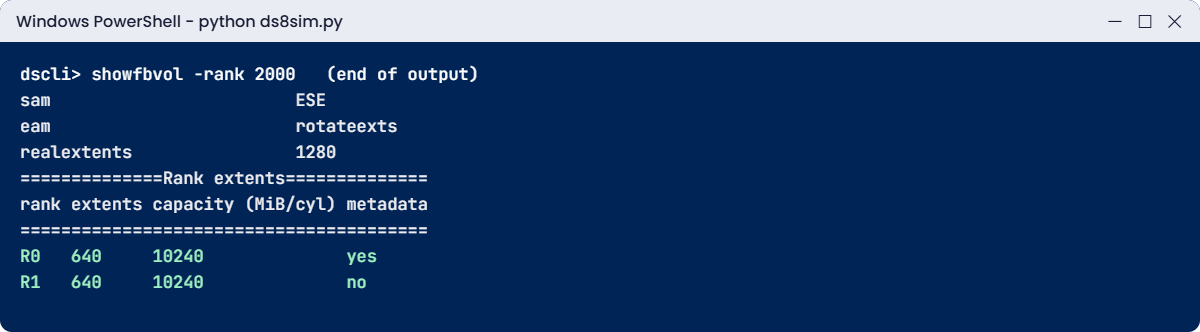
showfbvol -rank 2000
You should see this:
dscli> mkfbvol -extpool P0 -cap 500 -sam ese -name db_#h 2000-2001
CMUC00025I mkfbvol: FB volume 2000 successfully created.
CMUC00025I mkfbvol: FB volume 2001 successfully created.
dscli> mkfbvol -extpool P1 -cap 500 -sam ese -name db_#h 2100-2101
CMUC00025I mkfbvol: FB volume 2100 successfully created.
CMUC00025I mkfbvol: FB volume 2101 successfully created.
dscli> simctl write 2000 20
SIM0102I simctl: volume 2000 now has 1280 allocated extents (20 GiB written).
dscli> showfbvol -rank 2000
Date/Time: 24 October 2026 11:04:18 UTC IBM DSCLI Version: 7.10.10.348 DS: IBM.2107-78SV001
Name                       db_2000
ID                         2000
...
extpool                    P0
exts                       32000
...
sam                        ESE
eam                        rotateexts
realextents                1280
...
==============Rank extents==============
rank extents capacity (MiB/cyl) metadata
========================================
R0   640     10240              yes
R1   640     10240              no
The showfbvol output is trimmed to the lines that matter (the shell prints about 40). exts 32000 is the full 500 GiB in 16 MiB extents, but realextents 1280 shows only 20 GiB has been allocated so far, because the volume is thin.
The rank table at the bottom is the main thing to look at in this lab. Those 1,280 extents were split 640 and 640 over R0 and R1, which is eam rotateexts (storage pool striping) doing its job: one volume using two ranks and all their drives. metadata yes tells you which rank holds the volume’s metadata.
✅ Checkpoint: The rank table shows 640 extents on R0 and 640 on R1.
4Estimate metadata and check the balance
The Redbook gives a quick formula for metadata overhead in large-extent pools, and that first part is planning maths on paper. The second part asks the box itself, through the DS CLI, how the data drives are split between the two servers.
Save it on your laptop as C:\ds8k-lab\pool_plan.py, next to ds8sim.py. It runs on your laptop, not on the DS8000.
A script can’t answer password prompts, so you first save your password in a password file. If security.dat and auto.profile are already in your lab folder from an earlier lesson, skip this bit (the shell would only tell you the record already exists).
Run this (PowerShell, with your own password both times):
python ds8sim.py -hmc1 10.0.0.1 -user admin -passwd YourPassw0rd managepwfile -action add -name admin -pw YourPassw0rd -pwfile security.datYou should see this:
CMUC00206I managepwfile: Record 10.0.0.1/admin successfully added to password file security.dat.Then save these eight lines as auto.profile in the same folder. With banner: off, header: on and format: delim, every list comes back as one header row followed by comma-separated rows, which is easy for Python to read. Implementation Lesson 2 covers profiles in full.
auto.profile:
hmc1: 10.0.0.1
username: admin
pwfile: security.dat
devid: IBM.2107-78SV001
banner: off
header: on
format: delim
delim: ,
The script:
# pool_plan.py - Redbook pool metadata estimate + live server balance check
# Runs on your workstation or jump server, not on the DS8000.
# It talks to the DS8000 only through the DS CLI (auto.profile: banner off, header on, format delim).
import csv, math, re, subprocess
DSCLI = ["python", "ds8sim.py", "-cfg", "auto.profile"]   # at work: ["dscli", "-cfg", "auto.profile"]

def dscli(*args):
    """Run one DS CLI command and return its rows as dictionaries."""
    out = subprocess.run(DSCLI + list(args), capture_output=True, text=True).stdout
    lines = [l for l in out.splitlines() if l and not l.startswith("SaatVedha") and not l.startswith("CMUC")]
    return list(csv.DictReader(lines))

# Part 1, planning maths (no DS8000 needed): metadata for large-extent pools (1 GiB / 1113 cyl)
def overhead(volumes, volume_extents, per_meta_extent):
    # (number of volumes x 2 + total volume extents / 10) / 64 for FB, / 53 for CKD, rounded up
    return math.ceil((volumes * 2 + volume_extents / 10) / per_meta_extent)
print("CKD pool, 700 volumes, 6,190 extents :", overhead(700, 6190, 53), "metadata extents")
print("FB pool, 100 thin volumes, 12,380 ext:", overhead(100, 12380, 64), "metadata extents")
print()

# Part 2, live check: how the data drives split between rank group 0 (server 0) and 1 (server 1)
data = {a["Array"]: int(re.search(r"\((\d+)", a["RAIDtype"]).group(1)) for a in dscli("lsarray", "-l")}
ranks = dscli("lsrank", "-l")
pools = dscli("lsextpool", "-l")
total = sum(data[r["Array"]] for r in ranks if r["extpoolID"] != "-")
for p in pools:
    mine = [r for r in ranks if r["extpoolID"] == p["ID"]]
    drives = sum(data[r["Array"]] for r in mine)
    print(f"{p['ID']} {p['Name']} (rank group {p['rankgrp']}, server {p['rankgrp']}): "
          f"{', '.join(r['ID'] for r in mine)}, {drives} data drives, {100*drives/total:.0f}% of capacity, "
          f"{int(p['numvols'])} volumes")
LIMIT = 55                                   # most you accept on one server, in % of data drives
big = max(100 * sum(data[r["Array"]] for r in ranks if r["Group"] == g) / total for g in "01")
print(f"Busiest server has {big:.1f}% of the data drives:", "OK" if big <= LIMIT else f"over {LIMIT}%, rebalance")
Run this in a second PowerShell window in C:\ds8k-lab:
python pool_plan.pyYou should see this:
CKD pool, 700 volumes, 6,190 extents : 39 metadata extents
FB pool, 100 thin volumes, 12,380 ext: 23 metadata extents

P0 fcm_fb_0 (rank group 0, server 0): R0, R1, 10 data drives, 45% of capacity, 2 volumes
P1 fcm_fb_1 (rank group 1, server 1): R2, R3, 12 data drives, 55% of capacity, 2 volumes
Busiest server has 54.5% of the data drives: OK
The first two lines match IBM’s own worked examples in the Redbook, 39 and 23 metadata extents. The formula overestimates slightly on purpose, and when you’re planning that’s what you want.
The balance lines come from lsarray -l, lsrank -l and lsextpool -l. The lab is close to even but not quite, 45% against 55%, because R0 and R1 keep spares. On a real system you’d try to put spare-holding arrays on both sides, or balance through volume placement, so neither server gets much more work than the other.
At work you’d run the same script from the jump server with dscli after every capacity change, so a pool pair drifting past your limit gets caught before one server is carrying most of the load.
✅ Checkpoint: Your script prints 39 and 23, matching the Redbook, and 54.5% for the busiest server.
Type quit when you’re done.
Here are two pool rules people tend to break in their first month. Keep the shell from the lab open.
1Break it: a fully provisioned volume in an FCM pool
The Oracle team wants a 500 GiB redo log volume “fully allocated, no thin stuff”, so you leave out -sam and the default (standard, fully provisioned) gets used.
Type this at the dscli> prompt:
mkfbvol -extpool P0 -cap 500 -name log_#h 2002You’ll get this error:
dscli> mkfbvol -extpool P0 -cap 500 -name log_#h 2002
CMUN02031E mkfbvol: P0: Only thin provisioned ESE volumes (-sam ese) can be created in an extent pool with FlashCore Module ranks.
Why: the Redbook says volumes on FlashCore Module drives must be thin provisioned and FCM pools need Easy Tier. FCMs compress data inside the drive, so the DS8000 has no way of knowing in advance how much physical space a “full” volume will need. (The message text comes from the practice shell.)
Tell the DBAs that thin doesn’t mean slow here, it only means space gets allocated as data is written. If they really need fully provisioned volumes, those belong in a pool built on industry-standard flash.
Fix it:
mkfbvol -extpool P0 -cap 500 -sam ese -name log_#h 2002
lsfbvol -l -extpool P0
You should see this:
dscli> mkfbvol -extpool P0 -cap 500 -sam ese -name log_#h 2002
CMUC00025I mkfbvol: FB volume 2002 successfully created.
dscli> lsfbvol -l -extpool P0
Date/Time: 24 October 2026 11:04:33 UTC IBM DSCLI Version: 7.10.10.348 DS: IBM.2107-78SV001
Name     ID   accstate datastate configstate deviceMTM datatype extpool sam captype cap (2^30B) ... ranks ... eam
================================================================================================== ... ===== ... ==========
db_2000  2000 Online   Normal    Normal      2107-900  FB 512   P0      ESE DS      500.0       ... 2     ... rotateexts
db_2001  2001 Online   Normal    Normal      2107-900  FB 512   P0      ESE DS      500.0       ... 0     ... rotateexts
log_2002 2002 Online   Normal    Normal      2107-900  FB 512   P0      ESE DS      500.0       ... 0     ... rotateexts
All three show sam ESE. The ranks column tells you how many ranks hold data for each volume: 2 for db_2000 (you wrote 20 GiB to it) and 0 for the others, since nothing’s been written to them yet. A few columns are cut with “…” to fit.
✅ Checkpoint: log_2002 shows sam ESE.
2Break it: put an FB rank in a CKD pool
The mainframe team has asked for a CKD pool on server 0. You create it and grab the next free rank, which happens to be FB.
Type these at the dscli> prompt:
mkarray -raidtype 6 -arsite S7
mkrank -array A4 -keygrp 1 -stgtype fb
mkextpool -rankgrp 0 -keygrp 1 -stgtype ckd ckd_0
chrank -extpool P2 R4
You’ll get this error:
dscli> mkarray -raidtype 6 -arsite S7
CMUC00004I mkarray: Array A4 successfully created.
dscli> mkrank -array A4 -keygrp 1 -stgtype fb
CMUC00007I mkrank: Rank R4 successfully created.
dscli> mkextpool -rankgrp 0 -keygrp 1 -stgtype ckd ckd_0
CMUC00000I mkextpool: Extent pool P2 successfully created.
dscli> chrank -extpool P2 R4
CMUN02020E chrank: R4: The storage type of rank R4 (fb) does not match the storage type of extent pool P2 (ckd).
Why: a pool is either FB or CKD, and only ranks of the same type can join it. An FB rank’s extents are 16 MiB or 1 GiB, while a CKD pool counts in cylinders. (Practice shell message text.)
Notice too that the new pool got the ID P2, an even number, because it’s rank group 0.
Check the state:
lsextpool -lYou should see this:
dscli> lsextpool -l
Date/Time: 24 October 2026 11:04:33 UTC IBM DSCLI Version: 7.10.10.348 DS: IBM.2107-78SV001
Name     ID stgtype rankgrp status availstor (2^30B) %allocated available reserved numvols ...
========================================================================================== ...
fcm_fb_0 P0 fb      0       below  199132            0          12744448  128      3       ...
fcm_fb_1 P1 fb      1       below  238982            0          15294900  128      2       ...
ckd_0    P2 ckd     0       full   0                 100        0         0        0       ...
An empty pool shows status full and %allocated 100, because with zero extents it’s full by definition. The proper fix is to build a CKD rank for it (mkrank -stgtype ckd on an unused array), as the mainframe lessons do, and R4 stays as an unassigned FB rank ready for an FB pool.
✅ Checkpoint: ckd_0 exists as P2 with stgtype ckd, and R4 is still unassigned.