Cache, NVS and NVDIMM: keeping writes safe

DS8000 cache and NVS are why a DS8000 can tell a host “your write is done” in a fraction of a millisecond. The cache is a big pool of memory in each CPC, and NVS (non-volatile storage) is a protected slice of that memory holding a second copy of every new write until it reaches flash.

You’ll see how reads and writes use the cache, why NVS sits in the other CPC and how NVDIMMs keep that copy safe when all power is lost. After that you read the cache and NVS sizes of the lab system, look at real cache-hit counters and use a small model to find out when a write burst fills NVS.

You need the practice shell from Lesson 1 and the even/odd ownership idea from Lesson 4.

TimeYou needBy the end you can
60 to 75 minutesThe practice shell from Lesson 1 and Python 3.8 or newerExplain how cache and NVS handle reads and writes, size NVS from system memory, read cache counters with showfbvol -metrics, and spot when a write burst will fill NVS

What it is, in one line

DS8000 cache and NVS are memory inside the two CPCs: the cache speeds up reads and writes, and NVS keeps a protected copy of each new write in the other CPC, saved to flash on NVDIMMs if power fails, until the data reaches the drives.

In Simple Words

The teacher’s desk and the class register

A teacher keeps the books children ask for most often on her desk, so she can hand one over the moment a child asks, and only the rare ones need a walk to the library. That desk is the cache.

When children hand in homework, she doesn’t walk to the office to file each sheet. She puts it on her desk, says “got it” and files the lot later in one trip. But a gust through the window could blow the sheets away, so the teacher next door writes each child’s name in her own register as well, and if the sheets are lost the register still says who handed in what. That register is the NVS.

The register is written in pen and kept in a fireproof drawer, which is the NVDIMM: even if the lights go out, the list survives. The weak spot is when thirty children hand in homework at once and the teacher can’t file fast enough, because then the register page fills up and children have to queue. That’s a full NVS.

Engineer's View

Cache, NVS and NVDIMMs in numbers

Each CPC has half of the system memory. Most of it is cache for reads and writes, managed in 4 KB segments, and a slice of it is NVS, which lives on NVDIMMs.

NVS is normally 1/16 of system memory, with three exceptions in the Redbook tables:

System memoryNVSModel
256 GB16 GB (8 GB per CPC, not 1/16)DS8A10
512 GB32 GBDS8A10
1,024 GB64 GBDS8A50
2,048 GB128 GBDS8A50
3,584 GB192 GB (not 1/16)DS8A50
4,864 GB256 GB (not 1/16)DS8A80

NVDIMMs behave like normal memory day to day. Each CPC has up to four of them, 16 GB or 32 GB each and always in pairs of the same size, and backup power modules (BPMs) keep them powered during a power cut: one BPM per CPC with 16 GB NVDIMMs, two with 32 GB NVDIMMs. BPMs recharge in 3 to 15 minutes.

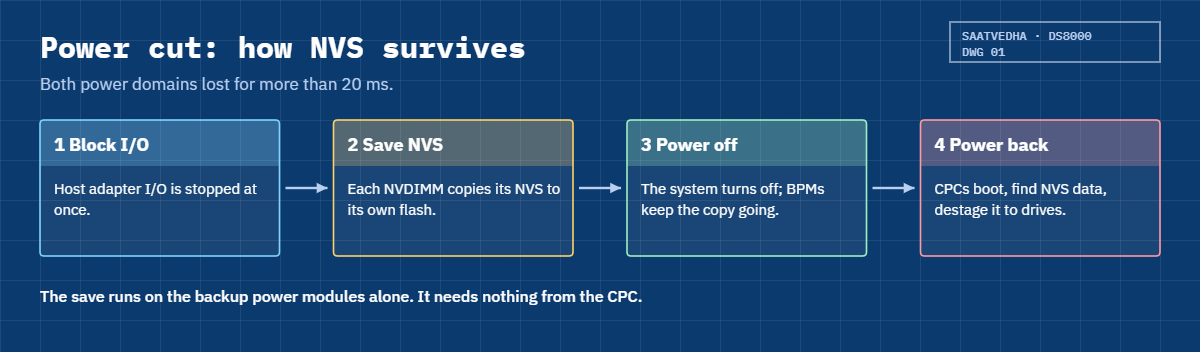
If both power domains lose power for more than 20 ms, host I/O is blocked, each NVDIMM copies its NVS contents to its own onboard flash (encrypted) and the system powers off without waiting. When power returns, the CPCs find the saved NVS during the initial microcode load (IML) and destage it to the drives.

Three cache algorithms keep the cache smart. SARC splits the cache between random and sequential data so a big sequential job doesn’t push out everyone else’s hot data, AMP prefetches sequential data before the host asks for it, and IWC (Intelligent Write Caching) decides the order and rate of destages, which can double throughput for random writes.

The GUI performance view shows two cache numbers every minute: read hits (reads served from memory) and write delays (writes held back because of write cache space or other conditions). It’s the second one you watch in busy periods.

On older DS8000 systems the idea of a mirrored NVS copy in the other CPC is the same. IBM notes that NVDIMMs did away with the large backup battery sets earlier generations needed, so on an older box you may still find battery hardware in the frame.

How it works, step by step

Follow the data through the memory of the two CPCs. Lesson 1 gave you the short version, and this time you look at what happens inside the memory at each step.

1A read arrives

The owning server checks its cache first. If the data is there (a read hit) it goes straight back to the host from memory; if it isn’t (a miss), the server reads it from flash, keeps a copy in cache and sends it to the host.

SARC decides what stays in cache based on how recently and how often data is used, and when the host reads in order, AMP fetches the next blocks before they’re asked for. A bigger cache means more hits.

2A write arrives

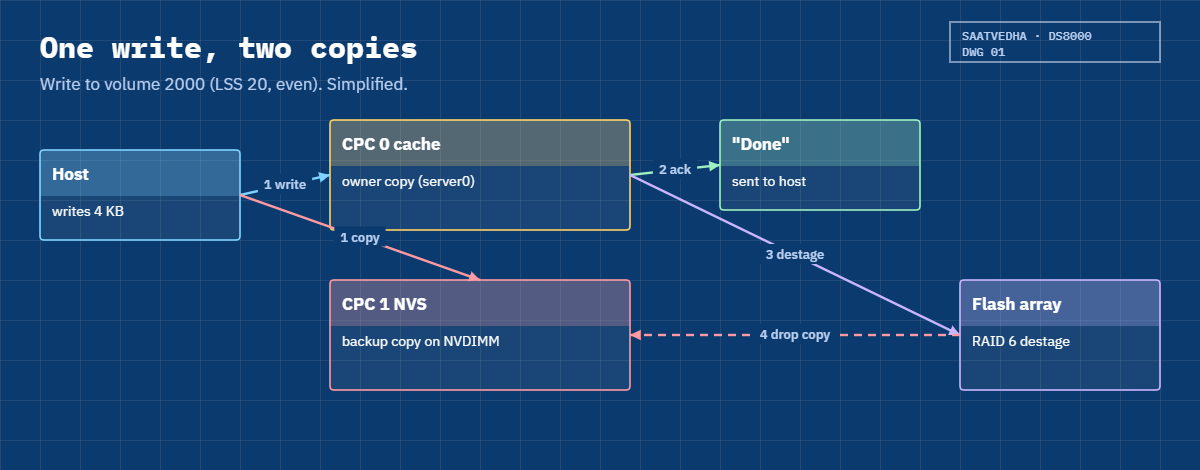
For a write to volume 2000 (LSS 20, even), server0 puts the data in its cache while CPC 1 stores a copy in its NVS, so there are two copies in two servers on two power supplies.

DS8000 cache and NVS write path: owner cache, NVS copy in the other CPC, acknowledge, destage

3The host hears “done”

The host gets its acknowledgement as soon as both copies exist, before any flash drive has been touched. This is called a fast write, and it’s why DS8000 write latency is so low.

4Destage, then drop the copy

Later, IWC chooses the order and rate of destages and writes the data to the RAID array. Once the destage is finished, the NVS copy in CPC 1 is deleted and that NVS space is free for new writes.

Think of NVS as a waiting room rather than a store. Data only stays there for the short time between the write and the destage, so its size matters only when writes come in faster than the arrays can take them.

5When writes arrive faster than destage

When a big burst of writes arrives faster than the back end can destage, NVS fills up. The DS8000 doesn’t drop any data; it slows new writes down until destage catches up, and the GUI shows write delays.

Hosts feel this as higher write latency. The usual causes are a burst bigger than planned, all the busy volumes on one CPC so that one NVS half fills first, or a failover that leaves one CPC doing everything.

DS8000 NVS power loss sequence with NVDIMMs and backup power modules

Now the worst case, where both power domains lose all power. Within 20 ms host I/O is blocked and each NVDIMM copies its NVS to its own flash on its backup power module, while the system switches off without waiting because the copy finishes on its own.

When power comes back, someone switches the system on from the HMC (unless remote power control is set to automatic). During the boot each CPC finds the saved NVS data and destages it to the drives, so every write a host was told is “done” is still there.

Keep two facts apart. The copy in the other CPC protects you when one CPC fails, and the NVDIMM protects you when both CPCs lose power, and because a DS8000 has both, acknowledged writes are safe either way.

Hands-on lab: read cache counters and model a write burst

Before you run any command, double-check it

Read every command twice before you press Enter. Check the target: the system or account, the IDs, the names and the sizes. These commands are for learning and were tested in our lab, not on your system. At work, run the read-only list commands first, follow your change process, make sure a backup exists, and ask a second person to check anything that changes or deletes data. You run them at your own risk.

You’ll read the cache and NVS sizes of the lab DS8A50, check them against the 1/16 rule and look at the cache counters of a busy volume, and then model a write burst you couldn’t safely create in a shell.

Practice shell note: the practice shell is our teaching tool, not IBM software, and real DS CLI output is similar but not identical. The counters showfbvol -metrics prints in the shell come from a simple formula after simctl io, whereas on a real DS8000 they count real host I/O. Lines starting with SIM are practice shell messages.

1Reset and create two volumes

The setup is the same as in Lesson 4. Start the shell, run simctl reset and then quit, save the lines below as setup-05.txt and run it.

setup-05.txt:

mkarray -raidtype 6 -arsite S1
mkarray -raidtype 6 -arsite S2
mkrank -array A0 -stgtype fb -extsize 16MiB -keygrp 1
mkrank -array A1 -stgtype fb -extsize 16MiB -keygrp 1
mkextpool -rankgrp 0 -stgtype fb -keygrp 1 pool_even
mkextpool -rankgrp 1 -stgtype fb -keygrp 1 pool_odd
chrank -extpool P0 R0
chrank -extpool P1 R1
mkfbvol -extpool P0 -cap 100 -sam ese -name db_even 2000
mkfbvol -extpool P1 -cap 100 -sam ese -name db_odd 2100

Run this (PowerShell):

python ds8sim.py -hmc1 10.0.0.1 -user admin -passwd YOURPASSWORD -script setup-05.txt

You should see the last two lines:

CMUC00025I mkfbvol: FB volume 2000 successfully created.
CMUC00025I mkfbvol: FB volume 2100 successfully created.

✅ Checkpoint: Volumes 2000 and 2100 exist.

2Read the cache and NVS sizes

Start the shell again and run:

Run this:

showsi IBM.2107-78SV001

You should see this (output shortened):

Date/Time: 24 October 2026 11:04:23 UTC IBM DSCLI Version: 7.10.10.348 DS: IBM.2107-78SV001
Name             ds8k-g10-lab
ID               IBM.2107-78SV001
Model            A05
...
NVS Memory       64.0 GB
Cache Memory     832.0 GB
Processor Memory 1015.6 GB
MTS              IBM.5341-78SV000
...

Check the rule: Lesson 4 showed 2 × 512 GB = 1,024 GB of system memory, and 1,024 ÷ 16 = 64 GB, which matches NVS Memory. The cache figure is what’s left for cache after the system takes its own share, and each CPC holds half the NVS, 32 GB.

✅ Checkpoint: You confirmed 64 GB NVS = 1/16 of 1,024 GB, so 32 GB per CPC.

3Make a volume busy and read its cache counters

Run this:

showfbvol -metrics 2000
simctl io 2000 3
showfbvol -metrics 2000

You should see this (counters shortened):

dscli> showfbvol -metrics 2000
Date/Time: 24 October 2026 11:04:23 UTC IBM DSCLI Version: 7.10.10.348 DS: IBM.2107-78SV001
ID            2000
Date          10/24/2026 11:04:23
normrdrqts    0
normrdhits    0
normwritereq  0
normwritehits 0
...
dscli> simctl io 2000 3
SIM0101I simctl: host I/O recorded on volume 2000 (in use for the next 5 minutes).
dscli> showfbvol -metrics 2000
Date/Time: 24 October 2026 11:04:23 UTC IBM DSCLI Version: 7.10.10.348 DS: IBM.2107-78SV001
ID            2000
Date          10/24/2026 11:04:23
normrdrqts    21037
normrdhits    15187
normwritereq  75713
normwritehits 75198
...
NVSspadel     0
...

normrdrqts counts normal (random) read requests and normrdhits counts how many were served from cache, so the read hit ratio is 15,187 ÷ 21,037 ≈ 72%. For writes it’s 75,198 ÷ 75,713 ≈ 99%, nearly every write a cache hit, because writes always land in cache first.

On a real DS8000 these counters keep adding up from the last reset, so you compare two readings taken a few minutes apart. The Redbook’s DS CLI chapter has a full real example, and the DS CLI help on a real system describes each counter.
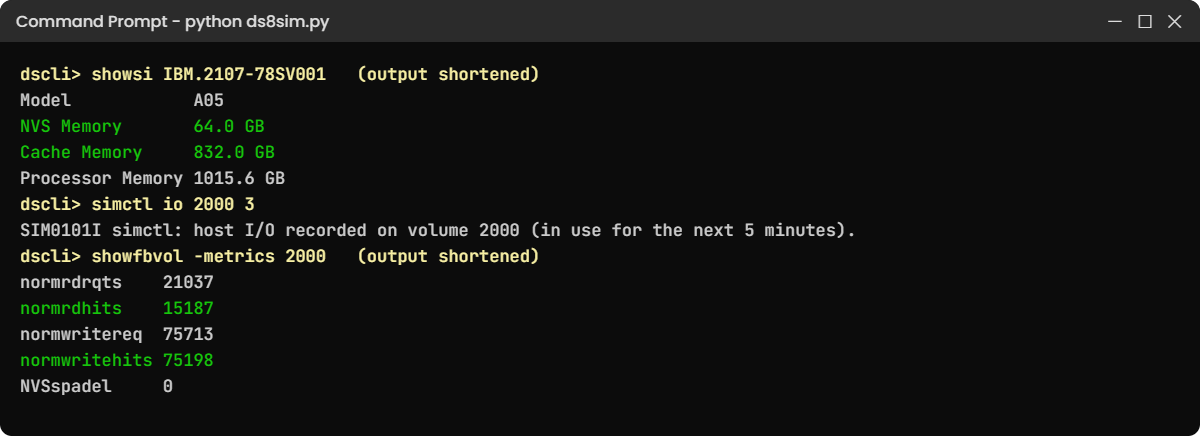
Practice shell showsi cache and NVS sizes and showfbvol -metrics cache hit counters
Cache and NVS sizes from showsi, and cache-hit counters for volume 2000 in the practice shell.

✅ Checkpoint: You calculated a read hit ratio of about 72 % for volume 2000.

Type quit to leave the shell.

4Model a write burst

You can’t create a real write burst on a laptop, so you’ll use a small model. It’s simple on purpose: it assumes the back end destages a fixed number of MB per second, split evenly between the two CPCs, and that each NVS half fills only when writes beat destage. A real DS8000 behaves more cleverly, but the shape is right.

Save this as nvs_burst.py on your laptop, in the lab folder next to ds8sim.py. It’s a planning model that runs there and not on the DS8000, and step 5 uses its --check part, which reads the real NVS size through the DS CLI.

# nvs_burst.py - SaatVedha NVS write-burst model (a simplified teaching model, not an IBM tool)
# A planning tool: it runs on your laptop or jump server, not on the DS8000.
# With --check it reads the NVS size (lssi, showsi) and server state (lsserver) through the DS CLI
# (auto.profile: banner off, header on, format delim) instead of taking the NVS GB from you.
# NVS holds new writes until they are destaged to flash. Each CPC holds half of the system NVS:
# CPC 1 keeps the copies of even-LSS writes, CPC 0 the copies of odd-LSS writes.
# Usage: python nvs_burst.py <NVS GB> <write MB/s> <destage MB/s> <burst seconds> [% writes to even LSS]
#        python nvs_burst.py --check <write MB/s> <destage MB/s> <burst seconds> [% writes to even LSS]
import csv, subprocess, sys
DSCLI = ["python", "ds8sim.py", "-cfg", "auto.profile"]   # at work: ["dscli", "-cfg", "auto.profile"]

def dscli(*args):
    """Run one DS CLI command and return its rows as dictionaries."""
    out = subprocess.run(DSCLI + list(args), capture_output=True, text=True).stdout
    lines = [l for l in out.splitlines() if l and not l.startswith("SaatVedha") and not l.startswith("CMUC")]
    return list(csv.DictReader(lines))

args = sys.argv[1:]
if args and args[0] == "--check":
    if len(args) < 4:
        print("Usage: python nvs_burst.py --check <write MB/s> <destage MB/s> <burst seconds> [% writes to even LSS]")
        sys.exit(1)
    dev = dscli("lssi")[0]["ID"]
    si = dscli("showsi", dev)[0]
    nvs = float(si["NVS Memory"].split()[0])
    down = [s["ID"] for s in dscli("lsserver") if s["SFI State"] != "Online"]
    print(f"From the DS CLI  : NVS Memory {nvs:.0f} GB (showsi), " +
          (f"{', '.join(down)} offline (lsserver)" if down else "both servers Online (lsserver)"))
    if down:
        # Failover: the surviving CPC has only its own half of the NVS, split between even and odd.
        nvs = nvs / 2
        print(f"Failover         : one CPC holds all write copies, so the model uses {nvs:.0f} GB")
    args = [str(nvs)] + args[1:]

if len(args) < 4:
    print("Usage: python nvs_burst.py <NVS GB> <write MB/s> <destage MB/s> <burst seconds> [% writes to even LSS]")
    sys.exit(1)

nvs, write, destage, secs = (float(x) for x in args[0:4])
even = float(args[4]) if len(args) > 4 else 50.0
side_mb = nvs / 2 * 1024

print(f"NVS per CPC side : {nvs / 2:.0f} GB")
for name, share in (("even LSS (copies in CPC 1)", even), ("odd LSS  (copies in CPC 0)", 100 - even)):
    w = write * share / 100
    d = destage / 2
    if w <= d:
        print(f"{name}: {w:.0f} MB/s in, {d:.0f} MB/s out -> keeps up")
        continue
    fill = side_mb / (w - d)
    verdict = "fits" if fill >= secs else "NVS FULL, writes wait"
    print(f"{name}: {w:.0f} MB/s in, {d:.0f} MB/s out -> full after {fill:.0f} s; {secs:.0f} s burst {verdict}")

Start with a calm day: 3,000 MB/s of writes against a back end that destages 4,000 MB/s, for 60 seconds.

Run this (PowerShell):

python nvs_burst.py 64 3000 4000 60

You should see this:

NVS per CPC side : 32 GB
even LSS (copies in CPC 1): 1500 MB/s in, 2000 MB/s out -> keeps up
odd LSS  (copies in CPC 0): 1500 MB/s in, 2000 MB/s out -> keeps up

Destage is faster than the writes, so NVS never fills. Now try a short, heavy burst of 6,000 MB/s for 20 seconds.

Run this:

python nvs_burst.py 64 6000 4000 20

You should see this:

NVS per CPC side : 32 GB
even LSS (copies in CPC 1): 3000 MB/s in, 2000 MB/s out -> full after 33 s; 20 s burst fits
odd LSS  (copies in CPC 0): 3000 MB/s in, 2000 MB/s out -> full after 33 s; 20 s burst fits
Each side now gets 1,000 MB/s more than it can destage, so its 32 GB would fill in about 33 seconds, and a 20-second burst fits. Soaking up short peaks like this is what NVS is for.

✅ Checkpoint: You can explain why a 20-second burst fits but the NVS would fill after 33 seconds.

5Feed the model from the box

Up to now you typed 64 GB yourself, and --check reads it instead: showsi gives NVS Memory and lsserver tells it whether both servers are up. You only give the write rate, the destage rate and the burst length.

A script can’t answer password prompts, so save your password in a password file first. If security.dat is already in your lab folder from an earlier lesson, skip this command (the shell would tell you the record already exists).

Run this (PowerShell):

python ds8sim.py -hmc1 10.0.0.1 -user admin -passwd YOURPASSWORD managepwfile -action add -name admin -pw YOURPASSWORD -pwfile security.dat

You should see this:

CMUC00206I managepwfile: Record 10.0.0.1/admin successfully added to password file security.dat.

Then save these eight lines as auto.profile in the same folder. banner: off, header: on and format: delim make every list come back as one header row plus comma-separated rows, which Python reads easily. Implementation Lesson 2 explains profiles in full.

auto.profile:

hmc1: 10.0.0.1
username: admin
pwfile: security.dat
devid: IBM.2107-78SV001
banner: off
header: on
format: delim
delim: ,

Run this (PowerShell):

python nvs_burst.py --check 6000 4000 20

You should see this:

From the DS CLI  : NVS Memory 64 GB (showsi), both servers Online (lsserver)
NVS per CPC side : 32 GB
even LSS (copies in CPC 1): 3000 MB/s in, 2000 MB/s out -> full after 33 s; 20 s burst fits
odd LSS  (copies in CPC 0): 3000 MB/s in, 2000 MB/s out -> full after 33 s; 20 s burst fits

It’s the same answer as before, except the 64 GB now came from the box. In the break lab you’ll see what the check does when a server is down.

At work you feed it the peak write and destage rates from your performance reports, and you run it again before every big batch change.

✅ Checkpoint: --check read 64 GB of NVS from showsi and the 20-second burst still fits.

Break It, Then Fix It

At work NVS trouble comes from bursts that last too long, busy volumes piled on one side, or failovers that halve the NVS. You’ll cause each one, two in the model and one in the shell.

1Break it: let the burst run too long

The 20-second burst fitted, but now the batch team tells you their nightly load runs at that speed for two minutes.

Run this (PowerShell):

python nvs_burst.py 64 6000 4000 120

You’ll get this:

NVS per CPC side : 32 GB
even LSS (copies in CPC 1): 3000 MB/s in, 2000 MB/s out -> full after 33 s; 120 s burst NVS FULL, writes wait
odd LSS  (copies in CPC 0): 3000 MB/s in, 2000 MB/s out -> full after 33 s; 120 s burst NVS FULL, writes wait

Why: NVS only absorbs peaks. When writes beat destage for longer than NVS can hold, it fills and the DS8000 slows new writes down to destage speed, so hosts see write latency rise and the GUI shows write delays.

Fix: NVS size isn’t the main lever here, because a sustained rate needs a faster back end. Spread the load over more ranks and device adapter pairs, or stretch the batch so it doesn’t peak so hard. A memory upgrade (more NVS) only helps with longer peaks, not with a rate the arrays can never keep up with.

✅ Checkpoint: You can explain why a longer burst fills NVS even though a short one fits.

2Break it: pile the busy volumes on one side

It’s the same 20-second burst, but this time 90% of the writes go to volumes in even LSSs. The fifth argument sets that share.

Run this:

python nvs_burst.py 64 6000 4000 20 90

You’ll get this:

NVS per CPC side : 32 GB
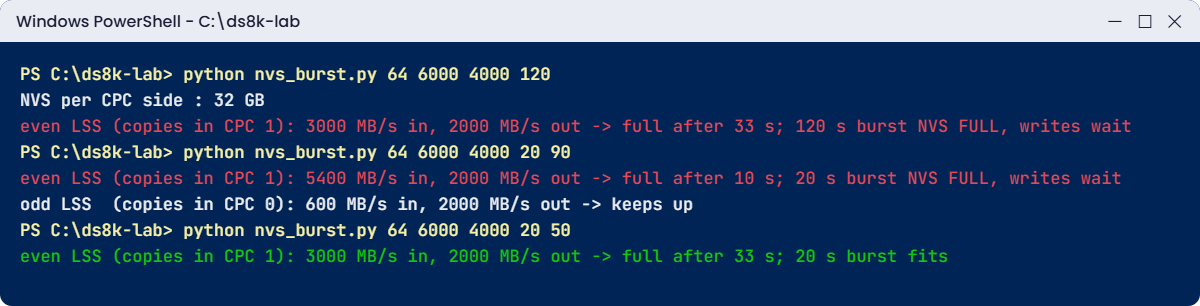
even LSS (copies in CPC 1): 5400 MB/s in, 2000 MB/s out -> full after 10 s; 20 s burst NVS FULL, writes wait
odd LSS  (copies in CPC 0): 600 MB/s in, 2000 MB/s out -> keeps up

Why: each NVS half only holds copies for one side. With 90% of writes on even LSSs, CPC 1’s NVS half fills in 10 seconds while CPC 0’s half stays nearly empty, so the system has 64 GB of NVS and you’re using only 32 GB of it.

Fix: balance the busy volumes between even and odd LSSs (and rank group 0 and 1 pools). More memory on its own barely helps; try python nvs_burst.py 128 6000 4000 20 90 and the even side still fills after about 19 seconds. Balanced, the same 64 GB system copes:

Run this:

python nvs_burst.py 64 6000 4000 20 50

You should see this:

NVS per CPC side : 32 GB
even LSS (copies in CPC 1): 3000 MB/s in, 2000 MB/s out -> full after 33 s; 20 s burst fits
odd LSS  (copies in CPC 0): 3000 MB/s in, 2000 MB/s out -> full after 33 s; 20 s burst fits
NVS burst model: long burst and unbalanced LSSs fill NVS, balanced short burst fits
The NVS model: a long burst and an unbalanced burst fill NVS; a balanced short burst fits.

✅ Checkpoint: You can show that balancing beats doubling memory for an unbalanced burst.

3Break it: lose a CPC during the burst

Start the shell and fail CPC 1, leaving the setup from the lab in place.

Run this:

simctl serverfail 1
lsserver

You’ll see this:

SIM0107I simctl: server1 is offline. Failover: server0 now serves rank groups 0 and 1. Host I/O continues; write cache runs in a single copy until failback.
Date/Time: 24 October 2026 11:05:25 UTC IBM DSCLI Version: 7.10.10.348 DS: IBM.2107-78SV001
ID      Image ID         Image Name   Power Control SFI State
=============================================================
server0 IBM.2107-78SV001 ds8k-g10-lab Online        Online
server1 IBM.2107-78SV001 ds8k-g10-lab Offline       Offline
Note (practice shell): server1 is offline. server0 now runs rank groups 0 and 1 (failover).

Why: CPC 1 held half of the NVS, and now server0 alone splits its own 32 GB of NVS between even and odd. The --check mode from the lab notices this by itself, finding server1 offline in lsserver and running the model with 32 GB instead of 64 GB. Run it while server1 is still down:

Run this (PowerShell):

python nvs_burst.py --check 6000 4000 20

You’ll get this:

From the DS CLI  : NVS Memory 64 GB (showsi), server1 offline (lsserver)
Failover         : one CPC holds all write copies, so the model uses 32 GB
NVS per CPC side : 16 GB
even LSS (copies in CPC 1): 3000 MB/s in, 2000 MB/s out -> full after 16 s; 20 s burst NVS FULL, writes wait
odd LSS  (copies in CPC 0): 3000 MB/s in, 2000 MB/s out -> full after 16 s; 20 s burst NVS FULL, writes wait

(The labels still say CPC 1 and CPC 0; during a failover, read them as the “even half” and “odd half” of server0.) The burst that fitted before now overflows.

Fix: there’s nothing to rush here, because the system is safe. Get the failed CPC repaired and failed back, and don’t schedule heavy batch or a code load while you’re running on one CPC. In the shell:

Run this:

simctl serverfix 1

You should see this:

SIM0108I simctl: server1 is online. Failback: rank group 1 moved back to server1.

✅ Checkpoint: Both servers are Online, and you can explain why a failover makes NVS full more likely.

This happened at work

The Black Friday write wall

A large online retailer ran its order and payment databases on a DS8A50 with 1 TB of memory, which meant 64 GB of NVS, and all year latency stayed under a millisecond.

At 00:00 on Black Friday the sale opened online, and order inserts, stock updates and payment logs hit the database at four times the normal write rate. Within two minutes write latency on the order database had gone from 0.4 ms to 12 ms, checkout pages were timing out and the queue page went up.

In the GUI performance view the storage team could see write delays climbing while the read hit ratio stayed fine, so it was clearly a write problem.

The cause turned out to have two parts. The new order database, added in the summer, sat entirely in even LSSs on rank group 0 pools, so one NVS half was taking almost every write while the other stayed quiet. And the summer load test had only run for 30 seconds, nowhere near the 15-minute peak the business got.

That night the team moved the log volumes onto new odd-LSS volumes with host mirroring, which halved the pressure on the busy side, and within an hour latency was back down to 2 ms. For the next season they balanced every database across even and odd LSSs, upgraded memory to 2 TB (128 GB NVS) for the longer peaks and ran a full-length load test, because NVS only absorbs a peak when both halves share the load and the peak is as long as you planned for.

Common mistakes and troubleshooting

SymptomLikely causeWhat to check / fix
Write latency spikes during batch or sales peaksWrites beat destage for longer than NVS can absorbCheck write delays in the GUI, then spread load over more ranks and DA pairs or smooth out the peak.
One CPC’s writes slow while the other is quietBusy volumes all in even (or odd) LSSsCompare LSS and pool balance, and put new busy volumes on the quiet side.
A memory upgrade didn’t fix write latencyExpecting more NVS to fix a back-end speed problemMore NVS only helps with longer peaks; a sustained write rate needs faster arrays or more of them.
NVS sizing sheet uses 1/16 for every modelForgetting the exceptions256 GB gives 16 GB, 3.5 TB gives 192 GB, 4.8 TB gives 256 GB.
Write latency rises during a failover or code loadOne CPC’s NVS now serves both sidesAvoid heavy batch while on one CPC, and plan code loads for quiet hours.
Fear of data loss after a full power cutNot knowing about NVDIMMsNVS was saved to NVDIMM flash and gets destaged during the next IML.
Cache hit ratios look odd after a failoverCounters reset on failover and failbackCompare readings taken after the reset, not across it.

Keep one picture in mind: NVS is a waiting room. The arrays decide how fast data leaves, and NVS only decides how long a crowd can wait before the door slows down.

Interview questions

Click a question to open it. Each is worded the way an interviewer would ask it, and underneath you’ll find why they ask it and one way you could answer in your own words.

Fresher level

1. What is the difference between cache and NVS on a DS8000?

Why they ask this: It’s a basic question, but it checks whether you know how writes can be safe and fast at the same time.

How you might answer: Cache is the big memory area in each CPC, used for reads and writes. NVS is a smaller protected part, normally 1/16 of system memory, that holds a second copy of each new write in the other CPC until it’s destaged, and since it sits on NVDIMMs it survives a total power cut by saving itself to flash.

2. Why does a DS8000 put the NVS copy in the other CPC and not in the same one?

Why they ask this: They want to see that you think in failure domains and not only in memory sizes.

How you might answer: If both copies were in the same CPC, losing that CPC would lose the write. With the copy in the other CPC, either server can fail and one copy survives, and the surviving CPC destages it to the drives during failover.

2–5 years experience

3. Users report slow writes every night at 1 a.m. Reads are fine. How do you investigate?

Why they ask this: They’re testing how you approach a classic performance complaint and whether you know which counters to look at.

How you might answer: I’d look at the GUI performance view or the volume metrics for write delays at 1 a.m. and see which volumes are busy, then check whether they’re balanced across even and odd LSSs and enough ranks. If writes beat destage for long stretches, NVS fills and writes get slowed, so the fix is usually balance and more back-end capacity, or spreading the batch out, rather than more memory.

4. How much NVS does a DS8A50 with 2 TB of memory have, and why does it matter?

Why they ask this: It’s a quick sizing check to see if you know the 1/16 rule and its exceptions.

How you might answer: 2,048 GB ÷ 16 = 128 GB, so 64 GB per CPC. It matters because NVS decides how big a write peak the system can absorb before it slows writes down, and each half only serves one side of the LSSs.

Senior level

5. Walk me through what happens to acknowledged writes if a data centre loses all power.

Why they ask this: At senior level you’re expected to know the exact sequence and explain it calmly to management after an incident.

How you might answer: If both power domains drop for more than 20 ms, host I/O is blocked straight away and each NVDIMM copies its NVS to its own flash on the backup power modules, while the system powers off without waiting for that copy. When power comes back and the system is switched on, each CPC finds the saved NVS during the IML and destages it to the drives, so every write a host was told was complete is still there.

6. The business wants to “buy more cache” to fix slow batch writes. Do you agree?

Why they ask this: They want to see whether you can push back with data and choose the right fix.

How you might answer: Not until I’ve seen the numbers. If write delays only show up in short peaks, more memory and so more NVS will help, but if the write rate stays above what the arrays can destage, more NVS only delays the slowdown by a few seconds. Then I’d balance the volumes across both CPCs, add ranks or DA pairs, or move the batch, and I’d show both options with numbers before anyone spends money.

Quick quiz

Q1. A DS8A50 has 1,024 GB of system memory. How much NVS does it have?

  1. 16 GB
  2. 32 GB
  3. 64 GB
  4. 128 GB
Show answer

C — NVS is normally 1/16 of system memory: 1,024 ÷ 16 = 64 GB, 32 GB per CPC.

Q2. Where is the backup copy of a write to an even-LSS volume kept?

  1. In CPC 0’s cache
  2. In CPC 1’s NVS
  3. On the HMC disk
  4. On a flash spare
Show answer

B — The owner (server0, CPC 0) keeps the data in cache; CPC 1 keeps the copy in its NVS.

Q3. What saves NVS contents when both power domains fail?

  1. The HMC battery
  2. NVDIMMs copying to their own flash, powered by BPMs
  3. A dump to the flash arrays
  4. Nothing; data is lost
Show answer

B — NVDIMMs save NVS to onboard flash using backup power modules, independent of the CPC.

Q4. Which cache algorithm stops a large sequential job from pushing out random hot data?

  1. IWC
  2. SARC
  3. RAID 6
  4. Easy Tier
Show answer

B — SARC divides the cache between random and sequential lists to protect the overall hit ratio.

Q5. Writes beat destage for ten minutes during a batch. What happens?

  1. Data is dropped
  2. NVS fills and new writes are slowed to the destage speed
  3. The DS8000 fails over
  4. Reads stop
Show answer

B — The DS8000 never drops acknowledged data; it slows new writes once NVS is full.

Quick recap

  • DS8000 cache and NVS live in the two CPCs; the cache serves reads and writes, NVS holds a second copy of each new write.
  • NVS is normally 1/16 of system memory, except 16 GB at 256 GB, 192 GB at 3.5 TB and 256 GB at 4.8 TB.
  • A write goes to the owner’s cache and the other CPC’s NVS, then the host hears “done”; destage comes later.
  • NVDIMMs and backup power modules save NVS to flash in a total power cut, and it is destaged at the next boot.
  • SARC, AMP and IWC keep the cache efficient for random, sequential and write workloads.
  • NVS fills when writes beat destage for too long, when one side gets all the writes, or during a failover.

Next lesson

Lesson 6: I/O enclosures and host adapters (FC, FICON, zHyperLink) → You follow data into the frame through the host adapters and learn how to cable a host properly.

Further reading: DS8000 cache and NVS

To go deeper into DS8000 cache and NVS, IBM Storage DS8A00 Architecture and Implementation Guide (IBM Redbooks) covers memory in chapter 2 and NVS during failover and power loss in chapter 4. For the two servers that hold all this memory, go back to Lesson 4: The two Power9+ servers.

You can also see the full plan for this course on the IBM DS8000 Architecture course page.

Scroll to Top

This website uses cookies

We use a few cookies to keep this site working. If you allow it, we also use Google Analytics to count visits so we can improve our lessons. You can accept all, deny the optional ones, or choose what to allow.