The two Power9+ servers (CPCs)
-
Phase 0: Start here
-
Phase 1: The hardware
-
Phase 2: Virtualization
-
Phase 3: Resilience and data protection
-
Phase 4: Generations, models and rack layouts
-
Phase 5: Wrap-up
A DS8000 CPC (central processor complex) is one of the two Power9+ servers inside every DS8000, and between them they do the real work, from holding the cache to deciding where each write lands. Each DS8000 has two of them, CPC 0 and CPC 1, and both are busy at the same time.
Here you’ll look inside one CPC, see how the two split the work between even and odd volumes, and follow a failover second by second. After that you fail CPC 0 in the practice shell and watch the volumes stay online, and a small calculator tells you whether one CPC alone could carry your load during a code upgrade.
You’ll need the practice shell from Lesson 1, and if you want a reminder of where the CPCs sit in the frame, that was Lesson 3.
| Time | You need | By the end you can |
|---|---|---|
| 60 to 75 minutes | The practice shell from Lesson 1 and Python 3.8 or newer | Explain what a DS8000 CPC holds, which server owns which volumes, what happens in a failover and failback, and check failover headroom with numbers |
What it is, in one line
A DS8000 CPC is one of two Power9+ servers that run the storage code; CPC 0 owns the even-numbered volumes and CPC 1 the odd ones, each keeps a backup copy of the other’s new writes, and either can take over all the work alone.
In Simple Words
Two cooks in one kitchen
Picture a small restaurant with two cooks. One handles every even-numbered dish on the menu and the other handles the odd ones.
They work side by side, which is why the orders come out quickly.
Each time a waiter hands Cook A an order, he pins a copy on Cook B’s board as well. Cook B doesn’t cook it, he only keeps it there in case something goes wrong.
Then one evening Cook A cuts his finger and has to go home. Cook B checks his board and finds he already has a copy of every order Cook A hadn’t finished.
So he cooks those first and then takes over the whole menu.
Customers wait a few seconds longer, but every order still reaches the table, and when Cook A comes back he goes back to the even dishes.
In storage terms, the cooks are the two CPCs, the dish numbers are volume numbers and the pinned copy is the NVS.
One cook running the whole kitchen is a failover. It works, but he’s stretched, so you want the second cook back soon.
Engineer's View
What is inside a DS8A00 CPC
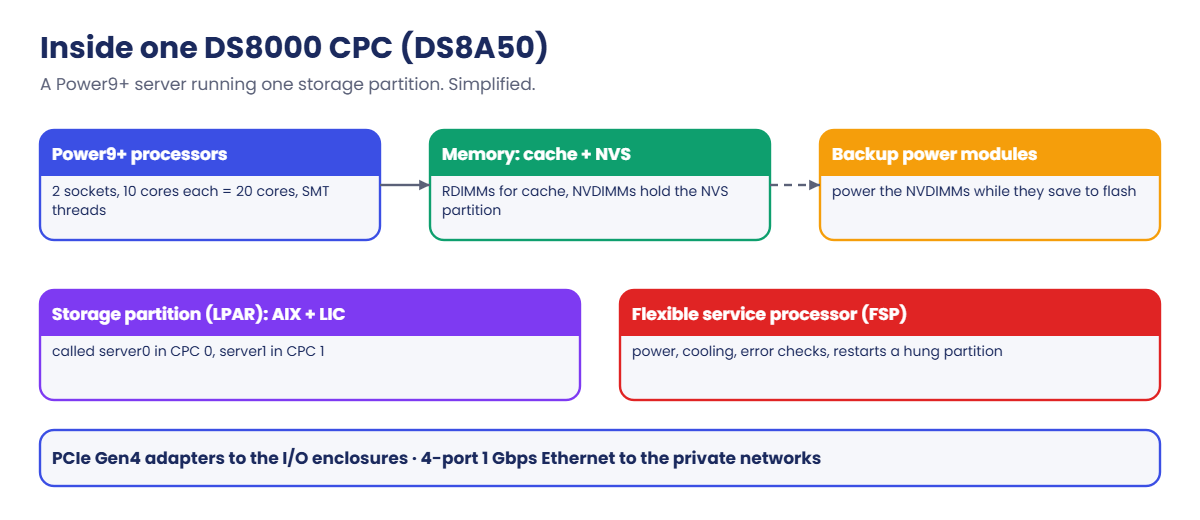
Each CPC is an IBM Power server running a logical partition (LPAR) with AIX and IBM’s storage code, the Licensed Internal Code (LIC). That partition is the storage node, called server0 in CPC 0 and server1 in CPC 1, so you’ll hear people use CPC, node and server for nearly the same thing.
| DS8A10 | DS8A50 | DS8A80 | |
|---|---|---|---|
| Server type | Power 9009-22G (S922, 2U) | Power 9009-42G (S924, 4U) | Power 9009-42G (S924) |
| Processors per CPC | 2 × 8-core chips, 5 cores used each = 10 | 2 × 10-core = 20 | 2 × 12-core = 24 |
| Memory per CPC | 128 or 256 GB | 512, 1,024 or 1,792 GB | 2,432 GB |
| NVS per system | 16 or 32 GB | 64, 128 or 192 GB | 256 GB |
| Backup power modules per CPC | 1 | 2 | 2 |
The processors run in Turbo mode, typically around 3.8 GHz, with simultaneous multithreading (SMT) so each core runs several threads at once. Each CPC also has two internal 800 GB NVMe drives and redundant power supplies, plus a flexible service processor (FSP) that looks after power and cooling, watches for hardware faults and can restart a hung partition.
Memory is split into cache and NVS. Ordinary RDIMMs work as the read/write cache, while NVDIMMs hold the NVS partition, and if power is lost they save what they hold to their own onboard flash, running on backup power modules (BPMs).
Configurations use up to four NVDIMMs per CPC.
Which server owns a volume depends on its LSS number: volumes in even logical subsystems (LSS 00, 20, 2A…) belong to server0, and those in odd LSSs (21, 2B…) belong to server1.
Extent pools follow the same split through rank groups, with rank group 0 served by server0 and rank group 1 by server1.
You can upgrade memory and cores while the system runs, and a failover or failback typically adds no more than 7 seconds to I/O latency.
On DS8900F: it’s the same two-CPC design, only with Power9 servers and PCIe Gen3, and the ownership rules and failover steps don’t change.
How it works, step by step
Below is what the two CPCs go through on a normal day, on a bad day and on the day after the repair, which the Redbook calls dual cluster operation, failover and failback.
1Normal day: each server owns half the volumes
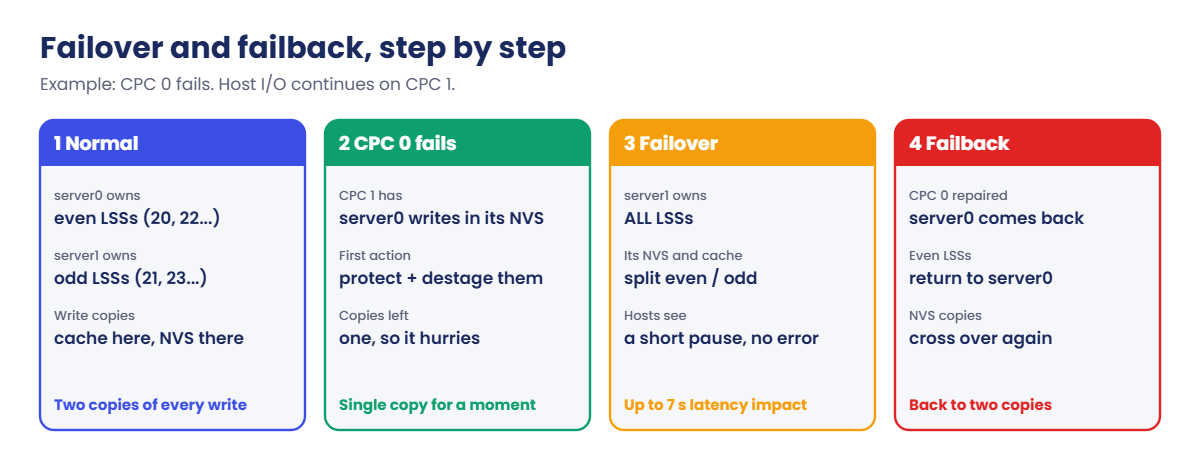
Say a write comes in for volume 2000 (LSS 20, even). It goes to server0, and server0 puts it in its cache while server1 stores a copy in its NVS at the same moment. Only after that does the host get its “done”.
For volume 2100 (LSS 21, odd) it’s the other way round, with the cache copy in server1 and the NVS copy in server0, so each server owns half the volumes and backs up the other half.
2Destage and drop the copy
A little later the owner writes the data from cache to the flash array, and once that’s done the NVS copy in the other CPC is thrown away. On most days nobody ever needs that copy.
3Bad day: CPC 0 fails
Now say CPC 0 stops. server1 still holds copies of every unfinished server0 write in its NVS, and since those are now the only copies, server1 protects them first and starts writing them to flash.
On top of that, server1’s own new writes had their backup copies in CPC 0, which is gone, so server1 adds those to its own NVS too and they survive even if server1 restarts. The Redbook says this protection may use at most 85% of NVS.
4Failover: one server does everything
server1 then splits its cache and NVS into an even half and an odd half and takes ownership of every LSS. Hosts may notice a short pause (up to about 7 seconds of extra latency), but they get no errors and lose no paths as long as they were zoned correctly.
The system can stay like this for as long as it needs to, but it’s running with only one copy of each new write in memory, less cache and one server doing double work, so IBM support starts on the failed CPC straight away.
5Failback: CPC 0 comes home
Once CPC 0 is repaired, the failback starts, either automatically or through the SSR or remote support. server1 goes back to using CPC 0’s NVS for its backup copies, the even LSSs move back to server0, and hosts again see no more than a short pause.
Planned work uses the same mechanism. During a code upgrade the system fails over to CPC 1, updates CPC 0, fails back and then repeats the whole thing for CPC 1, which is how DS8000 code loads run without stopping hosts.
It’s also why you never want both CPCs running near their limit. During a failover or a code load one CPC carries both workloads, so if CPC 0 is 55% busy and CPC 1 is 50% busy, the survivor needs 105% and your applications will feel it.
So in practice, spread your volumes across even and odd LSSs and across rank group 0 and 1 pools to keep the CPCs balanced, and when you check load, add the two CPCs together instead of looking at each one on its own.
The lab below has you practise both.
Hands-on lab: fail a CPC and watch the volumes stay online
Before you run any command, double-check it
Read every command twice before you press Enter. Check the target: the system or account, the IDs, the names and the sizes. These commands are for learning and were tested in our lab, not on your system. At work, run the read-only list commands first, follow your change process, make sure a backup exists, and ask a second person to check anything that changes or deletes data. You run them at your own risk.
You’ll build one even volume and one odd volume, check which server owns each, then fail CPC 0 and bring it back. Don’t worry about understanding every setup command yet, because arrays, ranks and pools get their own lessons from Lesson 10 on.
Practice shell note: the practice shell is our own teaching tool, not IBM software, and real DS CLI output is similar but not identical. On a real DS8000 there’s no command to “fail” a CPC. simctl serverfail only exists in the practice shell, as do the lines starting with SIM and the Note line after lsserver.
1Reset and load the setup script
Start the shell, run simctl reset, then quit. Save these lines as setup-04.txt in your lab folder.
setup-04.txt:
mkarray -raidtype 6 -arsite S1
mkarray -raidtype 6 -arsite S2
mkrank -array A0 -stgtype fb -extsize 16MiB -keygrp 1
mkrank -array A1 -stgtype fb -extsize 16MiB -keygrp 1
mkextpool -rankgrp 0 -stgtype fb -keygrp 1 pool_even
mkextpool -rankgrp 1 -stgtype fb -keygrp 1 pool_odd
chrank -extpool P0 R0
chrank -extpool P1 R1
mkfbvol -extpool P0 -cap 100 -sam ese -name db_even 2000
mkfbvol -extpool P1 -cap 100 -sam ese -name db_odd 2100Run this (PowerShell):
python ds8sim.py -hmc1 10.0.0.1 -user admin -passwd YOURPASSWORD -script setup-04.txtYou should see this:
CMUC00004I mkarray: Array A0 successfully created.
CMUC00004I mkarray: Array A1 successfully created.
CMUC00007I mkrank: Rank R0 successfully created.
CMUC00007I mkrank: Rank R1 successfully created.
CMUC00000I mkextpool: Extent pool P0 successfully created.
CMUC00000I mkextpool: Extent pool P1 successfully created.
CMUC00008I chrank: Rank R0 successfully modified.
CMUC00008I chrank: Rank R1 successfully modified.
CMUC00025I mkfbvol: FB volume 2000 successfully created.
CMUC00025I mkfbvol: FB volume 2100 successfully created.The lab flash is FlashCore Modules, and that’s why the volumes use -sam ese (thin provisioned). Lesson 15 explains the reason.
✅ Checkpoint: Ten success messages, ending with volumes 2000 and 2100.
2See who owns what
Start the shell again and run:
Run this:
lslss
lsextpoolYou should see this:
Date/Time: 24 October 2026 10:59:15 UTC IBM DSCLI Version: 7.10.10.348 DS: IBM.2107-78SV001
ID Group addrgrp stgtype confgvols subsys
=========================================
20 0 2 fb 1 0xFF20
21 1 2 fb 1 0xFF21
Date/Time: 24 October 2026 10:59:15 UTC IBM DSCLI Version: 7.10.10.348 DS: IBM.2107-78SV001
Name ID stgtype rankgrp status availstor (2^30B) %allocated available reserved numvols
===========================================================================================
pool_even P0 fb 0 below 99576 0 6372864 64 1
pool_odd P1 fb 1 below 99576 0 6372864 64 1The Group column of lslss tells you the owner: LSS 20 is in group 0 (server0) and LSS 21 in group 1 (server1). Pools follow the same rule through rankgrp, so volume 2000, which lives in LSS 20 and pool P0, sits entirely on server0.
Volume 2100, though, is on server1.
✅ Checkpoint: You can say which server owns volume 2000 and which owns 2100.
3Fail CPC 0
Run this:
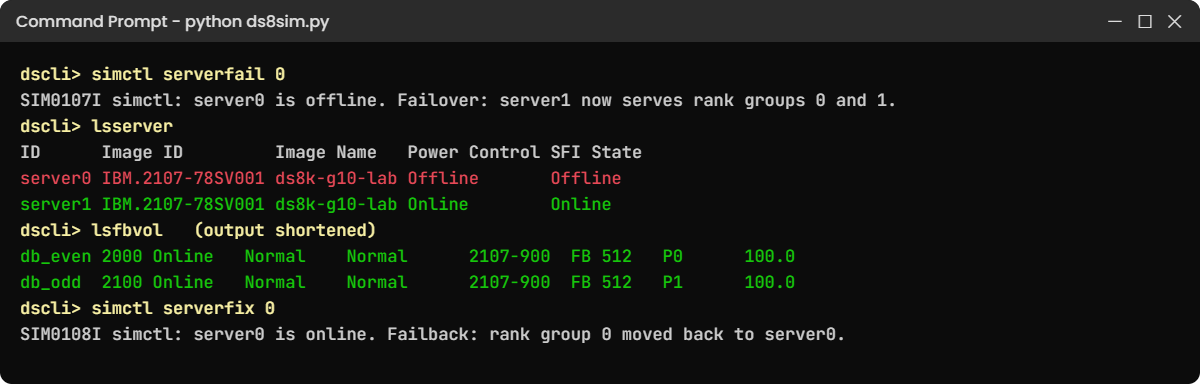
simctl serverfail 0
lsserver
lspnodeYou should see this:
SIM0107I simctl: server0 is offline. Failover: server1 now serves rank groups 0 and 1. Host I/O continues; write cache runs in a single copy until failback.
Date/Time: 24 October 2026 10:59:15 UTC IBM DSCLI Version: 7.10.10.348 DS: IBM.2107-78SV001
ID Image ID Image Name Power Control SFI State
=============================================================
server0 IBM.2107-78SV001 ds8k-g10-lab Offline Offline
server1 IBM.2107-78SV001 ds8k-g10-lab Online Online
Note (practice shell): server0 is offline. server1 now runs rank groups 0 and 1 (failover).
Date/Time: 24 October 2026 10:59:15 UTC IBM DSCLI Version: 7.10.10.348 DS: IBM.2107-78SV001
ID State Release Processor Memory Location
===============================================================
00 Offline R10.1 Power9+ 20-core 512.0 GB U9009.42A.78SV00-P1
01 Online R10.1 Power9+ 20-core 512.0 GB U9009.42A.78SV01-P1✅ Checkpoint: server0 and node 00 show Offline; server1 is Online.
4Check that the volumes are still online
Run this:
lsfbvolYou should see this:
Date/Time: 24 October 2026 10:59:15 UTC IBM DSCLI Version: 7.10.10.348 DS: IBM.2107-78SV001
Name ID accstate datastate configstate deviceMTM datatype extpool cap (2^30B) cap (10^9B) cap (blocks)
===========================================================================================================
db_even 2000 Online Normal Normal 2107-900 FB 512 P0 100.0 - 209715200
db_odd 2100 Online Normal Normal 2107-900 FB 512 P1 100.0 - 209715200Volume 2000 belongs to the server that just died, yet it still shows Online because server1 is serving it now. A real host would notice no more than a short pause, and that’s what having two CPCs buys you.
✅ Checkpoint: Both volumes show accstate Online while server0 is offline.
5Fail back
Run this:
simctl serverfix 0
lsserverYou should see this:
SIM0108I simctl: server0 is online. Failback: rank group 0 moved back to server0.
Date/Time: 24 October 2026 10:59:15 UTC IBM DSCLI Version: 7.10.10.348 DS: IBM.2107-78SV001
ID Image ID Image Name Power Control SFI State
=============================================================
server0 IBM.2107-78SV001 ds8k-g10-lab Online Online
server1 IBM.2107-78SV001 ds8k-g10-lab Online Online✅ Checkpoint: Both servers are Online again.
6Check failover headroom with numbers
The shell can show you a failover, but it can’t tell you how busy the CPCs are. At work you’d read CPC utilisation from the performance tools (Lesson 22 of the Implementation course), so here you use a small rule-of-thumb script instead: add both loads together and see whether one CPC could carry the total.
Save it as cpc_headroom.py on your laptop, in the lab folder next to ds8sim.py. It’s a planning tool that runs there and not on the DS8000, and its --check part (you’ll use it in step 7) adds what the DS CLI can tell you.
# cpc_headroom.py - SaatVedha failover headroom check (a planning rule of thumb, not an IBM tool)
# A planning tool: it runs on your laptop or jump server, not on the DS8000.
# The busy % comes from your performance tools. --check adds what the DS CLI can tell you
# (auto.profile: banner off, header on, format delim): server state and volumes per server.
# During a failover or a code load, ONE CPC must carry the work of BOTH.
# Usage: python cpc_headroom.py <busy % of CPC 0> <busy % of CPC 1> [safe limit %] [--check]
import csv, subprocess, sys
DSCLI = ["python", "ds8sim.py", "-cfg", "auto.profile"] # at work: ["dscli", "-cfg", "auto.profile"]
def dscli(*args):
"""Run one DS CLI command and return its rows as dictionaries."""
out = subprocess.run(DSCLI + list(args), capture_output=True, text=True).stdout
lines = [l for l in out.splitlines() if l and not l.startswith("SaatVedha") and not l.startswith("CMUC")]
return list(csv.DictReader(lines))
check = "--check" in sys.argv
args = [a for a in sys.argv[1:] if a != "--check"]
if len(args) < 2:
print("Usage: python cpc_headroom.py <busy % of CPC 0> <busy % of CPC 1> [safe limit %] [--check]")
sys.exit(1)
cpc0, cpc1 = float(args[0]), float(args[1])
limit = float(args[2]) if len(args) > 2 else 80.0
alone = cpc0 + cpc1
print(f"CPC 0 busy : {cpc0:.0f} %")
print(f"CPC 1 busy : {cpc1:.0f} %")
print(f"One CPC alone : {alone:.0f} % (both workloads on one server)")
if alone <= limit:
print(f"Result : OK, below your {limit:.0f} % limit. A failover or code load is safe.")
elif alone <= 100:
print(f"Result : TIGHT, above {limit:.0f} %. Expect higher latency during a failover.")
else:
print(f"Result : OVERLOAD. One CPC can't carry {alone:.0f} %. Plan the code load off-peak,")
print(" move workload, or size up (more cores and memory).")
skew = abs(cpc0 - cpc1)
if skew > 20:
print(f"Balance : CPC loads differ by {skew:.0f} points. Check even/odd LSS and pool balance.")
if check:
# Both servers must be Online before a code load: if one is down, you already run on one CPC.
servers = dscli("lsserver")
print("Servers (lsserver): " + ", ".join(f"{s['ID']} {s['SFI State']}" for s in servers))
for s in servers:
if s["SFI State"] != "Online":
print(f"STOP : {s['ID']} is not Online. No code load until it is repaired and failed back.")
# lslss Group 0 = even LSSs = server0, Group 1 = odd LSSs = server1.
vols = {"0": 0, "1": 0}
for lss in dscli("lslss"):
vols[lss["Group"]] += int(lss["confgvols"])
total = vols["0"] + vols["1"]
print(f"Volumes (lslss) : server0 {vols['0']}, server1 {vols['1']}")
if total and abs(vols["0"] - vols["1"]) * 100 / total > 20:
side = "server0" if vols["0"] > vols["1"] else "server1"
print(f"Balance : most volumes sit on {side}. New volumes should go to the other side.")The 80% default limit is a habit many teams use when planning, not an IBM number, so change it with the third argument if your team works with another value.
Run this (PowerShell):
python cpc_headroom.py 30 25You should see this:
CPC 0 busy : 30 %
CPC 1 busy : 25 %
One CPC alone : 55 % (both workloads on one server)
Result : OK, below your 80 % limit. A failover or code load is safe.✅ Checkpoint: You get OK for 30 % and 25 %.
Type quit in the shell when you are done.
7Add what the DS CLI knows
The busy numbers come from your performance tools, but two facts come straight from the box: whether both servers are Online, and how the volumes are split between them. --check gets both by asking the DS CLI for lsserver and lslss.
A script can’t answer password prompts, so save your password in a password file first. If security.dat is already in your lab folder from an earlier lesson, skip this command, or the shell will tell you the record already exists.
Run this (PowerShell):
python ds8sim.py -hmc1 10.0.0.1 -user admin -passwd YOURPASSWORD managepwfile -action add -name admin -pw YOURPASSWORD -pwfile security.datYou should see this:
CMUC00206I managepwfile: Record 10.0.0.1/admin successfully added to password file security.dat.Then save these eight lines as auto.profile in the same folder. banner: off, header: on and format: delim make every list come back as one header row plus comma-separated rows, which Python reads easily. Implementation Lesson 2 explains profiles in full.
auto.profile:
hmc1: 10.0.0.1
username: admin
pwfile: security.dat
devid: IBM.2107-78SV001
banner: off
header: on
format: delim
delim: ,Run this (PowerShell):
python cpc_headroom.py 30 25 --checkYou should see this:
CPC 0 busy : 30 %
CPC 1 busy : 25 %
One CPC alone : 55 % (both workloads on one server)
Result : OK, below your 80 % limit. A failover or code load is safe.
Servers (lsserver): server0 Online, server1 Online
Volumes (lslss) : server0 1, server1 1Both servers are Online and each owns one volume (in lslss, Group 0 belongs to server0 and Group 1 to server1). If a server were offline the script would print a STOP line, because you’d already be running on one CPC.
At work the change team runs this on the morning of every code load with the latest busy numbers and attaches the report to the change record.
✅ Checkpoint: --check shows both servers Online and one volume on each server.
Break It, Then Fix It
At work, CPC trouble rarely comes from broken hardware. Far more often it’s volumes and pools piled onto one server, or a busy box going into a code load, so you’ll break both on purpose here.
1Break it: put an even volume in an odd pool
A colleague wants more space for the database and picks pool P1 because “it has room”. The new volume ID is 2001, which puts it in LSS 20. Start the shell (the lab setup is still in place) and try it.
Run this:
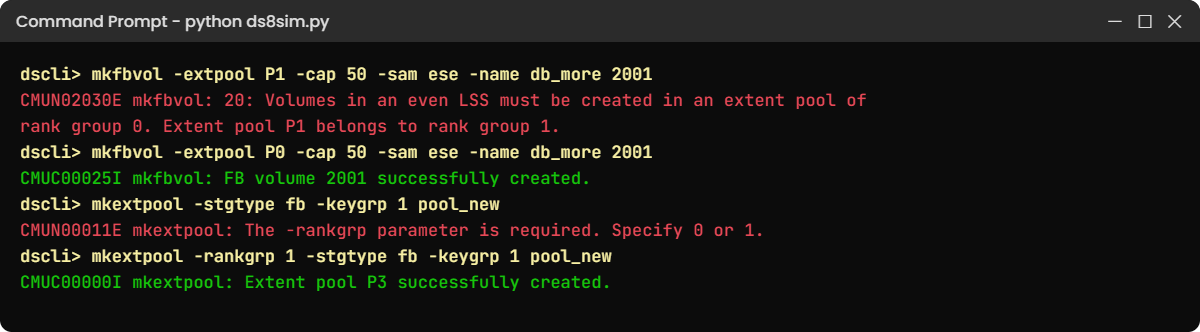
mkfbvol -extpool P1 -cap 50 -sam ese -name db_more 2001You’ll get this error:
CMUN02030E mkfbvol: 20: Volumes in an even LSS must be created in an extent pool of rank group 0. Extent pool P1 belongs to rank group 1.Why: LSS 20 is even, so server0 owns it, but pool P1 is in rank group 1 and served by server1. A volume can’t belong to one server and live in the other server’s pool.
This is the practice shell’s wording; a real DS8000 refuses too, with its own message.
Fix: keep even LSSs with rank group 0 pools and odd LSSs with rank group 1 pools.
Run this:
mkfbvol -extpool P0 -cap 50 -sam ese -name db_more 2001You should see this:
CMUC00025I mkfbvol: FB volume 2001 successfully created.Now look at the balance: server0 owns 2000 and 2001 while server1 owns only 2100. One extra volume doesn’t matter, but two hundred extra on one side is how a CPC ends up at 90% while the other sits idle (that’s the story in Lesson 12).
✅ Checkpoint: Volume 2001 exists in pool P0.
2Break it: forget the rank group
Another classic mistake is creating a pool without saying which server it belongs to.
Run this:
mkextpool -stgtype fb -keygrp 1 pool_newYou’ll get this error:
CMUN00011E mkextpool: The -rankgrp parameter is required. Specify 0 or 1.Why: every extent pool belongs to one rank group, which means one server, and the DS CLI makes you choose. This exact text comes from the practice shell.
Fix: pick the side that keeps your CPCs balanced. server1 has fewer volumes here, so use rank group 1.
Run this:
mkextpool -rankgrp 1 -stgtype fb -keygrp 1 pool_newYou should see this:
CMUC00000I mkextpool: Extent pool P3 successfully created.
✅ Checkpoint: Pool P3 exists in rank group 1.
3Break it: plan a code load on a busy, unbalanced box
Change control asks, “Can we load new code at 2 p.m.?” Monitoring shows CPC 0 at 55% and CPC 1 at 50%, so check it.
Run this (PowerShell):
python cpc_headroom.py 55 50You’ll get this:
CPC 0 busy : 55 %
CPC 1 busy : 50 %
One CPC alone : 105 % (both workloads on one server)
Result : OVERLOAD. One CPC can't carry 105 %. Plan the code load off-peak,
move workload, or size up (more cores and memory).Why: a code load fails over each CPC in turn, so for a while one server carries everything, and at 105% that means queues and slow applications for the whole window.
Fix: move the change to a quiet time. If the night-time numbers are 40% and 38%, check again:
Run this:
python cpc_headroom.py 40 38You should see this:
CPC 0 busy : 40 %
CPC 1 busy : 38 %
One CPC alone : 78 % (both workloads on one server)
Result : OK, below your 80 % limit. A failover or code load is safe.✅ Checkpoint: You can explain why “both CPCs at 50%” is not a safe time for a code load.
This happened at work
The month-end code load
This one is from an insurance company that had to update its DS8000 code to fix a known issue. The change board approved a window on the last Friday of the month at 6 p.m., and the change record said “It’s non-disruptive”, which was true as far as it went.
What nobody had looked at was the timing. Month-end premium runs started at 5 p.m., both CPCs were already around 50% busy, and because most of the policy database volumes sat in even LSSs, CPC 0 was at 62%.
The code load failed over to CPC 1 so it could update CPC 0, and for about forty minutes CPC 1 carried both workloads on its own. No host lost a path and no I/O failed.
Still, response times on the policy database climbed from 1 ms to 9 ms and the premium batch finished two hours late.
The claims call centre felt it as well, with screens that normally opened instantly taking several seconds, and the incident went in as “performance degradation during a planned change”.
When the team looked into it, the DS8000 was fine and the problem was planning. One CPC alone had to carry more than 100% of the combined load, and the volumes weren’t balanced across even and odd LSSs.
Afterwards code loads moved to Sunday mornings, after a headroom check of both CPC loads added together, and over the next quarter the team spread new volumes evenly across both servers.
What the team took away is that “non-disruptive” only promises no outage, so you still have to check what one CPC will face on its own.
Common mistakes and troubleshooting
| Symptom | Likely cause | What to check / fix |
|---|---|---|
| Latency jumps during a code load | One CPC carries both workloads during the update | Add both CPC loads together before the window and load code at quiet times. |
| One CPC busy, the other idle | Volumes and pools piled into even or odd LSSs only | Compare lslss and lsextpool by group, and create new volumes on the quieter side. |
mkfbvol refuses a pool | Even LSS volume in a rank group 1 pool (or the reverse) | Even LSSs go with rank group 0 and odd ones with rank group 1. |
| Someone says “the DS8000 is down” when one server is Offline | Not knowing that failover keeps volumes online | Check lsserver and lsfbvol. One Offline server means redundancy is gone, but the data is safe. |
| After a failback, alerts stay open | Assuming the box is fully healthy after failback | Confirm both servers are Online, then close the case with IBM support. |
| Confusion over CPC, node and server | Three names for related things | CPC = the Power box; node/server0/server1 = the storage partition running in it. |
Before every change on a DS8000, ask one question: “If one CPC carries everything for the next hour, are we fine?” If you can’t answer with a clear yes, move the window.
Interview questions
Click a question to open it. Each is written the way an interviewer would ask it, and underneath you’ll find why they ask it and one way you could answer in your own words.
Fresher level
1. What is a CPC on a DS8000, and how many are there?
Why they ask this: They want a precise definition and want to see you can link CPC, node and server, since that’s the vocabulary you’ll hear on IBM support calls.
How you might answer: A CPC is one of the two Power9+ servers in a DS8000, so there’s CPC 0 and CPC 1. Each one runs a partition with AIX and the storage code, which we call server0 and server1. They’re both active all the time, and if one fails the other can take over all the work.
2. Which server owns volume 2105, and why?
Why they ask this: It’s a quick test of the even and odd rule, and interviewers like it because people get it wrong under pressure.
How you might answer: Volume 2105 sits in LSS 21, which is odd, so server1 in CPC 1 owns it, whereas even LSSs go to server0. Its pool also has to be in rank group 1, which server1 serves.
2–5 years experience
3. Walk me through what happens during a DS8000 CPC failover.
Why they ask this: It’s a core architecture question for any storage role, and they’re checking that you understand NVS and data safety rather than just saying “the other one takes over”.
How you might answer: Say CPC 0 fails. CPC 1 already has copies of server0’s unfinished writes in its NVS, so the first thing it does is protect and destage those. It also starts keeping its own new writes in its NVS, because their backups were in CPC 0 and that’s gone.
After that server1 splits its cache and NVS for even and odd LSSs and takes over every LSS. Hosts see a short pause, up to about 7 seconds of latency impact, but no errors.
4. We have a code upgrade next week. What do you check about the CPCs first?
Why they ask this: They want to know you’re aware that code loads use failover and that you plan for running on one CPC.
How you might answer: First I’d check both servers are Online with lsserver, then I’d look at CPC utilisation over the last few weeks at the planned time. If the two loads added together go above our limit, I’d move the window.
I’d also make sure every host has healthy paths on both fabrics before we start.
Senior level
5. Your monitoring shows CPC 0 at 85% and CPC 1 at 25% for weeks. What is going on and what do you do?
Why they ask this: At senior level you’re expected to diagnose an imbalance and fix it without an outage, so this is about design thinking as much as operations.
How you might answer: My first guess would be that the busy volumes sit in even LSSs and rank group 0 pools, and I’d confirm it with lslss, lsextpool and the per-volume performance data.
The quick fix is to create all new volumes on the odd side. For something that lasts I’d plan migrations, say with host-based mirroring, to move the hot volumes to odd LSSs, and I’d flag that a failover right now would be risky.
6. A manager asks why the DS8000 needs two CPCs if only one can carry the load in a failover. What is your answer?
Why they ask this: They’re testing whether you can explain availability and performance trade-offs to someone who isn’t a storage person.
How you might answer: I’d say the two CPCs give us two things. Normally they share the work, so we get the speed of both plus two copies of every write, and if one fails the other can carry everything, so nothing stops.
If we sized for one CPC only, we’d lose the speed and the safety margin, so we size things so the two loads together still fit in one CPC, at least at quiet times.
Quick quiz
Q1. Which server owns volumes in LSS 20?
- server1
- server0
- Both
- The HMC
Show answer
B. Even LSSs belong to server0 in CPC 0, and odd LSSs to server1 in CPC 1.
Q2. Where is the backup copy of a new write to an odd-LSS volume kept?
- In server1’s cache
- In server0’s NVS
- On the HMC
- On a spare drive
Show answer
B. The owner (server1) keeps it in cache and the other CPC (server0) keeps the copy in its NVS.
Q3. How many cores does each CPC have in a DS8A50?
- 10
- 20
- 24
- 40
Show answer
B. A DS8A50 CPC has two 10-core processors, which makes 20 cores per CPC and 40 for the system.
Q4. During a failover, what is the typical maximum impact on host I/O latency?
- None at all
- About 7 seconds
- About 5 minutes
- Hosts lose their paths
Show answer
B. The Redbook says recovery actions generally don’t add more than 7 seconds to I/O latency.
Q5. CPC 0 is 50% busy and CPC 1 is 45% busy. Is a code load safe now?
- Yes, both are under 50%
- No, one CPC alone would face about 95%
- Yes, code loads never use failover
- Only if the HMC is offline
Show answer
B. A code load fails over each CPC in turn, so for a while one server carries both loads.
Quick recap
- A DS8000 CPC is one of two Power9+ servers; the storage partition inside it is server0 or server1.
- DS8A50 CPCs have 20 cores each, DS8A10 10 and DS8A80 24, with cache in RDIMMs and NVS on NVDIMMs.
- Even LSSs and rank group 0 belong to server0; odd LSSs and rank group 1 belong to server1.
- Every write sits in the owner’s cache and in the other CPC’s NVS until it’s destaged.
- In a failover one CPC owns all the LSSs and hosts see no more than a short pause; failback then restores the split.
- Code loads use failover, so add both CPC loads together before you choose a window.
Next lesson
Lesson 5: Cache, NVS and NVDIMM: keeping writes safe → Next you go deeper into the memory inside each CPC and see how it survives a power cut.
Further reading: DS8000 CPC
If you want more on the DS8000 CPC, the IBM Storage DS8A00 Architecture and Implementation Guide (IBM Redbooks) covers the CPCs in chapter 2 and failover in chapter 4. For where the CPCs sit in the frame, go back to Lesson 3: Inside the frame.
You can also see the full plan for this course on the IBM DS8000 Architecture course page.
